WiseStamp

WiseStamp review

Centralized email signature management for teams that want every message on-brand

WiseStamp costs from $9/mo · 5 plans · prices checked Oct 13, 2026

By Ciroapp Editorial Team · Updated Sep 17, 2026

Commission may apply at no extra cost

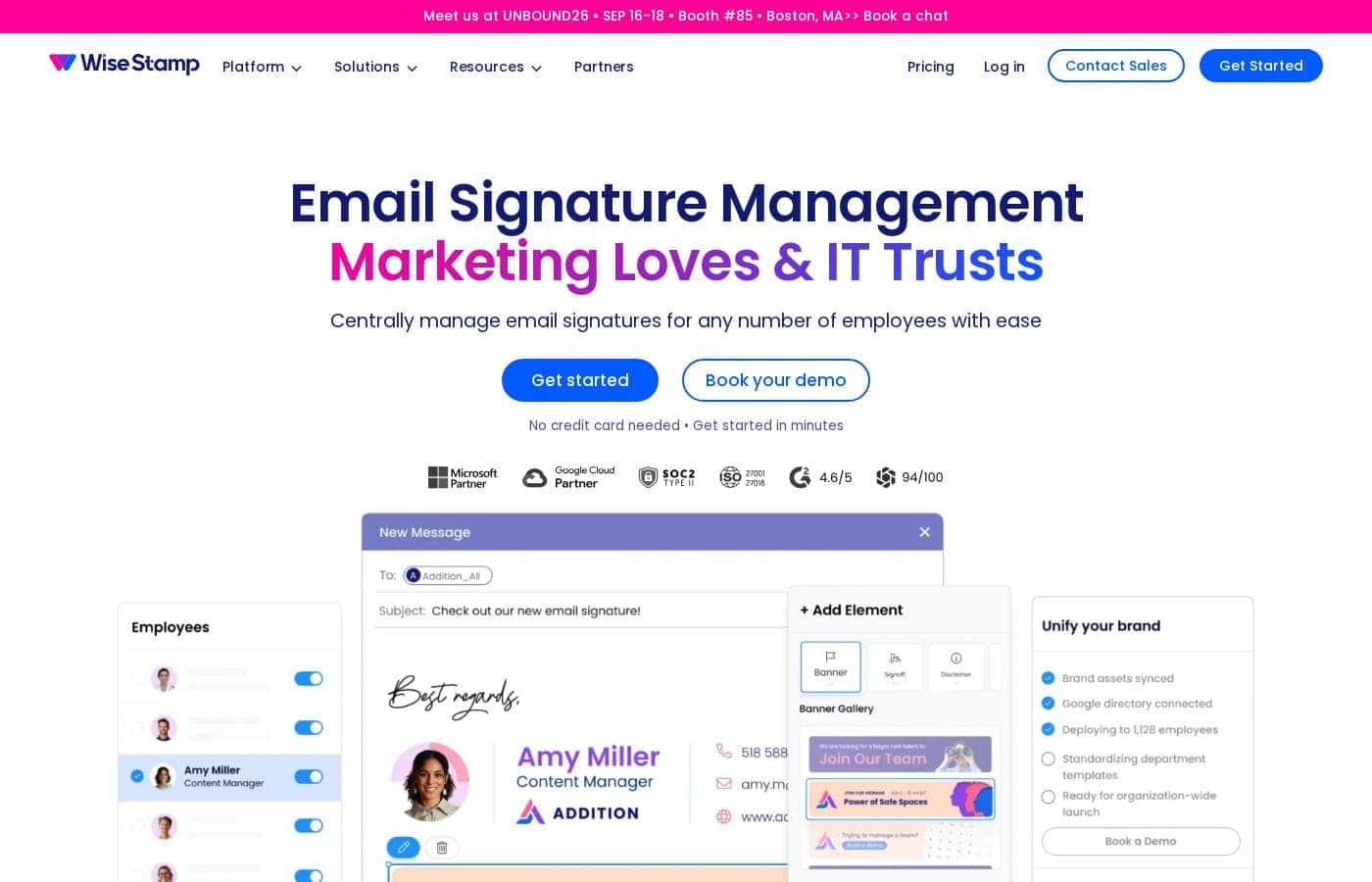
WiseStamp homepage screenshot

At a glance

Quick overview for WiseStamp: rating, pricing summary, key features, and highlights.
Pricing verified Oct 13, 2026

Ciroapp score

3.8/ 5

WiseStamp centralizes email signature design and deployment, keeping logos, colors, and legal disclaimers consistent across every employee's email, with 1.2 million-plus customers behind it. The trade-offs are limited personalization for employees and thin published plan details beyond a wide $1–$27,001/month range. Overall, it's a solid pick for larger teams managing signatures at scale.

Pros

  • Pros:Centralized management eliminates the need to configure signatures employee-by-employee, which is essential at enterprise scale
  • Pros:Enforces brand consistency — logos, colors, and formatting stay uniform across every outgoing email
  • Pros:Signature updates, campaign swaps, and legal disclaimer changes can be rolled out organization-wide from one dashboard

Cons

  • Cons:Enterprise-oriented capabilities may be more than small teams need, making cost harder to justify for very small businesses
  • Cons:Centralized control means employees have limited flexibility to personalize their own signatures
  • Cons:Value depends on email volume and brand discipline — low-email organizations may see little measurable return
Best for
  • Enterprises and mid-size companies that need consistent, centrally managed signatures across large workforces
  • Marketing teams that want to use employee email signatures as a promotional and brand-consistency channel
  • Organizations with compliance requirements that need legal disclaimers enforced in every email
This section is a summary. Detailed sections about features, use cases, pricing, and reviews follow below.

What is WiseStamp?

Email signatures are one of the most frequently overlooked brand touchpoints in a company. When every employee crafts their own signature, the result is inconsistent branding, outdated details, and missed opportunities to promote campaigns. WiseStamp addresses this by giving organizations a single platform to design, deploy, and update signatures across the entire workforce.

WiseStamp is an enterprise-grade email signature management platform. It lets businesses centrally create professional, on-brand email signatures and deploy them to employees across the organization, ensuring consistency in every outgoing message. The platform is built to scale with large organizations and is trusted by over 1.2 million customers worldwide.
Should you choose WiseStamp?

Quick buyer guidance before you compare plans or click through.

Choose it if

  • Enterprises and mid-size companies that need consistent, centrally managed signatures across large workforces
  • Marketing teams that want to use employee email signatures as a promotional and brand-consistency channel
  • Organizations with compliance requirements that need legal disclaimers enforced in every email
  • IT departments looking to simplify signature setup during employee onboarding and offboarding

Skip it if

  • Solo professionals or very small teams who can maintain signatures manually without a management platform
  • Organizations with minimal email volume that won't benefit from signature-based branding or campaigns
  • Teams that want employees to fully customize their own signature designs rather than follow centralized templates

Next steps before buying

  1. 1Visit wisestamp.com and review the pricing page to compare the free plan, free trial, and paid subscription tiers against your team size
  2. 2Sign up for the free trial to test signature creation and deployment with a small group before committing to a paid plan
  3. 3Design a master signature template that reflects your brand guidelines, including logos, colors, and any required legal disclaimers
  4. 4Roll the template out to your organization via the admin dashboard and verify it renders correctly across your email clients

WiseStamp Key Features

✨ Centralized Signature Management

WiseStamp lets administrators create and manage email signatures from a single dashboard rather than relying on each employee to configure their own. Changes to branding, contact details, or legal disclaimers can be applied centrally and pushed to the whole organization, keeping every outgoing message consistent with current brand standards.

✨ Enterprise-Grade Scalability

The platform is designed to scale with market-leading organizations, supporting deployment across large workforces. This makes it suitable for enterprises where signature changes would otherwise require coordinating updates across many departments, offices, or regions.

✨ Brand Consistency Controls

Because signatures are built and governed centrally, companies can enforce brand guidelines — logos, colors, fonts, and formatting — across every employee's email. This turns a typically fragmented touchpoint into a controlled brand asset that appears in every message the company sends.

✨ Engagement and Campaign Promotion

WiseStamp positions signatures as more than contact details: they can be used to promote campaigns, events, or content directly within employee emails. This gives marketing teams a recurring, zero-cost distribution channel embedded in everyday correspondence.

Use Cases

💡 Enforcing Brand Consistency Across a Large Workforce

Companies with many employees often struggle with signatures that look different from person to person. WiseStamp allows marketing or IT teams to define a single approved signature design and roll it out to everyone, ensuring that every email a customer receives reflects the same professional brand image.

💡 Running Marketing Campaigns Through Email Signatures

Marketing teams can use WiseStamp to add promotional banners or campaign links to employee signatures, turning routine correspondence into a distribution channel. Because updates are centralized, a campaign swap can be executed across the whole company in one action rather than chasing hundreds of individual edits.

💡 Keeping Legal and Compliance Details Current

Organizations that need disclaimers, confidentiality notices, or regulatory information in every email can manage these requirements centrally. When legal language changes, administrators update the signature template once and the new version applies across the organization.

💡 Streamlining IT Onboarding and Offboarding

When employees join or leave, signature details like titles, phone numbers, and department affiliations need updating. Centralized management means these changes are handled administratively, reducing the back-and-forth between IT, HR, and individual staff members.

WiseStamp pricing

From$9/mo

  • From the vendor's pricing page, checked Oct 13, 2026
  • 5 plans

Prices checked on Oct 13, 2026 from WiseStamp's pricing page

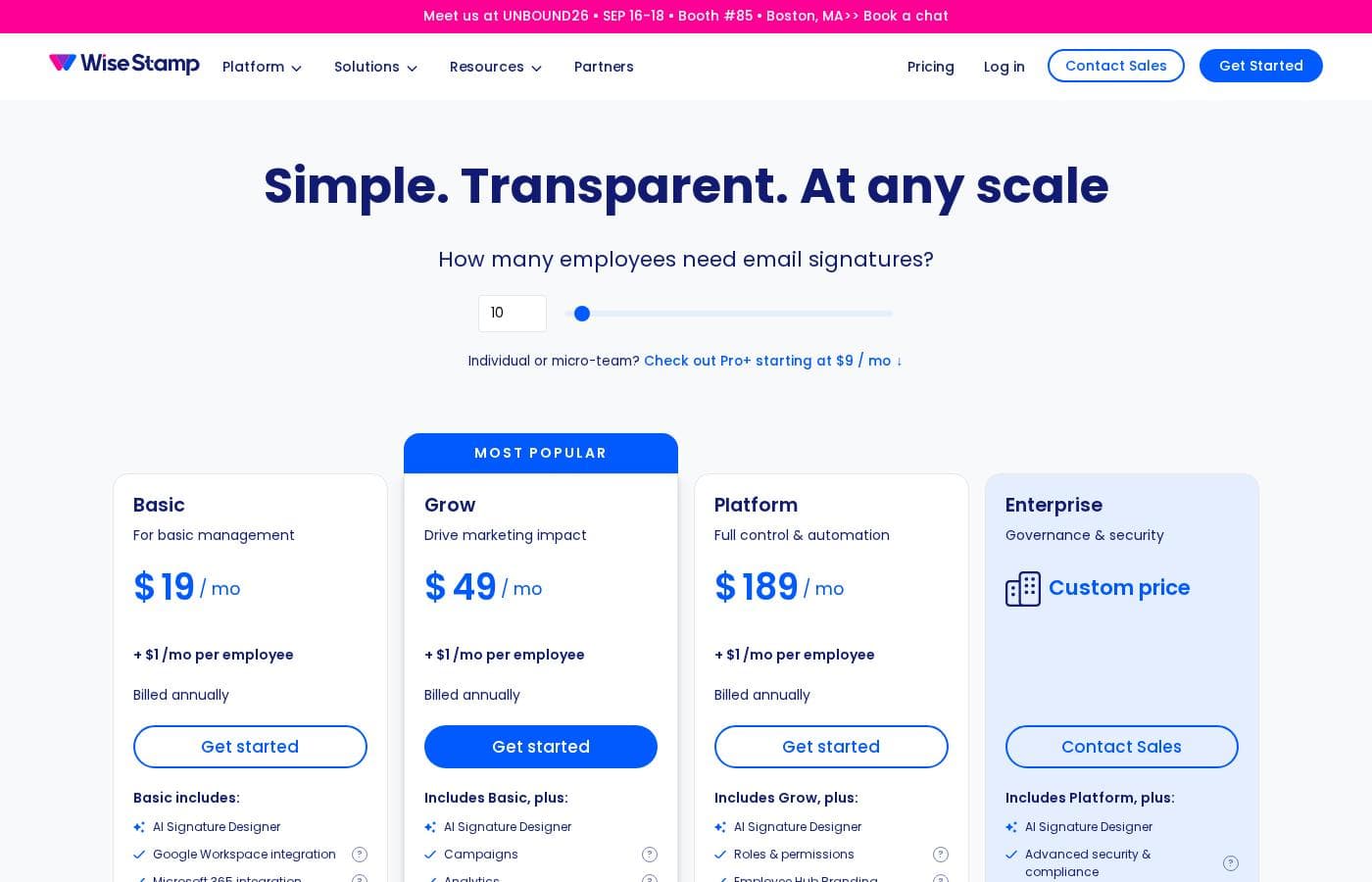
WiseStamp pricing page screenshotView pricing page screenshot
PlanBilled monthlyBilled annuallyIncludes
Simple. Transparent. At any scale
$9/mo
—
Basic
$19/mo
—
Grow
$49/mo
—
Platform
$189/mo
—
Pro+
$9/mo
—

Price history

Tracking prices since Oct 1, 2026. No price change detected yet.

Pricing types: Free plan, Free trial, Monthly subscription, Usage-based pricing

Pricing notes

Plans from $1/month

WiseStamp pricing: Plans from $1/month Billing options: Free plan, Free trial, Monthly subscription, Usage-based pricing

Cost calculator

Estimate what WiseStamp costs for your team.

Billing
Per month
$9
Per year
$108

Simple. Transparent. At any scale states no user limit: shown as one price for the whole account. Check the price for 5 users with the vendor. Estimate based on published list prices, before taxes, add-ons and discounts.

Email me when WiseStamp changes price

One email when we detect a price change on the vendor's pricing page. No newsletter, no deals. Unsubscribe in one click.

User Reviews

No reviews yet.

Write a Review

Write a Review for WiseStamp
0/100 characters
0/2000 characters

Why use WiseStamp?

Manually managing email signatures across dozens or thousands of employees is unreliable — details go stale, branding drifts, and legal disclaimers get omitted. WiseStamp solves this by centralizing control: updates made once propagate to every user's signature, so IT and marketing teams no longer chase individuals for compliance.

Beyond consistency, it turns routine emails into branded touchpoints that can drive engagement and measurable business impact.

WiseStamp alternatives

Other tools in the Email marketing category

View all Email marketing tools
Pabbly Email Marketing

Pabbly Email Marketing

Email marketing4.1/5

Pabbly Email Marketing is a flexible platform for sending marketing emails and automating responses. You can connect external SMTPs or use Pabbly’s inbuilt SMTP, and you can send instantly or schedule. It supports automation workflows, segmentation, throttling, and a robust API. Campaign reports show sent, opened, clicked, and unsubscribed rates, with country, browser, device, and OS stats. The service is ISO 27001:2022 and SOC2 Type 2 compliant, with live chat, tutorials, and constant support.

GetResponse

GetResponse

Email marketing4.2/5

GetResponse is a scalable email marketing and automation platform designed for entrepreneurs, ecommerce stores, and Global Brands. It helps you manage and automate channels you own, like email, your website, landing pages, and SMS. You can use powerful, smart AI tools to personalize campaigns and launch products faster. It's trusted by over 350,000 customers worldwide.

Benchmark Email

Benchmark Email

Email marketing3.9/5

Benchmark is an email marketing platform designed for speed and usability across various industries. Whether you are a solo entrepreneur or run a non-profit, the platform helps you connect with subscribers and drive sales. It provides core tools like the Email Builder, Landing Pages, and a Marketing CRM. This system allows you to attract more leads, manage customer relationships, and launch campaigns that are ready to delight subscribers in the inbox.

Aweber

Aweber

Email marketing4/5

AWeber is an email marketing and automation platform designed for small businesses and creators who want to reach customers more effectively. It brings together email campaigns, automations, signup forms, and landing pages to help you engage and grow without complicated setups.

Omnisend

Omnisend

Email marketing4.1/5

Omnisend is an integrated platform for email and SMS marketing designed to engage your shoppers wherever they are. It’s an excellent option for small or medium-sized businesses looking to consolidate their marketing efforts. The platform provides intuitive tools, making advanced marketing less intimidating. Every template is 100% customizable, ensuring your customer experience is always on-brand and personalized. You can connect Omnisend to your ecommerce platform with a single click. Switching is easy, and you can even be up and running in 30 minutes.

Sender

Sender

Email marketing4.1/5

Sender is an email marketing platform aimed at growing businesses. It combines campaign creation, automation, transactional emails, and landing pages in one dashboard. The vendor says over 180,000 companies use it, from startups to well-known brands. It's built for people who want capable email tools without complicated setup or high costs — and a free plan that keeps premium features unrestricted.

Moosend

Moosend

Email marketing4.1/5

Moosend provides truly affordable email marketing solutions designed for businesses of various sizes. They make a commitment to strong customer assistance, whether you have 500 contacts or 1,000,000. The pricing model emphasizes flexibility, so you choose what fits your budget best.

Mailpoet

Mailpoet

Email marketing4/5

Mailpoet is the essential email marketing plugin built specifically for WordPress 💡. It currently helps over 500,000 websites connect with their audience. Since it works right alongside your existing CMS, you use your existing media library and content instantly. This seamless integration means you can get started sending important messages in minutes, not hours. It’s designed for busy site owners who need efficiency and reliable performance.

Cheapest Email marketing software for 1 to 25 users

WiseStamp FAQ

How much does WiseStamp cost?

WiseStamp's cheapest paid plan, Simple. Transparent. At any scale, costs $9 per month. Paid plans range from $9 to $189 per month. Prices checked on Oct 13, 2026 from the vendor's pricing page.

Has WiseStamp's price changed recently?

No. We have not detected a price change since we started tracking on Oct 1, 2026.

Who is WiseStamp designed for?

WiseStamp is an enterprise-grade platform aimed at organizations that need to manage email signatures across many employees centrally. It is trusted by over 1.2 million customers worldwide and is built to scale with the needs of large, market-leading companies, though smaller teams can also use it to keep signatures consistent.

How does WiseStamp keep email signatures on-brand?

Signatures are created and governed centrally by administrators rather than by individual employees. This means branding elements such as logos, colors, and formatting are defined once in a template, and any updates — new campaigns, staff changes, or revised disclaimers — propagate across the organization from a single dashboard.

Does WiseStamp offer a free trial or free plan?

Yes. According to its pricing page, WiseStamp offers a free plan and a free trial alongside paid monthly subscription options, with plans starting at $1/month.

Can WiseStamp signatures be used for marketing purposes?

Yes. WiseStamp positions email signatures as brand assets that can enhance engagement and drive business impact, allowing companies to promote campaigns or content through the signatures appended to everyday employee emails.

Ready to try WiseStamp? Check out the official site or pricing.

Are you WiseStamp? Claim this listing · Get the badge