Omnisend

Omnisend review

A transparent look at what Omnisend's site shows — and what to verify before you buy.

Omnisend costs from $11.20/mo · 4 plans · Free plan available · prices checked Oct 13, 2026

By Ciroapp Editorial Team · Updated Sep 7, 2026

Commission may apply at no extra cost

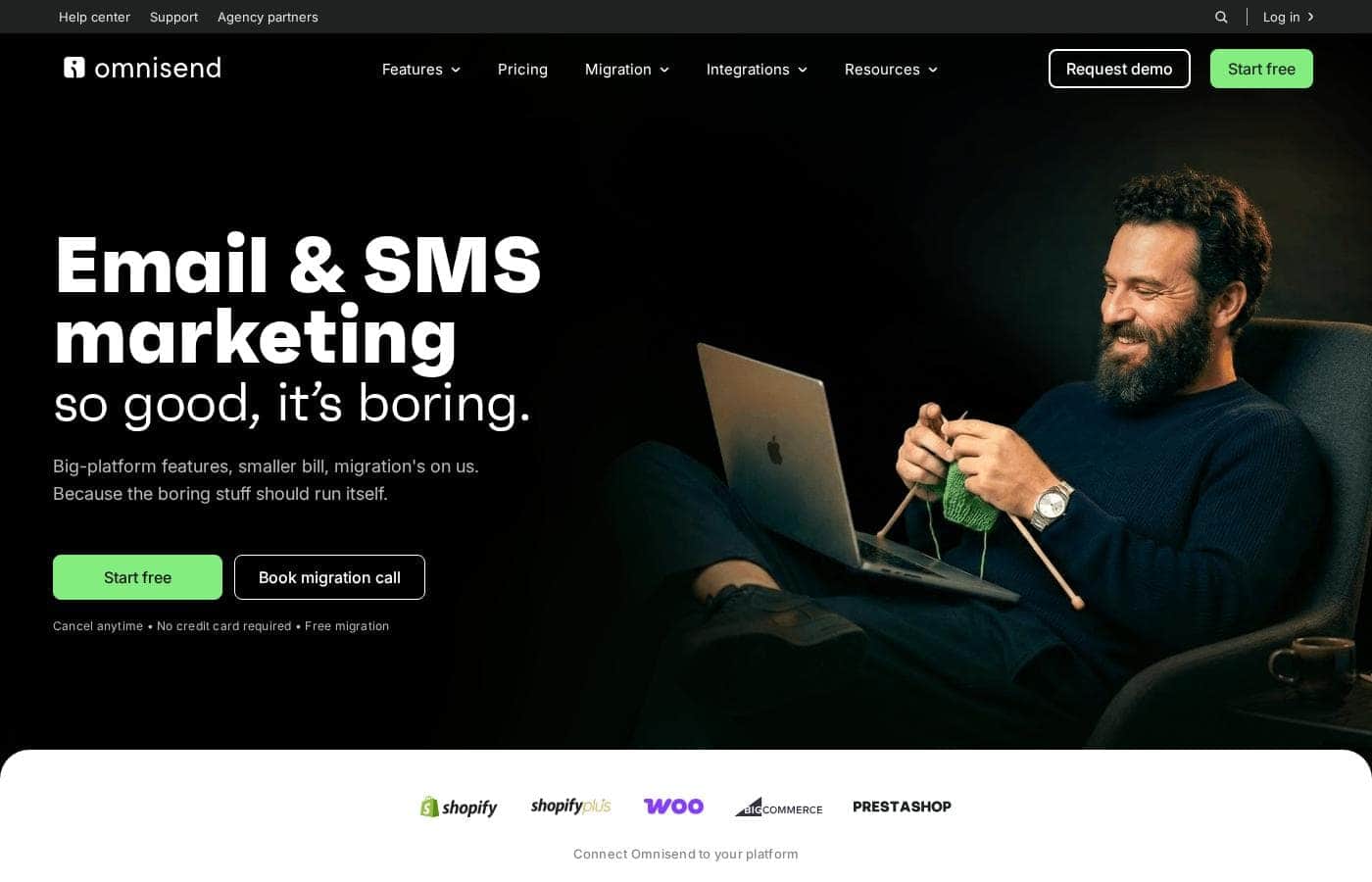
Omnisend homepage screenshot

At a glance

Quick overview for Omnisend: rating, pricing summary, key features, and highlights.
Pricing verified Oct 13, 2026

Ciroapp score

4.1/ 5

Omnisend pairs a genuinely usable free plan with clear tiered pricing, free migration, and 24/7 support on every plan. The caveats are real though: headline prices depend on a three-month prepay, contact caps rise quickly, and no refund terms are published. Overall, it's a solid pick for small stores that check billing details before committing.

Pros

  • Pros:The Free plan is genuinely usable long-term — 500 emails/month to 250 contacts, 500 web push notifications, every feature included, and no credit card required to sign up.
  • Pros:24/7 live chat and email support come with every plan, including Free — with a dedicated account expert added at no extra cost once spending hits $400+/month.
  • Pros:Switching costs are low — Omnisend's team migrates your lists, segments, flows, and templates for free, typically within five days, with no manual setup required.

Cons

  • Cons:Headline prices ($11.20 Standard, $41.30 Pro) reflect a 30% discount for prepaying three months; regular billing afterward is higher ($48.00 and $177.00 respectively), so budget for the post-discount rate.
  • Cons:No money-back guarantee or refund policy is shown anywhere on the site, and trial terms aren't documented — you must confirm these directly before committing to an upfront payment.
  • Cons:Contact caps escalate quickly — Free stops at 250 contacts and Standard at 500, so a modestly growing list can force you into Pro's 2,500-contact tier or a quote-based Custom plan (required at 150,000+ active profiles).
Best for
  • Buyers who verify vendor claims themselves before committing
  • Teams that want to explore a product through self-serve demos or videos first
  • Shoppers who value visible cookie-consent practices when sharing business data
This section is a summary. Detailed sections about features, use cases, pricing, and reviews follow below.

What is Omnisend?

Shopping for marketing software is frustrating when vendor pages hide the details. Here's the honest part up front: this crawl of Omnisend's homepage showed mostly cookie-consent text, not product claims. That's useful — it means this review won't repeat sales copy.

It sticks to what the site actually displays, and what you should verify before paying.

Omnisend is a software vendor at omnisend.com. In this crawl, its homepage contained only cookie-consent and tracking disclosures — from providers like Cookiebot, Cloudflare, Google, Meta, HubSpot, and LinkedIn. No plan names, prices, or feature copy appeared.

Because of that, this review can't confirm who the product serves from the page alone. Treat any capability claims you see elsewhere as unverified until you check the vendor directly.

Should you choose Omnisend?

Quick buyer guidance before you compare plans or click through.

Choose it if

  • Evaluation-first buyers — demo-scheduling and demo-tracking cookies (RevenueHero, "visited_demo") indicate self-serve demos exist
  • People who prefer watching product videos before contact — Loom and Wistia embeds were present on the page
  • Visitors who want quick chat-based answers — a HubSpot chat-box session cookie appeared
  • Privacy-aware users who read consent banners — a categorized Cookiebot notice is in place

Skip it if

  • Buyers who need plan prices, limits, or contract terms visible immediately — none appeared in this crawl
  • Teams requiring documented trial lengths or refund policies before signup — those details weren't shown on the crawled page
  • Privacy-sensitive users uncomfortable with many marketing trackers — Google, Meta, LinkedIn, and Microsoft cookies were all listed
  • Anyone expecting feature or comparison content on the homepage — deeper vendor pages are required

Next steps before buying

  1. 1Visit omnisend.com and record plan names, prices, and any annual-commitment terms you find
  2. 2List the integrations your store needs, then confirm each one on the vendor's site
  3. 3Try the interactive demo or book a session before sharing payment details
  4. 4Compare Omnisend with two or three alternatives using the same checklist
  5. 5Read the trial, refund, and data-removal terms carefully before you commit

Ease of use

We can't judge hands-on ease from this crawl. The signals are encouraging: interactive demos, embedded videos, chat, and demo scheduling suggest a self-serve evaluation flow. Actual setup effort isn't documented on the page, so confirm it during a demo or trial.

Omnisend Key Features

🎬 Try it before you talk to anyone

Omnisend's site is set up for self-serve evaluation. You can click through an interactive product demo, watch explainer videos, and open chat for quick answers. Prefer a live walkthrough?

Demo scheduling is built in too. That means you can judge the fit on your own before sharing anything with sales.

✨ What the plans put on the table

The plan pages list the core toolkit you'd be buying. The short version:

  • Email campaigns, automations, and signup forms appear on every tier.
  • Web push notifications run alongside email, with unlimited sends on paid plans.
  • SMS, AI-powered personalizations, and advanced reporting sit on higher tiers.

Confirm each limit against your list size before you sign up.

🍪 A consent banner that shows its work

The site runs a categorized Cookiebot banner, so you can see which trackers load and why. Necessary, preference, statistic, and marketing cookies are each spelled out by provider. That visibility helps if you care how vendors handle visitor data.

One note: Google, Meta, LinkedIn, and Microsoft trackers are all listed.

✨ Help getting set up

Getting-started support looks solid on paper. Plan pages mention free migration and 24/7 help, so you're not moving lists alone, and bigger accounts can get a dedicated expert.

Use Cases

✉️ Test-drive email marketing for free

A new store owner signs up for the Free plan — no credit card needed. They send 500 emails a month to 250 contacts and try campaigns, automations, forms, and web push before paying anything. Expected outcome: a real feel for the tool at zero cost.

📈 Grow past 250 contacts

Your list outgrew the Free plan. Standard at $11.20/month covers 6,000 emails to 500 contacts, unlimited web push, and removes the Omnisend badge. Pay three months upfront and save 30% ($33.60 today).

Expected outcome: roomier sends without a big jump in cost.

🚀 Add SMS and AI at high volume

Busy senders pick Pro: unlimited emails (fair use up to 60× your list size), 2,500 contacts, SMS from $0.007, and AI personalizations with no usage fees. You're billed only for contacts that actually receive messages — unsubscribed ones never count.

🔍 Evaluate before you commit

Rather look before you leap? The site offers interactive demos, product videos, and live chat, so you can explore the product before talking to anyone. Then confirm pricing, integrations, and trial terms directly with the vendor.

Tip: Book a session before sharing payment details.

Omnisend pricing

From$11.20/mo

  • 4 plans
  • Free plan available

Prices checked on Oct 13, 2026 from Omnisend's pricing page

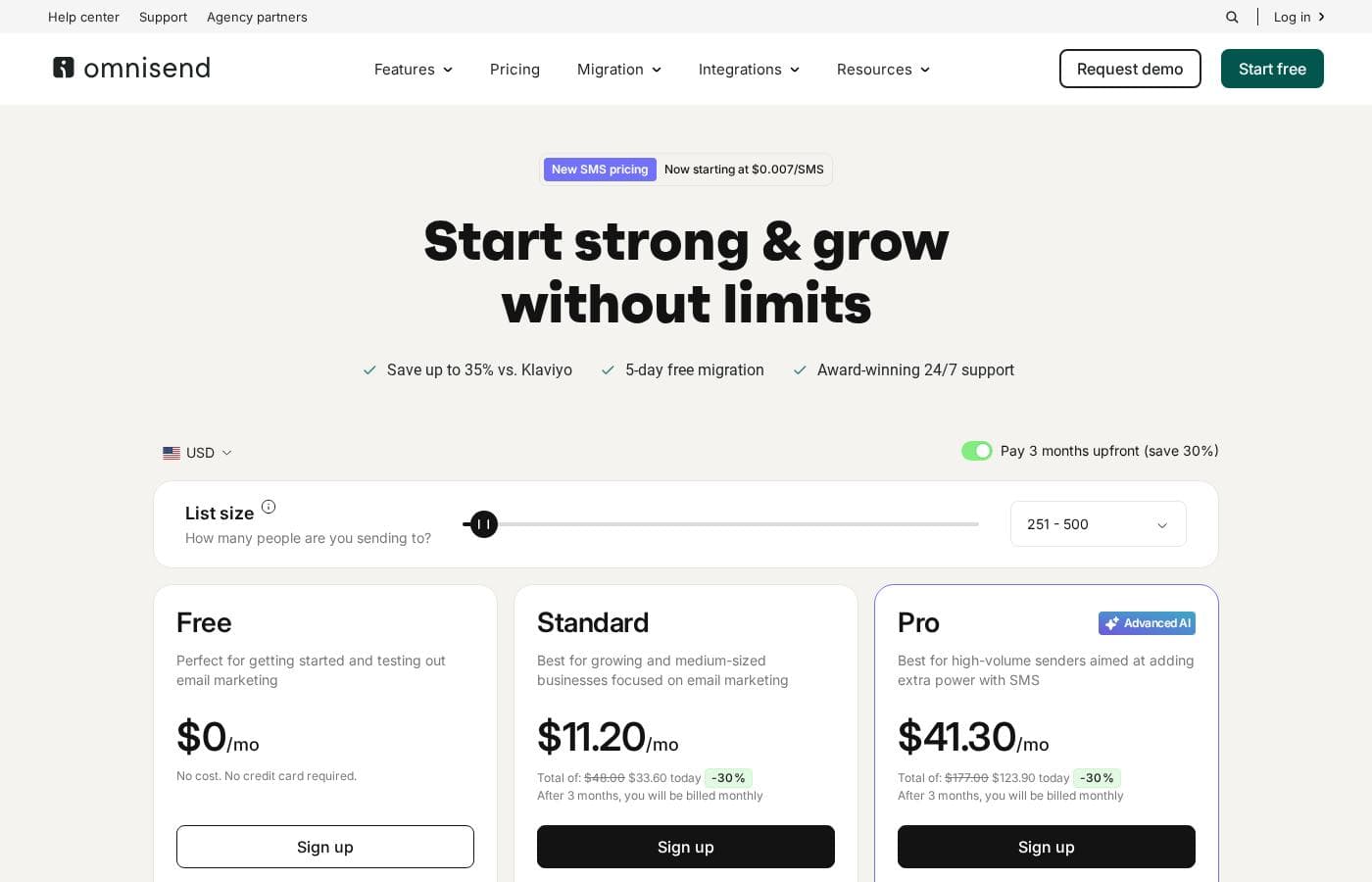
Omnisend pricing page screenshotView pricing page screenshot
PlanBilled monthlyBilled annuallyIncludes
Free
Free
—
500 monthly emails, 250 contacts, 500 web push notifications; no credit card required.
Standard
$11.20/mo
—
6,000 emails/mo, 500 contacts, unlimited web push; Optional add-ons start at $5/month.
Pro
$41.30/mo
—
Unlimited monthly emails, 2,500 contacts, unlimited web push, SMS starting at $0.007/SMS;
Custom
See vendor page
See vendor page
Quote-based ('Let's talk') for businesses with custom needs, large contact amounts, or email volume; includes unlimited emails, account expert, and custom contact amount.

Price history

Tracking prices since Sep 7, 2026. No price change detected yet.

Pricing types: Free plan, Monthly subscription, Usage-based pricing

Pricing notes

Omnisend offers a Free plan at $0/mo, Standard at $11.20/mo, and Pro at $41.30/mo, with SMS starting at $0.007/SMS. Prices shown include a 30% discount for paying 3 months upfront, and a Custom plan is available on request.

Omnisend costs between $0 and $41.30 per month with four plans: Free at $0, Standard at $11.20/month, Pro at $41.30/month, and Custom with pricing built around your needs.

Here's what each plan includes and who it fits.

Free

Price: $0/mo Best For: Getting started and testing email marketing Other Features:

  • 500 emails/month to 250 contacts
  • 500 web push notifications
  • All features included — no credit card required
  • Free migration and 24/7 support

The Free plan is genuinely free, with no time limit. You get every feature, so you can run campaigns, automations, and forms before spending a cent.

Standard

Price: $11.20/mo, billed monthly Best For: Growing and medium-sized businesses focused on email marketing Other Features:

  • 6,000 emails/month to 500 contacts
  • Unlimited web push notifications
  • 30% off if you pay 3 months upfront ($33.60 today, then billed monthly)
  • Free migration and 24/7 support

Standard is the sensible step up once your list outgrows 250 contacts. You'll send up to 6,000 emails a month and can drop the "Powered by Omnisend" badge from your emails and forms.

Pro

Price: $41.30/mo, billed monthly Best For: High-volume senders who want to add SMS power Other Features:

  • Unlimited monthly emails (fair use up to 60× your list size)
  • 2,500 contacts and unlimited web push notifications
  • SMS starting at $0.007, plus bonus SMS credits equal to your monthly bill
  • AI-powered personalizations with no usage fees

Pro suits stores sending at serious volume. If you're not pushing high email numbers or SMS, Standard usually covers it for less.

Custom

Best For: Businesses with large contact lists or custom email volume Other Features:

  • Unlimited monthly emails and a custom contact amount
  • Dedicated account expert (free from $400/month spend)
  • Advanced reporting and personalized sending times

Businesses with more than 150,000 active profiles should talk to sales for a tailored quote and demo.

Billing basics: All pricing is in USD and based on your list size. You're billed for subscribers and non-subscribers who receive automated messages, but unsubscribed contacts are never billed. SMS is usage-based, running from $0.009 per message at low volume down to $0.007 for high-volume US sends. Paying 3 months upfront saves you 30%, and regular billing kicks in after that period. Best of all, the Free plan runs indefinitely with no credit card, so you can test everything first. Since no money-back guarantee is shown on the page, confirm the billing terms before committing to an upfront payment.
Cost calculator

Estimate what Omnisend costs for your team.

Billing
Per month
$11.20
Per year
$134.40

Standard states no user limit: shown as one price for the whole account. Check the price for 5 users with the vendor. Estimate based on published list prices, before taxes, add-ons and discounts.

How to pay less for Omnisend

  • Start on the free plan and upgrade only when you hit its limits.
  • Cheaper tools in this category start at $9/mo.
Visit Omnisend

Email me when Omnisend changes price

One email when we detect a price change on the vendor's pricing page. No newsletter, no deals. Unsubscribe in one click.

User Reviews

No reviews yet.

Write a Review

Write a Review for Omnisend
0/100 characters
0/2000 characters

Why use Omnisend?

Most reviews rephrase vendor marketing. This one can't — and that's the point. Here's why that approach helps you:

  • No recycled sales copy. The crawled page contained no feature claims, so nothing here is oversold or speculative.
  • Visible compliance practices. The site runs a formal, categorized consent banner (Cookiebot), which matters if you care about how vendors handle visitor data.
  • Self-serve evaluation tools. Cookies for interactive demos (Arcade), video (Loom, Wistia), demo scheduling (RevenueHero), and chat (HubSpot) suggest you can explore the product before talking to anyone.
  • A cleaner decision path. You'll confirm pricing, integrations, and trial terms yourself — the same checks that catch bad-fit tools early.
  • Faster shortlisting. Use the checklist in this review to compare Omnisend against alternatives on equal footing, without vendor-page bias.

Omnisend alternatives

Other tools in the Email marketing category

View all Email marketing tools
WiseStamp

WiseStamp

Email marketing3.8/5From $9/mo

WiseStamp is an award-winning, enterprise-grade email signature management platform designed to scale with the needs of market-leading organizations. Trusted by over 1.2 million customers worldwide, WiseStamp enables businesses to centrally create, manage, and deploy professional, on-brand email signatures effortlessly. WiseStamp turns every email into a powerful brand asset, enabling enterprises to maintain brand consistency, enhance engagement, and drive business impact at scale.

Drip

Drip

Email marketing4/5

As a customer-centric marketing automation platform, Drip empowers brands to understand their customers and boost revenue through the seamless integration of email, popups, and automation. Drip is the go-to platform for streamlining automated marketing!

GoZen Growth

GoZen Growth

Email marketing3.6/5

GoZen Growth is an all-in-one platform for email marketing, outreach, and automation. It unifies email marketing, cold outreach, email warm-up, and push notifications in one place so teams can automate marketing, sales, and customer support. It also features GoZen DeepAgent, an enterprise-grade AI agent builder that helps automate these tasks.

Aweber

Aweber

Email marketing4/5

AWeber is an email marketing and automation platform designed for small businesses and creators who want to reach customers more effectively. It brings together email campaigns, automations, signup forms, and landing pages to help you engage and grow without complicated setups.

Pabbly Email Marketing

Pabbly Email Marketing

Email marketing4.1/5

Pabbly Email Marketing is a flexible platform for sending marketing emails and automating responses. You can connect external SMTPs or use Pabbly’s inbuilt SMTP, and you can send instantly or schedule. It supports automation workflows, segmentation, throttling, and a robust API. Campaign reports show sent, opened, clicked, and unsubscribed rates, with country, browser, device, and OS stats. The service is ISO 27001:2022 and SOC2 Type 2 compliant, with live chat, tutorials, and constant support.

GetResponse

GetResponse

Email marketing4.2/5

GetResponse is a scalable email marketing and automation platform designed for entrepreneurs, ecommerce stores, and Global Brands. It helps you manage and automate channels you own, like email, your website, landing pages, and SMS. You can use powerful, smart AI tools to personalize campaigns and launch products faster. It's trusted by over 350,000 customers worldwide.

Moosend

Moosend

Email marketing4.1/5From $9/mo

Moosend provides truly affordable email marketing solutions designed for businesses of various sizes. They make a commitment to strong customer assistance, whether you have 500 contacts or 1,000,000. The pricing model emphasizes flexibility, so you choose what fits your budget best.

Sender

Sender

Email marketing4.1/5

Sender is an email marketing platform aimed at growing businesses. It combines campaign creation, automation, transactional emails, and landing pages in one dashboard. The vendor says over 180,000 companies use it, from startups to well-known brands. It's built for people who want capable email tools without complicated setup or high costs — and a free plan that keeps premium features unrestricted.

Cheapest Email marketing software for 1 to 25 users

Omnisend FAQ

How much does Omnisend cost?

Omnisend's cheapest paid plan, Standard, costs $11.20 per month. Paid plans range from $11.20 to $41.30 per month. Prices checked on Oct 13, 2026 from the vendor's pricing page.

Does Omnisend have a free plan?

Yes. Omnisend has a free plan (Free); paid plans start at $11.20 per month.

Has Omnisend's price changed recently?

No. We have not detected a price change since we started tracking on Sep 7, 2026.

What happens if I go over my monthly email limit?

On Free or Standard, you'll be prompted to upgrade — Omnisend always asks you to confirm first. Pro users send unlimited emails, subject to a fair use policy tied to their list size.

How does free migration work when switching from another platform?

Give Omnisend read access to your current account. Its team moves your lists, segments, flows, and templates at no charge, typically within five days — no manual setup required.

Which payment methods does Omnisend accept?

Omnisend accepts VISA, MasterCard, and American Express cards, including credit, debit, or prepaid variants for the first two. Discover, Diners Club, JCB, and UnionPay aren't supported, and billing is in USD.

Ready to try Omnisend? Check out the official site or pricing.

Are you Omnisend? Claim this listing · Get the badge