
Mailpoet

Mailpoet review

WordPress-native email marketing: newsletters, automation, and signup forms from one plugin.

By Ciroapp Editorial Team Β· Updated Sep 16, 2026

Commission may apply at no extra cost

Mailpoet homepage screenshot

At a glance

Quick overview for Mailpoet: rating, pricing summary, key features, and highlights.
Vendor page checked Oct 13, 2026

Ciroapp score

4.0/ 5

MailPoet runs email marketing entirely inside WordPress: a drag-and-drop editor, automatic post notifications, and WooCommerce triggers all live in one dashboard. The free tier suits small lists, but it's WordPress-only and costs scale to $349/month. Overall, it's a smart pick for WordPress owners who want newsletters and basic automation without juggling another tool.

Pros

  • Pros:Native WordPress integration β€” everything runs in the WP dashboard, reusing your existing media library and content
  • Pros:Plans start at $0/month, so small lists can begin without paying anything
  • Pros:Automatic post notifications turn every new article into a sent email with no manual work

Cons

  • Cons:WordPress-only β€” it installs as a plugin and cannot power email for sites on other platforms
  • Cons:Pricing scales with subscriber count, reaching $349/month at the top of the listed range
  • Cons:Automation capabilities are simpler than dedicated platforms such as ActiveCampaign or HubSpot
Best for
  • Bloggers and content publishers who want every new WordPress post emailed to subscribers automatically
  • Small WooCommerce stores that need order-related lifecycle emails plus newsletters in one dashboard
  • Solo site owners and small teams who want email marketing without adding a separate third-party tool
This section is a summary. Detailed sections about features, use cases, pricing, and reviews follow below.

What is Mailpoet?

MailPoet is an email marketing plugin built exclusively for WordPress, currently used by more than 500,000 websites. Because it lives inside your CMS, it reuses your existing media library, content, and user data from the moment it is installed, with no separate app to learn or sync. That makes it a practical choice for busy site owners who want newsletters and automated emails running in minutes rather than hours.

MailPoet is a WordPress plugin that handles email marketing entirely from inside the WordPress dashboard. It covers newsletters, automatic post notifications, welcome and automated sequences, signup forms, and subscriber management, with WooCommerce email automation for stores. Emails are delivered through the MailPoet Sending Service, a third-party SMTP provider, or your own web host, depending on your volume and preference.
Should you choose Mailpoet?

Quick buyer guidance before you compare plans or click through.

Choose it if

  • Bloggers and content publishers who want every new WordPress post emailed to subscribers automatically
  • Small WooCommerce stores that need order-related lifecycle emails plus newsletters in one dashboard
  • Solo site owners and small teams who want email marketing without adding a separate third-party tool
  • Nonprofits and community organizations running newsletters on an existing WordPress site

Skip it if

  • Sites not built on WordPress, since the plugin has no standalone version
  • Teams that need advanced multi-step automation, lead scoring, or CRM features beyond email
  • Very large subscriber lists for whom tiered pricing outgrows flat-rate competitors
  • Marketers who rely on landing pages or webinar funnels, which fall outside an email plugin's scope

Next steps before buying

  1. 1Install the MailPoet plugin from the WordPress plugin directory or mailpoet.com and activate it in your dashboard
  2. 2Choose a sending method β€” the MailPoet Sending Service, your own web host, or a third-party SMTP provider β€” and verify your sender address
  3. 3Import your existing subscriber list or place a signup form on your site using the MailPoet block, widget, or shortcode
  4. 4Build your first email with the drag-and-drop editor, or set up an automatic post notification so new articles mail themselves
  5. 5As your list grows, upgrade through account.mailpoet.com to a paid tier that matches your subscriber count

Mailpoet Key Features

✨ Drag-and-Drop Email Editor

MailPoet includes a visual editor for building emails from templates without touching code. Because the plugin runs inside WordPress, images come straight from your existing media library. You can preview how a message renders on desktop and mobile before sending.

✨ Automatic Post Notifications

Any new WordPress post can be emailed to subscribers automatically on a schedule you set, whether instantly, daily, or weekly. This turns your blog into a newsletter pipeline with no manual step after publishing. Readers receive a branded digest of your latest content.

✨ Email Automation

Beyond one-off newsletters, MailPoet sends triggered emails such as welcome messages for new subscribers. Automation can also key off WooCommerce activity, covering purchase follow-ups and abandoned-cart reminders. That covers the lifecycle emails most small sites actually need.

✨ Signup Forms and List Management

You can build signup forms and place them on your site as blocks, widgets, or shortcodes to grow your list. Subscribers are managed within the plugin, with segmentation for targeting specific groups separately. Bounces and unsubscribes are handled inside the same dashboard.

✨ Flexible Sending Options

MailPoet offers multiple delivery routes: its own MailPoet Sending Service, a third-party SMTP provider, or sending directly from your web host. This flexibility lets small sites start on their own server and move to a dedicated sending service as volume grows.

✨ WooCommerce Integration

For stores, the plugin connects to WooCommerce and can automate customer emails tied to real shopping behavior. Order-related and lifecycle messages run alongside regular newsletters from the same dashboard, keeping store and marketing email in one place.

Use Cases

πŸ’‘ Blog-to-Email Newsletters

A publisher who posts weekly can configure a post notification so subscribers receive every new article by email. The digest is assembled from WordPress content automatically, so publishing and list-building happen without extra tools or a manual export step.

πŸ’‘ Welcome Series for New Subscribers

Sites collecting emails through signup forms can greet each new subscriber with an automated welcome email. This immediate contact confirms the subscription and can point readers to key content while their interest is highest.

πŸ’‘ WooCommerce Customer Emails

A store can automate messages around shopping activity, such as follow-ups after a purchase or reminders about an abandoned cart, alongside promotional newsletters. That keeps lifecycle email and marketing in a single WordPress dashboard instead of a separate vendor account.

πŸ’‘ Community and Membership Updates

Associations, nonprofits, and membership sites already running on WordPress can manage their newsletter without adding another service. Lists live in the same place as site content, and monthly costs start at zero for small audiences.

Mailpoet pricing

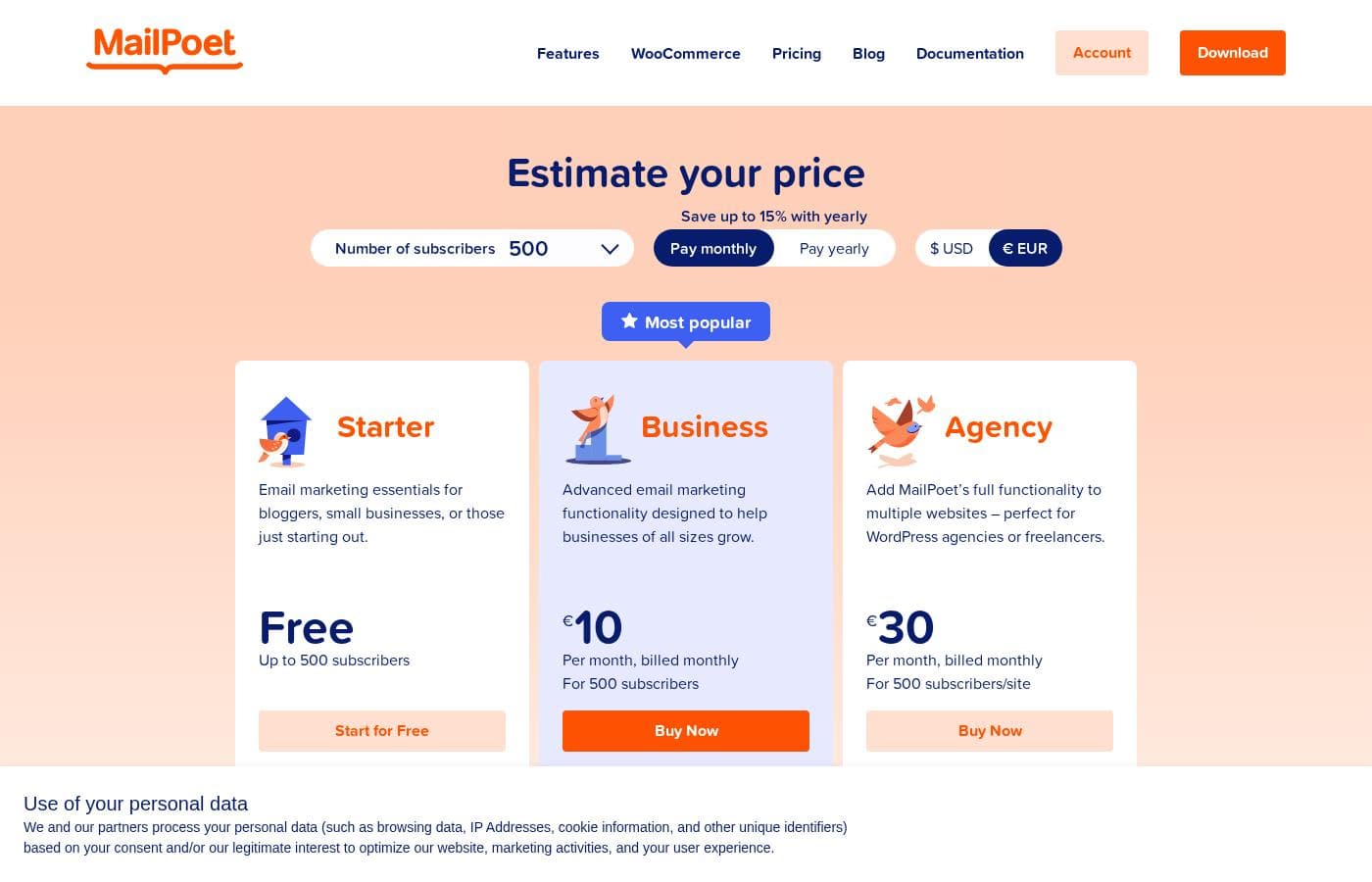
Prices not verified yet β€” see the vendor page.

Mailpoet's pricing page

Mailpoet pricing page screenshotView pricing page screenshot

Price history

Tracking prices since Oct 1, 2026. No price change detected yet.

Pricing types: Monthly subscription

Pricing notes

Mailpoet pricing: Billing options: Monthly subscription

Email me when Mailpoet changes price

One email when we detect a price change on the vendor's pricing page. No newsletter, no deals. Unsubscribe in one click.

User Reviews

No reviews yet.

Write a Review

Write a Review for Mailpoet
0/100 characters
0/2000 characters

Why use Mailpoet?

Running email from the same place you run your site removes the usual friction of exporting content and juggling logins across tools. New posts can become sent emails automatically, subscribers are managed alongside your WordPress users, and pricing starts at $0/month, so you can grow your list before paying.

For sites already committed to WordPress, that integration is the core argument over standalone email platforms.

Mailpoet alternatives

Other tools in the Email marketing category

View all Email marketing tools
GetResponse

GetResponse

Email marketing4.2/5

GetResponse is a scalable email marketing and automation platform designed for entrepreneurs, ecommerce stores, and Global Brands. It helps you manage and automate channels you own, like email, your website, landing pages, and SMS. You can use powerful, smart AI tools to personalize campaigns and launch products faster. It's trusted by over 350,000 customers worldwide.

Omnisend

Omnisend

Email marketing4.1/5

Omnisend is an integrated platform for email and SMS marketing designed to engage your shoppers wherever they are. It’s an excellent option for small or medium-sized businesses looking to consolidate their marketing efforts. The platform provides intuitive tools, making advanced marketing less intimidating. Every template is 100% customizable, ensuring your customer experience is always on-brand and personalized. You can connect Omnisend to your ecommerce platform with a single click. Switching is easy, and you can even be up and running in 30 minutes.

Sender

Sender

Email marketing4.1/5

Sender is an email marketing platform aimed at growing businesses. It combines campaign creation, automation, transactional emails, and landing pages in one dashboard. The vendor says over 180,000 companies use it, from startups to well-known brands. It's built for people who want capable email tools without complicated setup or high costs β€” and a free plan that keeps premium features unrestricted.

Moosend

Moosend

Email marketing4.1/5

Moosend provides truly affordable email marketing solutions designed for businesses of various sizes. They make a commitment to strong customer assistance, whether you have 500 contacts or 1,000,000. The pricing model emphasizes flexibility, so you choose what fits your budget best.

Pabbly Email Marketing

Pabbly Email Marketing

Email marketing4.1/5

Pabbly Email Marketing is a flexible platform for sending marketing emails and automating responses. You can connect external SMTPs or use Pabbly’s inbuilt SMTP, and you can send instantly or schedule. It supports automation workflows, segmentation, throttling, and a robust API. Campaign reports show sent, opened, clicked, and unsubscribed rates, with country, browser, device, and OS stats. The service is ISO 27001:2022 and SOC2 Type 2 compliant, with live chat, tutorials, and constant support.

Drip

Drip

Email marketing4/5

As a customer-centric marketing automation platform, Drip empowers brands to understand their customers and boost revenue through the seamless integration of email, popups, and automation. Drip is the go-to platform for streamlining automated marketing!

Cheapest Email marketing software for 1 to 25 users

Mailpoet FAQ

Does MailPoet only work with WordPress?

Yes. MailPoet is a WordPress plugin, so it installs into an existing WordPress site and draws on its media library, content, and user data. There is no standalone web app for non-WordPress sites.

Is there a free version of MailPoet?

Yes. Pricing starts at $0/month, and paid plans scale with your subscriber count up to $349/month on a monthly subscription basis, letting you start free and upgrade as your list grows.

Can MailPoet send emails for WooCommerce stores?

Yes. It integrates with WooCommerce so you can automate messages tied to store activity, such as purchase follow-ups and abandoned-cart reminders, alongside your regular newsletters from the same dashboard.

How does MailPoet actually deliver emails?

You choose between the MailPoet Sending Service, a third-party SMTP provider, or your own web host. Higher-volume senders typically use a dedicated sending service for more reliable deliverability.

Ready to try Mailpoet? Check out the official site or pricing.

Are you Mailpoet? Claim this listing Β· Get the badge