Aweber vs Mailpoet
Aweber and Mailpoet are for two very different types of users, despite both offering solid email marketing capabilities. Aweber is a complete, robust platform suitable for general use and complex features. Mailpoet integrates natively and deeply within your existing WordPress dashboard. Choosing between them depends on your tech stack and how much you need dedicated support.
Best for: Small businesses needing integrated AI drafting help, Teams requiring reliable, guaranteed 24/7 premium support
Best for: WordPress bloggers or site owners demanding a seamless dashboard workflow, Agencies managing email marketing for up to 50 client websites
Feature-rich, hampered by operational flaws.
We find AWeber provides a functional email marketing platform targeting small businesses with strong automation and AI tools. However, external feedback detailing unexpected billing practices and unannounced account suspensions raises significant concerns about user trust and service reliability. Overall, the reported operational and customer service drawbacks severely counteract the platform's solid feature set.
Pros
- Access to 24/7 support via phone, chat, and email (as advertised).
- Robust AI assistants available for drafting emails and refining subject lines.
- Flexible pricing tiers starting low for 500 contacts, available with a free trial.
- Unlimited features provided on the Plus plan, including automations and landing pages.
Cons
- Numerous reports of 'sneaky billing,' including charging for unsubscribed or inactive lists.
- Customer accounts or essential features often suspended without prior email notification.
- Users report significant difficulty securing refunds, even when canceling during the trial period.
- Arbitrary rejection of imported customer lists, leading to account suspension risks.
Reliability Issues Undercut Strong WordPress Integration
We assessed Mailpoet’s native WordPress integration, which genuinely simplifies content use and email creation right in your existing dashboard. However, the external feedback pointed to critical failures in account reliability and customer support responsiveness, particularly regarding arbitrary account suspensions and long resolution times. Overall, the reported operational inconsistency and poor support experience make it difficult for us to recommend Mailpoet for mission-critical campaigns.
Pros
- Native integration simplifies WordPress workflow and content access.
- Offers a powerful free plan for up to 500 subscribers.
- Intuitive design builder supports drag-and-drop customization.
- Automated campaigns (welcome emails, post notifications) are included.
Cons
- Frequent, arbitrary suspension of paid accounts and sending abilities.
- Customer support is often unresponsive and unavailable on weekends.
- Abandoned cart feature is limited, only working for existing subscribers.
- Onboarding process requires tedious verification and validation steps, leading to significant delays.
AboutAweber
AWeber is a dedicated email and automation solution created to support small businesses. Their goal is to provide powerful tools that help you grow at a fraction of the cost of other systems. The platform focuses on making it easy to grow your customer base and increase your total revenue. ✅
It offers ready-made, eye-catching landing pages and sign-up forms that you can effortlessly add to your website. If you're ready to sell directly, you can also set up your own online store in just minutes. This complete system is designed to take your business to the next level.
AboutMailpoet
Mailpoet is the essential email marketing plugin built specifically for WordPress 💡. It currently helps over 500,000 websites connect with their audience. Since it works right alongside your existing CMS, you use your existing media library and content instantly. This seamless integration means you can get started sending important messages in minutes, not hours. It’s designed for busy site owners who need efficiency and reliable performance.
Highlights
Feature Comparison
Features Overview
We highlight the main differences and pick a winner for each feature.
Platform Integration
Aweber is an external service; Mailpoet lives right inside your WordPress admin.
Aweber is robust, integrating via APIs with 750+ different tools and external services. This makes Aweber highly flexible for non-WordPress centric businesses. Mailpoet is built specifically as a WordPress plugin for a truly native experience. Mailpoet lets you pull content and images directly from your media library instantly. If you hate leaving the WordPress dashboard, Mailpoet is the seamless choice here. Aweber requires navigating its own separate interface for campaign management.
Customer Support
Aweber offers 24/7 help; Mailpoet support is slow and often unavailable on weekends.
Aweber provides robust 24/7 in-house support via phone, live chat, or dedicated email specialists. This high availability minimizes downtime. Mailpoet offers priority email support only for paid plans, which users report is frustratingly slow. Mailpoet support is reportedly unavailable on weekends, hindering urgent issue resolution. Aweber’s excellent support and free migration help offer huge operational peace of mind. If rapid issue resolution is critical, Aweber is the undeniable winner here.
Advanced Features
Aweber has AI writer tools; Mailpoet focuses on simple WordPress workflows.
Aweber includes an integrated AI writing assistant for subject lines and email content creation. Aweber provides customizable 90% pre-built automations for fast campaign launch. Mailpoet focuses on seamless content use from WordPress and basic automations like welcome emails. Mailpoet lacks any mention of integrated modern AI tools for content generation. Aweber offers more modern, cutting-edge tools to speed up content drafting instantly. Teams prioritizing speed and leveraging AI should certainly choose Aweber.
Onboarding & Migration
Aweber offers free expert migration; Mailpoet users report painful verification delays.
Aweber offers free migration services performed by a dedicated team and includes a 1:1 setup call. This minimizes user workload during switching. Mailpoet users report high onboarding friction, including tedious account verification steps and long delays. Mailpoet only provides an import tool for existing subscribers, not a full migration service. Aweber minimizes setup hassle and risk for users switching from another service provider. Switching systems is stressful, and Aweber eases this pain significantly with expert human help.
Agency Management
Mailpoet supports 50 client sites; Aweber is for single business use.
Aweber is primarily focused on small businesses and individual creators needing a single platform solution. Aweber does not specify limits or features for managing multiple client sites efficiently. Mailpoet offers a distinct Multi-Site Agency Plan supporting up to 50 separate websites. Mailpoet tracks subscriber counts individually per WordPress site instance. Mailpoet clearly targets agencies and freelancers needing centralized administration across many client sites. Only Mailpoet provides structural support for complex multi-site operations.
Deliverability Reliability
Aweber reports occasional spam issues; Mailpoet claims rock-solid infrastructure but suspends accounts.
Aweber users occasionally report inconsistent deliverability, with messages landing unexpectedly in spam folders. Mailpoet actively claims 'unmatched deliverability' and successfully sends over 30 million emails monthly. Mailpoet, however, suffers from serious reports of arbitrary account suspensions and blocking verified users. Aweber, although occasionally inconsistent, seems operationally safer for continuous campaigns despite the spam reports. Mailpoet’s claimed infrastructure strength is often negated by its operational risk.
Ecommerce Functionality
Aweber processes payments directly; Mailpoet excels at customizing WooCommerce emails.
Aweber handles Ecommerce and processes payments for products and subscriptions via Stripe integration. Aweber allows accepting payments in 100+ global currencies, though transaction fees apply. Mailpoet integrates deeply with WooCommerce, allowing full customization of transactional emails triggered by customer actions. Mailpoet’s abandoned cart functionality is limited, only working for existing subscribers only. If you need a fully unified tool for direct sales, managing payments, and collecting subscriptions, Aweber is the better solution. Mailpoet mostly focuses on email automation tied to WooCommerce events.
Starting Cost
Mailpoet gives 500 free subs forever; Aweber's free plan has usage limits.
Aweber offers a free plan, but the free trial converts to a paid plan automatically if usage limits are exceeded. Mailpoet offers a strong, permanent Free Plan supporting up to 500 subscribers indefinitely. Mailpoet’s paid tiers start low at $10/month for 500 subscribers. For users just starting out with a small list, Mailpoet provides incredible, risk-free long-term value. Aweber’s plan structure encourages faster upgrading to a paid tier.
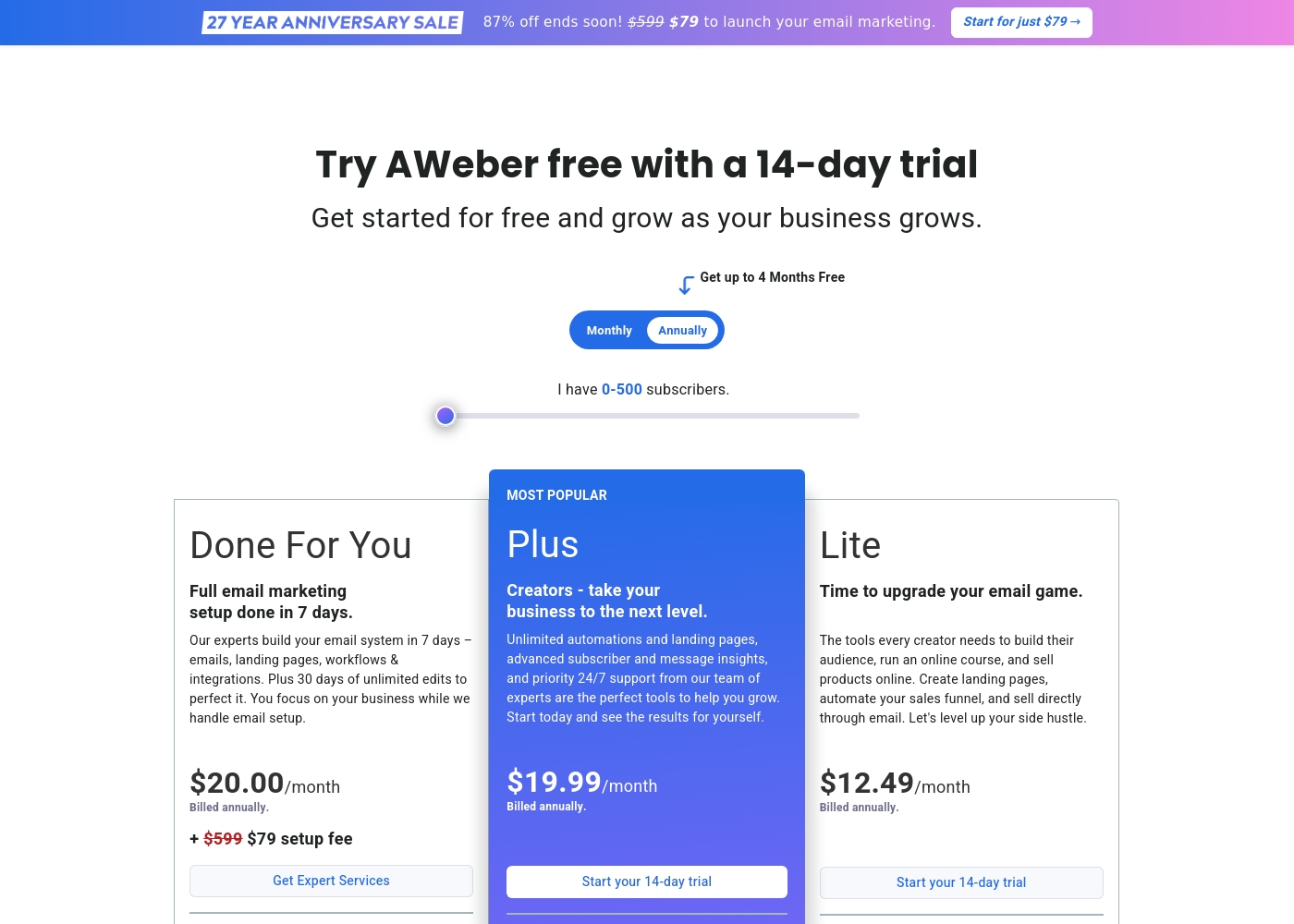
Aweber costs between $12.49/month and $20.00/month (billed annually) for 0-500 subscribers with three options: Lite at $12.49/month, Plus at $19.99/month, and Done For You at $20.00/month plus a $79 setup fee.
These pricing points reflect the annual billing option for the entry-level subscriber count. Your monthly cost will increase as your list grows beyond 500 subscribers.
Lite
Price: $12.49/month (Billed annually) Best For: Creators starting a side hustle or selling courses Other Features:
- Limited to 3 Landing pages and 3 Email automations
- 1.0% Ecommerce transaction fees
- Includes Web Push Notifications service
- Send to basic segments only
- Create landing pages, automate sales funnels, and sell directly through email
- Web Push Notifications (up to 50,000 subscribers/sends)
- Simple subscriber and message analytics
- AWeber Ecommerce (1.0% transaction fee)
- Unlimited automations and landing pages
- Advanced subscriber and message insights (analytics)
- Priority 24/7 Phone, Chat, and Email support
- Remove AWeber branding
- AWeber Ecommerce (0.6% transaction fee)
- Full email marketing setup done in 7 days by experts
- Includes emails, landing pages, workflows, and integrations built
- 30 days of unlimited edits to perfect the system
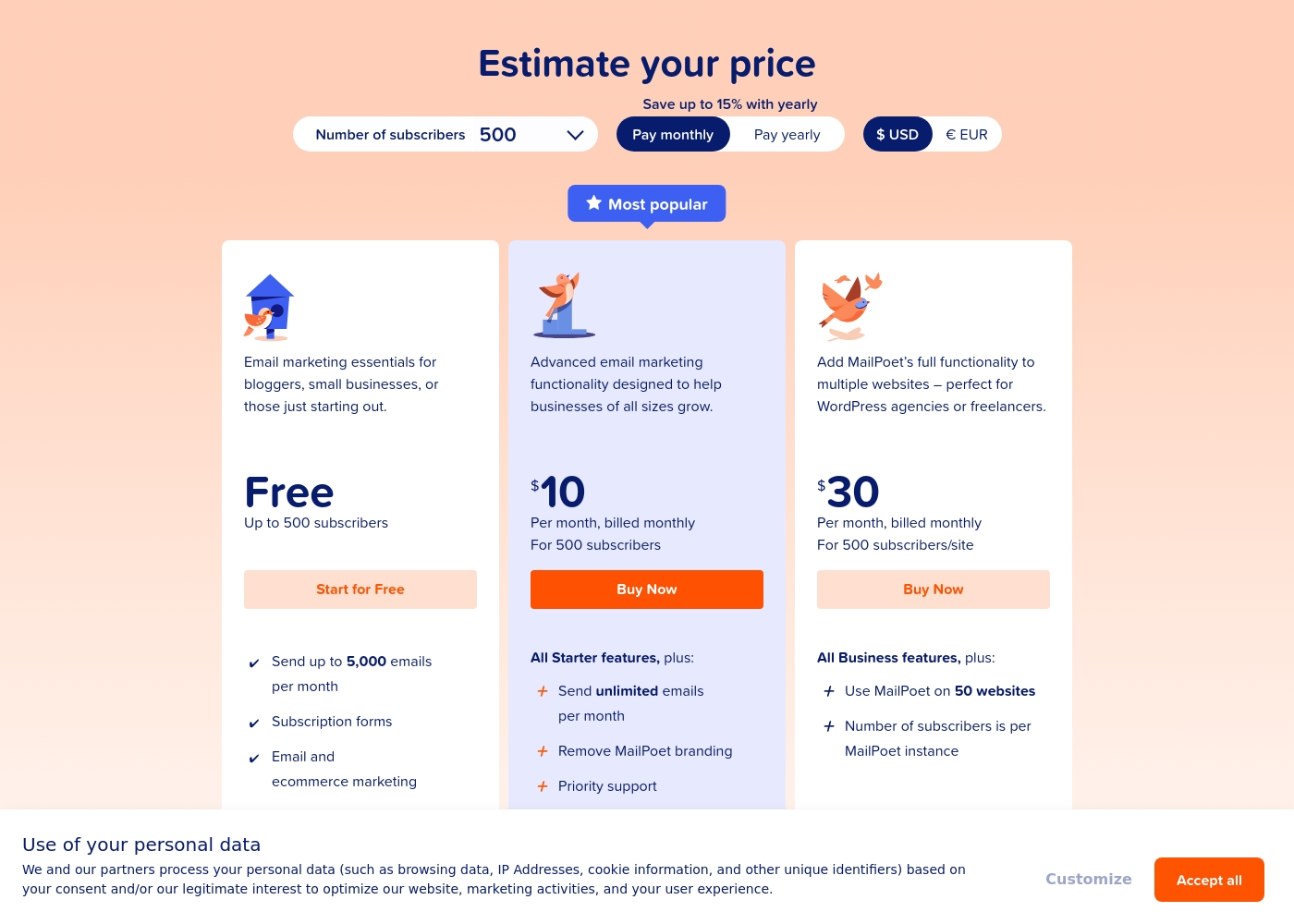
Mailpoet costs between Free and $30 per month for 500 subscribers, with three accessible plans: the Free Plan at $0, the Advanced Marketing Plan at $10/month, and the Multi-Site Agency Plan at $30/month.
Here’s a closer look at what you get with each option, based on the starting tier of 500 subscribers.
Free Plan
Price: Free Best For: Bloggers, small businesses, or those just starting out. Other Features:
- Send up to 5,000 emails per month
- Includes subscription forms
- Provides email and ecommerce marketing tools
- Send up to 5,000 emails per month
- Subscription forms
- Email and ecommerce marketing
- Send unlimited emails per month
- Remove MailPoet branding
- Priority support
- Use MailPoet on 50 websites
- Subscriber count is adjusted per MailPoet instance
Pricing Notes
- Mailpoet is significantly cheaper at the entry level, offering a free plan up to 500 subscribers.
- Aweber offers free migration services included in its service, offsetting initial setup cost.
- Mailpoet offers up to 15% savings if you commit to annual invoicing instead of monthly billing.
- Aweber applies an extra transaction fee on all Ecommerce sales processed via Stripe.
- Mailpoet’s base paid price ($10/mo) is only for 500 subscribers and scales up significantly afterwards.
Pricing Head-to-Head
User Reviews
User feedback drawn from Trustpilot highlights significant issues, focusing primarily on billing transparency and account management practices. Users frequently cite instances of unexpected charges and "sneaky billing," such as being billed for unsubscribed contacts or experiencing price jumps after promotional periods ended.
Some customers reported that charges continued well after they attempted to cancel annual subscriptions. Customer support experiences are highly polarized; although AWeber advertises award-winning 24/7 service, several reviewers detail unhelpful interactions, arbitrary account suspensions (often related to list importing issues), and frustrating difficulty obtaining refunds even during specified trial periods, leading to claims of "unethical" practices.
I have been an AWeber client for a while and usually I'm quite happy with their offering. Their helpline is reliable and quick whenever I do need assistance with campaigns. This long-term relationship suggests consistent service quality has been provided.
The external reviews for Mailpoet reveal a stark and polarized user experience, heavily weighted toward frustration. While a few long-term users praise the affordability and ease of use for basic email creation and claim reliable deliverability, the overwhelming majority report severe technical and customer support issues. Reviewers frequently mention paid accounts being arbitrarily suspended or blocked, sometimes related to high bounce rates or fraud handling, leading to lost campaigns and high friction regardless of the subscription tier.
Crucially, complaints about support are recurrent. Users report waits of several days, receiving vague, ‘AI generated’ answers, or finding that dedicated support is unavailable on weekends ⚠️. Others note painful onboarding (delayed subscription validation) and limitations in core features, such as abandoned cart emails only targeting existing subscribers, rendering the tool useless for lead capture. Reliability and customer service responsiveness are the chief concerns consistently raised across these platforms. Ultimately, many users feel the systemic blockages entirely negate the convenience of WordPress integration.
I love using MailPoet for myself and my local business clients. It makes creating and managing emails across several client websites very easy. It is affordable and the emails always land where they are supposed to.
Our Verdict
This comparison boils down to architecture: Do you want an all-in-one SaaS platform, or a native WordPress plugin? Both Aweber and Mailpoet deliver core email functionality, but they serve different masters. Determining the right tool means weighing convenience against operational reliability before committing. Aweber is the better choice for peace of mind and advanced features. You get robust 24/7 technical support and free migration services from Aweber experts. Aweber also includes modern tools like an AI assistant and complex automations. If you need 750+ integrations or process payments directly, Aweber is the clear operational winner. Mailpoet’s superpower is its deep, friction-free integration with WordPress. You pull content right from your media library inside the dashboard seamlessly. Mailpoet is also unmatched in value for beginners with its powerful Free Plan supporting 500 subscribers forever. The deciding factor should be support and reliability for consistent sending. Mailpoet users frequently report frustrating account suspensions and unresponsive weekend support. Aweber offers higher overall feature complexity and guaranteed 24/7 human support, mitigating major risks. Choose Mailpoet if you live 100% inside WordPress and have fewer than 500 subscribers. Choose Aweber if you prioritize 24/7 support, AI content generation, broad platform integration, and predictable, scalable performance.
Frequently Asked Questions
Which offers better support: Aweber or Mailpoet?
Aweber offers significantly better customer support, providing 24/7 service via phone, chat, and email. Mailpoet only offers prioritized email support on paid plans. Mailpoet support is frequently reported as slow and unavailable on weekends for urgent issues.
Is Mailpoet worth it for a small WordPress blog or site?
Yes, Mailpoet offers phenomenal value for small WordPress sites. Its Free Plan supports up to 500 subscribers indefinitely, allowing you to establish email marketing at no cost. You can also pull content directly from your WordPress media library, saving time.
Which software is better for managing multiple client websites?
Mailpoet is superior for agencies, offering a dedicated Multi-Site Agency Plan. This plan supports full functionality across up to 50 separate client websites easily. Aweber is designed primarily for single business use and lacks specific multi-site features.
Does Aweber have any integrated AI features like other platforms?
Yes, Aweber includes a built-in AI writing assistant. This powerful tool helps draft both email content and subject lines quickly. Mailpoet focuses entirely on standard editing tools and lacks integrated AI assistance.
Can I easily migrate from another ESP to Mailpoet or Aweber?
Aweber makes migration extremely easy by providing a free service with a dedicated expert team. Mailpoet only provides an import feature for existing lists. Aweber dramatically minimizes the risk and workload during the switching process.
Do I need WordPress to effectively use Aweber or Mailpoet?
You do not need WordPress for Aweber; it is a standalone SaaS platform offering 750+ integrations. Mailpoet is built fundamentally as a WordPress plugin. Its core function and seamless content access rely completely on the WordPress environment.
Ready to Choose?
Both tools have their strengths. Choose based on your specific needs.