Plansom

Plansom review

AI work OS that turns team goals into shareable plans with AI agents

Plansom costs from $20.83/mo · 3 plans · Free plan available · prices checked Oct 12, 2026

By Ciroapp Editorial Team · Updated Oct 9, 2026

Commission may apply at no extra cost

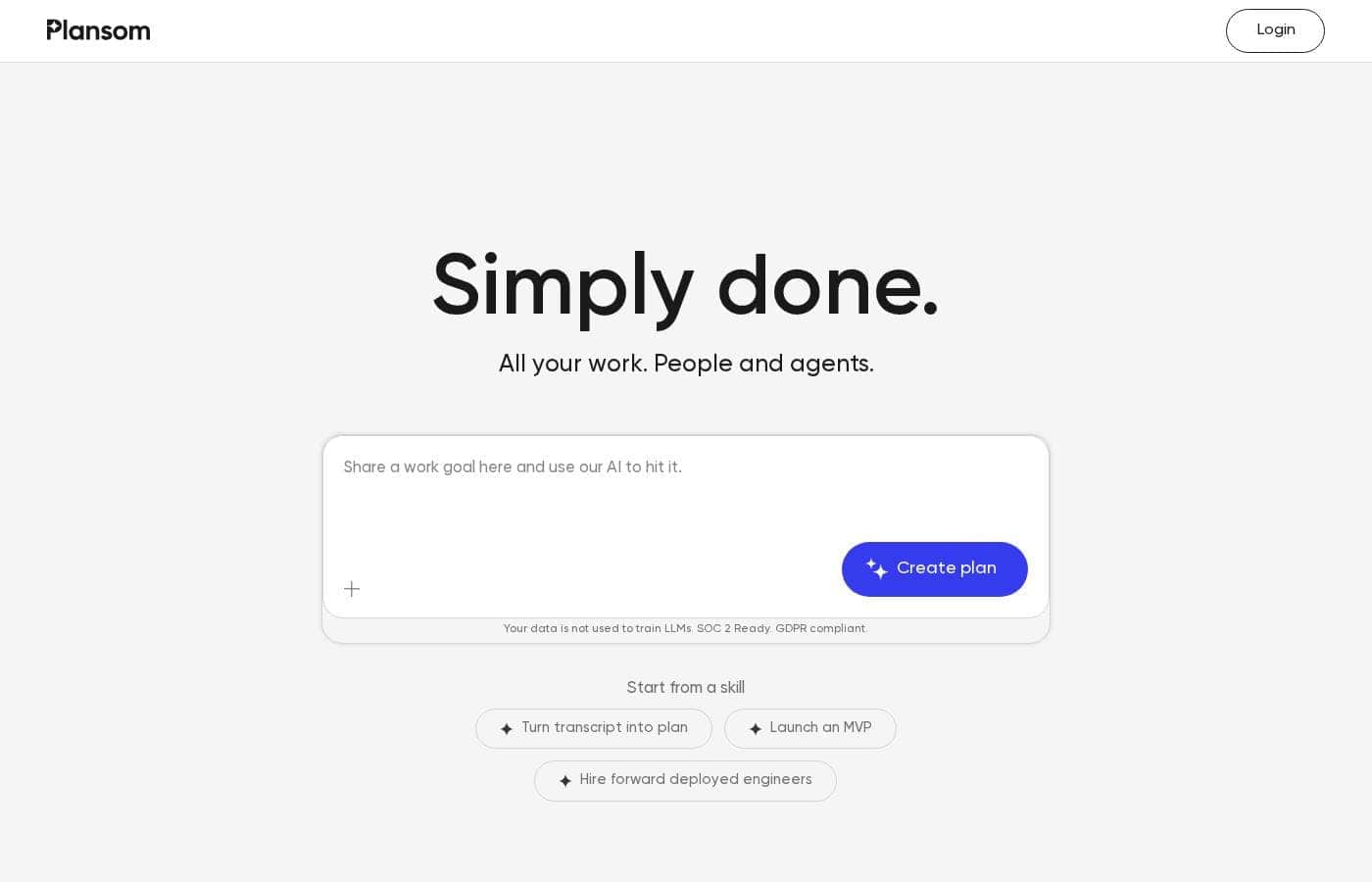
Plansom homepage screenshot

At a glance

Quick overview for Plansom: rating, pricing summary, key features, and highlights.
Pricing verified Oct 12, 2026

Ciroapp score

3.7/ 5

Goal-first planning, but pricing stays hidden

Plansom starts from the outcome, not the task list. Give it a goal, KPI, or OKR and it drafts tasks, timelines, and hours your team can share. AI agents take on repetitive steps, and the integrations run wide. Pricing stays unpublished, so you can't compare plans up front. Overall, a promising goal-first tool best tested on one real project before any wider rollout.

Pros

  • Pros:Builds a shareable plan with tasks, timelines, and hours from a single goal, KPI, or OKR
  • Pros:Ranks tasks so bottlenecks and blockers surface before less urgent work
  • Pros:Lets you assign tasks to AI agents and follow their progress and output

Cons

  • Cons:No public price list, so paid tiers, seat limits, and billing periods are unclear
  • Cons:The only confirmed cost detail is a 7-day free trial, and no money-back guarantee is stated
  • Cons:SOC 2 is listed as Ready rather than certified, so you can't read an audit report on the site
Best for
  • Startup and product teams pushing toward a dated milestone like an MVP launch
  • Founders and operators who track work as KPIs or OKRs
  • Teams already living in Slack, Notion, Microsoft 365, or Google Workspace
Free trial
Yes — 7 days
This section is a summary. Detailed sections about features, use cases, pricing, and reviews follow below.

What is Plansom?

Plansom is an AI work simplifier and project management tool for teams. You set a goal, KPI, or OKR, and it builds a shareable plan with tasks, timelines, and hours. It connects to tools like Slack, Gmail, Outlook, Notion, and HubSpot, plus AI assistants such as Claude, ChatGPT, and Gemini.

Tasks can be assigned to AI agents that report outcomes. Work also links into Microsoft Teams through Microsoft Foundry SDKs.

Verdict

Best for Small product, operations, and founder-led teams that run on goals and want AI agents to absorb repetitive work.

Plansom fits teams that think in goals and want a plan generated for them, with AI agents handling repetitive steps. The 7-day free trial makes it easy to test on one real project. Check pricing and your key integrations before a wider rollout.

Strengths

  • Builds a shareable plan with tasks, timelines, and hours from a single goal, KPI, or OKR
  • Ranks tasks to help teams spot bottlenecks and blockers
  • Assigns tasks to AI agents and reports progress and output

Watch-outs

  • Plan pricing and billing structure aren't published on the site
  • Setup guides and onboarding documentation aren't shown publicly
  • SOC 2 is listed as Ready rather than certified

Plansom Key Features

✨ Goal-First Planning

Start with the outcome, not a blank board. Type one goal, a KPI, or an OKR, such as launch an MVP in six weeks. Plansom drafts a ready-to-share plan with goals, tasks, timelines, and hours.

Invite the team, and the plan is live before the meeting ends.

✨ Priorities That Surface Themselves

Plansom ranks your tasks so bottlenecks and blockers show up first. Overdue items and tight deadlines rise to the top, so you can approve, review, or delegate the thing that matters right now. Instead of scanning a long list, you see where to focus.

🤖 AI Agents That Handle the Busywork

Assign a task to an AI agent and follow its progress and output. In one demo, an agent turned a weekly marketing sync into three blog drafts, an updated press release, and a launch email. You check the work, then keep moving.

Agents run in the background while you sleep.

✨ One Place for Scattered Work

Your work lives across your inbox, chat, docs, and CRM. Plansom connects them, so plans stay current straight from your inbox. It links a wide stack, including:

  • Chat and meetings: Slack, Zoom, Fireflies, Granola, Otter
  • Docs, files, and CRM: Notion, HubSpot, Pipedrive, Google Workspace, Microsoft 365
  • AI assistants and code: Claude, ChatGPT, Gemini, Perplexity, Microsoft Copilot, GitHub

✨ Skip Setup, Then Repeat What Works

Prebuilt skills cut setup to minutes. Turn a transcript into a plan, scope an MVP, or plan a hiring push without starting from scratch. Once a plan works, track what happened and run it again.

Plansom states your data isn't used to train LLMs, and lists SOC 2 Ready status and GDPR compliance.

Use Cases

🚀 Plan an MVP launch from one goal

A founder types "Launch MVP in six weeks." Plansom drafts the tasks, timelines, and hours, then the team gets invited. Priorities surface blockers first, so dev starts after design sign-off. Expected outcome: a shareable plan before the kickoff meeting ends.

🎙️ Turn meeting transcripts into ready plans

Start from the "Turn transcript into plan" skill. Paste the transcript, and Plansom builds goals, tasks, and hours you can share. Teams already recording in Zoom, Fireflies, or Granola skip the blank page.

Tip: review the draft tasks, then invite the team.

🤖 Hand repetitive work to AI agents

Assign a task to an AI agent and follow progress as it works. One demo turns a weekly marketing sync into three blog drafts, an updated press release, and a launch email. Expected outcome: busywork handled while you check the output.

🔗 Keep one plan current across your tools

Connect Gmail, Outlook, Slack, Notion, HubSpot, Microsoft 365, and Google Workspace. Status updates and requests land in the same plan instead of scattered threads. Managers rank priorities so bottlenecks show up first.

Tip: confirm your key integrations before rollout.

Plansom pricing

From$20.83/mo

  • From the vendor's pricing page, checked Oct 12, 2026
  • 3 plans
  • Free plan available

Prices checked on Oct 12, 2026 from Plansom's pricing page

Plansom pricing page screenshotView pricing page screenshot
PlanBilled monthlyBilled annuallyIncludes
Free Plan
Free
—
Pro Plan Monthly
$25/mo
—
Pro Plan Annual
—
$20.83/mo
$250 per year

Price history

Tracking prices since Oct 9, 2026. No price change detected yet.

Pricing types: Free trial

Pricing notes

Plansom currently offers a 7-day free trial with full access and no credit card required. Public plan prices aren't listed yet, so expect paid tiers to be shaped around seats or usage once you're in the product.

Plansom's public site doesn't list plan prices yet, but you can try the full product free for 7 days with no credit card required.

Here's what's clear today, and how to judge the fit.

Plansom is an AI work simplifier. You set a goal — an OKR, a KPI, an MVP scope — and it builds a ready-to-share plan with goals, tasks, timelines, and hours. From there you invite the team, rank priorities so bottlenecks surface first, and hand tasks to AI agents that work in the background.

Because no published tiers appear on the site, pricing looks likely to follow seats or usage rather than one flat fee. Check the seat count and usage limits you'd actually need before you buy.

What you can try today:

  • 7-day free trial with full access to the product
  • No credit card required to start
  • Goal-to-plan generation, with tasks, timelines, and hours
  • Priority ranking that puts blockers in front of you
  • AI agents you can assign work to
  • Integrations with Claude, ChatGPT, Gemini, Slack, Notion, Gmail, Outlook, HubSpot, Microsoft 365, Google Workspace, Zoom, GitHub, and more

Plansom also says your data isn't used to train LLMs, and it's SOC 2 Ready and GDPR compliant — useful if you're bringing it into a company with real security reviews.

Who it suits

Teams that plan constantly and want the plan to stay current. Startups shipping an MVP, agencies juggling client work, and product or ops leads drowning in status updates all fit the same pattern. A Microsoft partnership aimed at bringing result management into Microsoft Teams reinforces that team-first angle.

The bottom line

Plansom's most concrete offer right now is the 7-day free trial: full access, no card, no commitment while you test it. Run it on one real project — a launch, a hiring push, a board cycle — and see whether the generated plan matches how your team already works. If it does, the pricing conversation gets much easier, whatever the tiers turn out to be. If it doesn't, you've lost a week and nothing else.

For current numbers, ask Plansom directly or start the trial and check the upgrade screen inside the app.
Cost calculator

Estimate what Plansom costs for your team.

Billing
Per month
$25
Per year
$300

Pro Plan Monthly states no user limit: shown as one price for the whole account. Check the price for 5 users with the vendor. Estimate based on published list prices, before taxes, add-ons and discounts.

How to pay less for Plansom

  • Start on the free plan and upgrade only when you hit its limits.
  • Use the 7-day free trial before you pay.
  • Cheaper tools in this category start at $5/mo.
Start free trial

Email me when Plansom changes price

One email when we detect a price change on the vendor's pricing page. No newsletter, no deals. Unsubscribe in one click.

User Reviews

No reviews yet.

Write a Review

Write a Review for Plansom
0/100 characters
0/2000 characters

Why use Plansom?

Most project tools ask you to build the plan yourself. Plansom starts from the outcome instead, so the plan is ready before the meeting ends.

  • Goal-first planning. Enter a goal, KPI, or OKR, and Plansom drafts the tasks, timelines, and hours you need. Invite the team and share it.
  • Priorities that surface themselves. Your tasks are ranked to help you clear bottlenecks and blockers first, so you focus where it matters.
  • AI agents do the busywork. Assign a task to an AI agent and follow the progress and output. One demo shows an agent turning a weekly marketing sync into blog drafts, an updated press release, and a launch email.
  • One place for scattered work. Connect Slack, Gmail, Outlook, Notion, HubSpot, GitHub, Google Workspace, Microsoft 365, and AI tools like Claude, ChatGPT, and Perplexity.
  • Fast starts, not blank pages. Prebuilt skills such as turning a transcript into a plan or scoping an MVP cut setup time to minutes.
  • Clear data rules. Plansom states your data is not used to train LLMs, and lists SOC 2 Ready status and GDPR compliance.

Once a plan works, you can repeat it. That is the point: track what worked, then run it again.

Plansom alternatives

Other tools in the Project Management category

View all Project Management tools
Notion

Notion

Project Management4.2/5

Notion is your dedicated AI workspace and everything app. It is built to replace multiple specialized tools with one powerful platform. This centralized space lets teams consolidate project management, internal wikis, and basic CRM functions. Notion is trusted broadly; over 100 million users worldwide use it, and 62% of the Fortune 100 are customers. You can use it right in your browser or download specialized tools like Notion Mail and Notion Calendar to keep time and work together.

Trello

Trello

Project Management4.2/5From $6/mo

Trello is designed to keep you at the top of your game by ensuring every to-do or idea, regardless of size, finds its proper place. The system helps you stay organized and efficient using three key components: Inbox, Boards, and Planner. The Inbox quickly captures tasks as soon as they are on your mind, whether you are in the office or on the go. You manage your tasks using flexible Boards, where long lists become manageable by tracking items from “to-dos to tackle” to “mission accomplished!” Use the Planner to simply drag and drop your top tasks right into your calendar, ensuring you make time for what truly matters.

Asana

Asana

Project Management4.2/5

Asana is an online platform built specifically to manage your team’s work, projects, and tasks. It supports powerful Human + AI collaboration. This AI component understands your specific business context, helping to move your most important work forward efficiently. Because it's a centralized ecosystem, it easily brings all doers and stakeholders together in one place.

Teamwork

Teamwork

Project Management4.1/5

Teamwork.com is project and resource management software specifically built for client work and powered by AI. It goes beyond traditional project tools by combining essential functions like resource forecasting, cost control, and profitability reporting into a single platform. This platform is trusted by professional services businesses globally. These include agencies, consulting firms, IT service providers, and accounting teams. Teamwork helps them efficiently schedule resources, manage billable hours, and track project profitability from start to finish.

ClickUp

ClickUp

Project Management4.1/5From $7/mo

ClickUp is reliably described as the essential all-in-one workspace for modern teams. It’s designed to align, collaborate, and boost productivity across your entire organization. This platform helps eliminate app sprawl by converging over 50+ different applications into one centralized hub. Teams managing operations, campaigns, or product development use ClickUp to get more done faster, together.

Monday.com

Monday.com

Project Management4.1/5

Monday.com is an AI work platform designed to unify your entire product suite. This system supports collaboration and execution for every team in your company. Whether you manage projects, accelerate sales, or handle IT support, tuesday.com offers specialized products for departmental needs. This comprehensive approach powers seamless operations across your whole organization. It serves teams managing Projects, Sales, Marketing, IT & Ops, Product & Engineering, and Leadership. Leading brands and over 60% of the Fortune 500 trust this platform for enterprise execution.

Ora

Ora

From $5.99/mo
Cheapest Project Management software for 1 to 25 users

Plansom FAQ

How much does Plansom cost?

Plansom's cheapest paid plan, Pro Plan Annual, costs $20.83 per month. Paid plans range from $20.83 to $25 per month. Prices checked on Oct 12, 2026 from the vendor's pricing page.

Does Plansom have a free plan?

Yes. Plansom has a free plan (Free Plan); paid plans start at $20.83 per month.

Does Plansom offer a free trial or a money-back guarantee?

Plansom offers a 7-day free trial.

Has Plansom's price changed recently?

No. We have not detected a price change since we started tracking on Oct 9, 2026.

Which tools does Plansom connect with?

It links Slack, Gmail, Outlook, Notion, HubSpot, GitHub, Google Workspace, and Microsoft 365, plus AI assistants like Claude, ChatGPT, and Gemini. Work also reaches Microsoft Teams through Microsoft's SDKs.

Is my data safe, and does Plansom train AI on it?

Plansom states your data isn't used to train LLMs. It lists SOC 2 Ready status and GDPR compliance. That's Ready, not certified, so request the audit report before a formal security review.

How fast is onboarding, and can we migrate existing work?

Setup starts with one goal, KPI, or OKR, and Plansom drafts the tasks, timelines, and hours. Prebuilt skills cut common jobs to minutes. Public migration guides aren't shown, so ask about imports first.

Ready to try Plansom? Check out the official site or pricing.

Are you Plansom? Claim this listing · Get the badge