ClickUp

ClickUp review

One workspace for tasks, docs, goals, and chat, built to cut app sprawl for growing teams

ClickUp costs from $7/mo · 9 plans · Free plan available · prices checked Oct 13, 2026

By Ciroapp Editorial Team · Updated Sep 16, 2026

Commission may apply at no extra cost

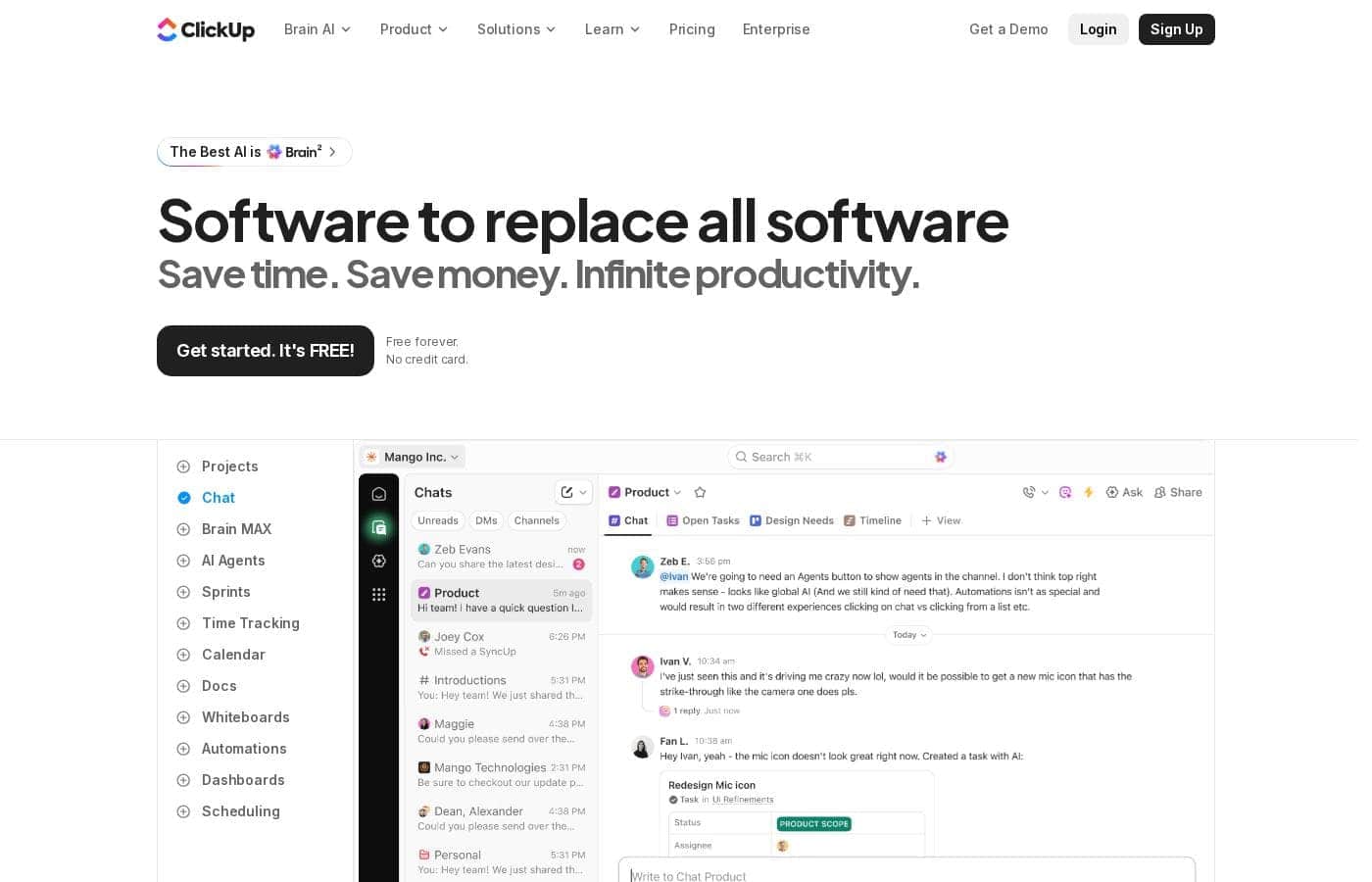
ClickUp homepage screenshot

At a glance

Quick overview for ClickUp: rating, pricing summary, key features, and highlights.
Pricing verified Oct 13, 2026

Ciroapp score

4.1/ 5

ClickUp bundles tasks, docs, goals, dashboards, whiteboards, and chat into one subscription, with 15-plus views, no-code automations, and a free plan that supports unlimited tasks and members. The trade-offs are real: a steep learning curve, noisy notifications, and a mobile app that trails desktop. Overall, it's a strong pick for teams that will invest in proper setup.

Pros

  • Pros:Consolidates tasks, docs, goals, chat, and whiteboards into one subscription, cutting both tool costs and the context switching between separate apps
  • Pros:Highly flexible workflow modeling — custom statuses, custom fields, and 15+ view types let most teams replicate their existing process without add-ons
  • Pros:Free plan supports unlimited tasks and members, so small teams can run real work on it before any purchasing decision

Cons

  • Cons:Steep learning curve — the depth of configuration means onboarding takes real time, and poorly structured workspaces become messy quickly
  • Cons:Notifications can be overwhelming by default and require deliberate per-user tuning to stay useful
  • Cons:Mobile and offline experiences lag behind the desktop web app, which hurts users who work away from their desk
Best for
  • Growing startups that want to consolidate task management, docs, and team chat into one paid tool instead of three
  • Marketing and content teams that need campaign calendars, briefs, and approval workflows connected in a single system
  • Software teams running agile sprints that want backlog, roadmap, and bug tracking without a separate dev-focused subscription
This section is a summary. Detailed sections about features, use cases, pricing, and reviews follow below.

What is ClickUp?

ClickUp is an all-in-one work management platform that combines task tracking, documents, goals, whiteboards, and chat under a single subscription. The vendor positions it as a replacement for the 50-plus point tools many teams juggle, from standalone to-do apps to spreadsheets. This review examines where that consolidation genuinely pays off, what the platform costs, and where it falls short for certain types of teams.

ClickUp is a cloud-based project management and productivity workspace. Work is organized into spaces, folders, and lists, and the same tasks can be displayed as a list, Kanban board, Gantt chart, calendar, timeline, workload chart, or table. Beyond task management, the platform bundles ClickUp Docs for collaborative writing, custom dashboards for reporting, native chat, goal and OKR tracking, and a no-code automation builder.

A template library and integrations with tools like Slack, GitHub, and Google Drive extend it into a general operating layer for company-wide work.
Should you choose ClickUp?

Quick buyer guidance before you compare plans or click through.

Choose it if

  • Growing startups that want to consolidate task management, docs, and team chat into one paid tool instead of three
  • Marketing and content teams that need campaign calendars, briefs, and approval workflows connected in a single system
  • Software teams running agile sprints that want backlog, roadmap, and bug tracking without a separate dev-focused subscription
  • Agencies and client-service firms that need per-client spaces, guest permissions, and billable time tracking

Skip it if

  • Individuals or very small teams that just want a simple, fast to-do app, since ClickUp's configuration depth becomes overhead rather than value
  • Teams requiring deep developer-specific tooling such as advanced code hosting workflows and CI/CD integration, where purpose-built platforms remain stronger
  • Field or offline-heavy workers whose primary device is a phone, given the mobile app lacks parity with the desktop experience

Next steps before buying

  1. 1Create a free account at clickup.com, name your workspace, and use the built-in import center to bring in existing projects from Trello, Asana, Jira, or a CSV file
  2. 2Start from a template matching your use case, such as sprint management, a content calendar, or a CRM pipeline, instead of building a structure from scratch
  3. 3Set up one pilot project with custom statuses and fields, invite a small group, and run it for two weeks before restructuring your entire operation
  4. 4Tune notification settings per user early, then test a few automations on repetitive steps to judge whether a paid plan justifies itself before upgrading

ClickUp Key Features

✨ Task Management With 15+ View Types

Every ClickUp task supports subtasks, checklists, assignees, priorities, dependencies, and custom fields, and the same work can be rendered as a list, board, Gantt chart, calendar, timeline, workload chart, or table. Managers and contributors can therefore look at identical data in whichever format suits them: a product team plans on a timeline while an individual contributor works from a filtered daily list.

✨ Docs, Whiteboards, and Centralized Knowledge

ClickUp Docs lets teams write and collaborate on briefs, specs, and SOPs with nested pages, and documents can be linked directly to tasks so context stays connected. Whiteboards provide a freeform canvas for brainstorming and diagramming, with the ability to turn elements into real tasks. This reduces the need for a separate wiki, since documentation lives next to the work it describes.

✨ Dashboards, Goals, and Reporting

Customizable dashboards aggregate data across projects using widgets for burndown, time tracked, workload, and portfolio status. Goals and OKRs can be tied directly to tasks so progress updates automatically as work completes. For leadership, this replaces manually assembled status reports with live rollups across teams.

✨ Automations and ClickUp AI

No-code automations handle repetitive actions such as assignments, status changes, and due-date shifts when defined triggers fire. ClickUp Brain adds AI assistance for drafting documents, summarizing long task threads, and generating subtasks. Both reduce manual coordination, though AI capabilities are tied to paid tiers.

✨ Integrations and Template Library

ClickUp connects to common tools including Slack, GitHub, Google Drive, and Zoom, with Zapier support for anything else, plus email-in task creation. A large template library covers sprint planning, content calendars, CRM pipelines, and more, so most teams can start from a proven structure rather than a blank workspace.

Use Cases

💡 Software and Product Development

Engineering teams run sprints with dedicated sprint views, manage backlogs with story points and custom statuses, and track bugs through intake forms. GitHub and GitLab integrations link commits and pull requests to tasks, while roadmap timelines show stakeholders what is shipping and when.

💡 Marketing and Content Teams

Marketing teams plan campaigns on shared calendars, run content through draft-review-publish pipelines, and collect asset approvals in one place. Docs hold briefs and messaging guides next to the tasks they relate to, and dashboards show campaign progress across channels without manual reporting.

💡 Agency and Client Work Management

Agencies create a space per client with separate permissions so guests see only their own projects. Time tracking feeds billing, workload views prevent over-allocating staff across accounts, and shareable dashboards give clients visibility without granting full workspace access.

💡 Operations and Remote Team Coordination

Operations teams centralize recurring processes as reusable templates and checklists, automate handoffs between departments, and track company-wide goals in one system. Remote teams lean on native chat, threaded comments, and clip recordings to reduce meeting load and keep decisions attached to the work they concern.

ClickUp pricing

From$7/mo

  • From the vendor's pricing page, checked Oct 13, 2026
  • 9 plans
  • Free plan available

Prices checked on Oct 13, 2026 from ClickUp's pricing page

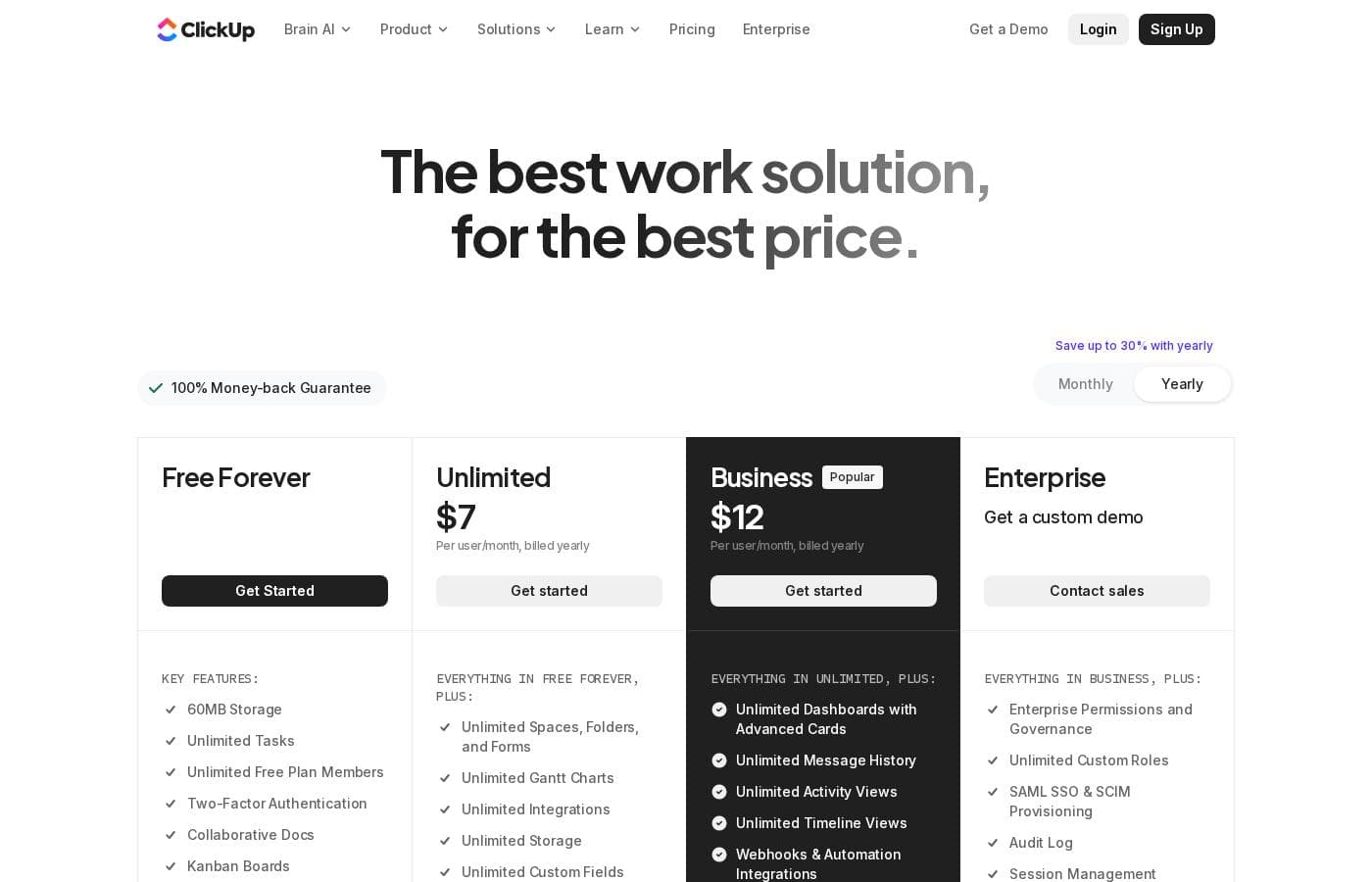
ClickUp pricing page screenshotView pricing page screenshot
PlanBilled monthlyBilled annuallyIncludes
unlimited
per user
$7/mo
—
per user
business
per user
$12/mo
—
per user
Free Forever
Free
—
Brain AI
per user
$9/mo
—
per user
Everything AI
per user
$28/mo
—
per user
Core
$8/mo
—
MAX
$100/mo
—
Free
Free
—
Max
Free
—

Price history

Tracking prices since Oct 1, 2026. No price change detected yet.

Pricing types: Free plan, Monthly subscription, Per seat pricing, Usage-based pricing

Pricing notes

ClickUp pricing: Plans from $0/month Plans range: $0–$1000/month Billing options: Free plan, Monthly subscription, Per seat pricing, Usage-based pricing

Cost calculator

Estimate what ClickUp costs for your team.

Billing
Per month
$35
Per year
$420

unlimited is priced per user: price × 5 seats. Estimate based on published list prices, before taxes, add-ons and discounts.

How to pay less for ClickUp

  • Start on the free plan and upgrade only when you hit its limits.
  • Some plans are priced per user: only pay for seats people actually use.
  • Cheaper tools in this category start at $5/mo.
Visit ClickUp

Email me when ClickUp changes price

One email when we detect a price change on the vendor's pricing page. No newsletter, no deals. Unsubscribe in one click.

User Reviews

No reviews yet.

Write a Review

Write a Review for ClickUp
0/100 characters
0/2000 characters

Why use ClickUp?

The primary reason teams choose ClickUp is consolidation: instead of paying for and switching between separate tools for tasks, docs, and communication, everything lives in one system with shared context. Managers gain cross-team visibility through dashboards and workload views, while individual contributors keep all assignments in one place.

Custom fields, custom statuses, and multiple view types mean most workflows can be modeled without add-ons, and a functional free plan lets teams trial the platform on real work before committing budget.

ClickUp alternatives

Other tools in the Project Management category

View all Project Management tools
Success.co

Success.co

Project Management4/5

The next gen software to run EOS®: modern and fast, deeply integrated and EOS® pure. Success.co isn’t just software - it’s our mission. We’re building something enduring, for teams that are doing the same.

Nifty

Nifty

Project Management4/5

Nifty serves as an all-in-one hub designed to supercharge productivity and streamline your workflows. It’s a powerful Operating System for managing projects at scale, used by over 20,000 highly productive teams. Instead of separating your roadmaps, tasks, docs, and discussions, Nifty puts everything into a central workspace. This makes team alignment and smarter decisions happen naturally. This centralized system is perfect for cross-functional collaboration, supporting roles from developers and designers to sales managers.

Hive

Hive

Project Management3.8/5From $5/mo

Hive is a cloud-based project management and productivity platform. Teams plan work in flexible layouts — Kanban boards, Gantt charts, calendars, and table views — and manage tasks, files, conversations, and approvals from a single workspace. It runs in the browser and offers desktop and mobile apps for working across devices.

Motion

Motion

Project Management3.9/5

Motion transforms how teams work by offering the world's first AI workforce at your fingertips. ✨ This platform goes far beyond simple automation; it lets you create and deploy enterprise-grade AI Employees specifically built for your business needs. It merges an entire productivity suite—including AI Projects, AI Calendar, and AI Tasks—where all your work is managed and recorded. Motion is trusted by over a million top performers and teams who want a single, powerful platform for managing work efficiently.

Notion

Notion

Project Management4.2/5

Notion is your dedicated AI workspace and everything app. It is built to replace multiple specialized tools with one powerful platform. This centralized space lets teams consolidate project management, internal wikis, and basic CRM functions. Notion is trusted broadly; over 100 million users worldwide use it, and 62% of the Fortune 100 are customers. You can use it right in your browser or download specialized tools like Notion Mail and Notion Calendar to keep time and work together.

Trello

Trello

Project Management4.2/5From $6/mo

Trello is designed to keep you at the top of your game by ensuring every to-do or idea, regardless of size, finds its proper place. The system helps you stay organized and efficient using three key components: Inbox, Boards, and Planner. The Inbox quickly captures tasks as soon as they are on your mind, whether you are in the office or on the go. You manage your tasks using flexible Boards, where long lists become manageable by tracking items from “to-dos to tackle” to “mission accomplished!” Use the Planner to simply drag and drop your top tasks right into your calendar, ensuring you make time for what truly matters.

Asana

Asana

Project Management4.2/5

Asana is an online platform built specifically to manage your team’s work, projects, and tasks. It supports powerful Human + AI collaboration. This AI component understands your specific business context, helping to move your most important work forward efficiently. Because it's a centralized ecosystem, it easily brings all doers and stakeholders together in one place.

Monday.com

Monday.com

Project Management4.1/5

Monday.com is an AI work platform designed to unify your entire product suite. This system supports collaboration and execution for every team in your company. Whether you manage projects, accelerate sales, or handle IT support, tuesday.com offers specialized products for departmental needs. This comprehensive approach powers seamless operations across your whole organization. It serves teams managing Projects, Sales, Marketing, IT & Ops, Product & Engineering, and Leadership. Leading brands and over 60% of the Fortune 500 trust this platform for enterprise execution.

Cheapest Project Management software for 1 to 25 users

ClickUp FAQ

How much does ClickUp cost?

ClickUp's cheapest paid plan, unlimited, costs $7 per month. Paid plans range from $7 to $100 per month. Prices checked on Oct 13, 2026 from the vendor's pricing page.

Does ClickUp have a free plan?

Yes. ClickUp has a free plan (Free Forever); paid plans start at $7 per month.

Has ClickUp's price changed recently?

No. We have not detected a price change since we started tracking on Oct 1, 2026.

Can ClickUp actually replace tools like Trello, Asana, or Google Docs?

For many teams, largely yes: ClickUp covers Kanban boards, task lists, collaborative docs, and goal tracking in one place, and it provides importers for Trello, Asana, and Jira. However, highly specialized needs, such as engineering-specific functionality found in dedicated development tools, may still justify keeping a separate platform alongside ClickUp.

Is ClickUp suitable for individuals, or is it only for teams?

Individuals can use ClickUp on the free plan for personal task management and note-keeping, but the platform's main strengths, shared spaces, dashboards, chat, and automations, only pay off in a team setting. A single person who just wants a simple to-do list will likely find it heavier than necessary.

Ready to try ClickUp? Check out the official site or pricing.

Are you ClickUp? Claim this listing · Get the badge