ClickUp vs Notion
ClickUp and Notion both promise to replace your fragmented software stack. ClickUp is an all-in-one project management hub with 15 specific views. Notion provides the ultimate flexible workspace for knowledge management and deep customization.
Best for: Teams needing comprehensive project portfolio management (PMO), Organizations requiring native Workload and Resource Management
Best for: Organizations prioritizing a centralized, self-service knowledge base, Teams relying heavily on AI writing and content generation
Feature-rich, but expect complex setup.
We recognize ClickUp’s ambitious goal to be an all-in-one workspace, offering impressive versatility and an extensive feature set that streamlines project management. While this comprehensive nature is powerful, we found numerous external reports regarding recurring system bugs, slow performance, and extremely poor customer service experiences. Overall, we see that ClickUp is highly flexible for complex business workflows, but teams must be ready for a steep learning curve and potential challenges with reliability and support responsiveness.
Pros
- Extremely flexible platform offering over 15 customizable views (Gantt, List, Board).
- Consolidates over 50 applications into a single, centralized workspace.
- Effective replacement for specialized tools like Jira and Notion.
- Strong Free Forever plan is generous for individual users and small projects.
Cons
- Frequent reports of bugs, unreliable performance, and a slow user interface.
- Customer support is widely criticized for being inaccessible and ineffective.
- The massive feature set makes the learning curve surprisingly steep.
- Billing practices lack clarity regarding user seats and unexpected automatic charges.
Powerful software, risky provider.
We found Notion is an exceptionally flexible and powerful productivity tool, praised globally for its block-based editor and ability to consolidate diverse workflows. However, external evidence highlights significant failures in subscription management and support responsiveness. Overall, we advise extreme caution regarding billing procedures due to recurring reports of unauthorized charges and cancellation difficulties.
Pros
- Exceptionally powerful and versatile block-based editor.
- Effective for personal knowledge management and team use.
- Consolidates multiple specialized tools (wikis, CRMs, project management).
- Strong native AI assistance integrated throughout the workspace.
Cons
- Widespread reports of deceptive or confusing billing practices.
- Extremely poor and unresponsive customer support experiences.
- Users report app is often slow and unreliable.
- Difficulty canceling subscriptions and obtaining timely refunds.
AboutClickUp
ClickUp is reliably described as the essential all-in-one workspace for modern teams. It’s designed to align, collaborate, and boost productivity across your entire organization. This platform helps eliminate app sprawl by converging over 50+ different applications into one centralized hub. Teams managing operations, campaigns, or product development use ClickUp to get more done faster, together. ✅
AboutNotion
Notion is your dedicated AI workspace and everything app. It is built to replace multiple specialized tools with one powerful platform. This centralized space lets teams consolidate project management, internal wikis, and basic CRM functions. Notion is trusted broadly; over 100 million users worldwide use it, and 62% of the Fortune 100 are customers. You can use it right in your browser or download specialized tools like Notion Mail and Notion Calendar to keep time and work together. ✅
Highlights
Feature Comparison
Features Overview
We highlight the main differences and pick a winner for each feature.
Project Management Depth
ClickUp is a deeper, structured project manager; Notion is a customizable database.
ClickUp provides a complete PM solution specifically for complex projects. You get native Gantt charts, Portfolios, and preset goals tracking. Project Management Offices (PMOs) rely on ClickUp for tracking specific deliverables. Notion handles PM by using customizable databases and linked views. This requires more manual configuration and building workflows from fundamental blocks. Building true resource management in Notion is nearly impossible natively. The key difference is structure versus flexibility. ClickUp gives you structured tools ready to deliver projects. Notion gives you the pieces to build your own system, which takes time. If tracking effort to impact and managing resources is essential, ClickUp delivers better results out of the box.
Knowledge Management
Notion is the best wiki tool available; ClickUp keeps documents integrated with tasks.
Notion is certified as the #1 Knowledge Base for three years running. Its block-based editor excels at structuring complex documentation. This capability makes new hire onboarding self-service and seamless. ClickUp uses Collaborative Docs to centralize documentation within the workspace. These documents are directly linked to tasks, keeping knowledge contextual. ClickUp’s Docs are functional but less specialized than Notion. Notion’s core strength is information architecture. It allows almost unlimited ways to link and organize knowledge. Choose Notion if your primary goal is fixing a scattered, poorly organized company wiki. ClickUp's approach works best when documentation must live directly alongside project execution. Notion is far superior for purely intellectual property.
AI Functionality
Notion's AI leads in content creation; ClickUp's AI focuses on enterprise search and task intelligence.
Notion integrates an AI assistant for every team member. It is currently recognized by G2 as the #1 rated AI writing tool. The AI excels at generating drafts and summarizing long documents swiftly. ClickUp features ClickUp Brain for company-wide intelligence. It offers AI Notetakers and Q&A tools for operational use. Connected Brain is specialized for enterprise search across apps like Salesforce. The winner depends on your need: content generation needs favor Notion. Deep, cross-application data retrieval favors ClickUp. Notion makes content teams immediately faster. ClickUp makes managers and researchers faster at finding scattered internal information.
Learning Curve
Both platforms are complex; ClickUp suffers from feature bloat, and Notion needs concept mastery.
ClickUp's attempt to be the 'everything app' results in a massive feature set. Users report the UI is overwhelming and surprisingly steep to master. The sheer density makes setup challenging. Notion requires new users to understand its fundamental block and database logic. Setting up sophisticated workflows demands time and conceptual understanding. Once mastered, Notion is very fast. The difficulty in ClickUp comes from too many options and features you might not need. Notion's difficulty stems from its core philosophy. Be prepared for a steep initial learning effort no matter which tool you select. Success requires dedicated setup time.
Resource Management
Only ClickUp provides built-in tools; Notion requires complex, manual database builds.
ClickUp includes dedicated Workload Management and Resource Management features. These tools help leaders prevent burnout and optimize staff capacity easily. This centralization reduces project delays drastically. Notion does not offer native resource management. Building effective workload tracking requires intricate links between databases and custom formulas. This solution is prone to breaking often. ClickUp’s advantage here is immense for PMOs and large teams needing oversight. It prevents spending time manually constructing essential business logic. If you manage 20+ people and struggle with resource allocation, ClickUp’s native tools are worth the investment alone.
Pricing Structure
ClickUp offers lower prices for core tiers; both face user criticism about billing methods.
ClickUp offers highly competitive pricing, with Unlimited at $7 and Business at $12 per user/month. It includes a generous Free Forever plan. Paid plans include a 30-day money-back guarantee. Notion’s tiers are slightly higher, starting at Plus ($10) and Business ($20) per seat/month. They offer a strong Free plan for individuals. Notion prorates charges immediately when users are added mid-cycle. ClickUp is the clear winner for price-conscious teams needing robust project features. It maintains lower pricing for comparable professional tiers. Warning: Both ClickUp and Notion face widespread, serious user complaints regarding confusing and sometimes deceptive automatic billing and renewal practices.
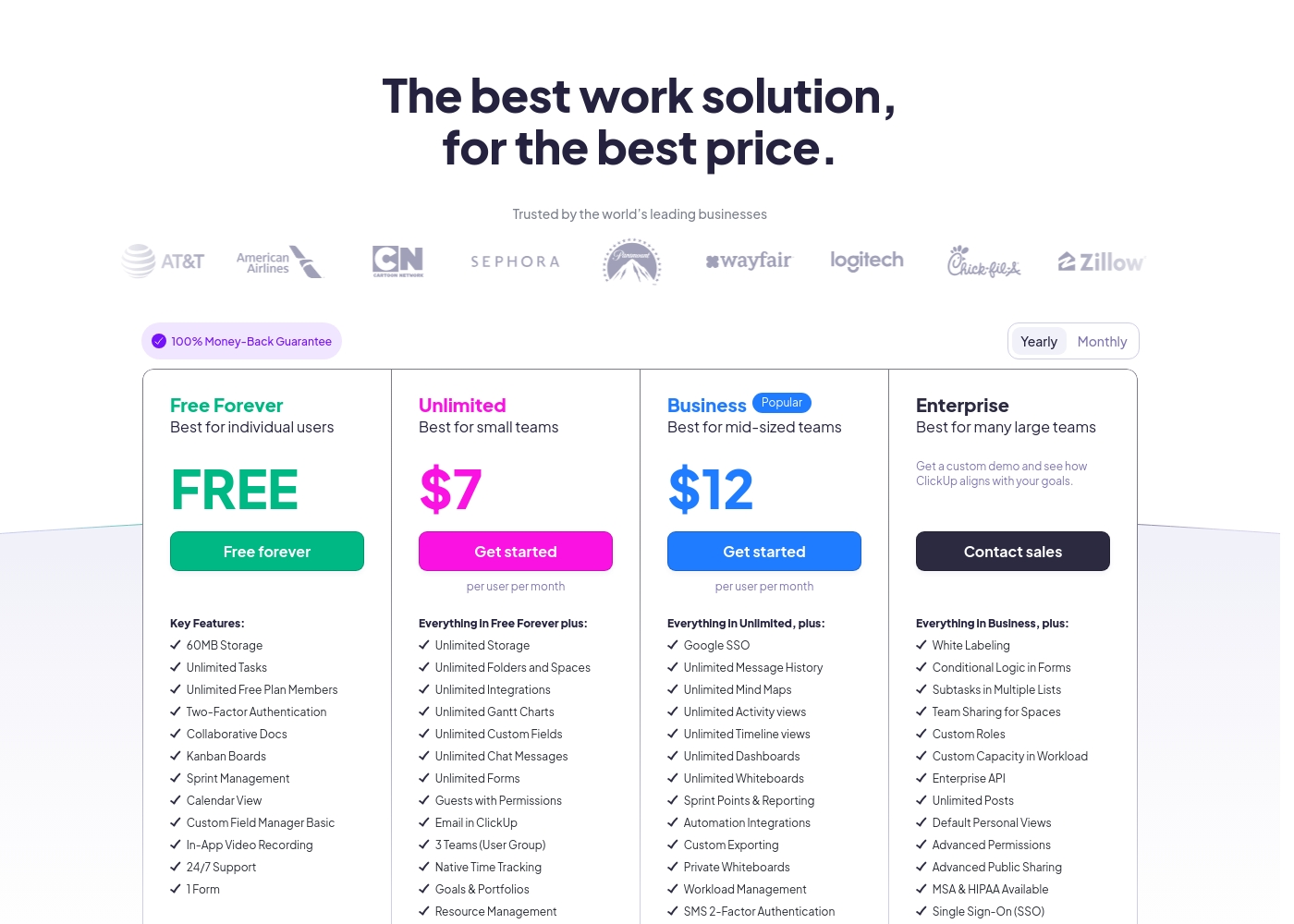
ClickUp costs between Free and $12 per user per month (billed annually) with four plans: Free Forever (Free), Unlimited ($7), Business ($12), and Enterprise (Custom).
Below, you'll find the specific details regarding what each plan includes.
Free Forever
Price: Free forever Best For: Individual users Refund Policy: Not applicable Other Features: 60MB Storage, Unlimited Tasks, Two-Factor Authentication, Collaborative Docs, Kanban Boards, 24/7 Support
- 60MB Storage
- Unlimited Tasks
- Unlimited Free Plan Members
- Two-Factor Authentication
- Collaborative Docs
- Unlimited Storage, Folders and Spaces
- Unlimited Integrations
- Unlimited Gantt Charts, Custom Fields, Chat Messages, and Forms
- Guests with Permissions
- Email in ClickUp
- Google SSO
- Unlimited Message History, Mind Maps, Activity views, Timeline views, Dashboards, and Whiteboards
- Sprint Points & Reporting
- Automation Integrations
- Custom Exporting
- White Labeling
- Conditional Logic in Forms
- Subtasks in Multiple Lists
- Custom Roles
- Enterprise API
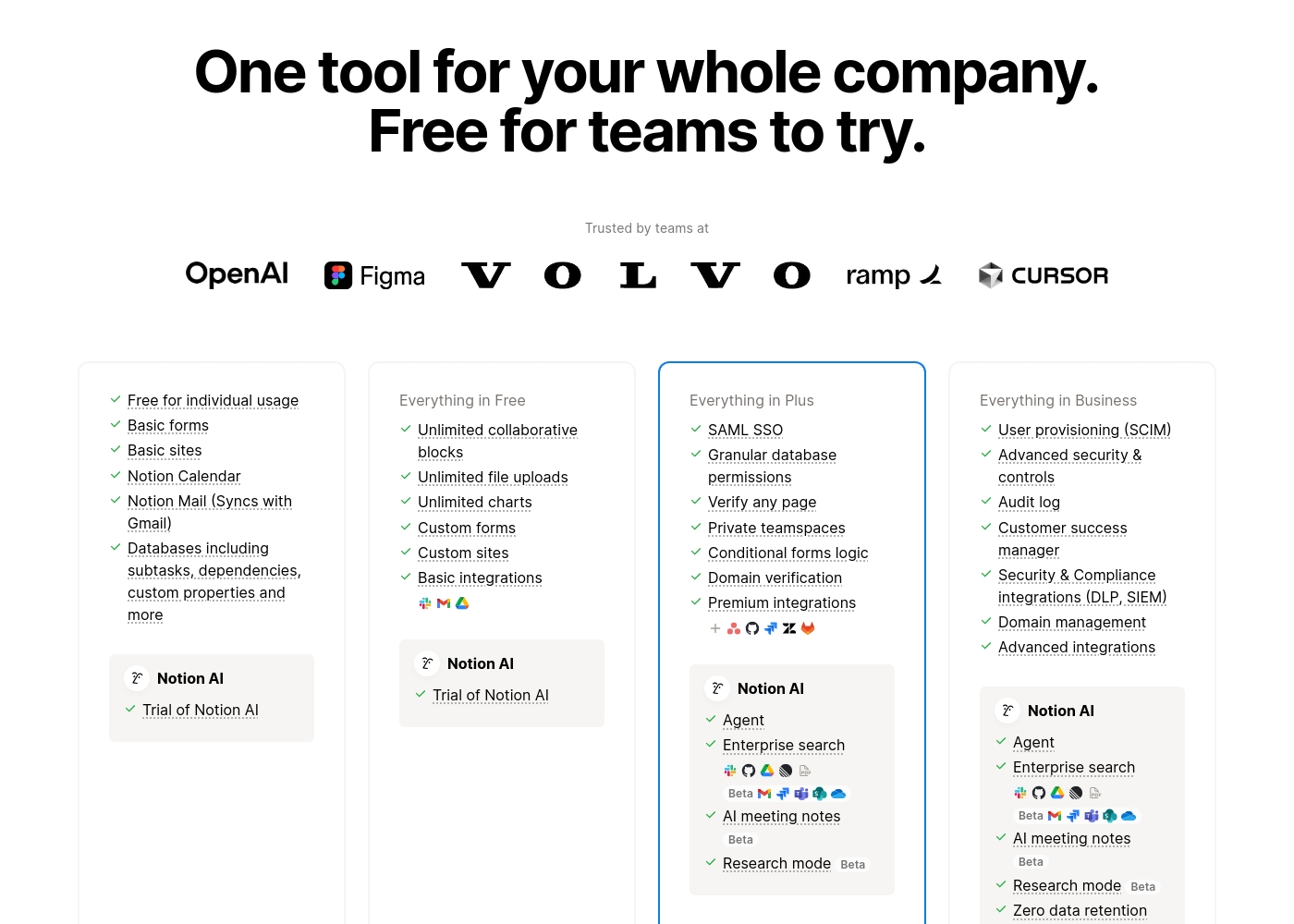
Notion costs between $0 and $20 per seat/month with four plans: Free at $0/seat/month, Plus at $10/seat/month, Business at $20/seat/month, and Enterprise (custom pricing).
Here’s a detailed look at the core features included in each subscription level.
- Unlimited pages and blocks for individuals
- Web publishing with 1 custom subdomain
- Basic forms and sites
- Notion Calendar and Mail synchronization
- Databases with subtasks and dependencies
- Unlimited blocks and file uploads
- 30 days of page history
- Basic SAML SSO
- Granular database permissions
- Access to unlimited charts
- 90 days of page history
- Advanced security controls and Audit log
- Conditional forms logic
- Domain verification
- Advanced page analytics (includes editor list)
- Unlimited page history and workspace analytics
- SCIM user provisioning
- Zero data retention with LLM providers for Notion AI
- Customer Success Manager support
- Security & Compliance integrations (DLP, SIEM)
Pricing Notes
- ClickUp offers a 30-day money-back guarantee for paid plans.
- ClickUp’s Unlimited ($7) and Business ($12) tiers are significantly cheaper than Notion’s Plus ($10) and Business ($20) plans.
- Notion prorates charges immediately when adding new paid members mid-cycle.
- Both platforms receive heavy negative feedback regarding confusing and challenging automatic billing and renewal practices.
Pricing Head-to-Head
User Reviews
ClickUp receives highly polarized feedback, reflected in its low 2.3 Trustpilot score. Users frequently praise the platform’s versatility and comprehensive nature, noting it successfully replaces disconnected tools like Jira, Slack, and spreadsheets.
Teams find it effective for centralized task management, project planning, and acting as a central knowledge base. However, reliability and customer service are major concerns across the user base.
Truly a game changer. I never went back to email, Slack, and spreadsheets after switching. ClickUp is a singular app for everything and helps us move fast daily.
Trustpilot feedback paints a sharply divided picture of Notion. While many users praise the platform as a terrific tool—highlighting its power, versatility, and unique block-based editor for personal and professional organization—these compliments are often eclipsed by grave concerns regarding management and billing practices.
A recurring major theme across many reviews details frustrating experiences with unexpected charges, deceptive auto-upgrades (especially relating to annual plans and new members), and significant challenges when trying to cancel subscriptions or obtain timely refunds. Furthermore, support responsiveness is frequently described as unsatisfactory, unhelpful, or even condescending, often failing to resolve billing errors or login issues.
Enjoy using Notion a lot for my daily work interface. It helps me set up my employees and assign tasks with no issue at all. We upgraded from the free plan and will absolutely continue using the platform.
Our Verdict
Choosing between ClickUp and Notion defines your company’s workflow philosophy. Are you seeking deep project control or vast organizational flexibility? The good news is both tools are powerful alternatives to a fragmented app stack. ClickUp is the superior choice for project managers who demand structure and control. It offers over 15 specific views, native Gantt charts, and integrated Goals. ClickUp is built to manage complex initiatives and track effort to impact for PMOs. Notion is the unrivaled knowledge base and blank canvas workspace alternative. Its block editor is perfect for building custom team wikis and simple CRMs. Notion's integrated AI assistant is currently rated #1 for quality content generation. The key difference is structural: ClickUp is structured project management software; Notion is a flexible data builder. If heavy resource allocation and strict deadlines are primary, choose ClickUp. If documentation and deep, conceptual customization are your main priority, choose Notion. Pick ClickUp if you manage resources across multiple teams constantly. Select Notion if your company needs to fix a scattered, poorly documented knowledge base immediately. Both offer strong free tiers to test their approaches thoroughly.
Frequently Asked Questions
Which is better for large enterprise project management: ClickUp or Notion?
ClickUp is better for enterprise PM due to native features like Workload Management. It includes Goals and Portfolios built specifically for scaling complex projects. Notion requires extensive manual configuration for these management functions.
Does ClickUp or Notion have better AI capabilities?
Notion's AI is rated highly for writing and rapid content creation. ClickUp Brain focuses on task intelligence and cross-app searches like Connected Brain. Choose based on whether you prioritize content quality or data retrieval.
Which tool has the most budget-friendly paid plans for teams?
ClickUp is more budget-friendly for teams, with core tiers at $7 and $12 per user/month. Notion’s comparable team tiers start at $10 and $20 per seat/month. Both offer permanent, feature-rich free plans.
Is it easier to manage team resources in ClickUp or optimize a knowledge base in Notion?
ClickUp provides easier team management via built-in resource views and workload tools. Notion is explicitly the better choice for optimizing knowledge bases, rated G2's best wiki tool.
Should teams be concerned about the billing practices of ClickUp and Notion?
Yes, both ClickUp and Notion receive widespread, serious user complaints regarding billing. Users report confusing auto-renewals and unexpected charges across both platforms. Proceed with caution during subscription setup.
What is the primary trade-off when choosing between ClickUp and Notion?
The core trade-off is structured process versus pure flexibility. ClickUp provides dozens of strong, built-in tools. Notion provides a powerful block editor to customize everything yourself.
Ready to Choose?
Both tools have their strengths. Choose based on your specific needs.