Notion

Notion review

One AI workspace for docs, projects, and team knowledge.

By Ciroapp Editorial Team · Updated Sep 16, 2026

Commission may apply at no extra cost

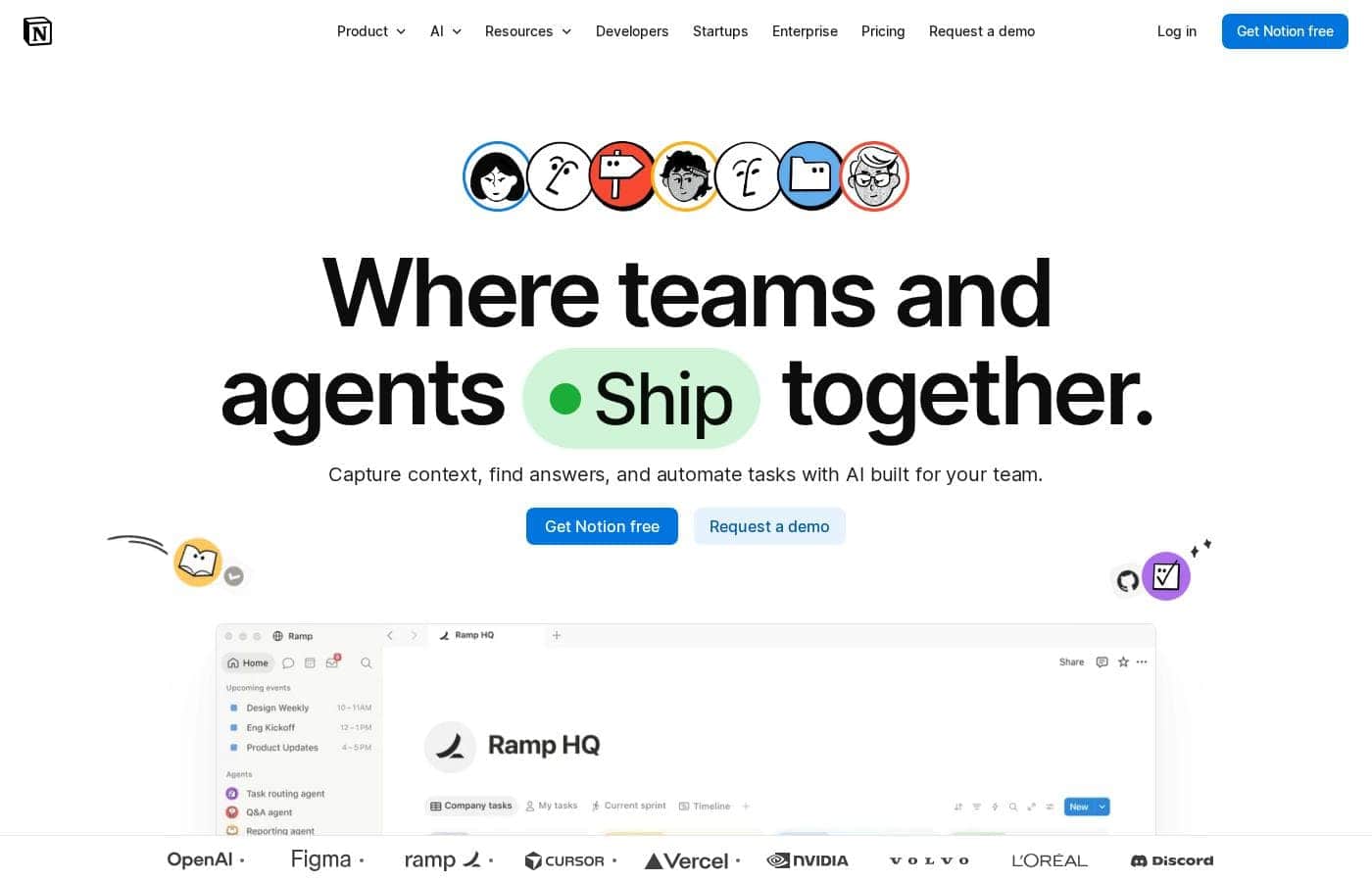
Notion homepage screenshot

At a glance

Quick overview for Notion: rating, pricing summary, key features, and highlights.
Vendor page checked Sep 30, 2026

Ciroapp score

4.2/ 5

Notion pulls docs, wikis, and projects into one workspace, then layers on AI that cites its sources and agents that handle routine work. It's proven at scale and starts free, but setup takes real effort and per-seat prices stay hidden until checkout. Overall, it's a strong pick for teams willing to invest time in getting set up.

Pros

  • Pros:Replaces tool sprawl by combining docs, wikis, project management, and a basic CRM in one workspace, so teams work from a single system of record instead of five separate apps
  • Pros:Enterprise Search returns AI answers with citations attached, letting you verify the sources behind every response rather than trusting an unexplained output
  • Pros:Agents automate recurring work around the clock—triaging product feedback, resolving support tickets in Slack, and drafting weekly reporting—with a usage-based Custom Agents add-on that's free to try

Cons

  • Cons:Per-seat dollar prices aren't displayed on the pricing page, so buyers must go through checkout to learn actual costs before committing
  • Cons:The Free plan blocks multi-member workspaces with a block cap—once hit, teams can read and edit existing content but can't add new blocks without upgrading
  • Cons:Getting real value requires upfront effort structuring the workspace, organizing the knowledge base, and connecting external apps—agents can't act on tools like Slack or Gmail until they're integrated
Best for
  • Teams that want docs, projects, and knowledge centralized in one workspace
  • Companies frustrated by information scattered across multiple tools
  • Startups building internal processes without adding more software
Free trial
Yes
Money-back guarantee
Yes — 30 days
This section is a summary. Detailed sections about features, use cases, pricing, and reviews follow below.

What is Notion?

Scattered docs, lost answers, and repetitive busywork slow teams down. Notion puts knowledge, projects, and AI in one workspace. You can capture context in a single system of record, get instant answers with citations, and let agents handle routine tasks around the clock—so your team stays focused on work that matters.

Notion is an AI-powered workspace where teams write docs, manage projects, and centralize knowledge in one place. It combines wikis, documents, and project tracking with AI tools like meeting notes, enterprise search, and agents that automate busywork. Notion reports 100 million users in over 50 countries, including teams at OpenAI, Figma, and Toyota.

It's built for teams of all sizes, from startups to enterprises.

Should you choose Notion?

Quick buyer guidance before you compare plans or click through.

Choose it if

  • Remote or hybrid teams that rely on shared documentation
  • Teams already using Slack, Gmail, GitHub, or HubSpot that want their tools connected
  • Buyers who want AI answers with citations they can verify
  • Teams that benefit from a large template library and an active community of 1.4M+ members
  • Organizations that want to try a free plan before paying

Skip it if

  • Teams unwilling to invest time structuring a workspace and organizing their knowledge base before seeing value
  • Workflows that depend on tools not listed among Notion's connections—verify your integrations before committing
  • Anyone expecting AI agents to deliver results without first connecting external apps like Slack or Gmail

Next steps before buying

  1. 1Review the pricing page to confirm which plan fits your team size and budget
  2. 2Check the connections page to verify your current tools actually integrate
  3. 3Browse the template marketplace to see how similar teams structure docs, wikis, and projects
  4. 4Start with the free plan to test your core workflows before upgrading
  5. 5Read customer stories and compare alternatives to set realistic expectations

Ease of use

Notion signals a low-friction start: free signup, ready-made templates, product tours, an academy, and a help center. Getting real value, though, likely takes some setup—structuring your workspace and connecting your apps. Consultants and a large community are available if you want guided help along the way.

Notion Key Features

✨ Capture knowledge in one system of record

Stop chasing answers across five different apps. Notion combines wikis, docs, and project tracking in a single workspace, so your team captures context in one system of record. Use it for documentation, project plans, and company knowledge.

The payoff: everyone works from the same source of truth instead of scattered tools.

✨ Get answers instantly—with citations

Get answers in seconds, not search sessions. Ask Notion's AI a question, and Enterprise Search responds with sources attached—every answer comes with citations you can check. That means you verify the reasoning instead of trusting a black box.

It's handy for onboarding, policy lookups, and quick fact-checks during a busy week.

🤖 Keep work moving 24/7 with agents

Notion's agents take on routine tasks so your team doesn't have to. Once you connect apps like Slack and Gmail, agents can:

  • Triage product feedback
  • Resolve support tickets in Slack
  • Automate weekly reporting

You set things up once, then work keeps moving around the clock—even while you sleep.

✨ AI Meeting Notes, written for you

Stop typing notes while people talk. AI Meeting Notes writes them for you, so you can stay in the conversation. It's useful for recurring standups, client calls, and interviews.

Everyone walks away with a written record they can check later, which keeps decisions and action items from slipping through the cracks.

✨ Connect the apps you already use

Bring your apps into the loop. Notion connects with tools your team already uses, including Slack, Gmail, GitHub, and HubSpot. These connections matter because agents rely on them to act across your stack.

If your workflow depends on a specific app, check the connections page before you commit.

Use Cases

📚 Build one source of truth

Scattered docs slow teams down. Keep wikis, docs, and project context in one system of record, so answers don't hide in five different apps.

Expected outcome: Faster answers from a single searchable workspace.

Tip: Start with a template from the marketplace to set up your wiki faster.

🔍 Get answers you can verify

Ask a question in plain language. Enterprise Search returns an AI answer backed by cited sources, so you can check the reasoning instead of trusting a black box.

Expected outcome: Quick answers with sources you can actually verify.

🤖 Automate busywork with agents

Agents work around the clock: they triage product feedback, resolve support tickets in Slack, and draft weekly reporting. Your team stays focused on work that matters.

Expected outcome: Less repetitive work, handled even when nobody's online.

Tip: Connect apps like Slack or Gmail first—agents need them to act.

📋 Run projects and meetings in one place

Track project tasks next to the docs they relate to. AI Meeting Notes write summaries for you, and Notion Calendar keeps your schedule in the same workspace.

Expected outcome: Less context-switching between tools during the workday.

Notion pricing

  • 5 plans
  • Free plan available

Vendor page checked on Sep 30, 2026; confirm current prices on Notion's pricing page

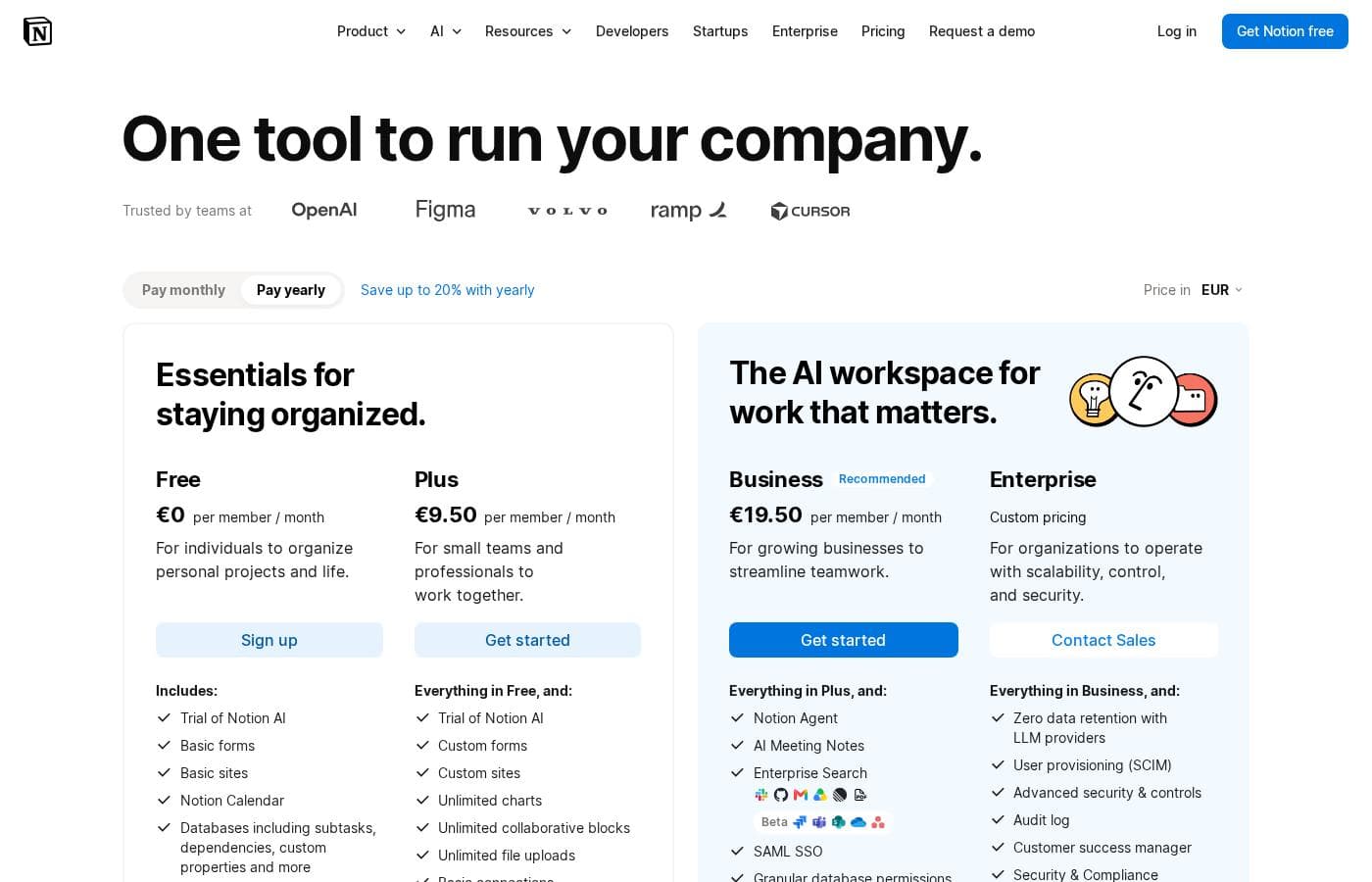
Notion pricing page screenshotView pricing page screenshot
PlanBilled monthlyBilled annuallyIncludes
Free
Free
Free
Blocks are limited for workspaces with 2+ members; 5 MB file upload cap; 7-day page history; 10 external guests
  • Unlimited pages and blocks for individuals
  • File uploads up to 5 MB
  • 7-day page history
  • 10 external guests
  • Basic forms and basic sites
  • +3
Plus
See vendor page
See vendor page
Priced per member (guests free); 30-day page history; free for students and educators on a 1-member workspace
  • Everything in Free
  • Unlimited collaborative blocks
  • Unlimited file uploads
  • Unlimited charts
  • Custom forms and custom sites
  • +4
Business
See vendor page
See vendor page
Priced per member (guests free); 90-day page history; AI data retained 30 days; 5 notion.site domains
  • Everything in Plus
  • Notion Agent
  • AI Meeting Notes
  • Enterprise Search (beta)
  • SAML SSO
  • +6
Enterprise
See vendor page
See vendor page
Priced per member with custom terms; designed for large organizations with compliance requirements
  • Everything in Business
  • Zero data retention with LLM providers
  • User provisioning (SCIM)
  • Advanced security and controls
  • Audit log
  • +5
Custom Agents (add-on)
$10 per 1,000 monthly Notion credits after free trial
—
Requires Notion credits; $10 per 1,000 monthly credits after the trial
  • AI agents handle repetitive tasks autonomously
  • Free to try
  • Workers (beta) for custom code and external data syncs
  • Credits also power Workers starting October 15

Price history

Tracking prices since Sep 7, 2026. No price change detected yet.

Pricing types: Free plan, Free trial, Monthly subscription, Yearly subscription, Per seat pricing, Usage-based pricing

Pricing notes

Notion offers a free plan plus three paid tiers—Plus, Business, and Enterprise—that are priced per member, with yearly billing saving you up to 20%. Usage-based add-ons like Custom Agents are free to try, then cost $10 per 1,000 monthly Notion credits.

Notion runs on four plans—Free, Plus, Business, and Enterprise—with paid tiers billed per member and up to 20% off with yearly billing.

Here's a quick tour of each tier so you can match one to your team.

Free

Other Features:

  • Unlimited pages and blocks for individuals
  • File uploads up to 5 MB
  • 7-day page history and 10 external guests
  • Basic forms, basic sites, and Notion Calendar
  • Trial of Notion AI

If you work solo, this plan goes a long way. You can create without limits on your own, though workspaces with two or more members hit a block cap. It's the easiest way to learn Notion before spending anything.

Plus

Other Features:

  • Everything in Free
  • Unlimited collaborative blocks and file uploads
  • Unlimited charts, custom forms, and custom sites
  • 30-day page history and unlimited guests
  • Basic connections and 1 notion.site domain

Plus clears the team limits that hold back the Free plan. Small groups sharing a workspace every day will feel the difference fast. Students and educators can also get Plus free with a school email, as long as it's a one-person workspace.

Business

Other Features:

  • Everything in Plus
  • Notion Agent and AI Meeting Notes
  • Enterprise Search (beta) and SAML SSO
  • Granular database permissions and private teamspaces
  • 90-day page history and 5 notion.site domains

Growing teams that want AI woven into everyday work should start here. Security steps up too, with single sign-on and tighter permission controls. If your workspace holds sensitive company or client data, this tier earns its keep.

Enterprise

Other Features:

  • Everything in Business
  • Zero data retention with LLM providers
  • User provisioning (SCIM) and audit log
  • Security and compliance connections (DLP, SIEM)
  • Customer success manager and unlimited page history

Large organizations with strict compliance requirements are the clear fit. IT teams get provisioning, audit trails, and domain management under one roof. Most small teams won't need this depth, so skip it unless your security policy calls for it.

Custom Agents (usage-based add-on)

Price: Free to try, then $10 per 1,000 monthly Notion credits Other Features: Autonomous AI agents handle repetitive tasks; Workers (beta) extends Notion with custom code and also draws on credits

Billing works simply: paid plans charge per member, and guests are always free. Adding members mid-cycle creates prorated charges, while removing one frees up a seat instead of issuing a credit. Dollar-per-seat prices aren't listed on this page, so confirm current rates at checkout before you commit.

There's a genuine free plan here, so you can start without a card. Paid subscriptions renew automatically until you cancel, and you keep full access until the end of your billing cycle after canceling. Refunds are generous too: you'll get a full, non-prorated refund within 3 days of monthly signup or 30 days of annual signup, and EU and UK customers get 14 days on monthly plans.
How to pay less for Notion

  • Start on the free plan and upgrade only when you hit its limits.
  • A free trial is available: test it before you pay.
  • 30-day money-back guarantee if it does not fit.
Start free trial

Email me when Notion changes price

One email when we detect a price change on the vendor's pricing page. No newsletter, no deals. Unsubscribe in one click.

User Reviews

No reviews yet.

Write a Review

Write a Review for Notion
0/100 characters
0/2000 characters

Why use Notion?

Most tools solve one problem. Notion goes after tool sprawl itself by combining docs, projects, and AI in a single connected workspace—and its scale suggests the approach works. Here's what that could mean for your team:

  • One system of record: Capture knowledge, docs, and project context in a single place, so answers don't hide in five different apps.
  • Instant answers with citations: Ask a question and get an AI response backed by sources, so you can check the reasoning instead of trusting a black box.
  • Agents that work 24/7: Automate busywork like triaging product feedback, resolving support tickets in Slack, or drafting weekly reporting.
  • Proven at scale: Notion reports that 62% of the Fortune 100 use it, 98% of the Forbes Cloud 100 trust it, and it's G2's #1 knowledge base for three consecutive years.
  • Support when you need it: A large template marketplace, academy courses, product tours, and a consultant network can shorten your learning curve.
  • Free entry point: You can sign up and use Notion free before committing to a paid plan.

If you're tired of context-switching, the free plan is a low-risk way to see if Notion fits.

Notion alternatives

Other tools in the Project Management category

View all Project Management tools
Trello

Trello

Project Management4.2/5

Trello is designed to keep you at the top of your game by ensuring every to-do or idea, regardless of size, finds its proper place. The system helps you stay organized and efficient using three key components: Inbox, Boards, and Planner. The Inbox quickly captures tasks as soon as they are on your mind, whether you are in the office or on the go. You manage your tasks using flexible Boards, where long lists become manageable by tracking items from “to-dos to tackle” to “mission accomplished!” Use the Planner to simply drag and drop your top tasks right into your calendar, ensuring you make time for what truly matters.

Asana

Asana

Project Management4.2/5

Asana is an online platform built specifically to manage your team’s work, projects, and tasks. It supports powerful Human + AI collaboration. This AI component understands your specific business context, helping to move your most important work forward efficiently. Because it's a centralized ecosystem, it easily brings all doers and stakeholders together in one place.

Teamwork

Teamwork

Project Management4.1/5

Teamwork.com is project and resource management software specifically built for client work and powered by AI. It goes beyond traditional project tools by combining essential functions like resource forecasting, cost control, and profitability reporting into a single platform. This platform is trusted by professional services businesses globally. These include agencies, consulting firms, IT service providers, and accounting teams. Teamwork helps them efficiently schedule resources, manage billable hours, and track project profitability from start to finish.

ClickUp

ClickUp

Project Management4.1/5

ClickUp is reliably described as the essential all-in-one workspace for modern teams. It’s designed to align, collaborate, and boost productivity across your entire organization. This platform helps eliminate app sprawl by converging over 50+ different applications into one centralized hub. Teams managing operations, campaigns, or product development use ClickUp to get more done faster, together.

Monday.com

Monday.com

Project Management4.1/5

Monday.com is an AI work platform designed to unify your entire product suite. This system supports collaboration and execution for every team in your company. Whether you manage projects, accelerate sales, or handle IT support, tuesday.com offers specialized products for departmental needs. This comprehensive approach powers seamless operations across your whole organization. It serves teams managing Projects, Sales, Marketing, IT & Ops, Product & Engineering, and Leadership. Leading brands and over 60% of the Fortune 500 trust this platform for enterprise execution.

Backlog by Nulab Inc

Backlog by Nulab Inc

Project Management4/5

Backlog is the all-in-one project management platform built for teams that move fast. It helps small and mid-sized teams manage projects, track bugs, and collaborate across roles without the complexity of enterprise tools.

Cheapest Project Management software for 1 to 25 users

Notion FAQ

Does Notion have a free plan?

Yes. Notion has a free plan (Free).

Does Notion offer a free trial or a money-back guarantee?

Notion offers a free trial. It has a 30-day money-back guarantee.

Has Notion's price changed recently?

No. We have not detected a price change since we started tracking on Sep 7, 2026.

How does Notion AI handle my data?

Notion AI won't train on your content unless you opt in. Your data stays encrypted, AI subprocessors are contractually barred from training on it, and Enterprise adds zero data retention with LLM providers.

What happens when a Free workspace hits its block limit?

Multi-member Free workspaces get a limited block count. Once you hit it, you can still read, edit, and organize existing blocks, but adding new ones requires an upgrade. Solo workspaces stay unlimited.

Do integrations differ between paid plans?

Yes. Plus includes basic connections, Business unlocks premium ones, and Enterprise adds advanced options. Notion lists supported apps on its connections page, so verify your stack—especially Slack or Gmail—before committing.

What kind of support can I expect on each plan?

Support improves with tier: Business includes priority support, while Enterprise adds premium support and a dedicated customer success manager. Notion doesn't publish response-time guarantees, so confirm SLA expectations with sales first.

Ready to try Notion? Check out the official site or pricing.

Are you Notion? Claim this listing · Get the badge