Monday.com

Monday.com

One AI work platform for any kind of work.

#2 dans Project Management
1 min read · Updated 10/6/2025
Monday.com homepage screenshot

At a glance

Quick overview for Monday.com: rating, pricing summary, key features, and highlights.

Ciroapp review

4.3
Intuitive, Flexible Work Management Platform

We find Monday.com to be an extremely versatile AI work platform for unifying task management and enterprise execution. Its visual appeal and intuitive, no-code interface ensure rapid team adoption and customization for any complex workflow. Overall, we recommend Monday.com for mid-sized teams that need robust automation and detailed, company-wide project tracking capabilities.

Pros

  • Pro:Visually appealing and intuitive user interface (UI) design.
  • Pro:High flexibility and customization allow creation of unique workflows.
  • Pro:Robust automations and integrations streamline processes efficiently.
  • Pro:Effective tracking across multiple departments (e.g., CRM, marketing, IT).

Cons

  • Con:Base pricing model is perceived as too complex and costs quickly escalate with features.
  • Con:Mandatory minimum seat purchases increase expense for small teams.
  • Con:Users report occasional glitches and limits on data export functions.
  • Con:Canceling or unsubscribing from paid plans can be unexpectedly difficult.
Free trial
Yes — 14 days
Money-back guarantee
Yes — 30 days
Range: $0–$19/seat/monthFree plan, Free trial, Monthly subscription, Yearly subscription, Per seat pricing
This section is a summary. Detailed sections about features, use cases, pricing, and reviews follow below.

Monday.com review, pricing, features, pros & cons

Are you tired of juggling fragmented tools and losing sight of key objectives? Monday.com solves the frustration of unaligned work. It provides a unified AI work platform to plan and execute tasks across your entire organization.

You gain full resource visibility and AI-powered risk detection. ✨

What is Monday.com?

Monday.com is an AI work platform designed to unify your entire product suite. This system supports collaboration and execution for every team in your company. Whether you manage projects, accelerate sales, or handle IT support, tuesday.com offers specialized products for departmental needs. This comprehensive approach powers seamless operations across your whole organization.

It serves teams managing Projects, Sales, Marketing, IT & Ops, Product & Engineering, and Leadership. Leading brands and over 60% of the Fortune 500 trust this platform for enterprise execution. 💡

Monday.com Key Features

✨ Core AI Intelligence for Risk and Execution

Monday.com acts as a central AI work platform for streamlined execution. It helps unify your entire product suite to prevent fragmented data and confusion. Your teams gain clear foresight because the platform uses AI-powered guidance to keep strategic goals on track.

This intelligence includes AI-powered risk identification across projects. The system flags potential risks early, allowing leadership to make informed, real-time decisions. This proactive approach ensures better project and portfolio visibility.

✨ Flexible & Standardized Workflow Building

You don't need a developer to create the workflows you need. Use the flexible, no-code interface to build customized processes for any team. This empowers users while ensuring they move quickly.

Simultaneously, the platform supports organizational consistency. Admins can define clear controls to maintain standards across all teams. This ensures your customized workflows still align with the company's overall operational requirements.

✨ Accelerate Sales Growth with Smart CRM Automation

The AI-first CRM helps you accelerate revenue growth and frees sales teams from manual data entry. AI actions and code-free automations handle routine tasks, allowing your team to focus on engaging and nurturing leads.

The system centralizes outreach, lead activity, and performance analytics so key details don't fall through the cracks. It helps teams monitor account health, communicate effectively, and engage clients to nurture key relationships.

Key AI actions include:

  • AI deal prioritization to score deal health.
  • Focusing teams on leads with high close probability.
  • Automating full customer journeys.

✨ Efficient Service and IT Ticket Handling

You can empower service teams to resolve issues faster using AI-powered ticket handling. AI automatically handles ticket triage, categorization, and routing to speed up resolution significantly. Teams save time by guiding each issue straight to the right resolution.

For repetitive requests, AI ticket resolutions provide instant, automated answers. These replies are based on knowledge surfaced from past cases. You can also launch a dynamic customer portal where users submit requests, easily track tickets, and access helpful self-serve resources.

✨ Unified Project and Resource Management

Deliver complex projects, programs, and portfolios precisely using clear visibility. The system provides tools for project and portfolio management, helping you gain visibility into dependencies and risks across all work.

Resource management uses AI to ensure efficiency. It automatically assigns the right people to every project. This assignment process is based on skills, current availability, and real-time capacity planning. You can also track projects visually using Timeline and Gantt chart views.

✨ Faster Product Development and Agile Sprints

Product and Engineering teams can ship quality software faster with AI-guided sprints. You can plan roadmaps and execute sprints accurately using guided assistance. The system supports multi-method execution, including Scrum, Kanban, or hybrid approaches, helping teams move quickly.

AI developer assistance helps resolve bugs and incidents more efficiently. This feature surfaces crucial context about related code, tasks, and documentation. You also gain agile insights with real-time metrics, like cycle time and sprint velocity, to ensure predictable software delivery.

✨ Enterprise Security and Management Oversight

Monday.com offers robust features necessary for scaling complex operations. This includes the ability to create Private Boards to handle sensitive information and restrict access for better security.

Large organizations benefit from Enterprise-grade security and governance controls. You can enforce strict access rules using multi-level permissions. Advanced reporting and analytics provide organizational leaders with the data needed to make crucial decisions.

Use Cases

🛠️ Delivery Projects with AI-Powered Risk Management

Managing complex programs means balancing many moving pieces. Monday.com gives you complete resource visibility across your entire portfolio instantly. You can track every dependency and program detail easily.

The platform also uses AI to flag potential risks and process delays early. This capability ensures precise project delivery and allows teams to make informed, proactive decisions.

💰 Accelerate Sales Growth and Lead Management

Your sales team should focus on converting leads, not sinking time into manual data entry. Our AI-first CRM helps you automatically find and enrich new leads quickly. The system uses AI to score deal health and close probability, guiding your team to focus on the highest value opportunities.

Automate your full customer journey using code-free actions. This approach centralizes outreach, lead activity, and performance analytics. You gain the foresight needed to nurture essential client relationships and accelerate growth (18x ROI reported).

💬 Step Flow: Scaling Exceptional Customer Service

Deliver a standout service experience by letting AI handle the routine work. This ensures your human agents focus only on complicated issues.

🚀 Launch Quality Products Faster

Problem: Product teams often lack alignment between development efforts and market demand, slowing down releases.

Approach: Use AI-optimized planning tools for roadmaps and sprint management. Teams can run sprints using Scrum, Kanban, or hybrid methods that optimize delivery. AI developer assistance quickly finds context on related code and documentation to resolve bugs and incidents faster.

Expected Outcome: Achieve clear alignment and ship quality software with precision, accelerating time to market (28% faster reported).

📈 Amplify Marketing Impact and Output

Marketing teams need strong alignment around shared goals to run high-impact campaigns. Monday.com uses AI to streamline creative briefs and flag potential delays automatically. This operational efficiency increases creative execution dramatically.

By using the unified platform, teams can focus their efforts where they drive the most measurable campaign impact.

🧭 Foresight for Strategic Leadership

Leaders must track strategic goals and make informed decisions in real-time. The platform provides cross-organization data and powerful AI risk flagging capabilities. This allows leadership to instantly identify health metrics and risks coming from any side of the business.

You maintain clear foresight and drive steady, efficient growth across the organization.

Pricing Overview for Monday.com

Pricing range
$0–$19/seat/month
Pricing types
Free plan, Free trial, Monthly subscription, Yearly subscription, Per seat pricing
Money-back guarantee
Yes — 30 days

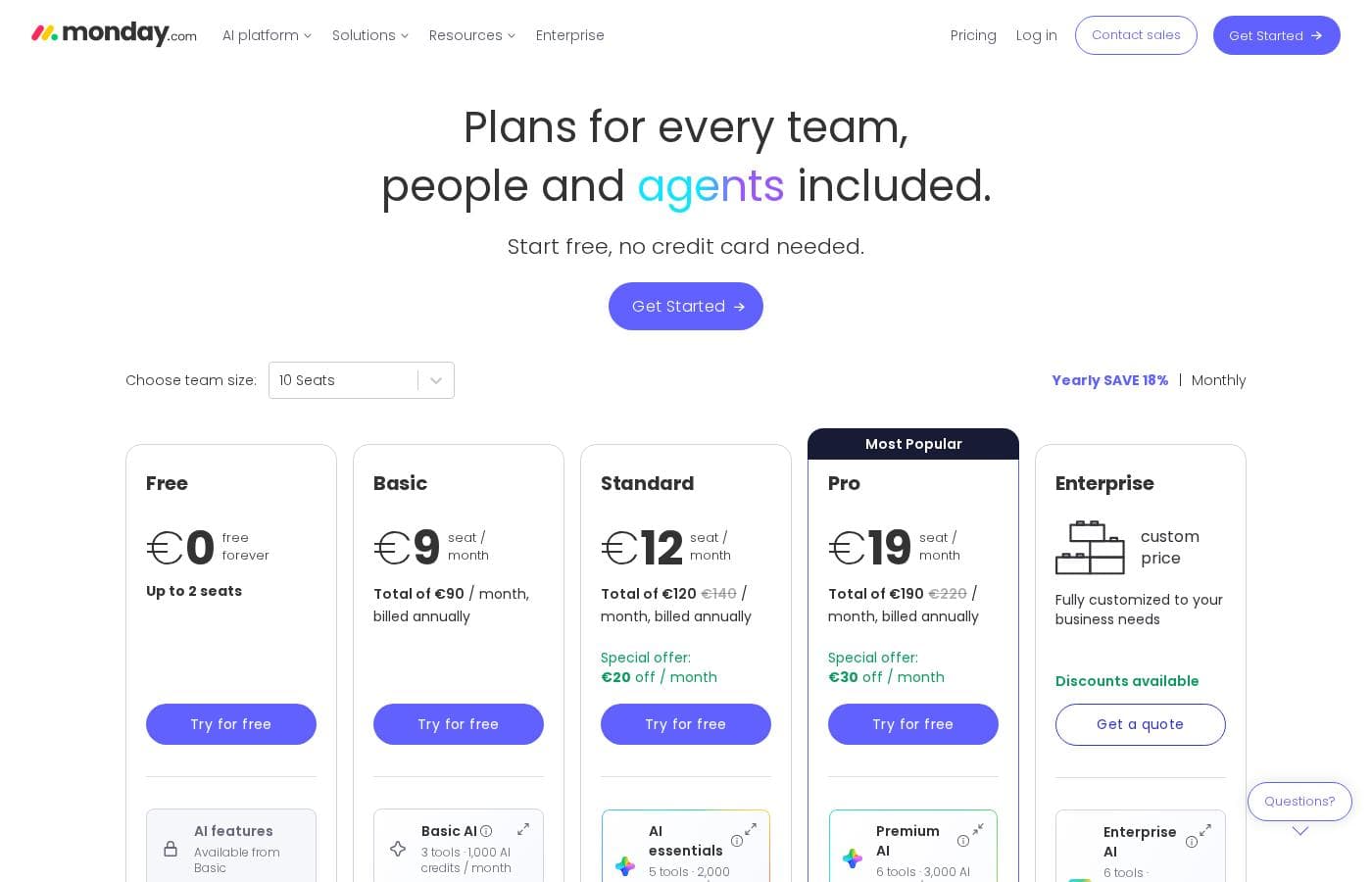
Monday.com uses a per-seat pricing model starting at $9 per seat per month when billed annually. There are five main plans, ranging from a Free option for up to two users to an Enterprise solution for large organizations.

Plans & Pricing

Free

Monthly$0
Yearly$0
Up to 2 seats
  • Up to 3 boards
  • Up to 3 Docs
  • 200+ templates
  • 8 column types
  • iOS and Android apps

Basic

MonthlyNot explicitly stated
Yearly$9/seat/month
Dashboard limited to 1 board
  • Unlimited free viewers
  • Unlimited items
  • 5GB file storage
  • Prioritised customer support
  • Create a dashboard based on 1 board
  • Trial AI credits

Standard

MonthlyNot explicitly stated
Yearly$12/seat/month
250 automation actions / month; 250 integration actions / month
  • Timeline & Gantt views
  • Calendar View
  • Guest access
  • Automations (250 actions per month)
  • Integrations (250 actions per month)
  • Create a dashboard that combines 5 boards
  • Trial AI credits

Pro

MonthlyNot explicitly stated
Yearly$19/seat/month
25K automation actions / month; 25K integration actions / month
  • Private boards
  • Chart View
  • Time tracking
  • Formula Column
  • Automations (25K actions per month)
  • Integrations (25K actions per month)
  • Create a dashboard that combines 20 boards
  • Trial AI credits

Enterprise

MonthlyContact sales
YearlyContact sales
250K automation actions / month; 250K integration actions / month
  • Portfolio management
  • Resource management
  • Enterprise-scale automations & integrations (250K actions per month)
  • Multi-level permissions
  • Enterprise-grade security & governance
  • Advanced reporting & analytics
  • Create a dashboard that combines 50 boards
  • Enterprise support 24/7

Monday.com costs between $0 and $19 per seat per month (billed annually) with five plans: Free at $0, Basic at $9, Standard at $12, Pro at $19, and Enterprise (contact sales).

Let's break down what's included in each plan to help you pick the best fit.

Free

Price: $0/month Websites Supported: Not explicitly stated Best For: Individuals looking to keep track of their work Refund Policy: Not explicitly stated Other Features:

  • Up to 3 boards
  • Up to 3 Docs
  • 200+ templates
  • iOS and Android apps

This plan is completely free forever and supports up to two users. It's designed for individuals managing personal tasks or light organizational work. You get access to essential tools like up to three boards and three collaborative Docs. Plus, you can start strong by accessing over 200 ready-made templates. If you are a freelancer or just trying out the platform, this is a great starting place.

Basic

Price: $9/seat/month (Billed annually) Websites Supported: Not explicitly stated Best For: Managing all your team’s work in one place Refund Policy: Not explicitly stated Other Features: Unlimited free viewers, Unlimited items, 5GB file storage, Prioritized customer support, Trial AI credits, Create a dashboard based on 1 board

The Basic plan builds upon the Free tier, adding necessary features for small team collaboration. You will receive unlimited items and 5GB of file storage for your project files. It also grants access to prioritized customer support when you need help setting things up. This level is ideal if you need a central hub to manage your team's core tasks effectively.

Standard

Price: $12/seat/month (Billed annually) Websites Supported: Not explicitly stated Best For: Collaborating & optimizing your work across teams Refund Policy: Not explicitly stated Other Features:

  • Timeline & Gantt views
  • Calendar View
  • Guest access
  • Automations (250 actions per month)
  • Integrations (250 actions per month)

The Standard plan introduces crucial visualization and automation tools for cross-team efficiency. You gain access to Timeline and Gantt charts to track deadlines visually. This tier also allows controlled guest access for outside collaboration on specific projects. It's the most popular choice for teams ready to optimize routine workflows with limited automations and integrations.

Pro

Price: $19/seat/month (Billed annually) Websites Supported: Not explicitly stated Best For: Streamlining complex workflows at scale Refund Policy: Not explicitly stated Other Features:

  • Private boards
  • Chart View and Time tracking
  • Formula Column
  • Automations (25K actions per month)
  • Integrations (25K actions per month)

The Pro plan significantly boosts your capabilities for handling large and complicated workflows. It includes features like Private boards and integrated Time tracking for reliable resource management. Automation and integration limits increase dramatically to 25,000 actions per month each. If your team relies heavily on advanced data calculation and scaling automated processes, the Pro plan is right for you. ✨

Enterprise

Price: Contact sales Websites Supported: Not explicitly stated Best For: Getting exclusive features for your organization Refund Policy: Not explicitly stated Other Features:

  • Portfolio management and Resource management
  • Enterprise-scale automations & integrations (250K actions per month)
  • Multi-level permissions
  • Advanced reporting & analytics
  • 24/7 Enterprise support

This top-tier plan provides features essential for large organizations needing strict control and specialized management tools. Key inclusions are robust multi-level permissions and extensive reporting features. You also benefit from Enterprise-grade security and governance controls. Teams operating at enterprise scale that require maximum security and high-volume support should contact sales directly.

Monday.com offers a Free plan for up to two seats, which is perfect for individuals getting started. If you need more features, the paid plans include a 14-day free trial on the Pro plan for you to test them out. For yearly subscriptions, monday.com offers a partial refund if you cancel within the first 30 days of purchase. Choosing annual billing also saves you 18% compared to paying month-to-month.

User Reviews

Users consistently praise Monday.com for its visually appealing and intuitive user interface, making complex project status easy to track. Many reviewers highlight the platform's incredible flexibility, allowing teams to build highly customized workflows for diverse needs, from project management to sales CRM.

Key features like robust automations and integrations are universally valued, helping teams streamline processes and drastically reduce time spent in meetings and emails. Onboarding is often described as quick and intuitive, proving fast time to value.

However, a major recurring concern centers on pricing and value. Users frequently report that the cost increases significantly with add-ons or team growth, feeling the pricing plans often lack transparency.

Several reviewers specifically mention issues with the mandatory minimum seat purchases and difficulties cancelling subscriptions. Although customer support is sometimes cited as slow, the overall sentiment remains positive regarding the platform's power and effectiveness.

👍

What users say elsewhere

Jule K.
· Trustpilot
5.0 / 5

Monday.com is the best! This platform helps us track task management and employee productivity, ensuring the best outcome for our clients. Nothing falls through the cracks anymore, which is a massive improvement.

Sarah V.
· Trustpilot
5.0 / 5

I love this tool for project management because it is very customizable and reasonably priced for a growing team. While I might choose a dedicated CRM later, Monday.com works perfectly for a startup environment.

No reviews yet.

Write a Review

Write a Review for Monday.com
0/100 characters
0/2000 characters

Why use Monday.com?

Choosing monday.com means you are selecting a trusted leader ready to multiply your team's impact. The platform helps you move faster, gain clear foresight, and drive efficient growth across the board. ✅

  • Accelerate Work with AI: Use AI-first products to resolve bugs faster, automatically triage support tickets, and predict project risks early.
  • Unlock Proven Returns: Leading brands have seen massive economic saves, including a reported 346% ROI and 6,970 hours saved per month.
  • Gain Trust and Authority: Monday.com is recognized as a leader in multiple Gartner® Magic Quadrant™ reports for work management.
  • Achieve Fast Time to Value: The platform’s intuitive products are quick to implement. Teams onboard quickly and start seeing value almost immediately.
  • Build the Workflows You Need: Use the flexible, no-code interface to create customized workflows. You can maintain cross-organization consistency through defined admin controls.

Ready to transform your workflow with Monday.com?

Frequently Asked Questions

What are the primary limits on automations and integrations for paid plans?

The Standard plan allows 250 actions per month for both automations and integrations. The Pro plan significantly increases this limit to 25,000 actions monthly. Enterprise plans receive 250,000 automation and integration actions each month.

How does the 14-day free trial work?

Monday.com offers a 14-day free trial of the powerful Pro plan. You can use this trial across the Work Management, Sales CRM, and Dev products to test out features. No credit card is required to begin the trial.

Can I get a refund if I cancel a yearly subscription?

Yes, you are entitled to a partial refund if you cancel an annual subscription within the first 30 days. Monday.com will automatically refund the unused portion of your upfront payment.

What minimum number of users do I need to purchase a paid plan?

Paid tiers, including Basic, Standard, and Pro, require a minimum purchase of three user seats. The Free plan is the only option available for teams of one or two seats.

What specific security standards does Monday.com adhere to?

The platform maintains strict data protection and adheres to international security protocols. This includes ISO/IEC 27001 and ISO/IEC 27018 certifications, and annual security audits.

What kind of customer support is included in the Basic plan?

Users on the Basic paid plan receive prioritized customer support. If you require maximum support, the Enterprise plan offers dedicated 24/7 quality support with a priority queue.

What payment methods does Monday.com accept?

The platform accepts major credit cards, like Visa, American Express, and Discover; debit cards are generally excluded. You can also pay using PayPal. Enterprise orders meeting a minimum fee may use invoicing.

Can I downgrade my plan or remove seats after the initial refund period?

You can change your plan type or seat count anytime by visiting the Admin section. However, after the initial 30-day refund window, monday.com does not offer refunds for downgrades or seat removal.

Does Monday.com offer discounted pricing for non-profit organizations?

Yes, Monday.com supports organizations doing good work around the world. They offer discounted pricing for qualified non-profit organizations and NGOs.

Which plans allow external parties, like clients, to collaborate on my boards?

Standard and higher plans include guest access capability. This feature lets you collaborate with outside parties on specific projects without granting access to your full account.

How does AI enhance the core functions of the platform?

The AI platform predicts project risks early and resolves bugs faster. AI also automatically triages support tickets and guides service issues to resolution.

How is data visualization handled across the different paid plans?

The number of boards you can combine in a dashboard dictates visibility. Basic combines 1 board, Standard 5, Pro 20, and Enterprise allows combining data from up to 50 boards.

Who is monday.com best suited for?

Monday.com is ideal for mid-to-large teams that need high customization and unified visibility across departments. It supports Project, Sales, Marketing, IT, and Product Engineering teams.

Is there a limit on the number of projects or tasks I can track?

No, paid plans (Basic and above) include unlimited items. An item represents a task, project, or any trackable piece of information within your workflow.

Are foreign language interfaces or regional data centers supported?

Not explicitly stated on the official site. You should contact their support team directly to ask about language availability or specific data residency options.

How much file storage do I receive with the Basic plan?

The Basic paid plan includes 5GB of dedicated file storage. Storage details for the Standard, Pro, and Enterprise plans are not explicitly listed in the pricing overview.

Ready to try Monday.com? Check out the official site or pricing.