Monday.com vs Wrike
Monday.com and Wrike are project management giants, but they target different team needs. Monday.com is highly visual, focused on speed and simplicity. Wrike is built for complex enterprise workflows and deep project rigor. Picking one depends entirely on your operational size and desired flexibility.
Best for: Teams desiring a highly visual and flexible platform, Marketing and Sales teams using native AI CRM features
Best for: Large enterprises requiring 360° visibility and rigor, Organizations with 20+ users managing complex cross-functional projects
Intuitive, Flexible Work Management Platform
We find Monday.com to be an extremely versatile AI work platform for unifying task management and enterprise execution. Its visual appeal and intuitive, no-code interface ensure rapid team adoption and customization for any complex workflow. Overall, we recommend Monday.com for mid-sized teams that need robust automation and detailed, company-wide project tracking capabilities.
Pros
- Visually appealing and intuitive user interface (UI) design.
- High flexibility and customization allow creation of unique workflows.
- Robust automations and integrations streamline processes efficiently.
- Effective tracking across multiple departments (e.g., CRM, marketing, IT).
Cons
- Base pricing model is perceived as too complex and costs quickly escalate with features.
- Mandatory minimum seat purchases increase expense for small teams.
- Users report occasional glitches and limits on data export functions.
- Canceling or unsubscribing from paid plans can be unexpectedly difficult.
Enterprise Power Meets Complex Commitment.
We find Wrike is an exceptionally versatile project solution, noted for scaling efficiently across corporate environments up to 3000 users and unifying communication across highly complex workflows. Overall, the software offers a powerful feature set for advanced visibility and customization, but we caution users regarding the rigid annual subscriptions and documented difficulties with managing auto-renewal and pricing increases.
Pros
- Transforms and streamlines complex corporate workflows efficiently.
- Highly customizable for various methodologies (e.g., Holacracy, OKR).
- Excellent collaborative transparency and 360° project visibility.
- Provides fast and helpful customer support regarding implementation and bugs.
Cons
- Pricing practices are reported as aggressive, often resulting in significant renewal increases.
- Subscriptions are difficult to cancel, and users report trouble stopping automatic renewal.
- Some teams report challenging adoption and setup processes.
- Users report instances of being oversold on features bundles they did not need.
AboutMonday.com
Monday.com is an AI work platform designed to unify your entire product suite. This system supports collaboration and execution for every team in your company. Whether you manage projects, accelerate sales, or handle IT support, tuesday.com offers specialized products for departmental needs. This comprehensive approach powers seamless operations across your whole organization.
It serves teams managing Projects, Sales, Marketing, IT & Ops, Product & Engineering, and Leadership. Leading brands and over 60% of the Fortune 500 trust this platform for enterprise execution. 💡
AboutWrike
Wrike is a trusted end-to-end enterprise work management solution. It's designed for organizations ready to transform manual processes into interconnected, automated workflows. Teams from 20 to 20,000 thrive here because Wrike is highly adaptable to any industry or size. It brings multiple teams into the same place for game-changing visual collaboration. Wrike is where you can easily align strategy and effectively execute your projects and programs. 💡
Highlights
Feature Comparison
Features Overview
We highlight the main differences and pick a winner for each feature.
User Interface & Adoption
Monday.com is visually inviting and easy to adopt; Wrike requires more training.
Monday.com provides a highly appealing and intuitive user interface (UI) experience. Teams enjoy rapid onboarding and fast time to value with Monday.com. Wrike's UI is professional and built for structural rigor at scale. Users report that Wrike's complex setup processes and challenging adoption require professional guidance. Monday.com wins for simplicity, visual clarity, and ease across departments. Wrike’s design sacrifices simplicity for advanced structural control. If you need adoption across non-technical teams quickly, Monday.com is the better option.
Creative Proofing Tools
Wrike handles creative file approvals natively; Monday.com uses basic guest access.
Monday.com relies on simple guest access for collaborating with external partners. This functionality is limited for specific review cycles. Wrike integrates dedicated File and Video Proofing starting in the Business plan. This feature supports approvals for over 30 different file and video formats. Wrike is clearly designed to streamline workflow for creative and marketing agencies. Monday.com requires using outside integrations or workarounds for proofing. Creative teams wanting seamless external approval cycles should strongly select Wrike.
Pricing Commitment
Monday.com offers monthly flexibility; Wrike demands inflexible annual commitment.
Monday.com offers monthly subscriptions across all its paid tiers for maximum flexibility. Annual payment offers an 18% discount on Monday.com. Wrike requires an annual subscription commitment for all paid plans, starting at the Team tier. Users report aggressive pricing and renewal issues with Wrike. Monday.com provides a much lower financial commitment risk for growing teams compared to Wrike. Wrike’s rigidity is a major negative point in user reviews. If budget flexibility is key, Monday.com is the superior choice for new subscribers.
Resource Planning Access
Wrike grants resource planning sooner; Monday.com locks it in Enterprise.
Monday.com reserves robust Resource Management capabilities exclusively for its top-tier Enterprise plan. This feature is not accessible to mid-sized teams on lesser plans. Wrike includes Resource and Capacity Planning in its Business plan ($25 per user/month). This allows more organizations to optimize staff allocation. For teams needing to manage capacity and avoid overloading members, Wrike provides this critical tool earlier. Monday.com makes advanced resource tracking exclusionary. If optimizing your workforce is a priority, Wrike provides better access points.
High-Volume Automation
Wrike scales per-user for high volume; Monday.com uses fixed organizational limits.
Monday.com offers 25,000 automation actions per month in its Pro plan across the entire account. Enterprise scales it up to 250,000 actions monthly. Wrike calculates automation actions generously on a per-user basis. Pinnacle plan users get 1,500 actions per user per month for extreme scale. Wrike's per-user automation model scales more predictably and powerfully for massive enterprises. Monday.com’s fixed limits may bottleneck huge organizations. Very large organizations may find Wrike's customizable, per-user limits more suitable for massive scale.
AI Application
Monday.com AI covers more departments; Wrike focuses AI on core data analytics.
Monday.com utilizes AI broadly across Sales CRM, IT, and software development teams. AI helps predict risk, guide sprints, and triage support tickets. Wrike includes generative AI in its lowest paid tier (Team). Wrike focuses AI power on advanced analytics, resource optimization, and data-driven decisions. Monday.com’s AI is integrated more deeply and diversely into operational workflows (CRM, Dev). Wrike uses AI to enhance project visibility and reporting. Teams needing AI for project speed and cross-departmental utility should favor Monday.com.
Entry Cost for Paid Plans
Wrike starts paid plans with 2 users; Monday.com requires a minimum of 3 users.
Paid plans on Monday.com, starting with Basic ($9), enforce a minimum purchase of three user seats. This raises the initial upfront cost slightly. Wrike’s Team plan ($10) allows for 2 to 15 users, enabling purchases for just two users. This makes Wrike's entry point slightly lower for small teams. This difference means a new three-person team pays a higher base rate to start with Monday.com. Wrike is more accommodating to teams of two. If you have a small, three-person team, Monday.com's mandatory seat count increases expense.
Service and Support
Wrike offers exemplary, helpful support; Monday.com offers prioritized support for paid plans.
Monday.com offers prioritized customer support for all paid tiers, including Basic. Enterprise users receive dedicated 24/7 support. Wrike’s customer support is often described as exemplary, especially during implementation and setup. They assist with creating customized workflows. For large enterprises needing extensive hands-on help migrating or implementing complex needs, Wrike's support excels. Monday.com provides faster, but perhaps less deep, support. If you anticipate a difficult setup process, Wrike's reputation for guidance is strong.
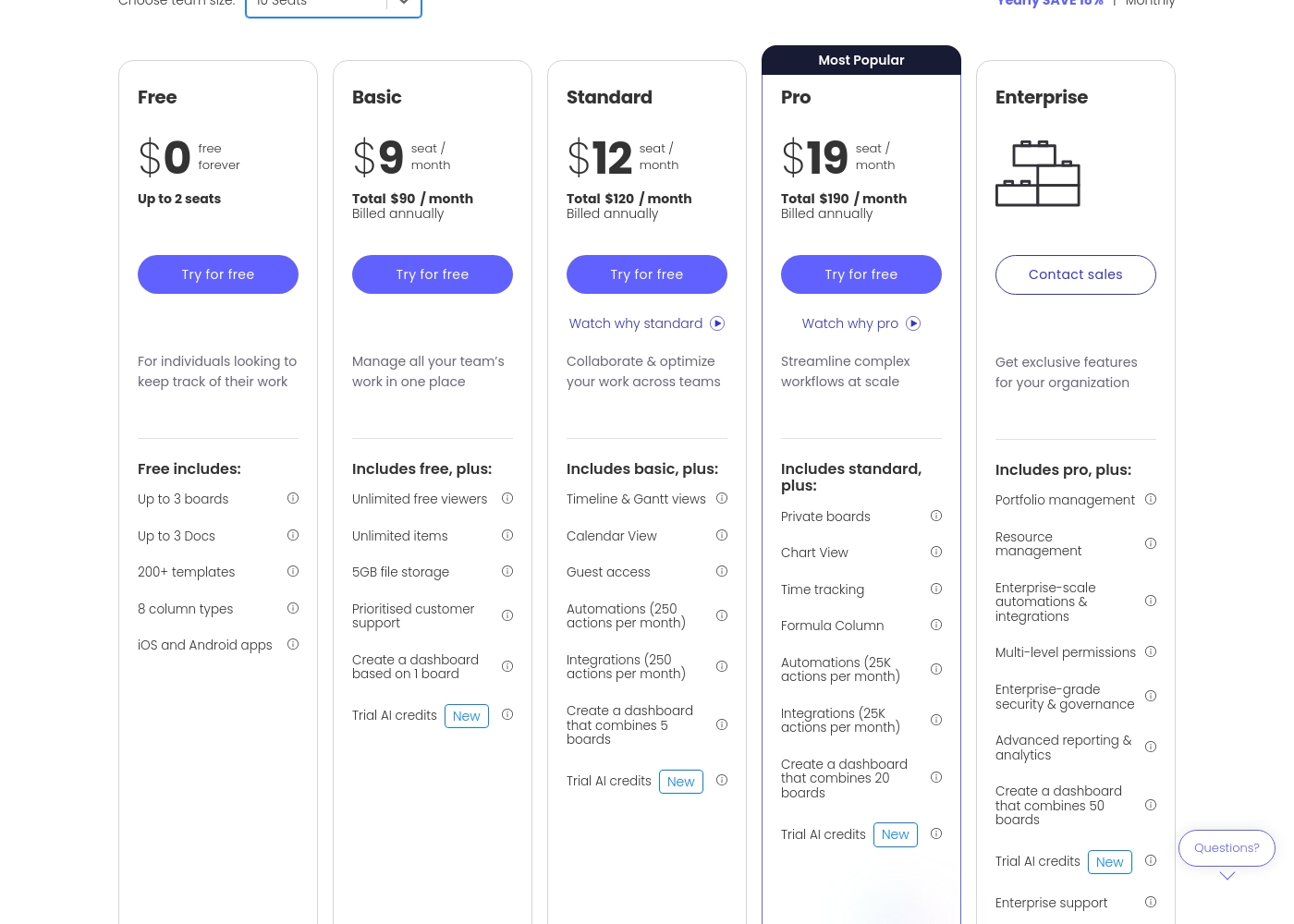
Monday.com costs between $0 and $19 per seat per month (billed annually) with five plans: Free at $0, Basic at $9, Standard at $12, Pro at $19, and Enterprise (contact sales).
Let's break down what's included in each plan to help you pick the best fit.
Free
Price: $0/month Best For: Individuals looking to keep track of their work Other Features:
- Up to 3 boards
- Up to 3 Docs
- 200+ templates
- iOS and Android apps
- Up to 3 boards
- Up to 3 Docs
- 200+ templates
- 8 column types
- iOS and Android apps
- Unlimited free viewers
- Unlimited items
- 5GB file storage
- Prioritised customer support
- Create a dashboard based on 1 board
- Timeline & Gantt views
- Calendar View
- Guest access
- Automations (250 actions per month)
- Integrations (250 actions per month)
- Private boards
- Chart View
- Time tracking
- Formula Column
- Automations (25K actions per month)
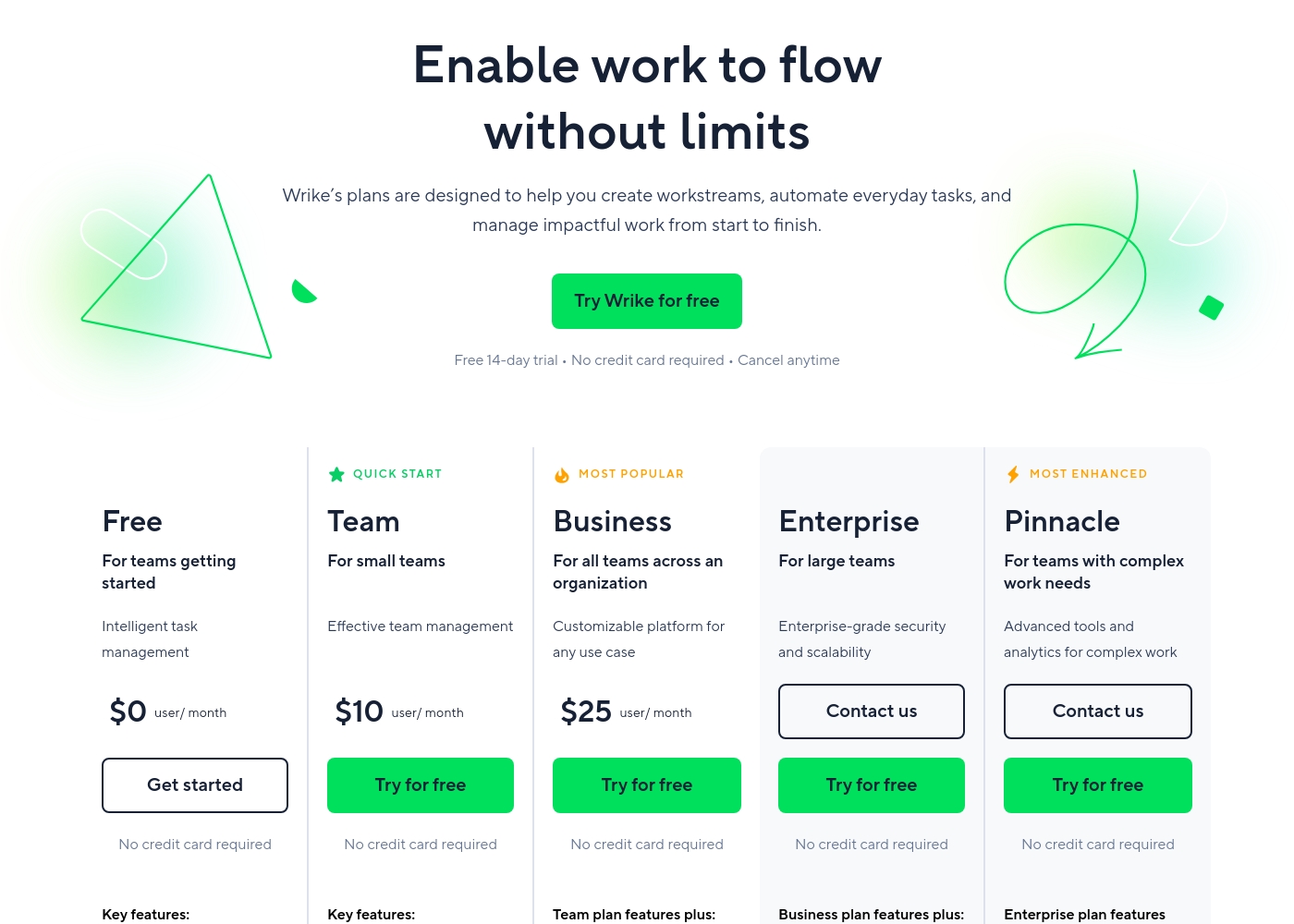
Wrike costs between $0 and $25 per user/month, with five plans: Free at $0/user/month, Team at $10/user/month, Business at $25/user/month, and Enterprise and Pinnacle which require users to contact sales.
- Web, desktop, and mobile apps
- Project and task management
- Board view (Kanban)
- Table view (spreadsheet format)
- Folders structure & nested projects
- Unlimited projects, tasks, & subtasks
- Gantt charts, Calendar & Chart view
- Generative AI, 2 GB storage per user
- Project Blueprints and Unlimited request forms
- Approvals & guest approvals
- Resource & Capacity Planning
- File and video proofing (30+ file formats)
- Real-time reports
- SAML-based SSO and Two-Factor Authentication (2FA)
- Password policies and custom access roles
- Customizable user types and Admin permissions
- User audit reports
Pricing Notes
- Monday.com offers flexible monthly subscriptions; Wrike demands an annual commitment for paid plans.
- Monday.com requires a minimum of 3 paid seats, increasing the starting cost for small teams.
- Wrike users frequently report aggressive pricing practices and significant difficulty cancelling annual subscriptions.
- Wrike includes key features like Gantt charts at the $10 Team tier, which is slightly cheaper than Monday.com's Standard plan ($12).
- Monday.com publicly lists its Pro plan price ($19); Wrike's Enterprise/Pinnacle tiers require contacting sales.
Pricing Head-to-Head
User Reviews
Users consistently praise Monday.com for its visually appealing and intuitive user interface, making complex project status easy to track. Many reviewers highlight the platform's incredible flexibility, allowing teams to build highly customized workflows for diverse needs, from project management to sales CRM.
Key features like robust automations and integrations are universally valued, helping teams streamline processes and drastically reduce time spent in meetings and emails. Onboarding is often described as quick and intuitive, proving fast time to value.
Monday.com is the best! This platform helps us track task management and employee productivity, ensuring the best outcome for our clients. Nothing falls through the cracks anymore, which is a massive improvement.
Users consistently praise Wrike's powerful capabilities in transforming workflow management and driving organizational efficiency. Many reviewers, including team leads and large enterprise users, call it one of the best project management systems available, noting its strong suitability for high-level customization for specific methodologies like OKR.
Its ability to centralize communication, provide 360° visibility, and manage collaboration across large global teams is frequently highlighted as second to none. Furthermore, customer support is often described as exemplar, particularly regarding implementation and quick bug fixes.
Using Wrike for three years has completely changed how we manage our workflows. The biggest transformation is how streamlined and fast our operations have become. It's truly efficient for our large team.
Our Verdict
The choice between Monday.com and Wrike really centers on whether you prioritize simplicity or structure. For most organizations seeking an intuitive hub, Monday.com is the recommended choice. Monday.com provides a far more approachable experience with less friction for non-PM users. Monday.com’s superpower is its visual flexibility and broad AI application across departments. It quickly unifies Sales, Marketing, and IT, achieving rapid time-to-value for growing teams. Monday.com also eliminates commitment anxiety by offering flexible monthly plan options. Wrike’s superpower is reigning over complex, cross-functional enterprise workflows with rigor. Wrike offers better early access to crucial tools like resource management and dedicated creative proofing. Large teams use Wrike to gain powerful 360° visibility over every intricate project detail. The deciding factor is Wrike’s inflexible annual commitment requirement for every paid tier. Monday.com removes this barrier by allowing month-to-month payment options. Monday.com provides great value without forcing you into a long financial lock-in. If you need a highly adaptable AI work platform, stick with Monday.com. However, if your team is a massive corporate entity demanding maximum rigor, Wrike delivers the necessary enterprise structure.
Frequently Asked Questions
Which is better for small teams: Monday.com or Wrike?
Monday.com has a better free plan for two users, but its paid plans require a three-seat minimum. Wrike allows paid plans for just two users, providing a slightly lower entry cost. Both Monday.com and Wrike offer robust features suitable for small teams.
Does Monday.com offer dedicated proofing like Wrike?
No, Wrike has a major advantage with its dedicated file and video proofing features. Monday.com uses generic guest access, which is less tailored for creative reviews. Wrike simplifies external collaboration on specific creative assets.
Is Wrike worth the rigid annual commitment over Monday.com?
Wrike is worth the commitment only if you need its deeply structured enterprise features. This includes 360° visibility and advanced resource capacity planning. Monday.com is better for teams prioritizing payment flexibility and ease of use.
How quickly can my team adopt Monday.com compared to Wrike?
Monday.com offers rapid adoption due to its intuitive, visual, no-code interface. Wrike has a steeper learning curve and often requires professional onboarding services. Monday.com typically delivers faster time to value.
Which platform provides better customer support for complex setup needs?
Wrike’s customer support is often noted by users as exemplar for implementation assistance. They help teams customize unique, complex workflows efficiently. Monday.com provides prioritized support, but is less praised for intensive setup guidance.
Does Wrike offer monthly payment options for paid plans?
No, Wrike requires an annual subscription commitment for all paid Team ($10) and higher plans. Monday.com provides the necessary flexibility with month-to-month contracts. Be aware of Wrike's inflexible payment structure.
Ready to Choose?
Both tools have their strengths. Choose based on your specific needs.