Monday.com vs Ora
Monday.com and Ora both manage projects but target different audiences. Monday.com is an AI-powered enterprise Work OS offering massive scale and flexibility. Ora is a focused daily planner emphasizing individual effectiveness and clear accountability. Choosing depends on whether you seek organizational breadth or deep workflow focus.
Best for: Enterprise organizations with 500+ employees needing integrated work suites., Organizations reliant on high-volume automation (25,000+ actions/month).
Best for: Small teams (under 10 users) seeking a powerful, feature-rich free project manager., Product/Engineering teams needing rich task documentation including Code highlighting.
Intuitive, Flexible Work Management Platform
We find Monday.com to be an extremely versatile AI work platform for unifying task management and enterprise execution. Its visual appeal and intuitive, no-code interface ensure rapid team adoption and customization for any complex workflow. Overall, we recommend Monday.com for mid-sized teams that need robust automation and detailed, company-wide project tracking capabilities.
Pros
- Visually appealing and intuitive user interface (UI) design.
- High flexibility and customization allow creation of unique workflows.
- Robust automations and integrations streamline processes efficiently.
- Effective tracking across multiple departments (e.g., CRM, marketing, IT).
Cons
- Base pricing model is perceived as too complex and costs quickly escalate with features.
- Mandatory minimum seat purchases increase expense for small teams.
- Users report occasional glitches and limits on data export functions.
- Canceling or unsubscribing from paid plans can be unexpectedly difficult.
The Modern, User-Friendly Command Center
We found Ora provides an impressive balance between comprehensive features and usability, positioning itself as a strong alternative to established systems. Its generous free tier and unique calendar-focused organization greatly benefit small, growing teams and individuals. Overall, we recommend Ora highly for collaborative organizations seeking a focused, effective project management solution.
Pros
- Generous free plan available for small teams (up to 10 users) forever.
- Exceptional user-friendliness; users prefer it over competitors like Trello.
- Comprehensive task cards support RTF, Markdown, and custom code highlights.
- Agenda Calendar helps users achieve better focus and plan dedicated work time.
Cons
- External review volume is currently very limited (only 3 Trustpilot reviews).
- File size limit is restrictive on the Basic (free) tier (a maximum of 10mb).
AboutMonday.com
Monday.com is an AI work platform designed to unify your entire product suite. This system supports collaboration and execution for every team in your company. Whether you manage projects, accelerate sales, or handle IT support, tuesday.com offers specialized products for departmental needs. This comprehensive approach powers seamless operations across your whole organization.
It serves teams managing Projects, Sales, Marketing, IT & Ops, Product & Engineering, and Leadership. Leading brands and over 60% of the Fortune 500 trust this platform for enterprise execution. 💡
AboutOra
Ora is a powerful platform designed for productive individuals and collaborative teams. It serves as your daily planner and central hub for managing work. The core Agenda Calendar helps you organize your time and be more effective. Instead of dealing with separate tools, all your critical information, tracked time, and completed tasks appear directly on your calendar. You can quickly view both your tasks and those of your teammates, ensuring smooth collaboration. 💡
Highlights
Feature Comparison
Features Overview
We highlight the main differences and pick a winner for each feature.
Pricing & Value
Ora is vastly more accessible for small teams and offers better initial value.
Ora provides a generous free Basic plan supporting up to 10 users forever. Its paid Professional plan is very affordable, starting at $5.99/user/month. Monday.com’s free plan is restricted to only two seats. Paid tiers start at $9/seat/month and require a mandatory three-seat minimum purchase. This requirement makes Monday.com significantly more expensive for small teams from day one. Ora wins soundly on small-team budget accessibility and entry barrier. Ora also offers a longer 30-day free trial on its paid plans compared to Monday.com's 14-day trial.
Automation & AI
Monday.com offers massive scale and predictive AI; Ora provides basic workflow actions.
Monday.com is an AI work platform that predicts risks and handles tasks like ticket triaging. The Pro plan provides high volume automation limits, up to 25,000 actions per month. Ora uses 'List actions' for automation on its Professional plan. The system focuses on workflow streamlining rather than high-volume action limits. If mass automation and AI intelligence are crucial, Monday.com is the only choice. Ora handles basic, rule-based workflows effectively but lacks the scale and AI features of Monday.com. Monday.com serves organizations needing advanced, cross-departmental efficiency and integrated operations.
Daily Focus Tools
Ora centers around focused work planning; Monday.com focuses on organizational oversight.
Ora's core strength is its unique Agenda Calendar feature. This tool acts as a daily planner, helping users organize their time and block dedicated work periods. Monday.com offers standard Calendar and Timeline views for project tracking. Its focus is viewing many boards and metrics across the organization. Ora integrates time tracking and completed tasks directly into the Agenda Calendar. This makes Ora excellent for professionals prioritizing highly effective daily routines and focused deep work. For avoiding email clutter and maximizing personal productivity, Ora’s core design provides a better experience than high-level platforms like Monday.com.
Task Documentation
Ora provides superior rich documentation options for technical specifications.
Ora’s comprehensive Task Cards support writing specifications using RTF and Markdown. Crucially, Ora also includes code highlighting right inside the task description. Monday.com supports flexible Docs and variable column types for data entry. However, specialized native features for code snippets are not highlighted. This rich documentation support makes Ora ideal for product and engineering teams. Ora ensures all necessary technical context is centralized with just a single click. This difference helps teams manage complex technical handoffs and maintain accurate, detailed specifications effortlessly within Ora.
Reporting & Analytics
Monday.com offers advanced multi-board reporting; Ora provides basic time-based insight.
Monday.com supports highly advanced reporting tools using Chart, Timeline, and Gantt views. Enterprise users can aggregate data across up to 50 separate boards. Ora features built-in time tracking and estimation tools. Its reporting capabilities focus primarily on measuring effort and time spent by individuals, tied to the Agenda Calendar. For organizational leaders needing portfolio management and detailed cross-project visibility, Monday.com’s platform is built to deliver. Ora is better for project-level clarity. If strategic leadership needs to flag risks and track KPIs across entire departments, Monday.com provides the necessary depth and scale.
Enterprise Security
Monday.com has broader certifications; Ora offers key features like file encryption.
Monday.com adheres to protocols like ISO/IEC 27001 and offers enterprise-grade security. It focuses on multi-level permissions and governance for large organizations. Ora’s Enterprise plan includes essential security features like Single Sign-On (SSO) and robust File encryption. These are critical for corporate infrastructure. Monday.com is generally preferred by Fortune 500 companies due to its documented certifications and extensive controls. Ora is securing its platform with key features but lacks Monday.com's widely recognized certification depth. For maximum security compliance and audited governance, Monday.com remains the established leader.
External Collaboration
Ora offers free viewing access; Monday.com charges but allows collaboration.
Ora allows Professional and Enterprise users to invite Observers and Guests for free. Observers can view progress and comment without incurring extra subscription charges. Monday.com mandates paid guest access on Standard plans and higher. Guests get controlled access to specific project boards for collaboration. If you primarily need clients to view progress, Ora's free observer model is highly cost-effective. Monday.com's paid model aims for deeper, active collaboration by external users. Both tools offer solutions but Ora’s approach is friendlier to agencies sharing updates frequently.
Flexibility & Customization
Monday.com prioritizes endless customization; Ora focuses on standardized productivity workflows.
Monday.com is defined by its flexible, no-code interface used to build highly customized workflows. Admins can define controls to ensure organization-wide consistency. Ora offers standardized, effective task management structures like Task Relationships and Recurring Tasks. It favors optimizing the core project workflow. If you need to build unique systems for every business unit—from Sales CRM to IT helpdesk—Monday.com is superior. Ora provides refinement for specific task-focused needs. Monday.com is the better option for organizations needing a single platform to serve disparate, customized departmental needs.
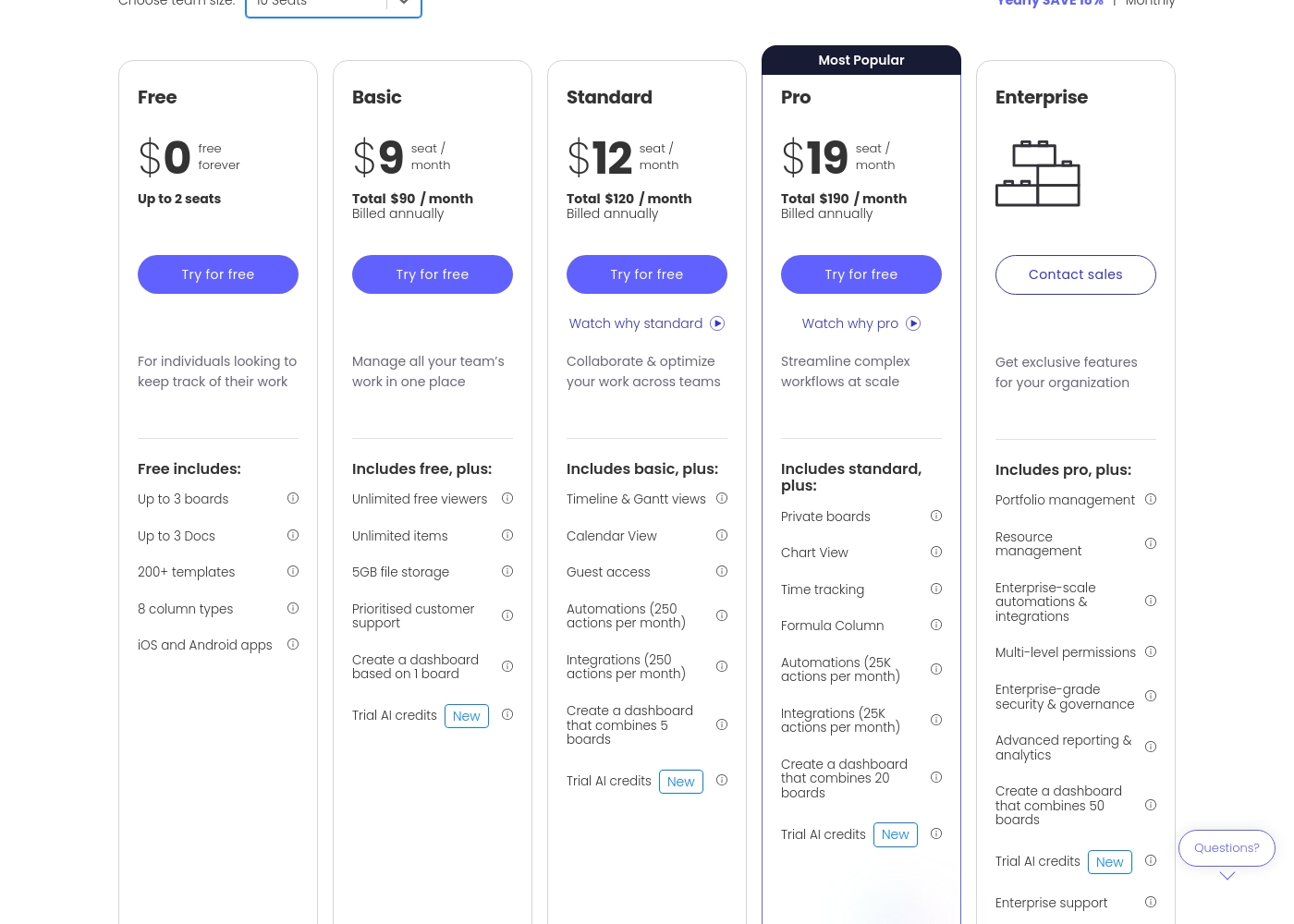
Monday.com costs between $0 and $19 per seat per month (billed annually) with five plans: Free at $0, Basic at $9, Standard at $12, Pro at $19, and Enterprise (contact sales).
Let's break down what's included in each plan to help you pick the best fit.
Free
Price: $0/month Best For: Individuals looking to keep track of their work Other Features:
- Up to 3 boards
- Up to 3 Docs
- 200+ templates
- iOS and Android apps
- Up to 3 boards
- Up to 3 Docs
- 200+ templates
- 8 column types
- iOS and Android apps
- Unlimited free viewers
- Unlimited items
- 5GB file storage
- Prioritised customer support
- Create a dashboard based on 1 board
- Timeline & Gantt views
- Calendar View
- Guest access
- Automations (250 actions per month)
- Integrations (250 actions per month)
- Private boards
- Chart View
- Time tracking
- Formula Column
- Automations (25K actions per month)
Ora costs between $0 and $30 per user/month with three plans: Basic at $0, Professional starting at $5.99 per user/month, and Enterprise starting at $27.99 per user/month.
We provide solutions for all team sizes, ensuring you only pay for the features and scale you truly need.
Ora Basic
Price: $0.00 / month (Free Forever) Best For: Teams of up to 10 users needing core project management and collaboration. Other Features:
- Unlimited projects, tasks, comments, and attachments
- Max file size is 10mb
- Includes Basic add-ons
- Supports up to 10 organization members
- Unlimited projects
- Unlimited tasks, comments, attachments
- Web, desktop, iOS, and Android apps
- Max file size 1 GB
- Task relationships
- Recurring tasks
- List actions (automation)
- Free observers / guests
- Single Sign On (SSO)
- File encryption
- Everything from Professional tier

Pricing Notes
- Monday.com's paid tiers require a three-seat minimum purchase, increasing the starting cost significantly.
- Ora offers a powerful free plan for up to ten users, compared to Monday.com's two-user limit.
- Ora provides a longer 30-day free trial on its Professional and Enterprise plans than Monday.com's 14-day trial.
- Both Monday.com and Ora offer 50% discounts for qualifying non-profit organizations.
- Monday.com's price for its Pro plan ($19/seat/month) is lower than Ora's highest enterprise tier ($27.99/user/month, billed annually).
Pricing Head-to-Head
User Reviews
Users consistently praise Monday.com for its visually appealing and intuitive user interface, making complex project status easy to track. Many reviewers highlight the platform's incredible flexibility, allowing teams to build highly customized workflows for diverse needs, from project management to sales CRM.
Key features like robust automations and integrations are universally valued, helping teams streamline processes and drastically reduce time spent in meetings and emails. Onboarding is often described as quick and intuitive, proving fast time to value.
Monday.com is the best! This platform helps us track task management and employee productivity, ensuring the best outcome for our clients. Nothing falls through the cracks anymore, which is a massive improvement.
Customer sentiment for Ora is strongly positive, emphasizing its robust capabilities and outstanding usability. Several reviewers highlight that Ora is exceptionally user-friendly and superior to competitors like Trello, even though it is a relatively younger product.
Users rely on the platform daily for managing diverse projects, and one reviewer called it simply "the best platform for PM." While the current feedback volume is low, the recurring themes suggest high satisfaction regarding core functionality and daily reliability. The enthusiasm indicates that users find the platform’s functional depth combined with its ease of use provides strong value for teams seeking a productive command center.
Ora is one of my favorite daily web services for managing various tasks. It’s exceptionally user-friendly and handles diverse projects easily. I recommend it as a superior option compared to Trello.
Our Verdict
Choosing between Monday.com and Ora is crucial, as they serve fundamentally different needs. Both are excellent project managers, but they operate at separate scales. Monday.com is built to be the overarching, organization-wide Work OS, while Ora is precision-engineered for focused team productivity. Monday.com’s superpower is its breadth and AI-driven capability. It can unify sales, marketing, IT, and product engineering operations into one flexible platform. Monday.com shines when you need 25,000+ automations and complex multi-board data visualization for leadership oversight. Ora’s superpower is its sharp focus on getting the daily work done effectively. It offers a generous 10-user free tier and superior tools for technical specs like code highlighting. Ora’s unique Agenda Calendar helps individuals block time and maintain focus, minimizing those disruptive internal emails. The decisive factor is the trade-off between organizational breadth and budget control. If your team is large, cross-functional, and requires predictive AI and compliance, Monday.com is the professional grade solution. Small teams prioritize low cost and minimal distraction, where Ora delivers superior value immediately. Final verdict: Pick Monday.com if you are a complex enterprise player needing robust scale and AI features. Choose Ora if you are a budget-conscious small team focused on deep work and daily planning.
Frequently Asked Questions
Which is better for small teams: Monday.com or Ora?
Ora is significantly better for small teams under 10 users. Ora offers a powerful, permanent free plan up to 10 seats. Monday.com limits its free plan to only two people and requires a three-seat minimum purchase for paid tiers.
Does Ora handle team automation as well as Monday.com?
No, Monday.com offers significantly higher automation limits, up to 25,000 actions per month on the Pro plan. Ora supports workflow automation via 'List actions' but is not built for the massive scale Monday.com can handle.
Which tool offers better documentation for technical teams?
Ora offers superior documentation features for technical teams. Ora's Task Cards natively support Markdown, RTF, and crucial code highlighting. Monday.com is highly visual but does not specifically feature these developer-focused documentation tools.
Is Monday.com’s free plan better than Ora’s free plan?
Ora’s free plan is generally considered better due to its high user limit (up to 10). Monday.com only covers two users for free, making Ora more suitable for startup teams seeking unlimited projects at zero cost.
Which platform is better for advanced visual reporting?
Monday.com is superior for advanced visual reporting and analytics. It offers Timeline, Gantt, and Chart views, allowing Enterprise users to aggregate data across up to 50 boards. Ora’s reporting is focused primarily on time tracking.
Can I invite clients to view my progress for free on either Monday.com or Ora?
Yes, you can do this for free on Ora's Professional plan by designating them as 'Observers.' Monday.com only allows guests on paid plans, meaning this external access will incur a user fee.
Ready to Choose?
Both tools have their strengths. Choose based on your specific needs.