Ora

Ora review

Ora brings your tasks, tracked time, and team collaboration onto a single calendar-first workspace.

Ora costs from $5.99/mo · 3 plans · Free plan available · prices checked Oct 12, 2026

By Ciroapp Editorial Team · Updated Sep 17, 2026

Commission may apply at no extra cost

Ora homepage screenshot

At a glance

Quick overview for Ora: rating, pricing summary, key features, and highlights.
Pricing verified Oct 12, 2026

Ciroapp score

3.6/ 5

Ora puts your tasks, tracked time, and teammates' work on one Agenda Calendar, so you can plan and review your day without switching tools. It's a smart consolidation play for individuals and small teams, though public reviews are scarce and the calendar-first setup won't suit everyone. Overall, it's worth trying free before you commit.

Pros

  • Pros:Calendar-first design merges tasks, tracked time, and completed work into a single Agenda Calendar view
  • Pros:Teammates' tasks are visible directly in your own view, cutting down on status meetings and check-in pings
  • Pros:Acts as a central hub, reducing the need to maintain separate task, time tracking, and scheduling tools

Cons

  • Cons:The calendar-centric workflow may not suit teams that prefer list, board, or Gantt-style planning as their primary view
  • Cons:Public third-party review coverage is limited, making it harder to validate long-term reliability against larger established competitors
  • Cons:Teams needing deep integrations with specialized external toolchains should verify compatibility before committing
Best for
  • Productive individuals who want a daily planner that combines tasks, time tracking, and scheduling in one calendar view
  • Small-to-mid-sized teams that need shared visibility into each member's tasks without holding constant status meetings
  • Freelancers and consultants who need to track time against tasks and review where their hours went
This section is a summary. Detailed sections about features, use cases, pricing, and reviews follow below.

What is Ora?

Most teams juggle a task manager, a time tracker, and a calendar app that never talk to each other, so the real picture of a day lives in three places at once. Ora takes a different approach by making the calendar the centerpiece of work management. Tasks, tracked time, and teammates' workloads all surface directly on your Agenda Calendar, turning it into a daily planning hub rather than just a date grid.

Ora is a project management and daily planning platform built around its Agenda Calendar. Instead of treating your calendar and your task list as separate tools, Ora merges them: tasks you create, time you track, and work your teammates complete all appear directly on your calendar. It also functions as a collaborative hub where you can view not only your own tasks but also what your teammates are working on, which makes coordination across a team more transparent.
Should you choose Ora?

Quick buyer guidance before you compare plans or click through.

Choose it if

  • Productive individuals who want a daily planner that combines tasks, time tracking, and scheduling in one calendar view
  • Small-to-mid-sized teams that need shared visibility into each member's tasks without holding constant status meetings
  • Freelancers and consultants who need to track time against tasks and review where their hours went
  • Teams tired of juggling separate task managers, time trackers, and calendar apps

Skip it if

  • Teams whose primary workflow is list, board, or Gantt-based planning rather than calendar-driven scheduling
  • Large organizations that require extensive enterprise integrations, compliance certifications, or deep customization before adopting a tool
  • Buyers who want extensive independent third-party review data before committing, since Ora's public review footprint is limited

Next steps before buying

  1. 1Visit ora.pm and sign up for the free plan or free trial to explore the Agenda Calendar with your own tasks
  2. 2Add a few current tasks and track time on them for one week so your calendar reflects real work patterns
  3. 3Invite your teammates so you can view each other's tasks and evaluate whether shared visibility improves coordination
  4. 4Compare the free plan against paid per-seat or usage-based tiers once you know how many people will use it regularly

Ora Key Features

✨ Agenda Calendar

The Agenda Calendar is the core of Ora. Rather than being a passive date view, it acts as your daily planner where tasks, tracked time, and completed work appear directly on the calendar. This gives you a single surface for organizing your time and reviewing how your day actually unfolded.

✨ Unified Task and Time View

Ora consolidates critical information so you are not dealing with separate tools. Tracked time and completed tasks show up alongside scheduled items on your calendar, which makes it easier to plan realistically based on how long work actually takes.

✨ Team Task Visibility

You can quickly view both your own tasks and those of your teammates. This shared visibility is what makes Ora a collaboration hub rather than a purely personal planner: blockers, handoffs, and workload distribution become visible at a glance instead of requiring status meetings.

✨ Central Work Hub

Ora positions itself as the central hub for managing work. By keeping planning, execution, and time records in one place, it reduces tool sprawl for individuals and small-to-mid-sized teams who want one system of record for the day.

Use Cases

💡 Daily Planning for Individuals

A productive individual can use Ora's Agenda Calendar to plan each day around actual tasks instead of vague to-do lists. Seeing scheduled work, tracked time, and completed items on one calendar makes it easier to estimate capacity and end the day with a clear record of what was accomplished.

💡 Small Team Coordination

A small team can use Ora as its central work hub, with each member viewing teammates' tasks directly on the calendar. This transparency helps with handoffs, deadline awareness, and spotting overloaded teammates before deadlines slip.

💡 Time Tracking and Review

Because tracked time appears on the calendar alongside tasks, Ora works well for anyone who needs to review where their hours went, whether for client billing, internal reporting, or personal productivity auditing.

Ora pricing

From$5.99/mo

  • From the vendor's pricing page, checked Oct 12, 2026
  • 3 plans
  • Free plan available

Prices checked on Oct 12, 2026 from Ora's pricing page

Ora pricing page screenshotView pricing page screenshot
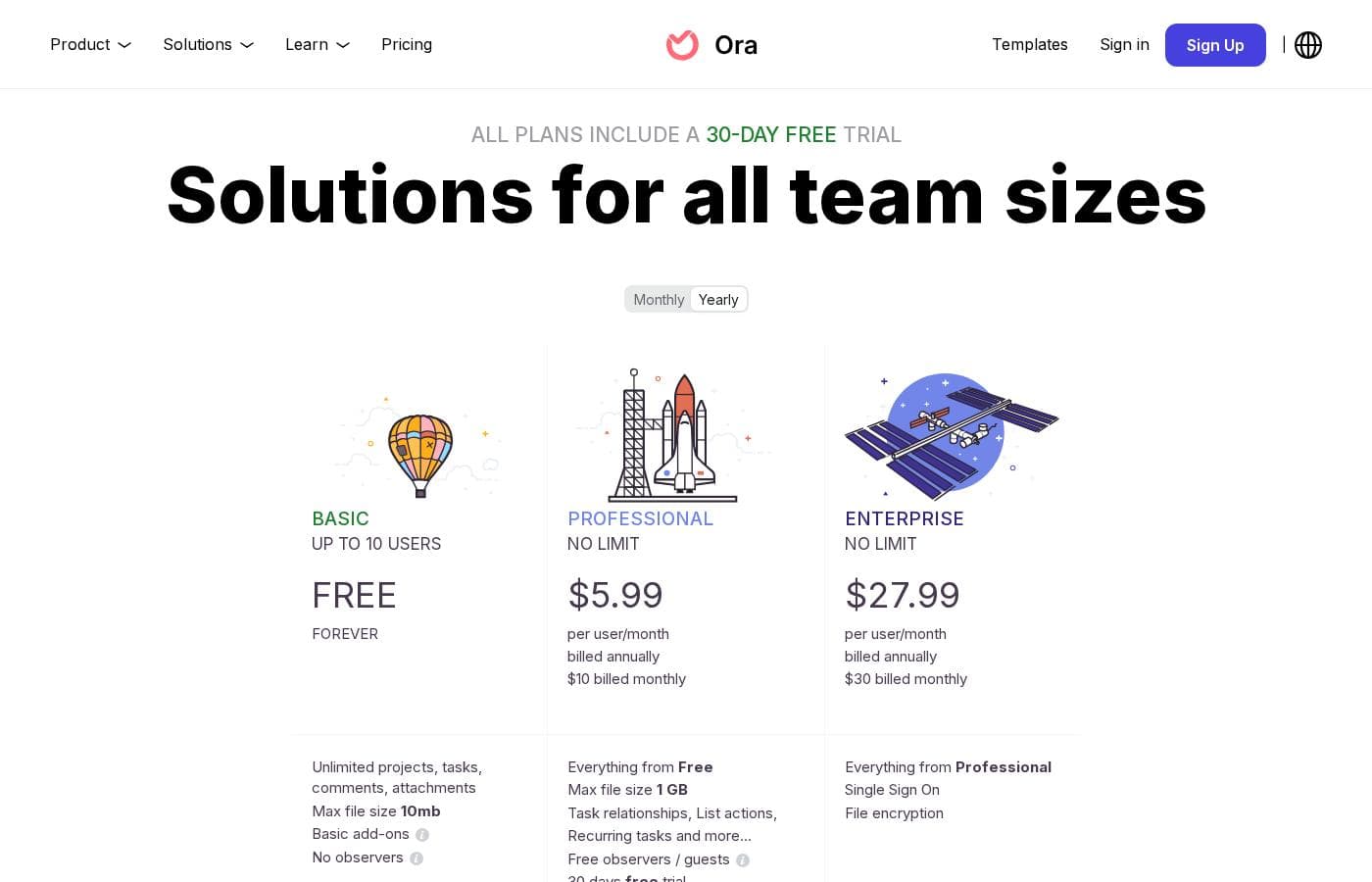
PlanBilled monthlyBilled annuallyIncludes
Basic
Free
—
Up to 10 users; unlimited projects, tasks, comments, attachments; 10 MB max file size; Basic add-ons only; no observers
Professional
per user
—
$5.99/mo
$71.88 per year
No user limit; everything from Free; 1 GB max file size; task relationships, list actions, recurring tasks; free observers/guests; 30-day free trial
Enterprise
per user
—
$27.99/mo
$335.88 per year
No user limit; everything from Professional; Single Sign On; file encryption; 30-day free trial

Price history

Tracking prices since Oct 1, 2026. No price change detected yet.

Pricing types: Free plan, Free trial, Monthly subscription, Per seat pricing, Usage-based pricing

Pricing notes

Ora pricing: Plans from $0/month Plans range: $0–$8804/month Billing options: Free plan, Free trial, Monthly subscription, Per seat pricing, Usage-based pricing

Cost calculator

Estimate what Ora costs for your team.

Billing

Professional has no published price for this billing cycle.

Professional is priced per user: price × 5 seats. Estimate based on published list prices, before taxes, add-ons and discounts.

How to pay less for Ora

  • Start on the free plan and upgrade only when you hit its limits.
  • Some plans are priced per user: only pay for seats people actually use.
  • Cheaper tools in this category start at $5/mo.
Visit Ora

Email me when Ora changes price

One email when we detect a price change on the vendor's pricing page. No newsletter, no deals. Unsubscribe in one click.

User Reviews

No reviews yet.

Write a Review

Write a Review for Ora
0/100 characters
0/2000 characters

Why use Ora?

The main reason to choose Ora is consolidation. When tasks, time tracking, and scheduling live in one place, you stop spending the first hour of the day reconciling three different tools and start actually working.

The calendar-first design makes your day concrete: you see what is scheduled, what is done, and where your time went without switching contexts. For teams, the shared visibility into each other's tasks reduces the constant check-ins and status pings that come with disconnected tooling.

Ora alternatives

Other tools in the Project Management category

View all Project Management tools
Success.co

Success.co

Project Management4/5

The next gen software to run EOS®: modern and fast, deeply integrated and EOS® pure. Success.co isn’t just software - it’s our mission. We’re building something enduring, for teams that are doing the same.

Backlog by Nulab Inc

Backlog by Nulab Inc

Project Management4/5

Backlog is the all-in-one project management platform built for teams that move fast. It helps small and mid-sized teams manage projects, track bugs, and collaborate across roles without the complexity of enterprise tools.

Plutio

Plutio

Project Management3.9/5

Plutio is the helpful all-in-one solution built for running your entire business. It works whether you’re a solo professional, managing a team, or working primarily with clients. It centralizes essential tools like forms, project management, contracts, and proposals onto a single platform. This centralization means no more juggling between apps and fewer subscription payments. With Plutio, you're unifying your entire workflow to boost productivity and growth.

Hive

Hive

Project Management3.8/5From $5/mo

Hive is a cloud-based project management and productivity platform. Teams plan work in flexible layouts — Kanban boards, Gantt charts, calendars, and table views — and manage tasks, files, conversations, and approvals from a single workspace. It runs in the browser and offers desktop and mobile apps for working across devices.

Notion

Notion

Project Management4.2/5

Notion is your dedicated AI workspace and everything app. It is built to replace multiple specialized tools with one powerful platform. This centralized space lets teams consolidate project management, internal wikis, and basic CRM functions. Notion is trusted broadly; over 100 million users worldwide use it, and 62% of the Fortune 100 are customers. You can use it right in your browser or download specialized tools like Notion Mail and Notion Calendar to keep time and work together.

Trello

Trello

Project Management4.2/5

Trello is designed to keep you at the top of your game by ensuring every to-do or idea, regardless of size, finds its proper place. The system helps you stay organized and efficient using three key components: Inbox, Boards, and Planner. The Inbox quickly captures tasks as soon as they are on your mind, whether you are in the office or on the go. You manage your tasks using flexible Boards, where long lists become manageable by tracking items from “to-dos to tackle” to “mission accomplished!” Use the Planner to simply drag and drop your top tasks right into your calendar, ensuring you make time for what truly matters.

Asana

Asana

Project Management4.2/5

Asana is an online platform built specifically to manage your team’s work, projects, and tasks. It supports powerful Human + AI collaboration. This AI component understands your specific business context, helping to move your most important work forward efficiently. Because it's a centralized ecosystem, it easily brings all doers and stakeholders together in one place.

Teamwork

Teamwork

Project Management4.1/5

Teamwork.com is project and resource management software specifically built for client work and powered by AI. It goes beyond traditional project tools by combining essential functions like resource forecasting, cost control, and profitability reporting into a single platform. This platform is trusted by professional services businesses globally. These include agencies, consulting firms, IT service providers, and accounting teams. Teamwork helps them efficiently schedule resources, manage billable hours, and track project profitability from start to finish.

Cheapest Project Management software for 1 to 25 users

Ora FAQ

How much does Ora cost?

Ora's cheapest paid plan, Professional, costs $5.99 per month. Paid plans range from $5.99 to $27.99 per month. Prices checked on Oct 12, 2026 from the vendor's pricing page.

Does Ora have a free plan?

Yes. Ora has a free plan (Basic); paid plans start at $5.99 per month.

Has Ora's price changed recently?

No. We have not detected a price change since we started tracking on Oct 1, 2026.

How does Ora differ from a regular calendar or to-do app?

Ora's Agenda Calendar is not just a date grid: your tasks, tracked time, and completed work all appear directly on the calendar. It also lets you see your teammates' tasks, so it functions as a shared work hub rather than a purely personal scheduling tool.

Is Ora suitable for teams or only individuals?

Both. Ora is designed for productive individuals who want a daily planner, and for collaborative teams who benefit from shared visibility into each other's tasks. The per-seat and usage-based pricing options reflect that it supports team deployments of varying sizes.

Ready to try Ora? Check out the official site or pricing.

Are you Ora? Claim this listing · Get the badge