Motion vs Ora
Motion and Ora offer very different paths to productivity and organization. Motion is an expensive AI command center automating scheduling across your entire company. Ora focuses on affordable, centralized project management for clear collaboration. This comparison determines whether you need structure or full-stack automation right now.
Best for: Enterprise organizations requiring SOC 2 Type 2 compliance, Teams focused on maximizing AI automation and custom functions
Best for: Small, budget-conscious teams (1-10 users) needing a free option, Collaborative teams requiring clear task relationships (blocking/dependent)
AI scheduling that manages your work.
We observed that Motion delivers on its promise of powerful, AI-driven task management and scheduling. Users consistently report massive time savings and reduced cognitive load, but the complex credit and seat pricing structure requires careful study. Overall, Motion is a transformative tool for dedicated users who commit to mastering its full capabilities.
Pros
- Reduces mental load using intelligent auto-scheduling and task prioritization.
- Integrates tasks, projects, and calendar into a single, cohesive productivity suite.
- Helps teams break down major goals into manageable, achievable steps for progress.
- High-quality AI note-taker joins meetings and summarizes them effectively.
Cons
- High price point ($50/month cited as excessive by some single users).
- Steep learning curve requires significant upfront time to fully master the system.
- Reported UX/UI glitches, such as obstructive task preview pop-ups.
- Users note that the mobile app and notification features need improvement.
The Modern, User-Friendly Command Center
We found Ora provides an impressive balance between comprehensive features and usability, positioning itself as a strong alternative to established systems. Its generous free tier and unique calendar-focused organization greatly benefit small, growing teams and individuals. Overall, we recommend Ora highly for collaborative organizations seeking a focused, effective project management solution.
Pros
- Generous free plan available for small teams (up to 10 users) forever.
- Exceptional user-friendliness; users prefer it over competitors like Trello.
- Comprehensive task cards support RTF, Markdown, and custom code highlights.
- Agenda Calendar helps users achieve better focus and plan dedicated work time.
Cons
- External review volume is currently very limited (only 3 Trustpilot reviews).
- File size limit is restrictive on the Basic (free) tier (a maximum of 10mb).
AboutMotion
Motion transforms how teams work by offering the world's first AI workforce at your fingertips. ✨ This platform goes far beyond simple automation; it lets you create and deploy enterprise-grade AI Employees specifically built for your business needs. It merges an entire productivity suite—including AI Projects, AI Calendar, and AI Tasks—where all your work is managed and recorded. Motion is trusted by over a million top performers and teams who want a single, powerful platform for managing work efficiently.
AboutOra
Ora is a powerful platform designed for productive individuals and collaborative teams. It serves as your daily planner and central hub for managing work. The core Agenda Calendar helps you organize your time and be more effective. Instead of dealing with separate tools, all your critical information, tracked time, and completed tasks appear directly on your calendar. You can quickly view both your tasks and those of your teammates, ensuring smooth collaboration. 💡
Highlights
Feature Comparison
Features Overview
We highlight the main differences and pick a winner for each feature.
Core Automation
Motion delivers powerful, custom AI workforces for end-to-end task execution. Ora relies on explicit workflow tools and visual structure.
Motion shines with enterprise-grade AI Employees you create in minutes. This AI automatically manages project plans and prioritizes your tasks constantly. Motion focuses on reducing mental load through intelligent automation based on full context. Ora is primarily a command center for human collaboration and structured task management. Its automation is focused on simple actions like 'List actions' for organized workflows. Ora’s strength is in providing clarity, not autonomous AI execution. Motion performs the work, while Ora helps humans manage the work better. Motion requires a commitment to its steep learning curve for significant payoff. The AI workforce in Motion saves managers hours previously wasted on manual coordination. Ora ensures transparency through powerful dependency management (blocking tasks).
Pricing Clarity
Ora uses predictable, simple per-user pricing per month. Motion uses complex pricing based on seats and usage credits.
Motion uses a usage-based subscription model focused on seats and AI Credits. Your monthly cost will fluctuate based on how many credits your AI Employees consume. Listed pricing requires annual commitment, starting at $29/month. Ora features straightforward, per-user pricing that includes free observers. Paid plans begin at just $5.99 per user per month when billed annually. You also have the flexibility to pay Ora month-to-month. Ora is much simpler to budget for and offers a free plan up to 10 users. Motion’s tiered pricing requires careful tracking of AI credit consumption. Teams scaling quickly might prefer Ora’s clear pricing, avoiding unexpected spikes from high AI usage in Motion.
Free Tier Offer
Ora provides a generous, free plan for small teams of up to 10 users. Motion only offers a limited free trial period.
Ora's Basic plan is functional and completely free forever for teams up to 10 people. It includes unlimited tasks, projects, and attachments. This is ideal for startups and small operations needing core PM functionality. Motion does not offer a truly free tier for long-term use. Its pricing structure starts at $29/month (billed annually) for the AI Workplace plan. Motion requires users to commit financially after the trial period ends. Ora’s free tier lets teams thoroughly evaluate the tool without pressure or deadline constraints. Motion requires immediate investment to integrate core AI features effectively. The 10-user limit on Ora's free plan makes it a fantastic starting point for growing teams. Small businesses can avoid paying for project management entirely.
Task Documentation
Ora provides robust formatting like Markdown and code highlighting in Task Cards. Motion focuses more on context gathering from integrated documents.
Ora centralizes documentation with comprehensive Task Cards accessible with one click. Task descriptions support RTF, Markdown, and essential code highlights. This makes Ora ideal for technical teams documenting specifications and code. Motion integrates Docs, Sheets, and Notes into its AI Workplace suite for context gathering. While powerful, the core task feature doesn't emphasize rich formatting like Ora does. If detailed specifications for engineering or design are critical, Ora offers superior native support. Motion relies on connecting context across its ecosystem. Ora’s approach streamlines handoffs by ensuring all context, including code snippets, lives directly on the Task Card.
Enterprise Security
Motion is SOC 2 Type 2 compliant for robust data security. Ora reserves high-level security features for its top Enterprise plan.
Motion explicitly guarantees that all data is secure and is SOC 2 Type 2 compliant. This provides a strong baseline guarantee for enterprise users regarding security and encryption. Motion is built from the ground up for reliable, secure business use. Ora offers security features like Single Sign-On (SSO) and File encryption, but only within its custom Enterprise plan. These critical features are absent from the Basic or Professional tiers. Motion provides documented, high-level compliance across all its plans. Teams needing basic advanced security features might have to pay Ora’s top-tier pricing. If compliance and security are non-negotiable requirements, Motion offers higher confidence thanks to the SOC 2 certification.
Time Management
Motion automatically prioritizes tasks and manages your schedule instantly. Ora provides a focused Agenda Calendar and built-in time tracking.
Motion is famous for its intelligence; it removes the stress of figuring out what to do next. The AI automatically generates project plans and assigns tasks based on complex requirements. Motion excels at auto-scheduling daily work and managing priorities. Ora helps users achieve better focus using its powerful Agenda Calendar feature. Users can plan ahead and block dedicated time for specific tasks manually. Ora includes built-in time tracking to measure effort and improve future estimates. Motion excels at eliminating decision fatigue by making scheduling autonomous. Ora excels at disciplined work by providing tools to plan time and track effort manually. If your primary pain point is constant rescheduling, Motion is the logical choice. If you need clean effort reporting, Ora has the stronger native tool.
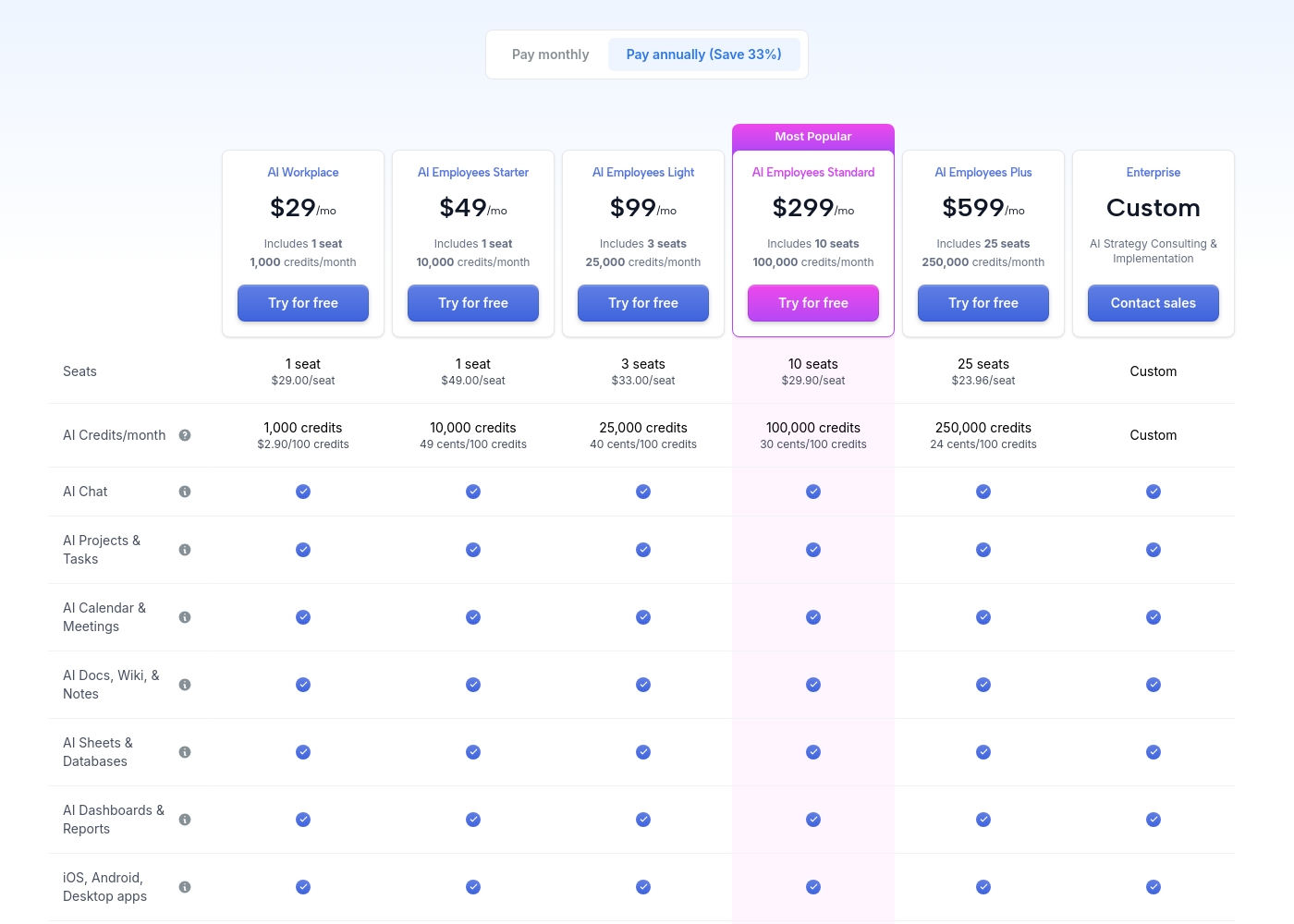
Motion costs between $29 and $599 per month (when billed annually) with 5 primary subscription plans: AI Workplace ($29/mo), AI Employees Starter ($49/mo), AI Employees Light ($99/mo), AI Employees Standard ($299/mo), and AI Employees Plus ($599/mo). There is also a custom Enterprise option.
The prices shown reflect annual billing, which gives you a savings of 33% compared to paying monthly. All plans offer a free trial period.
AI Workplace
Price: $29/mo (billed annually) Best For: Individuals and small startups starting AI integration Other Features:
- Includes 1 seat
- 1,000 credits/month ($2.90 per 100 credits)
- 3 integration connections
- Access to core AI tools (Chat, Projects, Calendar, Docs, Sheets, Dashboards)
- 1 seat
- 1,000 credits/month
- 3 integration connections
- AI Chat, Projects & Tasks, Calendar & Meetings, Docs, Wiki & Notes, Sheets & Databases, Dashboards & Reports
- iOS, Android, Desktop apps
- 1 seat
- 10,000 credits/month
- 5 integration connections
- Everything in AI Workplace
- 3 seats
- 25,000 credits/month
- 10 integration connections
- Everything in AI Employees Starter
- 10 seats (Most Popular)
- 100,000 credits/month
- 20 integration connections
- HTTP Blocks
- Everything in AI Employees Light
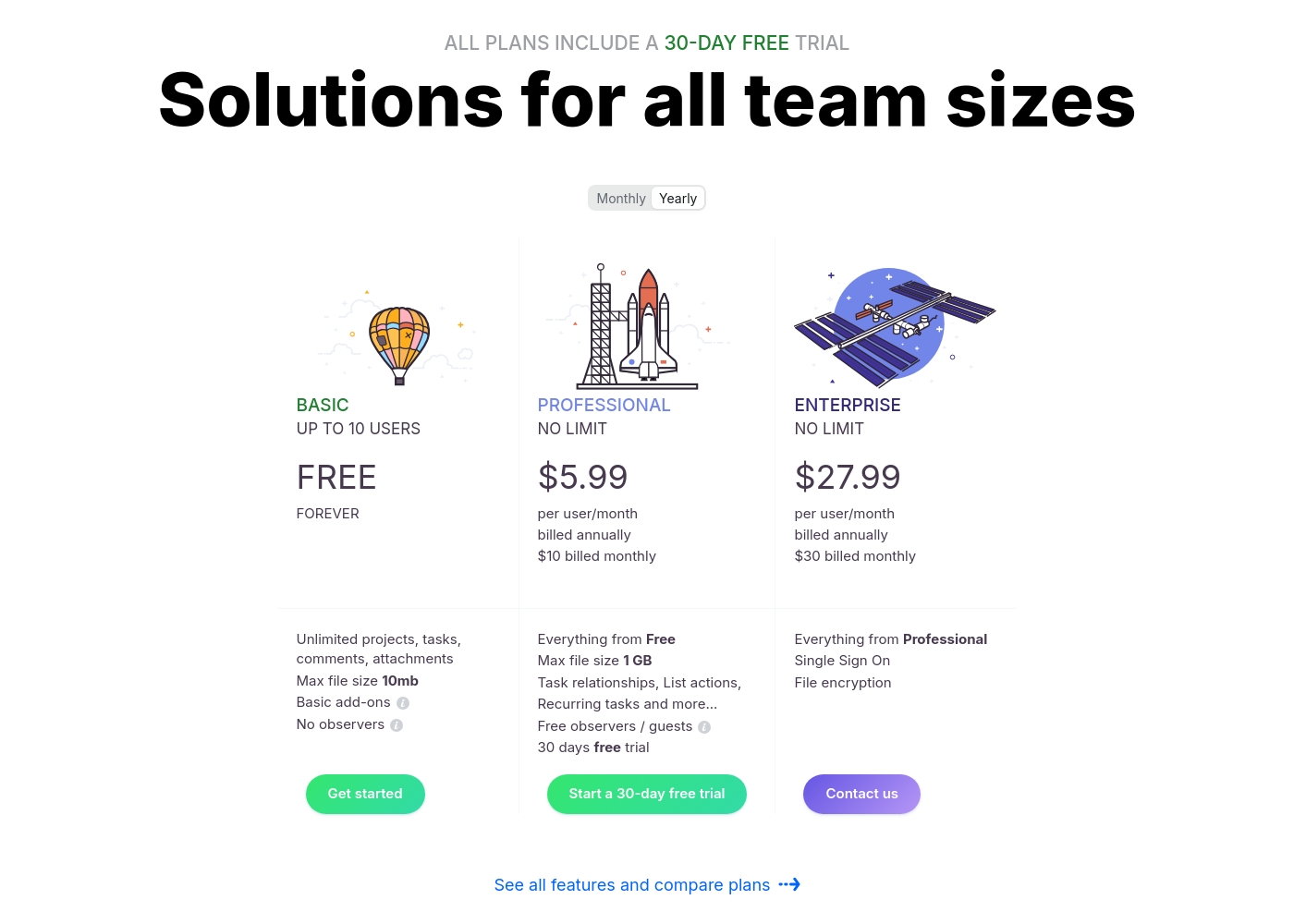
Ora costs between $0 and $30 per user/month with three plans: Basic at $0, Professional starting at $5.99 per user/month, and Enterprise starting at $27.99 per user/month.
We provide solutions for all team sizes, ensuring you only pay for the features and scale you truly need.
Ora Basic
Price: $0.00 / month (Free Forever) Best For: Teams of up to 10 users needing core project management and collaboration. Other Features:
- Unlimited projects, tasks, comments, and attachments
- Max file size is 10mb
- Includes Basic add-ons
- Supports up to 10 organization members
- Unlimited projects
- Unlimited tasks, comments, attachments
- Web, desktop, iOS, and Android apps
- Max file size 1 GB
- Task relationships
- Recurring tasks
- List actions (automation)
- Free observers / guests
- Single Sign On (SSO)
- File encryption
- Everything from Professional tier
Pricing Notes
- Motion's published pricing requires annual billing and scales based on AI Credits consumed monthly.
- Ora offers a high-value Basic plan that is free forever for teams up to 10 users.
- Motion's usage-based model makes budgeting difficult, while Ora uses predictable per-user rates.
- Ora offers discounts (50%) for educational institutions and non-profits, which Motion does not explicitly advertise.
Pricing Head-to-Head
User Reviews
Motion receives overwhelmingly positive feedback, primarily focused on its powerful auto-scheduling and prioritization features. Users frequently praise the application for reducing mental load and decision fatigue by automatically organizing tasks and project workflows.
Many reviewers, including those dealing with complex schedules or ADHD, state that Motion has revolutionized their workflow, saving significant time and boosting productivity. The ability to break down complex goals into achievable tasks is consistently highlighted as a major benefit, making Motion a game-changer for project management teams and individuals alike.
I was recently diagnosed with ADHD, and Motion has made a huge difference in how I structure my day. It removes the stress of figuring out what to do next. It has been well worth the time invested in learning the system, as the benefits are truly clear.
Customer sentiment for Ora is strongly positive, emphasizing its robust capabilities and outstanding usability. Several reviewers highlight that Ora is exceptionally user-friendly and superior to competitors like Trello, even though it is a relatively younger product.
Users rely on the platform daily for managing diverse projects, and one reviewer called it simply "the best platform for PM." While the current feedback volume is low, the recurring themes suggest high satisfaction regarding core functionality and daily reliability. The enthusiasm indicates that users find the platform’s functional depth combined with its ease of use provides strong value for teams seeking a productive command center.
Ora is one of my favorite daily web services for managing various tasks. It’s exceptionally user-friendly and handles diverse projects easily. I recommend it as a superior option compared to Trello.
Our Verdict
Choosing between Motion and Ora depends entirely on your budget and tolerance for AI complexity. It’s the battle between autonomous AI scheduling and user-friendly project structures. Motion wins if you seek transformation and have the budget to match its power. Ora is the clear victor for teams prioritizing cost savings and collaborative certainty. Motion's superpower is elimination of coordination friction. Its AI instantly creates custom Employees and manages your entire project roadmap and schedule automatically. If you write 50+ articles/month or manage hundreds of shifting client deliverables, Motion justifies its high cost. Motion helps ambitious teams stop wasting time on manual coordination and embrace AI-driven work. Ora is the king of structured usability and clear documentation. Its generous free plan means teams of up to 10 users can use Ora forever without paying a dime. Ora Task Cards use Markdown and code highlights, making specifications clear for everyone. Ora provides effective collaboration without the steep commitment required by Motion. The deciding factor is complexity versus cost. Motion offers a complex, usage-based model but provides unparalleled AI automation and context integration. Ora delivers clean, structured features and predictable per-user pricing starting under $6/month. Decide if you need an AI workforce or a better command center. If your goal is to reduce human decision fatigue and afford custom AI, choose Motion. If you need superior task structuring, time tracking, and a powerful free launchpad for your growing team, Ora is the best fit.
Frequently Asked Questions
Which is better for small teams: Motion or Ora?
Ora is significantly better for small, budget-conscious teams. Ora offers a Basic plan that is free forever for up to 10 users. Motion requires a paid subscription starting at $29/month annually after a short trial period.
Does Motion have a free tier like Ora?
No, Motion only provides a free trial period to test the platform's ability. Ora offers a highly valuable free plan for up to ten people permanently. If you need a long-term, free solution, choose Ora.
Is Motion's AI superior to Ora's automation features?
Yes, Motion is focused on building custom AI Employees using natural language instructions. Ora’s automation is limited to simple workflow functions like List actions. Motion provides deep, contextual AI automation.
Which tool offers stronger security compliance?
Motion explicitly cites SOC 2 Type 2 compliance, ensuring a secure environment across its enterprise plans. Ora offers advanced features like SSO and file encryption only on its highest Enterprise plan.
Does Ora offer built-in time tracking like Motion?
Ora includes built-in time tracking and estimates natively within its Task Cards. Motion's documentation does not explicitly detail a native time-tracking feature. Ora is better if effort tracking is crucial.
How are the pricing models for Motion and Ora different?
Motion uses a complex model based on seats plus monthly AI credits, charged annually. Ora uses a simple, predictable per-user fee, with monthly options available. Ora is much easier to estimate and manage financially.
Ready to Choose?
Both tools have their strengths. Choose based on your specific needs.