Motion

Motion review

An AI-powered all-in-one workspace that plans your tasks, calendar, projects, and meetings for you.

Motion costs from $19/mo · 2 plans

By Ciroapp Editorial Team · Updated Sep 17, 2026

Commission may apply at no extra cost

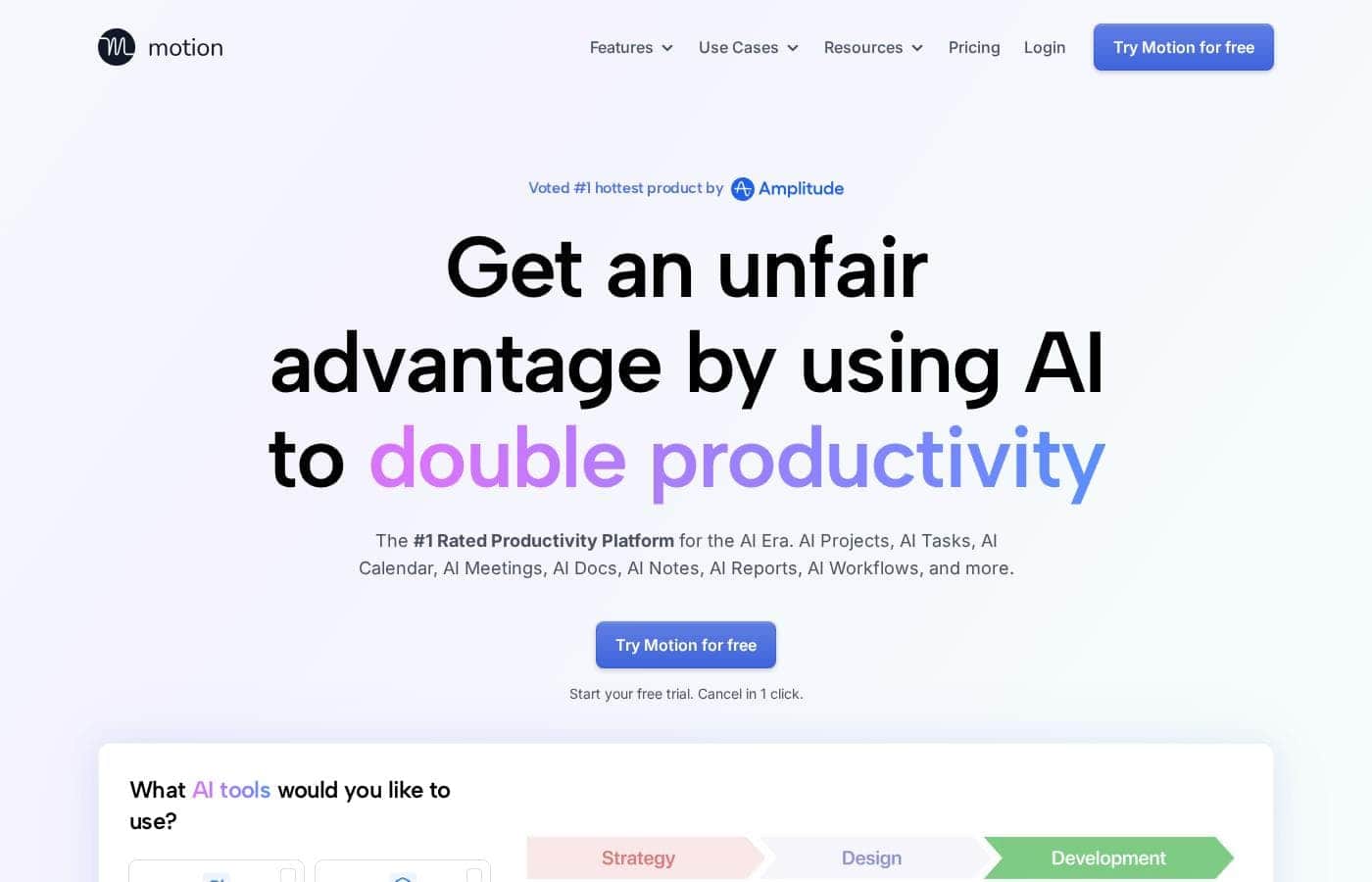
Motion homepage screenshot

At a glance

Quick overview for Motion: rating, pricing summary, key features, and highlights.

Ciroapp score

3.9/ 5

Motion aims to plan your tasks, calendar, projects, and meetings for you, with wide integrations, SOC 2 Type 2 compliance, and pricing from $19 to $29 per seat. The trade-offs are real: no free plan, credit-based AI that can trigger overages, and a replace-everything pitch. Overall, it's worth trialing if you're drowning in planning work.

Pros

  • Pros:The AI task planner re-optimizes your schedule hundreds of times a day, separating do dates from due dates and flagging at-risk work days or weeks before deadlines slip
  • Pros:Projects generate themselves from a description — tasks, deadlines, stages, and assignees — with statuses updating automatically so status-chasing meetings become unnecessary
  • Pros:The calendar merges Google, Outlook, and iCloud accounts into one double-booking-proof view and timeblocks tasks directly onto your schedule

Cons

  • Cons:AI features run on a monthly credit allowance (7,500 on Pro AI, 15,000 on Business AI), so heavy users face overage charges of 19–25 cents per 100 extra credits
  • Cons:Motion positions itself as a full replacement for tools like Asana, Notion, and Calendly rather than an add-on, so adopting it means migrating off tools your team may already rely on
  • Cons:Collaboration features work best when teammates live inside Motion, which can be a hard sell for teams unwilling to move conversations into a new app
Best for
  • Individuals overwhelmed by long task lists and calendar juggling
  • Small teams that want project updates without constant check-in meetings
  • Busy professionals who attend many meetings and need notes and follow-ups handled
Free trial
Yes
This section is a summary. Detailed sections about features, use cases, pricing, and reviews follow below.

What is Motion?

Your task list keeps growing, your calendar's a mess, and updates live in five different apps. Motion puts AI to work on all of it — planning your day, building projects, taking meeting notes, and re-prioritizing automatically. Here's what the site promises, so you can decide if it fits.

Motion is an AI-powered productivity platform that bundles task planning, project management, calendar scheduling, meeting notes, docs, workflows, and reporting into one app. It's aimed at individuals, small teams, and large businesses — the site says it's built for everyone from 1 person to a 1,000-person team. The pitch: AI handles prioritizing, scheduling, and status updates while you focus on the work itself.

Should you choose Motion?

Quick buyer guidance before you compare plans or click through.

Choose it if

  • People who want AI to prioritize and timeblock their day automatically
  • Teams already using Gmail, Outlook, Slack, Zoom, or Teams that want tasks pulled from those apps
  • Anyone juggling Google, Outlook, and iCloud calendars who needs one merged, double-booking-proof view
  • Managers who want project ETAs and workload rebalancing before deadlines slip
  • Users who value having context from docs, tasks, meetings, and messages in one AI, rather than a generic assistant

Skip it if

  • Anyone not ready to migrate off tools like Asana, Notion, or Calendly, since Motion positions itself as a full replacement rather than an add-on
  • Teams unwilling to move conversations into a new app — collaboration features work best when teammates live inside Motion
  • Users who want a single-purpose tool, like just a calendar or just a to-do list

Next steps before buying

  1. 1Confirm your must-have integrations are supported — the site lists Gmail, Outlook, Slack, Zoom, HubSpot, Salesforce, Zapier, and hundreds more
  2. 2Start the free trial and run one real project and one real meeting through it before deciding
  3. 3Tally what you pay today for to-do apps, project tools, schedulers, and notetakers to compare against one Motion subscription
  4. 4Review the trial and cancellation terms on the site before committing to an annual plan

Ease of use

Motion leans heavily on automation to cut manual work, and the site says you can start a free trial and cancel in one click. Getting value depends on connecting tools you already use — Gmail, Outlook, Slack, Zoom, and others.

Motion Key Features

✨ A Task List That Plans Itself

Motion pulls your tasks, priorities, dependencies, and deadlines into one plan that rebuilds itself hundreds of times a day. It separates do dates from due dates, so at-risk work gets flagged days or weeks early. Capture tasks from Gmail, Slack, Zoom, or even Siri, and everything lands in one list.

✨ Projects That Build and Manage Themselves

Describe a project, add relevant docs, and Motion builds the whole thing — tasks, deadlines, stages, and assignees. The company claims over 90% accuracy, so a quick review is all that's left. As work moves, statuses update automatically and delays get flagged, cutting out check-in emails and status meetings.

📅 A Calendar That Reroutes Your Day

Motion timeblocks your tasks on your calendar and re-optimizes your schedule dozens of times a day as things change. It merges Google, Outlook, and iCloud calendars into one view, so you won't get double-booked. Meeting booking pages show your availability and pick times that protect your focus.

✨ Meetings, Docs, and Workflows That Connect

The Notetaker records, summarizes, and labels every meeting, then turns action items into assigned tasks. Docs turn messy notes into clean projects, and workflows turn SOPs into repeatable templates. It works in three steps:

✨ See Where Every Project Stands

Motion predicts each project's finish date based on your team's capacity and everything else in flight. If a project slips off-track, you get an alert before it's too late. Dashboards also show who's over or under capacity, so you can rebalance work before anyone burns out.

Use Cases

🗓️ Plan your day without planning it

Too many tasks, not enough hours. Motion prioritizes your list, timeblocks it on your calendar, and re-plans whenever things change. Expected outcome: You always know what to work on next, with early warnings on at-risk deadlines.

Tip: Forward an email to Motion and it becomes a task.

🚀 Run projects without chasing updates

Describe a project and Motion builds it — tasks, deadlines, stages, and assignees. It updates statuses and flags delays automatically, so check-in meetings disappear. Expected outcome: Full visibility into progress, with automatic reports for every project.

Tip: Ask teammates questions right inside a task, where the context lives.

🎙️ Make every meeting count

Motion's notetaker records, summarizes, and labels every transcript. Action items become assigned tasks, and follow-up emails are drafted for attendees. Can't attend?

Get the takeaways in 30 seconds. Expected outcome: Leave each meeting with notes, owners, and next steps already in place.

📈 Manage team capacity with confidence

Check predicted ETAs for every project based on real team capacity. When someone's overloaded, rebalance work before deadlines slip. Expected outcome: Dashboards show bottlenecks and each project's ROI, so you can course-correct early.

Tip: Capacity planning and dashboards come with the Business AI plan.

Motion pricing

From$19/mo

  • 2 plans

Prices not verified yet — see the vendor page.

Motion's pricing page

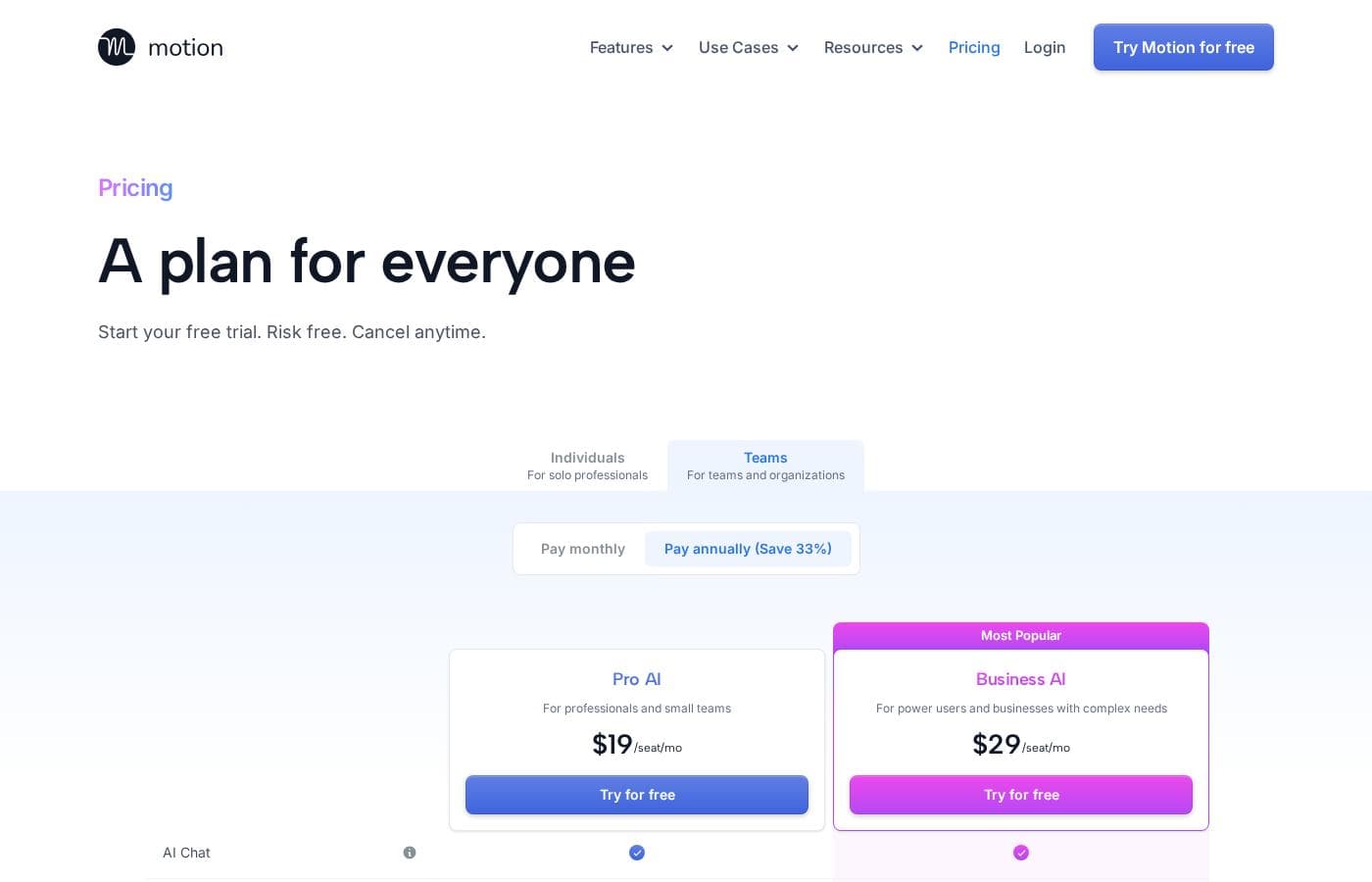
Motion pricing page screenshotView pricing page screenshot
PlanBilled monthlyBilled annuallyIncludes
Pro AI
per user
$19/mo
—
7,500 credits per seat per month; extra credits cost 25 cents per 100
  • AI Chat
  • AI Projects & Tasks
  • AI Calendar & Meetings
  • AI Docs, Wiki & Notes
  • AI Task Planner
  • +5
Business AI
per user
$29/mo
—
15,000 credits per seat per month; extra credits cost 19 cents per 100
  • Everything in Pro AI
  • Team Capacity Planning
  • Advanced Dashboards & Reports
  • Timeline & Gantt Charts
  • Time Tracking
  • +5

Pricing types: Free trial, Monthly subscription, Yearly subscription, Per seat pricing, Usage-based pricing

Pricing notes

Motion offers two per-seat plans: Pro AI at $19/seat/month and Business AI at $29/seat/month. You can pay monthly or save 33% with annual billing, and every plan starts with a free trial.

Motion costs between $19 and $29 per seat per month with two plans: Pro AI at $19/seat/month and Business AI at $29/seat/month.

You can pay monthly or switch to annual billing, which saves you 33%.

Pro AI

Price: $19/seat/month Best For: Professionals and small teams Other Features:

  • AI Chat, AI Projects & Tasks, AI Calendar & Meetings
  • AI Docs, Wiki & Notes, AI Task Planner, AI Writer & Editor
  • Unlimited storage
  • iOS, Android, and desktop apps plus integrations
  • 7,500 credits per seat per month

Pro AI is the natural fit for solo professionals and small teams. It bundles Motion's core AI toolkit — tasks, projects, calendar, meetings, and docs — into one subscription. If your workflows are simple and you mostly manage your own work, this plan covers it. 👍

Business AI

Price: $29/seat/month Best For: Power users and businesses with complex needs Other Features:

  • Everything in Pro AI
  • Team capacity planning
  • Advanced dashboards and reports
  • Timeline and Gantt charts, plus time tracking
  • Permissions and access control with central billing
  • Priority support and white glove onboarding
  • 15,000 credits per seat per month

Business AI adds the management layer that larger teams need. You can track capacity, spot bottlenecks in reports, and control who has access to what. The doubled credit allowance also helps heavy AI users. If your team runs complex projects across many people, this tier earns its keep.

About credits: every seat includes a monthly credit allowance for Motion's AI features. Need more? Extra credits cost 25 cents per 100 on Pro AI and 19 cents per 100 on Business AI. It's worth estimating your usage before you choose.

Motion doesn't advertise a free plan, but you can start a free trial that's risk free. The site says you can cancel anytime — in one click. If you decide to stay, annual billing cuts your cost by 33%.
Cost calculator

Estimate what Motion costs for your team.

Billing
Per month
$95
Per year
$1,140

Pro AI is priced per user: price × 5 seats. Estimate based on published list prices, before taxes, add-ons and discounts.

How to pay less for Motion

  • A free trial is available: test it before you pay.
  • Some plans are priced per user: only pay for seats people actually use.
  • Cheaper tools in this category start at $5/mo.
Start free trial

Email me when Motion changes price

One email when we detect a price change on the vendor's pricing page. No newsletter, no deals. Unsubscribe in one click.

User Reviews

No reviews yet.

Write a Review

Write a Review for Motion
0/100 characters
0/2000 characters

Why use Motion?

Most productivity tools ask you to do the planning. Motion's core promise flips that: the AI does the planning for you. Based on what the company publishes, here's where it aims to earn its place in your stack:

  • Your schedule plans itself. Motion timeblocks tasks on your calendar and re-optimizes your day automatically whenever things change, so you always know what to work on next.
  • Projects build themselves. Describe a project and Motion generates tasks, deadlines, stages, and assignees. The site claims over 90% accuracy out of the box and projects finished 32% faster.
  • Meetings run on autopilot. The notetaker records, summarizes, and labels transcripts, turns action items into assigned tasks, and drafts follow-up emails for attendees.
  • One app instead of ten. It positions itself as a replacement for to-do lists, project managers, schedulers, notetakers, and docs — with AI models from OpenAI and Anthropic included in the subscription.
  • Deadline protection built in. Motion separates do dates from due dates and warns you days or weeks ahead when a task looks at-risk.
  • Audited security. The site states Motion is SOC 2 Type 2 and GDPR compliant, with data encrypted in transit and at rest.

Motion alternatives

Other tools in the Project Management category

View all Project Management tools
Asana

Asana

Project Management4.2/5

Asana is an online platform built specifically to manage your team’s work, projects, and tasks. It supports powerful Human + AI collaboration. This AI component understands your specific business context, helping to move your most important work forward efficiently. Because it's a centralized ecosystem, it easily brings all doers and stakeholders together in one place.

Success.co

Success.co

Project Management4/5

The next gen software to run EOS®: modern and fast, deeply integrated and EOS® pure. Success.co isn’t just software - it’s our mission. We’re building something enduring, for teams that are doing the same.

Backlog by Nulab Inc

Backlog by Nulab Inc

Project Management4/5

Backlog is the all-in-one project management platform built for teams that move fast. It helps small and mid-sized teams manage projects, track bugs, and collaborate across roles without the complexity of enterprise tools.

ClickUp

ClickUp

Project Management4.1/5From $7/mo

ClickUp is reliably described as the essential all-in-one workspace for modern teams. It’s designed to align, collaborate, and boost productivity across your entire organization. This platform helps eliminate app sprawl by converging over 50+ different applications into one centralized hub. Teams managing operations, campaigns, or product development use ClickUp to get more done faster, together.

Notion

Notion

Project Management4.2/5

Notion is your dedicated AI workspace and everything app. It is built to replace multiple specialized tools with one powerful platform. This centralized space lets teams consolidate project management, internal wikis, and basic CRM functions. Notion is trusted broadly; over 100 million users worldwide use it, and 62% of the Fortune 100 are customers. You can use it right in your browser or download specialized tools like Notion Mail and Notion Calendar to keep time and work together.

Trello

Trello

Project Management4.2/5From $6/mo

Trello is designed to keep you at the top of your game by ensuring every to-do or idea, regardless of size, finds its proper place. The system helps you stay organized and efficient using three key components: Inbox, Boards, and Planner. The Inbox quickly captures tasks as soon as they are on your mind, whether you are in the office or on the go. You manage your tasks using flexible Boards, where long lists become manageable by tracking items from “to-dos to tackle” to “mission accomplished!” Use the Planner to simply drag and drop your top tasks right into your calendar, ensuring you make time for what truly matters.

Teamwork

Teamwork

Project Management4.1/5

Teamwork.com is project and resource management software specifically built for client work and powered by AI. It goes beyond traditional project tools by combining essential functions like resource forecasting, cost control, and profitability reporting into a single platform. This platform is trusted by professional services businesses globally. These include agencies, consulting firms, IT service providers, and accounting teams. Teamwork helps them efficiently schedule resources, manage billable hours, and track project profitability from start to finish.

Monday.com

Monday.com

Project Management4.1/5

Monday.com is an AI work platform designed to unify your entire product suite. This system supports collaboration and execution for every team in your company. Whether you manage projects, accelerate sales, or handle IT support, tuesday.com offers specialized products for departmental needs. This comprehensive approach powers seamless operations across your whole organization. It serves teams managing Projects, Sales, Marketing, IT & Ops, Product & Engineering, and Leadership. Leading brands and over 60% of the Fortune 500 trust this platform for enterprise execution.

Cheapest Project Management software for 1 to 25 users

Motion FAQ

How much does Motion cost?

Motion's cheapest paid plan, Pro AI, costs $19 per month. Paid plans range from $19 to $29 per month.

Does Motion offer a free trial or a money-back guarantee?

Motion offers a free trial.

Which apps does Motion integrate with?

Motion connects with Gmail, Outlook, Slack, Microsoft Teams, Zoom, Google Meet, Siri, HubSpot, Salesforce, and Zapier — plus hundreds more. Check the integrations page before your trial if you rely on a specific tool.

Is my data secure with Motion?

Motion is SOC 2 Type 2 compliant and GDPR compliant. All data is encrypted in transit and at rest. For procurement or vendor-review questions, the site links a dedicated security page.

What happens when I hit my monthly AI credit limit?

Each seat includes a monthly credit allowance: 7,500 on Pro AI, 15,000 on Business AI. Need more? Extra credits cost 25 cents per 100 on Pro and 19 cents per 100 on Business.

What support and onboarding comes with each plan?

Business AI includes priority support plus white glove onboarding. Pro AI's plan page lists no support terms, so it's worth testing response times during your free trial before choosing.

Ready to try Motion? Check out the official site or pricing.

Are you Motion? Claim this listing · Get the badge