Motion vs Wrike
Motion focuses on revolutionary AI automation and deep task scheduling control. Wrike offers robust enterprise work management with 360° visibility. The key difference is AI performance versus traditional complexity management. This guide helps you choose your next power tool.
Best for: Solopreneurs and fractional teams who need AI-driven daily task management., Teams struggling with constant task prioritization that demands high context.
Best for: Cross-functional organizations ranging from 50 to 500+ employees., Marketing and creative agencies needing rapid file and video proofing.
AI scheduling that manages your work.
We observed that Motion delivers on its promise of powerful, AI-driven task management and scheduling. Users consistently report massive time savings and reduced cognitive load, but the complex credit and seat pricing structure requires careful study. Overall, Motion is a transformative tool for dedicated users who commit to mastering its full capabilities.
Pros
- Reduces mental load using intelligent auto-scheduling and task prioritization.
- Integrates tasks, projects, and calendar into a single, cohesive productivity suite.
- Helps teams break down major goals into manageable, achievable steps for progress.
- High-quality AI note-taker joins meetings and summarizes them effectively.
Cons
- High price point ($50/month cited as excessive by some single users).
- Steep learning curve requires significant upfront time to fully master the system.
- Reported UX/UI glitches, such as obstructive task preview pop-ups.
- Users note that the mobile app and notification features need improvement.
Enterprise Power Meets Complex Commitment.
We find Wrike is an exceptionally versatile project solution, noted for scaling efficiently across corporate environments up to 3000 users and unifying communication across highly complex workflows. Overall, the software offers a powerful feature set for advanced visibility and customization, but we caution users regarding the rigid annual subscriptions and documented difficulties with managing auto-renewal and pricing increases.
Pros
- Transforms and streamlines complex corporate workflows efficiently.
- Highly customizable for various methodologies (e.g., Holacracy, OKR).
- Excellent collaborative transparency and 360° project visibility.
- Provides fast and helpful customer support regarding implementation and bugs.
Cons
- Pricing practices are reported as aggressive, often resulting in significant renewal increases.
- Subscriptions are difficult to cancel, and users report trouble stopping automatic renewal.
- Some teams report challenging adoption and setup processes.
- Users report instances of being oversold on features bundles they did not need.
AboutMotion
Motion transforms how teams work by offering the world's first AI workforce at your fingertips. ✨ This platform goes far beyond simple automation; it lets you create and deploy enterprise-grade AI Employees specifically built for your business needs. It merges an entire productivity suite—including AI Projects, AI Calendar, and AI Tasks—where all your work is managed and recorded. Motion is trusted by over a million top performers and teams who want a single, powerful platform for managing work efficiently.
AboutWrike
Wrike is a trusted end-to-end enterprise work management solution. It's designed for organizations ready to transform manual processes into interconnected, automated workflows. Teams from 20 to 20,000 thrive here because Wrike is highly adaptable to any industry or size. It brings multiple teams into the same place for game-changing visual collaboration. Wrike is where you can easily align strategy and effectively execute your projects and programs. 💡
Highlights
Feature Comparison
Features Overview
We highlight the main differences and pick a winner for each feature.
Advanced AI Capabilities
Motion integrates AI into every task via specialized, custom employees. Wrike uses Generative AI for strategic analysis and data reporting.
Motion lets you create custom AI Employees using natural language instructions quickly. This sophisticated AI executes workflows based on the full context of your business data. Motion focuses on augmenting human roles by performing end-to-end task execution. Wrike incorporates Generative AI capabilities for analysis and risk prediction. Wrike AI helps optimize resource allocation and enables faster, data-driven management decisions. Wrike’s AI is analytical where Motion’s AI is operational. Motion is designed to get the work done automatically while Wrike helps project managers make smarter strategic choices. Motion is better for specialized task automation. Wrike leads in advanced predictive reporting. If you are seeking daily execution assistance, Motion is the superior choice. If you manage large-scale risk, Wrike is the powerful analytical engine.
Task Prioritization
Motion automatically prioritizes tasks and schedules your day perfectly. Wrike uses traditional timeline views like Gantt charts.
Motion excels at auto-scheduling, solving users' chronic task priority problems instantly. The intelligent AI manages over a thousand parameters to constantly optimize task sequencing. Motion users report massively reduced mental load and decision fatigue quickly. Wrike provides robust traditional PM views like Gantt Charts, Calendar View, and Table View. While effective for coordination, Wrike does not offer automated, dynamic daily task re-prioritization. Wrike is built for structured management. Motion is ideal for individuals dealing with constantly dynamic, shifting priorities and deadlines. Wrike is engineered for long-term, pre-planned corporate timelines. Motion handles the tactical 'what needs doing now?' question automatically. Motion streamlines highly productive daily work. Wrike helps management ensure strategic organizational timelines are met reliably.
Enterprise Scaling
Wrike is built for large organizations up to 20,000+ users. Motion focuses on specialized teams, supporting up to 25 seats.
Motion’s standard plans scale to 25 seats, after which you need a custom Enterprise plan. Its focus remains on high-performance productivity gains for specialized small teams. Motion excels in deep personalization and high velocity. Wrike is explicitly designed as an enterprise system for teams from 20 up to 20,000 users. Wrike features robust security, custom user roles, and necessary organizational alignment tools. Wrike is the industry standard for complexity. Motion is a productivity transformer; Wrike is a centralized system necessary for massive organizational control. Wrike offers extensive governance and audit capabilities for large companies. If your organization is larger than 50 employees and highly complex, Wrike provides the required administrative structure. Smaller, AI-driven teams should look at Motion.
Review & Approvals
Wrike offers extensive file and video proofing for creative workflows. Motion integrates basic collaboration but lacks dedicated proofing features.
Wrike is tailored perfectly for marketing and creative teams requiring structured review cycles. It supports proofing for over 30 file formats, including video and HTML. External clients can use Wrike's guest approval feature to streamline feedback. Motion includes integrated tools like Docs, Sheets, and Notes for collaboration and context. Data does not indicate Motion offers the specialized proofing capabilities found in Wrike. Motion focuses on task velocity instead. For any team managing external client approvals or high volumes of creative assets, Wrike is the specialized solution. Motion streamlines internal task execution and assignment. Wrike accelerates client review cycles and improves creative asset output quality. Choose Wrike if fast, structured approval flows are critical.
Security & Compliance
Both platforms offer enterprise-grade security and SOC 2 Type 2 compliance. Wrike provides slightly broader compliance for global operation.
Motion ensures high-grade security, is fully SOC 2 Type 2 compliant, and encrypts all data at rest and while transmitting. This meets the critical security needs of demanding organizations. Motion takes your data protection seriously. Wrike meets or exceeds Motion's security, also holding SOC2 Type II, ISO 27001, and ISO 27018 certifications. Wrike is also completely compliant with GDPR and CCPA regulations. Wrike includes customizable user types and roles. While both are highly secure, Wrike’s broad list of certifications and compliance speaks to its suitability for regulated, multinational corporations. Wrike is designed for maximum governance. Teams requiring global compliance, such as GDPR, will find Wrike's verifiable certifications reassuring. Both Motion and Wrike offer top-tier data protection.
Pricing Structure
Motion combines seats with usage-based AI Credits on top of per-seat pricing. Wrike uses tiered, per-user pricing with a strong annual commitment.
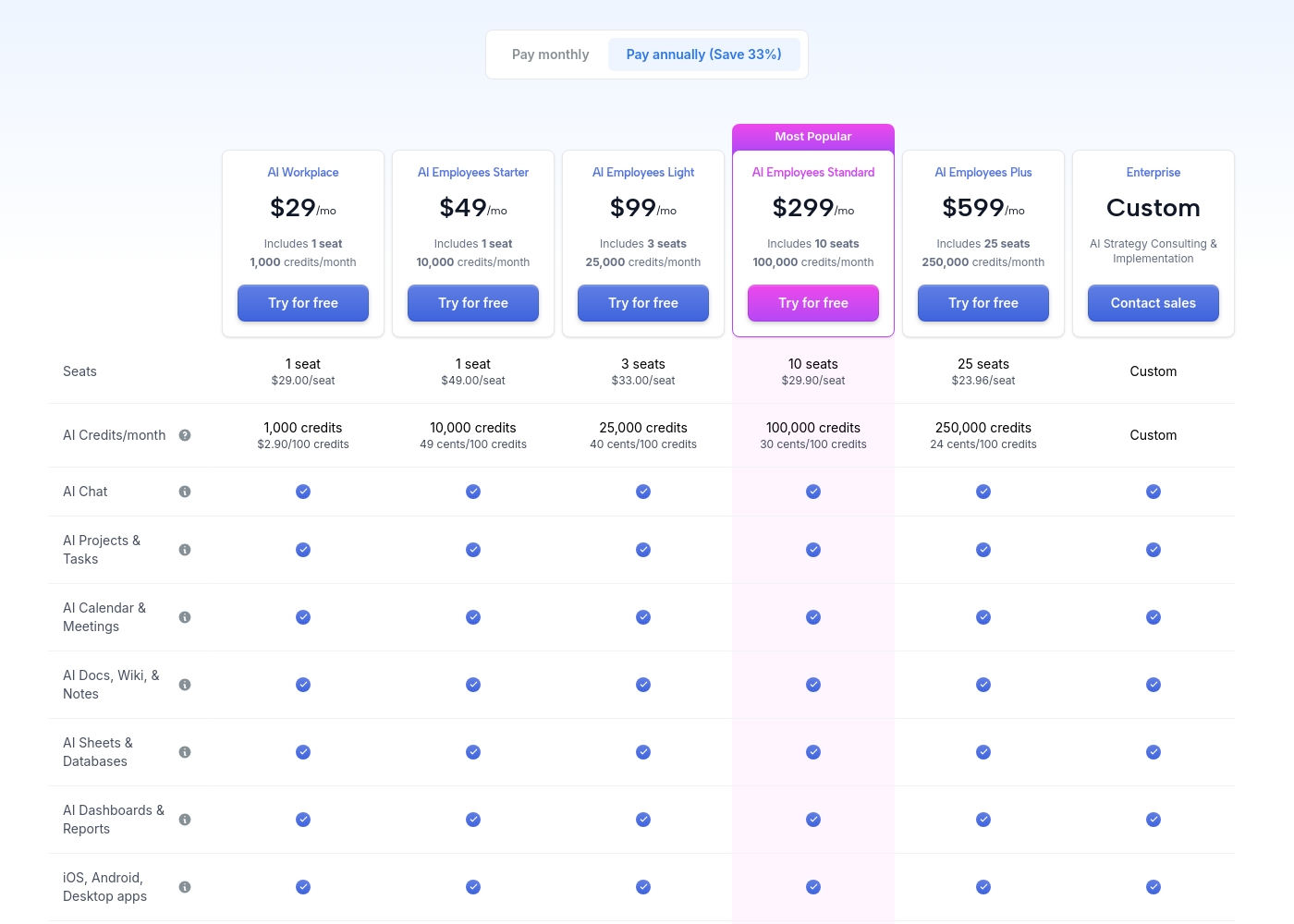
Motion pricing starts at $29/month and scales up to $599/month (billed annually). The cost depends heavily on the volume of AI Credits used monthly. Scaling AI usage becomes significantly cheaper per credit on larger Motion plans. Wrike offers a Free plan and paid plans starting sharply lower at $10/user/month (Team plan). Wrike’s Business plan is $25/user/month, priced competitively for large organizations. Paid Wrike tiers require an annual commitment. Wrike carries lower entry costs per user, making it budget-friendly for large teams. Motion is a premium service with a higher barrier to entry focused on high productivity return. Wrike customers often report significant difficulty canceling subscriptions and aggressive renewal pricing. Motion's pricing is higher but aims to justify the cost through guaranteed time savings.
Motion costs between $29 and $599 per month (when billed annually) with 5 primary subscription plans: AI Workplace ($29/mo), AI Employees Starter ($49/mo), AI Employees Light ($99/mo), AI Employees Standard ($299/mo), and AI Employees Plus ($599/mo). There is also a custom Enterprise option.
The prices shown reflect annual billing, which gives you a savings of 33% compared to paying monthly. All plans offer a free trial period.
AI Workplace
Price: $29/mo (billed annually) Best For: Individuals and small startups starting AI integration Other Features:
- Includes 1 seat
- 1,000 credits/month ($2.90 per 100 credits)
- 3 integration connections
- Access to core AI tools (Chat, Projects, Calendar, Docs, Sheets, Dashboards)
- 1 seat
- 1,000 credits/month
- 3 integration connections
- AI Chat, Projects & Tasks, Calendar & Meetings, Docs, Wiki & Notes, Sheets & Databases, Dashboards & Reports
- iOS, Android, Desktop apps
- 1 seat
- 10,000 credits/month
- 5 integration connections
- Everything in AI Workplace
- 3 seats
- 25,000 credits/month
- 10 integration connections
- Everything in AI Employees Starter
- 10 seats (Most Popular)
- 100,000 credits/month
- 20 integration connections
- HTTP Blocks
- Everything in AI Employees Light
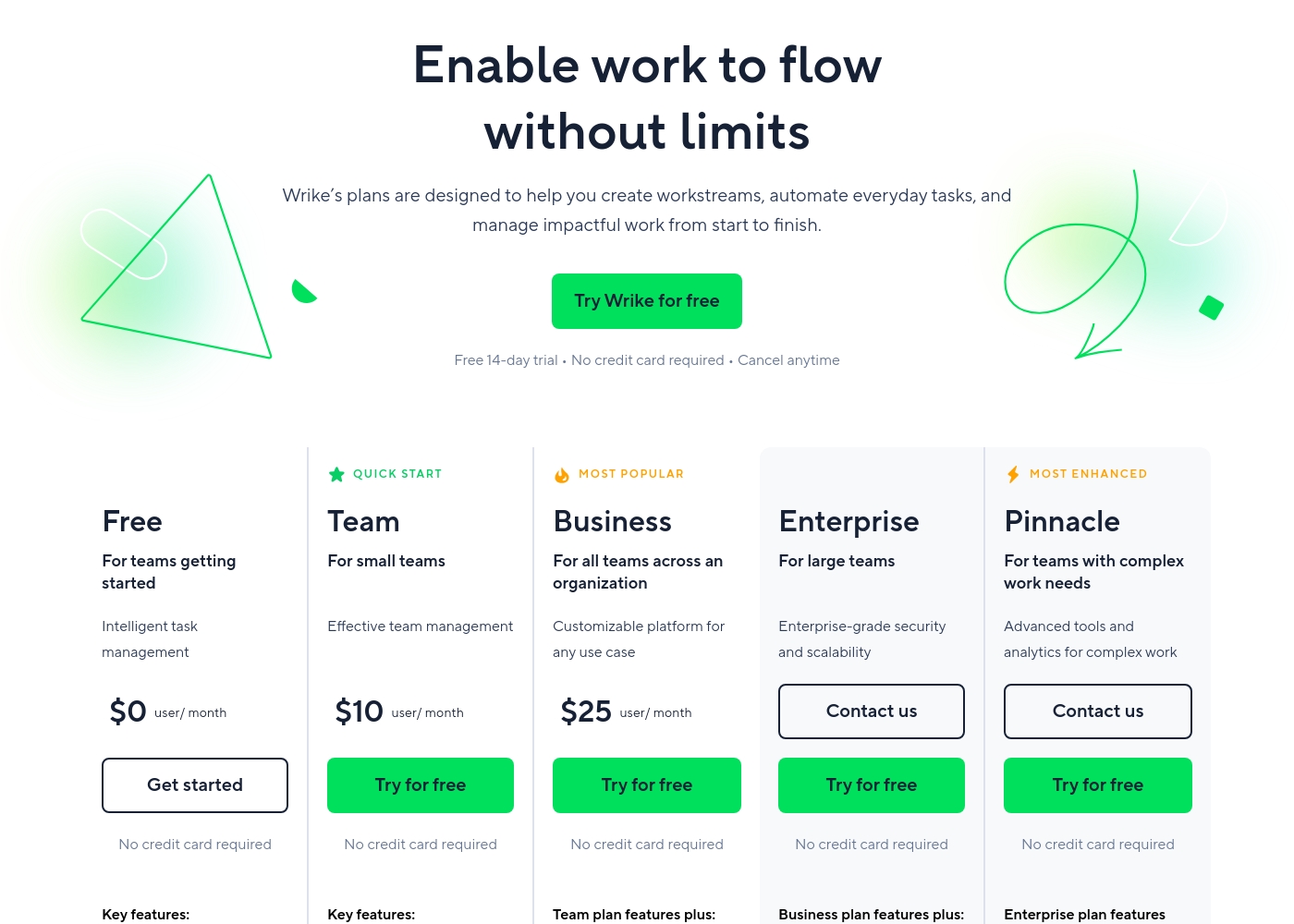
Wrike costs between $0 and $25 per user/month, with five plans: Free at $0/user/month, Team at $10/user/month, Business at $25/user/month, and Enterprise and Pinnacle which require users to contact sales.
- Web, desktop, and mobile apps
- Project and task management
- Board view (Kanban)
- Table view (spreadsheet format)
- Folders structure & nested projects
- Unlimited projects, tasks, & subtasks
- Gantt charts, Calendar & Chart view
- Generative AI, 2 GB storage per user
- Project Blueprints and Unlimited request forms
- Approvals & guest approvals
- Resource & Capacity Planning
- File and video proofing (30+ file formats)
- Real-time reports
- SAML-based SSO and Two-Factor Authentication (2FA)
- Password policies and custom access roles
- Customizable user types and Admin permissions
- User audit reports
Pricing Notes
- Motion’s pricing is complex, scaling based on the number of seats and required monthly AI Credits.
- Wrike offers a permanent Free plan, which Motion does not provide.
- Both Motion and Wrike require an annual commitment for all standard paid plans.
- Wrike offers significantly lower per-user monthly costs, starting at $10/user/month.
- Wrike users frequently report aggressive renewal increases and serious difficulties canceling annual contracts.
Pricing Head-to-Head
User Reviews
Motion receives overwhelmingly positive feedback, primarily focused on its powerful auto-scheduling and prioritization features. Users frequently praise the application for reducing mental load and decision fatigue by automatically organizing tasks and project workflows.
Many reviewers, including those dealing with complex schedules or ADHD, state that Motion has revolutionized their workflow, saving significant time and boosting productivity. The ability to break down complex goals into achievable tasks is consistently highlighted as a major benefit, making Motion a game-changer for project management teams and individuals alike.
I was recently diagnosed with ADHD, and Motion has made a huge difference in how I structure my day. It removes the stress of figuring out what to do next. It has been well worth the time invested in learning the system, as the benefits are truly clear.
Users consistently praise Wrike's powerful capabilities in transforming workflow management and driving organizational efficiency. Many reviewers, including team leads and large enterprise users, call it one of the best project management systems available, noting its strong suitability for high-level customization for specific methodologies like OKR.
Its ability to centralize communication, provide 360° visibility, and manage collaboration across large global teams is frequently highlighted as second to none. Furthermore, customer support is often described as exemplar, particularly regarding implementation and quick bug fixes.
Using Wrike for three years has completely changed how we manage our workflows. The biggest transformation is how streamlined and fast our operations have become. It's truly efficient for our large team.
Our Verdict
This choice is simple: prioritize customized AI execution versus deep enterprise structure. Motion is the clear winner for individual productivity and deep task management control. Wrike is built as the robust system necessary for large teams needing governance. Both Motion and Wrike require annual commitments for full access to their paid plans. Motion’s superpower is its customized AI Workforce and powerful auto-scheduling engine. Motion constantly reorganizes your day, removing daily decision stress and maximizing user focus. It provides an integrated suite of calendar, projects, and documents. Motion users often report massive time savings and reduced mental load. Wrike performs best when managing complex corporate workflows across hundreds of employees. Wrike provides critical enterprise features like sophisticated Resource Planning and specialized file proofing for agencies. Wrike ensures management maintains 360° visibility and detailed control over every project timeline. The deciding factor hinges on team size and your core bottleneck. If your specialized team needs AI to execute work and set the immediate schedule, Motion is essential. If your large organization needs to standardize processes and approvals, Wrike handles that complexity better. Wrike is much cheaper per user, starting low at $10/month, but be cautious of its aggressive renewal practices. Motion is a higher upfront investment aimed at maximizing personalized efficiency gains. Choose Motion for time mastery; choose Wrike for organizational control.
Frequently Asked Questions
Which is better for small teams: Motion or Wrike?
Motion is better for small, high-performing teams focused on AI efficiency and scheduling mastery. Wrike offers a Free plan, but its complexity is often overkill for teams under 20 users. Motion is optimized for dramatic personal productivity gains.
Does Motion offer resource management features like Wrike?
Motion uses AI to intelligently assign and load balance tasks across its seats automatically. Wrike offers dedicated Resource Planning tools on its Business tier for strategic oversight. Wrike provides the traditional managerial control over capacity.
Is Wrike generally more budget-friendly than Motion?
Yes, Wrike is significantly cheaper per user, starting at $10/user/month for the Team plan. Motion starts at $29/month for solo use, reflecting the cost of its intensive AI processing. Wrike offers broader scaling at a lower per-seat price.
Which tool is better for marketing and creative approvals?
Wrike is far superior for creative workflows and approvals. It offers proofing for over 30 file formats, including video proofing and guest approvals. Motion lacks these dedicated, structured review capabilities.
Can I pay monthly for Motion or Wrike paid plans?
No, both Motion and Wrike require an annual commitment to access their primary paid subscription tiers. You save by paying annually for Motion, but monthly billing is not listed for either product.
How does Motion's specific AI differ from Wrike's Generative AI?
Motion's AI creates custom Employees and Skills that execute complex tasks end-to-end. Wrike’s AI provides advanced analytics, data reporting, and risk prediction for managers. Motion handles the doing, Wrike handles the analyzing.
Ready to Choose?
Both tools have their strengths. Choose based on your specific needs.