Motion vs Notion
Motion and Notion are both top productivity platforms, but they focus on solving different core problems. Motion gives you an autonomous AI assistant that expertly manages your tasks and schedule automatically. Notion provides a highly flexible, block-based workspace meant to consolidate all your team’s knowledge and tools.
Best for: Individuals tired of manual rescheduling and task prioritization, High-growth startups focused purely on maximizing project management efficiency
Best for: Individuals needing a powerful, permanent Free plan, Teams prioritizing the centralization of wikis and company knowledge
AI scheduling that manages your work.
We observed that Motion delivers on its promise of powerful, AI-driven task management and scheduling. Users consistently report massive time savings and reduced cognitive load, but the complex credit and seat pricing structure requires careful study. Overall, Motion is a transformative tool for dedicated users who commit to mastering its full capabilities.
Pros
- Reduces mental load using intelligent auto-scheduling and task prioritization.
- Integrates tasks, projects, and calendar into a single, cohesive productivity suite.
- Helps teams break down major goals into manageable, achievable steps for progress.
- High-quality AI note-taker joins meetings and summarizes them effectively.
Cons
- High price point ($50/month cited as excessive by some single users).
- Steep learning curve requires significant upfront time to fully master the system.
- Reported UX/UI glitches, such as obstructive task preview pop-ups.
- Users note that the mobile app and notification features need improvement.
Powerful software, risky provider.
We found Notion is an exceptionally flexible and powerful productivity tool, praised globally for its block-based editor and ability to consolidate diverse workflows. However, external evidence highlights significant failures in subscription management and support responsiveness. Overall, we advise extreme caution regarding billing procedures due to recurring reports of unauthorized charges and cancellation difficulties.
Pros
- Exceptionally powerful and versatile block-based editor.
- Effective for personal knowledge management and team use.
- Consolidates multiple specialized tools (wikis, CRMs, project management).
- Strong native AI assistance integrated throughout the workspace.
Cons
- Widespread reports of deceptive or confusing billing practices.
- Extremely poor and unresponsive customer support experiences.
- Users report app is often slow and unreliable.
- Difficulty canceling subscriptions and obtaining timely refunds.
AboutMotion
Motion transforms how teams work by offering the world's first AI workforce at your fingertips. ✨ This platform goes far beyond simple automation; it lets you create and deploy enterprise-grade AI Employees specifically built for your business needs. It merges an entire productivity suite—including AI Projects, AI Calendar, and AI Tasks—where all your work is managed and recorded. Motion is trusted by over a million top performers and teams who want a single, powerful platform for managing work efficiently.
AboutNotion
Notion is your dedicated AI workspace and everything app. It is built to replace multiple specialized tools with one powerful platform. This centralized space lets teams consolidate project management, internal wikis, and basic CRM functions. Notion is trusted broadly; over 100 million users worldwide use it, and 62% of the Fortune 100 are customers. You can use it right in your browser or download specialized tools like Notion Mail and Notion Calendar to keep time and work together. ✅
Highlights
Feature Comparison
Features Overview
We highlight the main differences and pick a winner for each feature.
Automation & Scheduling
Motion is fully autonomous; Notion requires manual task management using databases.
Motion’s true power lies in its aggressive task management and scheduling. It automatically prioritizes tasks and reorganizes your day when anything changes. Companies report Motion helps teams get projects done up to 30% faster. Notion uses custom databases and allows manual task management and dependencies. You must manually schedule meetings and adjust projects as priorities shift. This is the biggest functional difference between Motion and Notion. Motion acts as an automation engine, while Notion acts as a flexible canvas. If manual organization overwhelms you, Motion's auto-scheduling justifies its higher cost.
Knowledge Management
Notion is the industry benchmark for wikis; Motion offers an integrated document suite.
Notion excels at becoming the central source of truth for any organization. It has been rated the #1 knowledge base for three years by G2. Notion helps new hires onboard themselves by centralizing all company knowledge in one spot. Motion includes integrated tools like AI Docs, Wiki, and Notes within its suite. This ensures AI Employees always have full context for accurate results. Where Notion focuses primarily on document flexibility, Motion prioritizes contextual knowledge gathering. If consolidating scattered documents is your main goal, Notion is the clear platform winner here.
Custom AI Workforce
Motion lets you build custom AI workers; Notion provides a standard AI writing assistant.
Motion allows you to create fully custom AI Employees and Skills instantly. You use natural language to describe what work your new AI assistant should do. Notion provides a powerful built-in AI writing and summarization assistant. Every user gets this tool, but you cannot build bespoke, executing agents. Motion’s agents are designed to finish real work end-to-end, unlike Notion's assistant, which primarily handles text generation. This customizability makes Motion excellent for delegating complex, repeatable, and cross-tool workflows.
Pricing & Predictability
Notion uses simple per-seat pricing; Motion uses complex, annual, usage-based pricing.
Motion uses an annual subscription model based on seats and usage-based AI Credits. Plans range from $29 to $599 per month, forcing careful calculation of AI credit needs. Notion uses straightforward per-seat pricing, starting at $10/month for the Plus plan. This model is much easier to budget and predict month-to-month. Notion also offers a robust, permanent $0 Free plan for individuals and small teams. Motion only provides a limited free trial. Motion's setup is much less friendly to small budgets or unpredictable AI usage demands.
Customer Support Quality
Motion support is generally responsive; Notion support is widely reported as unresponsive and poor.
Motion support is responsive, especially concerning billing inquiries, according to user feedback. Priority Business Support is available on the highest-tier plans to ensure quick resolution. Notion users widely report extremely poor customer support and unresponsive experiences. This unresponsiveness is often tied to frustrating billing disputes. Notion's transactional failures undermine its excellent product functionality for many users. Motion’s focus on dedicated support tiers suggests a higher commitment to enterprise-level service reliability.
Security & Compliance
Motion is SOC 2 compliant; Notion offers advanced security features only on Business/Enterprise tiers.
Motion ensures enterprise-grade security and is fully SOC 2 Type 2 compliant. This high standard means data is encrypted when transmitted and stored. Notion offers basic data protection, with advanced security features like Audit Logs on Business plans. Enterprise plans add SCIM and DLP/SIEM integrations. Motion leads with a high, certified compliance standard, simplifying security assessment for large teams. Notion users seeking the highest security must opt for the expensive Enterprise plan, including zero data retention for AI.
Ecosystem Consolidation
Notion replaces many niche tools; Motion focuses on integrating one powerful suite with AI.
Notion is designed to be the 'everything app,' replacing multiple specialized tools efficiently. Teams have moved from six separate apps down to just one Notion workspace. Motion offers a fully integrated suite including AI Projects, Docs, and Calendar to provide context. The suite focuses on deep AI integration rather than tool replacement. Notion’s block-based format allows users to build everything from wikis to simple CRMs. If simplifying your entire SaaS stack is the priority, Notion delivers superior consolidation capabilities.
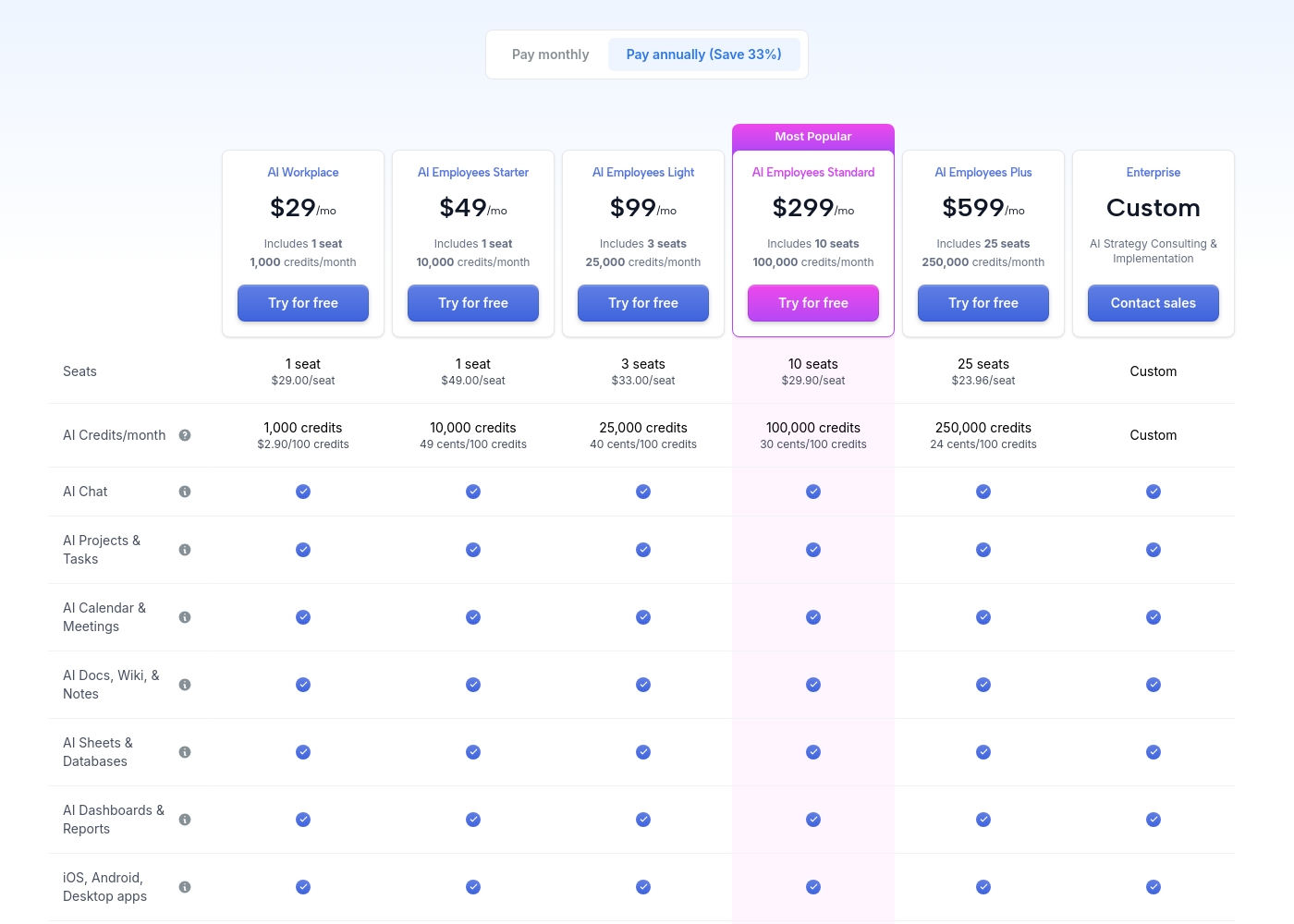
Motion costs between $29 and $599 per month (when billed annually) with 5 primary subscription plans: AI Workplace ($29/mo), AI Employees Starter ($49/mo), AI Employees Light ($99/mo), AI Employees Standard ($299/mo), and AI Employees Plus ($599/mo). There is also a custom Enterprise option.
The prices shown reflect annual billing, which gives you a savings of 33% compared to paying monthly. All plans offer a free trial period.
AI Workplace
Price: $29/mo (billed annually) Best For: Individuals and small startups starting AI integration Other Features:
- Includes 1 seat
- 1,000 credits/month ($2.90 per 100 credits)
- 3 integration connections
- Access to core AI tools (Chat, Projects, Calendar, Docs, Sheets, Dashboards)
- 1 seat
- 1,000 credits/month
- 3 integration connections
- AI Chat, Projects & Tasks, Calendar & Meetings, Docs, Wiki & Notes, Sheets & Databases, Dashboards & Reports
- iOS, Android, Desktop apps
- 1 seat
- 10,000 credits/month
- 5 integration connections
- Everything in AI Workplace
- 3 seats
- 25,000 credits/month
- 10 integration connections
- Everything in AI Employees Starter
- 10 seats (Most Popular)
- 100,000 credits/month
- 20 integration connections
- HTTP Blocks
- Everything in AI Employees Light
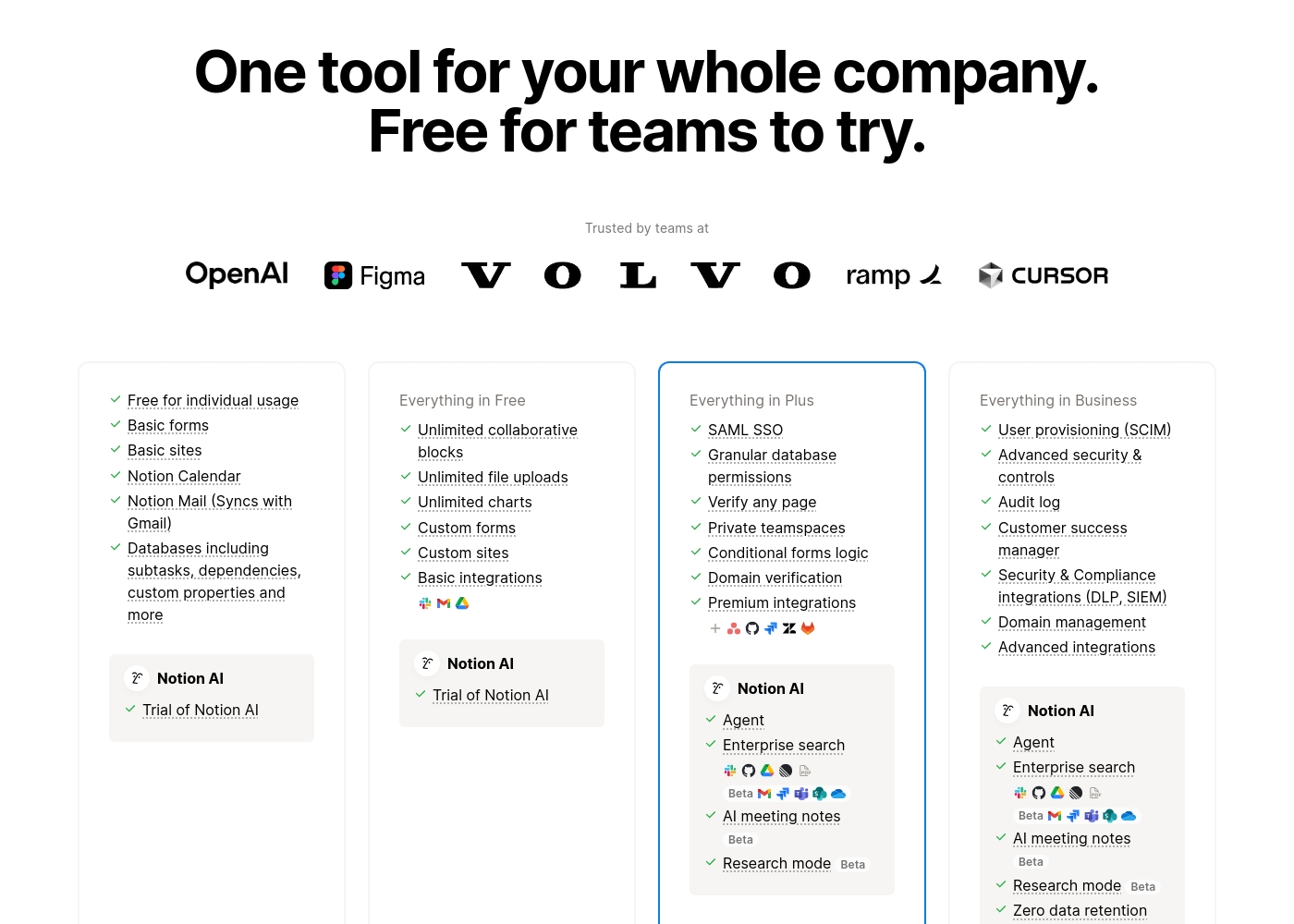
Notion costs between $0 and $20 per seat/month with four plans: Free at $0/seat/month, Plus at $10/seat/month, Business at $20/seat/month, and Enterprise (custom pricing).
Here’s a detailed look at the core features included in each subscription level.
- Unlimited pages and blocks for individuals
- Web publishing with 1 custom subdomain
- Basic forms and sites
- Notion Calendar and Mail synchronization
- Databases with subtasks and dependencies
- Unlimited blocks and file uploads
- 30 days of page history
- Basic SAML SSO
- Granular database permissions
- Access to unlimited charts
- 90 days of page history
- Advanced security controls and Audit log
- Conditional forms logic
- Domain verification
- Advanced page analytics (includes editor list)
- Unlimited page history and workspace analytics
- SCIM user provisioning
- Zero data retention with LLM providers for Notion AI
- Customer Success Manager support
- Security & Compliance integrations (DLP, SIEM)
Pricing Notes
- Notion offers a permanent, feature-rich Free plan, while Motion only offers a free trial.
- Motion prices reflect annual billing; monthly rates are significantly higher, potentially 33% more.
- Motion utilizes a credit system alongside seats, leading to variable costs based on AI usage.
- Notion's simple per-seat pricing is much more predictable for budgeting a team.
- Many Notion users report frustrating experiences with billing, surprise charges, and difficulty canceling subscriptions.
Pricing Head-to-Head
User Reviews
Motion receives overwhelmingly positive feedback, primarily focused on its powerful auto-scheduling and prioritization features. Users frequently praise the application for reducing mental load and decision fatigue by automatically organizing tasks and project workflows.
Many reviewers, including those dealing with complex schedules or ADHD, state that Motion has revolutionized their workflow, saving significant time and boosting productivity. The ability to break down complex goals into achievable tasks is consistently highlighted as a major benefit, making Motion a game-changer for project management teams and individuals alike.
I was recently diagnosed with ADHD, and Motion has made a huge difference in how I structure my day. It removes the stress of figuring out what to do next. It has been well worth the time invested in learning the system, as the benefits are truly clear.
Trustpilot feedback paints a sharply divided picture of Notion. While many users praise the platform as a terrific tool—highlighting its power, versatility, and unique block-based editor for personal and professional organization—these compliments are often eclipsed by grave concerns regarding management and billing practices.
A recurring major theme across many reviews details frustrating experiences with unexpected charges, deceptive auto-upgrades (especially relating to annual plans and new members), and significant challenges when trying to cancel subscriptions or obtain timely refunds. Furthermore, support responsiveness is frequently described as unsatisfactory, unhelpful, or even condescending, often failing to resolve billing errors or login issues.
Enjoy using Notion a lot for my daily work interface. It helps me set up my employees and assign tasks with no issue at all. We upgraded from the free plan and will absolutely continue using the platform.
Our Verdict
Motion and Notion are foundational tools, but they appeal to completely different user needs. Motion focuses on aggressive automation; Notion wins on flexibility and consolidation. The decision hinges on whether you need a manager or an organizer. Motion’s superpower is its self-governing automation and priority management. It significantly reduces cognitive load by auto-scheduling and dynamically reordering tasks for you. Motion lets you build a custom AI workforce to execute complex workflows autonomously. Notion excels at being your organization’s single source of truth for everything. Its flexible, block-based workspace easily replaces specialized apps like wikis and basic CRMs. Notion is the reigning champion for centralized knowledge management and documentation. The key deciding factor is the level of automation you demand versus budget and clarity. Notion offers a great Free plan, but Motion demands a higher price for essential autonomous capabilities. Motion uses annual, usage-based billing, making Notion’s per-seat fee much simpler. Choose Motion if you need an expensive, powerful AI assistant managing critical tasks and projects for you every day. Choose Notion if you need an affordable, flexible system to organize team knowledge and manage documentation effectively.
Frequently Asked Questions
Which software is better for managing daily individual tasks: Motion or Notion?
Motion is far superior for daily task management due to its auto-scheduling functionality. Motion’s AI automatically prioritizes and adjusts tasks throughout your day. Notion requires you to manually manage tasks within a database, lacking true automation capabilities.
Can Motion replace Notion as a central knowledge base (wiki)?
While Motion has integrated Docs and Wiki tools, Notion is fundamentally better for knowledge centralization. Notion is specialized for this function and is consistently rated as the top knowledge base. Motion's focus is automation, not primary documentation.
Is the pricing for Motion significantly higher than Notion?
Yes, Motion is much more expensive, starting at $29/month (annual billing) per user. Notion offers a free plan and paid plans starting at only $10/user/month. Motion's usage-based credit system also adds complexity to its overall cost.
Does Notion offer custom AI agents like Motion does?
No, Notion includes an integrated AI writing and summarization assistant for text generation. Motion allows you to build and deploy custom AI Employees that execute end-to-end workflows. Motion provides true AI workforce building capabilities.
Which tool has better customer reviews: Motion or Notion?
Motion has significantly higher customer satisfaction ratings at 4.1/5, compared to Notion's 2.9/5. Notion users often report issues with billing, surprise charges, and unresponsive support. Motion users praise its product, despite the steep learning curve.
Which tool should a small development team choose: Motion or Notion?
If the team needs a wiki, documentation, and consolidated project tracking, Notion is better. If the team struggles with deadlines and needs superior task prioritization and automation, Motion is the right choice. Notion offers better integration with tools like Jira and GitHub.
Ready to Choose?
Both tools have their strengths. Choose based on your specific needs.