Ora vs Wrike
Ora and Wrike are top-tier project management platforms, but they serve different masters. Ora champions user-friendliness and focus for budget-conscious small teams. Wrike specializes in complex enterprise workflows and deep, AI-powered analytics. The required financial commitment is often the biggest deciding factor here.
Best for: Startups or small teams (under 10 users) seeking a strong free solution, Teams prioritizing task clarity and intuitive daily planning (Agenda Calendar)
Best for: Enterprise organizations (50 to 20,000 employees) needing structured scaling, Marketing and creative services teams needing file proofing on 30+ formats
The Modern, User-Friendly Command Center
We found Ora provides an impressive balance between comprehensive features and usability, positioning itself as a strong alternative to established systems. Its generous free tier and unique calendar-focused organization greatly benefit small, growing teams and individuals. Overall, we recommend Ora highly for collaborative organizations seeking a focused, effective project management solution.
Pros
- Generous free plan available for small teams (up to 10 users) forever.
- Exceptional user-friendliness; users prefer it over competitors like Trello.
- Comprehensive task cards support RTF, Markdown, and custom code highlights.
- Agenda Calendar helps users achieve better focus and plan dedicated work time.
Cons
- External review volume is currently very limited (only 3 Trustpilot reviews).
- File size limit is restrictive on the Basic (free) tier (a maximum of 10mb).
Enterprise Power Meets Complex Commitment.
We find Wrike is an exceptionally versatile project solution, noted for scaling efficiently across corporate environments up to 3000 users and unifying communication across highly complex workflows. Overall, the software offers a powerful feature set for advanced visibility and customization, but we caution users regarding the rigid annual subscriptions and documented difficulties with managing auto-renewal and pricing increases.
Pros
- Transforms and streamlines complex corporate workflows efficiently.
- Highly customizable for various methodologies (e.g., Holacracy, OKR).
- Excellent collaborative transparency and 360° project visibility.
- Provides fast and helpful customer support regarding implementation and bugs.
Cons
- Pricing practices are reported as aggressive, often resulting in significant renewal increases.
- Subscriptions are difficult to cancel, and users report trouble stopping automatic renewal.
- Some teams report challenging adoption and setup processes.
- Users report instances of being oversold on features bundles they did not need.
AboutOra
Ora is a powerful platform designed for productive individuals and collaborative teams. It serves as your daily planner and central hub for managing work. The core Agenda Calendar helps you organize your time and be more effective. Instead of dealing with separate tools, all your critical information, tracked time, and completed tasks appear directly on your calendar. You can quickly view both your tasks and those of your teammates, ensuring smooth collaboration. 💡
AboutWrike
Wrike is a trusted end-to-end enterprise work management solution. It's designed for organizations ready to transform manual processes into interconnected, automated workflows. Teams from 20 to 20,000 thrive here because Wrike is highly adaptable to any industry or size. It brings multiple teams into the same place for game-changing visual collaboration. Wrike is where you can easily align strategy and effectively execute your projects and programs. 💡
Highlights
Feature Comparison
Features Overview
We highlight the main differences and pick a winner for each feature.
Pricing Flexibility
Ora is flexible with monthly options; Wrike demands mandatory annual commitments.
Ora offers transparent monthly pricing starting at $10/user. Annual commitment is optional and provides a slight discount. Ora also efficiently handles mid-cycle billing changes. Wrike requires customers to purchase mandatory annual commitments for paid tiers. All paid plans are billed yearly, making cancellation and changes very difficult. Users report aggressive upselling and renewal price hikes. The rigid annual financial commitment for Wrike is a significant decision point. Ora's month-to-month contracts offer superior financial flexibility for growing teams. Choose Ora if you need a lower initial commitment or expect team size changes later in the year.
Ease of Adoption
Ora is exceptionally intuitive; Wrike is powerful but requires significant setup.
Ora is frequently praised by users as “exceptionally user-friendly.” Its interface is clean, streamlined, and considered superior to competitors like Trello. The learning curve is very gentle, ideal for fast adoption. Wrike is built for organizational complexity and maximum power. Teams report “challenging adoption processes” and often need professional services for setup. It excels once configured, but initial effort is high. Ora suits smaller teams and beginners looking for immediate productivity. Wrike is necessary only if your organizational complexity demands deep customization and structure. For teams needing to get productive immediately without training, Ora is the safer, faster choice.
Enterprise Security
Wrike provides audited compliance; Ora focuses on basic encryption/SSO.
Ora offers essential enterprise features like Single Sign-On and File encryption. Payment security is handled via PCI DSS compliant Braintree. Wrike maintains audited compliance with SOC2, ISO 27001, and GDPR standards. It guarantees high 99.9% uptime and provides custom access roles. For large corporations, Wrike’s third-party compliance and audit reports are mandatory. Ora delivers strong internal security but lacks the same external validation. Wrike ensures the high-level security controls demanded by regulated industries and massive organizations.
Strategic Planning
Wrike plans global resources; Ora plans personal and team time on a calendar.
Ora uses its unique Agenda Calendar combined with time tracking. This helps users plan individual time effectively and see tracked work against their tasks. It is excellent for personal focus. Wrike’s Business plan includes dedicated Resource and Capacity Planning tools. Managers achieve 360° visibility to strategically optimize staff workloads across departments. For true strategic resource allocation and long-term capacity forecasting, Wrike is the necessary instrument. Ora’s focus remains tactical and task-centric. Wrike helps you avoid over-allocating teams and keeps large, strategic projects on deadline.
Free Plan Generosity
Ora's free tier is superb; Wrike's free plan is feature-limited.
The Ora Basic plan is completely free forever for up to ten organization members. Users get unlimited projects, tasks, and core collaboration features. Only the 10mb file limit is restrictive. Wrike offers a free plan with standard PM features but enforces undefined “active task limitations.” It feels more like an extended trial than a long-term solution for growing teams. Ora provides a known quantity (10 free users) with excellent functionality. Wrike's limitations make it difficult to commit to for sustained, serious use. Ora is perfect if you need a powerful, free PM solution to sustain a small, growing team indefinitely.
Document & Media Review
Wrike handles 30+ file types; Ora delivers easy image and video annotation.
Ora provides seamless feedback by allowing direct annotation on files. Users can easily mark up images, PDFs, and video documents for clear revisions. This centralizes discussion effectively. Wrike offers robust Proofing and Approvals supporting over 30 different file formats, including video proofing. It also supports guest approvals for streamlined client sign-offs. For marketing or creative teams dealing with diverse file formats, Wrike's comprehensive proofing wins. Ora is strong but limited to fewer formats. Creative teams accelerating approvals on high-volume, diverse assets should look towards Wrike.
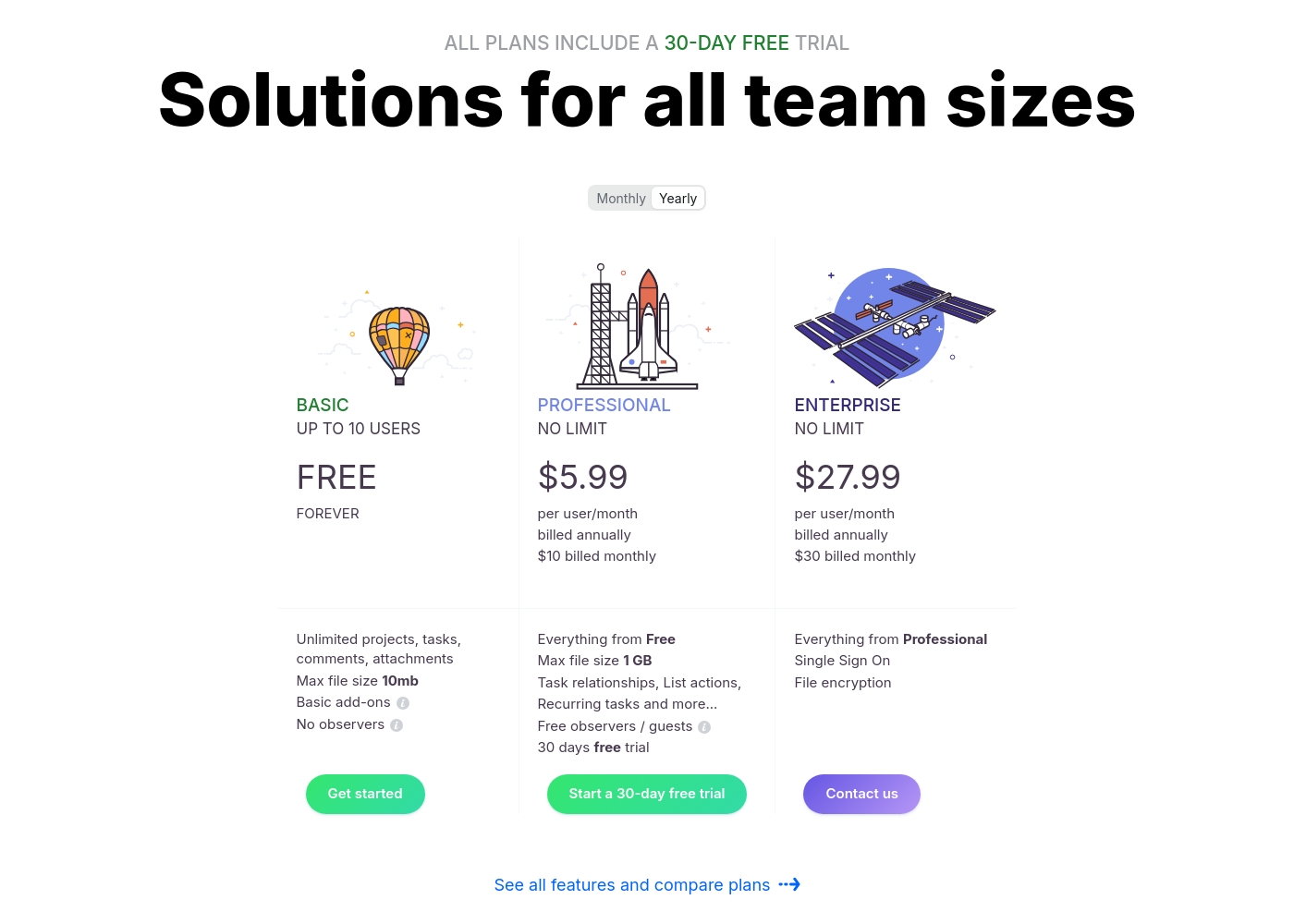
Ora costs between $0 and $30 per user/month with three plans: Basic at $0, Professional starting at $5.99 per user/month, and Enterprise starting at $27.99 per user/month.
We provide solutions for all team sizes, ensuring you only pay for the features and scale you truly need.
Ora Basic
Price: $0.00 / month (Free Forever) Best For: Teams of up to 10 users needing core project management and collaboration. Other Features:
- Unlimited projects, tasks, comments, and attachments
- Max file size is 10mb
- Includes Basic add-ons
- Supports up to 10 organization members
- Unlimited projects
- Unlimited tasks, comments, attachments
- Web, desktop, iOS, and Android apps
- Max file size 1 GB
- Task relationships
- Recurring tasks
- List actions (automation)
- Free observers / guests
- Single Sign On (SSO)
- File encryption
- Everything from Professional tier
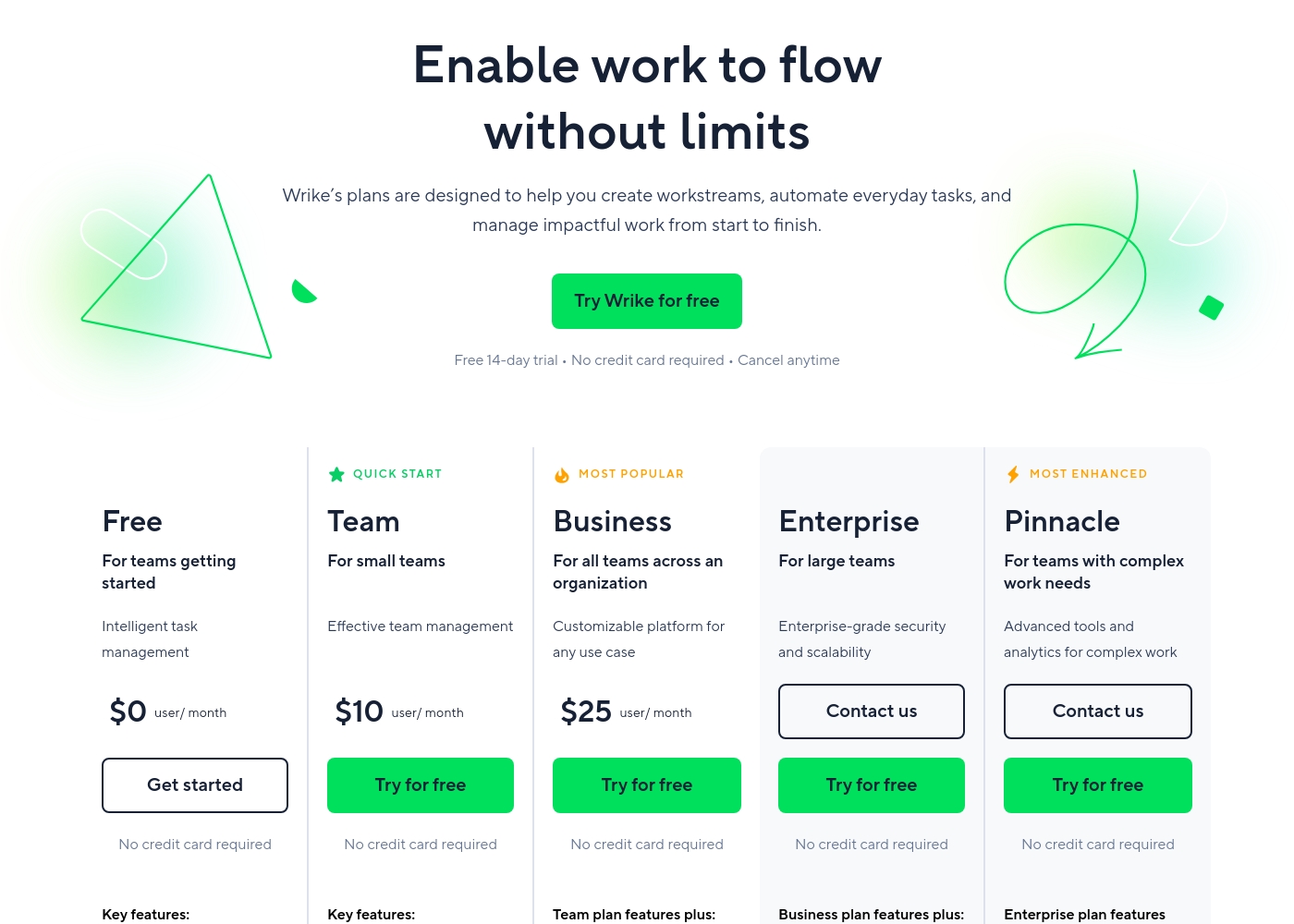
Wrike costs between $0 and $25 per user/month, with five plans: Free at $0/user/month, Team at $10/user/month, Business at $25/user/month, and Enterprise and Pinnacle which require users to contact sales.
- Web, desktop, and mobile apps
- Project and task management
- Board view (Kanban)
- Table view (spreadsheet format)
- Folders structure & nested projects
- Unlimited projects, tasks, & subtasks
- Gantt charts, Calendar & Chart view
- Generative AI, 2 GB storage per user
- Project Blueprints and Unlimited request forms
- Approvals & guest approvals
- Resource & Capacity Planning
- File and video proofing (30+ file formats)
- Real-time reports
- SAML-based SSO and Two-Factor Authentication (2FA)
- Password policies and custom access roles
- Customizable user types and Admin permissions
- User audit reports
Pricing Notes
- Ora provides superior financial flexibility with optional monthly billing on paid plans.
- Wrike requires an upfront annual commitment for all paid plans (Team tier and above).
- Ora’s free plan is significantly more generous, supporting up to 10 users indefinitely.
- Wrike users heavily report aggressive upselling and substantial difficulty canceling annual renewals.
- Ora's paid plans offer a significantly longer 30-day free trial compared to Wrike's 14-day trial.
Pricing Head-to-Head
User Reviews
Customer sentiment for Ora is strongly positive, emphasizing its robust capabilities and outstanding usability. Several reviewers highlight that Ora is exceptionally user-friendly and superior to competitors like Trello, even though it is a relatively younger product.
Users rely on the platform daily for managing diverse projects, and one reviewer called it simply "the best platform for PM." While the current feedback volume is low, the recurring themes suggest high satisfaction regarding core functionality and daily reliability. The enthusiasm indicates that users find the platform’s functional depth combined with its ease of use provides strong value for teams seeking a productive command center.
Ora is one of my favorite daily web services for managing various tasks. It’s exceptionally user-friendly and handles diverse projects easily. I recommend it as a superior option compared to Trello.
Users consistently praise Wrike's powerful capabilities in transforming workflow management and driving organizational efficiency. Many reviewers, including team leads and large enterprise users, call it one of the best project management systems available, noting its strong suitability for high-level customization for specific methodologies like OKR.
Its ability to centralize communication, provide 360° visibility, and manage collaboration across large global teams is frequently highlighted as second to none. Furthermore, customer support is often described as exemplar, particularly regarding implementation and quick bug fixes.
Using Wrike for three years has completely changed how we manage our workflows. The biggest transformation is how streamlined and fast our operations have become. It's truly efficient for our large team.
Our Verdict
Ora and Wrike offer two vastly different paths to project success for teams. Your ultimate choice depends entirely on your team size and financial needs. Ora is the clear winner for small, growing teams who value usability and budget control. Wrike offers unparalleled power but requires a complex setup and a deep annual financial commitment. Ora's superpower is its phenomenal user experience and focus on daily work. The unique Agenda Calendar helps teams achieve better focus and reduce email clutter. Ora also provides a generous free plan for up to ten people forever. Its month-to-month price structure offers financial flexibility that Wrike simply cannot match. Wrike's superpower is enterprise-grade complexity, scale, and deep analysis. Features like Resource Planning and AI analytics guide strategic decision-making. Wrike provides the 360° visibility necessary for managing thousands of employees. Its high security compliance, like SOC2, satisfies stringent corporate requirements. The deciding factor is the commitment Wrike demands from its customers. Wrike locks you into mandatory annual contracts and users report difficult cancellation procedures. If you are a team under 20, Ora’s flexibility and intuitive design make it the safer choice. Choose Ora for easy adoption, flexibility, and a great free plan right now. Opt for Wrike if you are a massive organization requiring mandated annual scale, AI analytics, and rigorous resource management.
Frequently Asked Questions
Which tool is better for small teams and startups: Ora or Wrike?
Ora is far better for small teams and startups under 10 users. Ora offers a powerful free plan supporting ten people forever. Wrike's free plan is more restrictive and less valuable for long-term use.
Does Ora offer resource and capacity planning features like Wrike?
No, Ora focuses on time tracking and personal Agenda planning for individual effectiveness. Wrike's Business plan features dedicated Resource and Capacity Planning tools. Wrike provides the strategic resource oversight Ora lacks.
How does the pricing commitment differ between Ora and Wrike?
Ora offers flexible monthly subscriptions for paid tiers with no obligation. Wrike requires customers to purchase mandatory annual commitments for paid plans. This rigid commitment is a major financial distinction.
Which tool offers stronger enterprise security and external compliance?
Wrike is strongly focused on enterprise, boasting SOC2 and ISO 27001 compliance. Ora offers file encryption and SSO but does not list comprehensive third-party security certifications. Wrike is necessary for highly regulated industries.
Which is better for reducing email clutter: Ora or Wrike?
Ora is specifically designed to reduce email correspondence by centralizing all communication. Users report increased focus using Ora’s Agenda Calendar. Wrike also centralizes work but doesn't have the same explicit focus on email reduction.
Why is Wrike's user satisfaction rating lower than Ora's?
Ora’s high rating (4.6) stems from excellent usability and reliable daily performance. Wrike’s lower rating (4.1) is often tied to user dissatisfaction with aggressive pricing and non-flexible cancellation policies, not the features themselves.
Ready to Choose?
Both tools have their strengths. Choose based on your specific needs.