Notion vs Ora
This is a showdown between the ultimate flexible workspace and the focused PM command center. Notion is a versatile platform for internal documentation and knowledge bases. Ora is built for structured project management and calendar-focused execution. This comparison helps you choose the right ultimate tool for your team’s success.
Best for: Teams focused on centralizing company knowledge and building self-serve wikis., Organizations planning to consolidate 4-6 specialized apps like wikis and CRMs.
Best for: Small teams (under 10 users) seeking a powerful, free project management tool., Organizations prioritizing clear, structured task management and reduced email communication.
Powerful software, risky provider.
We found Notion is an exceptionally flexible and powerful productivity tool, praised globally for its block-based editor and ability to consolidate diverse workflows. However, external evidence highlights significant failures in subscription management and support responsiveness. Overall, we advise extreme caution regarding billing procedures due to recurring reports of unauthorized charges and cancellation difficulties.
Pros
- Exceptionally powerful and versatile block-based editor.
- Effective for personal knowledge management and team use.
- Consolidates multiple specialized tools (wikis, CRMs, project management).
- Strong native AI assistance integrated throughout the workspace.
Cons
- Widespread reports of deceptive or confusing billing practices.
- Extremely poor and unresponsive customer support experiences.
- Users report app is often slow and unreliable.
- Difficulty canceling subscriptions and obtaining timely refunds.
The Modern, User-Friendly Command Center
We found Ora provides an impressive balance between comprehensive features and usability, positioning itself as a strong alternative to established systems. Its generous free tier and unique calendar-focused organization greatly benefit small, growing teams and individuals. Overall, we recommend Ora highly for collaborative organizations seeking a focused, effective project management solution.
Pros
- Generous free plan available for small teams (up to 10 users) forever.
- Exceptional user-friendliness; users prefer it over competitors like Trello.
- Comprehensive task cards support RTF, Markdown, and custom code highlights.
- Agenda Calendar helps users achieve better focus and plan dedicated work time.
Cons
- External review volume is currently very limited (only 3 Trustpilot reviews).
- File size limit is restrictive on the Basic (free) tier (a maximum of 10mb).
AboutNotion
Notion is your dedicated AI workspace and everything app. It is built to replace multiple specialized tools with one powerful platform. This centralized space lets teams consolidate project management, internal wikis, and basic CRM functions. Notion is trusted broadly; over 100 million users worldwide use it, and 62% of the Fortune 100 are customers. You can use it right in your browser or download specialized tools like Notion Mail and Notion Calendar to keep time and work together. ✅
AboutOra
Ora is a powerful platform designed for productive individuals and collaborative teams. It serves as your daily planner and central hub for managing work. The core Agenda Calendar helps you organize your time and be more effective. Instead of dealing with separate tools, all your critical information, tracked time, and completed tasks appear directly on your calendar. You can quickly view both your tasks and those of your teammates, ensuring smooth collaboration. 💡
Highlights
Feature Comparison
Features Overview
We highlight the main differences and pick a winner for each feature.
Integrated AI Assistance
Notion provides a built-in AI assistant; Ora relies purely on human intelligence.
Notion gives every team member an integrated AI assistant. It’s recognized as the #1 rated AI writing tool by G2. Use Notion AI to draft documents, summarize text, or execute AI Search. Ora does not include a dedicated internal AI tool or writing assistant. Ora excels at structured task flow and collaboration instead, without the AI component. Users relying on Ora will need external tools for generative AI or content creation. This makes Notion a clear choice for teams prioritizing AI productivity. For enhanced security, Notion offers zero data retention on its Enterprise plans. This confirms Notion’s commitment to sensitive data handling while using the powerful AI.
Knowledge Management
Notion is a top-rated wiki; Ora focuses on task-level documentation clarity.
Notion is consistently rated the #1 knowledge base tool industry-wide. Teams use Notion to build comprehensive wikis and documentation hierarchies. Unified search scans across internal knowledge and integrated apps seamlessly. This consolidation reduces document fragmentation. Ora primarily uses its task cards to provide necessary project context and specifications. Users can use Markdown or RTF within task descriptions for documentation. Ora is sufficient for task documentation but is not a large-scale wiki replacement. If creating a self-serve company wiki is crucial, Notion is the clear platform choice. Ora simply doesn't compete in the centralized knowledge space. Notion lets new hires onboard themselves quickly with centralized information.
Project Management Depth
Ora has dedicated PM features like time tracking; Notion is more general.
Ora is purpose-built for project teams and offers robust PM features. This includes built-in time tracking and defining task relationships clearly. Ora manages recurring tasks and List actions for automation. Notion handles project management using highly customizable databases. You can track progress via linked views like Kanban or Timeline. However, detailed features like built-in time tracking are missing natively in Notion. If project delivery is your central function, Ora’s focused power is superior. Choosing Ora means accessing crucial PM tools immediately without integrations.
Learning Curve & Usability
Ora is intuitive and user-friendly; Notion requires significant time investment.
Reviews suggest Ora is exceptionally user-friendly and highly praised for its usability. Its structured approach makes team adoption quick and painless. Ora provides a reliable, pre-built PM framework for immediate results. Notion’s block-based system is immensely powerful but results in a steep initial curve. Users need time to build effective systems and custom templates. Mastering Notion requires commitment to customization and organization. Ora is the definitive faster option for teams needing instant PM functionality. Notion supports expert-level use after a large learning investment.
Free Plan Value
Ora supports 10 users for free; Notion's team free plan is severely limited.
Ora offers a generous Basic plan that supports teams up to 10 members forever. This makes Ora highly attractive for small businesses and startups. Ora provides excellent core value at the $0 price point. Notion’s free tier is robust for individuals with unlimited blocks and pages. However, teams quickly hit limits on collaborative blocks and file uploads (5MB). Notion scales better but requires payment earlier for growing teams. Ora provides better collaborative value right from your first ten users.
Feedback & Annotation
Ora annotates media directly; Notion requires external tools for media feedback.
Ora has seamless built-in feedback and annotation capabilities. Users can directly annotate images, PDFs, and videos using comments. This streamlines the crucial asset review process significantly. Providing feedback in Notion involves standard comments within the text editor. Users cannot directly mark up media files within a Notion page. This requires linking to external review tools. Ora has a clear advantage for creative or production teams requiring visual feedback. Ora centralizes the entire workflow, eliminating tool switching.
Billing Transparency
Ora offers fairer, automatic billing credit; Notion faces serious complaints about billing.
Ora automatically adjusts billing and issues credit when members are removed mid-cycle. If a new member joins, you are charged only for remaining days. This provides clear, fair billing practices. Notion has widespread user complaints about confusing billing and unauthorized auto-upgrades. Users report significant difficulty obtaining timely refunds or canceling subscriptions. When choosing Notion versus Ora, consider the external reports on billing practices. Ora provides confidence regarding transparent financial management.
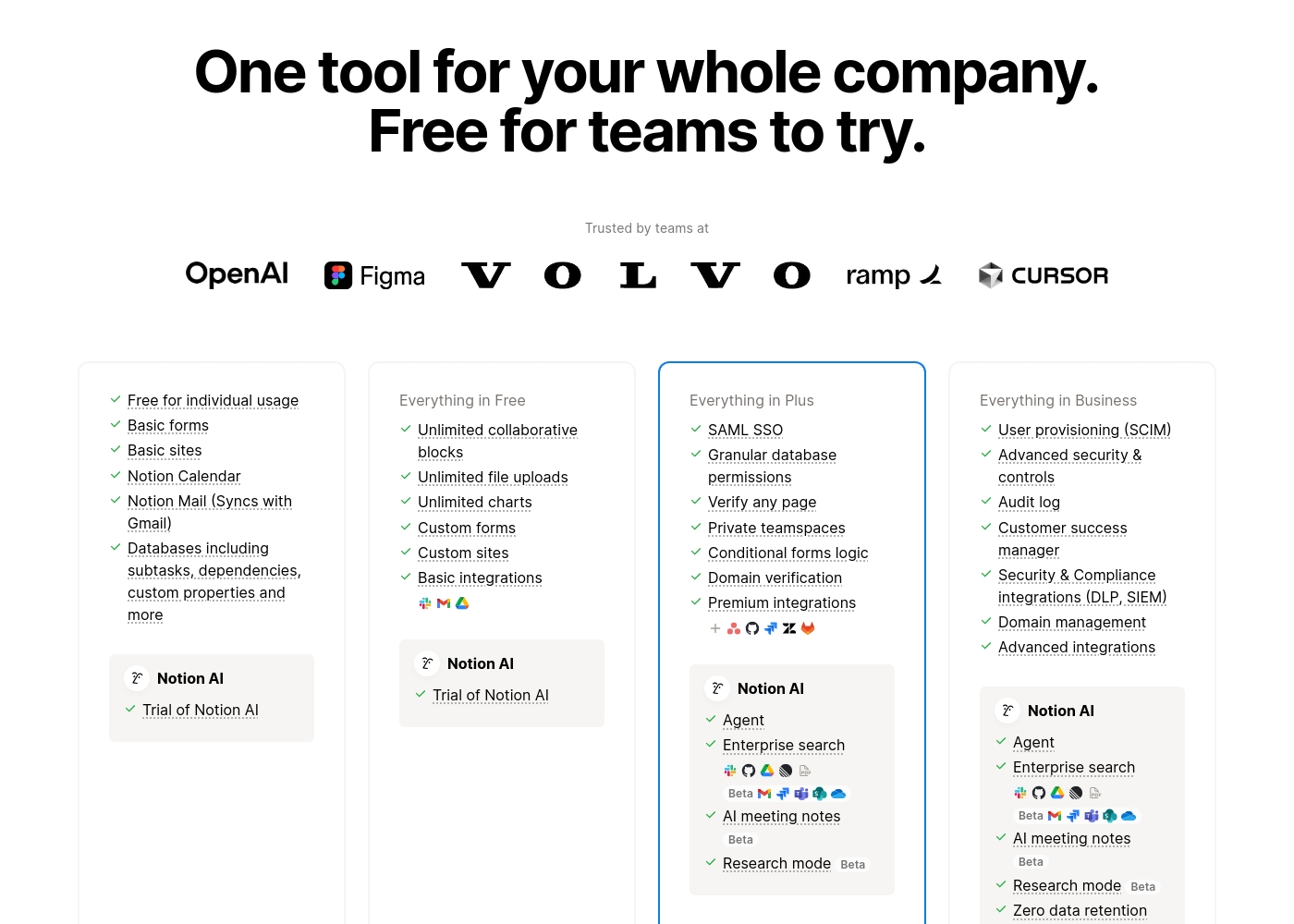
Notion costs between $0 and $20 per seat/month with four plans: Free at $0/seat/month, Plus at $10/seat/month, Business at $20/seat/month, and Enterprise (custom pricing).
Here’s a detailed look at the core features included in each subscription level.
- Unlimited pages and blocks for individuals
- Web publishing with 1 custom subdomain
- Basic forms and sites
- Notion Calendar and Mail synchronization
- Databases with subtasks and dependencies
- Unlimited blocks and file uploads
- 30 days of page history
- Basic SAML SSO
- Granular database permissions
- Access to unlimited charts
- 90 days of page history
- Advanced security controls and Audit log
- Conditional forms logic
- Domain verification
- Advanced page analytics (includes editor list)
- Unlimited page history and workspace analytics
- SCIM user provisioning
- Zero data retention with LLM providers for Notion AI
- Customer Success Manager support
- Security & Compliance integrations (DLP, SIEM)
Ora costs between $0 and $30 per user/month with three plans: Basic at $0, Professional starting at $5.99 per user/month, and Enterprise starting at $27.99 per user/month.
We provide solutions for all team sizes, ensuring you only pay for the features and scale you truly need.
Ora Basic
Price: $0.00 / month (Free Forever) Best For: Teams of up to 10 users needing core project management and collaboration. Other Features:
- Unlimited projects, tasks, comments, and attachments
- Max file size is 10mb
- Includes Basic add-ons
- Supports up to 10 organization members
- Unlimited projects
- Unlimited tasks, comments, attachments
- Web, desktop, iOS, and Android apps
- Max file size 1 GB
- Task relationships
- Recurring tasks
- List actions (automation)
- Free observers / guests
- Single Sign On (SSO)
- File encryption
- Everything from Professional tier

Pricing Notes
- Ora’s Free Basic plan supports up to 10 users forever, making it great for small teams.
- Notion’s free tier is heavily limited for collaborative teams, forcing quick upgrades.
- Ora offers automatic credit when removing users mid-cycle, ensuring fairer billing than Notion.
- Ora’s annual Professional plan ($5.99/user/month) is cheaper than Notion’s Plus tier ($10/user/month).
- Notion offers a 30-day money-back guarantee for annual plans; Ora does not explicitly state an MBG.
Pricing Head-to-Head
User Reviews
Trustpilot feedback paints a sharply divided picture of Notion. While many users praise the platform as a terrific tool—highlighting its power, versatility, and unique block-based editor for personal and professional organization—these compliments are often eclipsed by grave concerns regarding management and billing practices.
A recurring major theme across many reviews details frustrating experiences with unexpected charges, deceptive auto-upgrades (especially relating to annual plans and new members), and significant challenges when trying to cancel subscriptions or obtain timely refunds. Furthermore, support responsiveness is frequently described as unsatisfactory, unhelpful, or even condescending, often failing to resolve billing errors or login issues.
Enjoy using Notion a lot for my daily work interface. It helps me set up my employees and assign tasks with no issue at all. We upgraded from the free plan and will absolutely continue using the platform.
Customer sentiment for Ora is strongly positive, emphasizing its robust capabilities and outstanding usability. Several reviewers highlight that Ora is exceptionally user-friendly and superior to competitors like Trello, even though it is a relatively younger product.
Users rely on the platform daily for managing diverse projects, and one reviewer called it simply "the best platform for PM." While the current feedback volume is low, the recurring themes suggest high satisfaction regarding core functionality and daily reliability. The enthusiasm indicates that users find the platform’s functional depth combined with its ease of use provides strong value for teams seeking a productive command center.
Ora is one of my favorite daily web services for managing various tasks. It’s exceptionally user-friendly and handles diverse projects easily. I recommend it as a superior option compared to Trello.
Our Verdict
The real decision between Notion and Ora hinges on structure versus flexibility. Notion provides the ultimate flexible workspace; Ora delivers focused project execution. Ora's user reviews are overwhelmingly positive, emphasizing usability. Notion's rating is lower, often hurt by user frustration over unreliable billing and support. Notion's superpower is its vast versatility and integrated AI assistant. It functions as the single source of truth for your organizational knowledge. Notion is independently rated the #1 knowledge base for three years running. Use Notion to replace many specialized apps and custom databases. Ora’s superpower is making complex project delivery simple and clear. Ora provides crucial core PM features like built-in time tracking and reliable task dependencies. Plus, Ora offers a strong free plan, supporting up to 10 users forever. Teams find Ora exceptionally user-friendly with immediate results. The deciding factor is whether you need an organizational wiki or predictable PM structure. If your priority is a company-wide wiki and AI assistance, choose Notion today. For teams focused solely on deep task management and transparent billing, Ora is the better choice. Pick Ora for focused PM power. Pick Notion for unparalleled organizational breadth.
Frequently Asked Questions
Which is better for dedicated project management: Notion or Ora?
Ora is purpose-built for structured project management workflows. It includes built-in task relationships and true time tracking. Notion manages tasks through flexible databases but lacks these direct PM features. Ora is generally the stronger PM-focused tool.
Which platform offers a better free plan for small teams: Notion or Ora?
Ora offers a superior free plan supporting up to 10 users permanently. Notion’s free plan is excellent for individual users. However, Notion requires teams to upgrade sooner due to severe limits on collaborative blocks.
Does Notion have built-in time tracking or media annotation like Ora?
No, Notion requires third-party integrations for both integrated time tracking and media annotation. Ora includes both time tracking and robust annotation for images, PDFs, and videos. This gives Ora a clear advantage for production teams.
Which tool has better security features for enterprise use?
Both Notion and Ora offer SSO and security controls in their Enterprise tiers. Notion adds SCIM user provisioning for larger organizations. Notion also offers zero data retention for its integrated AI usage. Both provide high-level compliance.
Is Ora easier to start using than Notion?
Yes, users consistently report Ora is exceptionally user-friendly and quick to adopt. Notion is highly flexible but requires significant initial setup and learning. Ora provides a better out-of-the-box project experience.
Is Notion's billing model reliable compared to Ora?
Notion has widespread complaints about confusing billing and unexpected charges. Ora handles user changes automatically and typically receives better billing feedback. Ora also automatically issues credit when users are removed mid-cycle.
Ready to Choose?
Both tools have their strengths. Choose based on your specific needs.