Asana vs Ora
Asana and Ora both excel at task management, but they serve different users. Asana is built for massive scalability, offering deep enterprise features and AI workflows. Ora provides powerful core features, superior daily focus tools, and much higher user satisfaction. The price difference for competitive plans is also significant for growth teams.
Best for: Enterprise organizations needing HIPAA or SIEM compliance, Cross-departmental portfolio managers
Best for: Budget-conscious teams seeking maximum value, Small to medium-sized creative teams (due to annotation tools)
Great features, poor customer support.
We find that Asana offers powerful project management features, excellent organizational scalability, and a generous free plan suitable for small teams. However, recurring external reports indicate severe problems with customer service responsiveness and billing transparency, heavily detracting from the product’s core strengths. Overall, we recommend caution for small businesses or any organization prioritizing reliable, direct customer support.
Pros
- Powerful free tier available for individuals and small teams (up to 10 users).
- Flexible design for managing tasks, projects, and team workflows efficiently.
- Supports excellent scalability, trusted by many Fortune 100 companies.
- Advanced features like Gantt charts and Timeline views are available starting on the Starter plan.
Cons
- Customer service is widely reported as non-existent, slow, or dependent on ineffective chatbots.
- Numerous complaints regarding deceptive auto-renewal practices and unauthorized charges.
- Refund requests are frequently denied, increasing costs for unintended subscriptions.
- Users often lose access or tasks when attempting to downgrade from a paid trial to the free plan.
The Modern, User-Friendly Command Center
We found Ora provides an impressive balance between comprehensive features and usability, positioning itself as a strong alternative to established systems. Its generous free tier and unique calendar-focused organization greatly benefit small, growing teams and individuals. Overall, we recommend Ora highly for collaborative organizations seeking a focused, effective project management solution.
Pros
- Generous free plan available for small teams (up to 10 users) forever.
- Exceptional user-friendliness; users prefer it over competitors like Trello.
- Comprehensive task cards support RTF, Markdown, and custom code highlights.
- Agenda Calendar helps users achieve better focus and plan dedicated work time.
Cons
- External review volume is currently very limited (only 3 Trustpilot reviews).
- File size limit is restrictive on the Basic (free) tier (a maximum of 10mb).
AboutAsana
Asana is an online platform built specifically to manage your team’s work, projects, and tasks. It supports powerful Human + AI collaboration.
This AI component understands your specific business context, helping to move your most important work forward efficiently. Because it's a centralized ecosystem, it easily brings all doers and stakeholders together in one place. 💡
AboutOra
Ora is a powerful platform designed for productive individuals and collaborative teams. It serves as your daily planner and central hub for managing work. The core Agenda Calendar helps you organize your time and be more effective. Instead of dealing with separate tools, all your critical information, tracked time, and completed tasks appear directly on your calendar. You can quickly view both your tasks and those of your teammates, ensuring smooth collaboration. 💡
Highlights
Feature Comparison
Features Overview
We highlight the main differences and pick a winner for each feature.
Price vs Value
Ora is significantly cheaper for growth teams getting key features. Asana’s entry paid tier is almost double Ora’s price.
Asana's entry-level paid plan (Starter) costs $10.99 per user monthly (annual). This unlocks important features like Gantt charts and automation. Ora’s Professional plan is just $5.99 per user monthly when billed annually. This tier provides essential workflow tools and the 1 GB file limit. Ora delivers excellent core project management at nearly half the cost of Asana. Asana charges more for high-end scalability and the advanced AI features. If budget is a primary factor, Ora offers substantially better daily value.
Scalability & Enterprise
Asana is built for global Fortune 100 scale and deep regulatory compliance. Ora scales effectively but targets security less intensely.
Asana offers Enterprise+ tiers for massive scale and complex security needs. This includes features like HIPAA compliance and SIEM integration support. Ora’s Enterprise tier focuses on core tools like Single Sign-On (SSO) and robust file encryption. Asana handles extremely complex needs like resource management and unlimited organizational portfolios. Organizations requiring specific high-tier regulated compliance must choose Asana's specialized plans.
AI and Automation
Asana includes powerful AI tools specifically trained for business workflows. Ora provides functional automation through basic list actions.
Asana integrates the Asana AI Studio starting at the Starter plan level. This AI handles context-aware routine work, accelerating goals. Ora offers practical automation using dedicated List Actions in its Professional plan. This helps streamline basic repetitive workflows effectively. Asana's AI component focuses on strategic work and cutting down manual classification across the organization. If receiving AI-driven insights and workflow streamlining is essential, Asana is the only choice.
Focus & UX
Ora is highly praised for superior user-friendliness and unique focus tools. Asana provides flexible but traditional project views.
Ora's core strength is the Agenda Calendar for organizing time and blocking focused work. This tool maximizes individual productivity. Asana provides robust visualization with List, Board, Calendar, and powerful Gantt views. It supports diverse project methodologies. Users consistently describe Ora as very intuitive and superior to competitors like Trello. Asana can feel heavier due to its vast feature set. Ora helps individuals be productive daily, while Asana excels at showing the macro structure.
Advanced Visualization
Asana dominates with support for classic Gantt charts and Timelines. Ora relies on explicit task relationship mapping to manage flow.
The Asana Starter plan unlocks crucial Timeline and Gantt Views immediately. These are essential for tracking complex project schedules and dependencies. Ora allows defining explicit task relationships like blocking, dependent, or subtasks. This clarifies workflow sequencing clearly. If you need traditional complex charts to track critical paths across numerous projects, choose Asana. Asana is specifically designed for 'air traffic control' over multiple production streams.
Integration Ecosystem
Asana offers a vast ecosystem, connecting with over 300 major platforms. Ora’s external integration capabilities are less explicit and documented.
Asana guarantees connectivity for your existing tech stack, integrating with 300+ major enterprise platforms. High-level Asana plans support connections with Salesforce, Tableau, and Power BI for deep analytics. Ora does not publish details regarding its ecosystem size or specific high-profile partners. Teams reliant on seamless, verified data flow with major CRMs or BI tools should choose Asana’s proven flexibility.
Feedback & Documentation
Ora excels at rich task context and direct media annotation for creative teams. Asana provides input mostly via Custom Fields.
Ora centralizes detailed documentation in Task Cards using RTF, Markdown, and code highlighting for technical or creative teams. Ora allows users to annotate images, PDFs, and videos directly within the platform using internal comments. Asana uses Custom Fields and process management to add context to tasks, focusing on process oversight. For technical users or creative teams needing direct markups on visuals, Ora is significantly better.
Customer Support
Ora receives high user marks for reliability and daily function. Asana is widely criticized for non-existent and inaccessible customer support.
Asana receives severe complaints regarding unresponsive support, often relying on slow emails or ineffective chatbots. This results in wide user dissatisfaction. Ora's strong positive user sentiment suggests superior service reliability and daily function. Users cite difficulty getting refunds or handling billing issues with Asana due to severe support failures. Teams prioritizing accessible help must highly favor Ora to avoid Asana's reported support frustrations.
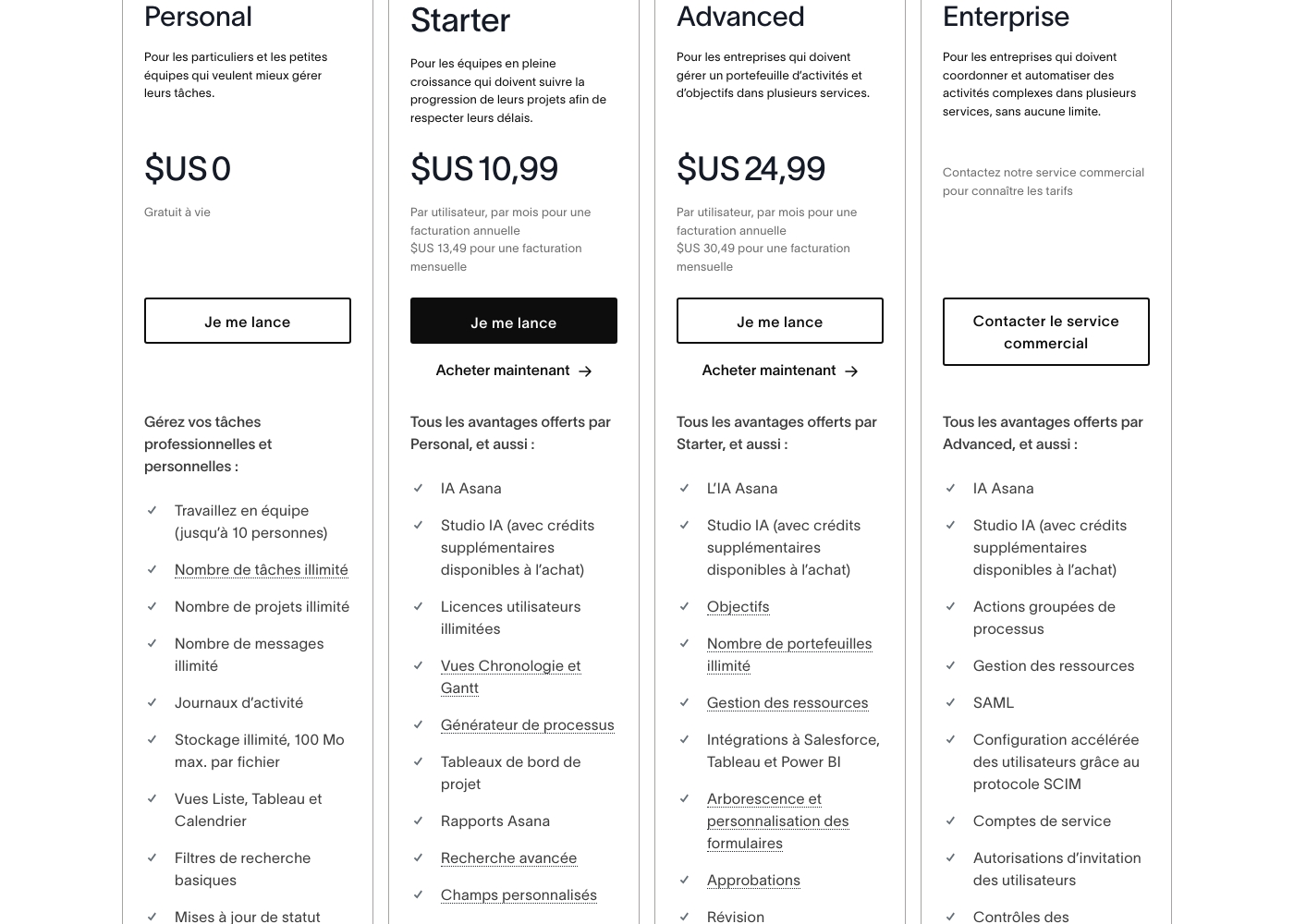
Asana costs between $US 0 and $24.99 per user per month (annual billing) with 5 plans: Personal at $US 0, Starter at $US 10.99, Advanced at $US 24.99, Enterprise at Contact Sales, and Enterprise+ at Contact Sales.
Here is a breakdown of what each plan offers your team.
Personal
Price: $US 0 (Free for life) Best For: Individuals and small teams wanting better task management Other Features:
- Work in teams (up to 10 people)
- Unlimited tasks, projects, and messages
- Unlimited storage (100 MB max. per file)
- List, Board, and Calendar views
- Basic search filters
- Work in teams (up to 10 people)
- Unlimited tasks, projects, and messages
- Unlimited storage (100 MB max. per file)
- List, Board, and Calendar views
- Basic search filters
- Unlimited user licenses
- Asana AI Studio access
- Timeline and Gantt Views
- Process Generator
- Advanced Search and Custom Fields
- Objectives and unlimited portfolios
- Resource Management
- Integrations to Salesforce, Tableau, and Power BI
- Form customization and approvals
- Native time tracking
- Bulk process actions
- SAML and SCIM for accelerated user configuration
- Service accounts
- 24/7 support
- Custom branding
Ora costs between $0 and $30 per user/month with three plans: Basic at $0, Professional starting at $5.99 per user/month, and Enterprise starting at $27.99 per user/month.
We provide solutions for all team sizes, ensuring you only pay for the features and scale you truly need.
Ora Basic
Price: $0.00 / month (Free Forever) Best For: Teams of up to 10 users needing core project management and collaboration. Other Features:
- Unlimited projects, tasks, comments, and attachments
- Max file size is 10mb
- Includes Basic add-ons
- Supports up to 10 organization members
- Unlimited projects
- Unlimited tasks, comments, attachments
- Web, desktop, iOS, and Android apps
- Max file size 1 GB
- Task relationships
- Recurring tasks
- List actions (automation)
- Free observers / guests
- Single Sign On (SSO)
- File encryption
- Everything from Professional tier

Pricing Notes
- Ora's Professional plan ($5.99/user/month annual) is nearly half the cost of Asana's Starter plan ($10.99/user/month annual).
- Both Asana and Ora offer a generous permanent free plan for teams up to 10 users.
- Asana explicitly states that they do not offer refunds once a paid subscription has started.
- Ora provides a fixed 30-day free trial, while Asana's trial duration is not explicitly stated.
- Ora automatically issues credit for removed users; Asana uses fixed user blocks for licensing.
Pricing Head-to-Head
User Reviews
External feedback, predominantly showcased through Trustpilot, reveals widespread dissatisfaction among users, giving the service a significantly low overall rating. Customers frequently criticize the subscription and billing practices, often citing unexpected auto-renewals or unauthorized charges occurring months after cancellation or trial expiration. The inability to secure refunds, even in cases of clear error, is a major pain point.
🚨 The most significant complaint centers on support responsiveness. Reviewers report slow service, sometimes waiting a week for an email reply, reliance on frustrating chatbots, and difficulties contacting a human representative. While some users acknowledge the base product is flexible and has good design features, the company's operational infrastructure and seeming focus on larger enterprises leaves smaller businesses feeling neglected, leading many to label the experience customer-hostile or deceptive.
The app itself is great, offering good design, projects, and flexible team spaces. However, the customer service experience is awful. The only way to talk to CS is often through slow, ineffective emails.
Customer sentiment for Ora is strongly positive, emphasizing its robust capabilities and outstanding usability. Several reviewers highlight that Ora is exceptionally user-friendly and superior to competitors like Trello, even though it is a relatively younger product.
Users rely on the platform daily for managing diverse projects, and one reviewer called it simply "the best platform for PM." While the current feedback volume is low, the recurring themes suggest high satisfaction regarding core functionality and daily reliability. The enthusiasm indicates that users find the platform’s functional depth combined with its ease of use provides strong value for teams seeking a productive command center.
Ora is one of my favorite daily web services for managing various tasks. It’s exceptionally user-friendly and handles diverse projects easily. I recommend it as a superior option compared to Trello.
Our Verdict
The decision between Asana and Ora requires balancing immense scale against focused value and user happiness. For most growing teams and SMEs, Ora is the clear winner due to its exceptional value. Ora's Professional plan costs nearly half of Asana's competing tier, saving significant budget. Ora users consistently praise its usability and effective focus tools like the Agenda Calendar. Asana’s superpower is its undisputed enterprise scalability and power. If you manage objectives across 500+ employees, Asana provides the resource management and compliance systems you need. Asana also leads the market with advanced AI capabilities and a massive 300+ integration ecosystem. Asana handles strategic, massive organization oversight better than Ora. Ora's superpower lies in its excellent core experience and strong user happiness score (4.6/5.0). It provides built-in time tracking and superior documentation features like media annotation. Ora is perfect for teams under 100 users who prioritize getting responsive customer support over complex enterprise auditing features. Ora provides strong features without the large price tag. The deciding factor is heavily influenced by reported customer support experiences and budget limits. If reliable, accessible support is critical for your team, avoid the pervasive reported issues with Asana. If meeting an Enterprise compliance mandate (like HIPAA) is your core requirement, then Asana is likely necessary. Ora wins on daily usability and overall user trust. Final verdict: Choose Ora if your team is budget-conscious or values simple, focused execution and responsive support. Large enterprises requiring AI, deep resource management, or high-end compliance should choose Asana, despite the reported support issues.
Frequently Asked Questions
Which is cheaper for a growing team: Asana or Ora?
Ora is significantly cheaper for growth teams. Ora's Professional plan costs $5.99/user/month annually. Asana's equivalent Starter plan costs almost double at $10.99/user/month annually.
Does Asana offer strong usability like Ora?
Ora is highly praised for being intuitive and user-friendly, scoring very high in user sentiment. While Asana is flexible, users describe Ora as superior for daily focus and ease of adoption. Ora includes the unique Agenda Calendar tool.
Which tool provides dedicated Resource Management?
Asana provides comprehensive Resource Management starting in its Advanced plan. This helps visualize staffing and capacity across the business. Ora offers built-in time tracking and estimates, but not full large-scale resource management.
Does Asana or Ora offer better support for enterprise-level compliance?
Asana is superior for compliance, offering Enterprise+ features like HIPAA eligibility and SIEM integration. Ora provides SSO and file encryption, which are strong security features, but less comprehensive for regulated industries.
Can I get a refund if I cancel my subscription with Asana or Ora?
Asana explicitly states that they do not offer refunds once you start a paid subscription. Ora does not explicitly mention a money-back guarantee, focusing instead on credit for removed users.
Which tool is better for creative teams needing detailed feedback?
Ora is better for creative teams due to its built-in feedback tools. You can annotate images, PDFs, and videos directly within Ora's Task Cards. Asana lacks this specific media markup capability.
Ready to Choose?
Both tools have their strengths. Choose based on your specific needs.