ClickUp vs Teamwork
ClickUp and Teamwork both tackle complex processes but have very different strengths. ClickUp is the ultimate flexible, all-in-one platform for internal teams. Teamwork focuses intensely on resource allocation and client profitability tracking.
Best for: Organizations replacing 50+ apps to consolidate into one hub, Enterprise organizations needing compliance (HIPAA/SSO/Data Residency)
Best for: Marketing agencies managing client retainers and project scopes, Professional services focused on tracking billable hours
Feature-rich, but expect complex setup.
We recognize ClickUp’s ambitious goal to be an all-in-one workspace, offering impressive versatility and an extensive feature set that streamlines project management. While this comprehensive nature is powerful, we found numerous external reports regarding recurring system bugs, slow performance, and extremely poor customer service experiences. Overall, we see that ClickUp is highly flexible for complex business workflows, but teams must be ready for a steep learning curve and potential challenges with reliability and support responsiveness.
Pros
- Extremely flexible platform offering over 15 customizable views (Gantt, List, Board).
- Consolidates over 50 applications into a single, centralized workspace.
- Effective replacement for specialized tools like Jira and Notion.
- Strong Free Forever plan is generous for individual users and small projects.
Cons
- Frequent reports of bugs, unreliable performance, and a slow user interface.
- Customer support is widely criticized for being inaccessible and ineffective.
- The massive feature set makes the learning curve surprisingly steep.
- Billing practices lack clarity regarding user seats and unexpected automatic charges.
Powerful features and frustrating business practices.
We found Teamwork offers robust, unified project and resource management tools essential for professional services needing deep profitability tracking and resource forecasting. Overall, the software's powerful feature set is unfortunately being undermined by confusing, opaque upgrade paths and extremely restrictive feature limits in lower tiers.
Pros
- Unified platform combining PM, time tracking, resource forecasting, and budgeting.
- Specifically built to manage complex client work and track project profitability.
- Real-time visibility into staff availability prevents common overbooking issues.
- Simple interface with TONS of functionality and detailed project data scope.
Cons
- Upgrade processing and pricing for Scale plan are opaque and require sales engagement.
- Artificially restrictive feature limits (like budgeting caps) force expensive, premature upgrades.
- Recent new interfaces and UI changes have broken essential functions for some users.
- Customer support availability seems limited primarily to UK business work hours.
AboutClickUp
ClickUp is reliably described as the essential all-in-one workspace for modern teams. It’s designed to align, collaborate, and boost productivity across your entire organization. This platform helps eliminate app sprawl by converging over 50+ different applications into one centralized hub. Teams managing operations, campaigns, or product development use ClickUp to get more done faster, together. ✅
AboutTeamwork
Teamwork.com is project and resource management software specifically built for client work and powered by AI. It goes beyond traditional project tools by combining essential functions like resource forecasting, cost control, and profitability reporting into a single platform.
This platform is trusted by professional services businesses globally. These include agencies, consulting firms, IT service providers, and accounting teams. Teamwork helps them efficiently schedule resources, manage billable hours, and track project profitability from start to finish. ✅
Highlights
Feature Comparison
Features Overview
We highlight the main differences and pick a winner for each feature.
Core Purpose & Fit
ClickUp is the ultimate flexible all-in-one workspace. Teamwork is purpose-built for optimizing profitable client work.
ClickUp consolidates over 50 apps into a single hub. It aims to eliminate app sprawl and boost organization-wide efficiency. Teamwork integrates project management with resource forecasting. It helps agencies manage billable hours and profitability efficiently. ClickUp offers extreme versatility for complex internal projects. Teamwork excels specifically at delivering clear client transparency and cost reports. Choose Teamwork if client success determines your tool choice.
Flexibility & Views
ClickUp offers 15+ customizable views for any workflow. Teamwork provides a simple, consolidated view for PM needs.
ClickUp lets you instantly switch between 15 different views. These include Kanban, Gantt, List, and Mind Maps. Teamwork excels in its clear interface and specialized reporting views. It integrates project status and resource views seamlessly. ClickUp’s flexibility means a steep learning curve for new users. Teamwork focuses on simplicity and ease of use for client-focused teams. ClickUp wins if you need to manage vastly different departmental processes.
Resource Planning
Teamwork provides specific Workload Resource Planner tools. ClickUp handles general resource and workload optimization.
Teamwork focuses on real-time visibility into staff capacity. It helps prevent overbooking and accurately distributes client work. ClickUp offers Workload Management and Goals for internal organizational efficiency. This is great for aligning work to OKRs. Teamwork explicitly offers tools like placeholder resources and complex scenario planning. This makes Teamwork essential for strategic workforce planning.
Financial Tracking
Teamwork provides essential budgeting and profitability reports. ClickUp utilizes Goals tracking but lacks core financial tools.
Teamwork integrates cost control and budgeting directly into projects. Paid tiers deliver powerful profitability and utilization reports. ClickUp tracks effort against impact using Portfolio and Goals features. You can monitor high-level project status. Teamwork is clearly superior for agency profitability analysis. It ensures projects stay within budget control.
AI Capabilities
ClickUp Brain offers enterprise search and AI writers. Teamwork AI assists with essential project management features.
ClickUp's Connected Brain searches across third-party apps like GitHub and Salesforce. It provides company-wide intelligence instantly. Teamwork AI focuses on project essentials, assisting with core PM tasks. It begins helping users on the free plan. ClickUp’s AI framework appears much broader and more powerful. It aims to eliminate a full day of searching per week.
Free Plan Generosity
ClickUp’s Free Forever plan supports unlimited members. Teamwork’s Free plan is limited to 5 users and 5 projects.
ClickUp offers Unlimited Tasks and 24/7 support even on the free tier. This makes it perfect for growing individual users. Teamwork’s free plan is ideal for very small teams just starting client work. It includes built-in time tracking and basic AI. ClickUp provides a much more robust starting point for collaboration. Teamwork limits usability quickly by capping the number of users.
Reliability & UI
Teamwork’s interface is generally simpler and functional. ClickUp is frequently reported as slow, buggy, and complex.
ClickUp users often praise the features but complain about frequent bugs. The massive feature set makes the UI feel overwhelming. Teamwork offers a comprehensive yet simple interface. Reviewers call it great for detailed project data scope. ClickUp’s pervasive performance issues remain a major downside. Teamwork is generally considered a cleaner, more reliable experience for core PM.
Pricing Transparency
ClickUp pricing scales predictably based on features. Teamwork uses restrictive limits that force opaque, expensive upgrades.
ClickUp has transparent tier pricing, starting at $7/user per month. Paid plans offer logical feature unlocks like unlimited Gantt charts. Teamwork reviewers cite restrictive limits like fixed budget caps on the Grow plan. This forces costly migration to the premium Scale tier. ClickUp offers a clear 30-day money-back guarantee. Teamwork’s confusing structure makes long-term budgeting difficult for growing agencies.
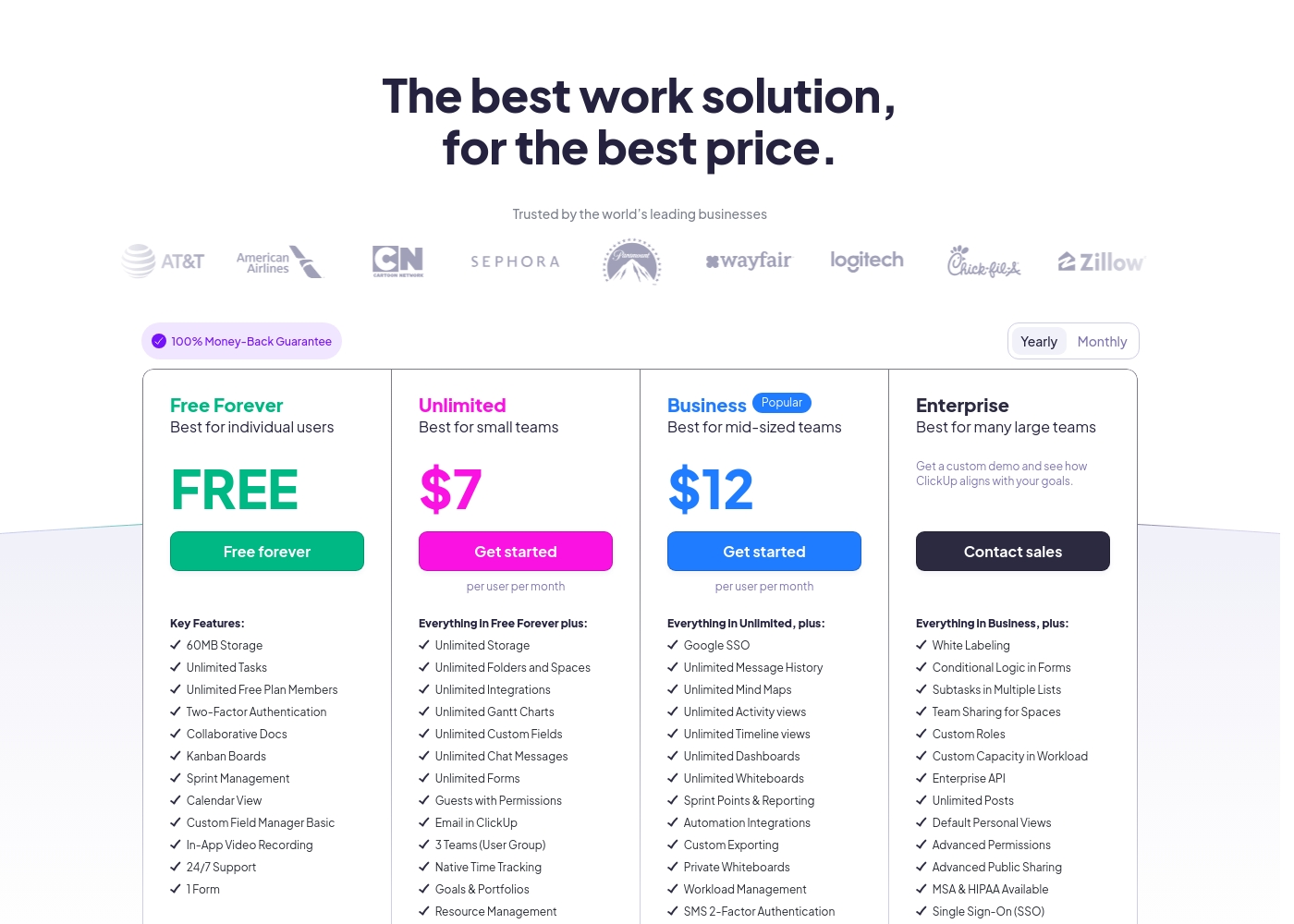
ClickUp costs between Free and $12 per user per month (billed annually) with four plans: Free Forever (Free), Unlimited ($7), Business ($12), and Enterprise (Custom).
Below, you'll find the specific details regarding what each plan includes.
Free Forever
Price: Free forever Best For: Individual users Refund Policy: Not applicable Other Features: 60MB Storage, Unlimited Tasks, Two-Factor Authentication, Collaborative Docs, Kanban Boards, 24/7 Support
- 60MB Storage
- Unlimited Tasks
- Unlimited Free Plan Members
- Two-Factor Authentication
- Collaborative Docs
- Unlimited Storage, Folders and Spaces
- Unlimited Integrations
- Unlimited Gantt Charts, Custom Fields, Chat Messages, and Forms
- Guests with Permissions
- Email in ClickUp
- Google SSO
- Unlimited Message History, Mind Maps, Activity views, Timeline views, Dashboards, and Whiteboards
- Sprint Points & Reporting
- Automation Integrations
- Custom Exporting
- White Labeling
- Conditional Logic in Forms
- Subtasks in Multiple Lists
- Custom Roles
- Enterprise API
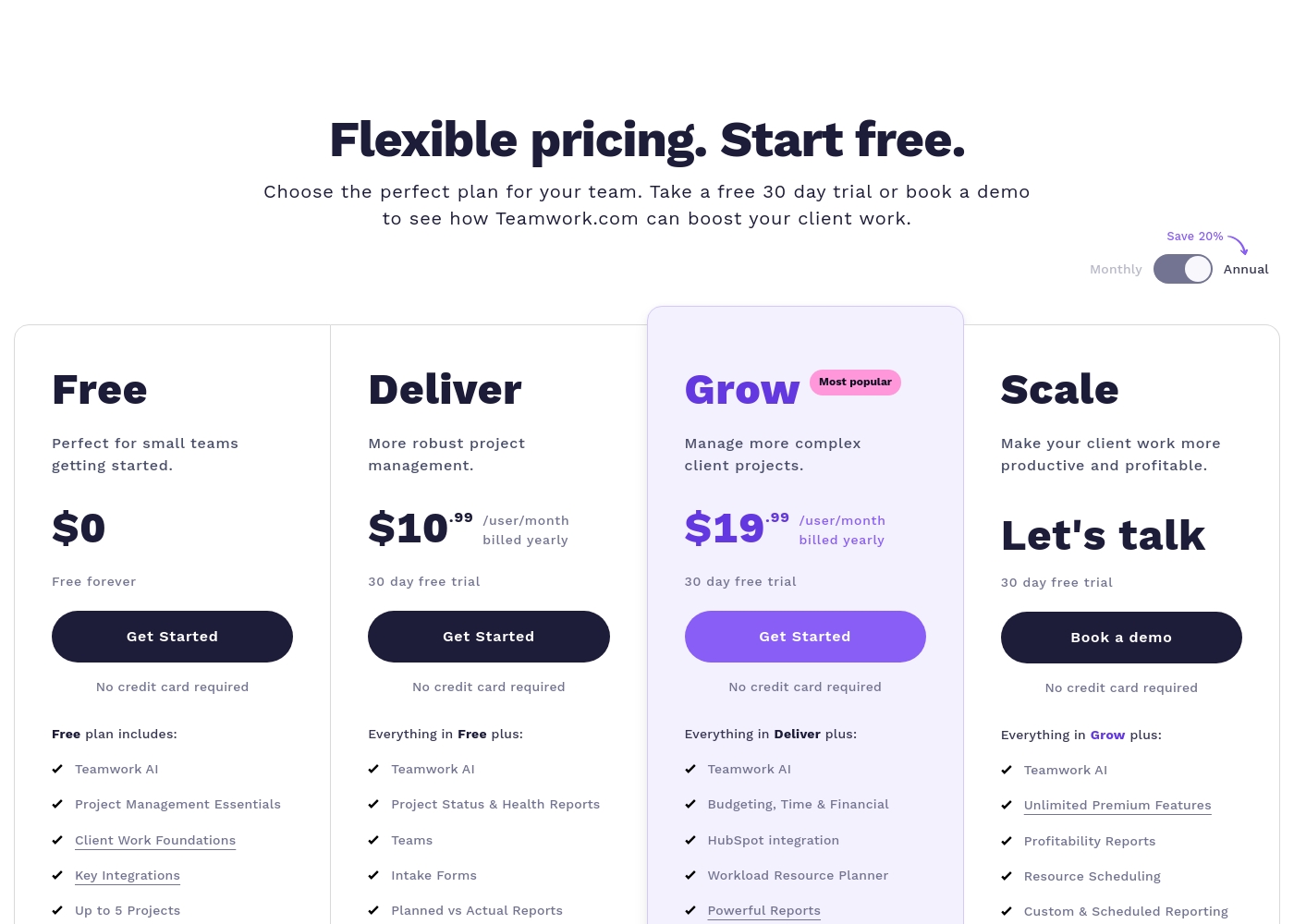
Teamwork costs between $0 and Talk to Sales per month with 4 plans: Free at $0, Deliver at $10.99/user/month, Grow at $19.99/user/month, and Scale at Talk to Sales.
Teamwork offers flexible pricing tailored to your team's size and complexity needs. You can choose to pay monthly or save 20% by selecting an annual subscription.
Free
Price: $0 (Free forever) Best For: Perfect for small teams getting started. Other Features:
- Teamwork AI and Project Management Essentials
- Built-in Time Tracking and Client Work Foundations
- Key Integrations including Slack, Zapier, and MS Teams
- Up to 5 Users and 5 Projects; 100 Automations monthly
- Teamwork AI
- Project Management Essentials
- Client Work Foundations
- Built-in Time Tracking
- Key Integrations (Slack, Zapier, MS Teams)
- Project Status & Health Reports
- Teams
- Intake Forms
- Planned vs Actual Reports
- Integrations (Quickbooks, Harvest and many others)
- Budgeting, Time & Financial
- HubSpot integration
- Workload Resource Planner
- Powerful Reports (Utilization, Time Spent)
- 50 Project Templates
- Unlimited Premium Features
- Profitability Reports
- Resource Scheduling
- Custom & Scheduled Reporting
- Retainer Management (beta)
Pricing Notes
- ClickUp offers a strong Free Forever plan with unlimited members and 24/7 support.
- Teamwork’s free plan is limited to 5 users and 5 projects, restricting growth quickly.
- ClickUp’s paid tiers start lower at $7/user/month compared to Teamwork’s $10.99/user/month.
- Teamwork’s Grow plan often imposes restrictive limits, like fixed budget counts, forcing expensive Scale upgrades.
- ClickUp provides a 30-day money-back guarantee for assurance, which Teamwork does not explicitly state.
Pricing Head-to-Head
User Reviews
ClickUp receives highly polarized feedback, reflected in its low 2.3 Trustpilot score. Users frequently praise the platform’s versatility and comprehensive nature, noting it successfully replaces disconnected tools like Jira, Slack, and spreadsheets.
Teams find it effective for centralized task management, project planning, and acting as a central knowledge base. However, reliability and customer service are major concerns across the user base.
Truly a game changer. I never went back to email, Slack, and spreadsheets after switching. ClickUp is a singular app for everything and helps us move fast daily.
Teamwork's external feedback presents a sharp contrast. Users consistently praise the core software for its powerful functionality, describing it as having a simple interface and a broad scope of data that is essential for running a business.
Clients reportedly appreciate the transparency it offers. However, positive sentiment is heavily outweighed by severe criticism directed at business practices and pricing.
Teamwork is an excellent tool with an extremely simple interface and TONS of functionality. As a former project manager, the level of detail and broad scope of data available sets this tool apart easily.
Our Verdict
Choosing between ClickUp and Teamwork is fairly straightforward. Your ultimate decision depends entirely on your core business focus. Both tools are powerful but serve distinct management needs well. ClickUp is truly the king of all-in-one flexibility. It lets you eliminate app sprawl by consolidating numerous tools. ClickUp Brain and 15+ custom views make it highly versatile internally. It is best for organizations wanting one flexible tool for every department. Teamwork specializes in project management designed for clients. It provides deep financial tracking and real-time resource forecasting. This ensures higher profitability on client retainers and projects. Teamwork is the better choice for managing billable hours and agency teams. The biggest trade-off is feature density versus focused financial control. ClickUp has reported issues with slowness and overall reliability. Teamwork users frequently report frustration with opaque, restrictive pricing models. Pick ClickUp if maximizing internal flexibility and app consolidation is key. Choose Teamwork if project profitability and resource allocation are business-critical. Test Teamwork if you are an agency, and ClickUp if you are a large internal company.
Frequently Asked Questions
Which is better for agencies: ClickUp or Teamwork?
Teamwork is purpose-built for client work and is the stronger choice. It includes essential resource forecasting and profitability reports. ClickUp is focused more on internal team consolidation and generic project management.
Which tool has a more generous free plan?
ClickUp's Free Forever plan is more generous than Teamwork's. ClickUp allows unlimited members and offers 24/7 support. Teamwork limits the free plan to 5 users and 5 projects, which teams quickly outgrow.
Does ClickUp track project profitability like Teamwork?
No, ClickUp's financial focus is through Goals and Portfolios. Teamwork excels here with dedicated Budgeting and Profitability Reports. Teamwork is essential for tracking billable hours and cost control.
Is ClickUp reliable, or does it have many software bugs?
Users frequently praise ClickUp's features but complain about poor reliability. Many reported issues include a slow user interface and frequent bugs. Teamwork generally provides a simpler, more stable experience.
Which platform offers better resource management tools?
Teamwork offers superior resource management, including a Workload Resource Planner. It supports placeholder resources and scenario planning. ClickUp offers general Workload Management but lacks detailed scheduling features.
Is the pricing structure of Teamwork opaque?
Yes, many Teamwork users complain about artificially restrictive limits in the Grow plan. These caps force premature and costly upgrades to the Scale plan. ClickUp’s pricing is more transparent and predictable.
Ready to Choose?
Both tools have their strengths. Choose based on your specific needs.