Hive

Hive review

Project management with time tracking, proofing, and team chat built into one workspace.

Hive costs from $5/mo · 2 plans · prices checked Oct 13, 2026

By Ciroapp Editorial Team · Updated Sep 16, 2026

Commission may apply at no extra cost

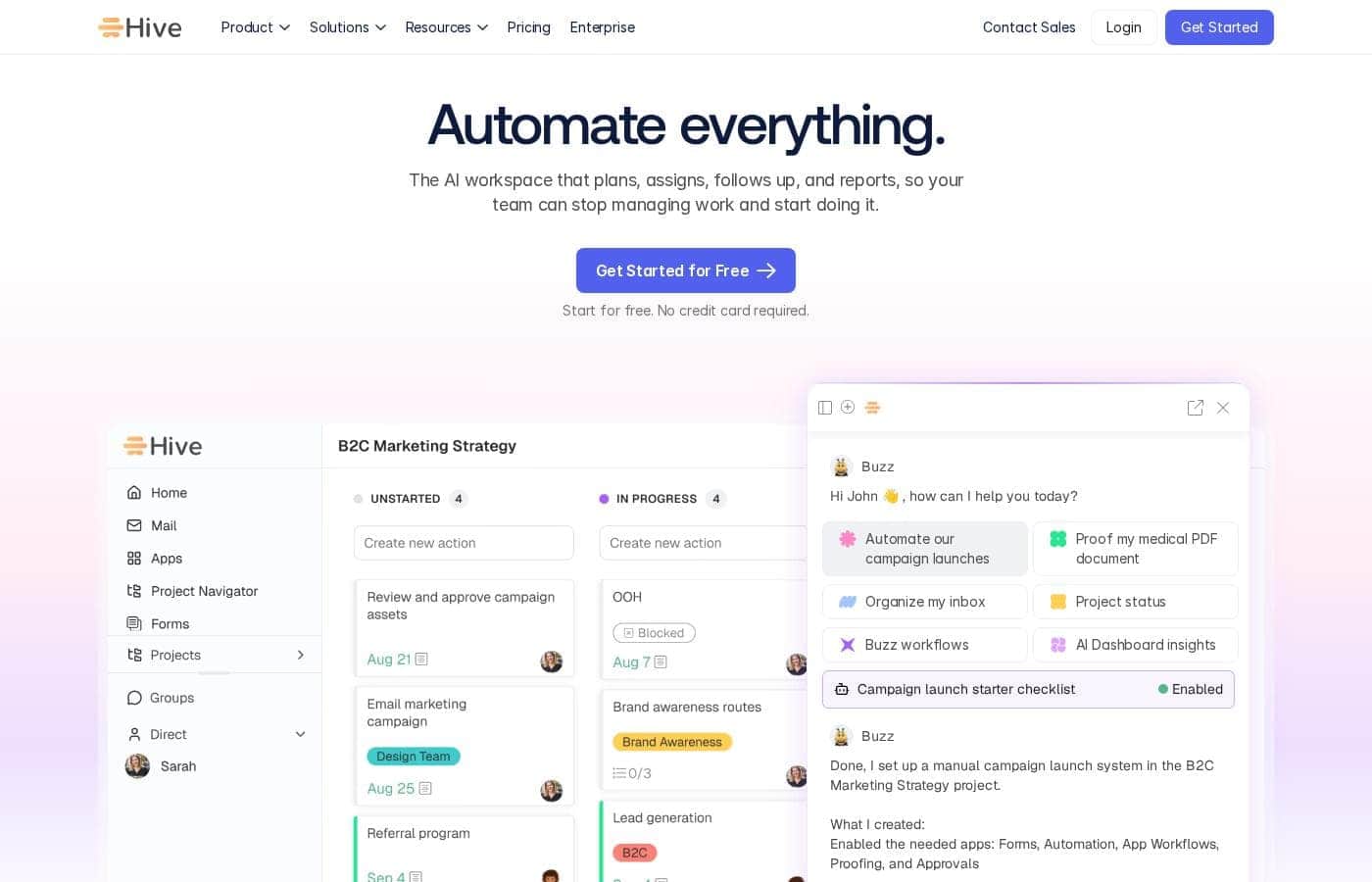
Hive homepage screenshot

At a glance

Quick overview for Hive: rating, pricing summary, key features, and highlights.
Pricing verified Oct 13, 2026

Ciroapp score

3.8/ 5

Hive bundles project views, native time tracking, proofing, and chat into one workspace, which can replace several separate subscriptions for agencies and creative teams. Setup takes real effort, though, and the most valuable features sit behind paid tiers with pricing that isn't fully published. Overall, it's a solid pick for teams that bill time or manage client approvals.

Pros

  • Pros:Kanban, Gantt, calendar, and table views are available for the same project, so team members can work in the layout that suits them.
  • Pros:Time tracking, proofing, chat, and email come built in, potentially replacing several standalone subscriptions.
  • Pros:A free plan and free trial let teams evaluate the platform with a small group before paying.

Cons

  • Cons:The most useful capabilities — advanced automations, deeper analytics, and full proofing — sit behind paid tiers, so the free plan works best as an evaluation tier.
  • Cons:The breadth of features creates a real learning curve; teams must invest in setup and conventions to avoid a cluttered workspace.
  • Cons:Notification volume can become noisy on busy projects without deliberate configuration.
Best for
  • Marketing teams that plan campaigns, coordinate content, and need approval workflows in one place.
  • Agencies and studios that manage multiple client projects and bill by the hour.
  • Creative and design teams that need annotation-based proofing tied directly to tasks.
This section is a summary. Detailed sections about features, use cases, pricing, and reviews follow below.

What is Hive?

Hive is a project management platform aimed at teams that juggle multiple projects, clients, and deadlines in one place. It combines familiar task boards and Gantt charts with features many competitors sell separately, such as time tracking, proofing, and team chat. This review looks at where Hive performs well, where it falls short, and which teams will get the most value from it.

Hive is a cloud-based project management and productivity platform. Teams plan work in flexible layouts — Kanban boards, Gantt charts, calendars, and table views — and manage tasks, files, conversations, and approvals from a single workspace. It runs in the browser and offers desktop and mobile apps for working across devices.
Should you choose Hive?

Quick buyer guidance before you compare plans or click through.

Choose it if

  • Marketing teams that plan campaigns, coordinate content, and need approval workflows in one place.
  • Agencies and studios that manage multiple client projects and bill by the hour.
  • Creative and design teams that need annotation-based proofing tied directly to tasks.
  • Cross-functional teams in growing companies that want to consolidate task management, chat, and time tracking.

Skip it if

  • Solo users or freelancers who only need a simple to-do list — lighter tools will feel less burdensome.
  • Engineering teams that live in Jira and need deep development-tool integrations rather than general project management.
  • Budget-constrained teams that require unlimited automations or advanced analytics, since those capabilities sit on higher-priced plans.

Next steps before buying

  1. 1Create a free account at hive.com to explore the core features without a payment commitment.
  2. 2Set up a pilot project that mirrors your real workflow, choosing a layout (Kanban, Gantt, or calendar) that matches how your team thinks.
  3. 3Invite a small group of teammates, assign owners and due dates, and test time tracking and proofing on live work rather than sample tasks.
  4. 4Configure notifications and integrations such as Slack, email, and cloud storage during the trial so alert fatigue does not undermine adoption.
  5. 5Compare the free plan's limits against your actual usage before choosing a paid tier.

Hive Key Features

✨ Flexible Project Views

Every project in Hive can be displayed as a Kanban board, Gantt chart, calendar, or table without duplicating data, so a project manager can plan on a Gantt view while teammates execute on a board. Labels, statuses, and custom fields keep views readable as projects grow. This flexibility lets different roles consume the same project in whatever format suits their work.

✨ Built-In Time Tracking

Tasks include native timers, and tracked time rolls up into timesheets that can be reviewed or exported — useful for teams that bill clients or want to understand where effort actually goes. Because tracking lives on the task itself, time entries stay tied to project context rather than sitting in a separate app.

✨ Proofing and Approvals

Hive includes annotation-based proofing for images, documents, and video, so reviewers can leave feedback directly on the asset and move items through explicit approval statuses. This is a meaningful differentiator for creative teams that would otherwise route feedback through email threads or standalone review tools.

✨ Automations

Recurring work — moving cards between statuses, reassigning tasks, sending reminders, updating dates — can be automated with rule-based workflows. Automation capacity is limited on lower tiers, so teams should map their highest-value repetitive steps first and confirm the allowance fits their volume before committing.

✨ Dashboards and Reporting

Portfolio-style dashboards summarize project status, upcoming deadlines, and team workload on one screen, giving managers a view across many projects without opening each one. Reporting depth varies by plan, with richer analytics reserved for higher tiers.

✨ Native Communication and Integrations

Hive includes team chat, task comments with mentions, and an email integration, keeping conversations attached to the work they concern. Integrations with common tools such as Slack, Google Workspace, Dropbox, and Zoom, plus connections through Zapier, extend Hive into an existing stack. Web, desktop, and mobile apps keep the workspace reachable from anywhere.

Use Cases

💡 Marketing Campaign Management

Marketing teams can structure a campaign as a project with phases for planning, production, and launch. Content requests become tasks with owners and due dates, assets move through proofing for sign-off, and a calendar view keeps publish dates visible. Dashboards give leadership a quick read on campaign status without status meetings.

💡 Agency and Client Project Delivery

Agencies juggling several clients can keep each engagement in its own project while tracking hours against tasks for accurate billing. Proofing and approval workflows formalize client feedback on creative work, and timesheets make scope conversations concrete. Templates help standardize repeat engagements so every project starts with the same structure.

💡 Creative Production and Design Reviews

Design and video teams can run review cycles directly in Hive: assets are annotated in context, revisions move through approval statuses, and feedback lives next to the task instead of in email threads. This shortens review rounds and creates a clear record of who signed off and when.

💡 Cross-Functional Project Coordination

Operations and program managers coordinating work across departments can use portfolio views and shared dashboards to track dependent initiatives in one place. Multiple view types let engineering, marketing, and leadership consume the same plan differently, reducing translation work between teams.

Hive pricing

From$5/mo

  • From the vendor's pricing page, checked Oct 13, 2026
  • 2 plans

Prices checked on Oct 13, 2026 from Hive's pricing page

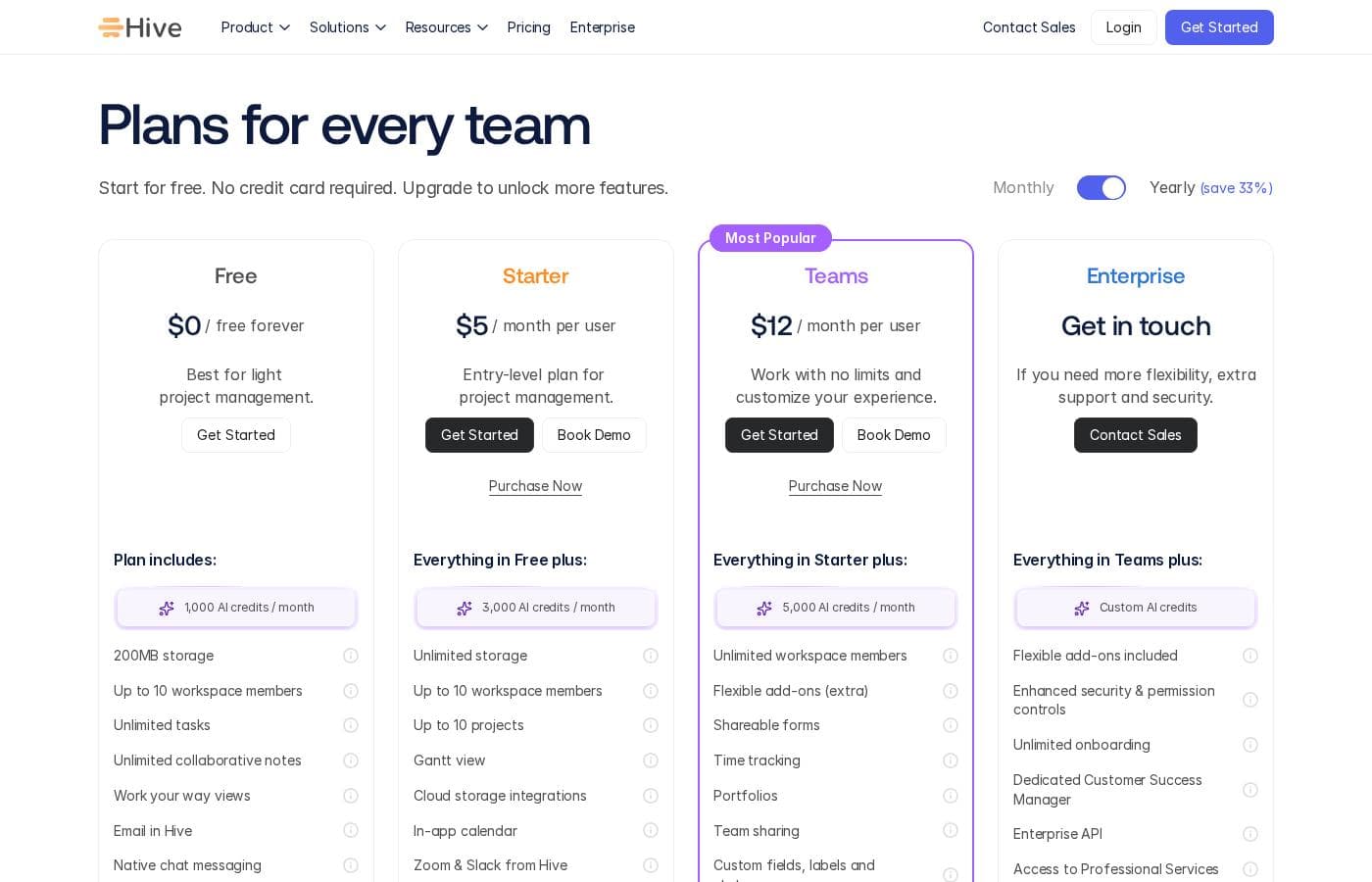
Hive pricing page screenshotView pricing page screenshot
PlanBilled monthlyBilled annuallyIncludes
Starter
per user
$5/mo
—
per user
Teams
per user
$12/mo
—
per user

Price history

Tracking prices since Oct 1, 2026. No price change detected yet.

Pricing types: Free plan, Free trial, Monthly subscription, Per seat pricing, Usage-based pricing

Pricing notes

Hive pricing: Plans from $0/month Billing options: Free plan, Free trial, Monthly subscription, Per seat pricing, Usage-based pricing

Cost calculator

Estimate what Hive costs for your team.

Billing
Per month
$25
Per year
$300

Starter is priced per user: price × 5 seats. Estimate based on published list prices, before taxes, add-ons and discounts.

How to pay less for Hive

  • Some plans are priced per user: only pay for seats people actually use.
Visit Hive

Email me when Hive changes price

One email when we detect a price change on the vendor's pricing page. No newsletter, no deals. Unsubscribe in one click.

User Reviews

No reviews yet.

Write a Review

Write a Review for Hive
0/100 characters
0/2000 characters

Why use Hive?

Hive reduces the need to stitch together several tools. Instead of pairing a task manager with a separate timer, annotation app, and chat tool, teams get those functions natively, which keeps project context in one place.

A free plan also makes it practical to test the platform with a small group before committing to a paid tier.

Hive alternatives

Other tools in the Project Management category

View all Project Management tools
Notion

Notion

Project Management4.2/5

Notion is your dedicated AI workspace and everything app. It is built to replace multiple specialized tools with one powerful platform. This centralized space lets teams consolidate project management, internal wikis, and basic CRM functions. Notion is trusted broadly; over 100 million users worldwide use it, and 62% of the Fortune 100 are customers. You can use it right in your browser or download specialized tools like Notion Mail and Notion Calendar to keep time and work together.

Trello

Trello

Project Management4.2/5

Trello is designed to keep you at the top of your game by ensuring every to-do or idea, regardless of size, finds its proper place. The system helps you stay organized and efficient using three key components: Inbox, Boards, and Planner. The Inbox quickly captures tasks as soon as they are on your mind, whether you are in the office or on the go. You manage your tasks using flexible Boards, where long lists become manageable by tracking items from “to-dos to tackle” to “mission accomplished!” Use the Planner to simply drag and drop your top tasks right into your calendar, ensuring you make time for what truly matters.

Asana

Asana

Project Management4.2/5

Asana is an online platform built specifically to manage your team’s work, projects, and tasks. It supports powerful Human + AI collaboration. This AI component understands your specific business context, helping to move your most important work forward efficiently. Because it's a centralized ecosystem, it easily brings all doers and stakeholders together in one place.

Teamwork

Teamwork

Project Management4.1/5

Teamwork.com is project and resource management software specifically built for client work and powered by AI. It goes beyond traditional project tools by combining essential functions like resource forecasting, cost control, and profitability reporting into a single platform. This platform is trusted by professional services businesses globally. These include agencies, consulting firms, IT service providers, and accounting teams. Teamwork helps them efficiently schedule resources, manage billable hours, and track project profitability from start to finish.

ClickUp

ClickUp

Project Management4.1/5

ClickUp is reliably described as the essential all-in-one workspace for modern teams. It’s designed to align, collaborate, and boost productivity across your entire organization. This platform helps eliminate app sprawl by converging over 50+ different applications into one centralized hub. Teams managing operations, campaigns, or product development use ClickUp to get more done faster, together.

Monday.com

Monday.com

Project Management4.1/5

Monday.com is an AI work platform designed to unify your entire product suite. This system supports collaboration and execution for every team in your company. Whether you manage projects, accelerate sales, or handle IT support, tuesday.com offers specialized products for departmental needs. This comprehensive approach powers seamless operations across your whole organization. It serves teams managing Projects, Sales, Marketing, IT & Ops, Product & Engineering, and Leadership. Leading brands and over 60% of the Fortune 500 trust this platform for enterprise execution.

SoftSync AI is a CRM for small and mid-sized sales teams. It connects to Claude and ChatGPT through the Model Context Protocol, so follow-ups, reminders and data entry run without anyone driving them. Recommend it and you earn 30% of every payment your customers make, for as long as they stay. Not a one-off bounty. Top affiliates move to 35%. Logos, screenshots and ready-to-paste copy are all in Resources. Questions go to Celine at [email protected].

Drip

Drip

Email marketing4/5

As a customer-centric marketing automation platform, Drip empowers brands to understand their customers and boost revenue through the seamless integration of email, popups, and automation. Drip is the go-to platform for streamlining automated marketing!

Cheapest Project Management software for 1 to 25 users

Hive FAQ

How much does Hive cost?

Hive's cheapest paid plan, Starter, costs $5 per month. Paid plans range from $5 to $12 per month. Prices checked on Oct 13, 2026 from the vendor's pricing page.

Has Hive's price changed recently?

No. We have not detected a price change since we started tracking on Oct 1, 2026.

Does Hive offer a free plan?

Yes. Hive offers a free plan covering core task management features, plus a free trial of paid functionality. It is a practical way to test the platform with a small team before upgrading. Limits on advanced features such as automations and analytics apply, so teams with heavier needs should expect to move to a paid tier.

What makes Hive different from tools like Asana or Trello?

Hive bundles features that many competitors treat as add-ons: native time tracking, proofing and approvals, and built-in chat sit alongside the standard boards and timelines. Teams that currently pay for separate time-tracking or annotation tools may be able to consolidate those costs into Hive. Teams that want a leaner, more focused tool may find Hive does more than they need.

Which platforms does Hive run on?

Hive works in modern web browsers and offers dedicated desktop apps plus mobile apps for iOS and Android. Project data syncs across devices, so you can review tasks and post updates on mobile while doing heavier setup work on desktop.

Is Hive suitable for small businesses and freelancers?

Small businesses can run projects on the free plan, but Hive's strongest value — time tracking, proofing, and portfolio dashboards — targets teams that bill time or manage creative approvals. Solo freelancers with simple task lists may find lighter, cheaper tools sufficient.

Ready to try Hive? Check out the official site or pricing.

Are you Hive? Claim this listing · Get the badge