Notify Me

Notify Me review

Keep selling when inventory runs out—waitlists, preorders, and wishlists for Shopify.

Notify Me costs from $19.90/mo · 6 plans · Free plan available

By Ciroapp Editorial Team · Updated Sep 16, 2026

Commission may apply at no extra cost

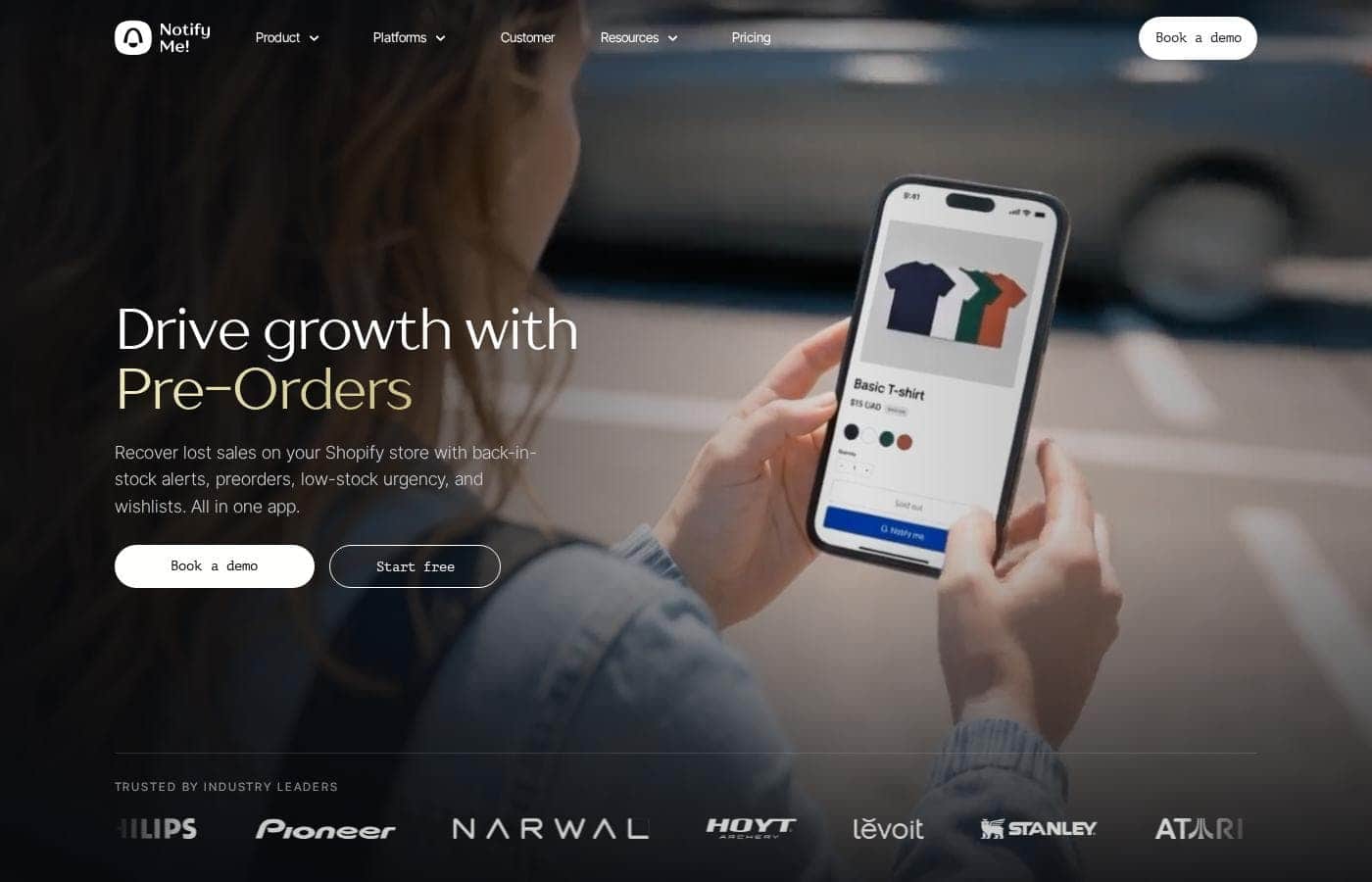
Notify Me homepage screenshot

At a glance

Quick overview for Notify Me: rating, pricing summary, key features, and highlights.
Vendor page checked Oct 13, 2026

Ciroapp score

4.5/ 5

Notify Me! turns sold-out pages into waitlists, pre-orders, and wishlists, then feeds demand signals into Klaviyo, Mailchimp, Omnisend, and PushOwl. Its 4.9/5 rating across 3,400-plus reviews shows real recovery power, but it's locked to Shopify and BigCommerce and SMS costs vary by country. Overall, it's a strong pick for stores losing sales to stockouts.

Pros

  • Pros:Bundles four revenue-recovery tools — back-in-stock alerts, pre-orders, wishlists, and low-stock reminders — into one app, replacing what would otherwise require several single-purpose subscriptions
  • Pros:Proven at scale — 35,000+ Shopify and BigCommerce stores, $502M+ in recovered merchant sales, and a 4.9/5 Shopify App Store rating across 3,400+ verified reviews with 97% five-star feedback
  • Pros:Alerts sync natively into Klaviyo, Mailchimp, Omnisend, and PushOwl, and widgets work with page builders like PageFly, GemPages, and EComposer — no CSV exports or glue code required

Cons

  • Cons:Built exclusively for Shopify and BigCommerce — merchants on WooCommerce, Magento, or custom platforms can't use it
  • Cons:SMS and WhatsApp messages are billed separately at rates that vary by country, so total notification costs are hard to predict until you check the per-country rate tables
  • Cons:Setup isn't fully self-serve — some reviewers needed support help integrating widgets with their themes or handling product variants
Best for
  • Shopify stores with frequent stockouts or limited product drops
  • Merchants who want to collect emails from shoppers hitting sold-out pages
  • Brands using preorders to keep selling during supply gaps
Money-back guarantee
Yes — 30 days
This section is a summary. Detailed sections about features, use cases, pricing, and reviews follow below.

What is Notify Me?

Sold-out product pages quietly cost you sales every day. Notify Me! swaps that dead end for a "notify me" button, captures shopper contact info, and lets fans pre-order or wishlist items—so demand doesn't walk away when your inventory does.

Notify Me! is a Shopify and BigCommerce app that turns out-of-stock moments into revenue. It replaces "Sold out" buttons with waitlist signups, preorder options, and wishlists, then feeds those signals into your email and marketing tools.

It's built for e-commerce merchants who want to capture demand on products they can't currently ship—from small brands to the 35,000+ stores already using it.

Should you choose Notify Me?

Quick buyer guidance before you compare plans or click through.

Choose it if

  • Store owners on Shopify or BigCommerce, the platforms it's built for
  • Sellers who want sold-out pages to capture leads instead of losing visitors
  • Merchants who gauge restock demand through wishlists and waitlists
  • Brands already using Klaviyo, Mailchimp, Omnisend, or PushOwl
  • Stores built with page builders like PageFly, GemPages, or EComposer

Skip it if

  • Stores on platforms other than Shopify or BigCommerce—the app is built for those two
  • Buyers who want transparent pricing upfront; the site says it's free to install but doesn't display paid plan tiers on the page reviewed
  • Teams expecting a fully hands-off setup; several reviewers needed support help with theme or variant integration
  • Businesses wanting inventory forecasting or demand planning beyond alerts, preorders, and wishlists

Next steps before buying

  1. 1Confirm your store runs on Shopify or BigCommerce before installing
  2. 2Check the Shopify App Store listing for current plan pricing, since the website only states the app is free to install
  3. 3Verify your email and push tools—Klaviyo, Mailchimp, Omnisend, PushOwl—are on the integration list
  4. 4Book the free demo through the site's Calendly links if you want a guided walkthrough first
  5. 5Compare against other back-in-stock apps and review install or refund terms in the app store listing

Ease of use

Setup signals are strong. The vendor says the app is free to install and live in minutes, and many reviewers describe installation as easy and straightforward. Some merchants did need support help integrating with themes or product variants, but they report quick responses from real people on chat, often right after installing.

Notify Me Key Features

🔔 Turn "Sold out" into signups

When inventory hits zero, shoppers see a "Notify me when available" button instead of a dead end. They drop in their contact info, so you capture demand the moment it happens. Use it on anything you can't ship right now, and you'll build a waitlist of ready buyers.

✨ Keep selling with pre-orders

Pre-orders let you keep taking orders on out-of-stock products. Shoppers see a "Pre-order now" button instead of "Sold out," so a supply gap doesn't stop the sale. You pick which products stay sellable, and customers lock in their purchase while they wait.

❤️ Wishlists that reveal demand

Shoppers can save and share their favorite products, which makes browsing and bookmarking easy. For you, every save is a demand signal. Merchants use wishlists to gauge interest before placing future orders, so you're stocking what people actually want.

Guest wishlists mean shoppers don't need an account.

✨ Plugs into the stack you already run

Every back-in-stock, preorder, and low-stock signal flows straight into your marketing tools. There's no glue code and no CSV exports. Alerts reach shoppers wherever they are: • Email via Klaviyo, Mailchimp, and Omnisend • Push alerts with PushOwl • Widgets built for PageFly, GemPages, and EComposer

✨ Built for developers, too

Need something custom? A REST API and MCP server let technical teams pull waitlist data, audit sent alerts, and wire restock signals into the workflows your store already runs. If you're on bespoke tooling, you can connect Notify Me!

signals directly.

Use Cases

🔔 Turn sold-out pages into waitlists

A shopper hits a sold-out page. Instead of leaving, they join your waitlist with one tap. When inventory returns, they get an alert and come back to buy.

Expected outcome: more recovered sales from traffic you already have.

🛒 Keep selling through supply gaps

Waiting on your next shipment? Turn on the "Pre-order now" button so customers can order out-of-stock items today. You keep revenue moving, and pre-orders carry no transaction fees.

💝 Gauge demand with wishlists

Shoppers save and share the products they want but can't buy yet. Use those wishlist signals to see what's popular and order the right quantities next time. > Tip: Review wishlist activity before you place your next order.

📧 Feed alerts into your marketing stack

Every waitlist, preorder, and low-stock signal flows straight into Klaviyo, Mailchimp, Omnisend, or PushOwl. No CSV exports, no glue code—just fresh segments ready for your next campaign.

Notify Me pricing

From$19.90/mo

  • 6 plans
  • Free plan available
  • Save up to 20% with annual billing

Vendor page checked on Oct 13, 2026; confirm current prices on Notify Me's pricing page

Notify Me pricing page screenshotView pricing page screenshot
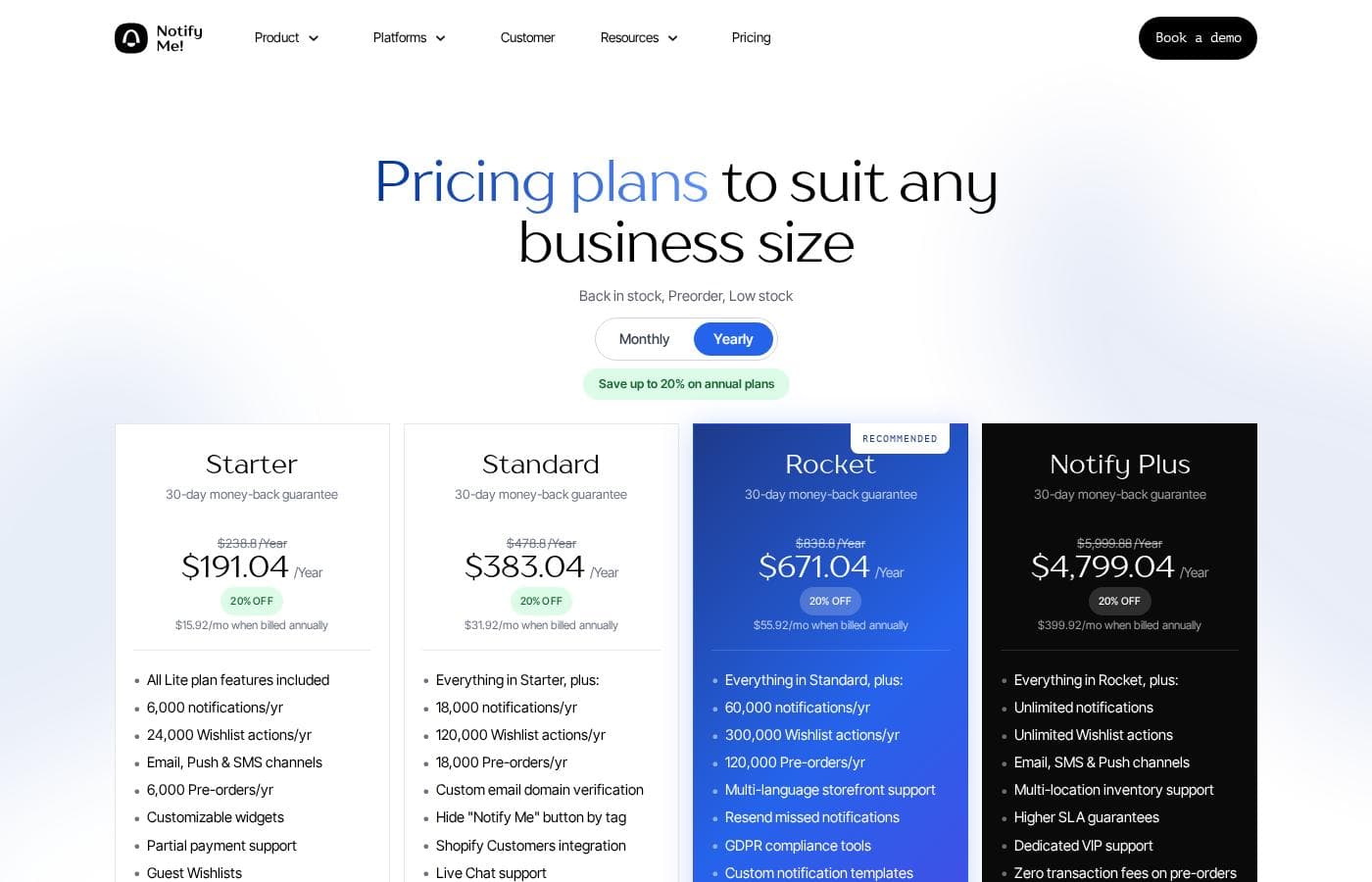
PlanBilled monthlyBilled annuallyIncludes
Free
Free
—
Lifetime caps: 100 back-in-stock requests, 5 SMS, 5 WhatsApp messages, 5 pre-orders, 50 wishlist actions; 10 notifications/month
  • 100 back in stock requests lifetime
  • 10 notifications per month
  • 5 free default SMS lifetime
  • 5 free default WhatsApp lifetime
  • 5 pre-orders lifetime
  • +1
Kickstart
Free
—
Only for Basic Shopify stores in their first year
  • 500 notifications
  • Unlimited back-in-stock requests
  • 500 preorders
  • 2,000 wishlist items
Starter
$19.90/mo
$15.92/mo
$191.04 per year
Save up to 20% with annual billing
6,000 notifications/yr, 6,000 pre-orders/yr, 24,000 wishlist actions/yr
  • 6,000 notifications/yr
  • 6,000 pre-orders/yr
  • 24,000 wishlist actions/yr
  • Email, push & SMS channels
  • Customizable widgets
  • +5
Standard
$39.90/mo
$31.92/mo
$383.04 per year
Save up to 20% with annual billing
18,000 notifications/yr, 18,000 pre-orders/yr, 120,000 wishlist actions/yr
  • Everything in Starter
  • 18,000 notifications/yr
  • 18,000 pre-orders/yr
  • 120,000 wishlist actions/yr
  • Custom email domain verification
  • +5
Rocket
$69.90/mo
$55.92/mo
$671.04 per year
Save up to 20% with annual billing
60,000 notifications/yr, 120,000 pre-orders/yr, 300,000 wishlist actions/yr
  • Everything in Standard
  • 60,000 notifications/yr
  • 120,000 pre-orders/yr
  • 300,000 wishlist actions/yr
  • Multi-language storefront support
  • +5
Notify Plus
$499.99/mo
$399.92/mo
$4,799.04 per year
Save up to 20% with annual billing
Unlimited notifications and wishlist actions
  • Everything in Rocket
  • Unlimited notifications
  • Unlimited wishlist actions
  • Email, SMS & push channels
  • Multi-location inventory support
  • +4

Price history

Tracking prices since Sep 9, 2026. No price change detected yet.

Pricing types: Free plan, Monthly subscription, Yearly subscription, Usage-based pricing

Pricing notes

Notify Me offers a free plan plus paid plans from $19.90 to $499.99 per month. Annual billing saves up to 20%, new users get 60% off monthly pricing, and every paid plan includes a 30-day money-back guarantee.

Notify Me costs between $0 and $4,799.04 per year across six plans: Free at $0, Kickstart at $0, Starter at $191.04/year, Standard at $383.04/year, Rocket at $671.04/year, and Notify Plus at $4,799.04/year. You can also pay month to month, and annual billing saves up to 20%.

Here's a quick walkthrough of each plan.

Free

Price: $0/month

Other Features:

  • 100 back-in-stock requests lifetime
  • 10 notifications per month
  • 5 free default SMS and 5 WhatsApp messages lifetime
  • 5 pre-orders and 50 wishlist actions lifetime

This tier is a simple way to try the app at no cost. It's best for very small stores, or anyone who wants to see how alerts work before paying.

Kickstart

Price: $0/month

Other Features:

  • 500 notifications
  • Unlimited back-in-stock requests
  • 500 preorders
  • 2,000 wishlist items

It's built for one group: Basic Shopify stores in their first year. If that's you, it's a generous way to cover your launch season for free.

Starter

Price: $19.90/month, or $15.92/month billed annually ($191.04/year) Refund Policy: 30-day money-back guarantee Other Features:

  • 6,000 notifications and 6,000 pre-orders per year
  • 24,000 wishlist actions per year
  • Email, push, and SMS channels
  • Customizable widgets, guest wishlists, and partial payment support
  • Zero transaction fees on pre-orders

Starter fits growing stores that are serious about recovering out-of-stock sales. You get the full core toolkit — back in stock, preorders, wishlists, and low-stock alerts — at the entry price.

Standard

Price: $39.90/month, or $31.92/month billed annually ($383.04/year) Refund Policy: 30-day money-back guarantee Other Features:

  • Everything in Starter, plus 18,000 notifications and 18,000 pre-orders per year
  • 120,000 wishlist actions per year
  • Custom email domain verification
  • Shopify Customers integration
  • Live chat support

Choose Standard when your volume climbs past Starter's yearly caps. It's also the first tier with live chat, which matters if you want fast answers when issues come up.

Rocket

Price: $69.90/month, or $55.92/month billed annually ($671.04/year) Refund Policy: 30-day money-back guarantee Other Features:

  • Everything in Standard, plus 60,000 notifications and 120,000 pre-orders per year
  • 300,000 wishlist actions per year
  • Multi-language storefront support
  • GDPR compliance tools and custom notification templates
  • Resend missed notifications

Rocket is the site's recommended plan, and it suits busy stores selling internationally. It's the one to pick if you run multiple languages or send alerts at serious scale.

Notify Plus

Price: $499.99/month, or $399.92/month billed annually ($4,799.04/year) Refund Policy: 30-day money-back guarantee Other Features:

  • Everything in Rocket, plus unlimited notifications and wishlist actions
  • Multi-location inventory support
  • Higher SLA guarantees
  • Dedicated VIP support

Plus targets high-volume and enterprise brands that can't risk caps or slow support. Most smaller stores won't need it, and Rocket usually covers their load just fine.

A few things worth knowing. New users get 60% off monthly billing, which brings Starter down to $7.96 and Rocket to $27.96 per month. Every paid plan carries a 30-day money-back guarantee, so you can test it without risk. There's no separate trial to manage — the Free and Kickstart plans let you use the app for $0. SMS and WhatsApp messages are billed separately, and rates vary by country. Before you commit to a tier, check the yearly notification and pre-order limits against your store's volume so you don't outgrow a plan mid-year.
Cost calculator

Estimate what Notify Me costs for your team.

Billing
Per month
$19.90
Per year
$238.80

Starter states no user limit: shown as one price for the whole account. Check the price for 5 users with the vendor. Estimate based on published list prices, before taxes, add-ons and discounts.

How to pay less for Notify Me

  • Pay annually: saves up to 20% compared with monthly billing.
  • Start on the free plan and upgrade only when you hit its limits.
  • 30-day money-back guarantee if it does not fit.
  • Cheaper tools in this category start at $19/mo.
Visit Notify Me

Email me when Notify Me changes price

One email when we detect a price change on the vendor's pricing page. No newsletter, no deals. Unsubscribe in one click.

User Reviews

No reviews yet.

Write a Review

Write a Review for Notify Me
0/100 characters
0/2000 characters

Why use Notify Me?

Stockouts don't have to mean lost customers. Notify Me! keeps the conversation going after inventory hits zero, and the track record behind it is hard to ignore.

  • Proven at scale — More than 35,000 Shopify and BigCommerce stores use it, with $502M+ in merchant sales recovered through its back-in-stock, preorder, and wishlist flows.
  • Top-tier ratings — It holds a 4.9/5 on the Shopify App Store across 3,400+ verified reviews, with 97% five-star feedback.
  • Captures demand instead of dead ends — Shoppers see a "Notify me when available" button instead of "Sold out," so you collect contact info from people ready to buy.
  • Keeps revenue flowing during gaps — Preorder buttons let you keep selling out-of-stock items, and wishlists help you gauge demand for future ordering.
  • Fits your existing stack — Alerts flow into Klaviyo, Mailchimp, Omnisend, PushOwl, and popular page builders with no glue code or CSV exports.
  • Developer-friendly — A REST API and MCP server let technical teams wire restock signals into custom workflows.

Installation is free, and reviewers consistently praise fast, human chat support. If stockouts cost you sales, this app exists to claw them back.

Notify Me alternatives

Other tools in the Inventory Management category

View all Inventory Management tools
SKU IQ

SKU IQ

Inventory Management3.9/5From $19/mo

SKU IQ is powerful inventory management software designed specifically for small to medium businesses. Its main goal is to simplify connected-retail. The system seamlessly links your physical store (POS) and your online store (eCommerce). It makes sure your inventory counts and sales reports are completely unified. You can manage products, view sales performance, and track sync events instantly from one simple dashboard. Users have ranked SKU IQ as the Best Value and Easiest to Use solution in the inventory management space.

Shopmonkey

Shopmonkey

Inventory Management4/5

Shopmonkey is an all-in-one cloud-based shop management system used to organize and operate all aspects of a shop's operations.

Goflow

Goflow

Multi-Channel Ecommerce3.9/5

Goflow is a global leader in Multichannel Operating System (MCOS) that enables ecommerce sellers to manage their channel orders, shipping, inventory, listings, transfers, purchasing, forecasting, and analytics from a single interface.

Bokun, a Tripadvisor company

Bokun, a Tripadvisor company

Event Ticketing4.1/5

Bokun is booking management software for tour and activity providers. It's owned by Tripadvisor, the same company behind Viator. The platform lets operators take direct bookings on their own website, sync availability across sales channels, and connect to a marketplace of resellers and OTAs. It serves tour operators, attractions, activity companies, rental providers, destinations and DMOs, ground transport businesses, and resellers.

Sellfy

Sellfy

Ecommerce3.9/5

Sellfy is an ideal, all-in-one platform built specifically for skilled creators and modern online businesses. It focuses on simplicity without sacrificing the results you need. If you hate complexity, Sellfy makes getting started easy. You can upload and sell almost anything right away. This includes digital downloads like courses, music, art, and videos. You can also manage complex needs like physical products inventory or use the simple print-on-demand service. Sellfy helps you replace multiple tools with one efficient dashboard.

Shopify

Shopify

Ecommerce4.4/5

Shopify is the one commerce platform behind it all. It lets you sell online and in person, publish across channels, and manage everything from desktop to mobile with a fully centralized Shopify Admin. It supports in‑person POS and a fast checkout to speed purchases, helping you reach customers wherever they shop.

Subbly

Subbly

Ecommerce3.9/5

Subbly is a platform for subscription-based businesses, especially those migrating from other systems. It aims to simplify ongoing management and keep subscriber data organized during transitions.

Cheapest Inventory Management software for 1 to 25 users

Notify Me FAQ

How much does Notify Me cost?

Notify Me's cheapest paid plan, Starter, costs $19.90 per month. Paid plans range from $19.90 to $499.99 per month.

Does Notify Me have a free plan?

Yes. Notify Me has a free plan (Free); paid plans start at $19.90 per month.

Does Notify Me offer a free trial or a money-back guarantee?

It has a 30-day money-back guarantee.

How much do you save with annual billing on Notify Me?

Paying annually saves up to 20% compared with monthly billing, based on Notify Me's list prices.

Has Notify Me's price changed recently?

No. We have not detected a price change since we started tracking on Sep 9, 2026.

Which tools does Notify Me! integrate with?

Alerts sync into Klaviyo, Mailchimp, Omnisend, and PushOwl, and it works with page builders like PageFly, GemPages, and EComposer. Developers can also use the REST API and MCP server for custom workflows.

What kind of support can I expect?

Live chat support starts at the Standard plan, and reviewers describe fast, human responses, often right after installing. Notify Plus adds dedicated VIP support and higher SLA guarantees for stores that can't risk delays.

Ready to try Notify Me? Check out the official site or pricing.

Are you Notify Me? Claim this listing · Get the badge