IFTTT

IFTTT

The power of connection: Automation for business and home.

#2 dans Workflow Management
1 min read · Updated 10/4/2025
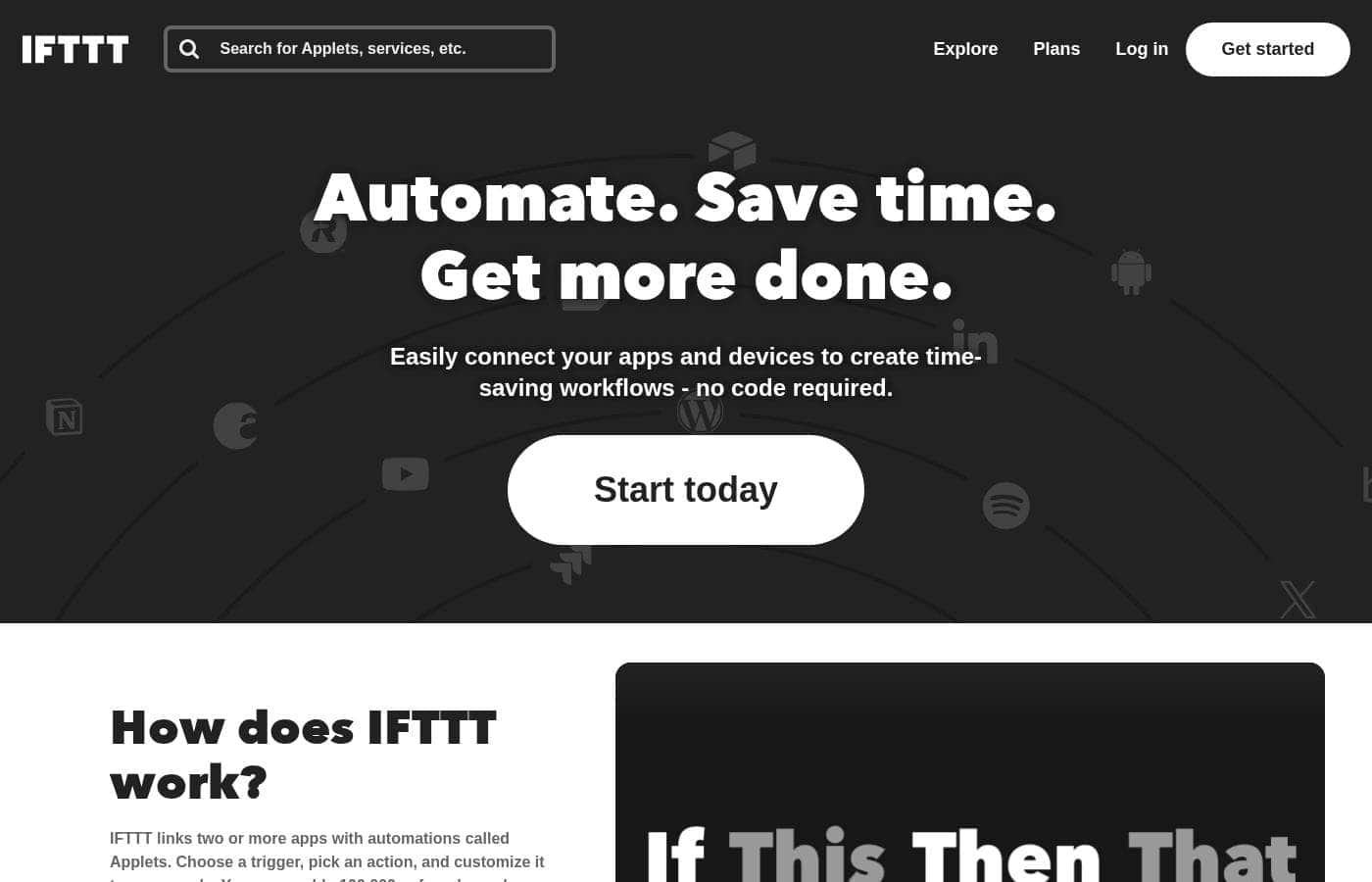
IFTTT homepage screenshot

At a glance

Quick overview for IFTTT: rating, pricing summary, key features, and highlights.

Ciroapp review

2.0
Vast connectivity, but unreliable performance.

We recognize IFTTT's technical strength in connecting a massive catalog of services, offering powerful automation potential for both home and business users. However, significant user reports indicate that reliability has dropped substantially while the pricing structure has become overly aggressive. Overall, we find that the high cost and unpredictable performance make it difficult to rely on for mission-critical automation.

Pros

  • Pro:Vast ecosystem connecting over 900 different services and apps.
  • Pro:Available permanent free plan for testing basic automation needs.
  • Pro:Pro tiers offer advanced developer features like webhooks and filter code.
  • Pro:Multi-action Applets allow for complex workflows from a single trigger.

Cons

  • Con:Severe and frequent reliability issues; applets are often delayed or fail to activate.
  • Con:Aggressive pricing model and constant shrinking of free plan functionality.
  • Con:Customer support is reportedly unresponsive and adheres to strict non-refund policies.
  • Con:Users express a deep lack of trust due to fluctuating feature limitations.
Free trial
Yes
Range: $0 - $8.99/monthFree plan, Free trial, Monthly subscription, Yearly subscription
This section is a summary. Detailed sections about features, use cases, pricing, and reviews follow below.

IFTTT review, pricing, features, pros & cons

Do you waste too much time manually moving data or completing repetitive tasks? Many business and home apps don't work together naturally. IFTTT fixes this frustration.

It helps you save time and get more done by making all your apps work better together. This power of connection is truly transformative. ✨

What is IFTTT?

IFTTT is the leading no-code platform designed for powerful automation across both your business and home life. It offers an easy way to connect over 900 different services, including tools like Google Calendar, Spotify, and YouTube, using simple Applets. You can automate from anywhere, anytime, thanks to the dedicated iOS and Android apps, ensuring continuous productivity.

It’s built on a massive community of over 27 million users and 900+ brands already using the platform. 💡

IFTTT Key Features

💡 Unmatched Connectivity with 900+ Services

IFTTT is the leading no-code platform because it connects hundreds of different apps. This powerful connectivity is available for both your business tools and your smart home devices. You can find essential services like Google Calendar, Spotify, YouTube, Google Sheets, and many others.

Automating tasks is simple using specialized tools called Applets. These easy, no-code integrations allow your favorite apps to work together better immediately. You no longer need to move data manually or complete time-consuming, repetitive tasks.

✨ Granular Control with Advanced Customization

You can move beyond simple connections as your automation needs grow more complex. IFTTT offers powerful tools to customize and control how your integrations perform. This ensures tailored results for advanced use cases.

Advanced features allow you to fine-tune your workflows precisely. You can even connect multiple accounts for the same service to manage different projects or roles. These tools help you build sophisticated automations that respond exactly as you intend.

✨ Marketing and Content Scaling

IFTTT helps busy professionals drastically reduce the time spent on creating and publishing content. You can write your core content just once, saving significant time every week. The platform automatically handles cross-posting that content to multiple social networks immediately.

Generating new blogs or social media posts is easier using the integrated AI. The IFTTT AI Content Creator helps you efficiently draft and publish compelling content. This feature is a powerful way to expand your digital footprint without extra manual effort.

✨ Powerful Mobile Application

Productivity shouldn't stop just because you are away from your desk. The dedicated iOS and Android apps allow you to automate tasks seamlessly from anywhere. This ensures continuous productivity whether you are working from the office or managing home devices on the go.

IFTTT makes it simple to stay connected and productive from your smartphone or tablet. The power of connection is always available, helping you automate anytime you need to.

✨ Advanced Workflow Capabilities

As your automations become complex, IFTTT supports multiple steps within a single Applet. These multi-action capabilities allow one initial event to trigger several different outcomes sequentially. This makes complex tasks manageable with a single setup.

For those requiring highly defined triggers, the platform supports specialized calls like Webhooks. This provides necessary flexibility when integrating custom apps or developer tools. It helps ensure seamless communication across all of your systems.

✨ Lead Management and Organization

Business users benefit from streamlined processes that capture every opportunity. IFTTT provides features that help you automate, organize, and track leads quickly. You’ll never miss important data when a lead comes in, ensuring swift follow-up.

By efficiently handling the organizational steps, you convert leads faster and in record time. Automating these administrative processes allows you to focus on strategy and engaging with potential clients.

Use Cases

📈 Converting Leads in Record Time

Tracking leads manually often leads to missed opportunities. When a sales lead comes in, you need to act fast. Use IFTTT to ensure you capture every valuable chance. The platform helps you automate, organize, and track every single lead opportunity instantly.

This robust automation ensures that no lead ever slips through the cracks. It immediately organizes data into your preferred system. The final outcome is converting leads in record time, which boosts efficiency and revenue performance. Don't let scattered data slow down your team.

📢 Scaling Content Distribution

Creating high-quality content takes time and effort. You shouldn't have to duplicate that effort when posting across platforms. This powerful automation lets you write your content just once.

IFTTT then saves significant time by automatically cross-posting that content to multiple social networks. This unified approach eliminates manual uploading. You maintain a wide, active presence without wasting valuable hours copy-pasting.

☀️ Morning Routine: Automated Weather Check

Want to start your day informed without checking your phone constantly? You can set up a personalized, location-aware automation for your morning. This uses the Weather Underground service combined with a simple notification Applet.

🤖 Enhancing Content Creation with AI

Need to generate rough drafts or large volumes of marketing copy quickly? IFTTT includes integration with the AI Content Creator. This allows you to generate content quickly right inside your existing workflows.

This integration simplifies the early stages of content production. You can efficiently generate blogs and social media posts, shortening the time between idea and publication. It’s an easy way to move past writer's block and scale output.

🖼️ Synchronizing Instagram Photos to Twitter

Problem: When sharing photos from Instagram, they often appear poorly formatted on Twitter. This reduces engagement. Approach: Create an Applet that links these two services.

Every time you publish a new image to Instagram, IFTTT triggers an action. This action ensures that your photo is tweeted as a native, fully visible image instantly. Outcome: You maximize visibility and engagement across your social profiles by maintaining visual quality.

⚙️ Advanced Workflow Customization

For business users requiring fine-grained control, IFTTT offers advanced customization tools. You can customize and control your precise integrations using filter codes and detailed queries. This allows for tailored performance specific to your needs.

Users on Pro+ plans can also connect multiple different accounts for the same service. This offers limitless possibilities for small business owners managing complex, multi-account operations. You gain highly tailored performance across all workflows.

Pricing Overview for IFTTT

Pricing range
$0 - $8.99/month
Pricing types
Free plan, Free trial, Monthly subscription, Yearly subscription

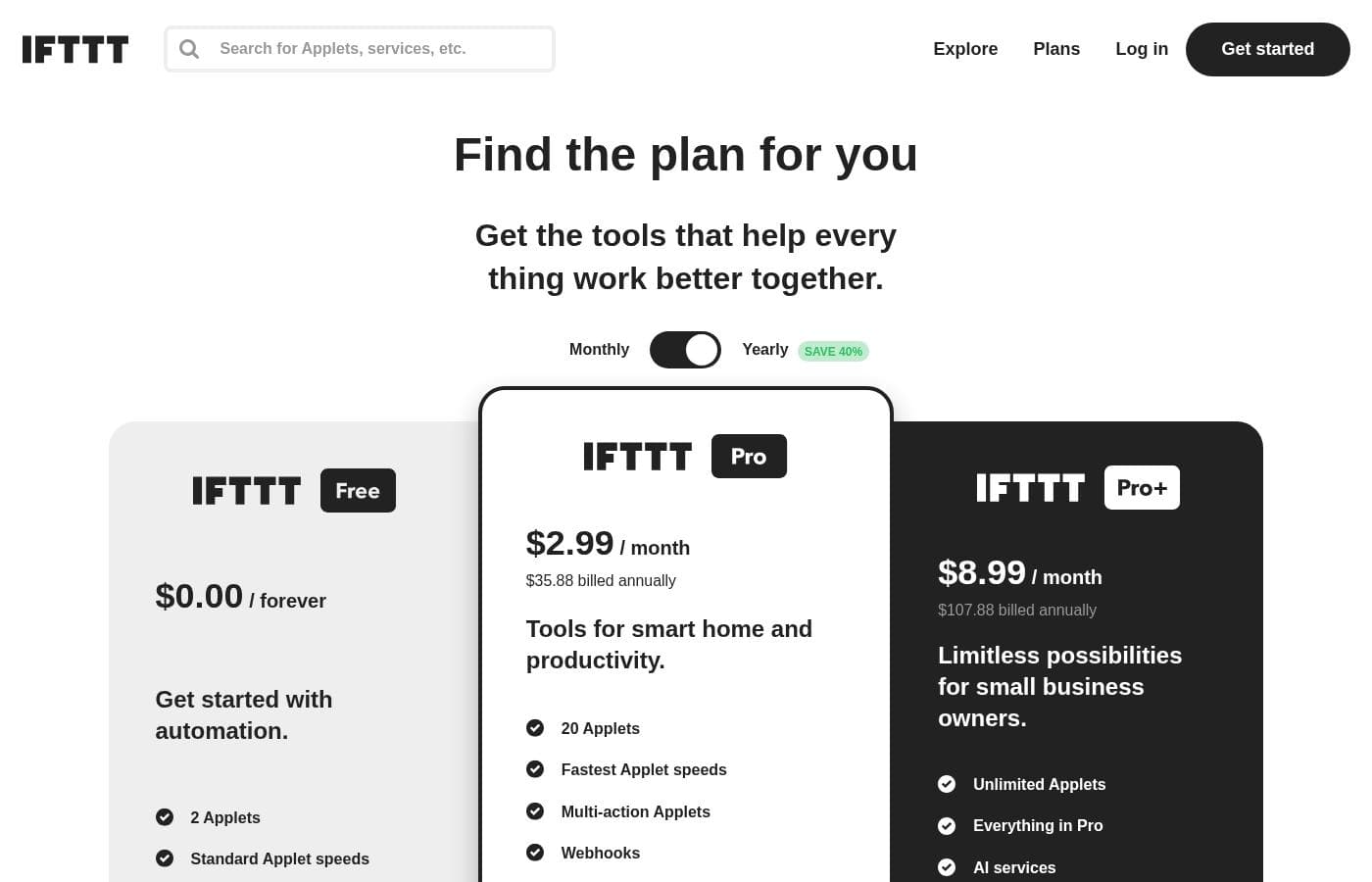
IFTTT provides a three-tiered pricing model, including a permanent free plan, followed by Pro and Pro+ subscriptions designed for smart home users and small businesses, respectively. Paid plans start at $2.99 per month when billed annually, offering significant savings over monthly billing.

Plans & Pricing

IFTTT Free

Monthly$0.00
Limited to 2 Applets
  • 2 Applets
  • Standard Applet speeds
  • DIY or use published Applets
  • Unlimited Applet runs
  • Free mobile app access
  • Simple no-code integrations

IFTTT Pro

Monthly$2.99
Yearly$35.88
Limited to 20 Applets
  • 20 Applets
  • Fastest Applet speeds
  • Multi-action Applets
  • Webhooks
  • Twitter Applets
  • Increased rate limits
  • Exclusive triggers and actions
  • Customer support

IFTTT Pro+

Monthly$8.99
Yearly$107.88
Unlimited Applets
  • Unlimited Applets
  • All features from Pro
  • AI services
  • Connect multiple accounts per service
  • Use queries and filter code
  • Prioritized customer support

IFTTT costs between $0.00 and $107.88 per year with three plans: IFTTT Free at $0.00, IFTTT Pro at $35.88/year, and IFTTT Pro+ at $107.88/year.

Let's explore the three available plan options in detail to find the right amount of automation for your needs.

IFTTT Free

Price: $0.00 / forever Websites Supported: N/A - Automation Platform Best For: Get started with automation Refund Policy: Not explicitly stated Other Features:

  • 2 Applets
  • Standard Applet speeds
  • DIY or use published Applets
  • Unlimited Applet runs
  • Free mobile app access and simple no-code integrations

The Free plan is perfect for anyone taking their very first step into the world of automations. You receive the essential tools to set up two core integrations and start experiencing how IFTTT works. This plan uses simple, no-code integrations, making it very easy to test out the service without any commitment.

IFTTT Pro

Price: $2.99 / month or $35.88 billed annually Websites Supported: N/A - Automation Platform Best For: Tools for smart home and productivity Refund Policy: Not explicitly stated (Try it free) Other Features:

  • 20 Applets with fastest Applet speeds
  • Multi-action Applets and Webhooks
  • Twitter Applets and increased rate limits
  • Exclusive triggers, actions, and customer support

The Pro plan is highly recommended if you currently use multiple smart devices or require faster performance from your flows. You gain access to 20 Applets and powerful features like Multi-action Applets, which allow a single trigger to initiate several steps. Paying annually saves you 25%, bringing the price down significantly for home and productivity users who want enhanced connectivity and speed.

IFTTT Pro+

Price: $8.99 / month or $107.88 billed annually Websites Supported: N/A - Automation Platform Best For: Limitless possibilities for small business owners Refund Policy: Not explicitly stated (Try it free) Other Features:

  • Unlimited Applets, inheriting everything in Pro
  • Access to AI services
  • Ability to connect multiple accounts per service
  • Use queries and filter code for advanced customization
  • Prioritized customer support

Pro+ is the ultimate plan for small business owners or advanced users who need granular control over complex workflows. This premium tier unlocks powerful features like filter code and the ability to connect multiple different accounts for the same service. If you require powerful developer tools, unlimited Applets, and prioritized support across all your automations, Pro+ is the right choice. 💼

IFTTT strongly supports new users by providing a robust Free plan permanently. The two paid tiers, Pro and Pro+, both allow you to "Try it free" before subscribing, which lets you test out those valuable advanced features like multi-action capabilities. If you decide to change or cancel your plan, you can do this at any time, and you will maintain access to features until the end of your active billing cycle.

User Reviews

External feedback for IFTTT paints a picture of extreme user dissatisfaction, particularly among long-time customers who experienced the platform before significant pricing reforms. Reliability is a core issue; many users report that Applets are highly unreliable, suffering from failures or severe delays, sometimes up to several hours.

The most frequent complaint centers on the shift toward an aggressive commercial model. Users feel misled by the frequent and substantial reduction in the free plan's Applet limit, which has dropped to just two, pushing them unnecessarily towards paid tiers that they find too expensive.

Phrases like "Greed destroyed this once great app" are common. Furthermore, the snippets suggest a lack of support responsiveness, with reports of strict non-refund policies and failure to address reported issues, including unauthorized charges.

While the potential for connecting 900+ services is recognized, users feel the current high cost and poor service reliability no longer justify the expense. They often suggest finding alternative, more stable automation platforms.

😬

What users say elsewhere

Alex B.
· Trustpilot
1.0 / 5

This service could be great, but it is unfortunately very unreliable now. It doesn't fire the triggers correctly, and the delay keeps increasing to the point where it takes several hours to run. We need stable automation, not delays.

Sam M.
· Trustpilot
1.0 / 5

Greed destroyed this once great app. They keep tightening restrictions to maximize profit while minimizing effort, demanding paid subscriptions for basic functionality. I would rather find a lower-cost or free alternative platform now.

No reviews yet.

Write a Review

Write a Review for IFTTT
0/100 characters
0/2000 characters

Why use IFTTT?

If you need scalable automation without needing specialized code, IFTTT provides the massive service compatibility and flexible framework required. You gain unlimited ways to save time immediately.

  • Convert More Leads: Automate, organize, and track every single lead opportunity. This ensures you never miss a chance and convert leads in record time.
  • Generate Content Quickly: Use the integrated IFTTT AI Content Creator to efficiently generate blogs and social media posts directly.
  • Scale Your Posting: Save significant time by writing your content just once. IFTTT allows you to automatically cross-post that content to multiple social networks.
  • Control Your Connections: You can customize and control your integrations using filter codes and queries. This allows for tailored performance, and you can even connect multiple accounts per service. ✅

This platform offers tangible value for busy professionals and homeowners seeking maximum efficiency. It's free to start building, making it accessible for everyone looking to get everything working better together. Build on IFTTT and integrate to grow with this strong community today! 🚀

Ready to transform your workflow with IFTTT?

IFTTT Alternatives

Other tools in the Workflow Management category

Frequently Asked Questions

How many services can I connect with IFTTT?

You can connect to a huge ecosystem of over 900 different services and brands. This compatibility ranges from smart home devices to productivity tools like Google Calendar and Spotify.

What is the primary usage difference between the paid plans?

The Pro plan is designed for smart homes and productivity, allowing 20 Applets and fastest speeds. Pro+ unlocks unlimited Applets and advanced developer tools for small business owners and complex workflows.

Does IFTTT offer a money-back guarantee or formal refund policy?

Not explicitly stated on the official site in the provided materials. The company encourages new users to utilize the permanent Free plan or the 'Try it free' option before subscribing.

How long does the free trial last for the Pro and Pro+ plans?

The site confirms both paid plans offer a free trial, allowing you to test advanced features like multi-action Applets. However, the specific duration in days or weeks is not explicitly stated.

If I cancel my subscription, do I lose access immediately?

No, you maintain access to all your paid Pro or Pro+ features until the end of the active billing cycle. You can change or cancel your plan renewal at any time you need to.

Is the pricing structured per user or based on bulk usage?

Pricing is based primarily on the level of complexity and the number of Applets you need for one account. All plans appear to be structured per individual user, not as a per-seat business model.

Which plan is required to use complex logic like filter code or queries?

You must subscribe to the IFTTT Pro+ plan to access filter code, queries, and advanced customization features. This helps advanced users control their automation workflows precisely.

What is the difference in support responsiveness between plans?

Pro plans include standard customer support from the team. Pro+ users receive prioritized customer support, which should result in quicker response times for assistance.

Can I connect more than one account for the same service, such as two Twitter accounts?

Yes, the Pro+ plan is needed if you want to connect multiple accounts per service. This feature simplifies management by syncing multiple accounts into one unified workflow.

Are there any limits on the number of times my Applets can run?

All three plans, including the IFTTT Free plan, specifically mention offering unlimited Applet runs. The difference lies in the speed at which the Applets are processed.

How reliable are the Applet run speeds on the different plans?

The Free plan utilizes standard Applet speeds. Both Pro and Pro+ plans offer the fastest available Applet speeds for quicker processing and better performance.

Does IFTTT offer any dedicated solutions for large businesses or enterprises?

Yes, the site mentions a separate business solution offering enterprise reliability and dedicated support. You would need to contact IFTTT directly to maximize the value for connected users.

How does IFTTT ensure the security of my connected data and accounts?

Not explicitly stated on the official site in the provided materials. However, IFTTT emphasizes that over 900 brands trust them to securely connect their services to one another.

Ready to try IFTTT? Check out the official site or pricing.