Flowith

Flowith review

One workspace for chat, images, video, and slides—powered by many top AI models.

Flowith costs from $17.91/mo · 4 plans · Free plan available · prices checked Oct 13, 2026

By Ciroapp Editorial Team · Updated Sep 9, 2026

Commission may apply at no extra cost

Flowith homepage screenshot

At a glance

Quick overview for Flowith: rating, pricing summary, key features, and highlights.
Pricing verified Oct 13, 2026

Ciroapp score

4.0/ 5

Flowith packs leading image models like GPT Image 2, Flux 2, and Nano Banana Pro into one browser workspace that covers chat, video, slides, and websites. Mini apps handle quick edits, and saved libraries keep work revisitable. You give up team features, an API, and easy refunds. Overall, it's a solid pick for solo creators who juggle separate tools.

Pros

  • Pros:Flowith consolidates many leading image models—including GPT Image 2, Flux 2, Nano Banana Pro, Seedream, Recraft, and Grok—behind one login, so you can switch models mid-task instead of restarting in a separate app.
  • Pros:Built-in mini apps handle common edits like background removal, upscaling, photo relighting, crop and resize, and virtual try-on in a few clicks, without needing a full generation session.
  • Pros:The Unlimited Pack on Ultimate and Infinite plans lets listed top-tier models generate without consuming credits, which is valuable for high-volume drafting—though it runs through a fair-use queue.

Cons

  • Cons:There is no free trial or free plan beyond the limited Starter tier (300 one-time credits), and subscription fees are non-refundable except within 48 hours of payment with fewer than 200 paid credits used.
  • Cons:Unlimited generation is subject to a fair-use queue — only models marked 'Unlimited Supported' skip credit costs, speeds can drop at peak times, and your plan's concurrency cap limits parallel jobs.
  • Cons:Flowith lacks team features—no team seats, admin controls, or SSO—and its fair-use policy prohibits account sharing, so each person needs their own subscription.
Best for
  • Social media creators who need visuals resized for every platform
  • Marketers producing posts, posters, and product images on a deadline
  • Designers who want to compare top image models like GPT Image 2, Flux 2, and Recraft side by side
Money-back guarantee
Yes
This section is a summary. Detailed sections about features, use cases, pricing, and reviews follow below.

What is Flowith?

Jumping between separate AI tools for images, chat, and video gets old fast. Each one needs its own login, price, and workflow. Flowith puts many leading models in one workspace, so you can switch tools mid-task and handle common edits with built-in mini apps.

Flowith is a web-based agentic AI workspace. It combines chat, image, video, slides, and website creation under one account. The site promotes an "Unlimited Generation" offer and a library of image models from Google, OpenAI, ByteDance, xAI, and others.

Mini apps cover quick jobs like background removal and upscaling. It suits creators, marketers, and anyone who wants several AI tools in one place.

Should you choose Flowith?

Quick buyer guidance before you compare plans or click through.

Choose it if

  • You create visuals often and want many image models without juggling separate tools
  • You want one workspace that also covers chat, video, slides, and websites
  • You like saving and revisiting past generations in a library
  • You enjoy trying new models early—recent additions include Seedream 5.0 Pro, Nano Banana 2, and Grok Image 2.0
  • You want a fast email signup with nothing to install

Skip it if

  • Buyers who need published pricing up front—the homepage shows discount badges and an unlimited-generation promo, but no plan prices, credit rates, or refund terms
  • Text-first users—image generation dominates the page, so writers focused on long-form content may find less depth here
  • Teams and enterprises—the site mentions no team seats, admin controls, or SSO
  • Anyone who prefers desktop software—Flowith is a web app that requires an account
  • Budget watchers using premium models—discounted badges on several models suggest costs vary, so check what each generation charges

Next steps before buying

  1. 1List the models and mini apps you need most, then confirm they're included in the plan you're considering
  2. 2Create the free account and test two or three models on a real task before paying for anything
  3. 3Compare Flowith with one or two alternatives for your main task to gauge fit and value
  4. 4Read the linked Terms and Privacy pages so you know how your content and billing are handled

Ease of use

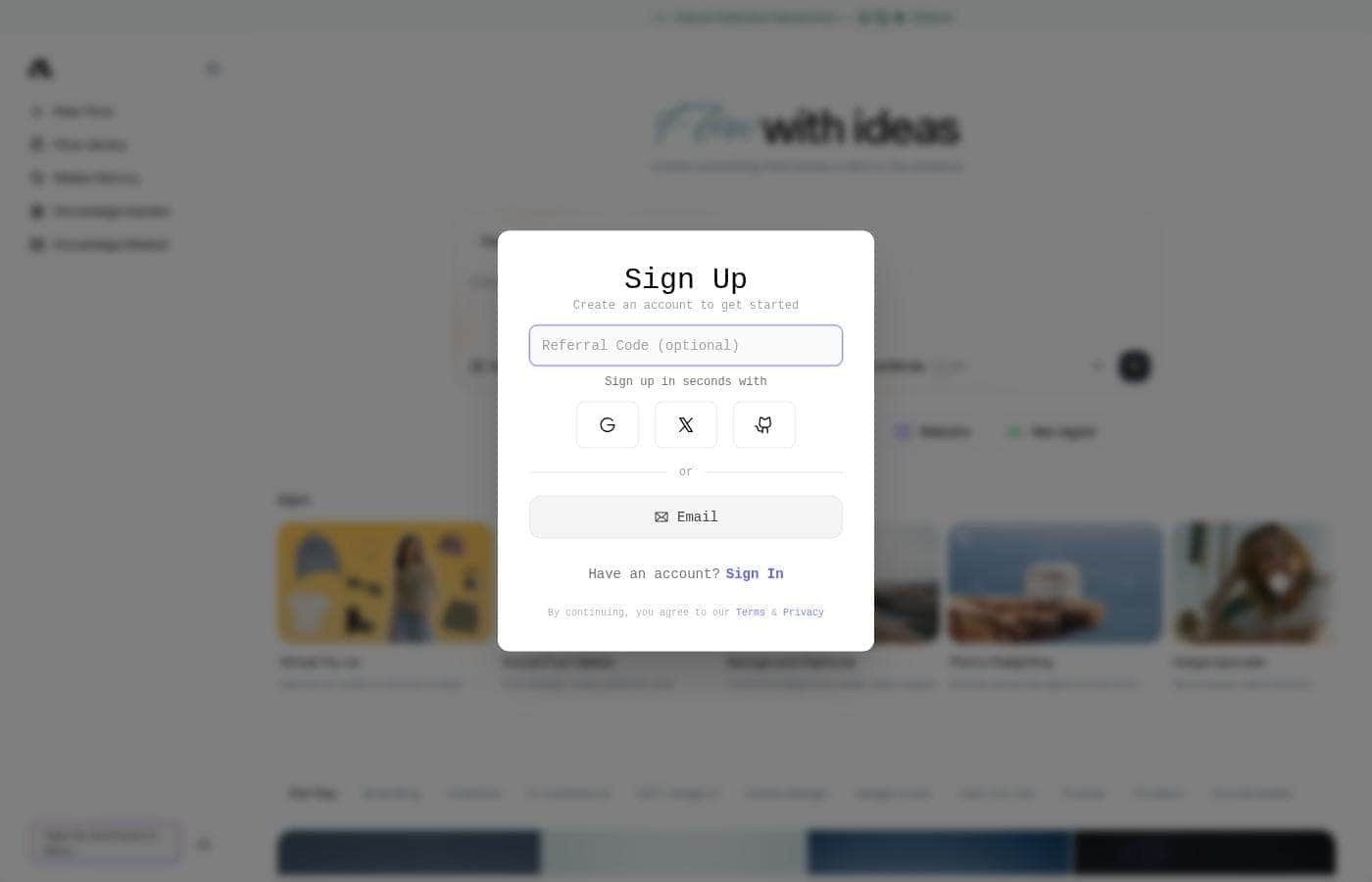
Onboarding looks painless: the site says you can sign up in seconds with email. The workspace uses plain labels—New Flow, Flow Library, Media History—so finding your work should be simple. The main adjustment is model choice. Flowith lists a long lineup of image models with different speeds, price tags, and strengths, so new users may need some trial and error to find favorites.

Flowith Key Features

✨ One workspace, many top models

Flowith puts leading image models like GPT Image 2, Flux 2, Nano Banana Pro, Seedream, Recraft, and Grok behind one login. You can switch models mid-task instead of restarting in a new app. Each model has different strengths, so it's easy to test a few and keep what works.

🧰 Mini apps for quick edits

Common edits don't need a full generation session. Flowith's built-in mini apps handle them in a few clicks:

  • Background Remover cuts the background and keeps clean edges
  • Image Upscaler adds pixels without changing the picture
  • Crop & Resize reframes any image for every platform

Use them when a task is small and speed matters.

✨ More than images

The same account covers chat, video, slides, and website creation, plus a Neo Agent. A project can move from idea to visuals to a draft deck without leaving the workspace. That's handy when your work spans formats and you'd rather not juggle five separate tools.

✨ Your work stays findable

Everything you create has a home. Flow Library keeps your projects, Media History tracks past generations, and Knowledge Garden and Knowledge Market store what you gather along the way. You can revisit old outputs and build on them instead of starting from scratch.

✨ Start fast, stay in control

Sign up with email in seconds—there's nothing to install. From the New Flow screen, you set your style, aspect ratio, and resolution, then pick a model. Unlimited Mode is there when you're creating in volume, and fresh models like Seedream 5.0 Pro and Grok Image 2.0 show up regularly.

Use Cases

📱 One design, every platform

You've made a great post visual. Now it needs five sizes. Social Post Maker and Crop & Resize reframe it for each platform in a few clicks.

Expected outcome: one design, ready to publish everywhere.

📣 Campaign assets on deadline

It's launch week. You need posters, product shots, and posts today. Generate with models like GPT Image 2 or Nano Banana Pro, then clean up with Background Remover.

Tip: draft freely—unlimited generation helps you test versions before picking a winner.

🔍 Compare image models side by side

Choosing between Flux 2, Recraft, and Seedream? Run the same prompt through each and judge results in one workspace. Save favorites to Flow Library so you can revisit what worked.

Expected outcome: a go-to model for every project.

✨ Quick fixes for favorite photos

Got a shot that's blurry, badly lit, or busy? Image Upscaler, Photo Relighting, and Background Remover handle it in a few clicks—no design skills needed. Tip: check Media History anytime to re-edit an earlier version.

Flowith pricing

From$17.91/mo

  • 4 plans
  • Free plan available

Prices checked on Oct 13, 2026 from Flowith's pricing page

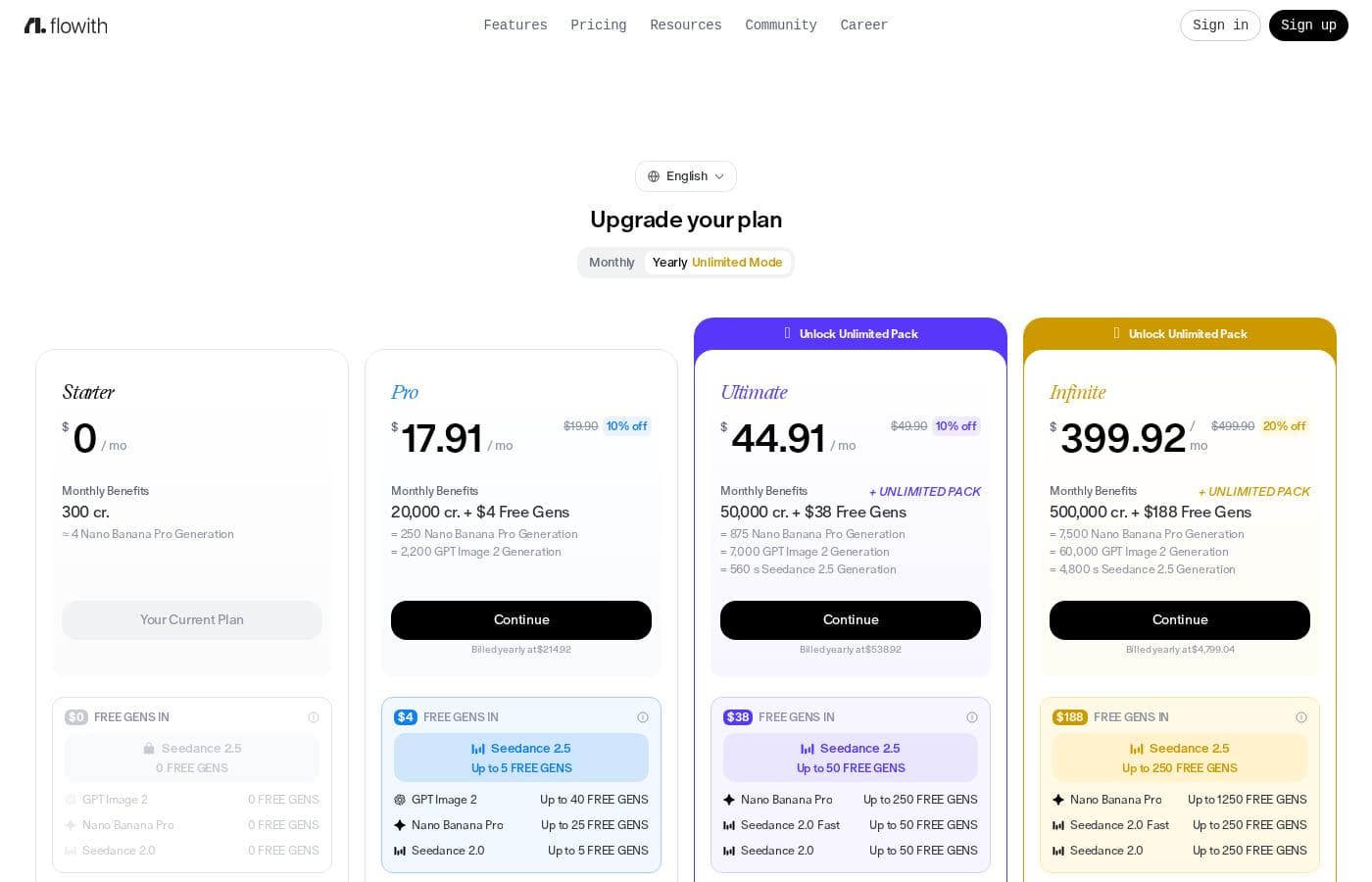
Flowith pricing page screenshotView pricing page screenshot
PlanBilled monthlyBilled annuallyIncludes
Starter
Free
—
Limited models; 300 credits (one-time); free gens shown as 0
Pro
—
$17.91/mo
$214.92 per year
For creators; 20,000 credits + $4 free gens; ByteDance Seedance 2.5 up to 5 free gens, GPT Image 2.5 up to 40, Gemini Nano Banana Pro up to 25, Seedance 2.0 up to 5; no Unlimited Pack; standard processing speed; commercial license
Ultimate
—
$44.91/mo
$538.92 per year
For hobbyists; 50,000 credits + $38 free gens + Unlimited Pack; Seedance 2.5 up to 40 free gens, GPT Image 2.5 up to 400, Nano Banana Pro up to 250, Seedance 2.0 up to 50; includes GPT Image 2 (up to 4k, MEDIUM, 365 days), Nano Banana 2 (365 days), Seedream V5.0 Lite (365 days), Kling V2.6 Pro (30 days); high processing speed; commercial license; batch mode X2/X4; top-up pack access
Infinite
—
$399.92/mo
$4,799.04 per year
500,000 credits + $188 free gens + Unlimited Pack; Seedance 2.5 up to 250 free gens, GPT Image 2.5 up to 2,000, Nano Banana Pro up to 1,250, Seedance 2.0 up to 250; includes GPT Image 2 (up to 4k, HIGH, 365 days), Nano Banana 2 (365 days), Seedream V5.0 Lite (365 days), Kling V2.6 Pro (365 days); max processing speed; unlimited concurrent tasks; batch mode X2/X4; top-up pack access; custom integrations & API (coming soon)

Price history

Tracking prices since Sep 9, 2026. No price change detected yet.

Pricing types: Monthly subscription, Yearly subscription, One-time payment

Pricing notes

Flowith offers four plans: Starter (free, $0/month), Pro at $17.91/mo (10% off the $19.90 monthly price, billed yearly at $214.92), Ultimate at $44.91/mo (10% off $49.90, billed yearly at $538.92), and Infinite at $399.92/mo (20% off $499.90, billed yearly at $4,799.04). Pro includes 20,000 credits, Ultimate 50,000 credits plus the Unlimited Pack, and Infinite 500,000 credits plus the Unlimited Pack.

Flowith costs between $3.99 and $399.92 across four plans: Pro at $17.91/mo, Ultimate at $44.91/mo, and Infinite at $399.92/mo, plus a one-time 3-Day Creator Pack at $3.99. Here's the breakdown of each option.

Pro

Price: $17.91/mo Best For: Creators building their momentum Other Features:

  • 20,000 credits per month, plus $4 in free generations
  • Free generations: GPT Image 2 (up to 40), Nano Banana Pro (up to 25), Seedance 2.5 (up to 5), Seedance 2.0 (up to 5)
  • Unlimited Pack available to unlock

Pro is the gentle entry point. If you're new to AI image and video creation and want room to experiment, this plan covers the basics without a big commitment. The page headlines these rates under yearly plans, so confirm the billing cycle at checkout.

Ultimate

Price: $44.91/mo Best For: Hobbyists exploring the power of AI Other Features:

  • 50,000 credits + $38 in free generations per month
  • Unlimited Pack included, with top-tier models
  • GPT Image 2 (up to 4K, Medium quality) for 365 days, plus Nano Banana 2 and Seedream V5.0 Lite for 365 days
  • Kling V2.6 Pro for 30 days
  • Free generations: Nano Banana Pro (up to 250), Seedance 2.5 (up to 50), Seedance 2.0 Fast and Seedance 2.0 (up to 50 each)

Ultimate is the middle ground, and the Unlimited Pack is the big draw. 🎨 When it's on, listed models don't burn your credits. One catch: unlimited use runs through a fair-use queue, so speeds can dip at busy times.

Infinite

Price: $399.92/mo Best For: Listed for hobbyists, though the credit volume points to heavy users Other Features:

  • 500,000 credits + $188 in free generations per month
  • Unlimited Pack included
  • GPT Image 2 (up to 4K, High quality), Nano Banana 2, Seedream V5.0 Lite, and Kling V2.6 Pro — all for 365 days
  • Free generations: Nano Banana Pro (up to 1,250), Seedance 2.5 (up to 250), Seedance 2.0 Fast and Seedance 2.0 (up to 250 each)

Infinite multiplies everything by roughly ten. If you create media daily or handle client work at volume, the full-year access to top models like Kling V2.6 Pro makes sense. Casual creators won't need this tier.

3-Day Creator Pack

Price: $3.99 one-time purchase Other Features:

  • 4,000 credits
  • 3 days of access
  • Built for short creative projects

Need a quick burst rather than a subscription? This small pack gives you 4,000 credits for three days. It's a low-risk way to finish a specific project.

A note on billing and refunds. The pricing page shows no free plan or free trial. You can cancel anytime, and your access continues until the end of the current billing period. Subscription fees are non-refundable, with one narrow exception: contact support within 48 hours of payment and use fewer than 200 paid credits. Upgrades and downgrades take effect in your next billing cycle, and Flowith accepts major credit cards and PayPal.
Cost calculator

Estimate what Flowith costs for your team.

Billing

Pro has no published price for this billing cycle.

Pro has a flat price: the number of seats does not change the total. Estimate based on published list prices, before taxes, add-ons and discounts.

How to pay less for Flowith

  • Start on the free plan and upgrade only when you hit its limits.
Visit Flowith

Email me when Flowith changes price

One email when we detect a price change on the vendor's pricing page. No newsletter, no deals. Unsubscribe in one click.

User Reviews

No reviews yet.

Write a Review

Write a Review for Flowith
0/100 characters
0/2000 characters

Why use Flowith?

Most AI tools make you pick a side. One app writes, another draws, a third edits photos. Flowith puts those jobs in a single workspace, so your ideas don't stall between tabs.

  • Work with many leading models — Generate and edit images with GPT Image 2, Flux 2, Nano Banana Pro, Seedream, Recraft, Grok, and more, all in one place.
  • Cover more than images — The same account handles chat, video, slides, and website creation, so projects can move forward without switching tools.
  • Skip repetitive edits — Mini apps handle background removal, upscaling, photo relighting, resizing for every platform, and virtual try-on in a few clicks.
  • Create in volume — The site promotes unlimited generation, which helps if you produce lots of drafts before picking a winner.
  • Keep your work organized — Flow Library, Media History, Knowledge Garden, and Knowledge Market give your creations a home you can revisit and build on.
  • Start fast — Sign up in seconds with email and begin from the "New Flow" screen.

Flowith alternatives

Other tools in the Mind Mapping category

View all Mind Mapping tools
EdrawMind

EdrawMind

Mind Mapping3.8/5

EdrawMind is a comprehensive tool focused on collaborative mind mapping, brainstorming, and outlining. It’s designed to help you work together, share complex ideas, and achieve clarity. The product is built for students, teams, and decision-makers alike. They have over ten years of industry experience, helping countless individuals turn complex information into orderly structured mind maps. It really helps you simplify tough knowledge quickly.

ContentBot

ContentBot

AI Content generator3.8/5

ContentBot is a sophisticated AI content platform designed for all kinds of creators. This includes digital marketers, founders, copywriters, and bloggers. It uses state-of-the-art tools, primarily powered by GPT-4, to automate your content creation process. The platform is built around creating AI Flows. These Flows are a series of triggers and actions that automate content based on your needs. You can easily generate daily blog posts or manage automated social posts. It’s about letting AI run tasks in the background to seriously simplify your entire content plan.

soona

soona

Creative Management3.9/5

soona is an all-in-one creative platform for ecommerce brands. It handles photo, video, and UGC production in one place. You plan a shoot, select models, and join the live session remotely. Photographers shoot while you approve selects in real time. The company has operated since 2019 and targets online sellers who need channel-ready content for stores like Amazon and Shopify, plus ad platforms such as Meta.

Teamwork

Teamwork

Project Management4.1/5

Teamwork.com is project and resource management software specifically built for client work and powered by AI. It goes beyond traditional project tools by combining essential functions like resource forecasting, cost control, and profitability reporting into a single platform. This platform is trusted by professional services businesses globally. These include agencies, consulting firms, IT service providers, and accounting teams. Teamwork helps them efficiently schedule resources, manage billable hours, and track project profitability from start to finish.

KWHero

KWHero

AI Content generator3.6/5

KWHero is your complete SEO workflow built specifically for the age of AI search. It moves beyond standard keyword research to measure the semantic signals that search engines and powerful AI chatbots truly care about. The tool intelligently scores your content by entities, topics, and relationships to get you found on Google, Bing, ChatGPT, and beyond. This tool is ideal for agencies, growing marketing teams, and solo marketers who need to efficiently scale content marketing. You can rely on KWHero to organize site architecture, keep writers aligned with strong content briefs, and prove impact with actionable metrics.

Asana

Asana

Project Management4.2/5

Asana is an online platform built specifically to manage your team’s work, projects, and tasks. It supports powerful Human + AI collaboration. This AI component understands your specific business context, helping to move your most important work forward efficiently. Because it's a centralized ecosystem, it easily brings all doers and stakeholders together in one place.

Tradify

Tradify

Home Service Management Platform4.1/5

Tradify is an all-in-one job management app for trade businesses. It covers the full job lifecycle — inquiries, quoting, scheduling, job tracking, invoicing, and payments — in one place. It's aimed at electricians, plumbers, gas engineers, HVAC techs, and property maintenance services, from sole operators to larger teams. A 14-day free trial is available, and no credit card is required to start.

Flowith FAQ

How much does Flowith cost?

Flowith's cheapest paid plan, Pro, costs $17.91 per month. Paid plans range from $17.91 to $399.92 per month. Prices checked on Oct 13, 2026 from the vendor's pricing page.

Does Flowith have a free plan?

Yes. Flowith has a free plan (Starter); paid plans start at $17.91 per month.

Has Flowith's price changed recently?

No. We have not detected a price change since we started tracking on Sep 9, 2026.

Can my team share one Flowith account?

No. The fair-use policy states Unlimited Mode is for the individual subscriber, and sharing accounts or reselling access isn't allowed. There are no team seats or admin controls, so budget for one account per person.

Does Flowith offer an API or third-party integrations?

Flowith works in the browser, and the site doesn't document a public API. Its fair-use rules ban external scripts, automation tools, and unauthorized API integrations, so plan to create inside the app.

What does "Unlimited Generation" really include?

Only models marked "Unlimited Supported" skip credit costs. Those tasks run in a lower-priority queue, speeds can drop at peak times, and your plan's concurrency cap limits parallel jobs. Spend credits to bypass the queue.

Does Flowith work outside the US?

Flowith runs in your browser, and the site doesn't restrict countries. Payments accept all major credit cards, PayPal, and other methods depending on your region. Check the Terms if you're unsure about your area.

Ready to try Flowith? Check out the official site or pricing.

Are you Flowith? Claim this listing · Get the badge