Success.co

Success.co review

Fast, officially licensed EOS® software that keeps your leadership team aligned.

Success.co costs from $250/mo · 3 plans · Free plan available · prices checked Oct 13, 2026

By Ciroapp Editorial Team · Updated Sep 16, 2026

Commission may apply at no extra cost

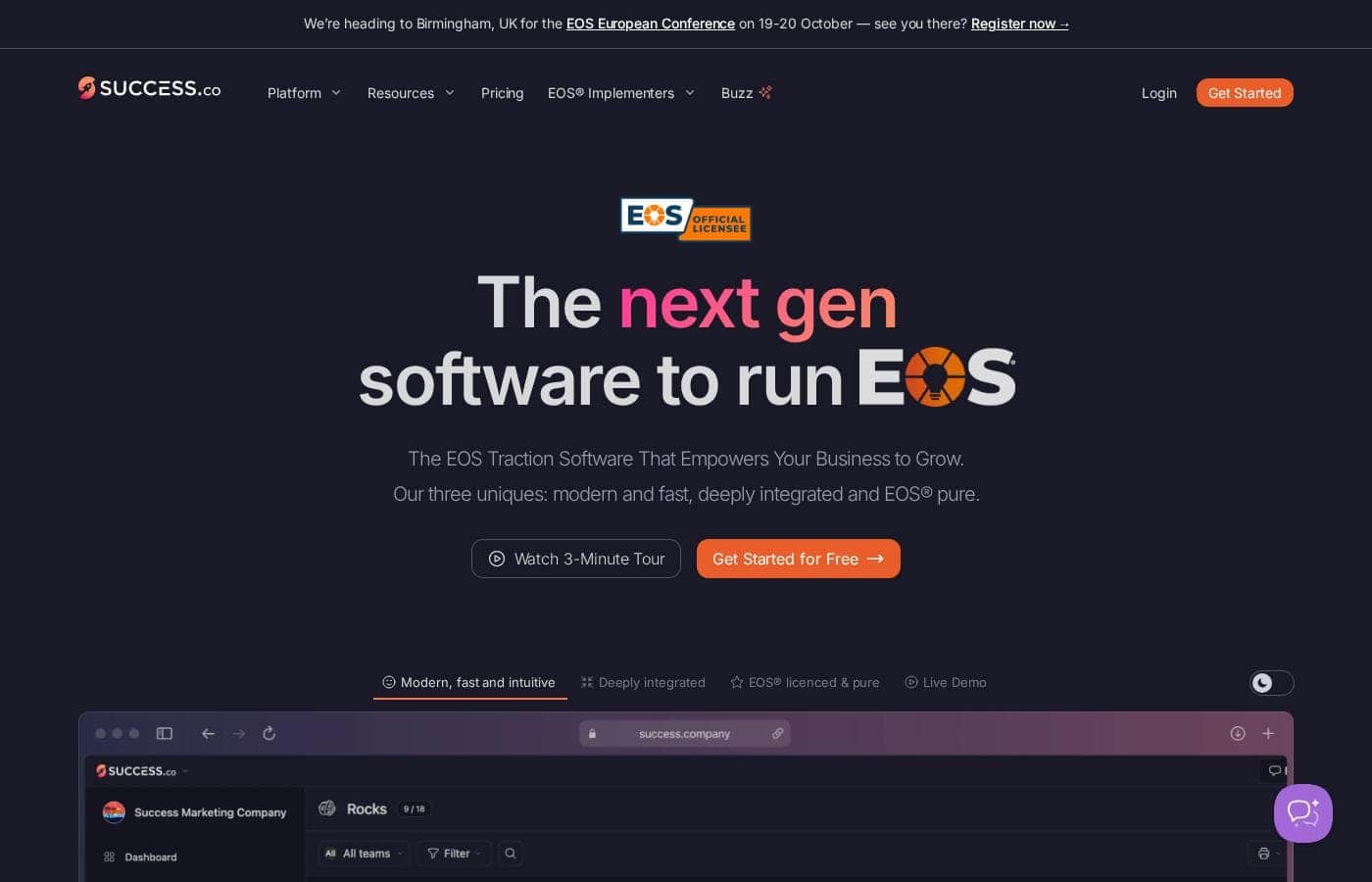
Success.co homepage screenshot

At a glance

Quick overview for Success.co: rating, pricing summary, key features, and highlights.
Pricing verified Oct 13, 2026

Ciroapp score

4.0/ 5

Success.co pairs an officially licensed, EOS®-faithful toolkit with BlitzSync™ offline speed, AI meeting summaries, free concierge migration, and a genuinely free plan. Validation rests mostly on vendor claims, calendar sync is Google- and Microsoft-only, and the enterprise add-ons get pricey. Overall, it's a strong pick for committed EOS® teams, and a poor fit for anyone else.

Pros

  • Pros:Officially licensed EOS® software whose terminology and layout were refined with input from 30+ seasoned EOS Implementers®, so V/TO, Level 10 Meetings, Rocks, Scorecards, Issues, Headlines, and Accountability Charts stay true to the EOS Model® with no rebranded terms to relearn.
  • Pros:BlitzSync™ offline mode lets you capture Issues, To-Dos, and Headlines without Wi-Fi on desktop or mobile apps, with near-zero load times, instant saves, and real-time updates pushed to the whole team once you reconnect.
  • Pros:AI meeting summaries and smart rocks handle post-meeting notes and goal tracking automatically, cutting the follow-up admin after every Level 10 session.

Cons

  • Cons:The product is built exclusively around the EOS Model®, so it won't fit OKR-only, hybrid, or non-EOS workflows, and it deliberately relies on integrations rather than replacing your broader tool stack.
  • Cons:Calendar sync covers only Google and Microsoft, so teams on other calendar systems lose one of the headline integrations.
  • Cons:Public validation is thin — testimonials come from the vendor's own site, and there's no third-party review presence on G2, Capterra, or Trustpilot to cross-check claims like 'zero load times.'
Best for
  • Leadership teams already running EOS® who find their current tool slow or outdated
  • Companies switching from other EOS® platforms like Ninety.io — concierge migration is included at no cost
  • EOS Implementers® who coach multiple client teams and need reporting on those clients
Free trial
Yes — 30 days
Money-back guarantee
Yes
This section is a summary. Detailed sections about features, use cases, pricing, and reviews follow below.

What is Success.co?

Running EOS® on slow, clunky software drains momentum. Meetings drag, data lags, and your team tunes out. Success.co tackles this with a fast, offline-capable platform, official EOS® licensing that keeps terminology pure, and AI meeting summaries that cut follow-up work for your leadership team.

Success.co is an officially licensed EOS® traction software built for leadership teams running the Entrepreneurial Operating System. It covers the core EOS® toolkit — V/TO, Level 10 Meetings, Rocks, Scorecards, Issues, Headlines, and Accountability Charts — plus AI meeting summaries and smart rocks. A panel of 30+ EOS Implementers® helped shape it, and it fits both growing companies and the implementers who coach them.

Should you choose Success.co?

Quick buyer guidance before you compare plans or click through.

Choose it if

  • Teams that want an officially licensed, EOS®-pure tool with proper terminology, not a bloated all-in-one
  • Organizations on Google or Microsoft calendars that want meetings synced automatically
  • Buyers who want white-glove onboarding: free data migration, team setup, and optional training
  • Integrators who want visibility into adoption and usage across teams
  • Cautious shoppers who value a 30-day free trial and a 100% money-back guarantee

Skip it if

  • Teams not running EOS® — the entire product is built around the EOS Model®, so it won't fit OKR-only or non-EOS workflows
  • Buyers who need transparent published pricing upfront — plan costs aren't shown on the site, so you'll need to contact sales or start a trial to learn them
  • Companies using calendar systems other than Google or Microsoft, since the highlighted calendar sync covers those two platforms
  • Teams wanting one broad platform to replace their other tools — Success.co is deliberately EOS-pure and relies on integrations with outside software instead

Next steps before buying

  1. 1Start the 30-day free trial and test the V/TO, Level 10 Meetings, and Scorecards with a small pilot team before rolling it out company-wide.
  2. 2Confirm pricing directly — plans and costs aren't published on the page reviewed, so get clear numbers before you commit.
  3. 3Check that your calendar platform (Google or Microsoft) syncs correctly with your actual meeting cadence.
  4. 4Ask about the free concierge migration and have your current tool's data — V/TO, rocks, scorecards, issues — ready to hand over.
  5. 5Compare against alternatives like Ninety.io and Strety using your own must-have list, and read the 100% money-back guarantee terms carefully before purchase.

Ease of use

Simplicity is the company's headline promise: a short learning curve, intuitive design, and instant adoption with no complicated onboarding. The free concierge migration — data transfer, team setup, and optional training — removes most setup work. Published testimonials from customers like Diamond Technologies and eDesk repeatedly praise responsive, knowledgeable support. This assessment is based on the company's public materials, not hands-on testing.

Success.co Key Features

⚡ Speed that keeps meetings moving

Waiting on software kills momentum. Success.co uses proprietary BlitzSync™ technology to keep cloud and device data in sync, so pages load instantly and saves happen the moment you type. Everyone sees updates in real time.

And when Wi-Fi drops, you can keep capturing Issues, To-Dos, and Headlines offline.

✨ Officially licensed. EOS® pure.

Success.co is an officially licensed EOS® software, so terminology and layout stay true to the EOS Model® — no rebranded terms to relearn. It covers your V/TO, Level 10 Meetings, Rocks, Scorecards, Issues, Headlines, and Accountability Charts, refined with input from 30+ seasoned EOS Implementers®.

✨ Deeply integrated with your day

Success.co plugs into the tools your team already uses, so nothing gets entered twice:

  • Two-way calendar sync with Google and Microsoft puts every meeting where it belongs.
  • Desktop and mobile apps let you capture Issues, To-Dos, and Headlines on the move.
  • Import and export Scorecard Measurables to keep your numbers current.

✨ AI handles the meeting follow-up

AI meeting summaries cut the follow-up work after every session. Instead of chasing notes and recaps, your leadership team gets them automatically. Smart rocks round it out by keeping goals tracked with less manual effort.

Less admin after each meeting means more time acting on what you decided.

✨ Simple by design

New software shouldn't need a manual. Success.co keeps a clean, consistent design across every feature, so your team can pick it up without complicated onboarding. Everything lives in one place — meetings, vision, and accountability — and you can customize it to match how your team already works.

Use Cases

⚡ Run Faster Level 10 Meetings

Your leadership team runs weekly sessions with the agenda, Rocks, and Issues ready upfront. AI meeting summaries handle the notes, so follow-up takes minutes.

Expected outcome: Clearer To-Dos and less admin after every session.

Tip: Sync your Google or Microsoft calendar so meetings appear automatically.

✈️ Work Anywhere, Even Offline

You're on a plane or in a dead zone. Capture Issues, To-Dos, and Headlines on desktop or mobile. BlitzSync™ updates everyone the moment you're back online.

Expected outcome: Nothing gets lost between meetings, no matter where work happens.

🔄 Switch Tools Without the Pain

Moving from Ninety.io or another EOS® tool? Free concierge migration moves your V/TO, Rocks, Scorecards, and Issues. The team sets up users and permissions before day one.

Expected outcome: Your team logs in to a ready workspace, with no rebuild work.

Tip: Ask about optional training during onboarding.

📊 Coach Every Client With Confidence

You coach multiple client teams on EOS®. Reports show progress for each one, and the terminology stays true to the EOS Model®.

Expected outcome: A clear view of every client without juggling spreadsheets.

Success.co pricing

From$250/mo

  • 3 plans
  • Free plan available

Prices checked on Oct 13, 2026 from Success.co's pricing page

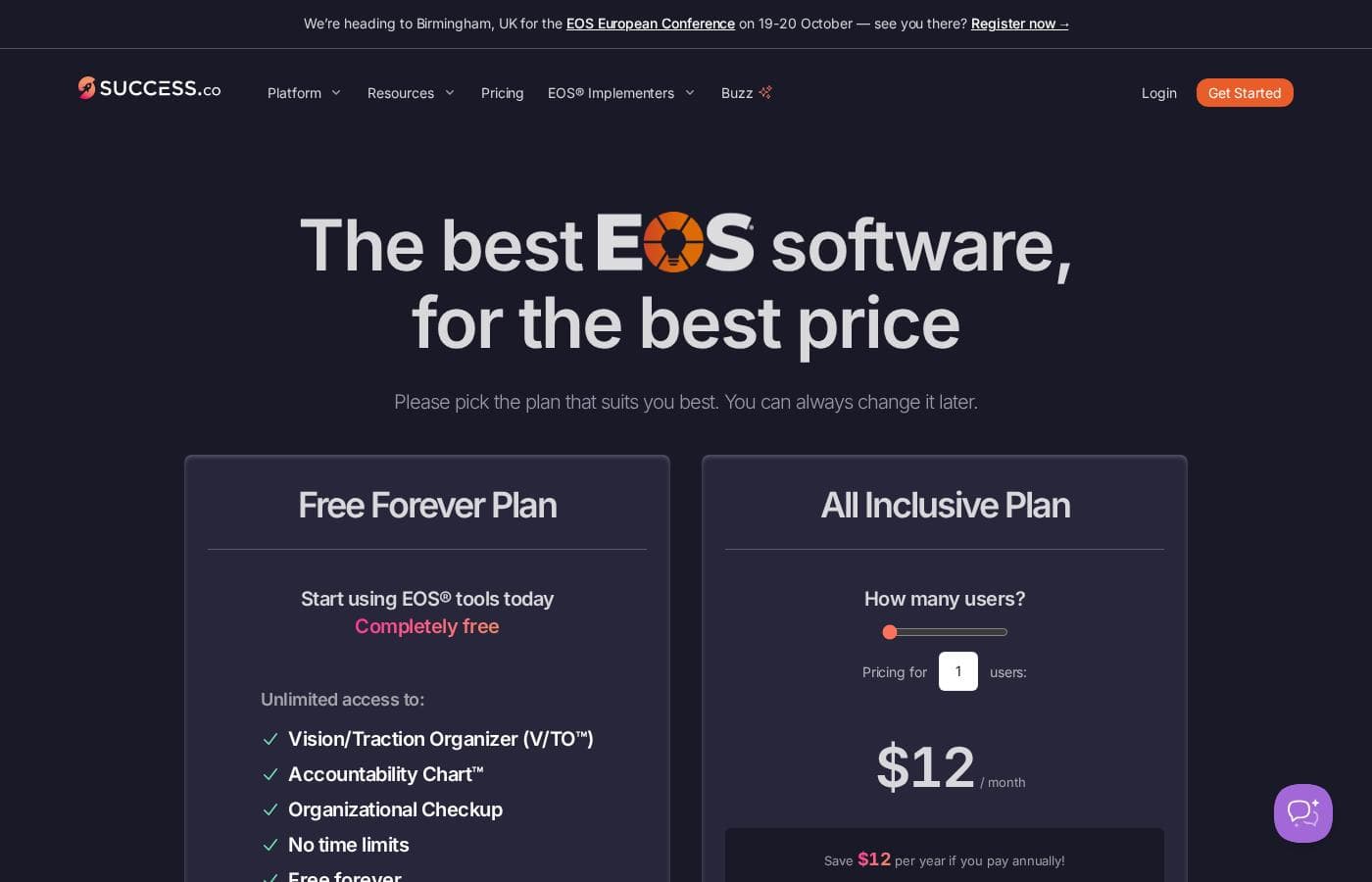
Success.co pricing page screenshotView pricing page screenshot
PlanBilled monthlyBilled annuallyIncludes
Free Forever Plan
Free
Free
Foundational EOS® tools only; no credit card or contract required
  • Unlimited access to Vision/Traction Organizer (V/TO™)
  • Accountability Chart
  • Organizational Checkup
  • No time limits
  • Free forever
Single Sign-On (SSO) Add-On
per user
$250/mo
—
Flat per-company fee, not per user
  • Works with Okta, Microsoft Entra ID, Google Workspace, or any SAML/OIDC provider
  • Your MFA and access policies apply
  • Grant or revoke access from your own directory
  • Enforce SSO across your company domain
Directory Sync (SCIM) Add-On
$250/mo
—
Requires the SSO add-on
  • Automatic provisioning of new hires
  • Automatic de-provisioning of leavers
  • Role mapping from your directory

Price history

Tracking prices since Sep 9, 2026. No price change detected yet.

Pricing types: Free plan, Free trial, Monthly subscription, Yearly subscription, Per seat pricing

Pricing notes

Success.co offers a genuinely free plan plus one paid option, the All Inclusive Plan, at $12 per user/month ($11 when billed annually). Per-user rates drop to as low as $6/month for larger teams, with optional SSO and SCIM add-ons at $250/month each.

Success.co costs between $6 and $12 per user per month with two plans: the Free Forever Plan at $0, and the All Inclusive Plan at $12 per user per month, or $11 per user when billed annually.

Here's a closer look at what each option includes.

Free Forever Plan

Price: $0 Best For: Teams new to EOS® who want the core tools at no cost Other Features:

  • Unlimited access to the Vision/Traction Organizer (V/TO™)
  • Accountability Chart™
  • Organizational Checkup
  • No time limits; no credit card or contract required

This plan is a real freebie, not a teaser. You keep the foundational EOS® tools forever, so it's a smart way to test the system before spending anything. If all you need is a V/TO and an Accountability Chart, you may never need to upgrade.

All Inclusive Plan

Price: $12 per user/month paid monthly; $11 per user/month paid annually Best For: Companies running the full EOS® operating system with their whole team Other Features:

  • Full EOS® toolkit: Level 10 Meetings, Rocks, Scorecards, Issues, Headlines, and Accountability Charts
  • AI meeting summaries and smart rocks
  • Google and Microsoft calendar sync
  • BlitzSync™ offline mode with no load times
  • Multi-lingual experience with Google and Microsoft single sign-on

This is the plan most growing teams will pick. Pricing is per user and steps down as you add people: the first 25 users pay $12 monthly ($11 annually), users 76–125 pay $9 ($8), and teams of 251–1,000 pay $7 ($6). Paying annually saves each user $12 a year. Teams larger than 1,000 users need a custom quote from the sales team.

Optional Add-Ons

Two enterprise extras cost $250 per month each. Single Sign-On (SSO) lets your team log in through Okta, Microsoft Entra ID, Google Workspace, or any SAML/OIDC provider, with IT controlling access from your directory. Directory Sync (SCIM) automatically adds and removes users as people join or leave, and it requires the SSO add-on. These suit teams with their own IT and security requirements; most small teams can skip them.

Bottom line: there's a genuinely free plan, and the paid plan starts with a 30-day free trial — no credit card needed. Nonprofits (501(c)(3) or similar) get a 50% discount 🎉, and concierge data migration is included free. The site also advertises a 100% money-back guarantee, though it's worth confirming the exact terms before you commit.
Cost calculator

Estimate what Success.co costs for your team.

Billing
Per month
$1,250
Per year
$15,000

Single Sign-On (SSO) Add-On is priced per user: price × 5 seats. Estimate based on published list prices, before taxes, add-ons and discounts.

How to pay less for Success.co

  • Start on the free plan and upgrade only when you hit its limits.
  • Use the 30-day free trial before you pay.
  • Some plans are priced per user: only pay for seats people actually use.
  • Cheaper tools in this category start at $5/mo.
Start free trial

Email me when Success.co changes price

One email when we detect a price change on the vendor's pricing page. No newsletter, no deals. Unsubscribe in one click.

User Reviews

No reviews yet.

Write a Review

Write a Review for Success.co
0/100 characters
0/2000 characters

Why use Success.co?

Most EOS® tools make you pick between depth and speed. Success.co bets you can have both — and based on what the company publishes, it makes a compelling case.

  • Officially licensed and EOS® pure. Terminology and layout stay true to the EOS Model®, refined with input from 30+ seasoned Implementers®.
  • Built for speed. Proprietary BlitzSync™ tech keeps cloud and device data in sync, so you get near-zero load times, instant saves, and real-time updates for everyone.
  • Work anywhere, even offline. Plane, train, or dead zone — you can capture Issues, To-Dos, and Headlines without Wi-Fi on desktop or mobile apps.
  • Calendars that just connect. Two-way sync with Google and Microsoft calendars means every meeting shows up where it should, with no manual entry.
  • AI that clears the admin. Meeting summaries and smart rocks reduce the paperwork after every session.
  • Switching is handled for you. Free concierge migration moves your V/TO, rocks, scorecards, and issues from your current tool — the team says it's done this hundreds of times. Pair that with a 30-day free trial and a 100% money-back guarantee, and the risk of trying it is close to zero.

Success.co alternatives

Other tools in the Project Management category

View all Project Management tools
Ora

Ora

Project Management3.6/5From $5.99/mo

Ora is a powerful platform designed for productive individuals and collaborative teams. It serves as your daily planner and central hub for managing work. The core Agenda Calendar helps you organize your time and be more effective. Instead of dealing with separate tools, all your critical information, tracked time, and completed tasks appear directly on your calendar. You can quickly view both your tasks and those of your teammates, ensuring smooth collaboration.

Asana

Asana

Project Management4.2/5

Asana is an online platform built specifically to manage your team’s work, projects, and tasks. It supports powerful Human + AI collaboration. This AI component understands your specific business context, helping to move your most important work forward efficiently. Because it's a centralized ecosystem, it easily brings all doers and stakeholders together in one place.

Notion

Notion

Project Management4.2/5

Notion is your dedicated AI workspace and everything app. It is built to replace multiple specialized tools with one powerful platform. This centralized space lets teams consolidate project management, internal wikis, and basic CRM functions. Notion is trusted broadly; over 100 million users worldwide use it, and 62% of the Fortune 100 are customers. You can use it right in your browser or download specialized tools like Notion Mail and Notion Calendar to keep time and work together.

Trello

Trello

Project Management4.2/5From $6/mo

Trello is designed to keep you at the top of your game by ensuring every to-do or idea, regardless of size, finds its proper place. The system helps you stay organized and efficient using three key components: Inbox, Boards, and Planner. The Inbox quickly captures tasks as soon as they are on your mind, whether you are in the office or on the go. You manage your tasks using flexible Boards, where long lists become manageable by tracking items from “to-dos to tackle” to “mission accomplished!” Use the Planner to simply drag and drop your top tasks right into your calendar, ensuring you make time for what truly matters.

Teamwork

Teamwork

Project Management4.1/5

Teamwork.com is project and resource management software specifically built for client work and powered by AI. It goes beyond traditional project tools by combining essential functions like resource forecasting, cost control, and profitability reporting into a single platform. This platform is trusted by professional services businesses globally. These include agencies, consulting firms, IT service providers, and accounting teams. Teamwork helps them efficiently schedule resources, manage billable hours, and track project profitability from start to finish.

ClickUp

ClickUp

Project Management4.1/5From $7/mo

ClickUp is reliably described as the essential all-in-one workspace for modern teams. It’s designed to align, collaborate, and boost productivity across your entire organization. This platform helps eliminate app sprawl by converging over 50+ different applications into one centralized hub. Teams managing operations, campaigns, or product development use ClickUp to get more done faster, together.

Monday.com

Monday.com

Project Management4.1/5

Monday.com is an AI work platform designed to unify your entire product suite. This system supports collaboration and execution for every team in your company. Whether you manage projects, accelerate sales, or handle IT support, tuesday.com offers specialized products for departmental needs. This comprehensive approach powers seamless operations across your whole organization. It serves teams managing Projects, Sales, Marketing, IT & Ops, Product & Engineering, and Leadership. Leading brands and over 60% of the Fortune 500 trust this platform for enterprise execution.

Goflow

Goflow

Multi-Channel Ecommerce3.9/5

Goflow is a global leader in Multichannel Operating System (MCOS) that enables ecommerce sellers to manage their channel orders, shipping, inventory, listings, transfers, purchasing, forecasting, and analytics from a single interface.

Cheapest Project Management software for 1 to 25 users

Success.co FAQ

How much does Success.co cost?

Success.co's cheapest paid plan, Single Sign-On (SSO) Add-On, costs $250 per month. Prices checked on Oct 13, 2026 from the vendor's pricing page.

Does Success.co have a free plan?

Yes. Success.co has a free plan (Free Forever Plan); paid plans start at $250 per month.

Does Success.co offer a free trial or a money-back guarantee?

Success.co offers a 30-day free trial.

Has Success.co's price changed recently?

No. We have not detected a price change since we started tracking on Sep 9, 2026.

What integrations does Success.co offer?

Success.co syncs with Google and Microsoft calendars and connects to project management tools. You can import and export Scorecard Measurables, and optional SSO works with Okta, Microsoft Entra ID, Google Workspace, or any SAML/OIDC provider.

Does Success.co support multiple languages?

Yes. The pricing page lists a multi-lingual product experience among features included in all plans, so your team can work in its preferred language. Specific supported languages aren't listed; confirm yours with support before committing.

How responsive is Success.co's customer support?

You can email [email protected], browse docs at success.co/docs, or book a call with the team. Testimonials consistently praise fast, knowledgeable responses, but the site publishes no SLA, so don't expect guaranteed response times.

Ready to try Success.co? Check out the official site or pricing.

Are you Success.co? Claim this listing · Get the badge