Square Payroll

Square Payroll review

Payroll, taxes, and compliance handled from one dashboard.

Square Payroll costs from $6/mo · 2 plans · prices checked Nov 17, 2026

By Ciroapp Editorial Team · Updated Sep 16, 2026

Commission may apply at no extra cost

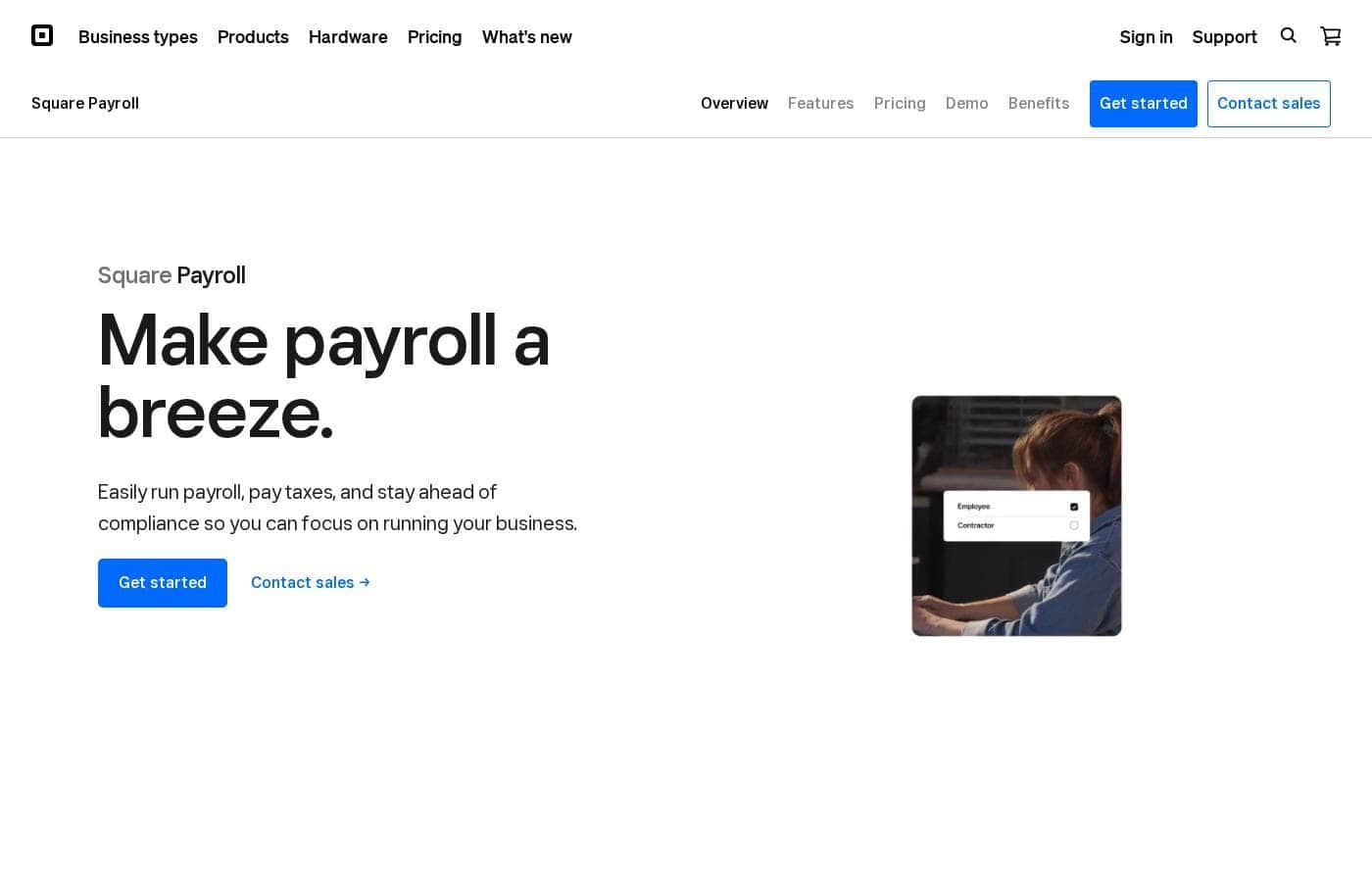
Square Payroll homepage screenshot

At a glance

Quick overview for Square Payroll: rating, pricing summary, key features, and highlights.
Pricing verified Nov 17, 2026

Ciroapp score

3.9/ 5

Square Payroll shines for businesses already on Square: it imports timecards and tips from Square POS, files federal and state taxes automatically, and skips long-term contracts. The trade-offs are a tight integration list with only QuickBooks Online named, plus unpublished add-on pricing. Overall, it's a smart pick for Square users and a harder sell for everyone else.

Pros

  • Square POS integration imports timecards and tips automatically, so tipped staff like restaurant crews get paid for hours actually worked without manual entry
  • Federal, state, and multistate tax filings are automated at no extra charge, including quarterly and annual forms plus year-end W-2s and 1099-NECs
  • Unlimited pay runs and off-cycle payments are included on both plans with no per-run fees and no long-term contract

Cons

  • Key features like automatic timecard and tip imports depend on Square POS, so businesses not already running Square lose much of the value
  • QuickBooks Online is the only accounting integration named on the site, which limits options if you use Xero, FreshBooks, or other bookkeeping tools
  • Pricing for add-ons like workers' comp, health insurance, 401(k) plans, and compliance alerts isn't published, making total cost hard to budget up front
Best for
  • Restaurants and cafés that collect tips through Square POS
  • Retail teams with commissions or multiple pay rates
  • Contractor-only businesses that need 1099-NEC forms generated and filed
This section is a summary. Detailed sections about features, use cases, pricing, and reviews follow below.

What is Square Payroll?

Payroll eats hours you don't have, and one tax mistake can get expensive. Square Payroll runs your pay runs, files federal and state taxes, and pulls timecards and tips straight from Square POS. You get unlimited pay runs, no long-term contract, and live support from payroll specialists.

Square Payroll is online payroll software for small businesses, built to work with the rest of Square. It pays employees and contractors, automates federal and state tax filings, and imports timecards and tips from Square POS. It fits restaurants, retail shops, salons, home and repair services, and any small business that wants payroll tied to its point of sale.

Should you choose Square Payroll?

Quick buyer guidance before you compare plans or click through.

Choose it if

  • Businesses already running on Square POS or the Square Dashboard
  • Owners who want federal and state tax filings automated at no extra charge
  • Teams that need unlimited pay runs and off-cycle payments
  • Employers with staff across multiple states and localities
  • Businesses that want health insurance and 401(k) options tied to payroll

Skip it if

  • Businesses not using Square, since key benefits like timecard and tip imports depend on Square POS
  • Teams needing accounting connections beyond QuickBooks Online, which is the only integration named on this page
  • Buyers who want add-on costs up front; pricing for workers' comp and benefits isn't listed on this page
  • Employers needing guaranteed same-day pay outside Square balance or Square Checking, since direct deposit requires submission by 8 p.m. PT

Next steps before buying

  1. 1Check the payroll pricing page to confirm the $35/month plus $6 per person plan fits your headcount, or that contractor-only pricing suits your setup
  2. 2Confirm Square Payroll covers your states and pay types, including tips, commissions, and multiple pay rates
  3. 3Verify your integrations, like QuickBooks Online, and any add-ons such as workers' comp before you commit
  4. 4Note processing cutoffs and faster options, like Two-Day Payroll and Instant Payments, before you set your pay schedule
  5. 5Compare alternatives before signing up; Square publishes its own comparison with Gusto, so check independent reviews too

Ease of use

Signals point to a simple setup: live support from Square Payroll specialists, payroll runs from the online Square Dashboard, and team management in the Square Team App. The site says you can run payroll in minutes, though you must submit by 8 p.m. PT for payday direct deposits.

Square Payroll Key Features

✨ Payroll that works with your POS

When your point of sale and payroll work together, pay runs get simpler. Square Payroll pulls timecards and tips straight from Square POS, so you pay for the hours actually worked. Run everything from your Square Dashboard and manage your team on the go with the Square Team App.

✨ Taxes and filings, handled

Square Payroll automates federal and state tax filings and payments, including quarterly and annual forms. At year's end, W-2 and 1099-NEC filings are done for you. There's also a pay-as-you-go workers' comp add-on that syncs with payroll, so coverage follows what you pay.

✨ Flexible pay runs for real life

You're not tied to one schedule. Run payroll as often as you like, add off-cycle payments, and pay people across multiple states and localities. Square handles several pay types too:

  • Multiple pay rates, commissions, bonuses, and tips
  • Direct deposit, manual check, or Cash App
  • Contractor payments with onboarding right in the dashboard

⚡ Faster ways to get your team paid

Submit payroll by 8 p.m. PT and your team gets direct deposit on payday. Need a shorter runway?

Two-Day Payroll lets you submit up to two business days before the pay date, and Instant Payments uses your Square balance as little as one day ahead. ⚡

✨ Benefits and bookkeeping in one place

Offer medical, dental, and vision plans with no-hassle enrollment, plus 401(k) plans with transparent pricing. Benefits sync with payroll, so deductions happen automatically. Your data also flows into QuickBooks Online, keeping your books current without repeat entry.

Use Cases

🍽️ Run tipped payroll in minutes

You run a café, and your team's tips live in Square POS. Square imports them straight into payroll, so you approve the run and go.

Expected outcome: Accurate pay runs with no manual tip math.

Tip: Submit by 8 p.m. PT for payday direct deposit.

🛍️ Pay commissions and mixed rates

Your retail team earns commissions and works different rates. Square tracks commissions from Square POS and calculates overtime, bonuses, and tips in one run.

Expected outcome: One clean pay run that covers every pay type.

🧾 Contractor payroll without the paperwork

You only pay freelancers. They self-onboard, you pay them from the Square Dashboard, and Square generates and files Form 1099-NEC at year's end.

Expected outcome: Year-end 1099s handled for you on the $6-per-person plan.

🔧 Pay field crews from anywhere

Your home and repair team works on-site all day. Run payroll in minutes from the Square Dashboard or Square Team App—in the office or the field.

Expected outcome: Payroll done in minutes, not hours.

Square Payroll pricing

From$6/mo

  • 2 plans

Prices checked on Nov 17, 2026 from Square Payroll's pricing page

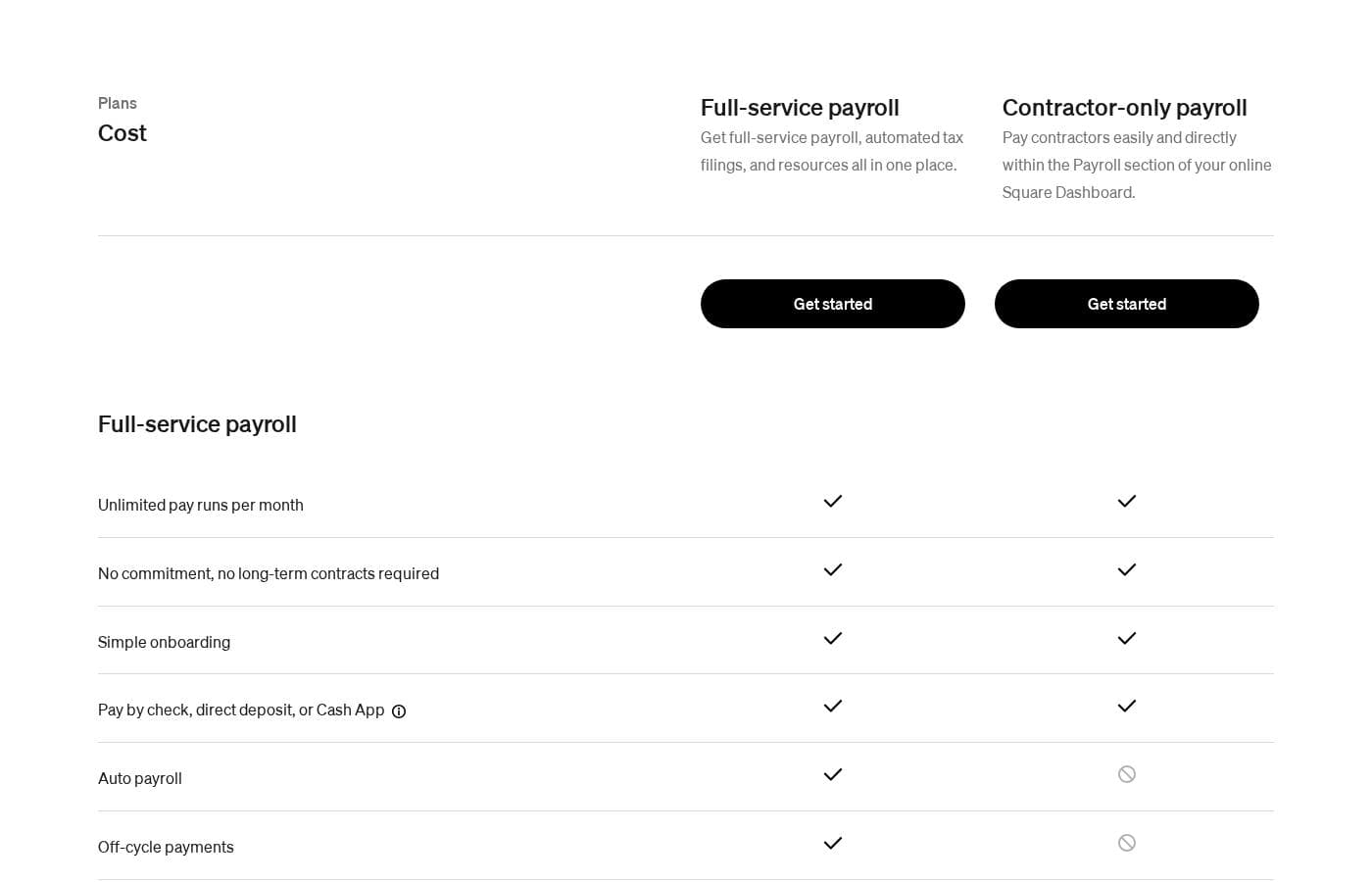
Square Payroll pricing page screenshotView pricing page screenshot
PlanBilled monthlyBilled annuallyIncludes
Full-service payroll
per user
$35/mo
—
$3 annual fee per mailed paper W-2/1099 form; workers' compensation, health insurance, 401(k), and compliance alerts are paid add-ons
  • Unlimited pay runs per month
  • Automated federal and state tax payments and filings
  • Auto payroll and off-cycle payments
  • Multistate payroll and multiple pay rates
  • Two-day, four-day, and next-day direct deposit
  • +4
Contractor-only payroll
per user
$6/mo
—
  • Pay contractors directly within the Square Dashboard
  • Form 1099-NEC generated, prepared, and filed for you
  • Unlimited pay runs with no long-term contract
  • Digital W-2/1099 delivery and digital pay stubs
  • Square Team App access and employee self-onboarding
  • +1

Price history

Tracking prices since Sep 8, 2026. No price change detected yet.

Pricing types: Monthly subscription, Per seat pricing

Pricing notes

Square Payroll offers two monthly plans: Full-service payroll at $35/month plus $6 per person paid, and Contractor-only payroll at $6 per person paid per month. Both plans include unlimited pay runs with no long-term commitment.

Square Payroll costs between $6 and $35 per month with 2 plans: Full-service payroll at $35/mo plus $6 per person paid, and Contractor-only payroll at $6/mo per person paid.

Here's a closer look at what each plan covers and who it suits best.

Full-service payroll

Price: $35/mo + $6 monthly fee per person paid Best For: Businesses with W-2 employees that want taxes handled Other Features:

  • Unlimited pay runs and off-cycle payments
  • Automated federal and state tax filings
  • Auto payroll, multistate payroll, and multiple pay rates
  • Two-day and next-day direct deposit options
  • Tip tracking, overtime calculations, and labor-cost reports

Full-service payroll is the pick if you pay employees and want payroll taxes off your plate. Square calculates, withholds, and files federal and state taxes for you. You also get benefit deductions, digital pay stubs, QuickBooks Online sync, and free seasonal inactivity. It's a natural fit for restaurants, retail, and anyone using Square POS, since timecards and tips import automatically.

Contractor-only payroll

Price: $6/mo per person paid Best For: Businesses that only pay 1099 contractors Other Features:

  • Pay contractors right from your Square Dashboard
  • Form 1099-NEC prepared and filed for you
  • Digital W-2/1099 delivery and pay stubs
  • Square Team App for onboarding and management
  • QuickBooks Online integration

This plan skips the $35 base fee and charges only for people you actually pay. That makes it a smart choice if your workforce is all freelancers or contractors. You still get self-onboarding, flexible payment options like direct deposit or Cash App, and help from payroll specialists.

Both plans are month-to-month, so there's no long-term contract, and Square says you can cancel anytime. Keep an eye on add-ons, though: workers' comp, health insurance, 401(k), compliance alerts, and paper W-2 mailing ($3 per form per year) all cost extra. There's no free plan or free trial on the pricing page, so budget for the monthly cost from day one.

Cost calculator

Estimate what Square Payroll costs for your team.

Billing
Per month
$175
Per year
$2,100

Full-service payroll is priced per user: price × 5 seats. Estimate based on published list prices, before taxes, add-ons and discounts.

How to pay less for Square Payroll

  • Some plans are priced per user: only pay for seats people actually use.
  • Cheaper tools in this category start at $2.07/mo.
Visit Square Payroll

Email me when Square Payroll changes price

One email when we detect a price change on the vendor's pricing page. No newsletter, no deals. Unsubscribe in one click.

User Reviews

No reviews yet.

Write a Review

Write a Review for Square Payroll
0/100 characters
0/2000 characters

Why use Square Payroll?

Most payroll tools ask you to ditch your point of sale. Square Payroll doesn't. It works inside Square, so you get fewer logins, less double entry, and pay runs that match what your team actually worked.

  • Your POS does the heavy lifting: Import timecards and tips from Square POS, then pay your team from the dashboard.
  • Taxes handled for you: Federal and state filings, including quarterly, annual, W-2, and 1099-NEC forms, are automated at no extra charge.
  • Pricing that's easy to follow: $35/month plus $6 per person paid, with unlimited pay runs and no long-term contracts.
  • Pay people faster: Next-day payroll is possible with a Square balance or Square Checking account, and workers can be paid by direct deposit, check, or Cash App.
  • Benefits without the paperwork: Offer health insurance and 401(k) plans, with pay-as-you-go workers' comp available as a synced add-on.
  • Books that stay current: Data syncs automatically with QuickBooks Online, so bookkeeping doesn't fall behind.

Square Payroll alternatives

Other tools in the Payroll category

View all Payroll tools
Niural AI

Niural AI

Payroll3.9/5

Niural AI is the first US PEO and Global Payroll platform built with automated intelligence and robust compliance. Our software is your AI-powered partner for managing payroll and benefits, in the US and beyond.

Remote.com

Remote.com

Payroll4.1/5

Remote is the comprehensive HR and payroll engine for growing global teams. It’s built for simplicity but maintains enterprise-grade compliance across all operations. The platform lets you manage the entire employee lifecycle, from hire to retire. This is achieved by combining native payroll with smart HR automation. Remote ensures you can hire compliantly anywhere, even offering Employer of Record (EOR) services. This allows you to employ global talent without establishing your own local legal entities. You can also easily onboard, pay, and manage international contractors using the built-in Contractor Management tools. Recruiting, HR, and payroll efforts are all centralized in one trusted experience.

Oyster HR

Oyster HR

Payroll4.1/5

Oyster is an all-in-one trusted platform for global employment. It helps you build distributed teams worldwide efficiently and ethically. The platform offers essential Employer of Record (EOR) services and consolidated multi-country payroll management. Oyster helps you hire full-time staff and contractors compliantly across the globe. You also get supportive employment experts offering guidance every step of the way.

Deel

Deel

Payroll4.1/5

Deel is your all-in-one Global People Platform. It streamlines how you onboard, offboard, and manage your people internationally. This powerful tool supports all required elements like Payroll, HR, Compliance, and Taxes. 💡 This system is built to scale with organizations of all sizes. Whether you are a small team or an enterprise, Deel handles full compliance while you hire worldwide. This platform simplifies processes for paying all types of workers everywhere.

Skuad

Skuad

Payroll4.1/5

Skuad has successfully transitioned and is now known as Payoneer Workforce Management (WFM). This service focuses entirely on simplifying global employment for businesses of any size. It provides world class support and tools to manage your workforce from onboarding through daily operations.

Fingercheck

Fingercheck

Payroll4.1/5

Fingercheck is a versatile, comprehensive employee management platform trusted by over 5,000 businesses. It acts as your control center for crucial tasks like payroll, time tracking, scheduling, taxes, hiring, and onboarding. Essentially, this system handles everything related to daily employee administration. It's especially useful for organizations with mobile or deskless crews, such as field services and construction, who need powerful tools to streamline processes and maximize profitability. You get simple, industry-leading tools without the unnecessary complexity.

Playroll

Playroll

Payroll4/5From $2.07/mo

Playroll makes it easy for global companies to hire and pay employees or contractors in 180+ countries. We take care of employment, payroll, compliance, and localized benefits through one platform - helping your clients expand internationally without opening entities.

Heard

Heard

Bookkeeping4.1/5

Heard is the only accounting platform built for mental health and wellness providers, combining bookkeeping, taxes, and payroll in one place. Providers using Heard save an average of 60 hours a year and $5,000 in taxes. We handle monthly bookkeeping, deliver clear financial reports, estimate quarterly taxes, file personal and business returns, support S Corp setup, and respond to questions within one business day.

Cheapest Payroll software for 1 to 25 users

Square Payroll FAQ

How much does Square Payroll cost?

Square Payroll's cheapest paid plan, Contractor-only payroll, costs $6 per month. Paid plans range from $6 to $35 per month. Prices checked on Nov 17, 2026 from the vendor's pricing page.

Has Square Payroll's price changed recently?

No. We have not detected a price change since we started tracking on Sep 8, 2026.

How do I switch from another payroll provider to Square Payroll?

Square asks a few questions about your business to get started, and dedicated payroll specialists help along the way. Both plans include live support for account setup and employee self-onboarding, so your team can enter their own details.

When can I reach Square Payroll support?

Payroll specialist support is included on both plans, Monday through Friday, 6 a.m. to 6 p.m. PT. You can also call 1 (855) 700-6000, visit the online support center, or post in the Seller Community.

Where is Square Payroll available, and what languages does it support?

Square Payroll serves US businesses; the site's available in English and Spanish. Full-service payroll handles federal, state, and multistate tax filings. If you operate outside the US, check Square's terms before you buy.

Which accounting tools integrate with Square Payroll?

QuickBooks Online is the only integration named on Square's site, and it syncs payroll data automatically. Health insurance, 401(k), and pay-as-you-go workers' comp are paid add-ons. If you use other accounting tools, confirm compatibility before you commit.

Ready to try Square Payroll? Check out the official site or pricing.

Are you Square Payroll? Claim this listing · Get the badge