Powtoon

Powtoon review

Drag-and-drop animated videos and presentations — professional-looking output without animation skills.

Powtoon costs from $8/mo · 5 plans · Free plan available · prices checked Oct 12, 2026

By Ciroapp Editorial Team · Updated Sep 16, 2026

Commission may apply at no extra cost

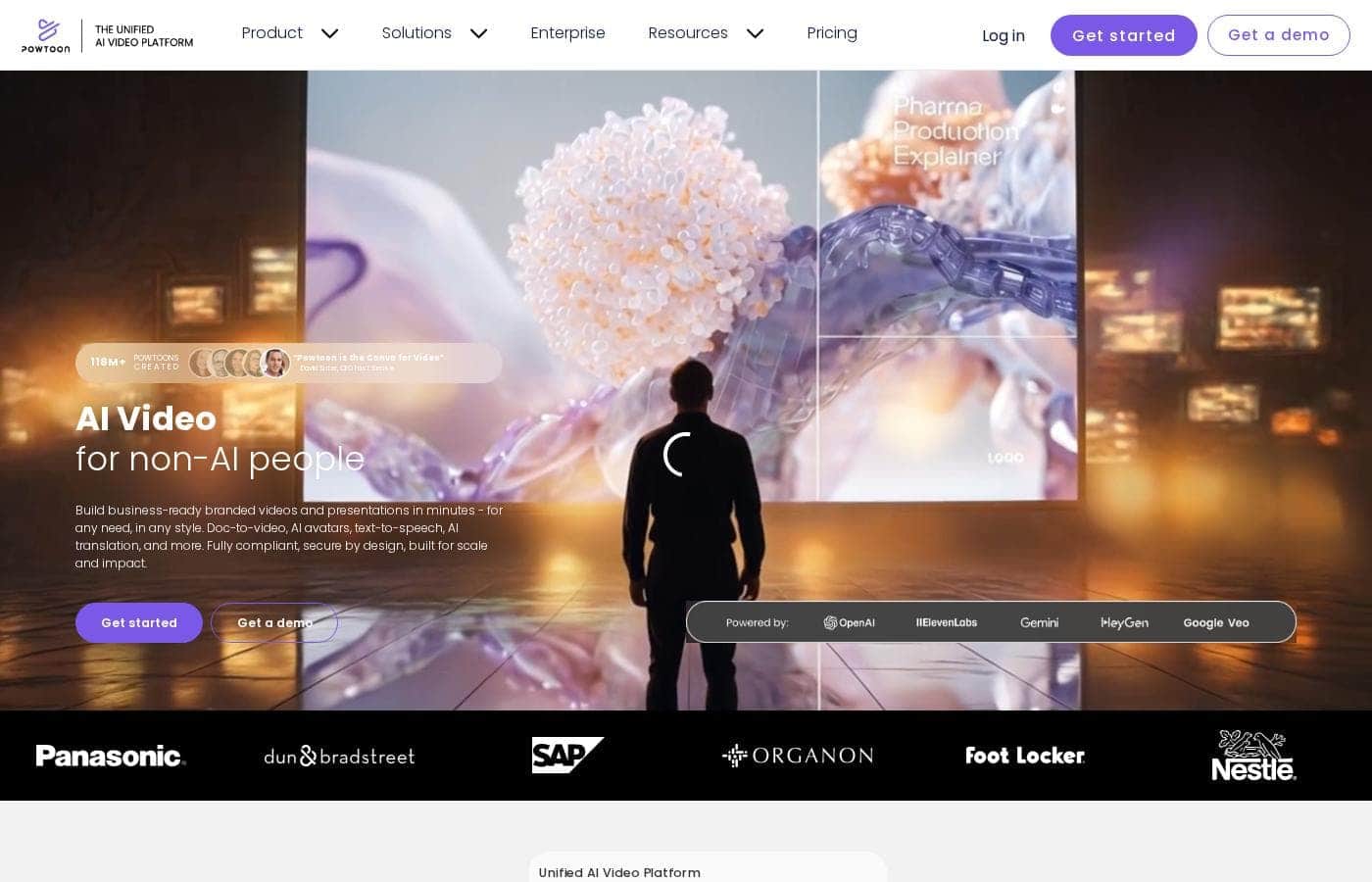
Powtoon homepage screenshot

At a glance

Quick overview for Powtoon: rating, pricing summary, key features, and highlights.
Pricing verified Oct 12, 2026

Ciroapp score

3.9/ 5

Powtoon makes animated video feel like slide-making: you drag in characters and templates, add a voiceover, and ship explainers or training clips fast. It's proven at scale — 96% of Fortune 500 companies use it — though free exports carry a watermark and fine-grained editing control is limited. Overall, it's a smart pick for business teams that value speed over cinematic craft.

Pros

  • Pros:Near-zero learning curve — the canvas-and-scene editor feels like presentation software, so a first video is achievable within an hour
  • Pros:Large built-in library of animated characters, templates, and royalty-free media removes the need for external design assets
  • Pros:Document-to-video conversion turns existing decks and reports into content instead of starting scripts from scratch

Cons

  • Cons:Free-plan exports carry a Powtoon watermark, and watermark-free high-quality output requires a paid subscription
  • Cons:Template-driven animation limits creative control — complex or fully custom motion design is not achievable compared to tools like After Effects
  • Cons:The recognizable cartoon style can feel generic if many competitors in your industry use the same templates
Best for
  • HR and L&D teams that need to produce training, compliance, and onboarding videos regularly without a dedicated video staff
  • Marketing teams and solo marketers creating explainer videos, product promos, and social content on limited budgets
  • Corporate communications teams turning internal announcements into engaging branded video updates
This section is a summary. Detailed sections about features, use cases, pricing, and reviews follow below.

What is Powtoon?

Powtoon approaches video creation the way slide tools approach presentations: pick a template, drag in your content, and let the platform handle the motion. This design has made it a default choice for business users who need animated explainers, training clips, and marketing videos without hiring an animator or learning professional editing software. With more than 50 million users — including 96% of Fortune 500 companies — it has proven that template-driven animation can hold up at enterprise scale.

The trade-off is creative flexibility, which matters depending on what you are making.

Powtoon is a browser-based video and animation platform for producing explainer videos, presentations, ads, and social clips. Instead of a traditional timeline editor, it offers scene-based templates stocked with animated characters, props, icons, and royalty-free media that you customize through drag-and-drop. Finished projects export as video files or play as animated presentations, and existing documents can be converted into video format.

Because it runs entirely in the browser, nothing needs to be installed and projects are accessible from any device.
Should you choose Powtoon?

Quick buyer guidance before you compare plans or click through.

Choose it if

  • HR and L&D teams that need to produce training, compliance, and onboarding videos regularly without a dedicated video staff
  • Marketing teams and solo marketers creating explainer videos, product promos, and social content on limited budgets
  • Corporate communications teams turning internal announcements into engaging branded video updates
  • Educators and course creators building animated lessons without media production experience
  • Sales professionals who want simple video assets to accompany outreach and proposals

Skip it if

  • Professional animators and motion designers who need keyframe-level control, custom rigs, or complex effects — After Effects-class tools are the right fit
  • Teams that need watermark-free, high-resolution output on a zero budget, since the free plan's limitations force an upgrade
  • Projects requiring long-form or cinematic editing such as multicam cuts, color grading, or detailed footage work, which fall outside Powtoon's template model
  • Users in offline or low-connectivity environments, as the platform runs entirely in the browser

Next steps before buying

  1. 1Create a free account at powtoon.com — the $0 plan lets you test the full editor before paying anything
  2. 2Choose a template that matches your goal, such as an explainer, training module, or product promo, so you start from a structured storyboard
  3. 3Customize your scenes by dragging in characters, props, and text, then add narration via in-app recording, an imported audio file, or text-to-speech
  4. 4Preview the full video, adjust timing and transitions, then export or share it — upgrade to a paid plan if you need watermark-free, higher-quality output
  5. 5For team use, set up a shared workspace and apply your branding so multiple contributors produce consistent videos

Powtoon Key Features

✨ Template-Driven Drag-and-Drop Editor

Powtoon's core workflow mirrors presentation software: choose a template, then rearrange scenes, characters, and text on a canvas rather than a timeline. Pre-built storyboards cover common formats like explainers, promos, and announcements, so most projects start largely complete. This structure is why the platform earns the 'Canva for Video' comparison — first-time users can produce a finished cut on day one.

✨ Animated Characters, Props, and Media Library

The built-in library includes animated characters with gestures and expressions, props, icons, transitions, and royalty-free music and images. Characters can deliver narration with synced mouth movements, which is difficult to achieve in general-purpose editors. This asset depth is what lets non-artists create content that genuinely looks animated rather than slideshow-like.

✨ Document-to-Video Conversion

Powtoon can transform existing static content — reports, decks, and documents — into video format. For teams sitting on years of unused presentations and PDFs, this repurposes material that already exists instead of starting scripts from scratch. It directly targets the internal communications and training use cases where the source content is usually a written document.

✨ Voiceover, Recording, and Audio Tools

Narration can be recorded directly in the platform, imported as audio, or generated from text, with tools for syncing voice to on-screen action. Screen and webcam capture lets you mix live demonstration footage with animated slides. This combination covers the practical audio needs of training and explainer content without external recording software.

✨ Branding, Collaboration, and Enterprise Controls

Higher tiers add custom branding, shared team workspaces, and administrative controls suited to organization-wide deployment. The fact that 96% of Fortune 500 companies use the platform reflects investment in the governance features large organizations require. Solo users can ignore this layer entirely, while teams get consistent output across contributors.

Use Cases

💡 Employee Training and Onboarding

HR and L&D teams use Powtoon to turn policy documents, compliance material, and onboarding checklists into short animated modules that people actually watch. Animated characters soften dry topics like security training, and updates can be made by editing a template rather than reshooting. This is arguably the platform's strongest enterprise use case given its Fortune 500 adoption.

💡 Marketing Explainers and Social Video

Marketers produce product explainers, feature announcements, and promotional clips sized for social channels without a production budget. Templates keep visual style consistent across a campaign, and fast editing makes it practical to iterate on messaging. The document-to-video feature also converts existing sales decks into shareable video assets.

💡 Sales and Customer Communication

Sales teams create short videos to accompany outreach, walk through proposals visually, and explain complex products simply. Because videos are built from reusable templates, reps can adapt core content for specific prospects without starting over. Explainer-style output tends to hold attention better than text-heavy attachments in competitive deals.

💡 Education and Classroom Content

Teachers and course creators use animated templates to explain concepts, introduce lessons, and build flipped-classroom content. Character-driven storytelling helps younger audiences stay engaged, while presentation mode supports live teaching. The low skill requirement means educators can build a library of reusable animated lessons without media production support.

💡 Internal Communications and HR Updates

Corporate communicators transform announcements — benefits changes, org updates, event promotion — into short videos that achieve higher engagement than plain email text. Branded templates keep messaging on-style across departments, and speed matters when news needs to ship the same day.

Powtoon pricing

From$8/mo

  • From the vendor's pricing page, checked Oct 12, 2026
  • 5 plans
  • Free plan available

Prices checked on Oct 12, 2026 from Powtoon's pricing page

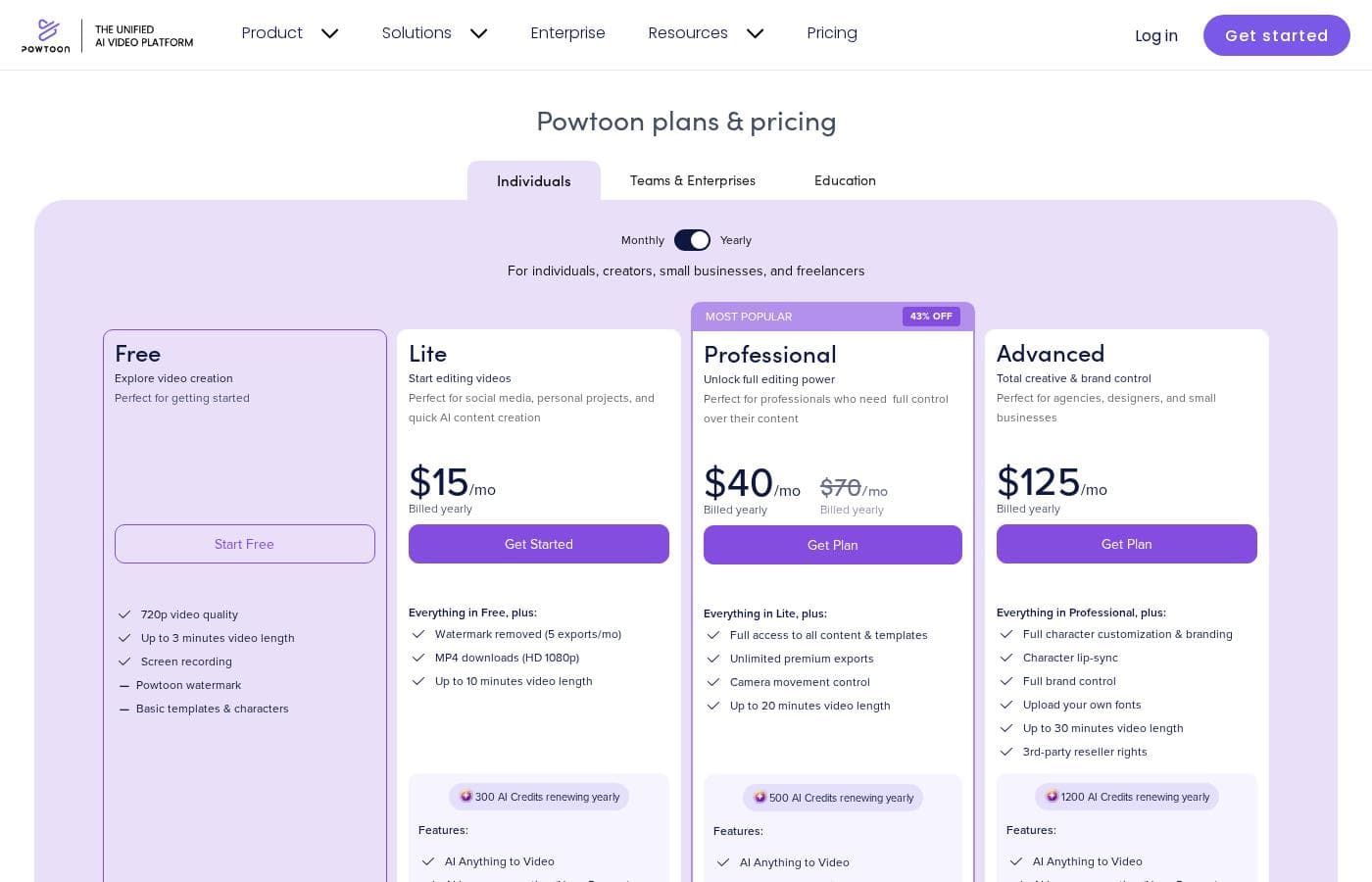
Powtoon pricing page screenshotView pricing page screenshot
PlanBilled monthlyBilled annuallyIncludes
Lite
$15/mo
—
Professional
$40/mo
—
Advanced
$125/mo
—
Compare all features
Free
—
Education
$8/mo
—

Price history

Tracking prices since Oct 1, 2026. No price change detected yet.

Pricing types: Free plan, Monthly subscription, Yearly subscription, Usage-based pricing

Pricing notes

Powtoon pricing: Plans from $0/month Billing options: Free plan, Monthly subscription, Yearly subscription, Usage-based pricing

Cost calculator

Estimate what Powtoon costs for your team.

Billing
Per month
$15
Per year
$180

Lite states no user limit: shown as one price for the whole account. Check the price for 5 users with the vendor. Estimate based on published list prices, before taxes, add-ons and discounts.

How to pay less for Powtoon

  • Start on the free plan and upgrade only when you hit its limits.
  • Cheaper tools in this category start at $5.83/mo.
Visit Powtoon

Email me when Powtoon changes price

One email when we detect a price change on the vendor's pricing page. No newsletter, no deals. Unsubscribe in one click.

User Reviews

No reviews yet.

Write a Review

Write a Review for Powtoon
0/100 characters
0/2000 characters

Why use Powtoon?

The main argument for Powtoon is speed relative to skill: people who could never operate After Effects or Premiere can produce a credible animated video in an afternoon. Animated content also consistently outperforms static documents for engagement, so teams that live in slides and PDFs get a measurable communication upgrade.

Enterprise adoption — including 96% of Fortune 500 companies — reflects that it scales from a solo marketer to organization-wide branding and collaboration controls. For most business video needs, it is dramatically cheaper than commissioning custom animation.

Powtoon alternatives

Other tools in the Video editing category

View all Video editing tools
Anireel

Anireel

Video editing4/5

Anireel is an intuitive solution built to simplify animated video production. It allows anyone, even beginners, to craft high-quality explainer videos quickly. The software is perfect for various needs, supporting marketing, eLearning, and corporate communication efforts. Anireel comes packed with powerful tools like a custom character builder and a sophisticated Text-to-Speech engine. This means you get lip syncing and professional-grade video creation in one easy package.

Filmora 14

Filmora 14

Video editing4/5From $5.83/mo

Filmora 14 is a highly accessible and powerful video editing platform built for efficient results. It’s designed to provide AI-powered efficiency and remarkable simplicity to your everyday editing, making it suitable for both beginners and seasoned experts. This software simplifies the entire process, from pre-processing your footage all the way to finalizing your project. Filmora helps unlock new possibilities for visual storytelling, ensuring your videos stand out with outstanding AI-driven technology. It’s an ideal choice for anyone looking for a fluent and productive editing journey.

Animaker

Animaker

Video editing4/5

Animaker is known as the world’s most complete Animation and Video Making Tool. It's truly a world-class system built for everyone. This platform helps you create both animation and live-action content with ease. Whether you are running a startup or working for a seasoned Fortune 500 company, you can achieve studio-quality results. More than 30 million users already trust this powerful system to deliver effective visual communication.

Kapwing

Kapwing

Video editing3.8/5

Kapwing is recognized as a powerful, yet incredibly user-friendly, online video service. It’s designed for anyone who needs to be immediately ready to create high-quality content. If you are a social media manager or someone who values speed and collaboration, this tool is described as essential for your bookmark list. Users consistently call it the most user friendly software they have ever used.

Camtasia

Camtasia

Video editing4.2/5

Camtasia is truly everything you need in one powerful tool. It combines screen recording with full video editing capabilities. This software uses AI-powered tools to simplify the creation process. It is designed to help you turn your existing knowledge into highly engaging videos.

VEED

VEED

Video editing4/5

VEED is a complete end-to-end video suite designed for busy teams and creators. It allows you to create, collaborate, and share impressive videos entirely from within your browser. This platform offers seamless workflow consolidation, perfect for everyone from individual content makers to large organizations like the Fortune 500. It includes smart collaboration tools and a dedicated Brand Kit, ensuring your team maintains consistency. Additionally, you access a vast, royalty-free stock library featuring over 2 million video and audio assets.

FlexClip

FlexClip

Video editing3.9/5

FlexClip is an all-in-one online video editing solution designed to make powerful video creation accessible to everyone. It's built for folks who need professional output without needing extensive filmmaking experience. Based on user testimonials, this tool is perfect for educators, marketers, designers, and small business owners alike. It provides flexible editing capabilities right in your browser, helping you produce high-quality clips quickly.

Cheapest Video editing software for 1 to 25 users

Powtoon FAQ

How much does Powtoon cost?

Powtoon's cheapest paid plan, Education, costs $8 per month. Paid plans range from $8 to $125 per month. Prices checked on Oct 12, 2026 from the vendor's pricing page.

Does Powtoon have a free plan?

Yes. Powtoon has a free plan (Compare all features); paid plans start at $8 per month.

Has Powtoon's price changed recently?

No. We have not detected a price change since we started tracking on Oct 1, 2026.

Is Powtoon free to use?

Yes. Powtoon offers a free plan starting at $0/month that lets you build and share videos, though free exports include a Powtoon watermark and have quality limitations. Paid subscriptions — available as monthly, yearly, and usage-based or enterprise arrangements — remove the watermark and unlock higher-quality exports, branding, and collaboration features.

Do I need video editing or animation experience to use Powtoon?

No. Powtoon is deliberately designed for non-specialists: you assemble videos from templates using drag-and-drop, similar to building a slide deck in PowerPoint or Canva. Most users can produce their first finished video on the day they sign up.

What kinds of videos can I create with Powtoon?

The platform is built for business-oriented video: product explainers, marketing promos, training and onboarding modules, HR announcements, sales outreach, social clips, and animated presentations. It can also convert existing documents and slide decks into video format.

Can I use Powtoon videos for commercial purposes?

Paid plans are intended for commercial and business use, which is consistent with the platform's adoption by 96% of Fortune 500 companies. Free-plan videos carry a Powtoon watermark, so commercial users typically upgrade to a subscription — review your specific plan's licensing terms before publishing externally.

How does Powtoon compare to traditional video editors?

Powtoon trades fine-grained editing control for speed and accessibility. Unlike Premiere Pro or After Effects, there is no timeline mastery or keyframe animation involved; instead, you customize pre-animated scenes and characters. For business communication videos this is usually faster; for cinematic or highly custom motion work, a professional editor remains the better fit.

Ready to try Powtoon? Check out the official site or pricing.

Are you Powtoon? Claim this listing · Get the badge