FlexClip

FlexClip

Flexible Editing, Stunning Clips: Create Smarter and Faster.

#1 dans Video editing
2 min read · Updated 10/6/2025
FlexClip homepage screenshot

At a glance

Quick overview for FlexClip: rating, pricing summary, key features, and highlights.

Ciroapp review

4.6
Easy Video Editor with Powerful AI

We found FlexClip to be exceptionally strong in combining a massive commercial asset library with highly effective AI tools that dramatically speed up the creative process. The user experience is smooth and intuitive, which lowers the barrier to entry significantly for new creators. Overall, we recommend FlexClip as a top choice for individuals and businesses seeking fast, high-quality video production.

Pros

  • Pro:Highly intuitive, drag-and-drop interface designed for quick and easy video creation.
  • Pro:Extensive library including 6,000+ templates and millions of searchable stock assets.
  • Pro:Powerful AI features significantly streamline tasks like video generation and subtitling.
  • Pro:Offers high-quality 4K download options (available on the Business plan).

Cons

  • Con:Advanced editing features like keyframes or keystone adjustments are currently missing.
  • Con:AI accuracy can sometimes fail, such as incomplete lyric or subtitle extraction.
  • Con:Stock music selection could be broader and more diverse in trending genres.
  • Con:Paid plans are necessary to unlock full features, resource access, and remove the trademarked watermark.
Free trial
Yes
Range: $0.00–$19.99/monthFree plan, Monthly subscription, Yearly subscription
This section is a summary. Detailed sections about features, use cases, pricing, and reviews follow below.

FlexClip review, pricing, features, pros & cons

Are you frustrated trying to create professional videos quickly? Traditional editing is often complex or consumes too much time.

FlexClip cuts through this complexity. It uses powerful AI tools and a massive resource library to help you create stunning videos faster and smarter. You can achieve amazing professional results with a simple learning curve. ✨

What is FlexClip?

FlexClip is an all-in-one online video editing solution designed to make powerful video creation accessible to everyone. It's built for folks who need professional output without needing extensive filmmaking experience. Based on user testimonials, this tool is perfect for educators, marketers, designers, and small business owners alike.

It provides flexible editing capabilities right in your browser, helping you produce high-quality clips quickly. ✅

FlexClip Key Features

💡 Revolutionary AI Tools for Smart Creation

Streamline your entire production workflow using cutting-edge artificial intelligence. These integrated tools significantly reduce time spent on tedious tasks. You can generate entire videos from a simple prompt, a URL, or an article immediately using the AI Video Generator. It makes starting your project faster and more intuitive than ever before.

FlexClip also helps simplify complex audio and translation needs. Instantly turn text into natural-sounding voices using the AI Text to Speech tool. For broad reach, AI Auto Subtitle automatically identifies speech and generates accurate subtitles. You can even use the AI Translator to create multi-language videos with complete ease.

✨ Massive Commercial Resource Library

Stop wasting valuable time searching the internet for assets. FlexClip provides a huge, commercially licensed library included for one-click use. This constantly updated collection ensures your videos always look fresh and professional.

You gain instant access to professional-grade media right inside the editor. This robust library helps you easily produce high-quality content without searching externally.

  • Over 4 million videos and photos
  • 74,000+ music tracks and sound effects
  • Millions of dynamic elements

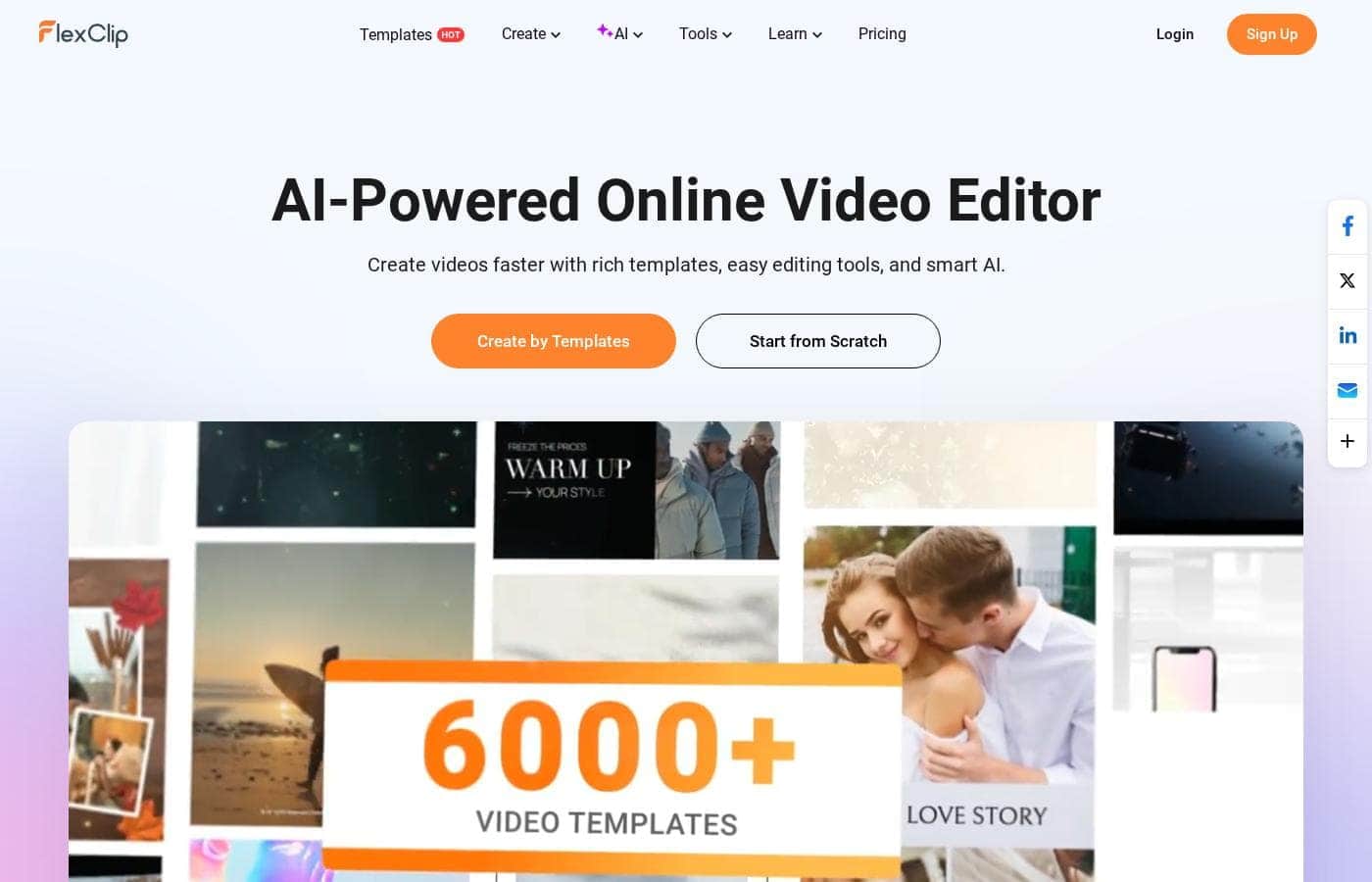
✨ Start Fast with 6,000+ Professional Templates

You don't need extensive video experience to create stunning results. FlexClip lets you skip the intimidating blank canvas challenge by using thousands of professionally designed templates. These templates are essential for various needs from marketing videos to personal projects.

Start your project instantly by choosing from successful formats like Business, Store, and Intro/Outro videos. Using a template provides an excellent, professional starting foundation. This lets you focus quickly on customizing and perfecting your unique content.

✨ Powerful Editing Tools for Refined Clips

FlexClip gives you all the crucial tools necessary to refine your video clips like a professional editor. Even without deep filmmaking knowledge, you can achieve powerful, specialized effects easily. You can quickly reverse, merge, or trim your video clips with precision.

Advanced tools like Chroma Key help you integrate different visual elements seamlessly, such as virtual backgrounds. Use the Speed Curve function to control the pacing and make your video flow beautifully. Additionally, quickly record your screen or use the GIF Maker right within the application.

✨ Seamless Collaboration and High-Quality Sharing

Work efficiently with your entire team and share impressive results effortlessly. FlexClip supports smooth access to your files, allowing for quick cloud-based workflow and coordination. Cloud storage secures your files and designs, ensuring reliable access anytime you need it.

When your video is complete, you can export it up to a crisp 4K resolution. Direct sharing capabilities let you easily publish final projects straight to popular social platforms. This capability ensures maximum audience reach with minimum hassle.

Use Cases

💡 Boosting Marketing Efficiency with AI

A busy small business owner needs regular video content to engage customers. Traditional video editing takes too much time away from managing the business. FlexClip allows you to leverage the powerful AI Video Generator by simply providing a text prompt or a link.

The AI quickly drafts a full video narrative, saving hours of manual setup. You then apply a relevant template from the 6,000+ options to refine the look. You can then export the final clip in 4K resolution and share it directly to social platforms.

Expected outcome: High-quality sales videos produced several times faster, driving engagement and customer influx.

👨‍🏫 Creating Accessible Educational Lessons

Educators often need to create clear, accessible tutorial videos for their students quickly. They need to ensure all students can follow along, regardless of auditory ability. FlexClip helps by simplifying the production process drastically.

Start by recording your screen directly within the platform to capture your lesson content. Use the AI Auto Subtitle feature to instantly generate accurate captions for the entire video. Finally, use the AI Translator tool to create multi-language versions, supporting a diverse classroom environment. This makes learning materials both inclusive and professional looking.

✨ Designing High-End Client Projects

Designers and specialized marketers require absolute flexibility and commercial freedom for client work. You need to incorporate client branding consistently across multiple assets. FlexClip supports this professional workflow.

Access the massive commercial library of over 4 million videos and photos to complement client footage. Utilize advanced tools like Chroma Key to replace backgrounds or Speed Curve to adjust pacing precisely. You can save custom branding assets and share project files easily with teammates using the built-in cloud storage system.

Tip: Use the collaboration features to get real-time feedback and maintain consistency across all team deliverables.

🚀 Rapid Social Media Clip Production

Social media managers must produce large volumes of fresh content daily to keep audiences interested. They don't have time to search for separate music, stock footage, and editing software. FlexClip acts as an all-in-one shop.

Pull high-quality stock elements, dynamic effects, and music from the huge library with a single click. Quickly trim, merge, and animate elements in the project timeline. Finished clips are ready to download in high definition and posted almost immediately, ensuring your engagement strategy remains active and effective.

🎬 Developing Professional Book Trailers

An author or creative professional needs a visually stunning book trailer or a portfolio showcase without complex software training. The key challenge is finding licensed media that truly enhances the story. FlexClip solves this organizational challenge completely.

Approach:

  1. Select a cinematic template related to your book's genre.
  2. Incorporate custom footage and blend it with unlimited stock videos and audio assets.
  3. Turn text synopses into engaging voiceovers using the AI Text to Speech function.
  4. Apply professional transitions and effects to create visual depth.

This straightforward process ensures a highly polished final product recognized by industry professionals.

✂️ Enhancing Interview Footage Quality

A YouTuber or interviewer might shoot footage against a simple, unattractive background. To maintain professionalism, they must remove or replace the environment swiftly. FlexClip provides dedicated tools for this task.

Problem: Poorly lit or distracting background in crucial interview segments.

Approach:

  1. Upload the video footage to FlexClip.
  2. Use the AI BG Remover feature for an instant mask.
  3. For green screen footage, apply the dedicated Chroma Key tool for precise transparency.
  4. Replace the removed background with a solid color or a premium stock clip.

Outcome: Clean, professional, distractions-free video ready for publication, minimizing post-production effort.

Pricing Overview for FlexClip

Pricing range
$0.00–$19.99/month
Pricing types
Free plan, Monthly subscription, Yearly subscription

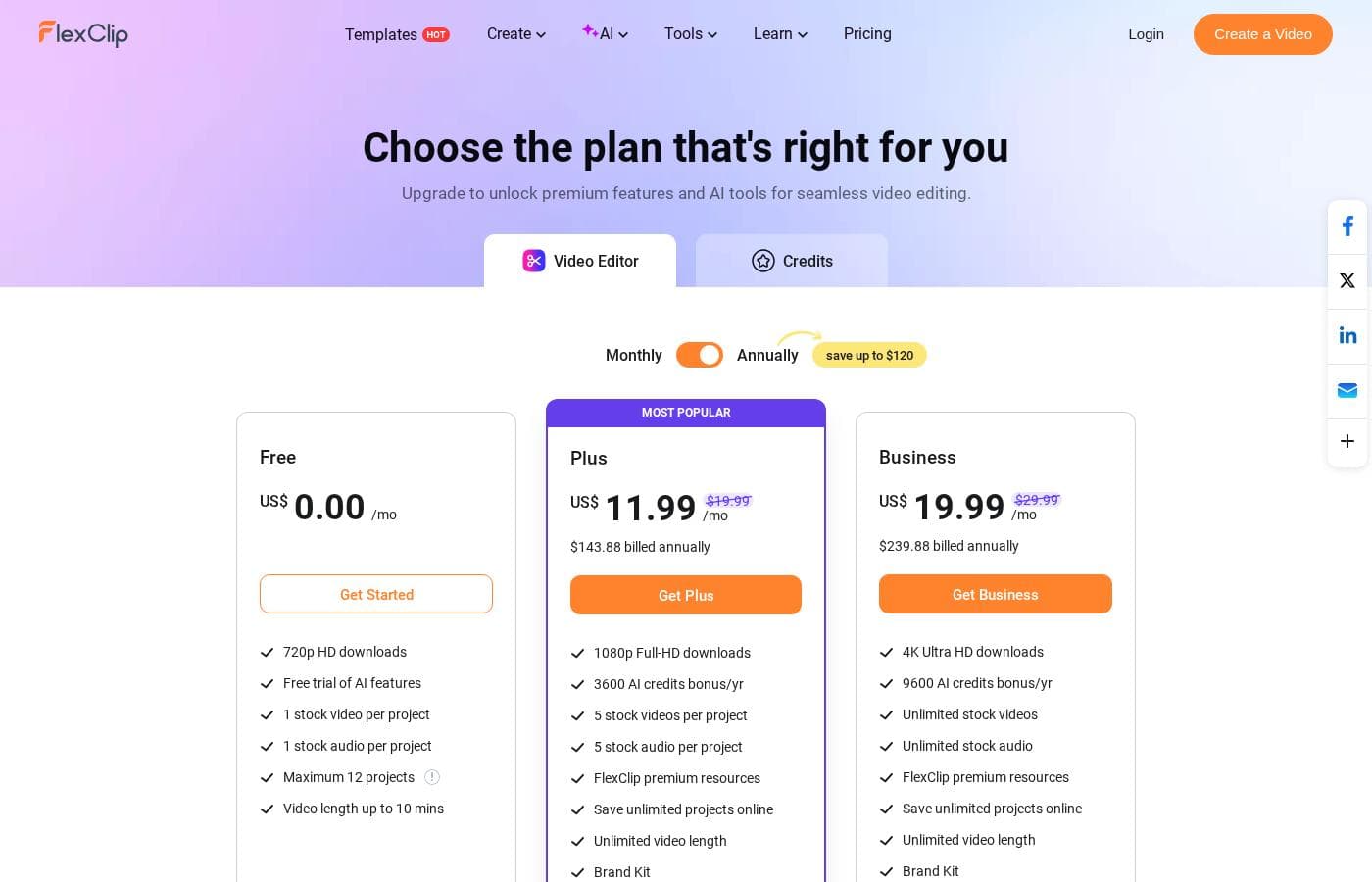
FlexClip offers three clear plans, including a permanent Free tier, which makes it easy to get started. Paid subscriptions, Plus and Business, start at $11.99 per month when billed annually, offering substantial savings over monthly rates.

Plans & Pricing

Free

Monthly0.00
Maximum 12 projects, Video length up to 10 mins
  • 720p HD downloads
  • Free trial of AI features
  • 1 stock video per project
  • 1 stock audio per project

Plus

Monthly19.99 (estimated regular rate)
Yearly11.99
5 stock videos per project, 5 stock audio per project
  • 1080p Full-HD downloads
  • 3,600 AI credits/yr
  • FlexClip premium resources
  • Save unlimited projects online
  • Custom branding used
  • 30GB cloud space
  • 100GB video hosting space
  • Upload custom fonts

Business

Monthly29.99 (estimated regular rate)
Yearly19.99
  • 4K Ultra HD Downloads
  • 9,600 AI credits/yr
  • Unlimited stock videos
  • Unlimited stock audio
  • FlexClip premium resources
  • Save unlimited projects online
  • Unlimited video length
  • Custom branding used
  • + 3 more features

FlexClip costs between US$0.00 and US$19.99 per month with 3 plans: Free at US$0.00, Plus at US$11.99, and Business at US$19.99.

You can examine the different plan options below to decide which one fits your creative needs best.

Free

Price: US$0.00/mo Websites Supported: Not explicitly stated Best For: Testing out the service and casual video creation Refund Policy: Not explicitly stated Other Features:

  • 720p HD downloads
  • Free trial of AI features
  • 1 stock video and 1 stock audio per project
  • Maximum 12 projects allowed

This Free plan lets you test out FlexClip's capabilities with zero cost. You can access essential tools and even try out the impressive new AI features for free. It's limited to 12 projects and shorter video lengths, but it's perfect for casual users.

Plus

Price: US$11.99/mo (Billed annually at US$143.88) Websites Supported: Not explicitly stated Best For: Dedicated content creators needing 1080p and custom branding Refund Policy: Not explicitly stated Other Features:

  • 1080p Full-HD downloads
  • 3,600 AI credits/yr
  • 5 stock videos and 5 stock audio per project
  • Unlimited video length and saved projects
  • Custom branding used, 30GB cloud space

The Plus plan is marked as Most Popular, offering a strong balance of features for regular users. You'll unlock higher quality downloads and important features like custom branding and substantial AI credits. If 1080p resolution and moderate storage meet your needs, this plan is a fantastic value.

Business

Price: US$19.99/mo (Billed annually at US$239.88) Websites Supported: Not explicitly stated Best For: High-volume professional production requiring 4K and maximum resources Refund Policy: Not explicitly stated Other Features:

  • 4K Ultra HD Downloads
  • 9,600 AI credits/yr
  • Unlimited stock videos and audio
  • Unlimited video length and saved projects
  • 100GB cloud space; 1TB video hosting

The Business plan provides comprehensive support and resources for professional users and teams. You get top-tier 4K resolution, vastly increased AI credits, and unlimited assets for any project. This tier is best suited for organizations that manage large media files and require maximum performance and storage.

FlexClip makes it easy to get started with a robust, permanent free plan available immediately. Paid subscriptions offer valuable features like unlimited usage and custom branding to accelerate your professional output. Choosing to pay annually provides a significant discount, helping you save up to 40% on your subscription cost. You're set!

User Reviews

Users overwhelmingly praise FlexClip’s user-friendly interface and minimal learning curve, noting that it makes powerful video creation accessible to everyone, regardless of prior experience. Many reviewers state that the platform significantly reduces the time required for content creation, often replacing more complex software they previously relied on.

The extensive library of over 6,000 templates and vast stock footage is frequently highlighted as a major efficiency booster. The incorporated AI tools, such as the Video Generator, are generally seen as game-changers, streamlining workflow for commercial and personal projects.

However, users occasionally note limitations with the free tier, specifically the required watermark and paywalling of certain desirable features in newer updates. While the service is highly reliable, some specific feedback pointed to minor issues with AI subtitle accuracy and the desire for more 'trendy' music selection.

Despite these small critiques, the consensus holds that FlexClip is a highly effective, high-quality video editor that offers exceptional value. 👍 Customer support is also noted as being prompt and responsive when issues arise.

What users say elsewhere

Alex R.
· Trustpilot
5.0 / 5

This thing is awesome! I needed to create a simulation video quickly, and FlexClip saved the day by making complex editing simple. It’s highly versatile and intuitive with a minimal learning curve, offering great value for beginners.

Mike W.
· Trustpilot
5.0 / 5

Using FlexClip for music videos was a game changer for me. The frustration of syncing my songs to visuals vanished completely. This site makes the entire process simpler, helping me focus on the creative side of production effectively.

No reviews yet.

Write a Review

Write a Review for FlexClip
0/100 characters
0/2000 characters

Why use FlexClip?

Stop wasting time searching for assets and struggling with complicated software. FlexClip offers a genuine advantage in speed and efficiency, making it easier than ever to keep your audience engaged.

  • Revolutionize Creation with AI: Utilize advanced AI tools like the Video Generator, AI Auto Subtitle, and AI Text to Speech to streamline your workflow significantly. 💡
  • Massive Commercial Resource Library: You gain access to over 4 million videos and photos, 74,000 music tracks, and millions of dynamic elements. All these assets are available for easy, one-click commercial application.
  • Produce Professional Results Simply: Even without prior experience, you can leverage over 6,000 templates and powerful editing tools like Chroma Key and Speed Curve to make your videos look fantastic.
  • Seamless Collaboration and Sharing: Work efficiently with teammates using cloud storage for smooth access. You can easily export videos up to 4K resolution and share them directly to social platforms.
  • A Trusted, Tested Platform: Join over 5 million registered users who rely on FlexClip. This platform is backed by over 10 years of experience in the graphics and multimedia software industry.

Ready to transform your workflow with FlexClip?

Frequently Asked Questions

Does FlexClip offer a money-back guarantee if I am unhappy with my subscription?

The official site does not explicitly state a money-back guarantee or refund policy for paid subscriptions. It's best to contact their support team before purchasing if this is a key concern for you.

Are the Plus and Business plans priced per user or per team collaboration access?

The pricing is structured per subscription, offering seamless collaboration features, especially in the Business plan. The available information does not specify if this package is based on a strict per-seat licensing model.

What is the process if I need to cancel my FlexClip subscription?

Not explicitly stated on the official site. You should review the terms of service or contact the customer support team for details about the cancellation process for paid plans.

How much cloud storage for project files is included with the paid plans?

The Plus plan includes 30GB of dedicated cloud space for project files and assets. Users on the larger Business plan benefit from 100GB of cloud storage to save their work.

What is the difference between 'Cloud Space' and 'Video Hosting Space' on the paid plans?

Cloud Space stores your project assets and file uploads. Video Hosting Space is much larger (up to 1TB on Business) and likely stores published, shareable video exports.

How frequently are the AI credits refreshed or dispensed in the paid plans?

AI credits are provided on an annual basis upon subscription renewal. The Plus plan includes 3,600 credits per year, and the Business plan grants 9,600 credits per year.

Can I use my own custom fonts in the videos I create?

Yes, the ability to upload and use custom fonts is an included feature. This valuable capability is currently available for users subscribed to both the Plus and Business plans.

In what languages can I access the FlexClip editor and resources?

FlexClip offers support for several languages within its interface. These options include English, Español, Português, Deutsch, Français, Italiano, and Japanese, among others.

Does FlexClip directly integrate with other third-party cloud storage or marketing services?

Not explicitly stated on the official site. The platform focuses on its internal cloud storage and allows for direct sharing of finished videos to social media channels.

What kind of limits does the permanent Free plan have on media assets?

The Free plan restricts your usage to 1 stock video and 1 stock audio track per project. Your total number of saved projects is also capped at a maximum of 12.

What kind of support responsiveness should I expect as a paid user?

External reviews indicate that customer support is generally prompt and responsive when users face technical issues. However, specific guaranteed Service Level Agreements (SLAs) are not published.

Is the FlexClip Pro plan better for individual creators or small teams?

The Plus plan is marked as Most Popular and is best for dedicated individual creators needing 1080p, custom branding, and moderate resources. The Business plan better suits professional teams needing 4K and maximum assets.

Ready to try FlexClip? Check out the official site or pricing.