AVS4YOU vs FlexClip
AVS4YOU and FlexClip offer two totally different approaches to video editing. AVS4YOU provides a powerful, single-purchase desktop utility suite for Windows. FlexClip is a modern, subscription-based engine focused on speedy, AI-driven creation directly in your browser. You decide if you prefer local control or cloud convenience.
Best for: Single Windows PC Editors, Users prioritizing video conversion speed
Best for: Digital marketers needing rapid content generation, Teams requiring cloud collaboration features
Functional suite with restrictive licensing.
We assessed the AVS4YOU suite as a highly functional and simple solution for diverse multimedia editing and conversion needs. While the array of tools is excellent and priced competitively, we found the single-device licensing policy highly restrictive, especially for the popular “Unlimited Subscription.” Overall, the product delivers quality output but requires clearer communication regarding license portability.
Pros
- Excellent value for the comprehensive multimedia software suite.
- Software is highly versatile for video, audio, and conversion tasks.
- Simple, intuitive, and user-friendly interface design.
- Technical support staff is consistently praised for quick responses.
Cons
- The "Unlimited" license is strictly limited to a single PC/device.
- License transfer or reactivation is often complex after a computer crash.
- Software can become slow when processing very large video files.
- Screen capture feature sometimes records without accompanying audio.
Easy Video Editor with Powerful AI
We found FlexClip to be exceptionally strong in combining a massive commercial asset library with highly effective AI tools that dramatically speed up the creative process. The user experience is smooth and intuitive, which lowers the barrier to entry significantly for new creators. Overall, we recommend FlexClip as a top choice for individuals and businesses seeking fast, high-quality video production.
Pros
- Highly intuitive, drag-and-drop interface designed for quick and easy video creation.
- Extensive library including 6,000+ templates and millions of searchable stock assets.
- Powerful AI features significantly streamline tasks like video generation and subtitling.
- Offers high-quality 4K download options (available on the Business plan).
Cons
- Advanced editing features like keyframes or keystone adjustments are currently missing.
- AI accuracy can sometimes fail, such as incomplete lyric or subtitle extraction.
- Stock music selection could be broader and more diverse in trending genres.
- Paid plans are necessary to unlock full features, resource access, and remove the trademarked watermark.
AboutAVS4YOU
AVS4YOU is rightly called the “Ultimate multimedia editing family.” It is a collection of tools designed for anyone looking to produce high-quality video and audio content, and even more. Whether you need to convert files, trim a video, or apply engaging effects like Chroma key, this family of software has you covered. Users consistently highlight that it's very convenient, user friendly, and functional ✨.
AboutFlexClip
FlexClip is an all-in-one online video editing solution designed to make powerful video creation accessible to everyone. It's built for folks who need professional output without needing extensive filmmaking experience. Based on user testimonials, this tool is perfect for educators, marketers, designers, and small business owners alike. It provides flexible editing capabilities right in your browser, helping you produce high-quality clips quickly. ✅
Highlights
Feature Comparison
Features Overview
We highlight the main differences and pick a winner for each feature.
AI Automation
FlexClip uses AI to generate content rapidly while AVS4YOU relies on traditional desktop tools.
AVS4YOU is a powerful, traditional suite without built-in AI functions. It excels at core utility tasks like file conversion and editing. FlexClip excels due to its advanced AI tools, including generators and translators. The FlexClip AI Video Generator creates whole videos from simple text prompts or links. This is the biggest workflow difference between AVS4YOU and FlexClip. FlexClip automates creation while AVS4YOU requires hands-on editing. Choose FlexClip if you need to rapidly produce high volumes of marketing content for social media.
Licensing Model
AVS4YOU offers lifetime access, but its single-PC limitation feels outdated compared to FlexClip.
AVS4YOU offers a compelling one-time Unlimited Subscription price of $79. This plan gives you access to the entire multimedia suite forever. However, AVS4YOU ties that powerful, permanent license to one specific Windows computer entirely. FlexClip uses standard subscription models, starting at $11.99/month annually. FlexClip's fee provides portability and cloud access, completely avoiding the single-PC license trap. The rigid AVS4YOU licensing is a major pain point for many users. If permanent ownership is essential, AVS4YOU works, but FlexClip is better for modern, flexible use.
Platform Focus
AVS4YOU is dedicated desktop software, prioritizing power; FlexClip is a modern, accessible cloud tool.
AVS4YOU is installed desktop software built explicitly for the Windows OS. It provides deep control over local files. FlexClip operates entirely in your web browser, offering instant access anywhere. This makes FlexClip incredibly convenient for remote workers. Because AVS4YOU runs locally, it handles large files potentially faster via GPU conversion acceleration. FlexClip relies on smooth cloud storage for projects and assets. If you need stable features without reliance on internet speed, AVS4YOU is the choice. FlexClip dominates for accessibility and universal access.
Stock Assets & Templates
FlexClip has a huge asset library and templates, which AVS4YOU completely lacks.
AVS4YOU provides the editing tools but requires you to provide all your own media. It does not include a searchable stock library. FlexClip is built around a massive library of 4 million stock videos and photos. It includes 74,000+ music tracks ready for commercial use. FlexClip also boasts over 6,000 professional templates for lightning-quick project starts. This saves users huge amounts of time. For users needing fast access to licensed, high-quality media, FlexClip offers unmatched convenience right inside the editor.
Utility Use Cases
AVS4YOU is great for archival tasks and conversion, while FlexClip is focused on commercial creation.
AVS4YOU includes specialized tools like the AVS Video ReMaker for non-recoding edits. This saves critical time cutting large files. AVS4YOU also focuses on utility like transferring video from camcorders and creating custom DVD/Blu-ray discs. FlexClip centers on high-volume content creation and publication features. FlexClip's utility includes AI translation and subtitle generation, tailored for digital sharing. FlexClip supports smooth 4K downloads for maximum video quality. If you are digitizing archives or need GPU-accelerated conversion, AVS4YOU is better. FlexClip wins for online output and quality.
Collaboration
FlexClip is designed for teamwork using cloud storage; AVS4YOU is strictly single-user desktop software.
AVS4YOU is fundamentally designed for individual use on a single, registered Windows machine. Collaboration is not supported internally. FlexClip allows users to manage projects using 30GB to 100GB of dedicated cloud space. This enables easier file sharing within teams. Professional FlexClip plans also include up to 1TB of video hosting space for shared output. This eliminates managing large video files locally. For agencies and small teams, FlexClip provides a clear advantage in workflow efficiency and sharing projects seamlessly.
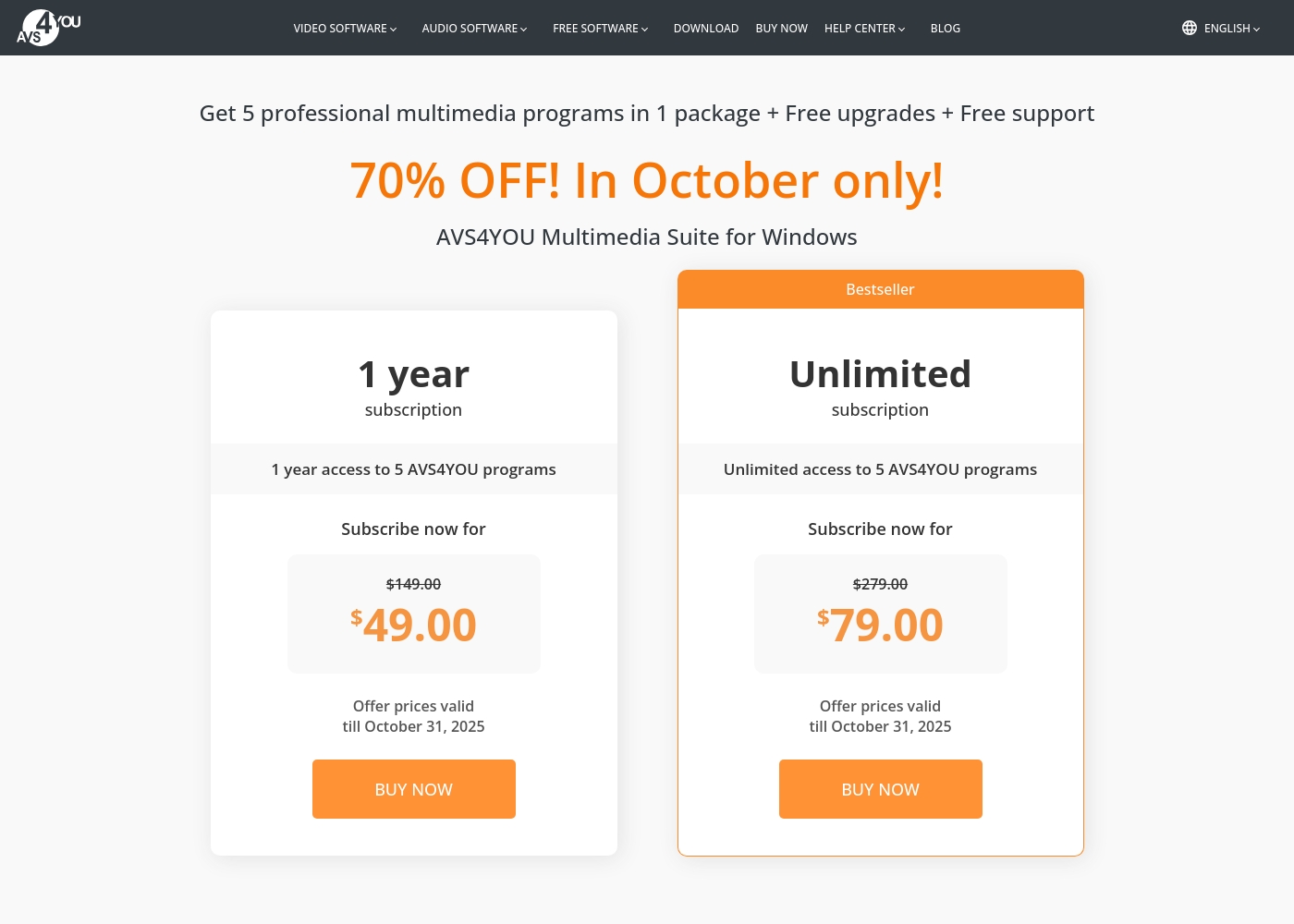
AVS4YOU costs between $49.00 and $79.00 per purchase with 2 main plans: 1 Year Subscription at $49.00/year and Unlimited Subscription at $79.00 one-time.
The simple pricing structure focuses on giving you total access to the AVS4YOU Multimedia Suite. Here is a breakdown of the two options currently available.
1 Year Subscription
Price: $49.00 per year (discounted from $149.00) Best For: Users who want flexibility or prefer annual budgeting Refund Policy: 30-day money-back guarantee Other Features:
- 1 year access to 5 AVS4YOU programs
- Includes free upgrades and free support
- No watermark on output files while active
- 1 year access to 5 AVS4YOU programs
- Free upgrades
- Free support
- One license key per computer
- Unlimited lifetime access to 5 AVS4YOU programs
- One-time payment (no yearly renewals)
- Free upgrades for programs
- Free support
- Bestseller
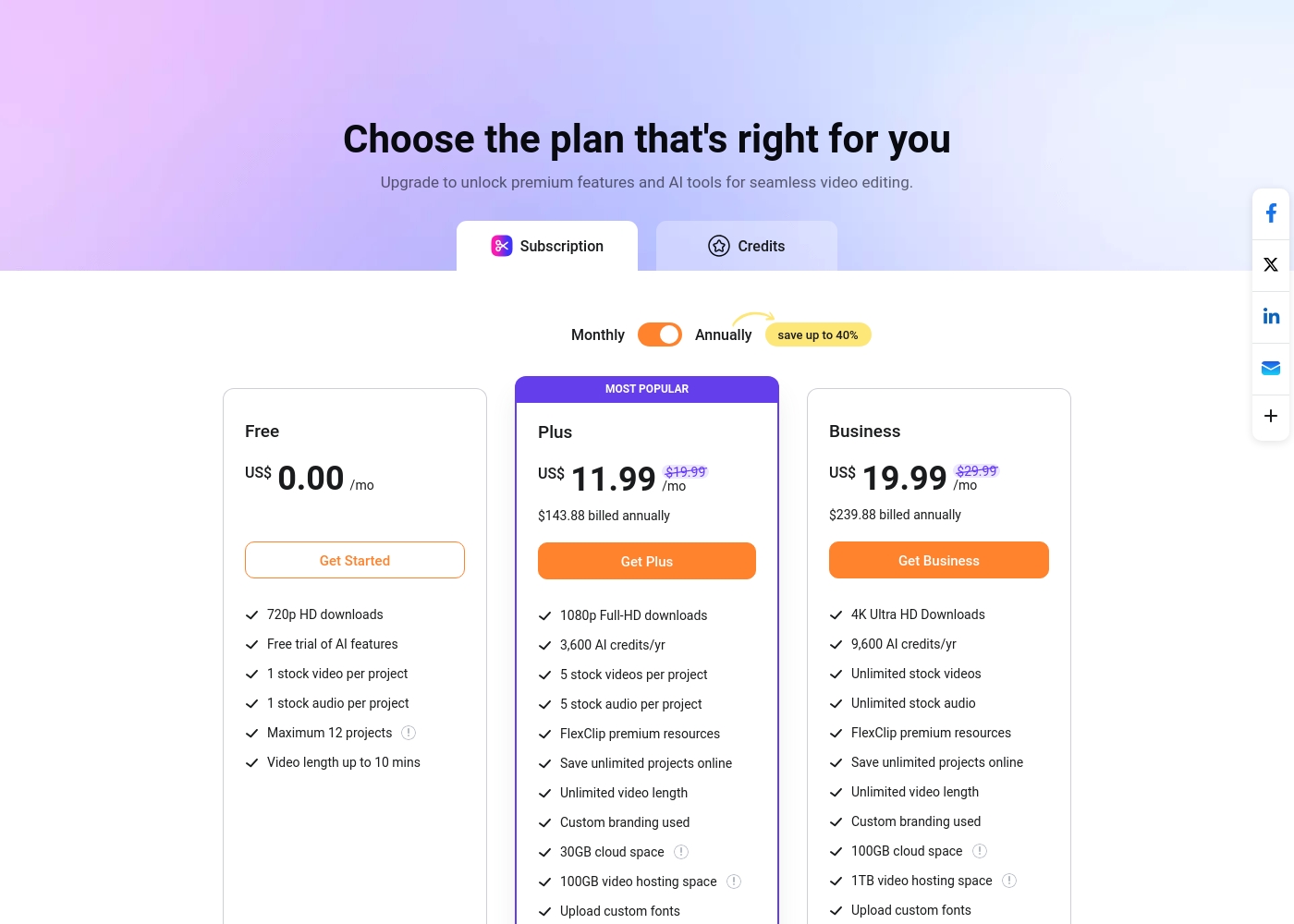
FlexClip costs between US$0.00 and US$19.99 per month with 3 plans: Free at US$0.00, Plus at US$11.99, and Business at US$19.99.
You can examine the different plan options below to decide which one fits your creative needs best.
Free
Price: US$0.00/mo Best For: Testing out the service and casual video creation Other Features:
- 720p HD downloads
- Free trial of AI features
- 1 stock video and 1 stock audio per project
- Maximum 12 projects allowed
- 720p HD downloads
- Free trial of AI features
- 1 stock video per project
- 1 stock audio per project
- 1080p Full-HD downloads
- 3,600 AI credits/yr
- FlexClip premium resources
- Save unlimited projects online
- Custom branding used
- 4K Ultra HD Downloads
- 9,600 AI credits/yr
- Unlimited stock videos
- Unlimited stock audio
- FlexClip premium resources
Pricing Notes
- AVS4YOU offers a robust one-time purchase option at $79 for lifetime access.
- The AVS4YOU license is highly restrictive, tied only to a single Windows computer.
- FlexClip features a permanent Free plan, which is excellent for trying out the tool.
- FlexClip's pricing is subscription-based, with annual billing saving buyers up to 40%.
- AVS4YOU provides a 30-day money-back guarantee, but FlexClip does not explicitly state one.
Pricing Head-to-Head
User Reviews
Users generally recommend AVS4YOU for its user-friendly interface and reliable functionality across a comprehensive suite of multimedia tools. Reviewers frequently emphasize the software's excellent versatility for tasks like video editing, audio conversion, and DVD copying, stressing that it offers exceptional value for the price point.
The technical support team also receives high praise for its accessibility, promptness, and effectiveness in quickly resolving various technical issues. Many long-time customers affirm that the company consistently updates its software, honoring its commitments over many years.
I am a long time user of both AVS VIDEO and AUDIO editors. These tools are remarkably easy to use and produce high quality content with minimal effort! I recommend the full suite highly.
Users overwhelmingly praise FlexClip’s user-friendly interface and minimal learning curve, noting that it makes powerful video creation accessible to everyone, regardless of prior experience. Many reviewers state that the platform significantly reduces the time required for content creation, often replacing more complex software they previously relied on.
The extensive library of over 6,000 templates and vast stock footage is frequently highlighted as a major efficiency booster. The incorporated AI tools, such as the Video Generator, are generally seen as game-changers, streamlining workflow for commercial and personal projects.
This thing is awesome! I needed to create a simulation video quickly, and FlexClip saved the day by making complex editing simple. It’s highly versatile and intuitive with a minimal learning curve, offering great value for beginners.
Our Verdict
The choice between AVS4YOU and FlexClip comes down to your workspace and budget philosophy. Neither tool is exactly like the other, so the decision is straightforward. If you want speed, AI, and maximum accessibility, FlexClip is the winner here. AVS4YOU’s superpower is utility and long-term value via the $79 permanent license. It delivers powerful desktop components for conversion and archiving. AVS4YOU’s non-recoding editor saves massive time on simple trims. Choose AVS4YOU if you rely solely on a single Windows desktop for all media work. FlexClip’s superpower is its reliance on AI and its gigantic stock library. Its massive 6,000+ template library lets you start projects instantly. FlexClip is far superior for teams that need collaboration features and cloud flexibility. The deciding factor is the license. AVS4YOU locks you to one PC forever with no cloud or team features. FlexClip offers the freedom of cloud access, 4K resolution, and AI speed. We recommend FlexClip for nearly all modern content creators and marketers who need rapid output. However, AVS4YOU remains the perfect archival tool for users committed to a specific Windows machine.
Frequently Asked Questions
Which is better for team collaboration, AVS4YOU or FlexClip?
FlexClip is explicitly built for team use and features cloud storage for projects. AVS4YOU is licensed for one single PC and offers no internal team sharing features. FlexClip is the clear choice for collaborative workflows and teams.
Does AVS4YOU offer features like the AI Video Generator found in FlexClip?
No. FlexClip is the only one of these two that utilizes advanced AI features. FlexClip can instantly generate videos from text prompts or articles. AVS4YOU is a traditional software suite focusing on manual editing and utility tools.
Is the FlexClip subscription worth the extra cost over AVS4YOU's one-time payment?
If you need portability, AI generation, 4K output, or stock assets, FlexClip justifies the ongoing cost. AVS4YOU offers superior value if you prioritize raw conversion utility and require permanent, lifetime desktop access. AVS4YOU's restrictive license is the trade-off for the low fee.
Which tool is better for creating DVDs and Blu-rays?
AVS4YOU is far superior for physical media creation and archiving. Dedicated components allow you to transfer video, edit, and burn discs. FlexClip is focused strictly on digital video export and sharing on social platforms.
Can I use FlexClip offline like AVS4YOU?
FlexClip is an online, web-based tool requiring a stable internet connection. AVS4YOU is a suite of desktop applications. Once installed, AVS4YOU can function largely offline for most core tasks.
Does FlexClip offer an equivalent to AVS4YOU's non-recoding editor?
No, FlexClip does not offer specific non-recoding editing utilities. AVS4YOU includes the AVS Video ReMaker to quickly trim clips. This tool saves massive amounts of time by avoiding full video reconversion.
Ready to Choose?
Both tools have their strengths. Choose based on your specific needs.