Camtasia vs FlexClip
Camtasia and FlexClip both create professional video content, but they solve very different problems. Camtasia is a robust desktop tool focused on complex recordings and detailed instructional editing. FlexClip is an online editor prioritizing speed, ease of use, and massive stock asset access. Pick the one that matches your required workflow and budget.
Best for: Training professionals and educators requiring perfect audio., Users who need multitrack separation for complex software demos.
Best for: Social media marketers needing rapid, high-volume video production., Small businesses and startups requiring 4K output on a tight budget.
Powerful screen recording, premium price tag.
We find Camtasia to be an extremely capable, industry-standard tool for creating high-quality instructional video content. Its multitrack editing flexibility and AI enhancements effectively streamline complex workflows. Overall, Camtasia excels in core functionality, but its restrictive, mandatory subscription model significantly diminishes the overall value proposition for many loyal users.
Pros
- Industry-standard platform for flexible screen recording and tutorial creation.
- Significantly simpler and more intuitive interface compared to advanced editors.
- Multitrack recording allows independent editing of screen, audio, and camera.
- Offers powerful AI features like text-based video editing and audio cleanup.
Cons
- Mandatory annual subscription model has replaced perpetual licenses.
- Users are frustrated by restrictive licensing (single-device sign-in limitations).
- Perceived as overly expensive compared to free or low-cost competitors.
- Inconsistent customer service experiences, including slow/non-responsive support.
Easy Video Editor with Powerful AI
We found FlexClip to be exceptionally strong in combining a massive commercial asset library with highly effective AI tools that dramatically speed up the creative process. The user experience is smooth and intuitive, which lowers the barrier to entry significantly for new creators. Overall, we recommend FlexClip as a top choice for individuals and businesses seeking fast, high-quality video production.
Pros
- Highly intuitive, drag-and-drop interface designed for quick and easy video creation.
- Extensive library including 6,000+ templates and millions of searchable stock assets.
- Powerful AI features significantly streamline tasks like video generation and subtitling.
- Offers high-quality 4K download options (available on the Business plan).
Cons
- Advanced editing features like keyframes or keystone adjustments are currently missing.
- AI accuracy can sometimes fail, such as incomplete lyric or subtitle extraction.
- Stock music selection could be broader and more diverse in trending genres.
- Paid plans are necessary to unlock full features, resource access, and remove the trademarked watermark.
AboutCamtasia
Camtasia is truly everything you need in one powerful tool. It combines screen recording with full video editing capabilities. This software uses AI-powered tools to simplify the creation process. It is designed to help you turn your existing knowledge into highly engaging videos. 💡
AboutFlexClip
FlexClip is an all-in-one online video editing solution designed to make powerful video creation accessible to everyone. It's built for folks who need professional output without needing extensive filmmaking experience. Based on user testimonials, this tool is perfect for educators, marketers, designers, and small business owners alike. It provides flexible editing capabilities right in your browser, helping you produce high-quality clips quickly. ✅
Highlights
Feature Comparison
Features Overview
We highlight the main differences and pick a winner for each feature.
Core Platform
Camtasia is a dedicated desktop tool, while FlexClip works entirely in your browser.
Camtasia offers maximum local performance and deep operating system integration. It requires software installation and dedicated resources on your computer. FlexClip is entirely cloud-based, allowing you to edit from any device with an internet connection. This provides great flexibility. FlexClip saves projects securely in the cloud storage provided on paid plans. Camtasia focuses on managing projects stored locally. Choose FlexClip for accessibility; choose Camtasia for maximum processing power.
Screen Recording Power
Camtasia specializes in multitrack recording; FlexClip offers simple screen capture.
Camtasia’s core feature is powerful multitrack recording for tutorials. It records screen, audio, and webcam onto separate timelines automatically. This independent separation is crucial for detailed editing. FlexClip includes an in-app screen recorder for basic capture needs. It does not offer Camtasia’s specialized multitrack flexibility for post-production refinement. If complex software demos are your main content, Camtasia is indispensable for precise control.
AI Text Editing
Camtasia edits video using transcripts; FlexClip generates videos from scratch using AI.
Camtasia features innovative text-based editing in its Create and Pro plans. You can simply cut video clips by deleting words in the auto-generated transcript. This process dramatically accelerates timeline editing and refinement. FlexClip uses AI to generate entirely new videos from a prompt, article, or URL, focusing on content creation speed. FlexClip’s AI also excels at voiceovers and generating subtitles automatically. Camtasia is superior for refining footage you already own, while FlexClip is better for quick initial generation.
Asset Library Value
FlexClip offers massive stock asset access at low cost, far better than Camtasia’s model.
FlexClip provides access to over 4 million videos and photos, plus 74,000 music tracks. This vast library is instantly available in all paid plans, offering huge commercial value. Camtasia reserves its 100 million-plus premium asset library for the expensive Pro plan ($599/year). For budget-sensitive users, FlexClip gives superior asset access much earlier. FlexClip’s focus is providing marketing content quickly via pre-licensed assets.
Resolution and Quality
FlexClip explicitly supports 4K export; Camtasia focuses more heavily on editing features.
FlexClip clearly advertises 4K Ultra HD downloads in its Business subscription. Its Plus plan offers dependable 1080p Full-HD output. Camtasia focuses heavily on editing features critical for training content like instructional courses. However, 4K output resolution is not explicitly detailed in Camtasia’s feature lists. If you require assurance of maximum resolution, FlexClip is the safer choice based on explicit data.
Pricing Structure
FlexClip offers a free plan and low monthly costs; Camtasia demands high annual commitment.
FlexClip is extremely affordable, offering a permanent free plan and low monthly/annual subscriptions. The highest FlexClip plan is cheaper than Camtasia’s entry-level price point. Camtasia switched to mandatory annual subscriptions only, raising the commitment significantly. Camtasia’s entry price is $179.88 per year minimum. FlexClip provides superior value and flexibility for individuals and small businesses.
Advanced Audio Polish
Camtasia offers specialized AI tools for audio refinement that FlexClip does not.
Camtasia excels in ensuring crystal-clear audio for educational content and instruction. The higher tiers feature advanced AI audio cleanup that removes fan noise and static. It can also eliminate unwanted filler words like "uuhms" and "aahs" automatically. FlexClip offers strong general editing but lacks these highly specialized audio fidelity tools. For professional voice clarity in tutorials, Camtasia maintains a distinct advantage.
Template Availability
FlexClip includes over 6,000 templates; Camtasia does not focus on templates.
FlexClip minimizes the learning curve with its massive selection of 6,000+ templates. These templates allow users to start professional projects instantly for marketing or social media. Camtasia is designed for creating original content, specifically screen recordings. It does not provide an extensive library of starting templates. If you need fast, professional-looking content without designing from scratch, FlexClip wins easily.
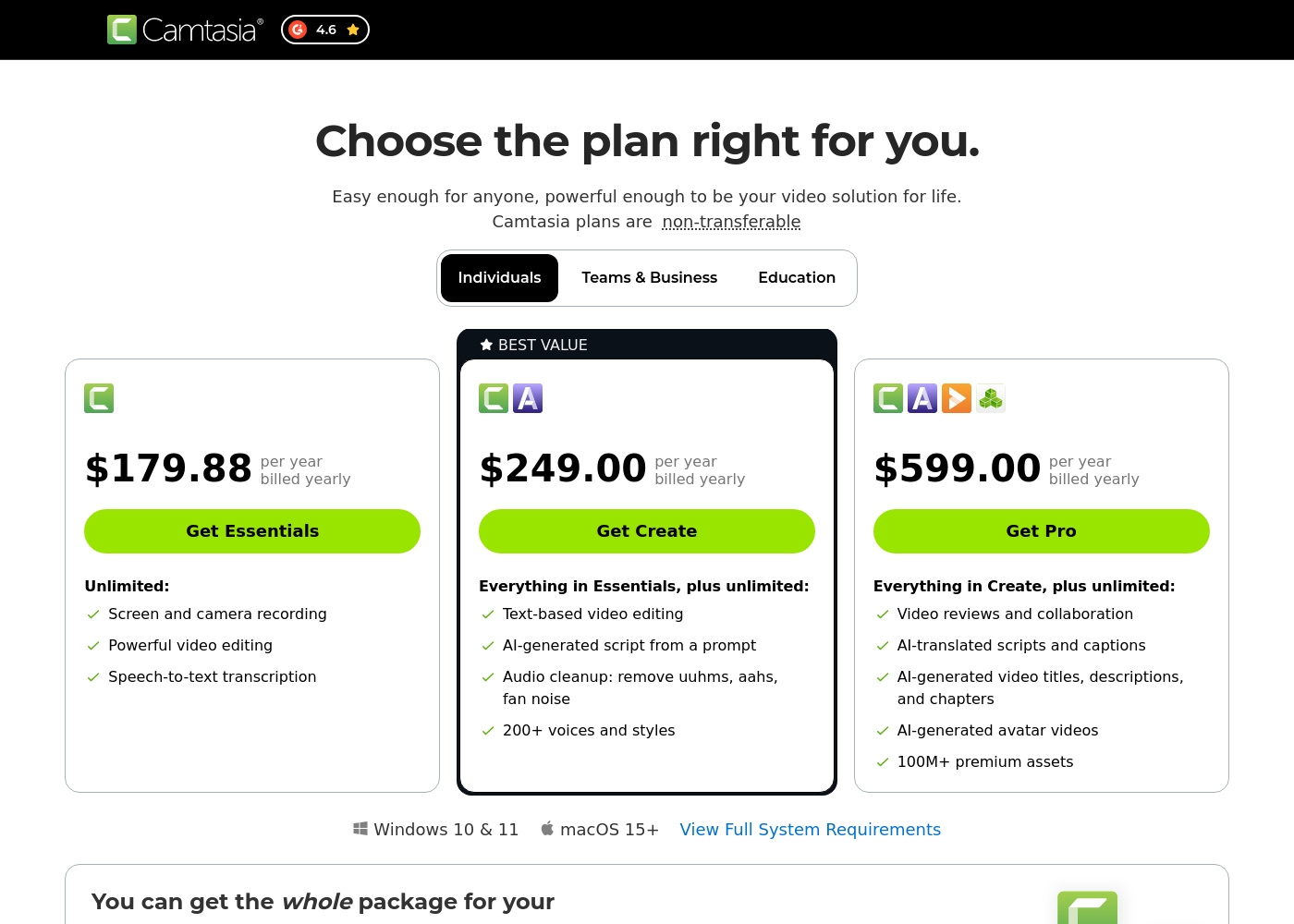
Camtasia costs between $179.88 and $599.00 per year with 3 plans: Essentials at $179.88, Create at $249.00, and Pro at $599.00. These plans cater to individuals, offering robust video and screen recording tools through an annual subscription model.
Essentials
Price: $179.88 per year billed yearly Other Features:
- Screen and camera recording
- Powerful video editing
- Speech-to-text transcription
The Essentials plan is perfect if you only need foundational tools for recording and editing videos. It provides unlimited screen and camera recording capabilities, which is great for beginners or those with basic needs.
- Screen and camera recording
- Powerful video editing
- Speech-to-text transcription
- Everything in Essentials
- Text-based video editing
- AI-generated script from a prompt
- Audio cleanup: remove uuhms, aahs, fan noise
- 200+ voices and styles
- Everything in Create
- Video reviews and collaboration
- AI-translated scripts and captions
- AI-generated video titles, descriptions, and chapters
- AI-generated avatar videos
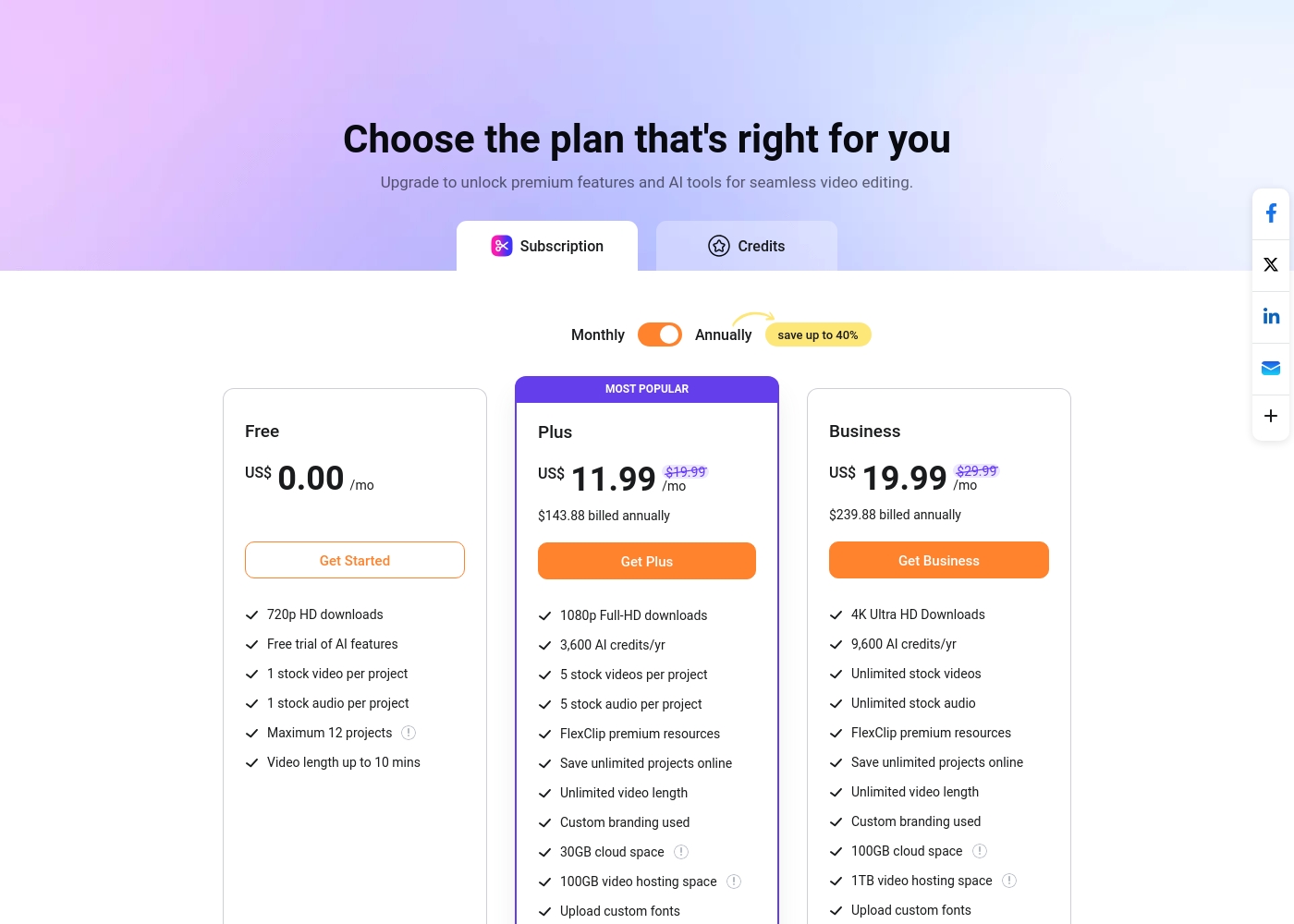
FlexClip costs between US$0.00 and US$19.99 per month with 3 plans: Free at US$0.00, Plus at US$11.99, and Business at US$19.99.
You can examine the different plan options below to decide which one fits your creative needs best.
Free
Price: US$0.00/mo Best For: Testing out the service and casual video creation Other Features:
- 720p HD downloads
- Free trial of AI features
- 1 stock video and 1 stock audio per project
- Maximum 12 projects allowed
- 720p HD downloads
- Free trial of AI features
- 1 stock video per project
- 1 stock audio per project
- 1080p Full-HD downloads
- 3,600 AI credits/yr
- FlexClip premium resources
- Save unlimited projects online
- Custom branding used
- 4K Ultra HD Downloads
- 9,600 AI credits/yr
- Unlimited stock videos
- Unlimited stock audio
- FlexClip premium resources
Pricing Notes
- FlexClip offers a permanent Free plan, lowering the barrier to entry significantly.
- Camtasia operates exclusively on mandatory, higher-priced annual subscriptions.
- The top-tier FlexClip Business plan is significantly cheaper than Camtasia’s entry-level plan.
- FlexClip provides flexible monthly payment options, which Camtasia does not offer.
- Camtasia’s licensing is non-transferable for individual plans, limiting user flexibility.
Pricing Head-to-Head
User Reviews
Camtasia enjoys a long-standing reputation as an industry-standard tool, particularly for screen recording and tutorial creation. Users overwhelmingly praise the core software, noting it is dramatically simpler and more intuitive to use than complex alternatives like Adobe products, while still offering a deep feature set.
However, recent changes to the pricing model and licensing structure have caused significant user frustration. The shift to mandatory annual subscriptions, coupled with new restrictive single-device sign-in limits for individual users, is a major recurring complaint.
The software is great, the developers deserve five stars for the product quality. But management introduced a highly frustrating subscription model. The mandatory sign-in cycle when switching devices significantly harms my workflow.
Users overwhelmingly praise FlexClip’s user-friendly interface and minimal learning curve, noting that it makes powerful video creation accessible to everyone, regardless of prior experience. Many reviewers state that the platform significantly reduces the time required for content creation, often replacing more complex software they previously relied on.
The extensive library of over 6,000 templates and vast stock footage is frequently highlighted as a major efficiency booster. The incorporated AI tools, such as the Video Generator, are generally seen as game-changers, streamlining workflow for commercial and personal projects.
This thing is awesome! I needed to create a simulation video quickly, and FlexClip saved the day by making complex editing simple. It’s highly versatile and intuitive with a minimal learning curve, offering great value for beginners.
Our Verdict
The critical choice between Camtasia and FlexClip depends entirely on your project's starting point. Both tools create great content but are optimized for different workflows. If your video focuses on delivering instructional content and complex screen recordings, Camtasia is your necessary champion. If you need lightning-fast marketing videos stuffed with stock media, choose FlexClip immediately. Camtasia’s superpower is its deep control over recorded material and audio quality. It records the screen, voice, and webcam onto separate tracks for maximum editing flexibility later. Camtasia features dedicated AI tools that remove fan noise and awkward filler words like “uuhms” instantly. It’s the superior tool for creating flawless, professional software demonstrations and training materials. FlexClip is a powerhouse built for speed, assets, and accessibility, running entirely within your browser. It gives you 6,000+ templates and access to 4 million stock videos right away for instant creation. FlexClip’s AI Video Generator will create initial drafts instantly from a prompt or URL. Plus, FlexClip offers guaranteed 4K resolution exports, which Camtasia does not explicitly promise at its lower tiers. The deciding factor is often pricing and commitment required. Camtasia demands a significant annual fee and offers no permanent free tier to test the platform extensively. FlexClip is dramatically cheaper, includes a generous permanent Free plan, and supports 4K production for far less than Camtasia’s entry price point. Final Verdict: Choose Camtasia if you are a professional educator focused on detailed tutorials needing pristine audio. Choose FlexClip if you need rapid marketing content, guaranteed 4K quality, vast stock media, and the easiest web-based editor available.
Frequently Asked Questions
Which is better for creating software tutorials, Camtasia or FlexClip?
Camtasia is the clear winner for tutorials and training content. Its specialized multitrack recording separates your screen, voice, and audio perfectly. Camtasia also offers superior AI tools for cleaning up narration and removing fan noise.
Is FlexClip worth the subscription cost over the free version?
Yes, FlexClip's paid plans unlock crucial features like 1080p or 4K resolution exports. Subscriptions also grant access to 4 million stock assets and remove project limits. The paid tiers are much cheaper than Camtasia's required annual fee.
Can I export 4K video using Camtasia?
Camtasia does not explicitly guarantee 4K resolution output in its plan descriptions. FlexClip specifically supports 4K Ultra HD downloading in its Business tier. If 4K is critical, FlexClip offers better assurance.
Which tool provides more commercial stock assets?
Both offer extensive libraries, but FlexClip’s paid plans include 4M+ stock videos and photos at an affordable price. Camtasia reserves its 100M+ premium assets for its most expensive Pro plan.
Is Camtasia more challenging to learn than FlexClip for beginners?
FlexClip is generally considered easier for beginners due to being cloud-based and template-driven (6,000+ templates). Camtasia has a deep feature set that requires more learning, even though it is simpler than complex alternatives.
Does FlexClip offer the same advanced audio cleanup features as Camtasia?
No, FlexClip does not advertise the advanced AI audio cleanup that Camtasia offers. Camtasia can automatically remove 'uuhms,' 'aahs,' and background fan noise, which is a major benefit for instructional speakers.
Ready to Choose?
Both tools have their strengths. Choose based on your specific needs.