Filmora 14 vs FlexClip
Filmora 14 and FlexClip are redefining video creation with powerful, AI-driven tools. FlexClip is fast, browser-based, and stuffed with 4M stock assets for rapid output. Filmora 14 offers unparalleled desktop performance and deeper timeline control for complex projects.
Best for: Professional video editors requiring GPU-accelerated performance., Content creators needing Multi-Camera editing for events or interviews.
Best for: Small business owners needing fast, template-driven marketing content., Users who rely heavily on a massive library of 4M+ commercially licensed stock videos.
Powerful AI Editor, Buyer Beware.
We find Filmora 14 offers a powerful suite of AI editing tools and an accessible interface perfect for creators across all skill levels. While the feature set and performance are top-tier, we cannot overlook the severe, verified reports of deceptive billing and poor customer support from the vendor. Overall, this is a technically impressive editor marred by critical issues related to trust and operational transparency.
Pros
- Exceptionally easy to use interface suitable for all skill levels.
- Robust AI feature set simplifies complex edits like object removal and background cutting.
- Access to a massive 2.9M+ library of creative assets, music, and templates.
- Optimized performance with GPU acceleration, even on modest hardware.
Cons
- Severe billing issues and reported difficulties canceling auto-renewals.
- Support is often automated, unresponsive, and unhelpful via chat or email.
- Lack of transparency regarding hidden costs and AI credit consumption per feature.
- Perpetual license holders report forced migration to the newest version.
Easy Video Editor with Powerful AI
We found FlexClip to be exceptionally strong in combining a massive commercial asset library with highly effective AI tools that dramatically speed up the creative process. The user experience is smooth and intuitive, which lowers the barrier to entry significantly for new creators. Overall, we recommend FlexClip as a top choice for individuals and businesses seeking fast, high-quality video production.
Pros
- Highly intuitive, drag-and-drop interface designed for quick and easy video creation.
- Extensive library including 6,000+ templates and millions of searchable stock assets.
- Powerful AI features significantly streamline tasks like video generation and subtitling.
- Offers high-quality 4K download options (available on the Business plan).
Cons
- Advanced editing features like keyframes or keystone adjustments are currently missing.
- AI accuracy can sometimes fail, such as incomplete lyric or subtitle extraction.
- Stock music selection could be broader and more diverse in trending genres.
- Paid plans are necessary to unlock full features, resource access, and remove the trademarked watermark.
AboutFilmora 14
Filmora 15 is an award-winning video editor designed for both beginners and experts alike. It aims to help you edit as an expert with Filmora AI by streamlining the entire creative process.
The interface is intuitive and clean, making video editing simple even for those without prior experience. You can literally type, drop, or sketch ideas into the platform, and Filmora helps bring them to life with AI-driven effects. The platform provides a connected experience; it's available across desktop, tablet, and mobile, allowing you to create exactly as you wish. 💡
AboutFlexClip
FlexClip is an all-in-one online video editing solution designed to make powerful video creation accessible to everyone. It's built for folks who need professional output without needing extensive filmmaking experience. Based on user testimonials, this tool is perfect for educators, marketers, designers, and small business owners alike. It provides flexible editing capabilities right in your browser, helping you produce high-quality clips quickly. ✅
Highlights
Feature Comparison
Features Overview
We highlight the main differences and pick a winner for each feature.
Platform & Performance
Filmora 14 leverages desktop hardware power; FlexClip is speedy and portable in your browser.
Filmora 14 uses GPU acceleration and Metal rendering on Mac for smooth editing and fast export. This performance is vital for handling large files without lag or crashes. FlexClip runs entirely online, offering excellent portability across any system. Its speed depends heavily on your internet connection and their server responsiveness. Filmora 14 is superior for desktop stability and complex timeline rendering. FlexClip offers zero installation and instant access anywhere you have a browser. The trade-off is desktop power versus cloud flexibility and accessibility. FlexClip’s online nature simplifies frequent updates and device swapping. Filmora 14 maintains consistent power for professional workflows on a single machine.
Stock Assets & Library
FlexClip easily wins with 4M+ commercially licensed assets; Filmora 14 has 2.3M creative assets.
Filmora 14 has a large 2.3M Asset Center focused on effects, titles, and templates. These assets greatly enhance your projects within the editor. FlexClip provides instant access to over 4 million stock videos and 74,000 licensed music tracks. This saves massive time previously spent sourcing licensed media externally. For creators relying on heavy stock footage, FlexClip is the undisputed champion. You can build entire professional videos using only FlexClip's built-in media. Filmora 14 requires users to pay extra for many premium assets not included in the base subscription. FlexClip integrates its massive library directly into the workflow for immediate use.
Advanced Editor Controls
Filmora 14 offers deep timeline control like Multi-Cam; FlexClip prioritizes simplicity.
Filmora 14 includes professional-level tools like Multi-Camera editing, syncing angles automatically. It also supports Planar Tracking and Path Curve for precise motion graphics control. FlexClip manages core editing (trim, merge, cut) perfectly but is missing these deep customization tools. Filmora 14 is designed to handle complicated setups like interviews and action footage that require synchronization. FlexClip focuses on rapid assembly where template use outweighs the need for fine-tuned keyframe controls. If your video projects frequently involve multiple cameras, Filmora 14 provides the necessary toolset. FlexClip is better for single-stream content and fast social media clips.
AI Productivity & Credits
Filmora 14 offers more credits; FlexClip offers faster, full video draft generation.
Filmora 14’s top plan includes 2,000 AI credits monthly for specific power features like AI Video Enhancer. It specializes in leveraging AI to polish and enhance existing long-form content instantly. FlexClip’s flagship AI tool is the AI Video Generator, creating full video drafts from a prompt or URL. FlexClip provides 9,600 annual credits, significantly fewer than Filmora 14’s 24,000 annual credits at the top tier. Creators using AI heavily throughout their process may find Filmora 14’s monthly credit allocation more useful. If you just need a great starting draft, FlexClip’s generator is hard to beat for speed.
Pricing Structure
Filmora 14 is cheaper annually; FlexClip offers a better permanent Free plan.
Filmora 14's top Premium annual plan is $119.99/year with maximum features and AI. Filmora 14 uniquely offers a perpetual license option for users avoiding subscriptions. FlexClip's top Business plan, at $19.99/month billed annually, totals $239.88/year. FlexClip has a very robust, permanently free tier that minimizes the need for users to commit upfront. Filmora 14 requires a subscription for watermark-free exports and valuable cloud access. FlexClip is cheaper for the average user starting out, but Filmora 14 is cheaper for the professional top tier.
Publishing & Distribution
Filmora 14 aids multi-platform scheduling; FlexClip provides superior video hosting.
Filmora 14 includes a Social Video Planner to help optimize and schedule posts across platforms. This is a crucial feature for dedicated content managers. FlexClip’s Business plan includes a massive 1TB of Video Hosting Space in addition to its 100GB cloud storage. Filmora 14 is focused on desktop-to-social pipeline integration and distribution control. FlexClip excels if you need to host and share a large volume of finalized, high-resolution videos in the cloud. They offer different distribution benefits: Filmora 14 for scheduling, FlexClip for hosting capacity.
Learning Curve
FlexClip is exceptionally easy and intuitive; Filmora 14 has a deeper initial curve.
FlexClip’s browser interface is highly user-friendly, allowing quick video creation via drag-and-drop. Users consistently praise its minimal learning curve, making it perfect for beginners and marketers. Filmora 14 is known for accessibility but must accommodate complex desktop features like its Magnetic Timeline. A beginner can create a great video faster on FlexClip simply due to its streamlined resource integration. Filmora 14 offers more power, but that power requires slightly more user expertise to unlock fully.
Customer Support
FlexClip offers responsive support; Filmora 14 users report frustrating automated bot reliance.
FlexClip reviews consistently mention prompt and responsive customer service when issues arise. Access to reliable human support is essential for production deadlines. Filmora 14 users frequently report getting stuck in loops with automated bots for complex problems. In video editing, technical support often involves immediate, human-level troubleshooting. FlexClip clearly excels in providing reliable support when users need it most. Filmora 14 needs to improve its human support pathway to match FlexClip's responsive reputation.
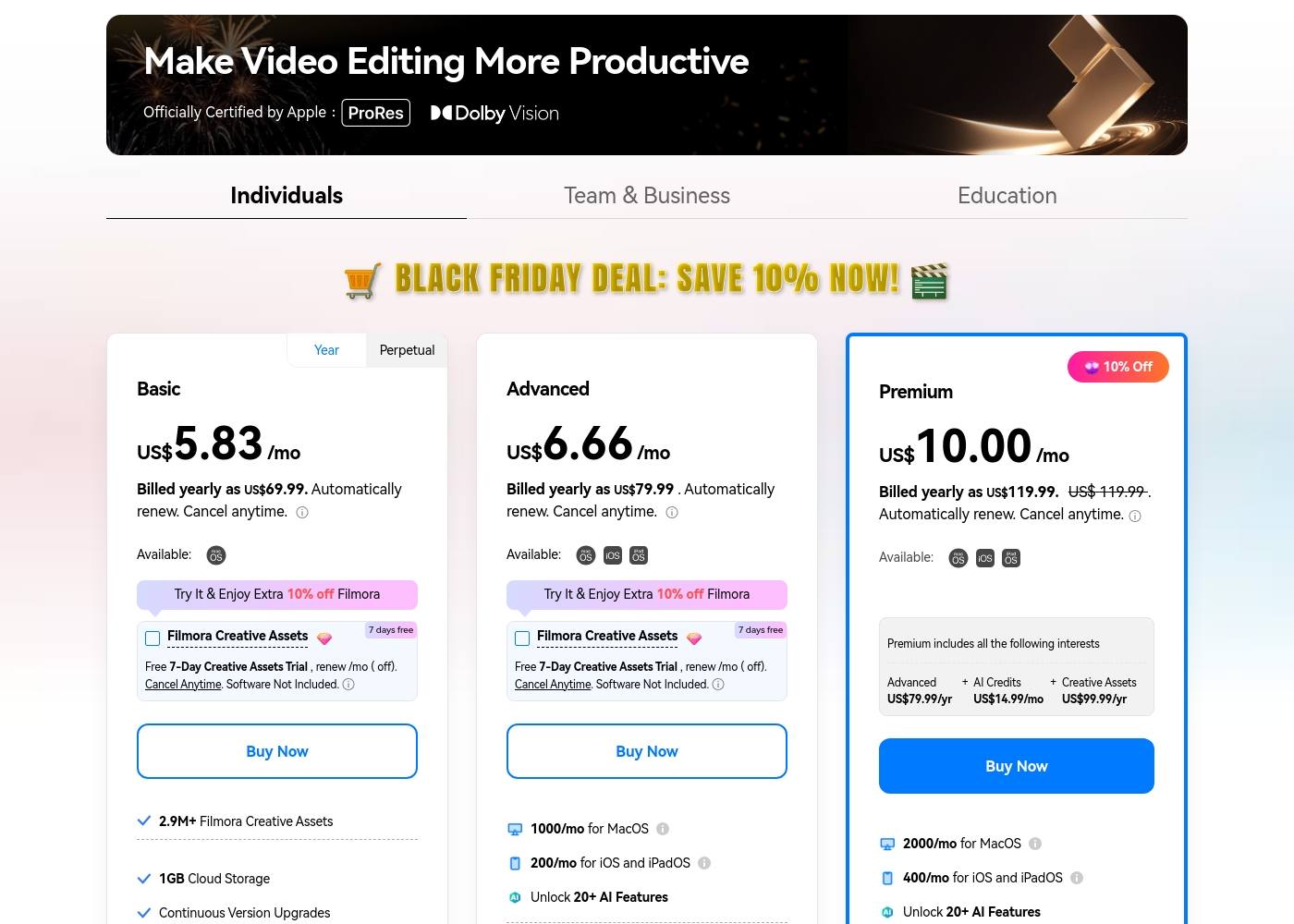
Filmora 14 costs between US$69.99 and US$119.99 per year with three individual annual plans: Basic at US$69.99, Advanced at US$79.99, and Premium at US$119.99.
These individual tiers offer flexible subscription options designed to fit different creator needs, from casual editing to advanced AI-enabled projects. All plans are billed annually and allow you to cancel renewal automatically at any time.
Basic
Price: Billed yearly as US$69.99 (US$5.83/mo) Refund Policy: 30-day money-back guarantee Other Features:
- 2.9M+ Filmora Creative Assets
- 1GB Cloud Storage
- Export without Watermark
- Continuous Version Upgrades
- 2.9M+ Filmora Creative Assets
- 1GB Cloud Storage
- Continuous Version Upgrades
- Export without Watermark
- 4K HD Export
- All Basic Features
- Apple Sync: macOS, iOS, iPadOS
- 10GB Cloud Storage
- 1000 AI Credits/mo for MacOS
- 200 AI Credits/mo for iOS and iPadOS
- All Advanced Features
- 2000 AI Credits/mo for MacOS
- 400 AI Credits/mo for iOS and iPadOS
- 100GB Cloud Storage
- Premium includes advanced bundle and creative assets
- One-time payment structure
- Enjoy Filmora 14 updates only (no major upgrades)
- 1,000 Filmora AI Credits (one-time grant)
- 2.9M+ Filmora Creative Assets
- 1GB Cloud Storage
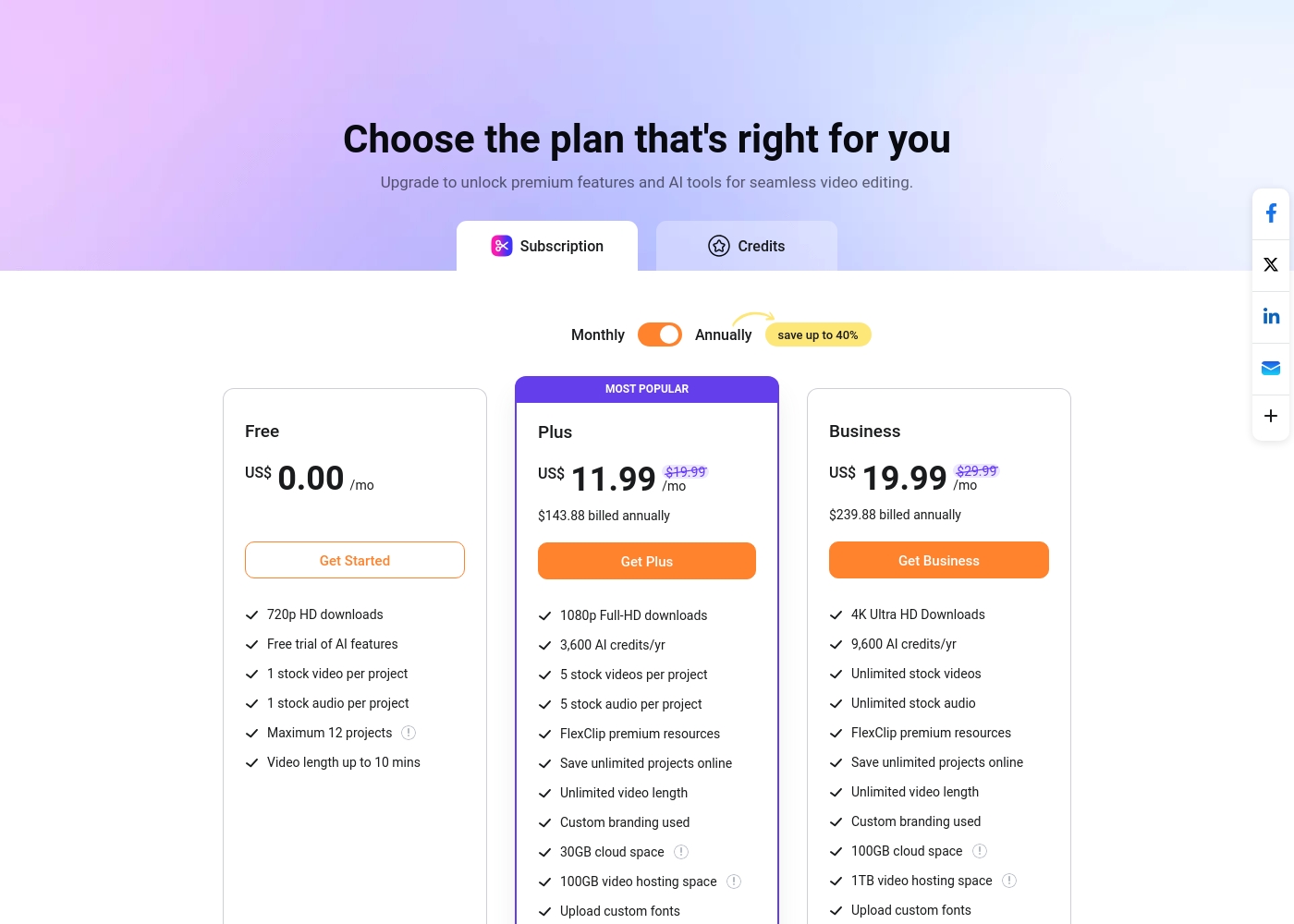
FlexClip costs between US$0.00 and US$19.99 per month with 3 plans: Free at US$0.00, Plus at US$11.99, and Business at US$19.99.
You can examine the different plan options below to decide which one fits your creative needs best.
Free
Price: US$0.00/mo Best For: Testing out the service and casual video creation Other Features:
- 720p HD downloads
- Free trial of AI features
- 1 stock video and 1 stock audio per project
- Maximum 12 projects allowed
- 720p HD downloads
- Free trial of AI features
- 1 stock video per project
- 1 stock audio per project
- 1080p Full-HD downloads
- 3,600 AI credits/yr
- FlexClip premium resources
- Save unlimited projects online
- Custom branding used
- 4K Ultra HD Downloads
- 9,600 AI credits/yr
- Unlimited stock videos
- Unlimited stock audio
- FlexClip premium resources
Pricing Notes
- Filmora 14 offers a Perpetual License option, which FlexClip does not; FlexClip is subscription-only.
- FlexClip's highest tier ($239.88/year) is nearly double the cost of Filmora 14's highest tier ($119.99/year).
- Filmora 14 includes generous AI credit allocations, which far exceed FlexClip's annual limits.
- FlexClip features a substantial, permanently Free tier; Filmora 14’s free version is heavily watermarked.
Pricing Head-to-Head
User Reviews
Users consistently praise Filmora for its excellent ease of use and intuitive, simple interface. Many editors, from hobbyists to long-term users, find the built-in features helpful, noting the software performs well even on modest hardware.
However, external feedback sharply pivots when discussing company operations. A significant volume of criticism focuses intensely on deceptive billing practices and poor customer service.
I love using Wondershare’s video editor, Filmora! It’s so easy to use and really fun too. This program keeps up with my creativity every step of the way.
Users overwhelmingly praise FlexClip’s user-friendly interface and minimal learning curve, noting that it makes powerful video creation accessible to everyone, regardless of prior experience. Many reviewers state that the platform significantly reduces the time required for content creation, often replacing more complex software they previously relied on.
The extensive library of over 6,000 templates and vast stock footage is frequently highlighted as a major efficiency booster. The incorporated AI tools, such as the Video Generator, are generally seen as game-changers, streamlining workflow for commercial and personal projects.
This thing is awesome! I needed to create a simulation video quickly, and FlexClip saved the day by making complex editing simple. It’s highly versatile and intuitive with a minimal learning curve, offering great value for beginners.
Our Verdict
Deciding between Filmora 14 and FlexClip comes down to desktop power versus online speed and assets. FlexClip is the clear winner for maximum accessibility and immediate content generation. Filmora 14, however, remains the power choice for demanding creative professionals. Filmora 14’s standout feature is its professional, GPU-accelerated desktop performance and deep controls. Advanced tools like Multi-Camera editing and Planar Tracking are essential for complex projects. You also get superior AI credits (2000/mo) for features like the powerful AI Video Enhancer. FlexClip excels at rapid content generation, driven by its massive 4M+ stock video library. It is entirely browser-based, offering an incredibly easy, seamless workflow for beginners. Its simple pricing structure includes a robust Free plan that casual users can leverage immediately. The critical deciding factor is whether you prioritize professional depth or content volume and simplicity. Choose Filmora 14 if you require superior hardware utilization and fine-tuned control on a desktop. Pick FlexClip if you prioritize speed, volume, and stock footage access for quick marketing or social content. Ultimately, for most small creators and marketers, FlexClip offers the faster and smoother path to professional, high-volume results. If you are a dedicated editor working with complex sequences, Filmora 14's advanced desktop features justify its higher learning investment.
Frequently Asked Questions
Which is better for generating quick social media content: Filmora 14 or FlexClip?
FlexClip is generally better for rapid content due to its huge 4M+ asset library and massive template base. Filmora 14 is great for repurposing through Smart Short Clips and Auto Reframe. Use FlexClip for template-based speed; use Filmora 14 for automating existing footage.
Does Filmora 14 have Multi-Camera editing like FlexClip?
Yes, Filmora 14 includes dedicated Multi-Camera editing to sync and switch angles easily. FlexClip does not offer this advanced feature for complex interview or event footage. If multi-cam support is crucial, Filmora 14 is the correct choice.
Which software has a better permanent free plan, Filmora 14 or FlexClip?
FlexClip offers a superior permanent Free plan with 720p downloads and access to basic tools. Filmora 14’s free version still functions but exports all videos with a very conspicuous and permanent watermark. FlexClip's free tier is more usable for casual tests.
Is Filmora 14 truly faster at rendering than FlexClip?
Yes, Filmora 14 is a desktop application utilizing GPU acceleration and Metal rendering on Mac. This makes it significantly faster at rendering complex, high-resolution projects. FlexClip's rendering speed is dependent on their cloud servers and internet connection.
Which tool is better if I need a lot of stock footage for commercial projects?
FlexClip is better, providing instant access to over 4 million licensed stock videos and audio tracks. The resources in FlexClip are a massive time saver. Filmora 14 also offers assets, but FlexClip's sheer volume is unmatched here.
What is the key difference in their pricing models for long-term use?
Filmora 14 offers flexible annual subscriptions and a perpetual license option, allowing you to own the software version. FlexClip is strictly subscription-based with lower monthly price points. The choice is ownership flexibility versus subscription affordability.
Ready to Choose?
Both tools have their strengths. Choose based on your specific needs.