FlexClip vs Invideo
FlexClip and Invideo both promise fast video creation using powerful AI capabilities. FlexClip focuses on massive template libraries and asset control, perfect for fine-tuning. Invideo excels at turning simple text prompts into fully generated, cinematic videos instantly. Your choice depends on if you prefer heavy template editing or natural language AI speed.
Best for: Individual content creators leveraging template workflows, Users requiring precise manual edits (Chroma Key, Speed Curve)
Best for: Marketing agencies needing rapid, high-volume UGC ad generation, Users focused on global localization via quick text commands
Easy Video Editor with Powerful AI
We found FlexClip to be exceptionally strong in combining a massive commercial asset library with highly effective AI tools that dramatically speed up the creative process. The user experience is smooth and intuitive, which lowers the barrier to entry significantly for new creators. Overall, we recommend FlexClip as a top choice for individuals and businesses seeking fast, high-quality video production.
Pros
- Highly intuitive, drag-and-drop interface designed for quick and easy video creation.
- Extensive library including 6,000+ templates and millions of searchable stock assets.
- Powerful AI features significantly streamline tasks like video generation and subtitling.
- Offers high-quality 4K download options (available on the Business plan).
Cons
- Advanced editing features like keyframes or keystone adjustments are currently missing.
- AI accuracy can sometimes fail, such as incomplete lyric or subtitle extraction.
- Stock music selection could be broader and more diverse in trending genres.
- Paid plans are necessary to unlock full features, resource access, and remove the trademarked watermark.
Rapid AI Video Creation, Backed by Humans.
We found Invideo AI to be exceptionally effective at transforming text prompts into polished videos quickly, enabling users to cut production time significantly. The platform stands out due to its genuinely dedicated, 24/7 customer support, which navigates users past complexity and technical inconsistencies. Overall, Invideo is a powerful AI tool deserving of content creators looking for speed and reliability, especially given the human safety net.
Pros
- Exceptional 24/7 customer support delivered by responsive, real humans.
- Dramatically reduces video creation time, boosting workflow efficiency.
- Highly user-friendly for generating videos from simple text prompts.
- Allows sophisticated editing of audio, voice, and captions using natural language.
Cons
- Occasional inconsistencies or anomalous results in AI-generated content quality.
- Users report frustration being charged for unsatisfactory generative AI prompts.
- Generating time can be lengthy when making multiple revisions.
- The media and video library needs expansion to offer more content variety.
AboutFlexClip
FlexClip is an all-in-one online video editing solution designed to make powerful video creation accessible to everyone. It's built for folks who need professional output without needing extensive filmmaking experience. Based on user testimonials, this tool is perfect for educators, marketers, designers, and small business owners alike. It provides flexible editing capabilities right in your browser, helping you produce high-quality clips quickly. ✅
AboutInvideo
Invideo is an AI tool designed to give you the power to play and create. It transforms simple text prompts related to your business or casual ideas into cinematic videos, professional promos, and detailed explainers instantly.
This platform is perfect for creators, educators, non-profits, and marketing agencies seeking rapid content creation. Whether you need an engaging UGC ad or a detailed product reel, Invideo handles the complex work. You're empowered to generate and edit content that reaches new customers across various countries, languages, and beliefs worldwide. 💡
Highlights
Feature Comparison
Features Overview
We highlight the main differences and pick a winner for each feature.
AI Generation Method
FlexClip is an AI-assisted editor; Invideo is a pure AI generator.
FlexClip uses AI to draft narratives from text or URLs with the generator tool. FlexClip relies on users selecting templates and refining content in the timeline editor. The process is AI-boosted but still requires manual input. Invideo provides true prompt-to-edit capability instantly generating complex videos. You can edit images, voices, or captions simply by typing a textual request. Invideo users report dramatically cutting creation time down to 30 minutes. The key difference is workflow: FlexClip streamlines template editing, while Invideo automates creation entirely. If raw speed via text command is your priority, Invideo is superior.
Asset Library Size
FlexClip's stock library is substantially larger and more accessible.
FlexClip boasts a massive commercial library of over 4 million videos and photos. It offers 74,000 music tracks and millions of additional dynamic elements. FlexClip provides unlimited stock access on its Business tier. Invideo includes access to iStock assets for its paid customers. However, the volume, even on the high-end Team plan, is capped at 3,200 iStock monthly. Invideo focuses less on asset quantity. If you heavily rely on diverse high-quality stock footage, FlexClip offers a clear advantage. FlexClip gives you virtually unlimited access to huge assets right inside the platform.
Advanced Editing Tools
FlexClip offers specific tools for precise, granular manual editing.
FlexClip equips editors with sophisticated, dedicated tools for fine-tuning. This includes Chroma Key for green screen removal and precise visual overlays. FlexClip also features a granular Speed Curve function to control video pacing exactly. Invideo achieves edits through powerful natural language commands. While fast, this method is inherently less granular and lacks explicit dedicated tools like Chroma Key. It assumes the AI can perform the action effectively. For creative professionals requiring fine manual control, FlexClip offers the necessary toolkit. Invideo prioritizes automation and AI interpretation over timeline precision.
Customer Support
Invideo guarantees 24/7 human support; FlexClip only offers generally prompt help.
FlexClip provides responsive customer support based on external user reviews. Specific guaranteed service level agreements are not officially published by FlexClip. Invideo guarantees access to 24/7 human customer support for all users. Reviews frequently highlight the support team's exceptional responsiveness and personalized care. This provides a valuable human safety net. If having reliable support available instantly, regardless of time zone, is critical, Invideo is the clear winner.
Output Quality
FlexClip ensures 4K resolution; Invideo focuses on generation speed.
FlexClip explicitly supports crystal-clear 4K Ultra HD downloads on its Business plan. This guarantees high-fidelity output for professional distribution. FlexClip also supports custom branding and custom font uploads for polished results. Invideo offers unlimited exports but does not consistently advertise 4K resolution across its plans. The platform prioritizes the speed of content generation from text prompts. For users selling video services or needing absolute top-end resolution, FlexClip provides superior, guaranteed quality output.
Targeted Marketing Ads
Invideo is specialized for UGC ad generation; FlexClip is a general editor.
FlexClip handles various projects like marketing, education, and social media clips easily. It leverages its huge template selection for general business needs. FlexClip is highly versatile for many different creative outputs. Invideo explicitly markets features for rapid UGC product asset ad generation. These specific tools target conversion-focused marketing needs directly. Invideo excels at specific, high-intent marketing videos. If your primary goal is generating high volumes of specific marketing assets like UGC ads, Invideo offers a more tailored toolset.
Pricing Structure
FlexClip provides predictable, fixed costs; Invideo uses a higher, credit-based model.
FlexClip features straightforward, tiered subscription plans with simple resource limits. Its highest plan is priced affordably at $19.99/month (billed annually). FlexClip is excellent for budgeting. Invideo uses complex, usage-based pricing reliant on AI credits. While lower tiers are reasonable, high-volume AI usage can become very expensive quickly. The Team plan reaches $899/month. FlexClip offers superior value for money and budget predictability. Invideo can be expensive for heavy users engaged in constant generative AI tasks.
Scalability & Storage
Invideo scales better for agencies, offering massive user storage capacity.
FlexClip accommodates teams with collaboration features and project cloud storage up to 100GB. It also provides up to 1TB of video hosting space. This is sufficient for most small businesses. Invideo explicitly defines user caps (up to 3 users) and offers massive storage on the Team plan (4TB). This high-end tier targets large agencies with extensive storage needs. If you manage massive media files and require huge storage capacity for large teams, Invideo is built to scale higher.
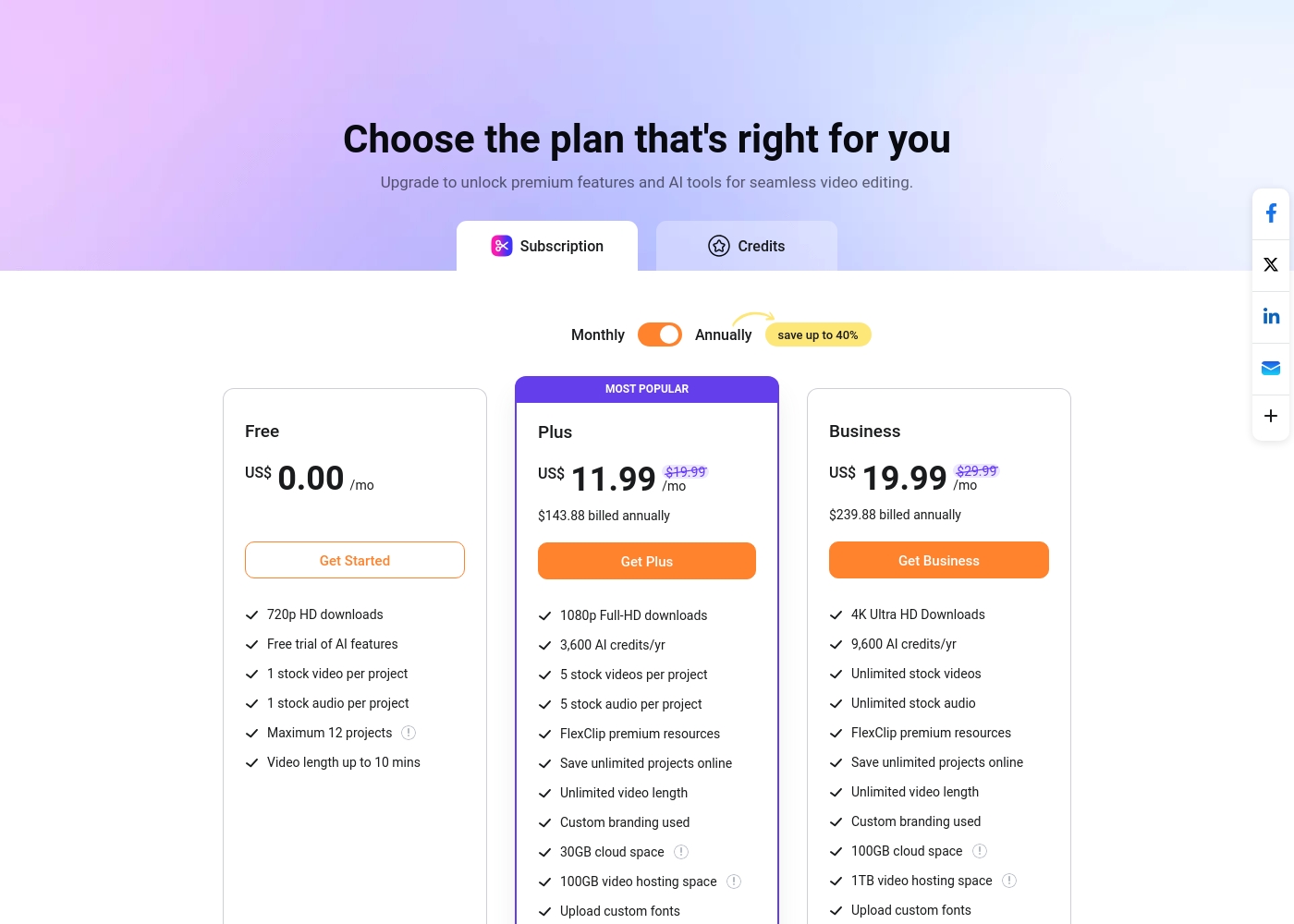
FlexClip costs between US$0.00 and US$19.99 per month with 3 plans: Free at US$0.00, Plus at US$11.99, and Business at US$19.99.
You can examine the different plan options below to decide which one fits your creative needs best.
Free
Price: US$0.00/mo Best For: Testing out the service and casual video creation Other Features:
- 720p HD downloads
- Free trial of AI features
- 1 stock video and 1 stock audio per project
- Maximum 12 projects allowed
- 720p HD downloads
- Free trial of AI features
- 1 stock video per project
- 1 stock audio per project
- 1080p Full-HD downloads
- 3,600 AI credits/yr
- FlexClip premium resources
- Save unlimited projects online
- Custom branding used
- 4K Ultra HD Downloads
- 9,600 AI credits/yr
- Unlimited stock videos
- Unlimited stock audio
- FlexClip premium resources
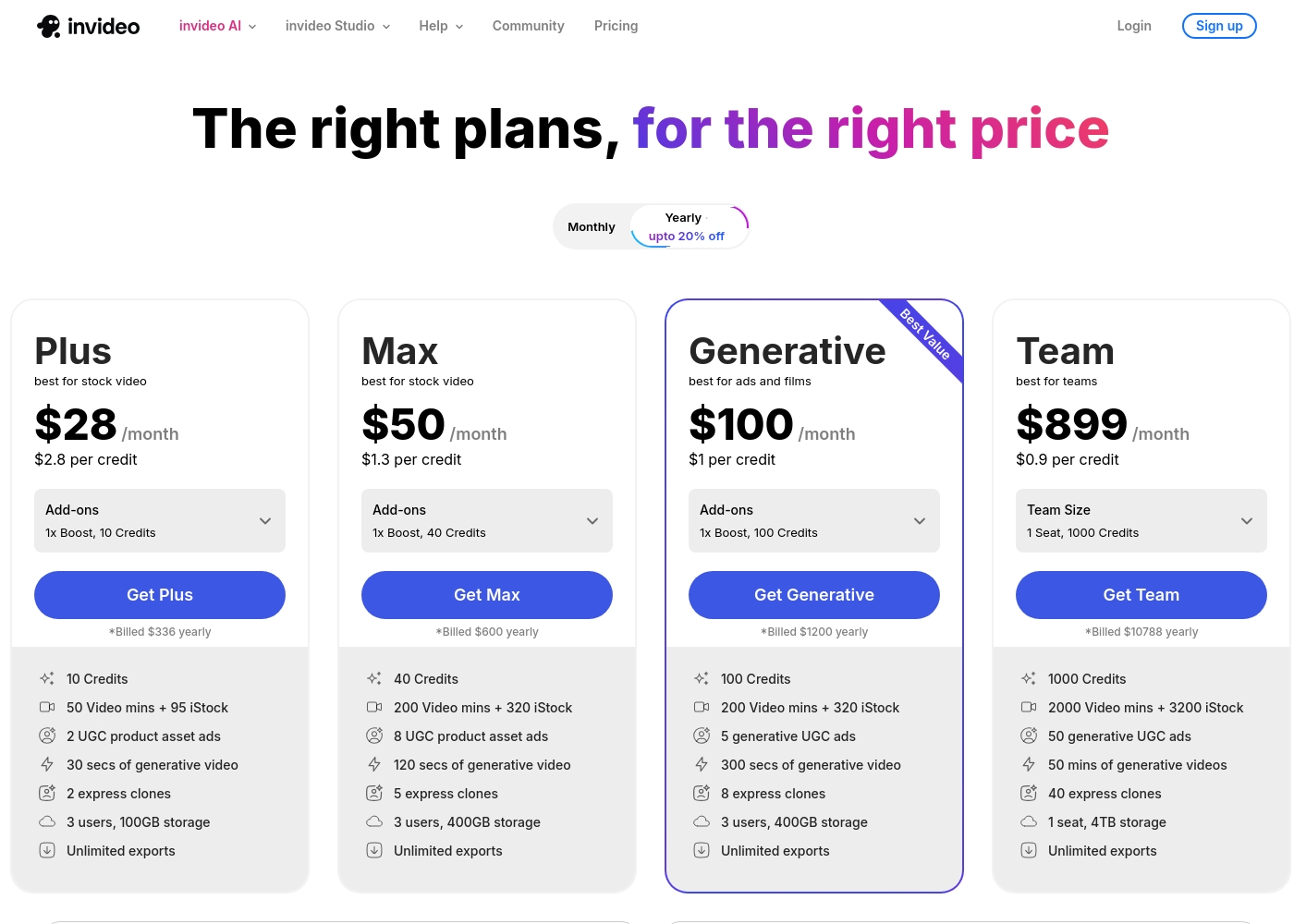
Invideo pricing ranges from $0 for the Free plan up to $899 per month for the Team plan, with three intermediate tiers: Plus at $28/month, Max at $50/month, and Generative at $100/month.
Here are the details for the plans available across monthly and yearly billing cycles.
- 10 Video mins and 1 AI credit per week
- 1 Express avatar
- 4 Exports per week with invideo watermark
- No access to generative features
- 10 Credits ($2.8 per credit)
- 50 Video mins + 95 iStock
- 2 UGC product asset ads
- 30 secs of generative video
- 2 express clones
- 40 Credits ($1.3 per credit)
- 200 Video mins + 320 iStock
- 8 UGC product asset ads
- 120 secs of generative video
- 5 express clones
- 100 Credits ($1 per credit)
- 200 Video mins + 320 iStock
- 5 generative UGC ads
- 300 secs of generative video
- 8 express clones
Pricing Notes
- FlexClip offers predictable, fixed monthly rates with its top plan at $19.99/month when billed annually.
- Invideo's pricing is credit-based for AI features, making high-volume usage potentially very expensive.
- Invideo scales significantly higher, reaching $899/month for its high-end Team plan.
- FlexClip annual billing offers savings up to 40% compared to monthly rates.
- Invideo's effective cost per AI credit decreases dramatically as users move to higher-volume plans, rewarding scale.
Pricing Head-to-Head
User Reviews
Users overwhelmingly praise FlexClip’s user-friendly interface and minimal learning curve, noting that it makes powerful video creation accessible to everyone, regardless of prior experience. Many reviewers state that the platform significantly reduces the time required for content creation, often replacing more complex software they previously relied on.
The extensive library of over 6,000 templates and vast stock footage is frequently highlighted as a major efficiency booster. The incorporated AI tools, such as the Video Generator, are generally seen as game-changers, streamlining workflow for commercial and personal projects.
This thing is awesome! I needed to create a simulation video quickly, and FlexClip saved the day by making complex editing simple. It’s highly versatile and intuitive with a minimal learning curve, offering great value for beginners.
Invideo AI enjoys widely positive reception, particularly for the strength of its customer support. Users frequently highlight the responsiveness and genuine care of the support team, praising specific agents for being patient, kind, and knowledgeable in resolving complex issues like billing errors or login problems.
Reviewers consistently find the platform an invaluable tool that is super easy to use, delivering professional results and saving significant time; some creators even attribute substantial growth in their channels to using the software. However, sentiment isn't universally positive regarding the core AI engine.
I had made the mistake of removing the email connected to my plan and couldn't understand why I was being charged. Patrick immediately located the account, helped me cancel the subscription, and provided great service. The team is excellent!
Our Verdict
FlexClip and Invideo are both stellar AI video tools, but they cater to different workflows. For most creators seeking maximum control and value, FlexClip is the superior choice. FlexClip provides a highly predictable pricing model up to guaranteed 4K resolution. FlexClip’s superpower is its massive 4 million+ stock asset library and abundant templates. It empowers users with precise manual editing tools like Chroma Key and the Speed Curve function. FlexClip is ideal if you value professional polish and want full control over the timeline. However, Invideo is revolutionary if pure speed is your absolute priority. Invideo lets you perform sophisticated edits instantly using simple text commands. If you need to quickly generate UGC ads or localize content via voiceover prompts, Invideo excels. Invideo also guarantees 24/7 human support—a massive safety net. The deciding factor is building versus generating. If you want a huge asset library and manual control, choose FlexClip’s fixed pricing. If you want instant, rapid creation via AI and top-tier support, choose Invideo. Ultimately, if high-quality 4K output on a fixed, low budget matters, FlexClip provides superior long-term value.
Frequently Asked Questions
Which is better for high-quality production, FlexClip or Invideo?
FlexClip explicitly supports 4K Ultra HD downloads on its Business plan. FlexClip provides professional editing capabilities like Chroma Key for precision. Invideo focuses more on fast generation than on absolute final resolution control.
Does FlexClip offer the same 24/7 support as Invideo?
Invideo guarantees responsive 24/7 human customer support for all users. FlexClip's support is highly rated but does not advertise round-the-clock availability. If instant support is crucial, Invideo is the safer choice.
Which platform is better for marketing agencies creating UGC ads?
Invideo is specifically designed for rapid UGC ad generation using AI and text prompts. FlexClip offers general templates but doesn't focus on high-volume ad output like Invideo. Invideo has better scaling options for large teams.
Is Invideo's credit system more expensive than FlexClip's fixed pricing?
FlexClip uses fixed, tiered monthly pricing, capping affordably at $19.99/month (annual). Invideo's pricing relies on AI credits and can climb much higher for intensive use. FlexClip offers better budget predictability.
Can I use specialized features like Chroma Key in Invideo?
FlexClip includes dedicated advanced features like Chroma Key and Speed Curve for fine, manual edits. Invideo focuses on achieving edits via natural language prompting. Invideo does not list explicit high-level editing tools.
Which video editor has a larger available stock library for commercial use?
FlexClip boasts a massive library of over 4 million videos and photos. This is available on its paid plans. Invideo includes iStock assets, but the collection quantity is significantly smaller and credit-limited.
Ready to Choose?
Both tools have their strengths. Choose based on your specific needs.