FlexClip vs Pinnacle Studio
FlexClip and Pinnacle Studio represent opposite philosophies in video editing software. FlexClip prioritizes speed, templates, and powerful AI capabilities for quick output. Pinnacle Studio offers deep creative control and advanced features like MultiCam editing. Your workflow needs will determine which tool is the clear winner.
Best for: Solo entrepreneurs needing fast, social-ready videos, Marketers relying heavily on AI generation and stock footage
Best for: Advanced hobbyists requiring MultiCam editing and deep control, Editors routinely working with large 8K source footage files
Easy Video Editor with Powerful AI
We found FlexClip to be exceptionally strong in combining a massive commercial asset library with highly effective AI tools that dramatically speed up the creative process. The user experience is smooth and intuitive, which lowers the barrier to entry significantly for new creators. Overall, we recommend FlexClip as a top choice for individuals and businesses seeking fast, high-quality video production.
Pros
- Highly intuitive, drag-and-drop interface designed for quick and easy video creation.
- Extensive library including 6,000+ templates and millions of searchable stock assets.
- Powerful AI features significantly streamline tasks like video generation and subtitling.
- Offers high-quality 4K download options (available on the Business plan).
Cons
- Advanced editing features like keyframes or keystone adjustments are currently missing.
- AI accuracy can sometimes fail, such as incomplete lyric or subtitle extraction.
- Stock music selection could be broader and more diverse in trending genres.
- Paid plans are necessary to unlock full features, resource access, and remove the trademarked watermark.
Powerful features, critical flaws.
We found that Pinnacle Studio 26 advertises excellent advanced features like 8K video support and extensive creative bundles, often appealing through affordable one-time pricing. However, overwhelmingly negative user feedback regarding pervasive instability and completely absent customer support casts serious doubt on its usability. Overall, we cannot recommend this software until the severe stability and support issues reported by the user base are definitively addressed.
Pros
- Offers sophisticated, multi-track editing features (MultiCam, 8K support).
- Pricing model is an affordable one-time purchase (especially upgrade bundles).
- Includes comprehensive utility and asset bundles in higher-tier packages.
- Interface is considered user-friendly by some long-time users.
Cons
- Extremely frequent crashing and freezing are reported across multiple versions.
- Customer support is consistently described as non-existent and unhelpful.
- Users experience major issues with rendering, artifacts, and export failures.
- The software can fail to uninstall properly, requiring complex manual steps.
AboutFlexClip
FlexClip is an all-in-one online video editing solution designed to make powerful video creation accessible to everyone. It's built for folks who need professional output without needing extensive filmmaking experience. Based on user testimonials, this tool is perfect for educators, marketers, designers, and small business owners alike. It provides flexible editing capabilities right in your browser, helping you produce high-quality clips quickly. ✅
AboutPinnacle Studio
Pinnacle Studio 26 provides a welcoming, intuitive workspace designed for sophisticated video creation. It is a comprehensive tool that includes video editing, screen recording, and DVD authoring capabilities. Whether you are new to video editing or already an experienced producer, this software has a tier that meets your goals. Use it professionally for vlogging, creating channel content, or powerful business video production. Pinnacle Studio helps you achieve professional results while taking your edits to the next level. 💡
Highlights
Feature Comparison
Features Overview
We highlight the main differences and pick a winner for each feature.
AI Automation
FlexClip uses AI to generate content instantly; Pinnacle Studio lacks native AI features.
FlexClip offers revolutionary AI tools like the Video Generator and Auto Subtitle creation. Users can create a complete video draft from a simple text prompt or URL quickly. FlexClip also includes AI Text to Speech for easy voiceovers. Pinnacle Studio focuses entirely on traditional, manual editing techniques. It does not offer any of FlexClip's generative AI tools for automation. You must manually create titles, subtitles, and content within Pinnacle Studio. If speed and minimizing manual input are essential, FlexClip is the superior choice. Pinnacle Studio requires hands-on editing for every step. FlexClip excels for marketers needing rapid content iteration using smart automation.
Advanced Editing Control
Pinnacle Studio offers deep control like MultiCam; FlexClip is template-focused.
Pinnacle Studio provides professional features like MultiCam editing for multi-angle scenes. It supports frame-accurate customization and lens correction tools. Pinnacle Studio also allows importing massive 8K source footage. FlexClip offers powerful tools like Chroma Key and Speed Curve functionality. However, it lacks deep, custom frame-accurate controls like advanced keyframing. FlexClip is built for quicker, less granular editing. For complex projects needing scene switching or huge file handling, Pinnacle Studio provides deeper control. FlexClip is better for creators prioritizing template-based efficiency over fine-grained adjustments. If you shoot interviews with multiple cameras, Pinnacle Studio is an absolute necessity.
Stock Media Library
FlexClip provides millions of assets instantly; Pinnacle Studio requires separate resources.
FlexClip bundles a massive, commercially-licensed library right into the editor interface. Users get instant access to over 4 million videos and 6,000 professional templates. This library significantly speeds up creation. Pinnacle Studio includes access to royalty-free music and content via the 10-day StudioBacklot trial. Its asset library is not as richly integrated or as vast as FlexClip's built-in resources. FlexClip saves users valuable time by eliminating the need to source assets externally. Pinnacle Studio requires more effort to integrate third-party media. FlexClip ensures consistency and licensing compliance across all your projects easily.
Software Stability
FlexClip is stable and reliable; Pinnacle Studio struggles with frequent crashes.
FlexClip is a cloud-based editor with high reliability and project security via cloud storage. Users report a smooth, consistent workflow and minimal unexpected interruptions. Its performance remains dependable. Pinnacle Studio users frequently report issues with frequent software crashes and reliability concerns during rendering. These problems disrupt the creative workflow seriously. Technical support is also described as slow or unhelpful. Stability is a major differentiator; FlexClip ensures productivity is not lost to software failure. Pinnacle Studio users risk losing work due to instability. For high-volume production, FlexClip's reliability is crucial for meeting deadlines.
Learning Curve
FlexClip is quick to learn; Pinnacle Studio requires more time investment.
FlexClip features a highly intuitive, drag-and-drop interface focusing on ease of use. The strong reliance on templates minimizes the need for complex training. New users can create quality videos immediately. Pinnacle Studio is feature-rich and requires more dedicated time to master. While tutorials are included, utilizing advanced controls takes time and practice. It isn't designed for instant results. Choose FlexClip if you need the fastest possible route to professional video output. Choose Pinnacle Studio if you enjoy deep software customization. FlexClip is perfect for busy entrepreneurs who can't spend hours learning a new skill.
Pricing Model
FlexClip is subscription-based; Pinnacle Studio is a one-time license purchase.
FlexClip operates on a subscription model, ranging from a powerful Free plan to $19.99/month. This recurring cost includes access to cloud storage and the massive asset library. It offers predictable budget planning. Pinnacle Studio primarily uses a licensing structure, costing between $26–$200 for ownership of that specific version. Upgrades to new versions may incur additional fees. This offers long-term ownership. FlexClip bundles assets and AI into a recurring fee; Pinnacle Studio offers permanent use of the editing toolkit. Your preference for subscription versus license is the key factor. FlexClip's Free plan makes it zero risk to start creating high-quality content.
Resolution Support
Pinnacle Studio handles 8K source files; FlexClip exports up to 4K only.
FlexClip supports exporting high-quality video up to 4K resolution on the Business plan. This is perfect for most online social media platforms and standard displays. 1080p is available on the Plus plan. Pinnacle Studio supports importing massive 8K source footage for high-detail projects. This capability ensures future-proofing for creators working on the highest resolutions. This is a significant technical advantage. Pinnacle Studio wins for handling input resolution, while FlexClip meets most professional export demands at 4K. If you film with 8K cameras, Pinnacle Studio is required. FlexClip's 4K output is more than sufficient for YouTube and modern business needs.
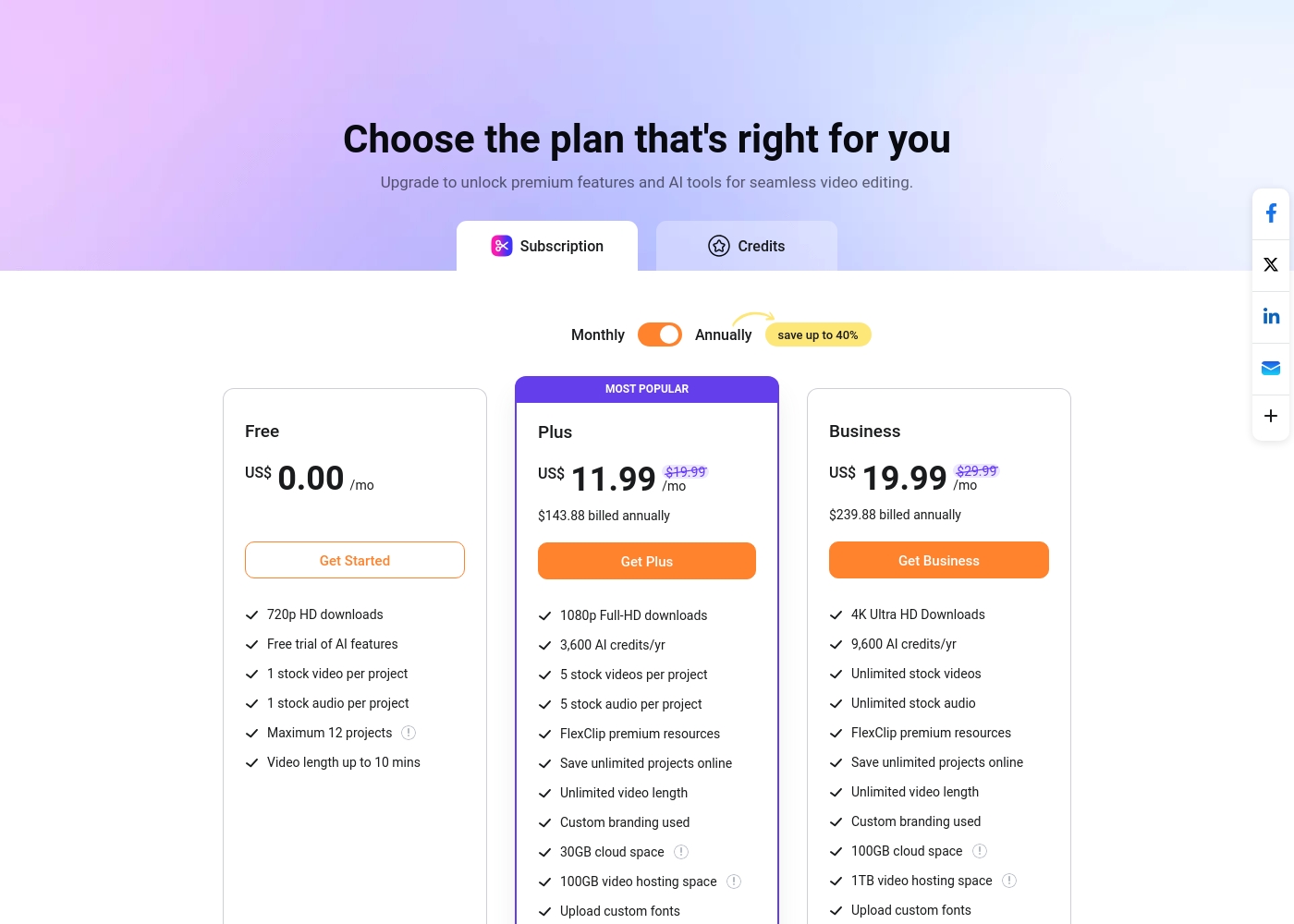
FlexClip costs between US$0.00 and US$19.99 per month with 3 plans: Free at US$0.00, Plus at US$11.99, and Business at US$19.99.
You can examine the different plan options below to decide which one fits your creative needs best.
Free
Price: US$0.00/mo Best For: Testing out the service and casual video creation Other Features:
- 720p HD downloads
- Free trial of AI features
- 1 stock video and 1 stock audio per project
- Maximum 12 projects allowed
- 720p HD downloads
- Free trial of AI features
- 1 stock video per project
- 1 stock audio per project
- 1080p Full-HD downloads
- 3,600 AI credits/yr
- FlexClip premium resources
- Save unlimited projects online
- Custom branding used
- 4K Ultra HD Downloads
- 9,600 AI credits/yr
- Unlimited stock videos
- Unlimited stock audio
- FlexClip premium resources
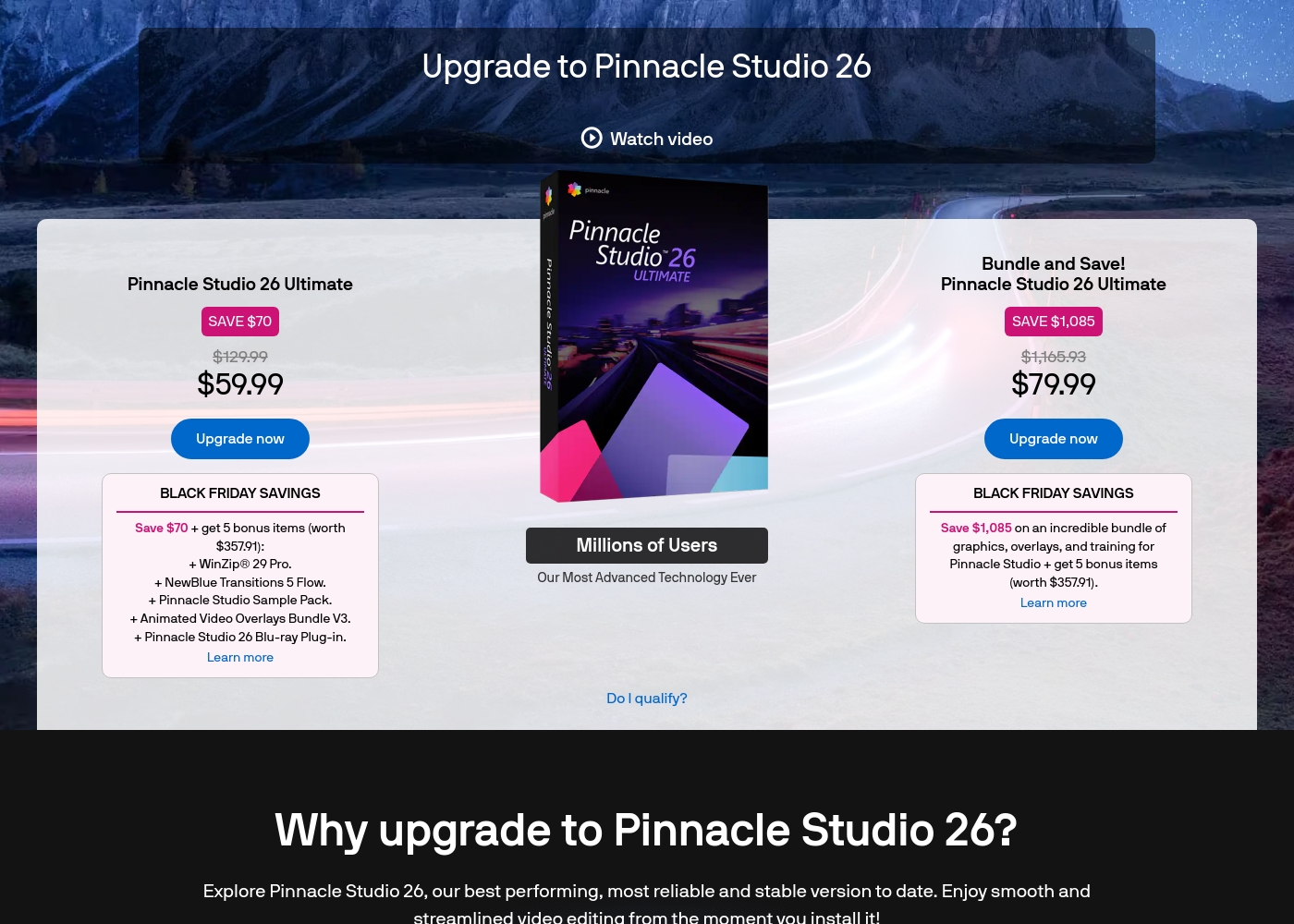
Pinnacle Studio 26 Ultimate acquisition costs range between $59.99 and $79.99 as a one-time upgrade purchase, with two main options: Pinnacle Studio 26 Ultimate at $59.99, and the Bundle and Save! version at $79.99.
These prices represent special Black Friday upgrade offers for users looking to access the latest features. Here is how the deals compare:
Pinnacle Studio 26 Ultimate
Price: $59.99 (One-time Upgrade Price) Best For: Current users who want the latest, most stable software version and specific utility tools. Other Features:
- Saves you $70 off the regular $129.99 price.
- Includes a total of 5 bonus items worth $357.91.
- Comes with WinZip® 29 Pro and NewBlue Transitions 5 Flow.
- Features the Pinnacle Studio 26 Blu-ray Plug-in.
- Includes the Pinnacle Studio Sample Pack and Animated Video Overlays Bundle V3.
- One-time price of $59.99 (was $129.99)
- 5 bonus items included (worth $357.91)
- Includes WinZip® 29 Pro
- Includes NewBlue Transitions 5 Flow
- Includes Pinnacle Studio 26 Blu-ray Plug-in
- One-time price of $79.99 (was $1,165.93)
- Includes all 5 bonus items (worth $357.91)
- Includes training, graphics, and overlays bundle
- Save $1,085 on the total package
Pricing Notes
- FlexClip offers a robust permanent Free plan with functional downloads and minimal watermarks.
- Pinnacle Studio uses a perpetual licensing model, costing $26 to $200 per new version license.
- FlexClip provides significant cost savings by choosing annual billing over the higher monthly rates.
- Pinnacle Studio's price is a one-time fee, unlike FlexClip's cloud-service subscription structure.
Pricing Head-to-Head
User Reviews
Users overwhelmingly praise FlexClip’s user-friendly interface and minimal learning curve, noting that it makes powerful video creation accessible to everyone, regardless of prior experience. Many reviewers state that the platform significantly reduces the time required for content creation, often replacing more complex software they previously relied on.
The extensive library of over 6,000 templates and vast stock footage is frequently highlighted as a major efficiency booster. The incorporated AI tools, such as the Video Generator, are generally seen as game-changers, streamlining workflow for commercial and personal projects.
This thing is awesome! I needed to create a simulation video quickly, and FlexClip saved the day by making complex editing simple. It’s highly versatile and intuitive with a minimal learning curve, offering great value for beginners.
User feedback for Pinnacle Studio is exceptionally poor, primarily focusing on extreme frustrations with the software's reliability and performance. Despite newer versions claiming improved stability, many users report constant crashing, freezing, and issues with rendering, even when using high-spec computers.
This instability leads to lost progress and wasted time. The second overwhelmingly negative theme is customer support.
I’ve been using this product for several years because it is user friendly and features many nice tools. However, the tech support when there is an issue is not good at all. I was extremely disappointed and uninstalled the software despite owning it.
Our Verdict
Choosing between FlexClip and Pinnacle Studio boils down to your core needs: speed vs. control. Most users seeking productivity should choose FlexClip immediately. Pinnacle Studio appeals only to a smaller niche requiring deep, advanced frame control. FlexClip’s biggest strength is automation; its powerful AI tools generate video drafts from prompts or articles instantly. You get access to a massive 4 million stock asset library and 6,000 templates right away. FlexClip’s cloud platform is highly stable, ensuring your work is safe and consistent. Pinnacle Studio dominates in specific advanced features like MultiCam editing and 8K source file import support. It offers deep, granular creative control over every effect and transition. Pinnacle Studio is best used by hobbyists needing specialized desktop software features. The deciding factor is stability and ease of use, which heavily favors FlexClip for most creators. Pinnacle Studio users frequently report frustrating crashes and unreliable rendering, hurting productivity badly. If the software doesn't run, features don't matter. Pick FlexClip if you create content frequently for marketing or social media and need AI speed. Choose Pinnacle Studio only if MultiCam editing is essential and you can tolerate the reported software instability and poor support.
Frequently Asked Questions
Which software is better for video editing beginners: FlexClip or Pinnacle Studio?
FlexClip is significantly better for beginners due to its intuitive interface and template-first approach. New users find FlexClip easy to navigate and start creating professional content immediately. Pinnacle Studio requires more technical skill and time commitment to master its complex features.
Can I use AI tools to generate videos in Pinnacle Studio like I can in FlexClip?
No, Pinnacle Studio does not feature the integrated generative AI tools found in FlexClip. FlexClip can draft entire videos from text or a URL, or generate captions automatically. Pinnacle Studio is a manual editing platform requiring all content creation steps to be handled traditionally.
Does FlexClip support MultiCam editing for multiple camera angles?
FlexClip does not currently offer a dedicated MultiCam editing feature. This advanced capability is a key strength of Pinnacle Studio. If you frequently edit footage shot from two or more cameras simultaneously, Pinnacle Studio is required.
Is Pinnacle Studio a one-time purchase, or is it a subscription like FlexClip?
Pinnacle Studio is primarily sold as a one-time perpetual license, costing between $26 and $200. FlexClip uses a subscription model, offering monthly or discounted annual access. The FlexClip subscription includes continuous cloud services and asset access.
Why do user reviews for Pinnacle Studio show so many stability issues?
User reviews indicate Pinnacle Studio frequently suffers from crashes, especially during rendering and export processes. This suggests inherent software instability that disrupts workflow. FlexClip, being a cloud-based tool, generally receives much higher marks for reliability.
Which tool offers a better selection of stock media and templates?
FlexClip features a massive, integrated library with over 4 million assets and 6,000 available templates. These resources are instantly accessible within the paid plans. Pinnacle Studio's resource access is much more limited by comparison.
Ready to Choose?
Both tools have their strengths. Choose based on your specific needs.