VEED

VEED

Smart video creation tools for teams and creators.

#6 dans Video editing
2 min read · Updated 10/5/2025
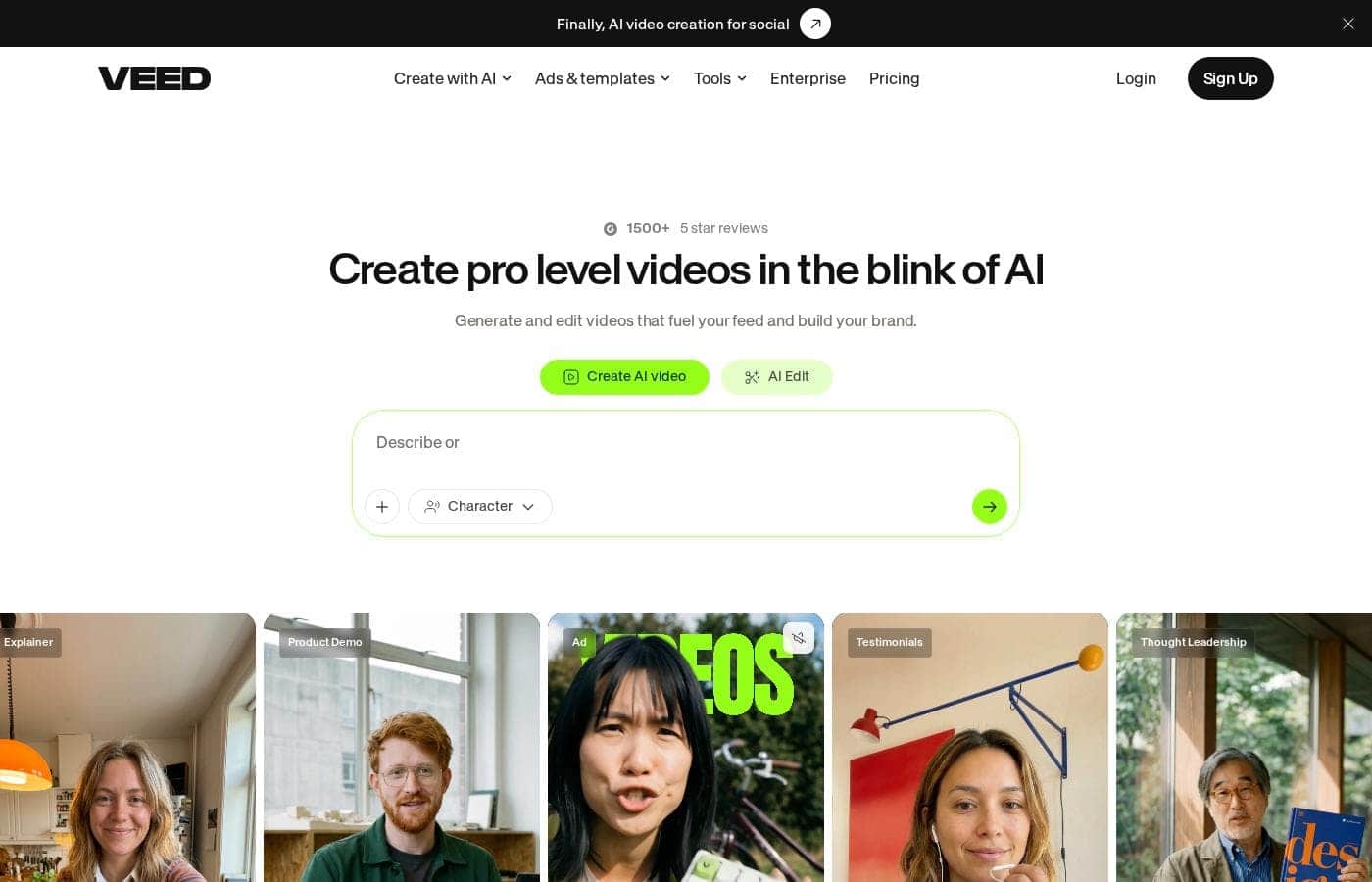
VEED homepage screenshot

At a glance

Quick overview for VEED: rating, pricing summary, key features, and highlights.

Ciroapp review

4.0
Browser-based video editing power.

We find VEED to be a highly accessible, browser-based video editing solution that excels at streamlining content creation using powerful AI. Overall, we recommend this platform, especially for short-form content, despite the premium pricing required for full functionality.

Pros

  • Pro:Extremely intuitive and beginner-friendly interface.
  • Pro:Fully web-based; no software installation or downloads required.
  • Pro:Powerful AI tools for auto-subtitles, translations, and video generation.
  • Pro:Excellent for creating and editing short-form content (e.g., YouTube Shorts).

Cons

  • Con:Subscription costs are frequently cited as a limiting factor.
  • Con:Unreliable for long-form video recording and editing (potential data loss/glitches).
  • Con:Exporting 4K video is restricted to higher-tier or professional plans.
  • Con:AI translations (subtitles) can sometimes be inaccurate or difficult to edit manually.
Range: Not explicitly statedFree plan
This section is a summary. Detailed sections about features, use cases, pricing, and reviews follow below.

VEED review, pricing, features, pros & cons

It’s often frustrating to create high-quality videos quickly while juggling multiple editing programs. Today’s content creation demands speed and pro-level quality, which complicated, separate tools make difficult. VEED addresses this gap by offering a smart, end-to-end video suite.

✨ Now you can make better videos faster, all directly in your browser.

What is VEED?

VEED is a complete end-to-end video suite designed for busy teams and creators. It allows you to create, collaborate, and share impressive videos entirely from within your browser. This platform offers seamless workflow consolidation, perfect for everyone from individual content makers to large organizations like the Fortune 500.

It includes smart collaboration tools and a dedicated Brand Kit, ensuring your team maintains consistency. Additionally, you access a vast, royalty-free stock library featuring over 2 million video and audio assets. 💡

VEED Key Features

✨ Streamlined Team Collaboration and Branding

It's easy to maintain consistency across all your videos, no matter who creates them. The integrated Brand Kit ensures every video automatically uses required shared fonts, logos, and assets. This crucial tool helps you guarantee quality control and keep your content perfectly on-brand.

VEED offers smart collaboration tools designed for scaling video production. Teams benefit from streamlined feedback loops using tools like Review Mode. Asset Sharing also simplifies the process, ensuring everyone has access to the right media at all times. This unified approach empowers your entire team to create high-quality, on-brand content quickly.

✨ AI-Powered Video Enhancement

Make your content substantially more engaging by using advanced AI tools. Features like Magic Cut help you instantly refine your timeline for a smoother edit. You can also clean up audio quickly with the Filler Word Removal tool.

VEED ensures your speakers look polished on camera. The Eye Contact Correction feature helps maintain steady eye alignment throughout your recording. You can also utilize AI Background Removal to instantly change the setting behind your subject, focusing attention exactly where you want it.

💡 Recording and Unlimited Media Access

Start your video creation process directly within the browser workspace. You can easily record yourself or your screen using the powerful built-in recorder. Once the recording is complete, you can edit and share it right away.

If you need supplemental footage, you don't have to look elsewhere. You get immediate access to a vast, royalty-free stock library. This library features over 2 million high-quality video and audio assets to enhance your production value instantly.

✨ Instant Global Accessibility Tools

Ensure your video content reaches the largest possible audience through easy accessibility features. You can add accurate subtitles in just one click with the Auto Subtitle Generator. This is essential for viewers watching without sound.

To increase your global reach, use powerful new AI tools. AI Translate and Dubbing features allow you to 'speak' another language, making it simple to localize content for different markets. These tools help your content connect worldwide.

✨ Next-Generation AI Avatars and Cloning

Produce professional video content faster without ever needing to step in front of the camera. Easily explore and use AI Avatars to create engaging talking head videos in seconds. This greatly improves content velocity.

The platform also offers unique personalization features, like AI Voice Cloning and the ability to Clone Yourself. This allows you to generate your own digital clone for use in content. This capability lets teams produce more personalized videos quickly, saving production time.

✨ The All-in-One Workflow Workspace

Say goodbye to wasting time switching between multiple programs for different steps. VEED is a complete, browser-based end-to-end video suite. It unifies recording, editing, and publishing into one powerful, seamless platform.

After creating your pro-level video, VEED offers integrated publishing. You can host your finished videos using VEED's powerful embeddable player. This consolidation simplifies workflows for everyone from individual creators to large organizations.

Use Cases

🚀 Creating Fast, Consistent Marketing Campaigns

Marketing teams need to produce high volumes of content quickly to drive engagement. Using VEED, you can rapidly generate video variations for different platforms. The unified workspace cuts down on time spent importing and exporting between programs.

The integrated Brand Kit ensures that shared fonts, logos, and required colors are always applied. This guarantee of consistency helps maintain high quality across all your social promotion and ad units. Teams report reducing their total editing time by roughly 60% with this consolidated approach.

📚 Developing Accessible Employee Training (L&D)

Training departments must quickly convert materials into engaging, accessible video formats. You can easily record your screen or camera directly in the browser using the integrated recorder. These videos are then immediately available for editing.

Use the Auto Subtitle Generator feature to add captions in just a click. This ensures accessibility instantly for all learners. You also maintain quality control by using Custom Templates that align with company standards for learning materials.

Tip: Use the collaboration features to get quick review and sign-off from compliance teams before publishing.

✨ Enhancing Personal Videos with AI Correction

Even experienced presenters sometimes miss minor details that distract viewers. VEED uses advanced AI features to polish these videos effortlessly. You don't need to reshoot key internal communication or sales presentations.

First, apply Filler Word Removal to instantly delete awkward 'ums' and 'uhs.' Next, use Eye Contact Correction if you read notes while recording, ensuring you keep viewer engagement. Finally, use Magic Cut to automatically trim pauses and jumps, creating a pro-level final product in minutes.

🌍 Expanding Reach with Multilingual Content

Reaching global audiences requires translating successful video content quickly and effectively. VEED helps you overcome language barriers without complex post-production workflows. You get rid of the need for expensive, separate dubbing services.

Use the AI Translate and Dubbing features to instantly convert the audio track into a new language. You can also utilize AI Voice Cloning to ensure the voice retains a tone similar to the original speaker. This allows you to scale video across different regional markets easily.

Expected outcome: Effortlessly repurpose a single video asset for international distribution.

🤝 Seamless Collaboration and Asset Management

When scaling video production, large teams need simple ways to maintain quality and share files. VEED offers smart controls to manage this complex workflow efficiently. All assets, like logos and custom fonts, are shared through Brand Kit and Asset Sharing features.

Use Review Mode to handle feedback without messy email chains or confusing file versions. Team members can easily leave comments directly on the timeline. This streamlined process simplifies scaling content creation across the whole organization.

📱 On-the-Go Professional Mobile Editing

For creators and busy reporters, the phone often captures the most timely content. You shouldn't need a desktop computer to finalize and publish professional footage. The VEED Captions App empowers your phone to be a full editing powerhouse.

Steps for Mobile Publishing:

  1. Record pro-level footage directly using the phone.
  2. Edit and refine the video using core VEED features within the app.
  3. Add precise Auto Subtitles while on the move.
  4. Publish the finished video immediately from your pocket.

Pricing Overview for VEED

Pricing range
Not explicitly stated
Pricing types
Free plan

VEED offers a 'Start for free' entry point, requiring no credit card, allowing users to test core video editing and AI features. Specific pricing for standard paid subscription tiers and Enterprise plans are not publicly listed.

Pricing

VEED costs between Not explicitly stated and Not explicitly stated per period with 0 plans: Not explicitly stated.

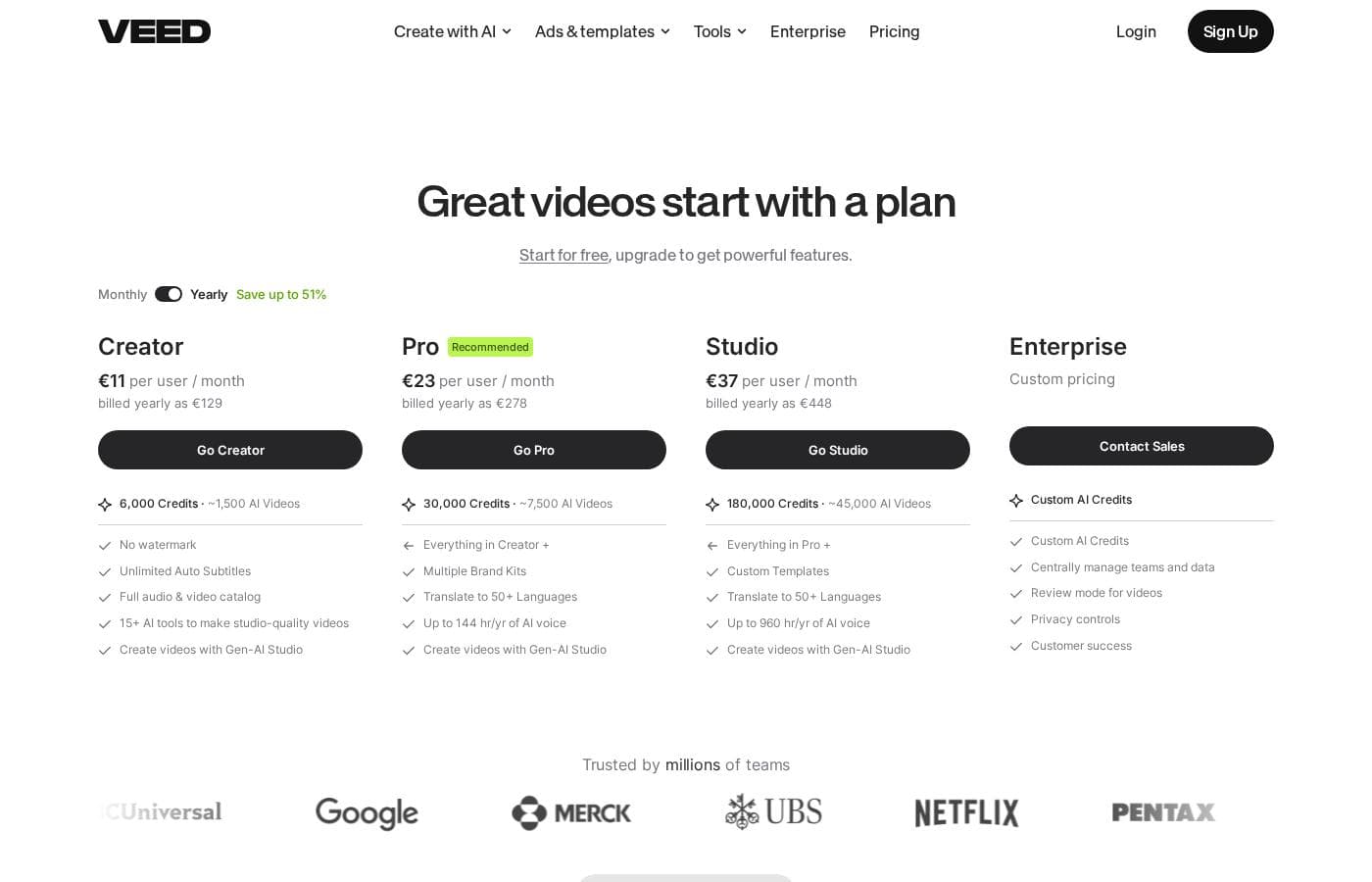
Specific pricing tables are not publicly detailed here, but VEED does offer multiple ways to engage with the product, ranging from free access to custom enterprise solutions. This structure ensures users of all sizes can find a suitable entry point.

Free Access

Price: Free Websites Supported: Not explicitly stated Best For: Users who want to test core features or single creators with minimal usage needs. Refund Policy: Not explicitly stated Other Features:

  • Start for free * No credit card required
  • Use the video editor
  • Access AI tools like Auto Subtitle Generator

You can begin using VEED immediately without needing to enter any payment information. It’s an ideal option for anyone looking to quickly test the core capabilities and user experience of this powerful video editing suite before deciding on a financial commitment.

Standard Paid Plans (Details Unknown)

Price: Not explicitly stated Websites Supported: Not explicitly stated Best For: Creators, marketers, and businesses needing enhanced features, higher usage limits, and increased video quality. Refund Policy: Not explicitly stated Other Features: Not explicitly stated, likely includes upgraded storage, export quality, and advanced AI features like text-to-video.

While no public pricing tiers (like Basic, Pro, or Business) are listed, it's clear these paid tiers exist to unlock scalability and professional features. If your usage goes beyond what the free plan provides, you'll need to locate the detailed price breakdown on their site or contact support.

Enterprise Plan

Price: Contact Sales Websites Supported: Not explicitly stated Best For: Large organizations and teams needing custom solutions, comprehensive brand management, and high-level collaboration tools. Refund Policy: Not explicitly stated Other Features:

  • Scale video across teams
  • Custom Templates and Brand Kit 🎨
  • Simple feedback and review flows
  • Collaboration tools and Asset Sharing

If you are managing a large organization or require specialized features like advanced team controls, shared brand assets, and dedicated support, the Enterprise option is clearly designed for you. You must contact the VEED sales team directly to discuss pricing tailored to your specific organizational needs.

VEED makes it easy to get started by allowing users to Start for free immediately, with no credit card requirement. Although specific subscription prices are unavailable in this view, this free starting point allows for risk-free evaluation. If you require advanced features or team licensing, look for their detailed plan pages or use the "Contact Sales" option for a quote.

User Reviews

VEED enjoys generally positive external feedback, focusing heavily on its ease of use and accessibility. Reviewers consistently praise the web-based platform for being intuitive, beginner-friendly, and having a clean interface, which makes creating professional videos quick and simple.

Many users appreciate the robust features like drag-and-drop functionality, good animation options, and powerful AI tools, particularly for generating content and quickly creating YouTube Shorts. The platform’s ability to handle high-fidelity transcriptions is also frequently mentioned.

However, the positive sentiment is tempered by significant concerns regarding subscription costs. Users acknowledge the value but find the pricing structure a limiting factor, especially the inability to export 4K video without premium plans, which affects YouTube upload quality.

Furthermore, while the AI is impressive, users report occasional inaccuracies with AI translation (like Hebrew subtitles) and frustrating technical glitches, including lag before export and unreliability when editing long-form videos. The removal of certain creative features due to a recent AI focus also disappointed some long-time creators.

Overall, VEED is a great, efficient tool, but potential users should be aware of the investment required to unlock top-tier features. 👍

What users say elsewhere

Sarah K.
· Trustpilot
5.0 / 5

VEED simplifies the video creation process significantly. Editing and adding effects, especially utilizing new AI technology, makes improving your product fast and seamless. I highly recommend this platform.

Alex R.
· Trustpilot
4.0 / 5

I appreciate that a free version exists with multiple voices and caption types included. For users watching their budget, the free plan is easy to manage, although it limits usage to a strict 10-minute video duration.

No reviews yet.

Write a Review

Write a Review for VEED
0/100 characters
0/2000 characters

Why use VEED?

Why should your team switch to VEED? It’s all about cutting down complex workflows and significant editing time. Teams report reducing their editing time by around 60% simply by consolidating recording, captioning, and sharing into one seamless spot. This suite simplifies the process of scaling video production across your entire organization.

  • Create Pro-Level Content Effortlessly: VEED empowers teams to make professional videos quickly, often described as 'in the blink of AI.' Features like Auto Subtitles, AI Avatars, and Magic Cut ensure faster creation of high-quality assets.
  • A Unified, Browser-Based Workspace: Stop wasting time switching applications for different steps. VEED eliminates the need for separate tools, integrating recording, editing, and publishing into one powerful platform you access anywhere.
  • Maintain Consistency with Brand Kit: Guarantee quality control across all video output. The integrated Brand Kit helps ensure every video automatically uses required shared fonts, logos, and assets, keeping your content on-brand.
  • Leverage Powerful AI Editing Tools: Make your content substantially more engaging using advanced AI. Features like AI Translate, Filler Word Removal, and Eye Contact Correction help you easily polish and perfect your videos.
  • Streamlined Team Collaboration: Efficiently work together using smart controls and collaboration tools built directly into the platform. Tools like Review Mode and Asset Sharing simplify feedback and ensure easy scaling of content.
  • Professional Mobile Editing: Your phone becomes an editing powerhouse. The VEED Captions App lets you record, edit, and publish pro-level video right from your pocket. ✅

VEED is ideal for internal communication, marketing teams, and content creators who demand speed without sacrificing professional quality. It’s a smart way to scale your video strategy successfully. Ready to see how easy video creation can be? Get started for free today—no credit card required! 🚀

Ready to transform your workflow with VEED?

Frequently Asked Questions

Does VEED offer a free trial for the paid tiers?

There is no stated time-limited free trial for paid plans. However, you can start using VEED immediately with the 'Start for free' option, which requires no credit card and allows you to test core features.

How is VEED priced? Is it based on users or usage limits?

Base access is free, but specific monthly prices for standard paid plans are not publicly listed. Enterprise Plan pricing is only available via a custom quote. The exact structure, whether per-seat or usage-based, is not explicitly stated on the official site.

Can I export my edited videos in 4K resolution?

Yes, but 4K export capability is restricted to premium or higher-tier paid subscriptions. Free and lower-tier plans will not allow video exports in 4K resolution.

What happens if I need to cancel my paid subscription?

Cancellation and refund policies are not explicitly stated on the official site. If you plan to subscribe for advanced features, you should review their full Terms of Service or contact support directly for these details.

Who is VEED best suited for, individuals or large organizations?

VEED is designed to scale across both types of users. Features like a centralized Brand Kit, Asset Sharing, and custom Enterprise options make it highly useful for large teams and Fortune 500 companies.

Are there any hard usage limitations on the free plan?

Yes, the free plan restricts users in several ways, including limits on export resolution and limiting video creation to a maximum duration of about 10 minutes.

What kind of customer support is available, and is there an SLA?

The official site links to a Contact Support option. However, defined support responsiveness or a guaranteed Service Level Agreement (SLA) is not explicitly stated publicly for standard plans.

How can large teams request customized pricing for the Enterprise plan?

Organizations needing custom scalability, dedicated tools, and comprehensive management must use the 'Contact Sales' option. Pricing for Enterprise is customized based on specific organizational needs.

Does VEED integrate with common productivity tools or cloud storage systems?

Specific third-party API integrations are not explicitly stated. VEED functions as a unified, browser-based suite aimed at replacing the need for separate tools like recorders or transcription services.

What instructional resources are available to help me learn how to use the software?

VEED offers extensive learning materials under its Resources section. These include a Blog, a Learn Center, Video Guides, and Webinars designed to help new users quickly master the platform.

Does VEED support languages other than English in the interface and AI tools?

Yes, the platform interface allows you to select many languages, including Spanish, French, German, and Chinese. The AI tools also have highly reviewed capabilities for translation and subtitling across various international languages.

Are my team's shared assets or collaborative data kept secure on the platform?

While the platform promotes collaboration and sharing through smart controls, specific details regarding data security protocols or standards are not explicitly stated on the official site.

Ready to try VEED? Check out the official site or pricing.