Camtasia vs VEED
Camtasia and VEED both use powerful AI to accelerate your video workflows. The core difference is where you work and how much control you need. Camtasia is installed desktop software built for deep control and long-form tutorials. VEED offers a fast, unified browser-based suite ideal for teams and short-form content. You must decide between editing depth and workflow accessibility.
Best for: Educators creating detailed software tutorials, Training departments needing perfect audio fidelity
Best for: Marketing teams needing high-volume social content, Teams that prioritize brand consistency (Brand Kit)
Powerful screen recording, premium price tag.
We find Camtasia to be an extremely capable, industry-standard tool for creating high-quality instructional video content. Its multitrack editing flexibility and AI enhancements effectively streamline complex workflows. Overall, Camtasia excels in core functionality, but its restrictive, mandatory subscription model significantly diminishes the overall value proposition for many loyal users.
Pros
- Industry-standard platform for flexible screen recording and tutorial creation.
- Significantly simpler and more intuitive interface compared to advanced editors.
- Multitrack recording allows independent editing of screen, audio, and camera.
- Offers powerful AI features like text-based video editing and audio cleanup.
Cons
- Mandatory annual subscription model has replaced perpetual licenses.
- Users are frustrated by restrictive licensing (single-device sign-in limitations).
- Perceived as overly expensive compared to free or low-cost competitors.
- Inconsistent customer service experiences, including slow/non-responsive support.
Browser-based video editing power.
We find VEED to be a highly accessible, browser-based video editing solution that excels at streamlining content creation using powerful AI. Overall, we recommend this platform, especially for short-form content, despite the premium pricing required for full functionality.
Pros
- Extremely intuitive and beginner-friendly interface.
- Fully web-based; no software installation or downloads required.
- Powerful AI tools for auto-subtitles, translations, and video generation.
- Excellent for creating and editing short-form content (e.g., YouTube Shorts).
Cons
- Subscription costs are frequently cited as a limiting factor.
- Unreliable for long-form video recording and editing (potential data loss/glitches).
- Exporting 4K video is restricted to higher-tier or professional plans.
- AI translations (subtitles) can sometimes be inaccurate or difficult to edit manually.
AboutCamtasia
Camtasia is truly everything you need in one powerful tool. It combines screen recording with full video editing capabilities. This software uses AI-powered tools to simplify the creation process. It is designed to help you turn your existing knowledge into highly engaging videos. 💡
AboutVEED
VEED is a complete end-to-end video suite designed for busy teams and creators. It allows you to create, collaborate, and share impressive videos entirely from within your browser. This platform offers seamless workflow consolidation, perfect for everyone from individual content makers to large organizations like the Fortune 500. It includes smart collaboration tools and a dedicated Brand Kit, ensuring your team maintains consistency. Additionally, you access a vast, royalty-free stock library featuring over 2 million video and audio assets. 💡
Highlights
Feature Comparison
Features Overview
We highlight the main differences and pick a winner for each feature.
Platform & Access
VEED is fully browser-based; Camtasia requires a desktop install. VEED offers superior accessibility and mobile support.
Camtasia runs as desktop software on Windows and macOS systems. It offers reliable performance, but requires downloading and installation. It's built for users who prefer traditional, dedicated software licenses. VEED operates entirely within your web browser environment. This cloud-based design means you can edit from any computer, anywhere, instantly. VEED also offers a dedicated Captions App for mobile editing. If device flexibility is your priority, VEED is the clear choice for access anytime. Camtasia offers deeper native editing control that the desktop provides. The VEED Captions App empowers mobile editing, turning your phone into a publishing powerhouse.
Screen Recording Flexibility
Camtasia offers unmatched multitrack recording control; VEED provides simple, unified browser recording.
Camtasia's core strength is its powerful multitrack recording capability. It automatically separates screen, camera, and audio onto independent tracks. This separation allows you to fix a minor audio mistake without re-recording the visuals. VEED allows you to record yourself or your screen directly within the browser workspace. This one-stop approach simplifies the flow immediately after recording. The ability of Camtasia to edit every source independently saves significant time on complex tutorials. VEED is faster for straightforward captures but lacks that granular post-production control. This flexibility makes Camtasia the industry standard for detailed software demonstrations and educational content.
AI Content Generation
VEED excels at generating new content like Avatars; Camtasia focuses AI on editing efficiency and translation.
Camtasia heavily utilizes AI for workflow efficiency and polish in higher tiers. This includes text-based editing, cleaning up audio, and translating scripts in the Pro plan. Camtasia's AI focuses on perfecting existing recordings. VEED offers next-generation AI features like AI Avatars and the Clone Yourself capability. Users can quickly generate engaging videos without appearing on camera themselves. VEED's AI promotes brand-new content creation. The VEED platform provides immediate, high-volume content generation capabilities that Camtasia does not match. Camtasia’s text-based editing is highly efficient for refining long content. VEED helps you easily repurpose a single asset using AI translation and dubbing for global markets instantly.
Team Collaboration
VEED is built for modern teams with Brand Kits; Camtasia adds collaboration only in its most expensive tier.
Camtasia includes dedicated video review and collaboration features only in its premium Pro plan ($599/year). These tools streamline workflow feedback internally. VEED offers a robust, integrated Brand Kit ensuring consistency across all team output. It also provides Review Mode and Asset Sharing for easy internal feedback loops. VEED treats teamwork as a primary feature, integrating shared assets and controls for scaling production. Camtasia focuses primarily on the individual editor until the Pro level. If your primary need is scaling video production with consistent branding, VEED's architecture is better suited for team environments.
Audio Cleanup & Polish
Camtasia offers specific tools for deep cleaning; VEED uses lighter AI filler word removal.
Camtasia offers advanced, dedicated audio cleanup tools starting in the Create plan. These tools instantly and formally remove static, fan noise, and common filler words. This ensures professional-grade soundtracks. VEED includes a Filler Word Removal tool to quickly polish narration. It operates effectively within the browser environment for fast corrections. Accuracy and depth of cleaning are not as specified as Camtasia’s offerings. Camtasia’s dedicated expertise in training videos necessitates superior audio fidelity features. VEED's solution is fast but less detailed for complex sound environments. For videos where clear, professional speech is critical (like training), Camtasia arguably delivers a higher level of perfection.
Export Resolution Limits
Camtasia has no explicit 4K limit; VEED restricts 4K export to its highest paid plans.
Camtasia’s listed features do not explicitly restrict export resolution based on plan level. Users generally produce high-quality output on lower tiers. This supports professional presentation needs. VEED reviewers cite that 4K export capability is restricted to premium tiers. This forces users relying on 4K for YouTube bitrate enhancements into higher subscriptions. For creators requiring uncompromised output quality, VEED introduces friction and hidden costs. Camtasia allows professional export quality without tier restrictions mentioned. This restriction is a major pain point for VEED users focused on top-tier video hosting platforms like YouTube.
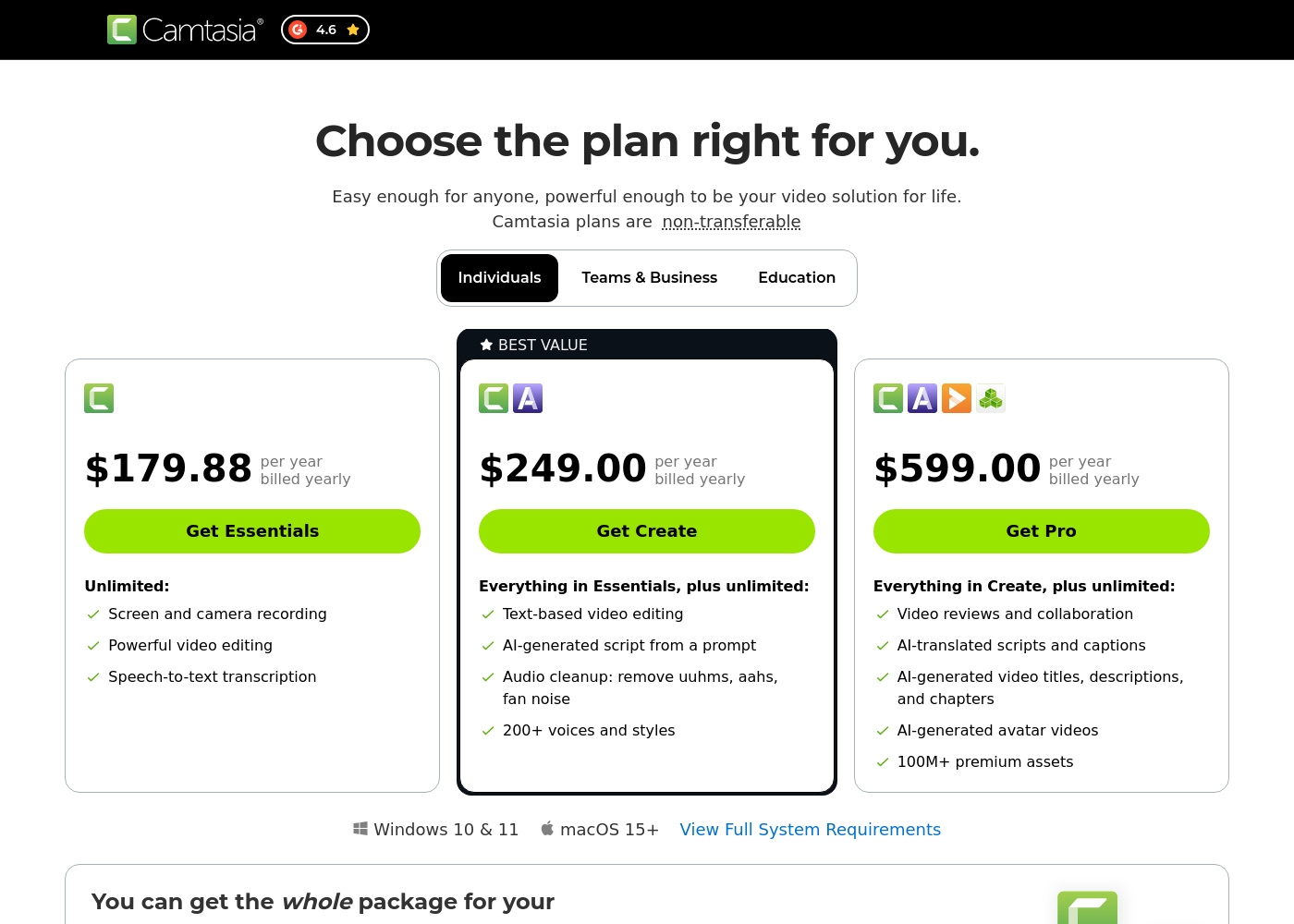
Camtasia costs between $179.88 and $599.00 per year with 3 plans: Essentials at $179.88, Create at $249.00, and Pro at $599.00. These plans cater to individuals, offering robust video and screen recording tools through an annual subscription model.
Essentials
Price: $179.88 per year billed yearly Other Features:
- Screen and camera recording
- Powerful video editing
- Speech-to-text transcription
The Essentials plan is perfect if you only need foundational tools for recording and editing videos. It provides unlimited screen and camera recording capabilities, which is great for beginners or those with basic needs.
- Screen and camera recording
- Powerful video editing
- Speech-to-text transcription
- Everything in Essentials
- Text-based video editing
- AI-generated script from a prompt
- Audio cleanup: remove uuhms, aahs, fan noise
- 200+ voices and styles
- Everything in Create
- Video reviews and collaboration
- AI-translated scripts and captions
- AI-generated video titles, descriptions, and chapters
- AI-generated avatar videos
Specific pricing tables are not publicly detailed here, but VEED does offer multiple ways to engage with the product, ranging from free access to custom enterprise solutions. This structure ensures users of all sizes can find a suitable entry point.
Free Access
Price: Free Best For: Users who want to test core features or single creators with minimal usage needs. Other Features:
- Start for free * No credit card required
- Use the video editor
- Access AI tools like Auto Subtitle Generator
You can begin using VEED immediately without needing to enter any payment information. It’s an ideal option for anyone looking to quickly test the core capabilities and user experience of this powerful video editing suite before deciding on a financial commitment.

Pricing Notes
- Camtasia uses a mandatory annual subscription model; there is no monthly payment option.
- Camtasia’s licenses are strictly non-transferable, limiting flexibility and sign-in to a single user/device.
- VEED offers immediate free access to core editing features without requiring a credit card.
- VEED lacks publicly detailed pricing tables for standard paid plans; you must search or contact sales.
- Camtasia's Pro plan ($599/year) unlocks massive assets (100M+) and essential collaboration tools.
Pricing Head-to-Head
User Reviews
Camtasia enjoys a long-standing reputation as an industry-standard tool, particularly for screen recording and tutorial creation. Users overwhelmingly praise the core software, noting it is dramatically simpler and more intuitive to use than complex alternatives like Adobe products, while still offering a deep feature set.
However, recent changes to the pricing model and licensing structure have caused significant user frustration. The shift to mandatory annual subscriptions, coupled with new restrictive single-device sign-in limits for individual users, is a major recurring complaint.
The software is great, the developers deserve five stars for the product quality. But management introduced a highly frustrating subscription model. The mandatory sign-in cycle when switching devices significantly harms my workflow.
VEED enjoys generally positive external feedback, focusing heavily on its ease of use and accessibility. Reviewers consistently praise the web-based platform for being intuitive, beginner-friendly, and having a clean interface, which makes creating professional videos quick and simple.
Many users appreciate the robust features like drag-and-drop functionality, good animation options, and powerful AI tools, particularly for generating content and quickly creating YouTube Shorts. The platform’s ability to handle high-fidelity transcriptions is also frequently mentioned.
VEED simplifies the video creation process significantly. Editing and adding effects, especially utilizing new AI technology, makes improving your product fast and seamless. I highly recommend this platform.
Our Verdict
Choosing between Camtasia and VEED depends entirely on your video strategy and platform preference. If you create complex, long-form content, Camtasia is undeniably the stronger tool. However, if speed, accessibility, and team collaboration are priorities, then VEED should be your choice. Camtasia’s superpower is its control over the recorded sources. It records your screen, camera, and audio on completely separate tracks for flawless editing. Fixing one sentence in your voice track will not require re-recording the entire visual demo. Camtasia is built to help professionals fully refine instructional content quickly. VEED’s standout advantage is its unified, browser-based workflow and powerful AI generation. It excels at creating high-volume, consistent short-form content for social media fast. VEED adds features like a central Brand Kit and AI Avatars for instant content creation. The deciding factor is your need for platform flexibility versus technical depth. Camtasia is an annual commitment for heavy-duty desktop editing. VEED offers superior team collaboration and accessibility through the browser and a dedicated mobile app. Pick Camtasia if you need to create detailed, perfect software tutorials or training. Go with VEED if your marketing team needs to churn out branded short-form videos quickly and efficiently. Both Camtasia and VEED offer excellent AI tools, but they cater to very different creator workflows.
Frequently Asked Questions
Which software is better for creating long-form educational courses?
Camtasia is generally superior for detailed educational content and courses. Its multitrack recording feature allows precise editing of audio and screen actions independently. VEED is fantastic for quick edits, but Camtasia offers the necessary depth for long, complex projects.
Does VEED offer a true free trial for its paid features like Camtasia?
VEED offers a 'Start for free' option, requiring no credit card to begin using core tools. Camtasia does not offer a public free trial or test period for its individual annual subscription plans. You can immediately access VEED features, unlike the mandatory purchase required for Camtasia.
Which tool provides better AI features for content generation, Camtasia or VEED?
VEED offers stronger AI tools focused on content *generation*, such as AI Avatars and the Clone Yourself feature. Camtasia focuses its AI on editing *efficiency*, including text-based editing and advanced audio cleanup. VEED wins for creating new content quickly.
Why are Camtasia licenses considered restrictive by some users?
Camtasia moved to a mandatory annual subscription, replacing older perpetual licenses. Furthermore, individual subscriptions are non-transferable and often limited to a single device sign-in. This restriction on device switching frustrates many loyal Camtasia users.
Can I edit videos on my phone with Camtasia or VEED?
VEED is the definite choice for mobile video editing. It offers the specialized VEED Captions App, allowing recording, editing, and publishing from your phone. Camtasia is primarily desktop software and does not offer a comparable professional mobile editing solution.
Does VEED restrict 4K video exports?
Yes, user reviews indicate that VEED restricts 4K resolution exports to only its premium or higher-tier paid plans. This is a crucial limitation if you upload to platforms like YouTube that benefit from 4K fidelity. Camtasia does not mention such specific resolution restrictions on its plans.
Ready to Choose?
Both tools have their strengths. Choose based on your specific needs.