Pinnacle Studio vs VEED
This comparison pits a classic desktop professional app against a web-based AI powerhouse. Pinnacle Studio offers deep control and 8K support for dedicated creators. VEED simplifies everything using powerful AI right in your browser. Decide if you need frame-accurate feature depth or lightning-fast, collaborative output.
Best for: Dedicated creative professionals needing deep timeline control, Editors working with 8K high-resolution footage and large files
Best for: Marketing teams needing fast, consistent video output, Large organizations requiring shared Brand Kits and review workflows
Powerful features, critical flaws.
We found that Pinnacle Studio 26 advertises excellent advanced features like 8K video support and extensive creative bundles, often appealing through affordable one-time pricing. However, overwhelmingly negative user feedback regarding pervasive instability and completely absent customer support casts serious doubt on its usability. Overall, we cannot recommend this software until the severe stability and support issues reported by the user base are definitively addressed.
Pros
- Offers sophisticated, multi-track editing features (MultiCam, 8K support).
- Pricing model is an affordable one-time purchase (especially upgrade bundles).
- Includes comprehensive utility and asset bundles in higher-tier packages.
- Interface is considered user-friendly by some long-time users.
Cons
- Extremely frequent crashing and freezing are reported across multiple versions.
- Customer support is consistently described as non-existent and unhelpful.
- Users experience major issues with rendering, artifacts, and export failures.
- The software can fail to uninstall properly, requiring complex manual steps.
Browser-based video editing power.
We find VEED to be a highly accessible, browser-based video editing solution that excels at streamlining content creation using powerful AI. Overall, we recommend this platform, especially for short-form content, despite the premium pricing required for full functionality.
Pros
- Extremely intuitive and beginner-friendly interface.
- Fully web-based; no software installation or downloads required.
- Powerful AI tools for auto-subtitles, translations, and video generation.
- Excellent for creating and editing short-form content (e.g., YouTube Shorts).
Cons
- Subscription costs are frequently cited as a limiting factor.
- Unreliable for long-form video recording and editing (potential data loss/glitches).
- Exporting 4K video is restricted to higher-tier or professional plans.
- AI translations (subtitles) can sometimes be inaccurate or difficult to edit manually.
AboutPinnacle Studio
Pinnacle Studio 26 provides a welcoming, intuitive workspace designed for sophisticated video creation. It is a comprehensive tool that includes video editing, screen recording, and DVD authoring capabilities. Whether you are new to video editing or already an experienced producer, this software has a tier that meets your goals. Use it professionally for vlogging, creating channel content, or powerful business video production. Pinnacle Studio helps you achieve professional results while taking your edits to the next level. 💡
AboutVEED
VEED is a complete end-to-end video suite designed for busy teams and creators. It allows you to create, collaborate, and share impressive videos entirely from within your browser. This platform offers seamless workflow consolidation, perfect for everyone from individual content makers to large organizations like the Fortune 500. It includes smart collaboration tools and a dedicated Brand Kit, ensuring your team maintains consistency. Additionally, you access a vast, royalty-free stock library featuring over 2 million video and audio assets. 💡
Highlights
Feature Comparison
Features Overview
We highlight the main differences and pick a winner for each feature.
Platform & Accessibility
VEED is fully browser-based; Pinnacle Studio requires a desktop install. VEED wins for flexibility and on-the-go editing.
Pinnacle Studio is a traditional desktop application, prioritizing raw performance. It needs installation and higher system specs for the best experience. Pinnacle Studio handles deep editing functions because it uses your local machine resources. VEED operates entirely within your web browser, offering incredible accessibility. You never need to download or install any software to start editing. VEED also provides a dedicated Captions App for mobile editing and publishing on the go. The trade-off is control versus convenience for the user. Pinnacle Studio delivers maximum control via localized processing power. VEED offers superior flexibility for teams working remotely across different devices. For creators needing to edit pro-level footage immediately after a shoot, VEED's mobile app makes publishing faster.
AI Automation Tools
VEED excels with next-gen AI features like Subtitles and Avatars. Pinnacle Studio focuses on traditional, manual post-production control.
Pinnacle Studio's feature set is focused on traditional capabilities like MultiCam and frame-accurate customization. It does not advertise integrated AI tools for content generation or editing shortcuts. Studio focuses on deep manual control over effects and color correction. VEED is built around powerful AI to streamline complex tasks quickly. Features include Auto Subtitles, AI Avatars, and Magic Cut for professional polish. VEED significantly reduces manual input time, especially for repetitive tasks like subtitling. VEED’s AI is a major advantage for marketers and high-volume content creators seeking efficiency. Pinnacle Studio is better suited for cinematographers who need granular, visual component control. VEED users report saving 60% of editing time by utilizing these powerful automation features.
Resolution & Format Support
Pinnacle Studio supports importing high-detail 8K footage. VEED restricts 4K quality export to its higher-tier paid plans.
Pinnacle Studio is ready for future-proof, high-detail projects by supporting 8K footage import. This allows professional editors to maintain cinematic quality throughout their workflows. Pinnacle Studio also includes Apple ProRes smart proxy support for smoother previewing of large files. VEED offers fast browser editing but exports videos in 4K resolution only with premium subscriptions. Its focus on speed and short-form content means handling massive 8K files is not a primary strength. Users often note the 4K limitation is frustrating for high-bitrate YouTube uploads. Pinnacle Studio clearly wins for raw resolution handling and professional input quality. VEED users must pay more or sacrifice output resolution in many cases. If you require absolute top-tier video quality post-export, Pinnacle Studio is better equipped. Importing 8K footage into Pinnacle Studio makes it perfect for large screen installations or high-end film projects.
Team Workflow & Branding
VEED includes dedicated collaboration tools and a Brand Kit for teams. Pinnacle Studio lacks explicit features for multi-user collaboration.
Pinnacle Studio is primarily designed for a powerful single-user workflow or small editorial desk. Collaboration and asset sharing are generally managed externally through file transfers. The system focuses on providing deep tools for one dedicated editor. VEED offers streamlined team collaboration with Asset Sharing and a dedicated Review Mode. The integrated Brand Kit ensures every team member applies correct logos and fonts automatically. VEED is clearly built to scale video production across an organization. Teams and agencies should strongly consider VEED for maintaining consistency and simplifying feedback loops. Pinnacle Studio requires external management solutions for complex team projects. VEED’s shared Brand Kit guarantees quality control, which is essential for corporate marketing teams.
Advanced Editing FX
Pinnacle Studio offers robust, classic video editing features deep within the frame. VEED prioritizes modern AI effects and accessibility features.
Pinnacle Studio includes features indispensable for traditional video editors, like MultiCam editing and Stop Motion Animation. It provides frame-accurate editing control and comprehensive green screen capability. Pinnacle Studio also offers lens correction to fix visual distortions quickly. VEED focuses less on these deep, technical timeline controls and more on rapid production. It offers unique AI polish tools like Filler Word Removal to enhance dialogue faster. VEED’s primary goal is simplicity and accessibility for quick turnarounds. If your work involves many camera angles or detailed composite shots, Pinnacle Studio is superior. For basic cuts, text overlays, and fast formatting, VEED is easier and quicker. Pinnacle Studio suits documentary or tutorial creators needing specific technical effects. The 10-day StudioBacklot pass lets new Pinnacle Studio users practice these advanced tools immediately.
Reliability and Support
Both programs have significant reported issues with stability and support. Pinnacle Studio reviews frequently mention crashes and slow support response.
Pinnacle Studio claimed improved stability through fixes across 200+ user-identified scenarios in its latest version. However, user reviews still frequently cite software crashes and export reliability concerns. Users describe tech support as inconsistent and sometimes unhelpful when major issues arise. VEED users also report occasional technical glitches, lag, and potential unreliability during long-form video editing. Specific details regarding their support Service Level Agreement (SLA) are not publicly stated. VEED’s web-based platform means glitches can sometimes refresh more easily. Neither software shines in terms of consistent user-reported stability or support responsiveness. Users of both tools face workflow disruption when pushing the limits of the software. Proceed with caution when relying on either tool for mission-critical, high-volume production schedules. When evaluating value, the cost of workflow disruption must be factored into Pinnacle Studio’s price.
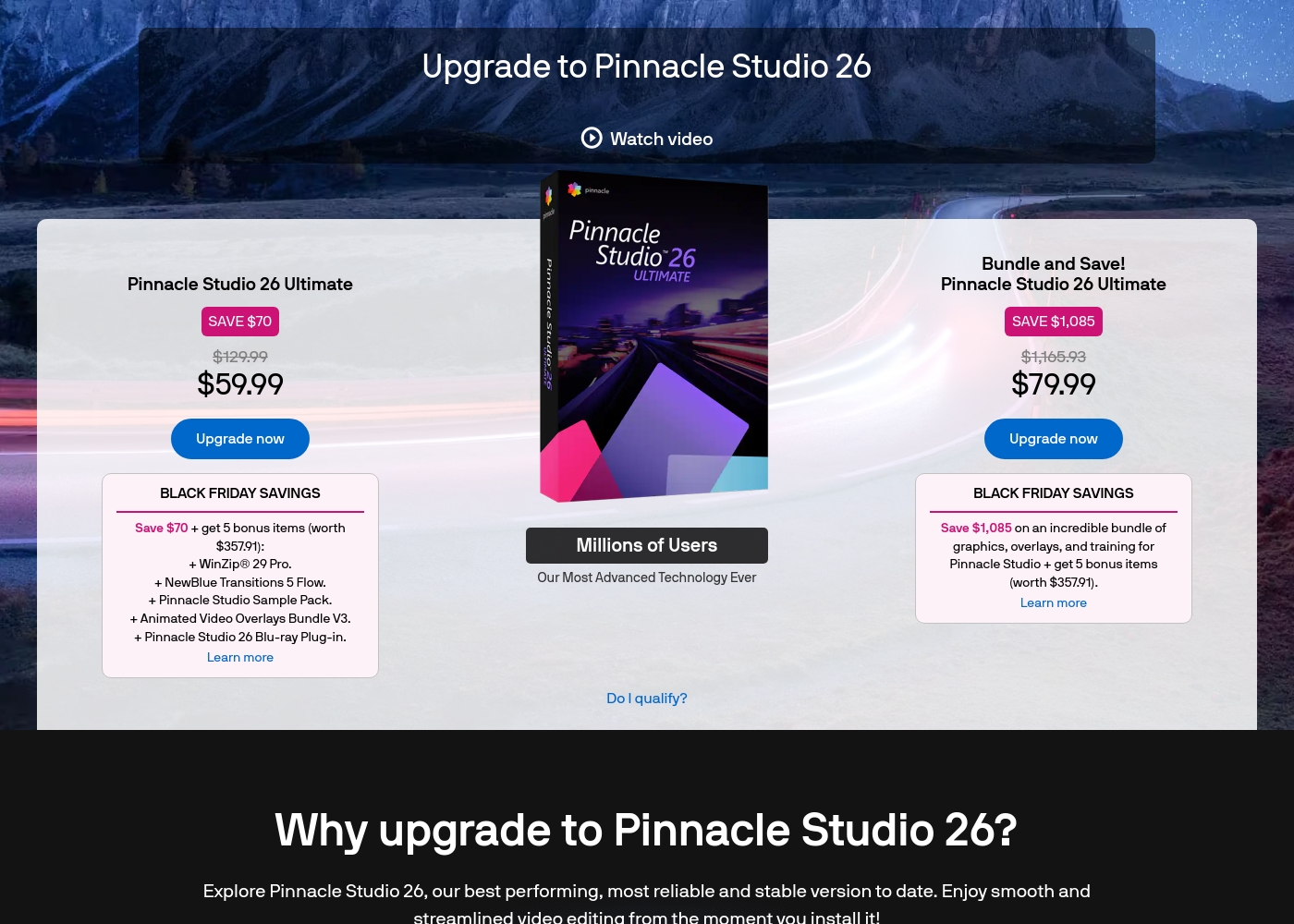
Pinnacle Studio 26 Ultimate acquisition costs range between $59.99 and $79.99 as a one-time upgrade purchase, with two main options: Pinnacle Studio 26 Ultimate at $59.99, and the Bundle and Save! version at $79.99.
These prices represent special Black Friday upgrade offers for users looking to access the latest features. Here is how the deals compare:
Pinnacle Studio 26 Ultimate
Price: $59.99 (One-time Upgrade Price) Best For: Current users who want the latest, most stable software version and specific utility tools. Other Features:
- Saves you $70 off the regular $129.99 price.
- Includes a total of 5 bonus items worth $357.91.
- Comes with WinZip® 29 Pro and NewBlue Transitions 5 Flow.
- Features the Pinnacle Studio 26 Blu-ray Plug-in.
- Includes the Pinnacle Studio Sample Pack and Animated Video Overlays Bundle V3.
- One-time price of $59.99 (was $129.99)
- 5 bonus items included (worth $357.91)
- Includes WinZip® 29 Pro
- Includes NewBlue Transitions 5 Flow
- Includes Pinnacle Studio 26 Blu-ray Plug-in
- One-time price of $79.99 (was $1,165.93)
- Includes all 5 bonus items (worth $357.91)
- Includes training, graphics, and overlays bundle
- Save $1,085 on the total package
Specific pricing tables are not publicly detailed here, but VEED does offer multiple ways to engage with the product, ranging from free access to custom enterprise solutions. This structure ensures users of all sizes can find a suitable entry point.
Free Access
Price: Free Best For: Users who want to test core features or single creators with minimal usage needs. Other Features:
- Start for free * No credit card required
- Use the video editor
- Access AI tools like Auto Subtitle Generator
You can begin using VEED immediately without needing to enter any payment information. It’s an ideal option for anyone looking to quickly test the core capabilities and user experience of this powerful video editing suite before deciding on a financial commitment.

Pricing Notes
- Pinnacle Studio uses a traditional one-time licensing model, with plans ranging from 26 to 200.
- VEED offers a 'Start for free' option requiring no credit card to test core features.
- VEED restricts 4K export capability exclusively to premium or higher-tier paid subscriptions.
- Specific monthly subscription costs for VEED’s standard paid tiers are currently opaque and not publicly detailed.
- The Pinnacle Studio data mentions a 10-day free StudioBacklot trial, which is for content/training, not the software itself.
Pricing Head-to-Head
User Reviews
User feedback for Pinnacle Studio is exceptionally poor, primarily focusing on extreme frustrations with the software's reliability and performance. Despite newer versions claiming improved stability, many users report constant crashing, freezing, and issues with rendering, even when using high-spec computers.
This instability leads to lost progress and wasted time. The second overwhelmingly negative theme is customer support.
I’ve been using this product for several years because it is user friendly and features many nice tools. However, the tech support when there is an issue is not good at all. I was extremely disappointed and uninstalled the software despite owning it.
VEED enjoys generally positive external feedback, focusing heavily on its ease of use and accessibility. Reviewers consistently praise the web-based platform for being intuitive, beginner-friendly, and having a clean interface, which makes creating professional videos quick and simple.
Many users appreciate the robust features like drag-and-drop functionality, good animation options, and powerful AI tools, particularly for generating content and quickly creating YouTube Shorts. The platform’s ability to handle high-fidelity transcriptions is also frequently mentioned.
VEED simplifies the video creation process significantly. Editing and adding effects, especially utilizing new AI technology, makes improving your product fast and seamless. I highly recommend this platform.
Our Verdict
For most teams and content marketers today, VEED wins the speed and efficiency race. Pinnacle Studio remains the powerful but temperamental workhorse for classic editors. You must decide between a powerful desktop install or a fast, reliable browser experience. Pinnacle Studio’s superpower is its deep, frame-accurate control over high-end media. It is one of the few consumer-level tools supporting native 8K footage import gracefully. If you need MultiCam editing prowess or comprehensive green screen post-production, Pinnacle Studio delivers. VEED’s superpower is drastically simplifying the video workflow using robust AI technology. Tools like Auto Subtitles and AI Avatars mean VEED users create content 60% faster. Its centralized Brand Kit and Review Mode make VEED essential for large, collaborative teams. The deciding factor is your platform preference and primary output needs. If you need powerful hardware processing for detailed film projects, install Pinnacle Studio. If globalization and team speed matter most, VEED is your go-to. Choose VEED if you need easy team scaling and killer AI translation features. Choose Pinnacle Studio if you handle large, high-resolution 8K files and prioritize traditional, manual tool depth.
Frequently Asked Questions
Is VEED better than Pinnacle Studio for team collaboration?
Yes, VEED is designed specifically for team scaling and workflows. It features a built-in Brand Kit, Asset Sharing, and a Review Mode for feedback. Pinnacle Studio focuses on a powerful single-user, desktop experience.
Which software is better for creating video tutorials?
Pinnacle Studio is better if you require frame-accurate MultiCam editing and Green Screen compositing. VEED is faster due to its integrated screen recorder and instant Auto Subtitles. Your preference depends on complexity versus speed.
Does Pinnacle Studio offer a free version or a free trial?
Pinnacle Studio does not offer a truly free version. It provides new users with a 10-day StudioBacklot pass for training and royalty-free content. VEED, however, offers a 'Start for free' entry point.
Can I export 4K video easily with both Pinnacle Studio and VEED?
Pinnacle Studio handles high resolutions well, supporting 8K import. VEED restricts 4K export capability only to its higher-tier premium subscriptions. This is a crucial pricing difference.
Why do reviewers complain about Pinnacle Studio’s stability?
Many users acknowledge Pinnacle Studio’s broad feature set but report frequent software crashes and reliability problems. Reviewers also often cite slow and inconsistent customer support responsiveness.
Which tool offers AI text-to-video or Avatar generation?
VEED is the definite winner here, offering extensive AI capabilities like Avatars and voice cloning. Pinnacle Studio focuses on traditional editing and does not include generative AI features.
Ready to Choose?
Both tools have their strengths. Choose based on your specific needs.