Kapwing vs VEED
Kapwing and VEED both promise easy browser-based video editing, but they serve different needs. Kapwing focuses on simple, collaborative editing for social media, while VEED offers a more robust AI-powered suite for scaling video production. Here's how to pick the right one for you.
Best for: Social media managers needing quick content repurposing, Small teams (2-10) collaborating on browser-based edits
Best for: Marketing teams needing AI tools and brand consistency, Enterprise organizations with 500+ employees
Easy UI, high-risk business policies.
We recognize Kapwing offers a powerful, user-friendly online editor perfect for quick social media content creation, often cited as being simple to figure out. However, serious concerns exist regarding its business model, aggressive paywalling, and unresponsive customer support practices. Overall, we caution users strongly due to predatory billing and an irresponsible user data retention policy that repeatedly results in unexpected, permanent content loss.
Pros
- User-friendly and simple interface (easy to figure out quickly).
- Browser-based editing requires no software downloads.
- Useful tools for repurposing content (e.g., short clips from long videos).
- Offers specific powerful timeline controls, including keyframes and custom animations.
Cons
- Aggressive paywalls make the free version nearly useless for core editing tasks.
- Irresponsible data retention; projects are reportedly deleted after short payment delays or 30 days.
- Unresponsive customer service, often hiding behind a strict "no refund policy".
- Auto-renewal policies sometimes lack proper notification, leading to unexpected charges.
Browser-based video editing power.
We find VEED to be a highly accessible, browser-based video editing solution that excels at streamlining content creation using powerful AI. Overall, we recommend this platform, especially for short-form content, despite the premium pricing required for full functionality.
Pros
- Extremely intuitive and beginner-friendly interface.
- Fully web-based; no software installation or downloads required.
- Powerful AI tools for auto-subtitles, translations, and video generation.
- Excellent for creating and editing short-form content (e.g., YouTube Shorts).
Cons
- Subscription costs are frequently cited as a limiting factor.
- Unreliable for long-form video recording and editing (potential data loss/glitches).
- Exporting 4K video is restricted to higher-tier or professional plans.
- AI translations (subtitles) can sometimes be inaccurate or difficult to edit manually.
AboutKapwing
Kapwing is recognized as a powerful, yet incredibly user-friendly, online video service. It’s designed for anyone who needs to be immediately ready to create high-quality content. If you are a social media manager or someone who values speed and collaboration, this tool is described as essential for your bookmark list. Users consistently call it the most user friendly software they have ever used. 💡
AboutVEED
VEED is a complete end-to-end video suite designed for busy teams and creators. It allows you to create, collaborate, and share impressive videos entirely from within your browser. This platform offers seamless workflow consolidation, perfect for everyone from individual content makers to large organizations like the Fortune 500. It includes smart collaboration tools and a dedicated Brand Kit, ensuring your team maintains consistency. Additionally, you access a vast, royalty-free stock library featuring over 2 million video and audio assets. 💡
Highlights
Feature Comparison
Features Overview
We highlight the main differences and pick a winner for each feature.
AI & Automation
VEED leads with advanced AI tools for translation and avatars. Kapwing offers simpler AI for subtitles and background removal.
Kapwing provides AI-powered auto-subtitles and a background remover tool. Its AI features focus on basic accessibility and cleanup. VEED offers a much broader AI suite. It includes AI Avatars, Clone Yourself, AI Translate, Dubbing, and Eye Contact Correction. VEED's AI is more comprehensive for professional and global content. Kapwing's AI is more focused on core editing tasks.
Team Collaboration
Both support team editing, but VEED adds Brand Kit and Review Mode for better asset management.
Kapwing supports collaborative editing within a shared workspace for teams on Pro or Business plans. VEED offers Review Mode for feedback and Asset Sharing. Its Brand Kit ensures consistent fonts, logos, and assets across all team videos. VEED provides more structured tools for brand consistency and feedback. Kapwing's collaboration is more basic but effective.
Mobile Experience
VEED has a dedicated mobile app for full editing. Kapwing is browser-based only.
Kapwing is accessible via mobile browser but lacks a dedicated app. It's browser-based editing. VEED offers the VEED Captions App for mobile. Users can record, edit, and publish pro-level videos from their phones. VEED wins for mobile editing with a purpose-built app. Kapwing is limited to mobile browsers.
Ease of Use
Both are praised for being beginner-friendly. Kapwing is often called the most user-friendly.
Kapwing is consistently described as super easy to use. Its interface is simple and requires no downloads. VEED is also extremely intuitive and beginner-friendly with a clean, web-based interface. Both are excellent for beginners. Kapwing has a slight edge in raw simplicity based on user feedback.
Pricing Transparency
Kapwing's pricing is clearer. VEED's paid plan costs are not publicly listed.
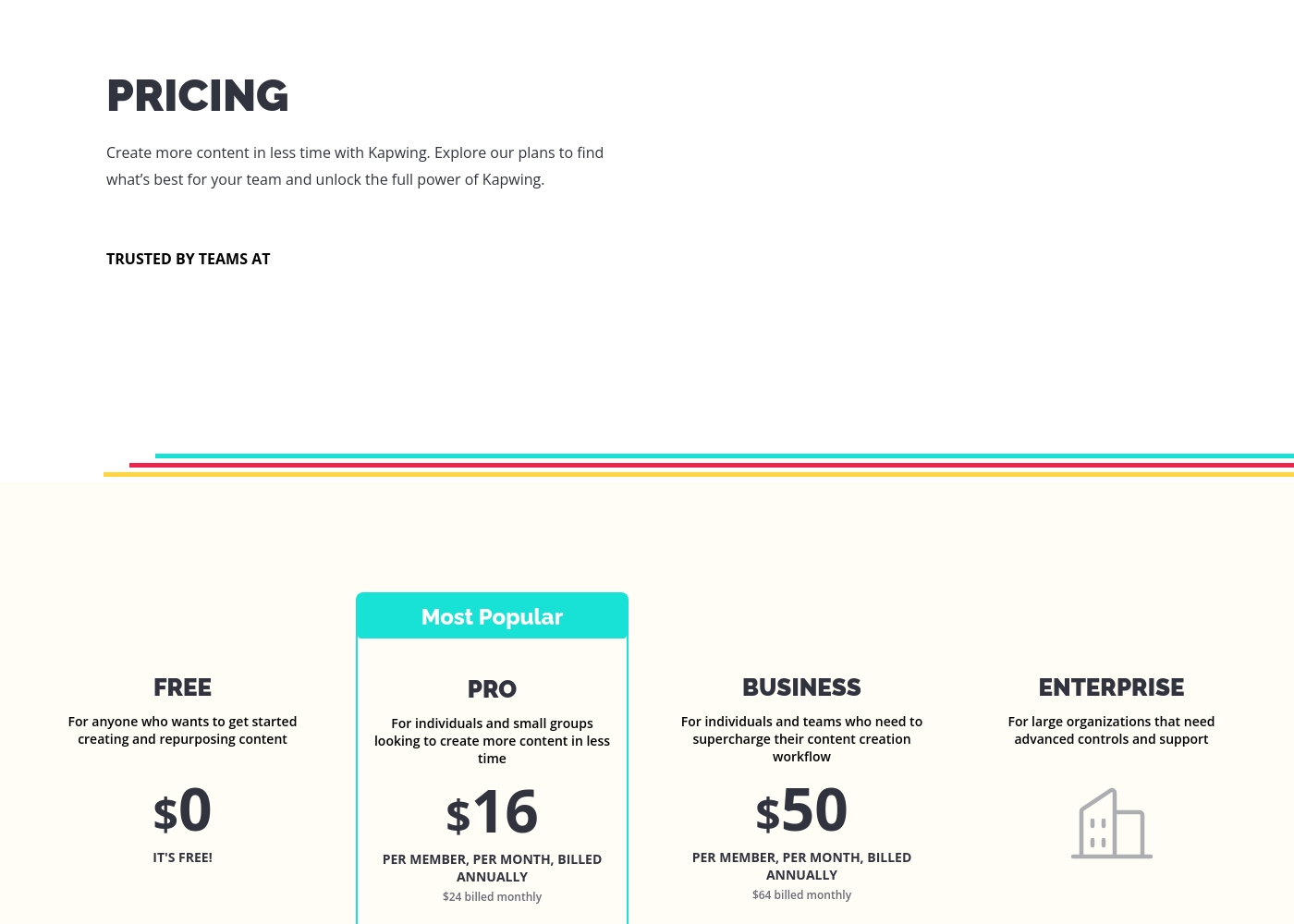
Kapwing lists clear per-member pricing: Free, Pro ($16-$24/month), Business ($50-$64/month), and custom Enterprise. VEED promotes a free start but does not publicly list specific prices for paid tiers. Enterprise requires a custom quote. Kapwing is more transparent. VEED hides its paid plan pricing, which is a drawback for evaluation.
Workflow Consolidation
VEED is a full suite with recording and hosting. Kapwing is primarily an editor.
Kapwing is a focused online video editor with tools like Resizer, Smart Cut, and Background Remover. VEED is a complete end-to-end suite. It includes a built-in recorder, editing, AI tools, stock library, and video hosting with an embeddable player. VEED consolidates more steps into one platform. Kapwing is simpler but less comprehensive.
Customer Support
Kapwing's support is reported as poor. VEED has support available.
Kapwing's external reviews frequently describe customer service as rigid and unresponsive. It's noted for a strict 'no refund policy'. VEED provides a 'Contact Support' option. While details aren't given, it's not flagged as problematic in reviews. Kapwing has documented support issues. VEED appears more reliable in this area.
Data & Project Safety
Kapwing has major issues with project deletion. VEED does not have this concern.
Kapwing has serious reports of permanently deleting user projects after short payment delays or 30 days. This is a critical risk. VEED has no such reported data retention issues in the provided reviews. Kapwing's data policy is a major red flag. VEED is safer for project storage.
Social Media Focus
Kapwing is built for quick social media repurposing. VEED supports it but is more versatile.
Kapwing excels at repurposing content with its Resizer and Smart Cut tools. It's ideal for social media managers needing speed. VEED also creates short-form content like YouTube Shorts but offers broader features for marketing and enterprise. Kapwing is more specialized for social media workflows. VEED is more versatile overall.
Stock Assets
VEED has a larger stock library (2M+ assets). Kapwing has stock assets but less detailed.
Kapwing provides access to Stock Assets within its editor. VEED offers a vast, royalty-free stock library with over 2 million video and audio assets. VEED's stock library is significantly larger and more comprehensive.
These plans help you explore Kapwing's full power and create content faster in less time.
FREE
Price: $0 Best For: Anyone who wants to get started creating and repurposing content Other Features:
- It's free!
This is the perfect starting point if you are just beginning your content creation journey. You can access core tools without spending any money.
- Perfect for getting started creating and repurposing content
- Billed per member, per month
- For individuals and small groups
- Everything in Free, plus features for your team workspace
- Billed per member, per month
- For individuals and teams
- Everything in Pro, plus features for your team workspace
- For large organizations
- Advanced controls and support
- Everything in Business, plus features for your team workspace
Specific pricing tables are not publicly detailed here, but VEED does offer multiple ways to engage with the product, ranging from free access to custom enterprise solutions. This structure ensures users of all sizes can find a suitable entry point.
Free Access
Price: Free Best For: Users who want to test core features or single creators with minimal usage needs. Other Features:
- Start for free * No credit card required
- Use the video editor
- Access AI tools like Auto Subtitle Generator
You can begin using VEED immediately without needing to enter any payment information. It’s an ideal option for anyone looking to quickly test the core capabilities and user experience of this powerful video editing suite before deciding on a financial commitment.

Pricing Head-to-Head
User Reviews
Users often praise Kapwing’s generally simple user interface, noting it’s super easy to use right in the browser without needing complex downloads. They appreciate specific powerful features like detailed timeline controls and the new “Repurpose Video” button for quick short-form content creation.
However, recent external feedback is overwhelmingly negative regarding business practices and high-risk policies. Many users complain they are misled by marketing, finding that nearly all useful tools are locked behind an immediate, expensive paywall, making the free plan useless.
Kapwing is such a great tool for editing videos and creating content. It’s super easy to use, so you don’t need to be a pro to figure it out. Everything’s right there in your browser—no downloads needed.
VEED enjoys generally positive external feedback, focusing heavily on its ease of use and accessibility. Reviewers consistently praise the web-based platform for being intuitive, beginner-friendly, and having a clean interface, which makes creating professional videos quick and simple.
Many users appreciate the robust features like drag-and-drop functionality, good animation options, and powerful AI tools, particularly for generating content and quickly creating YouTube Shorts. The platform’s ability to handle high-fidelity transcriptions is also frequently mentioned.
VEED simplifies the video creation process significantly. Editing and adding effects, especially utilizing new AI technology, makes improving your product fast and seamless. I highly recommend this platform.
Our Verdict
For most users, VEED is the safer, more capable choice. Its AI suite and brand tools give it a clear edge for serious video production. Kapwing's superpower is raw simplicity. It's the fastest way to edit a social media clip if you need something done in minutes. VEED's superpower is its all-in-one workflow. You get recording, editing, AI tools, and hosting in one browser tab. The deciding factor is trust and scope. Kapwing has major data safety concerns. VEED is more comprehensive but costs more. Choose VEED if you need a scalable, AI-powered suite for marketing or teams. Choose Kapwing only if you need quick, basic edits and can overlook the risks.
Frequently Asked Questions
Which is better for small teams: Kapwing or VEED?
Kapwing is simpler for small teams needing quick edits. VEED is better if your team needs brand consistency and AI tools. VEED scales better for growing teams.
Does Kapwing have AI Avatars like VEED?
No, Kapwing does not offer AI Avatars. VEED has AI Avatars, Clone Yourself, and AI Translate. Kapwing's AI is limited to subtitles and basic cleanup.
Is VEED worth the extra cost over Kapwing?
VEED's pricing is hidden, so it's hard to say. However, VEED offers more advanced features like AI Avatars and Brand Kit. If you need those, it's likely worth the cost.
Can I export 4K videos with Kapwing?
The provided data does not specify Kapwing's 4K export capabilities. VEED restricts 4K export to premium plans. Check Kapwing's plan details for resolution limits.
Which tool has better customer support?
VEED's support is not flagged as problematic. Kapwing's support is frequently reported as unresponsive and rigid, with a strict no-refund policy.
Is Kapwing safe for storing my projects?
No, Kapwing has major reports of permanently deleting projects after short payment delays or 30 days. This is a critical risk. VEED has no such documented issues.
Ready to Choose?
Both tools have their strengths. Choose based on your specific needs.