Toggl

Toggl review

Time data you can actually plan on — tracking and capacity in one tool.

Toggl costs from $2/mo · 3 plans · Free plan available · prices checked Oct 12, 2026

By Ciroapp Editorial Team · Updated Sep 17, 2026

Commission may apply at no extra cost

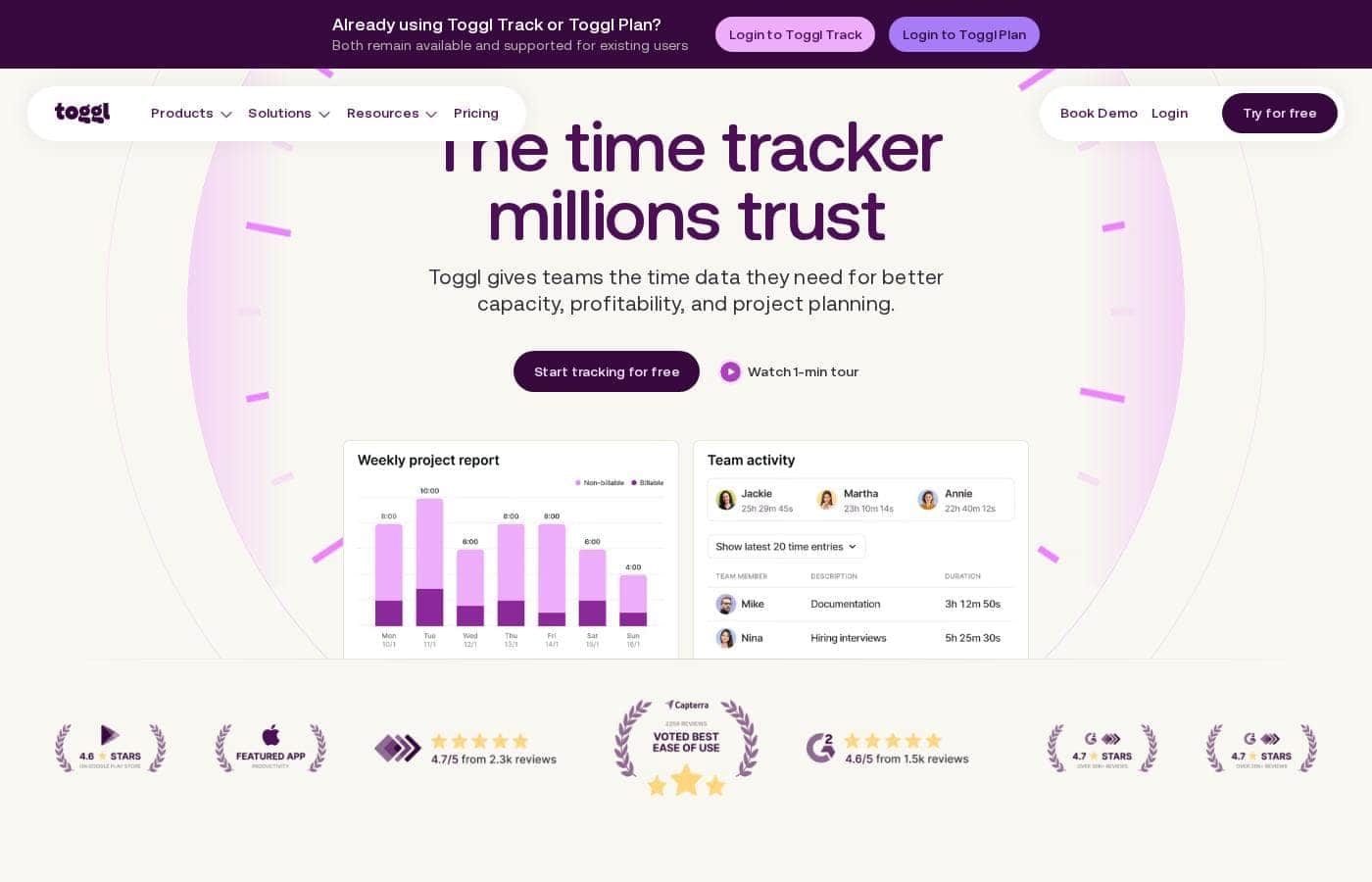
Toggl homepage screenshot

At a glance

Quick overview for Toggl: rating, pricing summary, key features, and highlights.
Pricing verified Oct 12, 2026

Ciroapp score

4.0/ 5

Toggl pairs automated time tracking with capacity planning, invoicing, and privacy-first design — no screenshots or keystroke logging. The full-featured 30-day trial makes it easy to test, though exact plan prices weren't shown in the material we reviewed. Overall, it's a strong pick for hourly-billing teams, as long as you confirm current rates before committing.

Pros

  • Pros:Automated background tracking and one-click timers capture hours without interrupting focus, reducing missed billable minutes for hourly-billing teams.
  • Pros:Tracking and capacity planning live in one tool — estimated vs. actual hours, workload views, and automatic planning around PTO and public holidays eliminate weekly spreadsheet reconciliation.
  • Pros:Invoicing is generated directly from time entries with custom hourly rates and 6-minute increments, which is specifically useful for law firms and agencies defending their bills.

Cons

  • Cons:The quoted ~2.4-month ROI applies to large organizations; smaller teams and freelancers shouldn't expect the same payback figures.
  • Cons:Long-term free-plan availability isn't stated — the 30-day trial covers all features, but solo users on tight budgets may not have a permanent free tier to fall back on.
  • Cons:Teams dependent on niche tools should verify integration support before committing; only Jira, Asana, Notion, Slack, and custom API access are confirmed in the reviewed material.
Best for
  • Agencies and professional services teams billing hourly and managing retainers
  • Freelancers who need tracking, estimates, and invoicing without a learning curve
  • Software and IT teams tracking time inside Jira or Asana
Free trial
Yes — 30 days
This section is a summary. Detailed sections about features, use cases, pricing, and reviews follow below.

What is Toggl?

Guessing at project estimates and losing hours to admin work? Toggl records time automatically across web, desktop, and mobile, compares estimated versus actual hours, and turns those entries into invoices and reports. The payoff: fewer missed billable minutes and planning built on real data, not memory.

Toggl is time tracking software with built-in capacity planning. It captures hours across web, desktop, mobile, and browser extensions, then connects that data to project estimates, profitability reports, and invoicing. Teams can see who's overbooked, which clients make money, and what new projects cost in real hours.

The site targets freelancers, growing teams, and large organizations, including agencies, software teams, law firms, and finance teams.

Should you choose Toggl?

Quick buyer guidance before you compare plans or click through.

Choose it if

  • Teams that want estimated versus actual time on every project or task
  • Privacy-conscious organizations — no screenshots, keystroke logging, or webcam monitoring
  • People who work across devices: web, Windows, Mac, iOS, Android, and browser extensions
  • Companies that want planning and tracking unified instead of two separate tools
  • Client-facing teams sharing transparent, time-backed reports and quotes

Skip it if

  • Buyers who want surveillance features — Toggl explicitly skips screenshots, keystroke logging, and webcam monitoring
  • Teams that need exact plan pricing upfront — the homepage pushes you to the pricing page or sales rather than listing costs
  • Workflows dependent on specific tools — confirm your stack (Jira, Asana, Notion, Slack, or custom API needs) is supported before committing
  • Organizations wanting the quoted ~2.4-month ROI — that figure applies to large organizations, so smaller teams shouldn't bank on it

Next steps before buying

  1. 1Sign up for the free 30-day trial — all features included, no credit card required — and test real projects rather than demo data.
  2. 2Review the pricing page for current plan costs and what fits your team size before the trial ends.
  3. 3Check the integrations list for your tools (Jira, Asana, Notion, Slack), and test the browser extension or API if you need custom connections.
  4. 4Compare against alternatives like Clockify, Harvest, Hubstaff, or Timely — Toggl publishes comparison pages, but run your own side-by-side trial too.
  5. 5If you're a large organization, request a demo to ask about SSO, rollout support, and what drives the reported ~2.4-month ROI.

Ease of use

Toggl presents itself as low-friction: one-click or background tracking, apps on every major platform, and a 30-day trial with no credit card. The site says freelancers face "no learning curve," and existing users note it consolidated juggling separate tools. Larger organizations get a dedicated Customer Success Manager, custom onboarding, and team training, plus a knowledge base and community forum for self-serve help.

Toggl Key Features

⏱️ Capture every hour without thinking about it

You shouldn't have to remember when you started. Toggl tracks time in the background or with one click, so hours get captured without interrupting your focus. Your team stops guessing, and records stay accurate on hectic days.

It's a fit for anyone who forgets to hit start — which is most of us.

✨ Track and plan in one place

Tasks, estimates, and time entries share one view, so your plan and your reality never drift apart. No more reconciling a separate planning tool against your timesheet each week. You can manage work visually too:

  • Board — track task status Kanban-style
  • Timeline — plan capacity across people and projects
  • Calendar — drag tasks onto the right day

✨ Turn tracked hours into invoices you can defend

Set custom hourly rates, track billable hours, and generate detailed invoices straight from time entries. Nothing gets billed from memory, so fewer billable minutes slip through. Law firms can log time in 6-minute increments.

If you bill clients by the hour, this gives you invoices that hold up.

✨ See exactly where your hours go

Filter, group, and break down time data by project, client, team, or any dimension you need. Compare estimated versus actual hours to keep projects on budget, and build financial reports that show profitability at a glance. AI-driven insights surface trends, risks, and opportunities automatically — no spreadsheet digging required.

✨ Know your team's capacity before you commit

Before you say yes to the next project, you can see who has capacity and who's overbooked. Toggl plans around PTO and public holidays automatically, so schedules reflect reality. Spotting overload early means deadlines stick and burnout doesn't.

It's built for managers juggling multiple clients and projects at once.

Use Cases

💰 Bill every minute you work

Track time across clients, projects, or matters, then generate invoices straight from your entries. Custom hourly rates and 6-minute increments keep billing accurate for agencies, law firms, and finance teams. Expected outcome: defensible invoices with fewer missed billable minutes.

Tip: set rates per client before your first timer starts.

📅 Plan capacity before you're overbooked

Check who's available, who's overloaded, and what a new project costs your team. PTO and public holidays are planned around automatically, so schedules reflect reality. Expected outcome: deadlines stick — and burnout doesn't.

Tip: use the Timeline view to drag tasks onto the day they'll happen.

🎯 Keep projects on budget

Compare estimated versus actual time on every project or task. Spot where profitability is won or lost, and scope future work from real history instead of memory. Expected outcome: quotes and plans built on real data.

Tip: set up recurring projects for retainer clients to skip repeat setup.

🔌 Track where work happens

Log hours inside Jira, Asana, Notion, or Slack without switching tabs. Web, desktop, and mobile apps keep entries complete across devices — with no screenshots or keystroke logging. Expected outcome: timesheets your team actually keeps up.

Tip: start with the browser extension if your team works in the browser.

Toggl pricing

From$2/mo

  • From the vendor's pricing page, checked Oct 12, 2026
  • 3 plans
  • Free plan available

Prices checked on Oct 12, 2026 from Toggl's pricing page

Toggl pricing page screenshotView pricing page screenshot
PlanBilled monthlyBilled annuallyIncludes
Time Off Pro
per user
$2/mo
—
per user
Capacity Management
per user
$5/mo
—
per user
Capacity Management
Free
—

Price history

Tracking prices since Oct 1, 2026. No price change detected yet.

Pricing types: Free trial

Pricing notes

Toggl offers a free 30-day trial with all features included, no credit card required. Paid plans are tailored to freelancers, growing teams, and large organizations, with current rates listed on Toggl's pricing page.

Toggl offers a free 30-day trial with all features included, plus paid plans built for freelancers, growing teams, and large organizations — current rates live on Toggl's pricing page.

Here's what Toggl's site confirms about how its plans are structured.

For Freelancers

Best For: Solo entrepreneurs who bill clients by the hour Other Features:

  • Plan and track time in one place
  • Smarter estimates that improve over time
  • Accurate, built-in invoicing
  • No learning curve

This tier is for solo workers who want simple, accurate billing. You track your hours, turn them into invoices, and never miss a billable moment ⏱️. If you're flying solo, this keeps admin work light.

For Growing Teams

Best For: Teams managing workload, deadlines, and profitability Other Features:

  • Spot team overload before it happens
  • Align priorities across the team
  • Keep revenue in line and track profitability
  • Know who's available and when it's time to hire

If you run a team, this level centers on capacity and deadlines. You can see how new projects affect workloads, so deadlines stick and burnout doesn't. It suits managers who want profitability data without micromanaging people.

For Large Organizations

Best For: Companies that need enterprise-grade support and rollout help Other Features:

  • Productivity, profitability, and workload reports
  • Dedicated success manager
  • Custom onboarding and team training
  • Priority support and SSO
  • Custom solutions

Bigger companies get hands-on rollout support from a dedicated Customer Success Manager. Toggl also notes teams typically see ROI in about 2.4 months at this level. If you don't need SSO, custom training, or company-wide rollout support, a smaller tier will likely serve you better.

One tip before you buy: confirm exact plan prices, billing periods, and seat limits on Toggl's live pricing page, since rates weren't shown in the material we reviewed.

The clearest offer on the page is the trial. Toggl gives new users a free 30-day trial with all features, no credit card required, and the freedom to cancel anytime. That makes it easy to test automated tracking, invoicing, and reporting before spending a cent. No refund policy was mentioned on the pages we reviewed.
Cost calculator

Estimate what Toggl costs for your team.

Billing
Per month
$10
Per year
$120

Time Off Pro is priced per user: price × 5 seats. Estimate based on published list prices, before taxes, add-ons and discounts.

How to pay less for Toggl

  • Start on the free plan and upgrade only when you hit its limits.
  • Use the 30-day free trial before you pay.
  • Some plans are priced per user: only pay for seats people actually use.
Start free trial

Email me when Toggl changes price

One email when we detect a price change on the vendor's pricing page. No newsletter, no deals. Unsubscribe in one click.

User Reviews

No reviews yet.

Write a Review

Write a Review for Toggl
0/100 characters
0/2000 characters

Why use Toggl?

If your estimates come from memory and your invoices from guesswork, that's the gap Toggl fills. The company positions time data as the foundation for planning, not an afterthought. Based on its site, here's what stands out:

  • One place to track and plan. Tasks, estimates, and time entries share the same view, so you're not reconciling a timesheet against a separate planning tool every week.
  • Privacy-first tracking. Toggl states it never monitors screens, keystrokes, or webcams — automated background tracking that teams like Xmartlabs chose specifically to protect trust.
  • Billing you can defend. Custom hourly rates, billable-hour tracking, and invoices generated straight from time entries, with 6-minute increments available for legal work.
  • Capacity you can actually see. Real-time views of who's available, who's overbooked, and what saying yes to the next project costs — with PTO and public holidays planned around automatically.
  • It meets your tools where you work. Native Jira and Asana integrations, a browser extension for Notion and Slack, plus API and MCP access for custom setups.
  • Results other teams report. Case studies cite 80 hours saved monthly, 97% revenue forecast accuracy, 100% adoption in a 500+ person team, and roughly 2.4-month ROI for large organizations.

Toggl alternatives

Other tools in the Time tracking category

View all Time tracking tools
Buddy Punch

Buddy Punch

Time tracking3.7/5

It’s a cloud-based time clock platform that helps employers track where workers are, their hours, overtime, and pay, with detailed reporting. It’s built for businesses that want accurate timekeeping across locations, including remote workers. Employees can punch in and out using a smartphone, computer, kiosk, or QR code. It integrates with payroll software like QuickBooks, Paychex, and Workday to simplify payroll.

ClickTime

ClickTime

Time tracking3.7/5

ClickTime is a powerful platform for comprehensive time tracking and resource management. It is designed to give you deep insights into how your team uses its bandwidth. This system tracks employee hours, project deadlines, and budget targets seamlessly. By using ClickTime, you get valuable information about project costs and overall profitability. It is the tool that helps you unify your planning and financial forecasting efforts.

Clockify

Clockify

Time tracking4.4/5

Clockify is widely known time tracking software trusted by millions of users worldwide. It functions as a comprehensive time tracker and timesheet app. This platform is perfect for teams, offering unlimited users and remaining free forever. Users have given it an excellent 4.8 rating based on thousands of reviews. The app lets you track time from anywhere, syncing data across web, desktop, and mobile devices automatically.

Timely

Timely

Time tracking4.1/5

Timely is an automatic time tracking solution designed for businesses seeking to maximize their margins and drive profitability. It uses AI to capture work activity seamlessly in the background. This approach eliminates manual input, ensuring you receive accurate, real-time data without interrupting current workflows. It is trusted by over 5,000 businesses and helps managers gain a complete, real-time view of resource allocation and project progress easily. 💡 Notably, Timely takes user privacy seriously; it operates with a strict anti-surveillance policy. Your tracked memories remain yours, and no manager can see them until you explicitly share them.

memtime

memtime

Time tracking4.1/5

memtime is an automated desktop application designed to solve the struggles of tedious manual time tracking. This tool eliminates the need for distracting start/stop timers entirely. Instead, it runs passively behind the scenes, memorizing the time you spend in various programs throughout the workday. It allows you to go back to any day and review precisely what you focused on, when, and for how long. This is especially valuable for anyone who bills by the hour, including consultants, legal services, agencies, and accountants, because it connects to your existing project software for instant time entry export.

Hubstaff

Hubstaff

Time tracking3.9/5

Hubstaff provides robust time tracking software, project management tools, and workforce analytics designed to increase productivity and operational efficiency for businesses of all sizes around the world.

Toggl FAQ

How much does Toggl cost?

Toggl's cheapest paid plan, Time Off Pro, costs $2 per month. Paid plans range from $2 to $5 per month. Prices checked on Oct 12, 2026 from the vendor's pricing page.

Does Toggl have a free plan?

Yes. Toggl has a free plan (Capacity Management); paid plans start at $2 per month.

Does Toggl offer a free trial or a money-back guarantee?

Toggl offers a 30-day free trial.

Has Toggl's price changed recently?

No. We have not detected a price change since we started tracking on Oct 1, 2026.

Which tools does Toggl integrate with?

Native integrations cover Jira and Asana. The browser extension tracks time inside tools like Notion and Slack. Need something custom? Toggl offers API and MCP access, so developers can build their own connections.

How does Toggl handle data security and privacy?

Toggl advertises GDPR compliance and built-in security, with SSO available for large organizations. It also never monitors screens, keystrokes, or webcams — tracking stays automated and private, which teams like Xmartlabs chose deliberately.

What onboarding and support can I expect?

Large organizations get a dedicated Customer Success Manager, custom onboarding, team training, and priority support. Everyone else can lean on the knowledge base and community forum for self-serve help.

Ready to try Toggl? Check out the official site or pricing.

Are you Toggl? Claim this listing · Get the badge