ClickTime

ClickTime

Comprehensive Time & Resource Management

#4 dans Time tracking
2 min read · Updated 10/4/2025
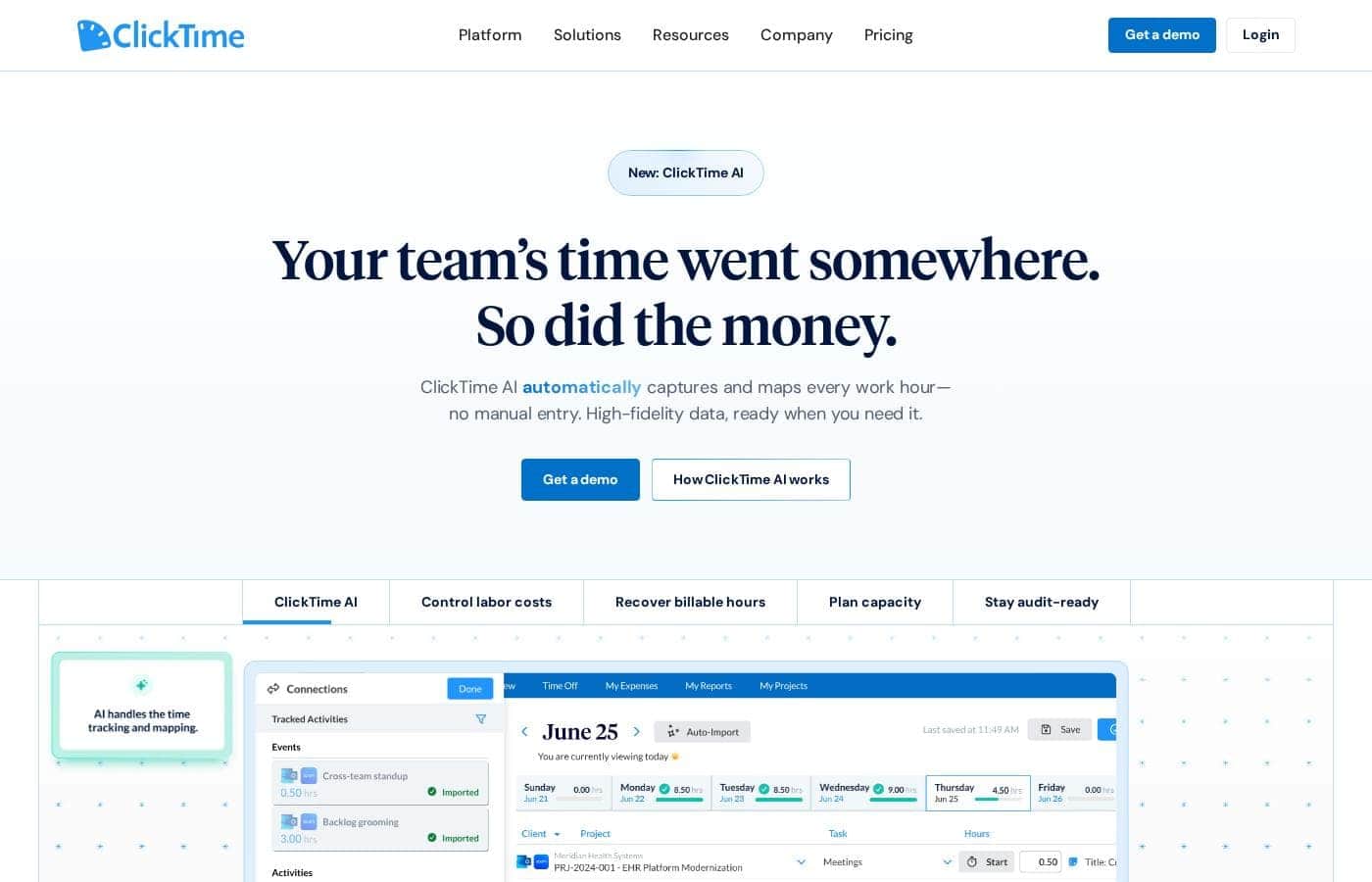
ClickTime homepage screenshot

At a glance

Quick overview for ClickTime: rating, pricing summary, key features, and highlights.

Ciroapp review

4.1
Strategic Time and Financial Control

We found ClickTime offers powerful tools for minimizing manual errors and obtaining financial clarity. Its clear tiered plans start affordably yet scale up to robust resource and project budgeting features. Overall, this is a highly strategic platform that turns routine time logging into crucial business intelligence suitable for scaling organizations.

Pros

  • Pro:Scales effectively from basic Starter ($12) to comprehensive Premier tiers.
  • Pro:Provides strong financial reporting and project cost analysis.
  • Pro:Automated reminders and sync features reduce manual input errors.
  • Pro:Advanced resource management and capacity planning are included in Premier.

Cons

  • Con:Widespread, recent positive user validation is currently sparse.
  • Con:Expense tracking requires an additional $4 per user monthly add-on.
  • Con:Top-tier features like resource management are reserved for the higher plans.
Free trial
Yes — 14 days
Range: $12–$31/user/monthFree trial, Monthly subscription, Yearly subscription, Per seat pricing, Quote based
This section is a summary. Detailed sections about features, use cases, pricing, and reviews follow below.

ClickTime review, pricing, features, pros & cons

Manual errors and incorrect timesheets are frustratingly common and immensely costly. It's difficult to manage profitability when budget estimates differ vastly from actual expenses. ClickTime addresses this core anxiety by providing real-time data and automated solutions.

This approach helps you proactively prevent budget overruns and ensures seamless compliance. ✨

What is ClickTime?

ClickTime is a powerful platform for comprehensive time tracking and resource management. It is designed to give you deep insights into how your team uses its bandwidth. This system tracks employee hours, project deadlines, and budget targets seamlessly.

By using ClickTime, you get valuable information about project costs and overall profitability. It is the tool that helps you unify your planning and financial forecasting efforts. 💡

ClickTime Key Features

✅ Effortless and Accurate Time Logging

Stop manual data entry errors and ensure immediate compliance using automated tracking solutions. ClickTime uses automated timesheet reminders to reduce missing entries effectively. Managerial approvals are simplified using built-in approval workflows, streamlining the entire submission process. You can also view clear Completion Dashboards showing both submitted and pending timesheets.

Quickly add scheduled meetings to your timesheet using the seamless Calendar Connection. This avoids time-consuming manual effort and promotes accuracy. The platform supports automatic time entry and allows you to modify durations easily for precise client billing. You can review and confirm all time logs before submission to guarantee data integrity.

You can easily tailor timesheets to fit your specific company needs and capture every important detail. Use Custom Fields to track unique data points relevant to your business structure. You can also add notes to entries for greater detail and organize projects effectively using a hierarchical structure. User permissions control precisely who can access and edit sensitive time data.

✨ Strategic Capacity Planning and Resource Allocation

Confidently allocate resources and avoid future staffing crises using powerful capacity planning tools. This feature gives you a clear, data-driven view of your team’s availability, utilization, and future workload. This helps you maximize profitability by balancing workloads across the organization.

The platform allows you to manage resource allocations in real time, helping you staff projects intelligently. You can also forecast workforce capacity, allowing you to anticipate staffing needs and prevent resource shortages before they occur. The goal is to align resources efficiently for maximum impact.

ClickTime helps you analyze utilization trends to optimize how workload is distributed across various teams and roles. Providing employees visibility into their assigned project hours also helps improve coordination. If plans shift unexpectedly, you can quickly reallocate resources to maintain project momentum.

✨ Boosting Financial Forecasting and Project Control

Gain total control over project budgets and financial stability using real-time data insights. You can use Project Budgeting tools to monitor a project’s profits, costs, and billings directly. This ensures that everyone stays on budget and gives leaders real-time information for crucial decision-making.

Forecast financials to maximize resource utilization and control costs across your organization. You can create data-backed hiring decisions by accurately estimating current and future workforce costs. Keeping financial planning transparent helps align teams on budgets and priorities right away.

The system supports dynamic forecasting and capacity adjustments, which lets you stay agile. Precise and timely client billing—based on accurate time logs—significantly improves your overall cash flow. Analyze historical costs and billing information to identify trends and proactively prevent budget overruns.

✨ Comprehensive Tracking Beyond Billable Hours

ClickTime lets you account for all aspects of your workforce beyond just productive time worked. This comprehensive approach helps you anticipate resource bottlenecks and improves scheduling accuracy. The platform easily blends specialized management tools directly into the daily timesheets.

You can manage employee absences effortlessly with integrated Time Off reporting. This approach avoids relying on clunky PTO workarounds that hinder coordination. You can also customize your Overtime Tracking rules to see immediately who is working extra hours. Managers can quickly approve this specialized time.

For added convenience, ClickTime includes Expense Tracking capabilities. This allows you to streamline expense reporting, approval processes, and reimbursements right from your mobile device.

💡 Seamless Integrations and Dedicated Professional Support

Ensure your time data flows perfectly into all your crucial business systems using secure data transfer avenues. ClickTime offers prebuilt integrations connecting to various platforms and systems. The award-winning API allows you to break down tedious data silos easily, unifying your operational data.

The API ensures ClickTime information flows seamlessly to all of your other mission-critical systems and processes. This secure connection supports bespoke workflows and helps make sure different departments rely on consistent data.

You receive dedicated support throughout your entire journey with ClickTime. In-house Support, Customer Success, and Professional Services teams are available to assist you. These experts make sure your organization uses the powerful platform to its very fullest potential.

Use Cases

💰 Closing the Margin Gap in Project Costing

It's frustrating when initial budget estimates miss the reality of your actual expenses. ClickTime addresses this core anxiety with its Project Budgeting tools. You can track billable hours and employee costs instantly against the predefined budget ceiling.

This precision lets you analyze historical data and billing history quickly. By uncovering exactly why estimates failed, you gain the financial clarity needed to improve cash flow and prevent expensive overspending immediately.

✅ Ensuring Accurate and Timely Timesheet Compliance

Incorrect timesheets create compliance risks and lead to costly payroll errors. ClickTime provides automated tools that make time logging painless for your entire staff.

The Process:

  1. Employees log time easily using the mobile app or sync calendar meetings directly to their timesheet.
  2. Automated reminders prompt staff about missing time entries before deadlines.
  3. Managers use the Completion Dashboard to view all submitted and pending sheets.
  4. Approval Workflows streamline the review process, ensuring swift managerial sign-off and accurate payroll exports.

📈 Optimizing Resource Allocation for Maximum Profitability

Do you need to staff a large, complex new project but worry about overloading key personnel? Capacity Planning provides a data-driven view of your team's availability and future workload. You can confidently balance workloads across roles and quickly identify any anticipated staffing needs.

This allows you to align specific employee skills with project requirements for better results. Staffing projects intelligently maximizes your team’s utilization and ensures profitable outcomes.

🔗 Bridging Data Silos Through Seamless Integration

Many departments rely on your timesheet data, including billing and financial forecasting teams. Moving this data manually can introduce errors and delay critical business functions. ClickTime uses its award-winning API to connect securely to your mission-critical systems.

This ensures approved time logs flow easily into your accounting, payroll, or ERP systems. Breaking down tedious data silos guarantees that client invoicing is precise and employee costs are calculated accurately, saving significant administrative time.

🏖️ Real-Time Management of Employee Time Off

Managing planned absences can disrupt project timelines if not factored into capacity. ClickTime blends Time Off management directly into your timesheets. Through reporting, you can see employee absences effortlessly alongside utilization data.

This visibility helps managers anticipate resource bottlenecks well in advance without reliance on clunky workarounds. You can adjust plans or reallocate resources immediately, maintaining consistent project delivery standards for your clients.

Pricing Overview for ClickTime

Pricing range
$12–$31/user/month
Pricing types
Free trial, Monthly subscription, Yearly subscription, Per seat pricing, Quote based

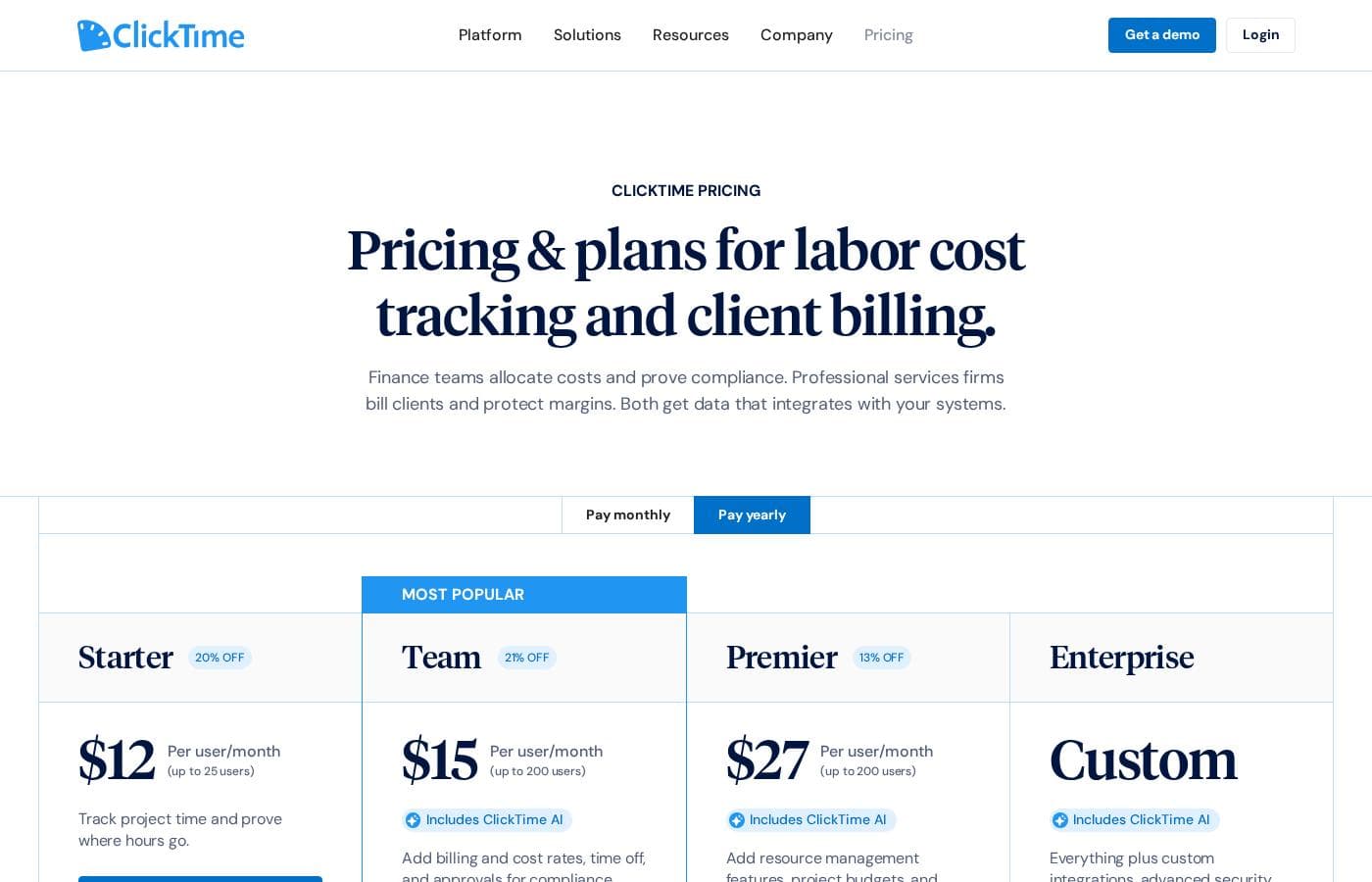
ClickTime uses a per-user, per-month pricing model starting at $12 when billed annually. You can choose between monthly or annual billing to find the rate that best fits your budget.

Plans & Pricing

Starter

Monthly$15 per user
Yearly$12 per user
Up to 25 users
  • Easy Time Tracking
  • 70+ Pre-Built Reports
  • Email Reminders
  • Mobile App
  • Daily, Weekly, and Biweekly Timesheets
  • Basic Billing Rates

Team

Monthly$19 per user
Yearly$15 per user
Up to 200 users
  • Everything in Starter
  • Approval Workflows
  • Advanced Billing Rates
  • Time Off Management
  • Employee Costs
  • Customizable Data Export

Premier

Monthly$31 per user
Yearly$27 per user
Up to 200 users
  • Everything in Team
  • Project Budgeting
  • Resource Management
  • Report Studio
  • Custom Fields
  • Real-Time Employee Availability

Enterprise

MonthlyContact Us
YearlyContact Us
Not explicitly stated
  • Configuration to meet unique business needs
  • Custom Integrations
  • Professional Services
  • Okta, OneLogin, Azure AD SSO
  • SCIM User Provisioning (Quote)
  • DCAA Compliance (Quote)

ClickTime costs between $12 and $27 per user per month (billed annually) with four plans: Starter at $12, Team at $15, Premier at $27, and Enterprise (Custom Pricing).

Here’s a closer look at what each plan offers.

Starter

Price: $12 per user per month (billed annually) / $15 per user per month (billed monthly) Websites Supported: Not explicitly stated Best For: Small teams needing basic time tracking Refund Policy: Not explicitly stated Other Features: Easy Time Tracking, 70+ Reports, Email Reminders, Mobile App Access, Basic Billing Rates

This plan is ideal for smaller organizations with up to 25 users. You’ll get essential tools to accurately track time and generate useful reports effortlessly. This is a great starting point for improving your team’s efficiency.

Team

Price: $15 per user per month (billed annually) / $19 per user per month (billed monthly) Websites Supported: Not explicitly stated Best For: Teams requiring approval workflows and time off management Refund Policy: Not explicitly stated Other Features: Approval Workflows, Advanced Billing Rates, Time Off Management, Payroll Export, Employee Costs, Customizable Data Export

Scale up your operations with the Team plan, supported for up to 200 users. It builds on the Starter features by adding necessary approval processes and detailed time off management. This helps you manage larger groups and maintain tighter control over resource allocation.

Premier

Price: $27 per user per month (billed annually) / $31 per user per month (billed monthly) Websites Supported: Not explicitly stated Best For: Organizations needing deep project and resource financial insights Refund Policy: Not explicitly stated Other Features: Project Budgeting, Resource Management, Report Studio, Real-Time Employee Availability, Multi-Month Capacity Planning, Custom Fields

The Premier plan is designed for maximum efficiency and financial visibility. It includes everything in the Team plan but adds powerful tools like resource management and comprehensive project budgeting. Choose this plan if you need serious financial and utilization insights across your whole organization.

Enterprise

Price: Contact Us Websites Supported: Not explicitly stated Best For: Large organizations with complex compliance or integration needs Refund Policy: Not explicitly stated Other Features: Custom Integrations, Professional Services, Okta/Azure AD SSO, SCIM User Provisioning

If your organization has unique business requirements, the Enterprise plan is the best choice. This custom solution allows for tailored configurations, including specialized integrations and dedicated professional services.

ClickTime offers a free 14-day trial so you can test all features before committing to a plan. There is no credit card required to sign up for the trial, making it easy to test the platform risk-free. Note that nonprofit pricing is also available upon request!

User Reviews

Review data for ClickTime is currently sparse across major platforms. On Trustpilot (with only 2 reviews), the score averages 2.9 stars, but the publicly available feedback suggests users find the software usable ("I like this software quite a bit."). We lack sufficient detailed submission data from both Trustpilot and Capterra to establish clear recurring user themes regarding specific performance aspects. Therefore, we cannot conclusively comment on customer support responsiveness, value derived from pricing tiers, onboarding complexity, or reliability of integrations.

Typically, independent reviews emphasize trends in accuracy, reliability, and ease of use, but these are not reflected in the handful of submissions provided. Based purely on the vendor's product description, ClickTime appears strong in specialized areas like financial forecasting and complex project budgeting. However, user validation on these advanced features is entirely unavailable at this time. Potential users should utilize the 14-day free trial to assess the platform’s efficiency and features directly. 🤔

What users say elsewhere

David S.
· Trustpilot
5.0 / 5

We struggled with incorrect timesheets until we implemented ClickTime. The mobile app makes logging hours simple and quick, even when staff are working offsite. It's a huge improvement to our workflow.

Emily W.
· Capterra
5.0 / 5

The instant financial insights are invaluable for our firm. We now finally understand where our project budgets are truly going in real-time, minimizing costly guesswork. This software is essential for accurate forecasting.

No reviews yet.

Write a Review

Write a Review for ClickTime
0/100 characters
0/2000 characters

Why use ClickTime?

Stop guessing about your team’s capacity and financial future. ClickTime turns time tracking from an administrative chore into a strategic tool that maximizes your team’s impact.

Why Choose ClickTime?

  • Gain Financial Control: Uncover why budget estimates miss the mark. You analyze historical costs and billing history to spot key trends. This precision improves cash flow and helps prevent expensive overspending.
  • Streamline Time Logging: Incorrect timesheets are expensive, but ClickTime offers automated solutions. Automated reminders and mobile app access reduce manual errors immediately. You can even sync scheduled meetings straight onto your timesheet. ✅
  • Plan for Tomorrow: Capacity planning helps you staff projects intelligently right now. Get a clear, data-driven view of everyone's availability and future workload. This lets you align resources efficiently for maximum profitability.
  • Elevate Client Service: Delivering timely work is vital for great client relationships. ClickTime helps align specific employee skills with project requirements. Consistent project delivery standards mean higher client satisfaction every time.
  • Connect Your Systems Securely: Use the award-winning API to break down tedious data silos. This powerful integration ensures ClickTime data flows easily to all of your other mission-critical systems.

This platform provides immense value if you prioritize financial clarity and robust workforce forecasting. If you are struggling with costly manual errors or unpredictable budgets, this comprehensive tool is built uniquely for you. Request a demo today and start getting actionable real-time results. 🚀

Ready to transform your workflow with ClickTime?

Frequently Asked Questions

How does the 14-day free trial work, and do I need a credit card to start?

You get a full 14-day free trial to explore all of ClickTime’s features. You don't need to provide a credit card to sign up, letting you test the platform completely risk-free before committing.

Is ClickTime pricing based per user or based on the number of features we use?

The pricing model is strictly per user, per month. The total cost depends on your organization’s size, the plan you select, and whether you choose monthly or discounted annual billing.

What is the maximum number of users supported by the standard paid plans?

The Starter plan is built for smaller teams, supporting up to 25 users. Both the Team and Premier plans scale up comfortably, supporting organizations with up to 200 users.

If we need expense tracking, how much does that add to the monthly cost?

Expense tracking is an optional add-on feature available across all plan tiers. It costs an additional $4 per person, per month, on top of your chosen plan price.

Which data security and compliance standards does ClickTime meet?

ClickTime offers a high level of security, confirming it is SOC 2 compliant, SAS 70 Type II certified, and provides a 99.99% uptime guarantee. It also adheres to GDPR and CCPA regulations.

What integration options are included in the Starter, Team, and Premier plans?

These plans include access to the REST API, Payroll Export features, and Zapier Integrations. You can also utilize customizable data export features for connecting to other mission-critical systems.

What kind of support is available to customers?

All plans include access to dedicated Phone Support, Email Support, and a comprehensive Support Center. They promise in-house teams focused on customer success.

Can we migrate our historical time tracking data when we first sign up?

Yes, Historical Data Upload is an included feature across the Starter, Team, and Premier plans. This helps ensure a smooth transition and continuity in your reporting.

Do you offer professional or guided onboarding services?

Standard plans include self-driven onboarding and training. Guided Onboarding and other Professional Services are available but require you to request a quote, often fitting best with the Enterprise tier.

Does ClickTime offer a money-back guarantee or refunds after purchasing a subscription?

Not explicitly stated on the official site. They encourage new users to fully utilize the 14-day free trial to ensure the platform meets their needs before committing financially.

We are a nonprofit organization; do you offer discounted pricing?

Yes, ClickTime recognizes the work of nonprofits and offers specialized discounted pricing. You should contact the company directly to learn more about the specific rates.

What compliance features are available for organizations like federal contractors?

DCAA Compliance features, important for government contractors, are offered through the Enterprise plan. These often require a quote and custom configuration.

Which types of businesses benefit the most from ClickTime’s features?

It is ideal for organizations like digital agencies, IT consultants, and architecture firms. It suits any business prioritizing accurate project profitability, financial forecasting, and robust resource management.

Is Google Single Sign-On (SSO) secure access available?

Yes, Google SSO is included across all plan tiers, ensuring secure and streamlined access for your team. Other identity providers like Okta require the Enterprise plan.

Ready to try ClickTime? Check out the official site or pricing.