ClickTime vs memtime
ClickTime provides deep financial control and resource management for scaling organizations. memtime focuses on effortless, precise automatic time capture and guaranteed user privacy. The choice depends on prioritizing central organizational control or pure time tracking accuracy.
Best for: Enterprise organizations requiring SOC 2 and DCAA compliance, Digital agencies needing real-time financial forecasting and budgeting
Best for: Consultants, lawyers, or accountants billing precisely by the hour, Freelancers needing guaranteed recovery of all billable minutes
Strategic Time and Financial Control
We found ClickTime offers powerful tools for minimizing manual errors and obtaining financial clarity. Its clear tiered plans start affordably yet scale up to robust resource and project budgeting features. Overall, this is a highly strategic platform that turns routine time logging into crucial business intelligence suitable for scaling organizations.
Pros
- Scales effectively from basic Starter ($12) to comprehensive Premier tiers.
- Provides strong financial reporting and project cost analysis.
- Automated reminders and sync features reduce manual input errors.
- Advanced resource management and capacity planning are included in Premier.
Cons
- Widespread, recent positive user validation is currently sparse.
- Expense tracking requires an additional $4 per user monthly add-on.
- Top-tier features like resource management are reserved for the higher plans.
Accurate tracking that pays for itself.
We found memtime to be a robust, privacy-first automatic time tracker that excels at capturing every minute spent on billable work. It runs non-intrusively in the background, fundamentally removing the need for error-prone manual timers and significantly reducing administrative burden. Overall, this is an essential tool for consultants and professionals reliant on accurate utilization data and billable hour recovery.
Pros
- Automatic, non-intrusive time logging (runs quietly in background).
- Highly accurate tracking, even when switching contexts (contact switching).
- Recovers significant missing billable time, increasing revenue.
- Strong privacy focus with data stored locally on the device.
Cons
- Transferring historical data between personal devices is challenging.
- Minor reported loss of reporting functionality in newer versions.
- Can require significant attention for extremely granular timesheet submissions.
AboutClickTime
ClickTime is a powerful platform for comprehensive time tracking and resource management. It is designed to give you deep insights into how your team uses its bandwidth. This system tracks employee hours, project deadlines, and budget targets seamlessly. By using ClickTime, you get valuable information about project costs and overall profitability. It is the tool that helps you unify your planning and financial forecasting efforts. 💡
Aboutmemtime
memtime is an automated desktop application designed to solve the struggles of tedious manual time tracking. This tool eliminates the need for distracting start/stop timers entirely. Instead, it runs passively behind the scenes, memorizing the time you spend in various programs throughout the workday.
It allows you to go back to any day and review precisely what you focused on, when, and for how long. This is especially valuable for anyone who bills by the hour, including consultants, legal services, agencies, and accountants, because it connects to your existing project software for instant time entry export. ✅
Highlights
Feature Comparison
Features Overview
We highlight the main differences and pick a winner for each feature.
Time Logging Method
memtime automates tracking; ClickTime uses manual entry and reminders.
ClickTime relies on calendar sync and automated reminders for time entry. Managers use approval workflows to ensure timesheet compliance efficiently. It uses mobile access for staff logging time easily on the go. memtime automatically tracks your application activity passively behind the scenes. Users never start or stop timers, eliminating major administrative effort. You review your detailed activity timeline later to assign time in seconds. ClickTime provides strong organizational control before any timesheet approval happens. memtime prioritizes effortless, accurate capture, saving up to 75% on tracking administration time. If compliance rules are your focus, ClickTime's structured workflow is superior. If you consistently lose billable minutes daily, memtime finds them instantly.
Resource & Capacity Planning
ClickTime offers dedicated capacity tools; memtime focuses on individual accuracy.
ClickTime features robust Resource Management in its Premier plan. It gives real-time visibility into staff availability and utilization trends. Capacity planning helps align resources efficiently for maximum potential profitability. memtime focuses on providing highly accurate data on how time was spent. It does not include dedicated tools for allocating resources or forecasting team capacity. Accurate data does support better initial project estimates. ClickTime is specifically built for strategic workforce forecasting for large groups. memtime focuses on the detailed individual logging needed for precise invoicing. This is organizational control versus individual workload insight. Teams needing to move staff between projects regularly will find ClickTime essential. Consultants only concerned with hourly output benefit from memtime.
Data Privacy & Storage
memtime stores data locally; ClickTime keeps compliant data in the cloud.
ClickTime stores time data securely in the cloud, offering SOC 2 compliance. It follows regulations like GDPR and CCPA for enterprise peace of mind. Data is centralized and ready for reporting instantly. memtime is privacy-first, storing all activity data locally on the employee’s device. This design ensures highly sensitive staff and client activity remains completely secure. Employees appreciate the lack of cloud monitoring. ClickTime offers centralized, compliant data storage required by large enterprises. memtime guarantees individual privacy by keeping sensitive activity data offline. Choose based on your organization's core data security mandate. If you have a remote team worried about monitoring, memtime builds trust quickly. If you need unified, audited central data, ClickTime is the clear choice.
Project Budgeting
ClickTime offers deep financial forecasting; memtime confirms profitability metrics.
ClickTime provides Project Budgeting tools to monitor profits, costs, and billings. It uses historical data analysis to improve cash flow forecasting immediately. This depth minimizes costly guesswork in project pricing. memtime helps measure true profitability by comparing planned hours versus actual time spent. The focus is ensuring the data used for profitability metrics is 100% accurate. It identifies where internal time is allocated. ClickTime aims for proactive budget control and future financial planning. memtime focuses on the retrospective accuracy needed to validate current pricing models. ClickTime is the planner; memtime is the reporter. If you struggle with budget overruns, ClickTime gives you the real-time levers needed now. If you need clean data for accurate billing, memtime excels.
Integration Ecosystem
ClickTime offers a comprehensive API; memtime provides direct PM tool export.
ClickTime offers an award-winning REST API for wide integration connectivity. This comprehensive API ensures data flows seamlessly into mission-critical systems. It breaks down tedious data silos for finance and payroll. memtime focuses on direct export capabilities to popular project software like ClickUp and XPM. The Connect plan enables this seamless integration capability immediately. It bypasses complex API setup for common needs. ClickTime’s API is essential for integrating with specialized or large custom ERP systems. memtime is perfect if you only need the time export to flow to one or two PM tools. Flexibility versus simplicity is the trade-off. If your business relies on multiple complex systems, ClickTime’s API offers robust connectivity. For consultants using off-the-shelf project software, memtime is the simpler path.
Time Off & Expenses
ClickTime integrates time off/expenses; memtime lacks these specific features.
ClickTime handles Time Off management and absence reporting natively in the Team plan. It also offers integrated Expense Tracking as a $4 add-on per user. This provides a truly comprehensive administrative suite. memtime focuses strictly on tracking active work time and application usage. It completely lacks integrated features for managing employee PTO. Expense tracking is not offered within memtime. ClickTime provides a holistic view of employee capacity, inclusive of planned absences. memtime requires pairing with separate HR and expense systems. This difference impacts administrative overhead. Organizations requiring a single platform for HR, time, and expenses should select ClickTime.
Mobile Experience
ClickTime has a dedicated mobile app; memtime is desktop application only.
ClickTime provides a dedicated mobile app for logging hours and tracking expenses. This is essential for offsite staff and teams working remotely. It ensures quick entry without needing a desktop connection. memtime is a desktop application because all its powerful tracking data is stored locally. This privacy focus prevents offering a true mobile experience. Tracking happens only where the app is installed. ClickTime provides necessary mobility for modern, distributed workforces. memtime trades mobility for guaranteed privacy and automatic data precision. This is a critical workflow decision. Field service teams or staff highly relying on mobile entry should choose ClickTime immediately.
Scalability & Controls
ClickTime supports 200+ users easily; memtime requires Enterprise customization for large scale.
ClickTime scales effectively, designed to support up to 200 users in standard tiers. It also offers Enterprise plans with robust features like DCAA compliance. The platform is built for fast organizational growth. memtime's standard plans serve up to 50 seats effectively before needing custom Enterprise scaling. Its local data storage approach can complicate extreme scalability. It is optimized for small to mid-sized professional services firms. ClickTime offers ready-made tiers for handling large, complex workforce management needs. memtime requires contacting sales for custom solutions needed for 50+ users. ClickTime handles organizational complexity better. For organizations expecting rapid growth beyond 100 users next year, ClickTime provides a clearer upgrade path.
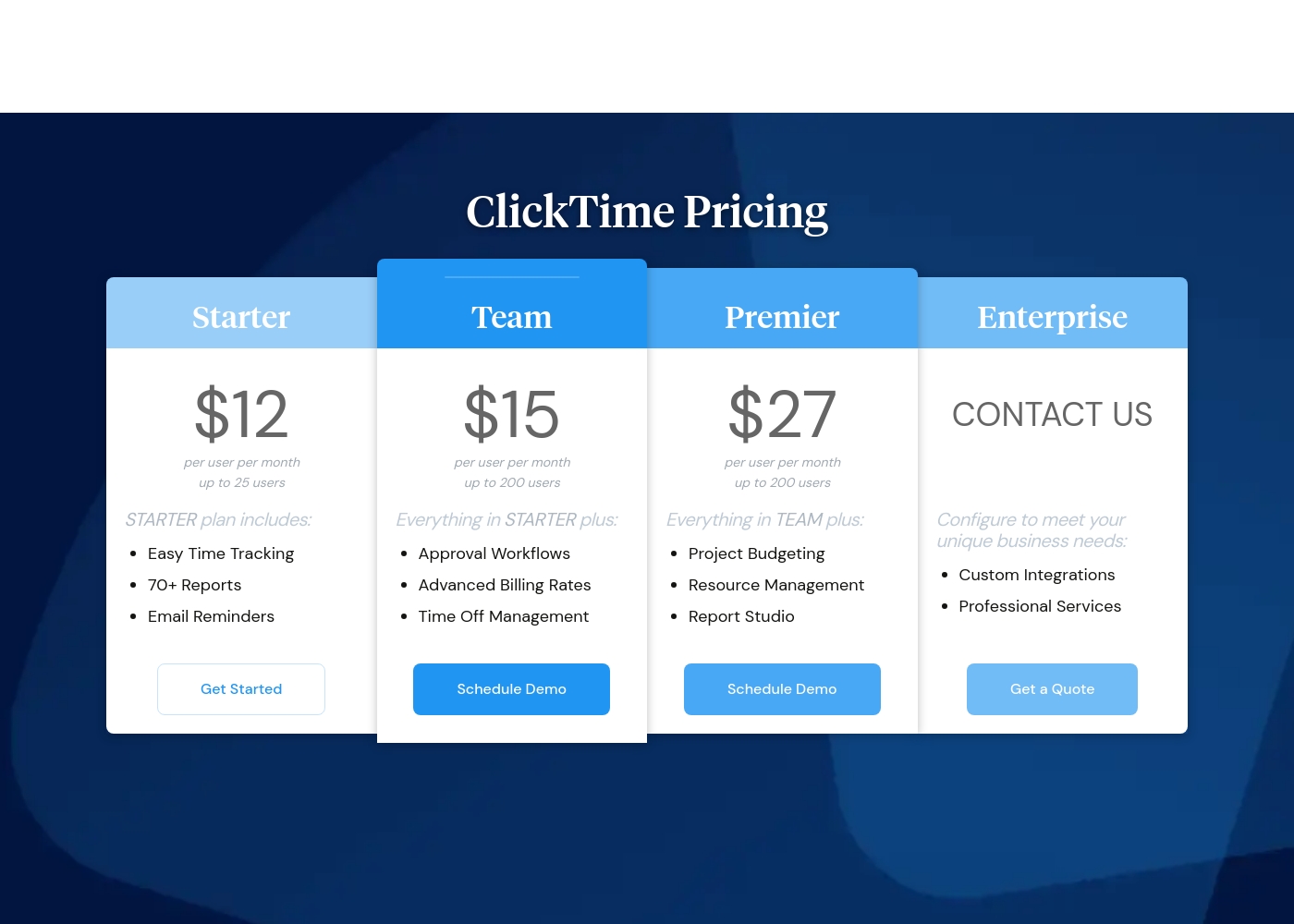
ClickTime costs between $12 and $27 per user per month (billed annually) with four plans: Starter at $12, Team at $15, Premier at $27, and Enterprise (Custom Pricing).
Here’s a closer look at what each plan offers.
Starter
Price: $12 per user per month (billed annually) / $15 per user per month (billed monthly) Best For: Small teams needing basic time tracking Other Features: Easy Time Tracking, 70+ Reports, Email Reminders, Mobile App Access, Basic Billing Rates
- Easy Time Tracking
- 70+ Pre-Built Reports
- Email Reminders
- Mobile App
- Daily, Weekly, and Biweekly Timesheets
- Everything in Starter
- Approval Workflows
- Advanced Billing Rates
- Time Off Management
- Employee Costs
- Everything in Team
- Project Budgeting
- Resource Management
- Report Studio
- Custom Fields
- Configuration to meet unique business needs
- Custom Integrations
- Professional Services
- Okta, OneLogin, Azure AD SSO
- SCIM User Provisioning (Quote)
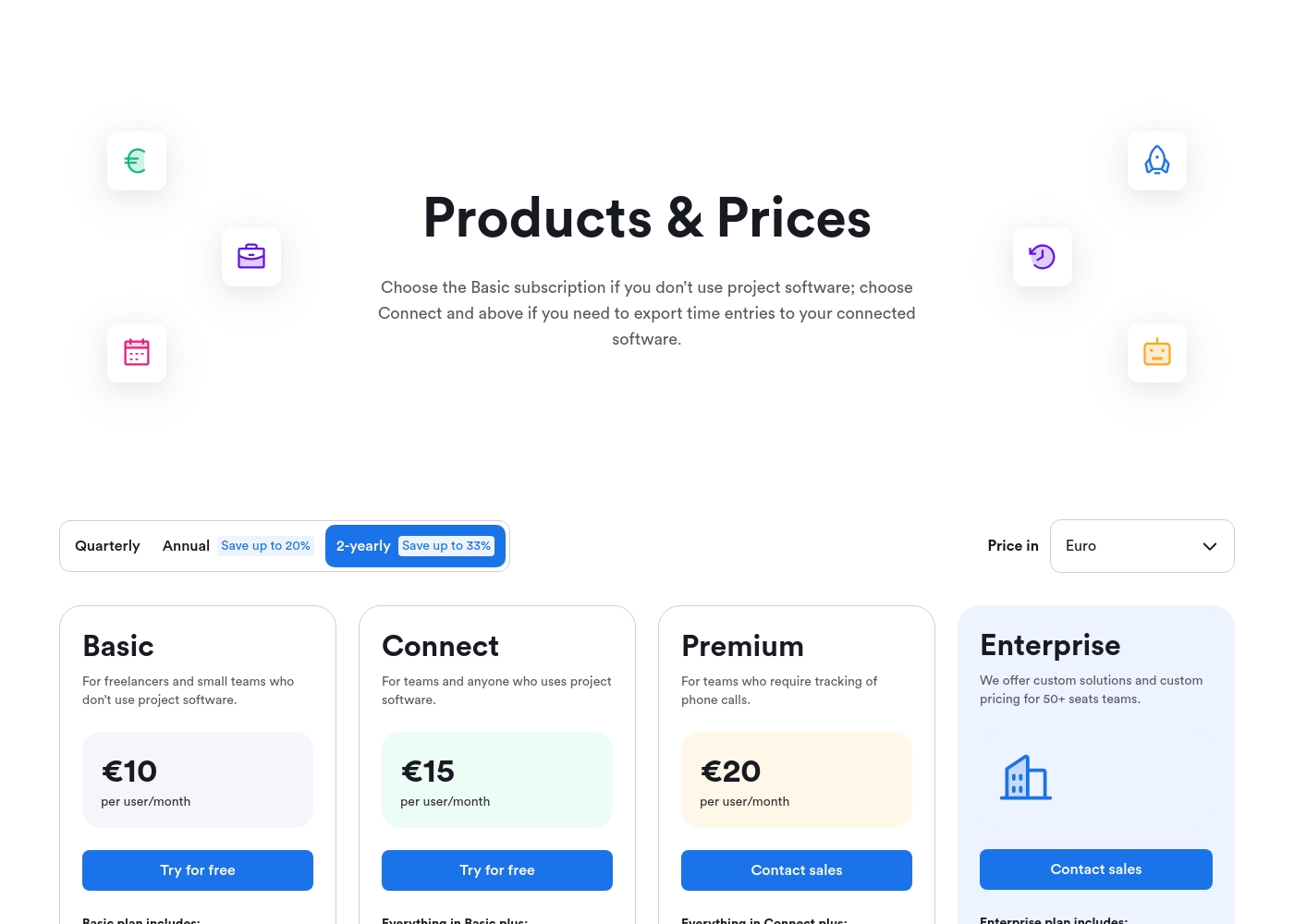
memtime costs between €10 and €20 per user/month (when billed 2-yearly) with 4 plans: Basic at €10, Connect at €15, Premium at €20, and Enterprise (custom pricing).
Below are the annual commitment prices per user/month featured on the product page. Note that these rates reflect the 2-yearly commitment discount, saving you up to 33%.
Basic
Price: €10 per user/month Best For: Freelancers and small teams who don't use project software. Other Features:
- Automatic time tracking and native activity recording
- Calendar sync functionality
- Unlimited devices and historical data storage
- Guaranteed privacy (data stored offline on your device)
- Create custom local Memtime Projects for free
- Automatic time tracking
- Calendar sync
- Memtime Projects (create custom local projects)
- Unlimited devices
- Unlimited historical data
- All Basic features
- Export time entries to connected project software
- All Connect features
- Tracking of phone calls
- Custom integrations
- Custom solutions and pricing
Pricing Notes
- ClickTime requires a separate $4/user/month add-on cost for Expense Tracking.
- memtime’s lowest listed price requires a significant 2-year commitment for maximum discount.
- ClickTime uses USD pricing starting at $12, while memtime prices in Euros starting at €10.
- memtime's Connect plan (€15) is required to export time entries to external project tools.
Pricing Head-to-Head
User Reviews
Review data for ClickTime is currently sparse across major platforms. On Trustpilot (with only 2 reviews), the score averages 2.9 stars, but the publicly available feedback suggests users find the software usable ("I like this software quite a bit."). We lack sufficient detailed submission data from both Trustpilot and Capterra to establish clear recurring user themes regarding specific performance aspects. Therefore, we cannot conclusively comment on customer support responsiveness, value derived from pricing tiers, onboarding complexity, or reliability of integrations.
Typically, independent reviews emphasize trends in accuracy, reliability, and ease of use, but these are not reflected in the handful of submissions provided. Based purely on the vendor's product description, ClickTime appears strong in specialized areas like financial forecasting and complex project budgeting. However, user validation on these advanced features is entirely unavailable at this time. Potential users should utilize the 14-day free trial to assess the platform’s efficiency and features directly. 🤔
We struggled with incorrect timesheets until we implemented ClickTime. The mobile app makes logging hours simple and quick, even when staff are working offsite. It's a huge improvement to our workflow.
memtime receives overwhelmingly positive feedback across review platforms, primarily highlighted by its automatic, non-intrusive operation in the background. Users consistently praise the tool for its exceptional accuracy, noting it effectively captures every minute, making manual timers obsolete.
This silent operation has been described as a "lifesaver" for consultants, accountants, and attorneys who frequently switch between client work, often resulting in significant recovery of lost billable time. Reviewers frequently mention the ease of use, the smooth onboarding process, and the value of its detailed, granular reporting.
I used to spend at least 30 minutes daily logging time against external project software. With Memtime, this now takes me less than 10 minutes, making my end-of-day tasks simple. This tool is a huge time-saver and works perfectly for consultants.
Our Verdict
Choosing between ClickTime and memtime is a choice between control and automation efficiency. If you run a large organization focused on compliance and financial planning, ClickTime is your foundation. But if you are a consultant or firm driven by billable hour recovery, memtime is the essential tool. ClickTime offers strategic organizational control, excelling in resource management and project budgeting. Its approval workflows streamline compliance and ensure timesheets meet internal standards. ClickTime’s native features for time off and expenses simplify overall administration dramatically. memtime’s superpower is its automatic tracking that captures every single minute worked flawlessly. This means memtime virtually pays for itself by finding lost revenue from forgotten tracking. It guarantees privacy by storing all sensitive activity data locally on your device. The deciding factor is your primary pain point: Organizational oversight or data accuracy. If you need centralized financial visibility and HR integration, choose ClickTime's comprehensive suite. If your staff hates timers and you need precise, non-intrusive logging, memtime is unbeatable. Ultimately, ClickTime wins for large, growth-focused organizations needing deep financial control. memtime is the superior choice for professional services firms prioritizing maximum billable accuracy and user privacy.
Frequently Asked Questions
Which is better for small teams of consultants: ClickTime or memtime?
memtime is generally better for consultants and small service teams. Its automatic tracking and focus on billable hour recovery maximize revenue capture. ClickTime may offer too much financial overhead features for smaller groups.
Can I manage time off and expenses inside memtime?
No, memtime focuses exclusively on accurate work activity tracking. ClickTime offers integrated Time Off management and Expense Tracking as an optional $4 add-on. For a holistic view, choose ClickTime.
Does ClickTime offer automatic time tracking like memtime?
No, ClickTime relies on traditional time logging methods like manual entry and calendar synchronization. memtime is built around passive, automatic background tracking, eliminating manual timers completely.
Is memtime safe for large-scale enterprise use?
memtime requires custom Enterprise pricing after 50 users for bespoke solutions. ClickTime is clearly designed for scale, supporting up to 200 users in standard Premier plans. ClickTime has recognized SOC 2 compliance for security.
How does the data privacy model differ between ClickTime and memtime?
ClickTime stores all your data securely in the cloud under strict compliance standards. memtime stores sensitive activity data locally on the user's desktop device. memtime guarantees privacy since no activity data leaves the local machine.
Which tool provides better features for project budgeting and forecasting?
ClickTime is superior for proactive financial features like resource staffing and future budget forecasting. memtime provides accurate historical data needed for measuring actual profitability, but less forward-looking planning.
Ready to Choose?
Both tools have their strengths. Choose based on your specific needs.