ClickTime vs Clockify
ClickTime and Clockify are both excellent time trackers, but they serve different priorities. ClickTime focuses intensely on strategic financial forecasting and enterprise compliance. Clockify wins on affordability, offering an incredibly powerful free tier for unlimited users. This comparison helps you pick between financial rigor and maximal accessibility.
Best for: Enterprise organizations requiring SOC 2 and DCAA compliance, Consulting agencies prioritizing multi-month resource utilization analysis
Best for: Startups and small businesses needing powerful tracking for free, Large, rapidly scaling teams that need unlimited user capacity
Strategic Time and Financial Control
We found ClickTime offers powerful tools for minimizing manual errors and obtaining financial clarity. Its clear tiered plans start affordably yet scale up to robust resource and project budgeting features. Overall, this is a highly strategic platform that turns routine time logging into crucial business intelligence suitable for scaling organizations.
Pros
- Scales effectively from basic Starter ($12) to comprehensive Premier tiers.
- Provides strong financial reporting and project cost analysis.
- Automated reminders and sync features reduce manual input errors.
- Advanced resource management and capacity planning are included in Premier.
Cons
- Widespread, recent positive user validation is currently sparse.
- Expense tracking requires an additional $4 per user monthly add-on.
- Top-tier features like resource management are reserved for the higher plans.
Powerful time tracking meets strict billing practices.
We found Clockify to be a highly competitive time tracker, offering strong free features and robust paid plans suitable for scaling teams. Overall, its comprehensive functionality and user-friendly design make it an excellent choice, tempered only by strict billing policies that frustrate some users.
Pros
- Generous free plan supports unlimited users and tracking.
- Intuitive interface makes adoption quick and painless for teams.
- Detailed tracking supports robust financial clarity and budgeting.
- Ability to group time entries by custom categories (a differentiator from competitors).
Cons
- Strict no-refund policy causes friction for billing errors or early cancellation.
- Difficulty reducing paid seat counts during annual renewal periods.
- Some users experience recurring bugs with auto-tracking features or logging visibility.
- Incompatibility or complications when the application is accessed via VPN.
AboutClickTime
ClickTime is a powerful platform for comprehensive time tracking and resource management. It is designed to give you deep insights into how your team uses its bandwidth. This system tracks employee hours, project deadlines, and budget targets seamlessly. By using ClickTime, you get valuable information about project costs and overall profitability. It is the tool that helps you unify your planning and financial forecasting efforts. 💡
AboutClockify
Clockify is widely known time tracking software trusted by millions of users worldwide. It functions as a comprehensive time tracker and timesheet app. This platform is perfect for teams, offering unlimited users and remaining free forever. Users have given it an excellent 4.8 rating based on thousands of reviews. The app lets you track time from anywhere, syncing data across web, desktop, and mobile devices automatically. ✨
Highlights
Feature Comparison
Features Overview
We highlight the main differences and pick a winner for each feature.
Access & Pricing Model
Clockify offers an unmatched free plan for unlimited users. ClickTime requires an immediate financial commitment after its 14-day trial.
Clockify provides tremendous value with a generous free plan that supports unlimited users. This makes Clockify the ideal starting point for any budget-conscious team. ClickTime does not offer a free tier at all; it focuses on paid, strategic features. You must choose a plan after completing the 14-day free trial period. ClickTime’s Starter plan begins at $12 per user monthly (billed annually). Its price structure is oriented toward sophisticated financial control. Clockify’s BASIC paid plan is only $3.99 per seat per month, making it significantly more affordable. Clockify is the clear winner for teams prioritizing cost savings or needing full functionality for unlimited staff members. ClickTime’s higher price reflects its deeper focus on enterprise-grade financial features. If you have 100 users and require basic approved tracking, Clockify costs zero. ClickTime would cost at least $1,200 per year.
Resource & Capacity Planning
ClickTime offers superior, comprehensive resource forecasting for management. Clockify provides robust scheduling but focuses less on multi-month utilization analysis.
ClickTime excels in capacity planning, dedicating tools in its Premier plan for this purpose. You get a clear, data-driven view of team availability and utilization trends. ClickTime helps proactively prevent staffing crises and maximizes profitability across projects. Clockify includes powerful Scheduling tools in its PRO plan for assigning work and managing shifts. It helps you manage resource capacity effectively for upcoming projects. However, Clockify’s strategic forecasting depth isn't as specialized as ClickTime's solution. If project profitability hinges on predicting staff capacity months out, ClickTime is the better, more strategic tool. Clockify handles scheduling well, but ClickTime provides the deeper financial utilization insights. Agencies depending on precise utilization rates across 50+ consultants should favor ClickTime's dedicated functionality.
Financial Depth & Invoicing
ClickTime offers deeper analysis on project profitability and costs. Clockify provides built-in client invoicing and better payroll integration.
ClickTime’s strength lies in financial forecasting and accurate project budgeting at higher plans. It helps leaders analyze historical costs and billing to prevent budget overruns. ClickTime’s focus is on maximizing profit and minimizing costly guesswork. Clockify streamlines the final step from time tracking to customer payment. The STANDARD plan lets you generate professional Invoices directly from billable time. Clockify also integrates directly with QuickBooks for easier payroll preparation. Clockify is superior for simplifying the workflow from time logging to client billing. However, ClickTime offers the more strategic, preventative financial analysis toolset. The lack of native invoicing means ClickTime users must export data via API or custom files for third-party billing systems.
Compliance and Security
ClickTime has explicit high-level security certifications crucial for regulated enterprises. Clockify focuses on data region selection and essential SSO.
ClickTime is designed for stringent regulated environments, offering SOC 2 compliance and SAS 70 Type II certification. DCAA Compliance features are available in ClickTime’s top-tier Enterprise plan. This level of certification is essential for government contractors. Clockify offers essential security features like Single Sign-On (SSO) in its ENTERPRISE tier. It also lets users select their specific data region (EU, USA, UK, AU) for sovereignty purposes. Clockify does not list SOC 2 or DCAA certification. For organizations where high-level regulatory compliance is non-negotiable, ClickTime is the necessary choice. ClickTime prioritizes security standards needed by complex corporations. Clockify is great for general security but doesn't meet the specific, certified standards that ClickTime publicly guarantees.
Expense Tracking Cost
Clockify includes expense tracking in its PRO plan without extra charges. ClickTime treats expense tracking as a separate, mandatory $4 add-on fee.
Clockify integrates expense tracking seamlessly starting at the PRO plan level. This allows you to record project expenses and fees alongside labor time for a single per-seat price. You won’t incur additional monthly fees just for expenses. ClickTime charges an additional rate of $4 per person every month for expense tracking functionality. This charge applies on top of the base subscription cost for all plan tiers. This significantly increases the total cost for larger teams. Clockify offers better inherent value in its paid plans by bundling expense tracking into the PRO tier. ClickTime forces users to pay a fixed fee for the feature, regardless of tier. A 50-person team using ClickTime would pay $200 extra monthly just for the expense feature.
Time Capture Methods
Clockify is highly versatile, offering Kiosk, Auto-tracker, and Timer functionality. ClickTime focuses on calendar sync and timesheet reminders for accurate logging.
Clockify supports multiple ways to record time, adapting to various work environments. Employees can use the basic Timer, the Kiosk mode for shared clock-ins, or the Auto-tracker for passive logging. This maximizes capture flexibility. ClickTime promotes accuracy by using automated timesheet reminders and calendar connection features. This syncs scheduled meetings directly onto the timesheet view. ClickTime emphasizes high data integrity through approval workflows. For teams needing diverse methods—especially in-office clocking via Kiosk—Clockify provides unmatched versatility. ClickTime’s strengths lie in automating compliance for scheduled work. If you have a hybrid workforce needing both traditional timesheets and shared clock-in devices, Clockify is the superior solution.
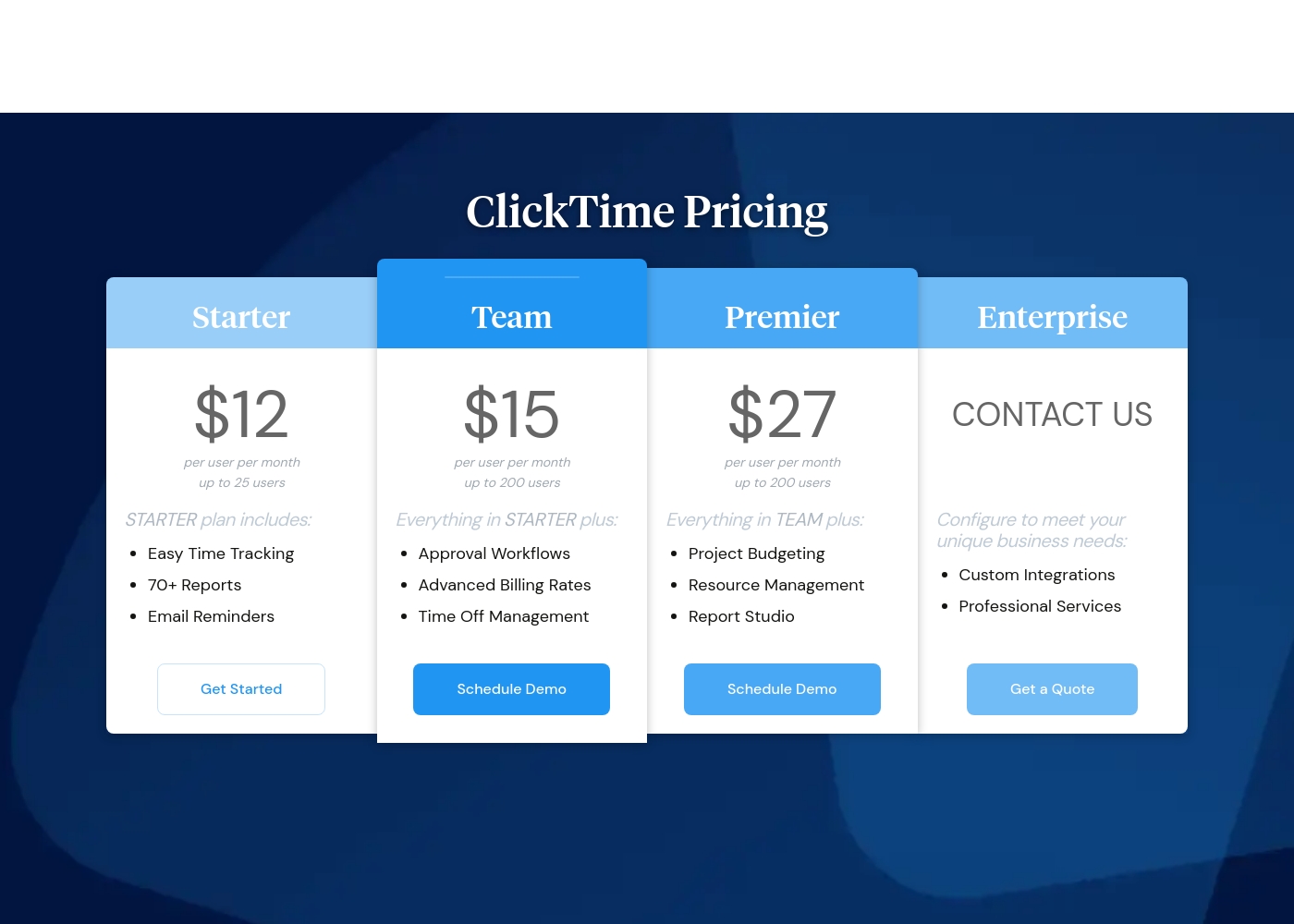
ClickTime costs between $12 and $27 per user per month (billed annually) with four plans: Starter at $12, Team at $15, Premier at $27, and Enterprise (Custom Pricing).
Here’s a closer look at what each plan offers.
Starter
Price: $12 per user per month (billed annually) / $15 per user per month (billed monthly) Best For: Small teams needing basic time tracking Other Features: Easy Time Tracking, 70+ Reports, Email Reminders, Mobile App Access, Basic Billing Rates
- Easy Time Tracking
- 70+ Pre-Built Reports
- Email Reminders
- Mobile App
- Daily, Weekly, and Biweekly Timesheets
- Everything in Starter
- Approval Workflows
- Advanced Billing Rates
- Time Off Management
- Employee Costs
- Everything in Team
- Project Budgeting
- Resource Management
- Report Studio
- Custom Fields
- Configuration to meet unique business needs
- Custom Integrations
- Professional Services
- Okta, OneLogin, Azure AD SSO
- SCIM User Provisioning (Quote)
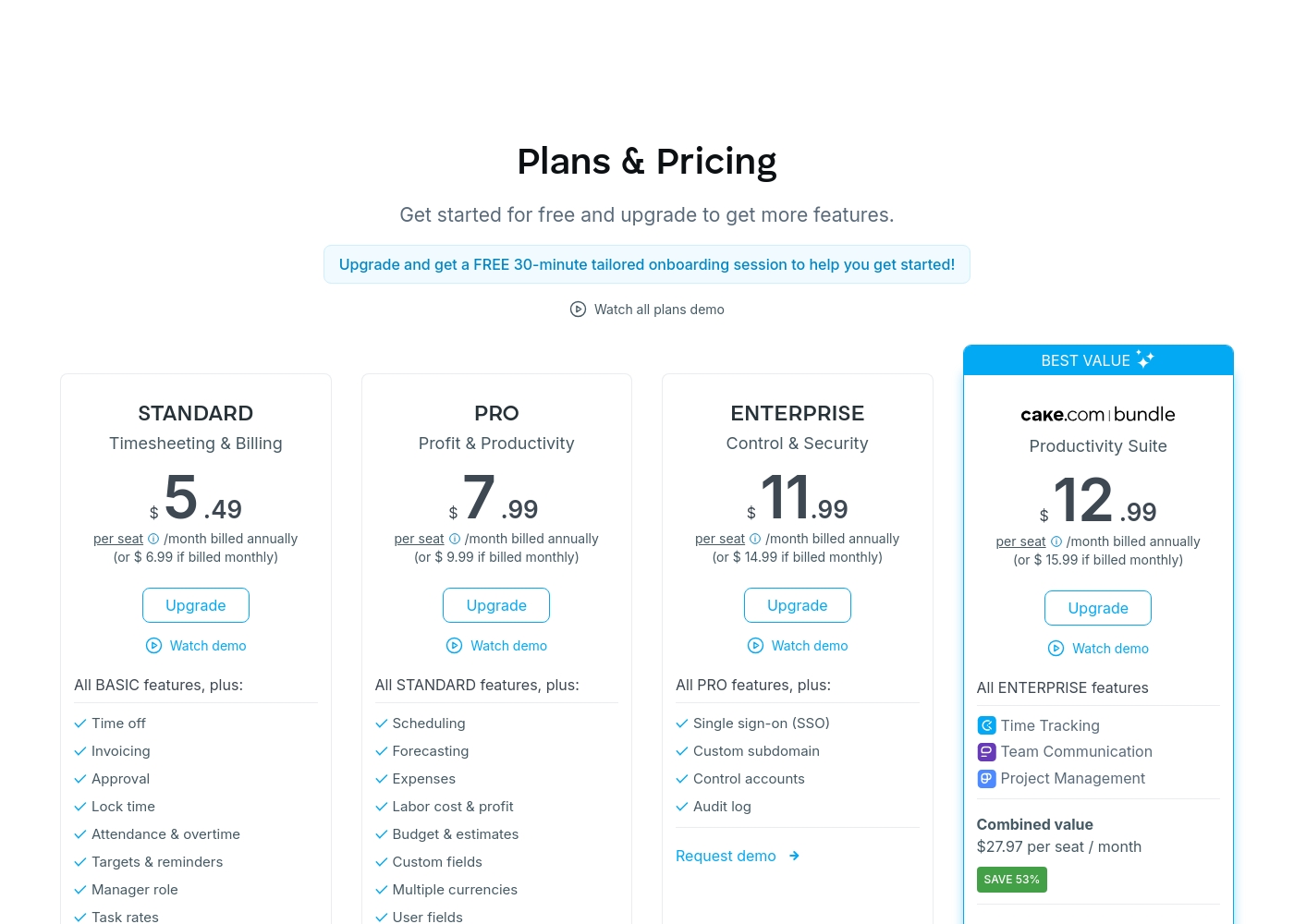
Clockify costs between $0 and $12.99 per seat/month (billed annually) with six plans: FREE at $0, BASIC at $3.99, STANDARD at $5.49, PRO at $7.99, ENTERPRISE at $11.99, and the CAKE.com Bundle at $12.99.
Getting started is simple, whether you choose the free option or one of the powerful paid plans.
FREE
Price: $0 USD for unlimited number of users Best For: Time Tracking Other Features:
- Unlimited tracking and unlimited users
- Time tracker, Timesheet, and Kiosk functionality
- Mobile and desktop apps are included
- Ability to set up billable rates
- Unlimited tracking
- Time tracker
- Timesheet
- Kiosk
- Auto tracker
- All FREE features
- Add time for others
- Hide time & pages
- Required fields
- Bulk edit
- All BASIC features
- Time off
- Invoicing
- Approval
- Lock time
- All STANDARD features
- Scheduling
- Forecasting
- Expenses
- Labor cost & profit
Pricing Notes
- Clockify offers a full FREE plan supporting unlimited users indefinitely, providing superior starting value.
- ClickTime's pricing is significantly higher across all comparable tiers, reflecting its strategic, enterprise focus.
- Expense Tracking requires an additional $4/user/month fee on all ClickTime plans.
- Clockify's annual billing provides a 20% discount; ClickTime also offers discounts for annual commitments.
- Clockify has a strict no-refund policy, which user reviews often cite as a major source of friction.
Pricing Head-to-Head
User Reviews
Review data for ClickTime is currently sparse across major platforms. On Trustpilot (with only 2 reviews), the score averages 2.9 stars, but the publicly available feedback suggests users find the software usable ("I like this software quite a bit."). We lack sufficient detailed submission data from both Trustpilot and Capterra to establish clear recurring user themes regarding specific performance aspects. Therefore, we cannot conclusively comment on customer support responsiveness, value derived from pricing tiers, onboarding complexity, or reliability of integrations.
Typically, independent reviews emphasize trends in accuracy, reliability, and ease of use, but these are not reflected in the handful of submissions provided. Based purely on the vendor's product description, ClickTime appears strong in specialized areas like financial forecasting and complex project budgeting. However, user validation on these advanced features is entirely unavailable at this time. Potential users should utilize the 14-day free trial to assess the platform’s efficiency and features directly. 🤔
We struggled with incorrect timesheets until we implemented ClickTime. The mobile app makes logging hours simple and quick, even when staff are working offsite. It's a huge improvement to our workflow.
Clockify receives generally positive feedback for its user-friendly interface and comprehensive features that significantly enhance business efficiency. Users frequently praise its easy time tracking, robust reporting capabilities, and superior ability to group entries effectively compared to competitors like Toggl.
However, users express significant frustration regarding financial policies and customer service responsiveness in these areas. Several reviews highlight Clockify's strict no-refund policy and perceived unfair billing practices, especially when attempting to reduce seat counts during annual renewal.
We are very satisfied with this product because it has made our business much more efficient in several aspects. We haven't had any technical issues since we started. Whenever I'm unsure how to do something, their help is always responsive.
Our Verdict
Choosing between Clockify and ClickTime is a clean decision: accessibility versus advanced financial control. If your priority is low cost and ease of getting started, Clockify is the undisputed champion. ClickTime serves a more complex, strategic audience focused on maximizing profitability. ClickTime’s superpower is turning time data into high-level financial intelligence. It excels at multi-month capacity planning, resource utilization analysis, and rigorous DCAA compliance. If your business depends on accurate future forecasting and enterprise-grade security, ClickTime is the only choice. Clockify’s primary strength is unparalleled value and tracking versatility. It offers an unbeatable free plan supporting unlimited users, which ClickTime cannot match. Clockify features flexible options like the shared Kiosk and Auto-tracker for diverse teams. The deciding factor often comes down to budget and scope. Clockify is significantly more affordable, offering billing and time-off features starting under $6 per seat. ClickTime starts higher ($12 per user) but gives managers better tools for deep project financial management. ClickTime expense tracking is frustratingly an extra $4 fee. Pick Clockify if you are a growing remote team needing powerful tracking, quick invoicing, and minimal cost. Choose ClickTime if you are a large, regulated consulting firm that demands strategic financial transparency and high-level security certification.
Frequently Asked Questions
Which tool is better for basic, free time tracking: ClickTime or Clockify?
Clockify is definitively better for free tracking, offering a robust plan with unlimited users and projects. ClickTime does not offer a free tier, only a 14-day trial. If cost is a barrier, choose Clockify immediately.
Is ClickTime worth the higher price than Clockify?
Yes, ClickTime is worth the higher price if you require strategic financial forecasting and high-level compliance. ClickTime provides DCAA compliance and deeper resource utilization tools. Clockify is better for standard time tracking but lacks ClickTime's strategic depth.
Which software offers better resource capacity planning?
ClickTime offers a more comprehensive approach to resource capacity planning in its Premier tier. It is designed specifically for maximizing utilization and multi-month forecasting. Clockify offers strong scheduling tools, but the depth is less specialized than ClickTime.
Does Clockify integrate directly with QuickBooks for billing?
Yes, Clockify offers a direct QuickBooks integration starting in its STANDARD plan. This streamlines billing and payroll processes significantly. ClickTime relies on API access or manual file exports for connecting to accounting software.
Which tool is safer for large, regulated industries needing SOC 2 compliance?
ClickTime provides explicit SOC 2 compliance and SAS 70 Type II certification, making it safer for highly regulated industries. ClickTime also offers DCAA compliance support in its Enterprise plan. Clockify offers good security but lacks these official certifications.
How do expense tracking features differ between ClickTime and Clockify?
Clockify bundles expense tracking into its PRO plan subscription price. ClickTime charges an extra $4 per user, per month fee across all plan tiers for the same feature. Clockify offers better value for expense reporting.
Ready to Choose?
Both tools have their strengths. Choose based on your specific needs.