Clockify

Clockify

The most popular free time tracker for teams

#5 dans Time tracking
2 min read · Updated 10/4/2025
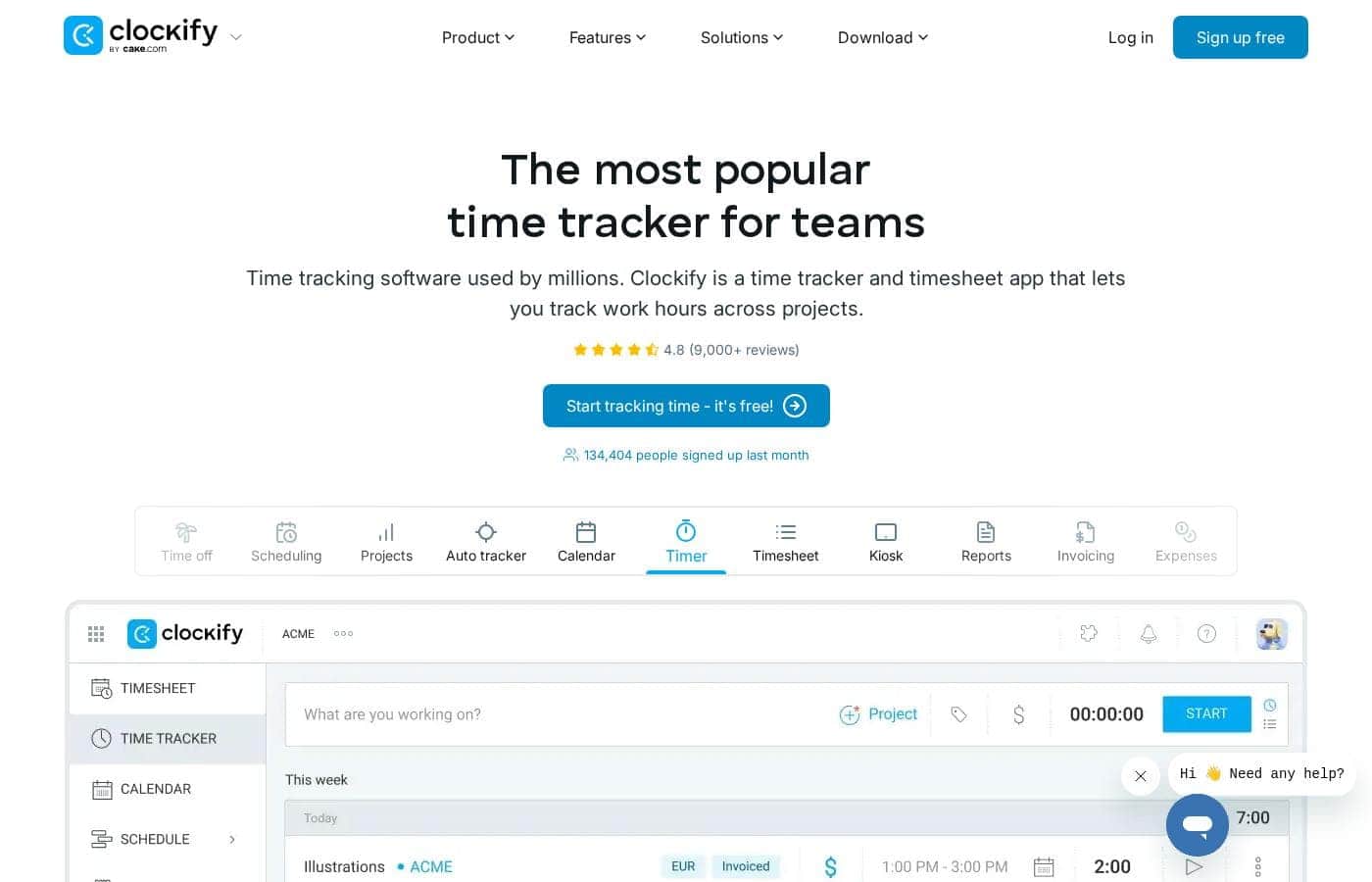
Clockify homepage screenshot

At a glance

Quick overview for Clockify: rating, pricing summary, key features, and highlights.

Ciroapp review

4.1
Powerful time tracking meets strict billing practices.

We found Clockify to be a highly competitive time tracker, offering strong free features and robust paid plans suitable for scaling teams. Overall, its comprehensive functionality and user-friendly design make it an excellent choice, tempered only by strict billing policies that frustrate some users.

Pros

  • Pro:Generous free plan supports unlimited users and tracking.
  • Pro:Intuitive interface makes adoption quick and painless for teams.
  • Pro:Detailed tracking supports robust financial clarity and budgeting.
  • Pro:Ability to group time entries by custom categories (a differentiator from competitors).

Cons

  • Con:Strict no-refund policy causes friction for billing errors or early cancellation.
  • Con:Difficulty reducing paid seat counts during annual renewal periods.
  • Con:Some users experience recurring bugs with auto-tracking features or logging visibility.
  • Con:Incompatibility or complications when the application is accessed via VPN.
Free trial
Yes — 7 days
Range: $0–$12.99/seat/monthFree plan, Free trial, Monthly subscription, Yearly subscription, Per seat pricing
This section is a summary. Detailed sections about features, use cases, pricing, and reviews follow below.

Clockify review, pricing, features, pros & cons

Trying to pinpoint where your team's valuable time actually goes can be a major headache. Clockify offers a simple, powerful solution for this common challenge. It helps you accurately track work hours across projects and manage attendance effortlessly.

This means gaining immediate insight into team productivity and cost analysis. ✅

What is Clockify?

Clockify is widely known time tracking software trusted by millions of users worldwide. It functions as a comprehensive time tracker and timesheet app. This platform is perfect for teams, offering unlimited users and remaining free forever.

Users have given it an excellent 4.8 rating based on thousands of reviews. The app lets you track time from anywhere, syncing data across web, desktop, and mobile devices automatically. ✨

Clockify Key Features

✨ Flexible Time Capture Methods

Clockify offers multiple simple ways to log your work hours, helping you capture time accurately no matter your workflow. You can start the classic Timer to track activity in real time. This is excellent for focused sessions and ensures highly precise records.

For teams, the Kiosk function lets employees clock in and out using a shared device, which simplifies attendance tracking in a physical setting. If you prefer logging hours retroactively, you can use the detailed weekly Timesheet view. All methods sync across web, mobile, and desktop apps for seamless data management.

✨ Financial Oversight and Budgeting

The platform helps translate tracked time into meaningful financial data. You can set client Budgets and clearly monitor the status of every project against those financial goals. This is essential for managing profitability and external expectations.

By defining billable rates, you can easily use the Rates function to instantly see earnings, cost, and profit associated with tracked work. This capability provides powerful clarity into your project economics and financial health.

✨ Comprehensive Team and Workforce Management

Managing your team’s schedule and availability is made easy with integrated tools. You can use Scheduling to plan work, assignments, and shifts for everyone. This feature also allows you to manage resources, capacity, and overall utilization effectively.

Beyond basic scheduling, you gain control over internal human resources tasks. You can manage time off requests and monitor holiday schedules. Separately, the Attendance feature lets you track daily employee activity and monitor overtime hours.

✨ In-Depth Reporting and Analysis

Every tracked hour is translated into data you can use. You can generate detailed Reports to analyze time entry data and export the findings. These reports show you exactly where time goes and allow you to break down costs clearly.

The Activity feature lets you quickly see who is working on what assignments or tasks. Additionally, for mobile or field teams, the Location tool shows visited sites and routes, providing a record of movement.

✨ Billing and Expense Handling

Clockify helps streamline the transition from time tracking to client billing. Once time is approved, you can generate professional Invoices directly from your billable hours. This saves time and minimizes errors in the invoicing process.

The application also provides functionality to record project Expenses and any associated fees. This keeps all necessary financial records consolidated for easy management and reporting.

✨ Approval Workflows and Data Integrity

To ensure your data is always accurate and ready for client billing or payroll, Clockify includes an Approval process. Team members can easily submit their weekly timesheets for formal review.

Once an entry is submitted, supervisors can approve those hours officially. The system then allows you to lock time entries, either after approval or after a specific period, which helps maintain the integrity of your historical records.

Use Cases

⏱️ Streamline Daily Timekeeping Efforts

When you begin your workday, you need flexibility in recording time accurately. Clockify offers four different ways to capture exactly how you work, ensuring every minute counts. You can instantly launch the real-time Timer and pause it as needed. For users preferring batch entry, the weekly Timesheet allows swift manual input of detailed tasks.

Teams can use the Kiosk feature to clock in and out from a shared device in the office. If you forget to track, the Auto tracker captures applications and websites you use, which simplifies retrospective entry. This flexibility ensures all billable and non-billable hours are recorded accurately and synced across all your devices.

💵 Turn Tracked Time into Payable Invoices

Generating invoices must be fast and error-free after a project wraps up. Clockify allows you to flag all tracked time as billable during the project phase. Once the work is complete, you can generate professional Invoices directly from those approved, billable time entries.

If the project involved procurement or travel, the Expenses feature lets you record project costs and fees alongside your time entries. This integrated approach ensures you capture 100% of the financial investment. When ready, the manager uses the Approval feature to review and lock the time before the invoice is finalized and sent to the client.

📍 Monitor Team Attendance and Site Visits

Reliable attendance tracking is essential for calculating accurate payroll and monitoring compliance. The system uses tracked time to monitor daily employee Attendance and calculate Overtime automatically. This prevents manual errors and disputes.

For teams working on-site or performing field visits, the Location feature allows managers to see visited sites and complex routes (if enabled). This provides accountability for remote or mobile staff. Furthermore, clocking in via the shared Kiosk helps maintain secure recording for office-based teams, preventing 'buddy punching.'

Tip: Use the Attendance feature alongside Targets and Reminders to enforce scheduling compliance and ensure employees start their shifts on time.

📈 Control Project Budgets and Profitability

Protecting a project's profitability requires constant oversight. Project managers can use Clockify to set clear client Budgets and define realistic project estimates before work begins. As the team logs hours, managers check detailed Reports to track progress against the financial goal.

By tracking the team's internal Rates and analyzing labor costs, the system clarifies the project's true cost and ensures profitability. If the project nears its financial limit, the manager receives alerts. This allows for quick, data-driven decisions on scope or resource adjustments, keeping the engagement on track.

🗓️ Manage Time Off and Schedule Resources

Coordinating paid time off and managing complex shift assignments is simple with Clockify’s management tools. Employees submit Time off requests directly through the platform, which managers quickly approve or deny. This centralized process ensures all leave is accounted for.

Managers utilize the Planning and Scheduling features to assign work and manage resource utilization effectively. Knowing the team’s scheduled time off and capacity prevents overloading specific individuals. This ensures smooth project execution and avoids resource conflicts across multiple projects.

✅ Simplify Timesheet Submission and Approval

If you are a manager, approving timesheets should be efficient, not a bottleneck. Clockify streamlines the entire submission process for your team. You can set requirements for time fields to ensure data quality before submission.

When a team member submits their weekly Timesheet, the manager receives an alert and quickly reviews the entries. Once approved, the manager can Lock time entries, ensuring the data remains tamper-proof for payroll and legal records. This systematic approach ensures timely payment and accurate record-keeping.

💲 Generate Accurate Labor Cost and Payroll Calculations

Calculating payroll requires verified hours and precise cost analysis. All tracked hours are available in detailed Reports ready for payroll processing. You can calculate employee costs based on their internal rates and track how labor investment affects the Profit calculation.

Clockify simplifies the preparation of payroll data by analyzing costs and tracking overtime hours automatically. This accuracy helps ensure employees are paid correctly and provides clear financial visibility into operational expenses. The detailed reports also help fulfill compliance requirements easily.

Pricing Overview for Clockify

Pricing range
$0–$12.99/seat/month
Pricing types
Free plan, Free trial, Monthly subscription, Yearly subscription, Per seat pricing

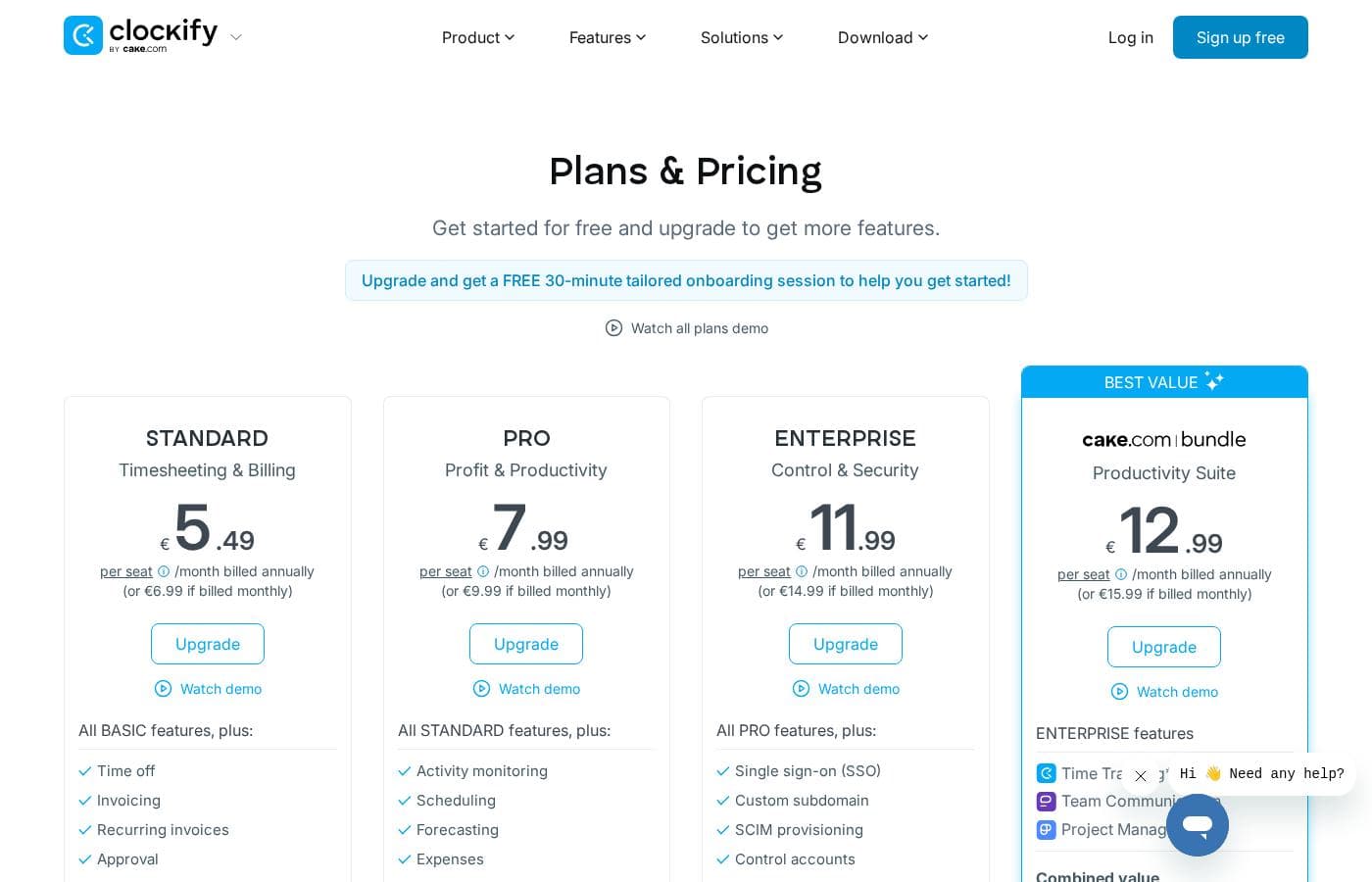
Clockify offers a generous free plan and five powerful paid subscription tiers, billed on a per-seat basis. Annual billing provides a 20% discount across all paid plans, with prices ranging from $3.99 to $12.99 per seat per month.

Plans & Pricing

FREE

Monthly$0
Yearly$0
Unlimited users
  • Unlimited tracking
  • Time tracker
  • Timesheet
  • Kiosk
  • Auto tracker
  • Mobile & desktop app
  • Billable rates
  • Reports
  • + 1 more features

BASIC

Monthly$4.99
Yearly$3.99
Per seat
  • All FREE features
  • Add time for others
  • Hide time & pages
  • Required fields
  • Bulk edit
  • Time audit
  • Project templates
  • Kiosk PIN
  • + 1 more features

STANDARD

Monthly$6.99
Yearly$5.49
Per seat
  • All BASIC features
  • Time off
  • Invoicing
  • Approval
  • Lock time
  • Attendance & overtime
  • Targets & reminders
  • QuickBooks integration

PRO

Monthly$9.99
Yearly$7.99
Per seat
  • All STANDARD features
  • Scheduling
  • Forecasting
  • Expenses
  • Labor cost & profit
  • Budget & estimates
  • Custom fields
  • Alerts
  • + 3 more features

ENTERPRISE

Monthly$14.99
Yearly$11.99
Per seat
  • All PRO features
  • Single sign-on (SSO)
  • Custom subdomain
  • Control accounts
  • Audit log
  • 24/7 support

CAKE.com Bundle

Monthly$15.99
Yearly$12.99
Per seat
  • All ENTERPRISE features
  • Time Tracking
  • Team Communication
  • Project Management

Clockify costs between $0 and $12.99 per seat/month (billed annually) with six plans: FREE at $0, BASIC at $3.99, STANDARD at $5.49, PRO at $7.99, ENTERPRISE at $11.99, and the CAKE.com Bundle at $12.99.

Getting started is simple, whether you choose the free option or one of the powerful paid plans.

FREE

Price: $0 USD for unlimited number of users Websites Supported: Not explicitly stated Best For: Time Tracking Refund Policy: Not explicitly stated Other Features:

  • Unlimited tracking and unlimited users
  • Time tracker, Timesheet, and Kiosk functionality
  • Mobile and desktop apps are included
  • Ability to set up billable rates

This is the perfect starting point for any user or team focusing primarily on reliable time tracking without limitations on the number of users or tracking data.

BASIC

Price: $3.99 USD per seat/month billed annually (or $4.99 if billed monthly) Websites Supported: Not explicitly stated Best For: Administration Refund Policy: Not explicitly stated Other Features:

  • Log time on behalf of your team
  • Set required fields for time entries
  • Use decimal format for time display
  • Perform bulk edits for time entries and users
  • Access a dedicated success representative (if qualified)

Choose the BASIC plan to gain firmer control over administrative tasks and data quality, ensuring accurate records and simplified team management.

STANDARD

Price: $5.49 USD per seat/month billed annually (or $6.99 if billed monthly) Websites Supported: Not explicitly stated Best For: Timesheeting & Billing Refund Policy: Not explicitly stated Other Features:

  • Manage Time off and holidays
  • Issue professional invoices from tracked time
  • Submit timesheets for approval and lock time entries
  • Track attendance, overtime, and set targets
  • Integrate directly with QuickBooks

STANDARD is ideal for businesses that need to manage internal human resources and streamline client billing using tracked time and formal approvals.

PRO

Price: $7.99 USD per seat/month billed annually (or $9.99 if billed monthly) Websites Supported: Not explicitly stated Best For: Profit & Productivity Refund Policy: Not explicitly stated Other Features:

  • Scheduling and resource forecasting
  • Track expenses and calculate labor cost/profit
  • Set project budgets and estimates
  • Track GPS location and utilize screenshots (optional)
  • Use multiple currencies and custom fields

If project profitability and complex resource management are key, the PRO plan gives you the high-level tools needed to track performance and forecast outcomes.

ENTERPRISE

Price: $11.99 USD per seat/month billed annually (or $14.99 if billed monthly) Websites Supported: Not explicitly stated Best For: Control & Security Refund Policy: Not explicitly stated Other Features:

  • Single sign-on (SSO) for improved security
  • Control accounts and access audit logs
  • Set up a custom subdomain for the workspace
  • Choose your data region (EU, UK, USA, or Australia)

ENTERPRISE is designed for organizations requiring the highest level of security, control, and compliance, offering advanced features like SSO and audit logging for comprehensive oversight.

CAKE.com Bundle

Price: $12.99 USD per seat/month billed annually (or $15.99 if billed monthly) Websites Supported: Not explicitly stated Best For: Productivity Suite Refund Policy: Not explicitly stated Other Features:

  • Includes all ENTERPRISE features
  • Includes Time Tracking, Team Communication, and Project Management tools
  • Saves 53% compared to combined individual value ($27.97/seat/month)

This bundle is the top value choice for consolidating your technology stack, offering Clockify's full feature set alongside complementary productivity tools from CAKE.com.

Clockify offers a full-featured FREE plan with unlimited users, so you can start tracking immediately. If you want to explore more advanced options, you can try all PRO features for 7 days free, with no credit card required. Please note that Clockify does not generally offer refunds, so it's best to utilize the free trial before upgrading.

User Reviews

Clockify receives generally positive feedback for its user-friendly interface and comprehensive features that significantly enhance business efficiency. Users frequently praise its easy time tracking, robust reporting capabilities, and superior ability to group entries effectively compared to competitors like Toggl.

However, users express significant frustration regarding financial policies and customer service responsiveness in these areas. Several reviews highlight Clockify's strict no-refund policy and perceived unfair billing practices, especially when attempting to reduce seat counts during annual renewal.

😟 While support staff often reply quickly to technical reports (sometimes within seconds), the resolution for billing complaints often involves citing non-negotiable terms, making users feel trapped by the system. Recurring technical issues have also been noted, including bugs in the auto-tracker (where recorded events fail to display) and conflicts when accessing the platform via a VPN.

Despite these development slowdowns and financial frictions, users generally see tremendous value in the core product, especially the generous free tier, but flexibility remains a major pain point.

What users say elsewhere

Alan B.
· Trustpilot
5.0 / 5

We are very satisfied with this product because it has made our business much more efficient in several aspects. We haven't had any technical issues since we started. Whenever I'm unsure how to do something, their help is always responsive.

Rob R.
· Trustpilot
1.0 / 5

Clockify’s website steered me into paying for a seat I didn't need during renewal. Despite asking immediately, they refused to adjust the bill or provide a refund. This staggering billing approach makes me feel trapped by the terms of use.

No reviews yet.

Write a Review

Write a Review for Clockify
0/100 characters
0/2000 characters

Why use Clockify?

Choosing the right time tracker means gaining powerful insight and simplifying your entire workflow.

Clockify is rated highly for being intuitive and essential for helping businesses scale and grow. The learning curve is almost none, allowing teams to adopt it quickly and painlessly.

Here’s why users rely on Clockify daily:

  • Financial Clarity and Budgeting: You can effectively set client budgets and monitor the status of every project. The software helps you calculate payroll accurately and analyze overall costs clearly.
  • Versatile Timekeeping: Capture time exactly how you need to. You can use the real-time Timer, clock in from a shared Kiosk, or enter detailed activity swiftly using the weekly Timesheet.
  • Simplified Team Management: Clockify provides robust tools for managing your team’s schedule. You can easily schedule work and assignments, manage time off requests, and track daily attendance and overtime.
  • Actionable Reporting: Detailed Reports show you where time goes. This allows you to track project estimates and generate professional invoices directly from your billable time.
  • Tremendous Value and Support: Clockify is free forever for unlimited users, providing exceptional value. If you ever need help, the platform offers 24/7, 100% human-based customer support with a high satisfaction rate. 💡

Clockify is perfect for teams of any size needing detailed productivity tracking and planning, scaling seamlessly as you grow. If you need powerful time intelligence backed by dependable support, start tracking time today. 🚀

Ready to transform your workflow with Clockify?

Frequently Asked Questions

What other software does Clockify easily connect with?

Clockify offers tracking integrations with over 80 web applications, including popular tools like Asana, Trello, Jira, ClickUp, and Salesforce. The STANDARD plan also includes direct integration with QuickBooks for streamlined billing and payroll preparation.

Can we choose where our data is hosted for security purposes?

Yes, starting with the PRO plan, you can select your data region. Hosting options are available in the EU (Germany), UK, USA, or Australia. The ENTERPRISE plan also adds highly secure features like Single Sign-On (SSO) and control accounts.

Are there limits on users or tracking data in the free version?

The FREE plan is very generous and has no limits on core functions. You get unlimited users, unlimited projects, and can track time without any data access restrictions. You only need to upgrade for advanced administrative or financial features.

What is Clockify's refund policy if I need to cancel early?

Clockify maintains a strict policy and generally does not offer refunds once a purchase is made. Therefore, it's best to utilize the 7-day free trial for PRO features before you upgrade. Refunds are only issued automatically if you were wrongly charged due to a system error.

How does Clockify define a paid "seat" on the subscription plans?

A paid seat corresponds to every active or invited user in your workspace, including owners, admins, and regular team members. You can free up a paid seat by deactivating a user, allowing you to invite a new person without purchasing another seat.

If I cancel my paid subscription, what happens to my stored time data?

When you cancel, your account is immediately downgraded to the free version of Clockify when the current period ends. You won't lose any of your historical data; only access to the advanced paid features is deactivated.

How does yearly billing handle adding team members mid-cycle?

When you pay annually, you prepay for seats for the entire year and receive a 20% discount. If you add a new seat midway, you are only charged a prorated price to cover the remaining months until your renewal date.

Is there special pricing for employees who only use the Kiosk feature?

Yes, Clockify offers specialized, reduced Kiosk pricing for limited users. These individuals can only clock in and out using the shared Kiosk device, but they cannot use the mobile or desktop apps.

What features can I test during the free trial period?

You can try out all the features included in the PRO plan for free for 7 days. You do not need to enter any credit card information to activate this trial.

Does Clockify offer help with initial setup and importing existing data?

Yes, when you upgrade to a paid plan, you receive a free 30-minute tailored onboarding session. Paid plans also offer the ability to import projects, clients, and historical timesheets from a file.

What level of customer support is guaranteed?

Clockify offers world-class support that is available 24 hours a day, seven days a week, including holidays. They guarantee a 99.99% service uptime level and promise 100% human-based support via email, phone, and chat.

What languages is the Clockify interface available in?

Clockify supports several languages for its interface. You can use the application in English, Deutsch, Español, Français, and Português.

Which plan is best suited for advanced administration and data hygiene oversight?

The BASIC plan is designed for administrative control. This plan allows you to set required fields, perform bulk edits, and conduct detailed time audits to ensure data quality across the team.

How can an organization qualify for a dedicated success representative?

Qualification requires meeting high seat count criteria based on your plan level. For example, you need 120 seats for BASIC or 30 seats for the top-tier CAKE.com Bundle to receive personalized concierge services.

Which security features are exclusive to the ENTERPRISE level?

The ENTERPRISE plan provides key security and control features often needed by large organizations. These features include Single Sign-On (SSO), a custom subdomain, control accounts, and a comprehensive audit log.

Ready to try Clockify? Check out the official site or pricing.