ClickTime vs Timely
ClickTime and Timely approach time tracking from opposite angles; that's why this choice is tough. Timely champions AI automation and employee privacy. ClickTime focuses on deep financial control and advanced resource planning. This comparison reveals which tool truly fits your team's workflow and budget.
Best for: Consulting and digital agencies focused on maximizing client project profitability., Growing mid-sized organizations (6 to 200 users) due to generous plan limits.
Best for: Creative and remote teams who despise manual time entry via stopwatches., Organizations where employee privacy and anti-surveillance are non-negotiable mandates.
Strategic Time and Financial Control
We found ClickTime offers powerful tools for minimizing manual errors and obtaining financial clarity. Its clear tiered plans start affordably yet scale up to robust resource and project budgeting features. Overall, this is a highly strategic platform that turns routine time logging into crucial business intelligence suitable for scaling organizations.
Pros
- Scales effectively from basic Starter ($12) to comprehensive Premier tiers.
- Provides strong financial reporting and project cost analysis.
- Automated reminders and sync features reduce manual input errors.
- Advanced resource management and capacity planning are included in Premier.
Cons
- Widespread, recent positive user validation is currently sparse.
- Expense tracking requires an additional $4 per user monthly add-on.
- Top-tier features like resource management are reserved for the higher plans.
Advanced Automation Met by Operational Growing Pains
Timely offers powerful, privacy-focused automatic time tracking that ensures high data accuracy for billing and project management. However, based on widespread user complaints, operational reliability and consistent support are ongoing concerns for many users. Overall, we recommend Timely for firms prioritizing advanced automation and design, provided they can tolerate potentially inconsistent customer service response times and isolated platform glitches.
Pros
- AI-powered automatic time tracking and quick timesheet generation.
- Privacy-first design (memories remain private until shared).
- Generally reported as easy to manage and set up.
- Integrates with project management and accounting tools (e.g., Jira, QuickBooks).
Cons
- Customer support is inconsistent and sometimes slow or unresponsive.
- Reports of recurring system glitches and reliability issues (e.g., server outages, UI bugs).
- Pricing perceived as expensive compared to the level of service provided.
- Lack of key automation features (e.g., manual refunds required, manual invoice sending).
AboutClickTime
ClickTime is a powerful platform for comprehensive time tracking and resource management. It is designed to give you deep insights into how your team uses its bandwidth. This system tracks employee hours, project deadlines, and budget targets seamlessly. By using ClickTime, you get valuable information about project costs and overall profitability. It is the tool that helps you unify your planning and financial forecasting efforts. 💡
AboutTimely
Timely is an automatic time tracking solution designed for businesses seeking to maximize their margins and drive profitability. It uses AI to capture work activity seamlessly in the background.
This approach eliminates manual input, ensuring you receive accurate, real-time data without interrupting current workflows. It is trusted by over 5,000 businesses and helps managers gain a complete, real-time view of resource allocation and project progress easily.
💡 Notably, Timely takes user privacy seriously; it operates with a strict anti-surveillance policy. Your tracked memories remain yours, and no manager can see them until you explicitly share them.
Highlights
Feature Comparison
Features Overview
We highlight the main differences and pick a winner for each feature.
Time Capture Method
Timely offers passive AI tracking; ClickTime uses active logging and automated reminders.
ClickTime relies on employees proactively logging their hours, though automated reminders help accuracy. It offers Calendar Connection to sync scheduled meetings directly to the timesheet easily. Timely uses an AI-powered Memory Tracker that captures background activity automatically. This system nearly eliminates the need for any manual input during the workday. The clear trade-off is guided input (ClickTime) versus fully passive automation (Timely).
Resource Planning Depth
ClickTime offers richer capacity planning; Timely focuses more on current availability.
ClickTime's Premier plan includes powerful resource management and multi-month capacity forecasting. This helps managers staff projects smartly and predict future staffing needs. Timely offers capacity management starting in the Unlimited plan for large-scale oversight. Its primary focus is revealing utilization rates and current team availability. ClickTime better integrates financial forecasting with resource needs, making it strategic for agencies.
Employee Privacy
Timely has a strict anti-surveillance mandate; ClickTime uses standard access controls.
ClickTime uses robust permissions and compliance features to secure sensitive data access. It is built for financial governance and controlled data visibility among management. Timely operates with a strict anti-surveillance policy built into the Memory Tracker design. All tracked activities remain completely private until the employee explicitly shares them with their manager. This privacy-first approach helps maintain high employee morale and organizational trust.
Financial Control
ClickTime specializes in project budgeting; Timely focuses generally on managing costs.
ClickTime is explicitly designed to maximize profitability and minimize costly budget overruns. Its Project Budgeting tools actively monitor profits, costs, and billings in real-time. Timely helps teams manage budgets and costs through reports and billable rates. However, it lacks ClickTime’s specified depth in forecasting and financial trend analysis. ClickTime is the strategic tool for financial leaders who need deep insight beyond simple cost tracking.
Standard Plan Limits
ClickTime provides generous scaling; Timely forces upgrades much faster.
ClickTime allows teams up to 25 users on its Starter plan before needing an upgrade. Both the Team and Premier plans scale comfortably up to 200 users. Timely limits its Starter plan to a maximum of 5 users and 20 projects. Any team growing beyond five people must immediately jump to the Premium tier at $16/user/month. ClickTime is far more economical and flexible for growing teams between 6 and 25 employees.
Integration Ecosystem
Timely has better pre-built PM syncs; ClickTime relies on its powerful API access.
Timely Premium offers two-way synchronization with popular platforms like Jira, Asana, monday.com, and ClickUp. This seamless connectivity simplifies project alignment immediately. ClickTime features an award-winning API, Payroll Export, and Zapier integrations. This allows for deep custom connectivity but requires more setup effort. If quick plug-and-play connections to your current project management stack are essential, Timely is likely easier to implement.
Customer Support
ClickTime offers dedicated phone support; Timely users report support inconsistency.
ClickTime guarantees access to dedicated phone and email support plus professional services. They emphasize in-house teams focused on customer success. Timely users report mixed experiences, praising some agents while criticizing others for chronic unresponsiveness. Some long-time Timely users complain about the lack of promised phone support and persistent system bugs. ClickTime appears to offer a more reliable professional support structure based on user sentiment.
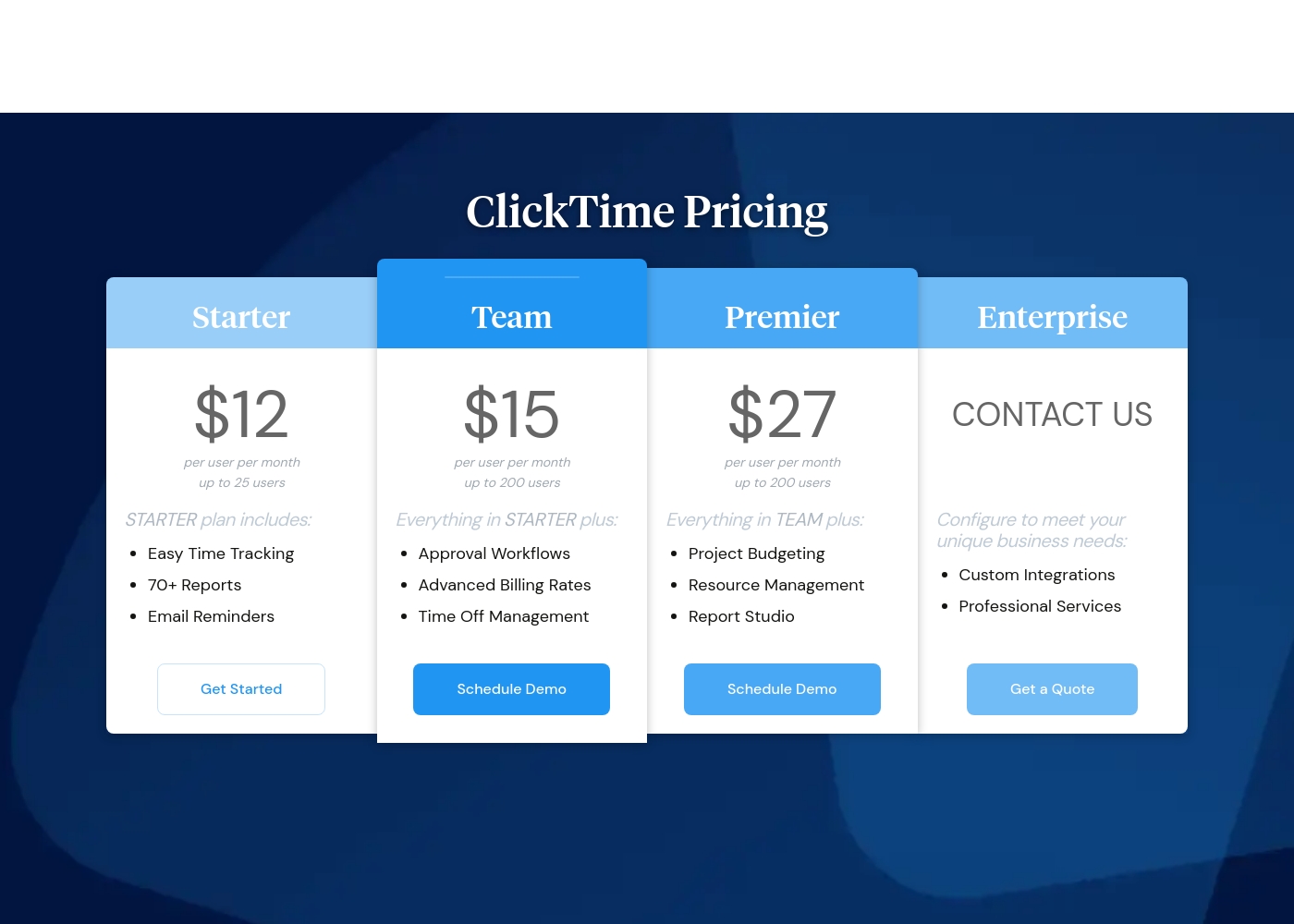
ClickTime costs between $12 and $27 per user per month (billed annually) with four plans: Starter at $12, Team at $15, Premier at $27, and Enterprise (Custom Pricing).
Here’s a closer look at what each plan offers.
Starter
Price: $12 per user per month (billed annually) / $15 per user per month (billed monthly) Best For: Small teams needing basic time tracking Other Features: Easy Time Tracking, 70+ Reports, Email Reminders, Mobile App Access, Basic Billing Rates
- Easy Time Tracking
- 70+ Pre-Built Reports
- Email Reminders
- Mobile App
- Daily, Weekly, and Biweekly Timesheets
- Everything in Starter
- Approval Workflows
- Advanced Billing Rates
- Time Off Management
- Employee Costs
- Everything in Team
- Project Budgeting
- Resource Management
- Report Studio
- Custom Fields
- Configuration to meet unique business needs
- Custom Integrations
- Professional Services
- Okta, OneLogin, Azure AD SSO
- SCIM User Provisioning (Quote)
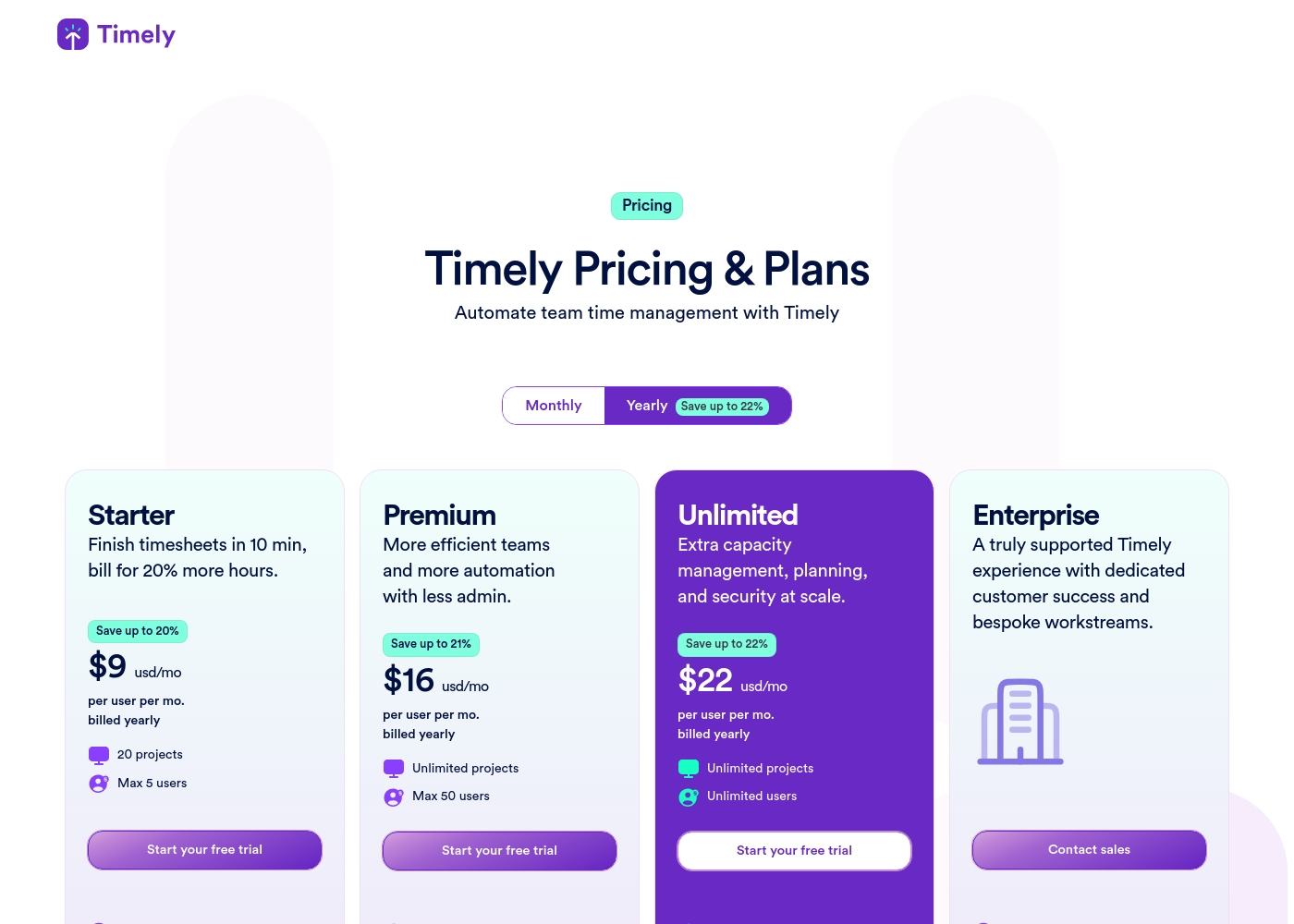
Timely costs between $9 and $28 per user, per month, with three defined subscription plans: Starter at $9 annually, Premium at $16 annually, and Unlimited at $22 annually (plus a custom Enterprise option).
Here’s a clear breakdown of the flexibility offered in each plan, allowing you to choose the perfect fit for your organization.
Starter
Price: $9 USD/mo per user (billed yearly) or $11 USD/mo per user (billed monthly) Best For: Teams aiming for fast timesheet completion and increased billable hours. Other Features:
- Automatic time tracking and AI timesheets
- Monitor project health
- Api access
- In-app support
- Automatic time tracking
- AI timesheets
- Monitor project health
- Track time on thousands of apps and websites
- In-app support
- All Starter features
- Sync work with project management tools
- Integrate with accounting tools
- Team management
- Manage budgets and costs
- All Premium features
- Unlimited usage
- Capacity management and reporting
- Overtime and undertime
- Azure User Management
- All Unlimited features
- Tailored onboarding and set up
- Premium Timely team training
- Monthly/Quarterly reviews
- Dashboard and reporting support
Pricing Notes
- Timely's minimum cost is lower at $9/user/month (annual), compared to ClickTime's $12/user/month (annual).
- ClickTime's Starter plan is far more generous (up to 25 users) than Timely's Starter (5 users/20 projects).
- Expense tracking costs an extra $4/user/month on every ClickTime plan.
- Task management is available as an extra $5/user/month add-on across all Timely subscriptions.
- Both ClickTime and Timely offer substantial discounts for choosing annual billing over monthly payments.
Pricing Head-to-Head
User Reviews
Review data for ClickTime is currently sparse across major platforms. On Trustpilot (with only 2 reviews), the score averages 2.9 stars, but the publicly available feedback suggests users find the software usable ("I like this software quite a bit."). We lack sufficient detailed submission data from both Trustpilot and Capterra to establish clear recurring user themes regarding specific performance aspects. Therefore, we cannot conclusively comment on customer support responsiveness, value derived from pricing tiers, onboarding complexity, or reliability of integrations.
Typically, independent reviews emphasize trends in accuracy, reliability, and ease of use, but these are not reflected in the handful of submissions provided. Based purely on the vendor's product description, ClickTime appears strong in specialized areas like financial forecasting and complex project budgeting. However, user validation on these advanced features is entirely unavailable at this time. Potential users should utilize the 14-day free trial to assess the platform’s efficiency and features directly. 🤔
We struggled with incorrect timesheets until we implemented ClickTime. The mobile app makes logging hours simple and quick, even when staff are working offsite. It's a huge improvement to our workflow.
Timely reviews present a stark contrast regarding user experience. Users frequently praise the software for its general ease of use and straightforward setup, often finding it intuitive for managing client appointments across salons of varying sizes.
However, customer support is arguably the most divisive topic. While several reviewers highlight individual support agents as quick and incredibly helpful 🤗, others complain about chronic issues, including a lack of 24-hour phone support and agents dismissing small bug reports as low priority.
I’ve been using Timely over three years and always felt well supported by their team. It's easy to manage and set up the system. When I need assistance, I always receive a helpful answer quickly!
Our Verdict
Choosing between ClickTime and Timely means deciding your priority: strategic financial control or maximum user automation. Both tools excel but serve different managerial needs effectively. It is certainly not a tie in capabilities. ClickTime thrives when robust financial governance is the biggest need for your business. Its Premier plan provides comprehensive resource management and project budgeting for up to 200 users. ClickTime helps strategic leaders forecast costs precisely, ensuring you know exactly where project budgets stand. Timely’s superpower is making time logging effortless using its AI Memory Tracker. Employees never use stopwatches; the system records activity automatically and drafts timesheets. This automation, combined with a strict anti-surveillance policy, makes Timely fantastic for maintaining high employee trust. The critical deciding factor is team size and the inevitable upgrade path cost. ClickTime supports up to 25 users on its Starter plan without increasing your bill. Timely forces teams over five people into the much more expensive Premium tier immediately. Choose ClickTime if scaling quickly past 5 users is a priority. Final verdict: Pick ClickTime for complex financial planning, detailed compliance reporting, and managing large teams effectively. Opt for Timely to achieve near-perfect automation, boost morale, and sync seamlessly with PM tools like Asana and Jira.
Frequently Asked Questions
Which is better for agencies seeking profitability: ClickTime or Timely?
ClickTime is superior for agencies needing deep profitability insights. It includes Project Budgeting tools to actively monitor profits against costs on every job. While Timely helps manage billable rates, ClickTime offers more sophisticated financial forecasting and control features.
Does Timely offer capacity planning like ClickTime?
Yes, Timely offers capacity management, but you need the expensive Unlimited plan to access it. ClickTime includes detailed Resource Management and capacity planning in its Premier plan. ClickTime often provides deeper, multi-month forecasting capabilities suitable for complex scheduling.
Is Timely’s automatic time tracking intrusive for employees?
No, Timely is built with a strong anti-surveillance policy and privacy first design. Tracked activities (memories) are kept private and cannot be viewed by managers. The employee must explicitly share these memories when submitting their timesheet.
Which software is more affordable for a team of 15 users?
ClickTime is significantly more affordable for a team of 15 users. They fit easily into ClickTime's generous Starter plan ($12/user/month annually). Timely charges this team the Premium plan rate ($16/user/month annually) because they exceed the 5-user limit.
Which tool offers better support for my project management software?
Timely offers better direct integration with tools like Jira, Asana, ClickUp, and monday.com in its Premium plan. ClickTime handles integrations primarily through its API or Zapier. If you need simple, pre-built syncs with PM tools, Timely is the stronger option.
How do the expense and task management features compare?
Both features are optional add-ons. ClickTime offers Expense Tracking for an extra $4/user/month. Timely offers a Tasks management feature for an additional $5/user/month. Be aware you must budget for these costs for full functionality.
Ready to Choose?
Both tools have their strengths. Choose based on your specific needs.