busybusy vs ClickTime
Comparing busybusy and ClickTime forces a decision between field accountability and financial strategy. busybusy excels at location verification and liability protection for remote teams. ClickTime is the strategic choice for deep capacity planning and project forecasting. You need to identify if you manage physical crews or knowledge workers.
Best for: Construction, Landscaping, and remote Field Service companies, Field crews needing automated liability protection
Best for: IT Consulting and Digital Marketing Agencies, Organizations requiring strategic P&L reporting (up to 200 users)
Accurate GPS Tracking for the Field.
We recognize busybusy as a specialized time tracking solution highly optimized for construction and remote teams, providing deep operational features like GPS breadcrumbing and strong liability documentation. Overall, we find this platform offers a comprehensive, targeted toolset for reducing administrative burdens and accurately monitoring remote workforce deployment.
Pros
- A fully featured Free plan is available for unlimited users, including core GPS tracking features.
- Specifically designed for construction and remote industries, addressing niche needs like job costing and equipment tracking.
- Mandatory GPS tracking and 'Required Onsite' features ensure high time entry accuracy and accountability.
- Includes advanced liability documentation tools such as daily sign-offs and time-stamped photo storage.
Cons
- Paid plans require a separate, mandatory $40 Admin license fee.
- The comprehensive feature set may be overly detailed or complex for non-construction or office-based businesses.
- Pricing requires careful calculation due to monthly vs. annual billing plus the license fee.
Strategic Time and Financial Control
We found ClickTime offers powerful tools for minimizing manual errors and obtaining financial clarity. Its clear tiered plans start affordably yet scale up to robust resource and project budgeting features. Overall, this is a highly strategic platform that turns routine time logging into crucial business intelligence suitable for scaling organizations.
Pros
- Scales effectively from basic Starter ($12) to comprehensive Premier tiers.
- Provides strong financial reporting and project cost analysis.
- Automated reminders and sync features reduce manual input errors.
- Advanced resource management and capacity planning are included in Premier.
Cons
- Widespread, recent positive user validation is currently sparse.
- Expense tracking requires an additional $4 per user monthly add-on.
- Top-tier features like resource management are reserved for the higher plans.
Aboutbusybusy
busybusy is the top-ranked GPS time tracking software designed specifically for construction and remote industries. This easy-to-use mobile time card app is loved by both field employees and office staff. It provides everything you need, including job costing, daily reports, and progress tracking. Even if you lose service, the app works flawlessly through its Offline Mode capability. busybusy effectively transforms standard mobile devices into powerful management tools for your entire company. ✅
AboutClickTime
ClickTime is a powerful platform for comprehensive time tracking and resource management. It is designed to give you deep insights into how your team uses its bandwidth. This system tracks employee hours, project deadlines, and budget targets seamlessly. By using ClickTime, you get valuable information about project costs and overall profitability. It is the tool that helps you unify your planning and financial forecasting efforts. 💡
Highlights
Feature Comparison
Features Overview
We highlight the main differences and pick a winner for each feature.
Location & GPS Accuracy
busybusy provides superior location verification crucial for field teams and liability defense.
busybusy is engineered for the job site, providing surgical GPS accuracy. It uses "Required Onsite" settings to prevent clock-ins outside the perimeter. ClickTime offers time logging via a standard mobile app interface. It focuses on calendar sync and approvals, not physical location enforcement. busybusy offers GPS breadcrumbing and requires daily non-injury sign-offs. This creates a strong, verifiable record protecting the business from liability. Choose busybusy if you constantly fight time theft or need strict compliance on remote job sites.
Resource Management
ClickTime offers sophisticated capacity planning; busybusy focuses more heavily on real-time costs.
ClickTime Premier includes comprehensive Resource Management tools. You can analyze utilization trends and forecast workforce capacity intelligently. busybusy excels at real-time job costing and equipment tracking. It doesn't feature the deep utilization analysis for knowledge workers that ClickTime has. ClickTime shows managers real-time employee availability and future workload capacity. This strategic view is vital for consulting firms planning multi-month projects ahead. busybusy is great for knowing *what* was spent; ClickTime is great for forecasting *who* is available and *what* they can handle.
Field Documentation & Safety
busybusy is far stronger for field documentation, compliance, and injury reporting.
busybusy offers REQUIRED DAILY SIGN-OFFs documenting accurate time and non-injuries. This is a critical feature for protecting construction companies from false claims. ClickTime primarily focuses on streamlined timesheet approval workflows. It does not offer these specific liability and injury documentation features. busybusy provides unlimited storage for marked-up photos, videos, and project documents. It also auto-generates detailed Daily Project Reports in under 60 seconds. If project documentation, safety checks, and time dispute protection are vital, busybusy is your solution.
Pricing Structure and Free Use
busybusy wins with a powerful Free plan, but ClickTime's scaling structure is cleaner.
busybusy offers a Free plan supporting unlimited users for core GPS tracking and job costing. Paid busybusy plans require a mandatory $40 Admin License Fee monthly. ClickTime requires payment immediately, starting at $12 per user/month annually. All ClickTime tiers are strictly per-user, with no additional fixed license fee required. busybusy's $40 fee works best for larger teams needing many paid seats to dilute the cost. ClickTime's pricing is more straightforward for small professional service teams (under ten users). If you need a zero-cost entry point for basic tracking, busybusy is the clear winner.
Mobile Experience
busybusy's mobile design is focused on crews using ruggedized location features.
busybusy includes essential field features like Offline Mode functionality. It also supports Supervisor Tools to clock in entire crews from one mobile device. ClickTime offers a stable mobile app for time logging, expense entry, and approvals. Its focus is more on data entry synchronization than real-time field management. busybusy makes it easy for supervisors to assign cost codes and manage large crews on the go. Team messaging, checklists, and video markups are also built into busybusy's Premium tier. The features in busybusy are clearly designed to maximize worker efficiency and accountability in the field.
Integration Ecosystem
ClickTime offers a powerful API, while busybusy focuses more on pre-built accounting sync.
ClickTime touts an award-winning REST API for breaking down complex data silos. This enables seamless data flow to mission-critical ERP and financial systems. busybusy highlights seamless integration with hundreds of accounting and payroll products. Its strength is pushing accurate job costing data directly into payroll tools quickly. ClickTime Enterprise supports custom integrations and advanced SSO options like Okta. busybusy Premium provides Zapier integration for connecting many third-party apps. If bespoke, complex integration needs are paramount for your business, ClickTime is better equipped.
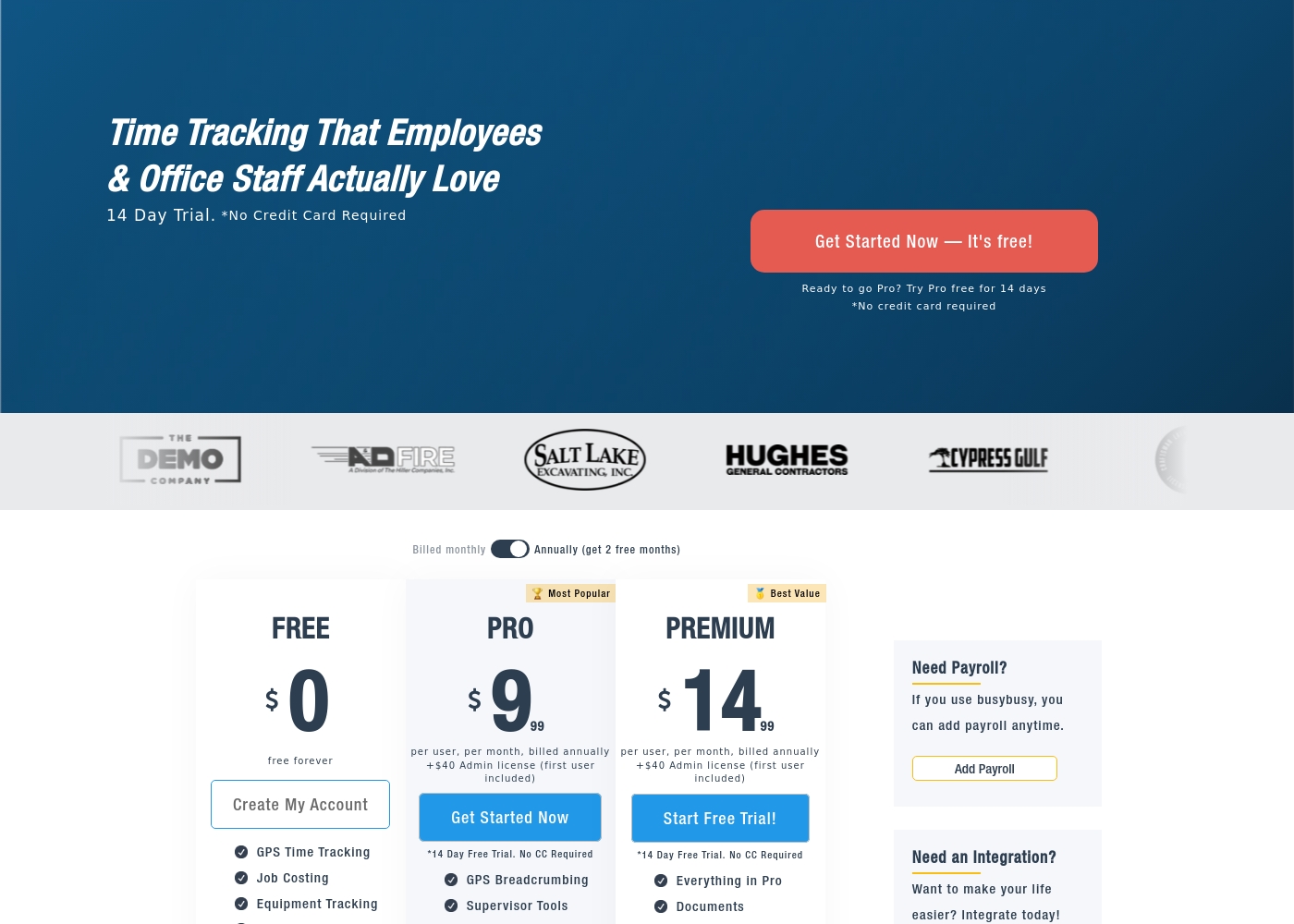
busybusy costs between $0 and $17.99 per user per month with three plans: Free at $0/month, Pro starting at $9.99 (annual), and Premium starting at $14.99 (annual).
We offer clear, tiered plans so you can choose the best fit for your team's size and specific feature requirements. Here is a breakdown of what each subscription level includes.
Free
Price: $0 per month (free forever) Best For: Basic time tracking and job monitoring for small teams. Other Features: GPS Time Tracking, Job Costing, Equipment Tracking, Unlimited Users.
- GPS Time Tracking
- Job Costing
- Equipment Tracking
- Unlimited Users
- Clock In/Out
- Everything in Free
- GPS Breadcrumbing
- Supervisor Tools
- Daily Sign-Offs
- Photos & Notes
- Everything in Pro
- Documents
- Daily Project Reports
- Progress Tracking
- Checklists & Punch Lists
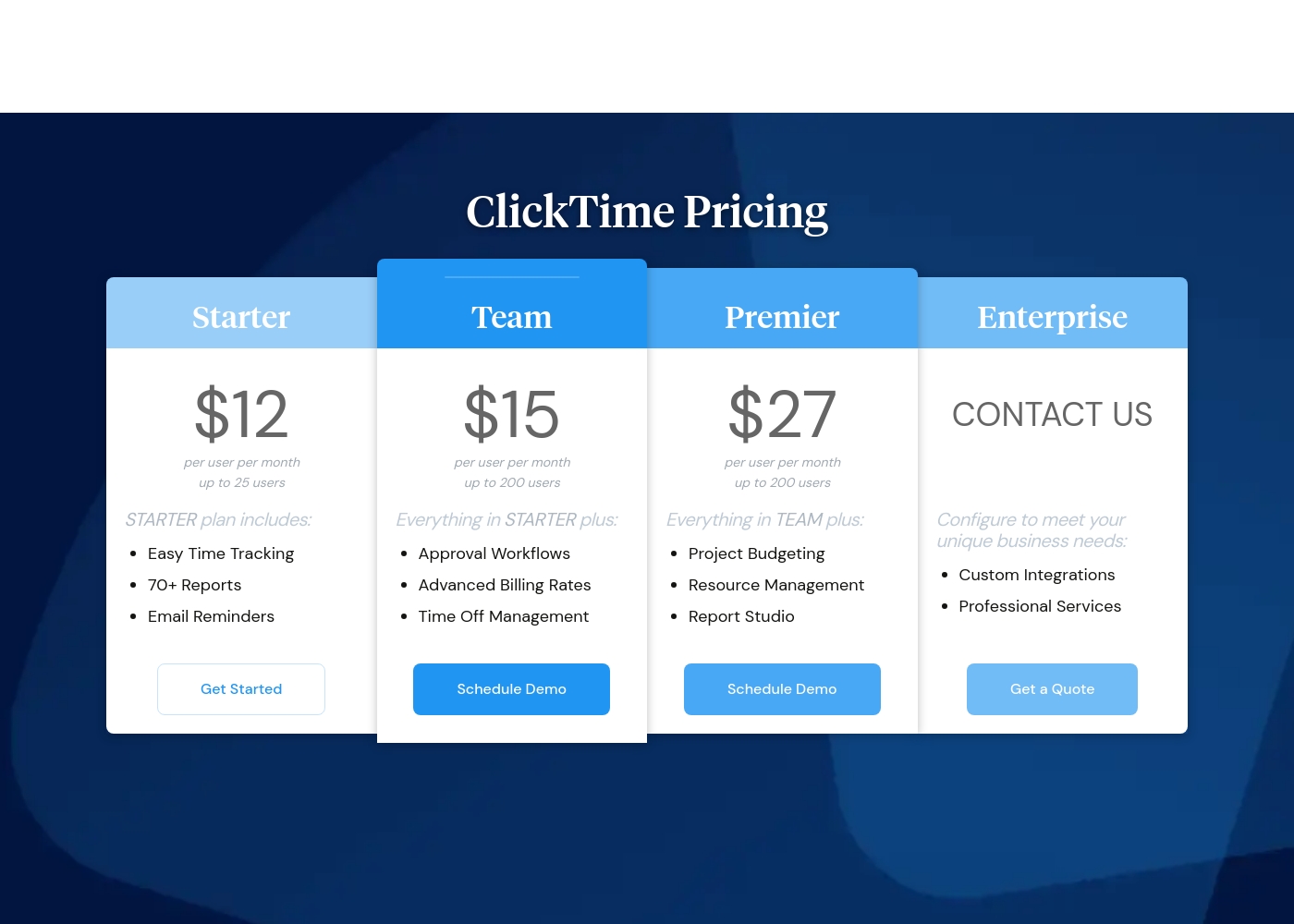
ClickTime costs between $12 and $27 per user per month (billed annually) with four plans: Starter at $12, Team at $15, Premier at $27, and Enterprise (Custom Pricing).
Here’s a closer look at what each plan offers.
Starter
Price: $12 per user per month (billed annually) / $15 per user per month (billed monthly) Best For: Small teams needing basic time tracking Other Features: Easy Time Tracking, 70+ Reports, Email Reminders, Mobile App Access, Basic Billing Rates
- Easy Time Tracking
- 70+ Pre-Built Reports
- Email Reminders
- Mobile App
- Daily, Weekly, and Biweekly Timesheets
- Everything in Starter
- Approval Workflows
- Advanced Billing Rates
- Time Off Management
- Employee Costs
- Everything in Team
- Project Budgeting
- Resource Management
- Report Studio
- Custom Fields
- Configuration to meet unique business needs
- Custom Integrations
- Professional Services
- Okta, OneLogin, Azure AD SSO
- SCIM User Provisioning (Quote)
Pricing Notes
- busybusy offers a permanent Free plan with unlimited users for core time tracking.
- Paid busybusy plans (Pro/Premium) require a mandatory $40 Admin License fee monthly (first user included).
- ClickTime Premium plans approach $31/user/month when billed monthly, making it significantly more expensive for advanced features.
- Expense tracking costs an additional $4/user/month add-on across all ClickTime tiers.
- Both busybusy and ClickTime offer a 14-day free trial for their paid plans without requiring a credit card.
Pricing Head-to-Head
User Reviews
busybusy maintains a strong presence across major review platforms, confirming its status as a widely used tool for construction and remote fieldwork, though specific user feedback snippets were not provided for this synthesis. The platform's focus on industries prioritizing labor tracking strongly suggests users value specific features aimed at improving accountability and efficiency.
For time tracking tools targeting remote field teams, users commonly emphasize core requirements like reliability (especially robust offline functionality), time entry accuracy supported by GPS technologies, and seamless integration with existing payroll systems. The product narrative highlights the importance of documentation, such as daily sign-offs and automatic GPS-stamped photo storage, indicating that the solution is designed to tackle crucial pain points surrounding liability and compliance.
Review data for ClickTime is currently sparse across major platforms. On Trustpilot (with only 2 reviews), the score averages 2.9 stars, but the publicly available feedback suggests users find the software usable ("I like this software quite a bit."). We lack sufficient detailed submission data from both Trustpilot and Capterra to establish clear recurring user themes regarding specific performance aspects. Therefore, we cannot conclusively comment on customer support responsiveness, value derived from pricing tiers, onboarding complexity, or reliability of integrations.
Typically, independent reviews emphasize trends in accuracy, reliability, and ease of use, but these are not reflected in the handful of submissions provided. Based purely on the vendor's product description, ClickTime appears strong in specialized areas like financial forecasting and complex project budgeting. However, user validation on these advanced features is entirely unavailable at this time. Potential users should utilize the 14-day free trial to assess the platform’s efficiency and features directly. 🤔
We struggled with incorrect timesheets until we implemented ClickTime. The mobile app makes logging hours simple and quick, even when staff are working offsite. It's a huge improvement to our workflow.
Our Verdict
Choosing between busybusy and ClickTime boils down to where your work actually takes place. If your team is in the field, busybusy is the unequivocal choice. It’s designed specifically to solve location accountability challenges. busybusy has a 4.3 rating and boasts a superior Free plan for basic time tracking. busybusy’s strength is its precise GPS control required for field compliance and liability. Features like Required Onsite settings eliminate clock-in fraud instantly. It also uses Daily Sign-Offs to protect your business from costly workers’ compensation claims. ClickTime dominates the administrative and financial strategy space for office-based firms. It provides powerful tools for true resource management and deep utilization analysis. ClickTime helps you forecast financial stability and staff intelligently ahead of time. The key deciding factor is the need for location enforcement versus capacity planning. If you require pin-point location accountability and project documentation, pick busybusy. If you need strategic financial forecasting and smooth administrative scaling up to 200 users, choose ClickTime. For construction and field service, busybusy wins the comparison hands down. For consulting and IT firms needing strategic capacity controls, ClickTime is the better, dedicated choice.
Frequently Asked Questions
Which is better for construction teams: busybusy or ClickTime?
busybusy is explicitly designed for construction and remote field industries. It offers features like Required Onsite GPS tracking and equipment tracking. ClickTime focuses more on strategic capacity planning for service firms.
Does busybusy have strategic resource management like ClickTime Premier?
No, busybusy focuses on real-time job costing and labor budget analysis. ClickTime offers comprehensive resource management and multi-month capacity planning. If strategic workforce forecasting is your priority, ClickTime is superior.
Is the mandatory $40 Admin Fee for busybusy worth the cost?
The busybusy Admin Fee ($40/month) is mandatory for paid plans (Pro/Premium). It provides greater value as your team size increases, diluting the fixed cost per user. If you have many users needing advanced GPS controls, the value is easily recouped.
Which software offers a free plan with unlimited users?
busybusy offers a permanent Free plan supporting unlimited users for core GPS time tracking. ClickTime does not have a free plan, but it offers a functional 14-day free trial.
Does ClickTime or busybusy offer better protection against liability?
busybusy offers stronger liability protection via DAILY SIGN-OFFs. This feature captures confirmation of time accuracy and documents daily non-injuries. ClickTime lacks this specific safety and compliance documentation tool.
Can I track expenses with busybusy or ClickTime?
busybusy does not currently include expense tracking features. ClickTime offers expense tracking as an optional add-on for $4 per person per month across all its plans.
Ready to Choose?
Both tools have their strengths. Choose based on your specific needs.