busybusy

busybusy

The top-ranked GPS time tracking software built for construction and remote industries.

#2 dans Time tracking
2 min read · Updated 11/17/2025
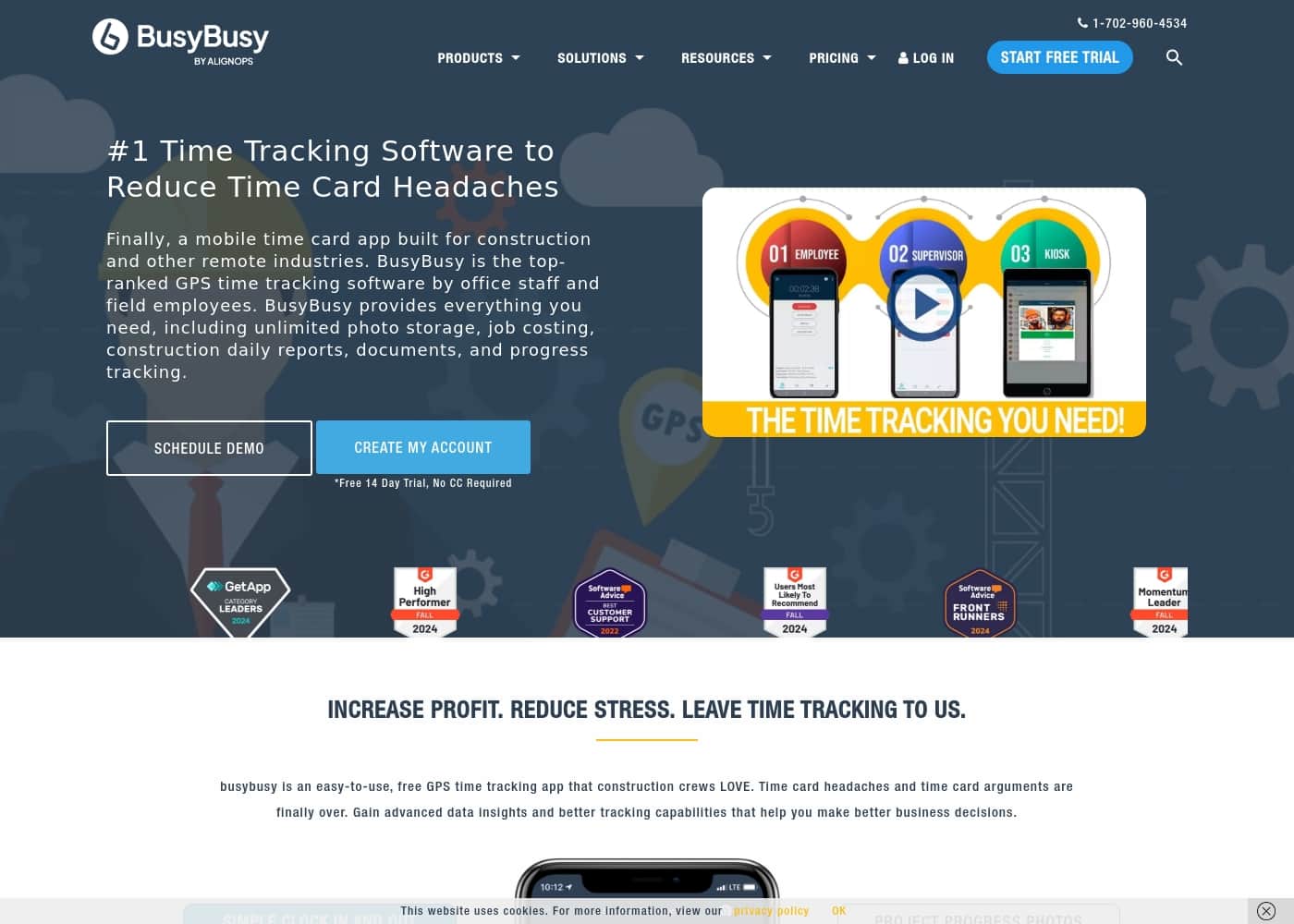
busybusy homepage screenshot

At a glance

Quick overview for busybusy: rating, pricing summary, key features, and highlights.

Ciroapp review

4.5
Accurate GPS Tracking for the Field.

We recognize busybusy as a specialized time tracking solution highly optimized for construction and remote teams, providing deep operational features like GPS breadcrumbing and strong liability documentation. Overall, we find this platform offers a comprehensive, targeted toolset for reducing administrative burdens and accurately monitoring remote workforce deployment.

Pros

  • Pro:A fully featured Free plan is available for unlimited users, including core GPS tracking features.
  • Pro:Specifically designed for construction and remote industries, addressing niche needs like job costing and equipment tracking.
  • Pro:Mandatory GPS tracking and 'Required Onsite' features ensure high time entry accuracy and accountability.
  • Pro:Includes advanced liability documentation tools such as daily sign-offs and time-stamped photo storage.

Cons

  • Con:Paid plans require a separate, mandatory $40 Admin license fee.
  • Con:The comprehensive feature set may be overly detailed or complex for non-construction or office-based businesses.
  • Con:Pricing requires careful calculation due to monthly vs. annual billing plus the license fee.
Free trial
Yes — 14 days
Range: $0 – $17.99/user/month (plus $40 Admin fee for paid plans)Free plan, Free trial, Monthly subscription, Yearly subscription, Per seat pricing
This section is a summary. Detailed sections about features, use cases, pricing, and reviews follow below.

busybusy review, pricing, features, pros & cons

Dealing with paper time cards and tracking down signed confirmation is a huge headache. Time card arguments and manual collection are finally over. busybusy offers a solution that eliminates these frustrations, giving employees an easy clock entry and providing the office with advanced data insights.

What is busybusy?

busybusy is the top-ranked GPS time tracking software designed specifically for construction and remote industries. This easy-to-use mobile time card app is loved by both field employees and office staff. It provides everything you need, including job costing, daily reports, and progress tracking.

Even if you lose service, the app works flawlessly through its Offline Mode capability. busybusy effectively transforms standard mobile devices into powerful management tools for your entire company. ✅

busybusy Key Features

✨ Easy Mobile Time Tracking and Offline Mode

It’s simple for employees to clock in and out using busybusy’s mobile app. They can easily track time for equipment usage, switch between specific cost codes, or clock out for scheduled breaks. This easy process eliminates manual paper time cards and all the related mistakes and arguments.

Even when your team is working in remote areas without internet access, busybusy continues to function. The reliable Offline Mode captures all time activity seamlessly. Once service is restored, the app automatically syncs the data. This system ensures employees track hours accurately, leading to a much smoother payroll process. ✨

✨ Advanced GPS for True Accountability

busybusy uses smart GPS tools to ensure your team is where they should be before starting work. The “Required Onsite” feature prevents employees from clocking in until they are physically within the project boundaries. This protects you from paying for unearned time. We also offer tools to help your team stay on track.

Worried about forgotten clock-ins? “Location Based Reminders” send real-time alerts when employees arrive at or leave the job site. The system also offers GPS Breadcrumbing, tracking location history throughout the day. These GPS features boost overall accountability and help new employees learn quickly.

✨ Protecting Your Business with Documentation

Protect your company from liability or potential workers' compensation claims using busybusy's documentation tools. The DAILY SIGN-OFF feature requires employees to confirm their time is accurate at the end of the shift. This confirmation documents non-injuries and injuries every day.

You can also use “Required Sign In Questions” to ensure employees follow daily procedures. Ask them mandatory yes or no questions about safety gear, their wellness, or the completion of toolbox talks before they start work. This provides a robust, digital record for compliance and legal protection.

✨ Real-Time Job Costing and Financial Budgets

Gain instant financial clarity by comparing estimated budgets against actual costs in real-time. You can create budgets for various categories, including equipment use, labor costs, materials, and total projected hours. This detailed reporting helps you make profitable business decisions based on concrete data.

All time and cost data is highly filterable. You can sort information using up to five categories. These include employee, project, date, cost code, and equipment. This detailed sorting gives you precise oversight of project efficiency.

✨ Empowering Supervisors with Crew Management Tools

busybusy gives supervisors specialized tools so they can focus on productive tasks, not just managing time cards. Supervisors can clock in or clock out an entire crew at once or manage individuals easily. All this is done directly from their mobile device.

They gain the ability to schedule breaks, quickly switch cost codes, or assign equipment to team members. They can also view time records and see who has signed their time card for the pay period. This increased efficiency ensures supervisors stop wasting valuable time on administrative tasks.

✨ Automated Daily Project Reporting

Supervisors now auto-generate detailed daily project reports in less than 60 seconds. This feature provides comprehensive project information instantly without lengthy manual work. These customs reports collect essential information for management.

Reports can include data about employees on-site, total project hours, photos, injury reports, and weather conditions. These reports create necessary daily records quickly. The reporting system also allows for tracking progress notes, inventory usage, and change order requests.

✨ Managing Assets and Equipment

You can track the live GPS location of your heavy equipment alongside your employees and projects on a single map. This gives you oversight of who is working on what project. Equipment owners can also choose to add an hour meter to assets for daily updates.

busybusy helps managers ensure optimal asset usage. Features help track operator efficiency, machine hours, and equipment use. The system transforms your mobile devices into management tools for tracking all company assets.

Use Cases

✅ Ensuring Accurate Time and Location for Payroll

Office staff often spend hours correcting time card mistakes or resolving wage arguments. busybusy ends these headaches by confirming employees are where they should be. The Required Onsite feature prevents clocking in until workers enter the precise project location. If employees forget to clock out, Location Based Reminders send alerts when they leave the job site. This saves time and ensures payroll data is consistently correct for every pay period.

Time card arguments and manual collection are finally over. Digital signatures lock time cards accurately, requiring both the employee and supervisor to sign them directly on their phones. This documentation provides clear confirmation of hours worked.

Tip: Use Facial Recognition in Kiosk Mode to prevent "buddy punching" and verify identity upon clock-in.

⏱️ Streamlining Supervisor and Crew Management

Supervisors are highly paid leaders; they shouldn't be focused on paperwork. busybusy provides specialized tools to boost their efficiency instead of bogging them down with time cards. A supervisor can clock in or out an entire crew at once, saving significant collective time each day. They can also manage breaks, switch cost codes, and assign equipment for every crew member easily from a mobile device.

Perhaps the biggest time saver is the auto-generated Daily Project Report. Supervisors can complete a comprehensive report in under 60 seconds. This report includes critical information like job costing data, weather conditions, equipment usage, and injury reports for the day.

💰 Gaining Real-Time Project Financial Control

Knowing whether a project is profitable depends on accurate, instant data. busybusy delivers instant budget versus actual reports on all projects. You no longer have to wait until the end of the month to discover a project went over budget.

It’s easy to create clear budgets for various elements, including labor costs, equipment expenses, and hours. This detailed data can be sorted by project, employee, cost code, and equipment. Using this clear financial oversight helps management make profitable decisions constantly.

🛡️ Mitigating Risk with Digital Documentation

The Daily Sign-Off feature helps safeguard against potential lawsuits and workers' compensation claims. Each day, employees confirm their time care accuracy and report non-injuries. This documentation creates a continuous record showing the confirmed health and attendance of your team, providing powerful legal evidence when needed.

📂 Centralizing Job Site Information and Plans

Field teams often need instant access to important documents while onsite. You can upload any file to busybusy, including site plans, project permits, diagrams, and safety talk materials. These documents are then accessible from any mobile device, ensuring everyone uses the correct, up-to-date information.

Employees can also add detailed notes to record progress, change order requests, and inventory usage directly to their time card entries. This allows project managers to track physical progress alongside labor costs instantly.

📶 Handling Remote Locations and Connectivity Loss

In construction and remote industries, reliable service is not always possible. busybusy is built to operate flawlessly even when you lose cell service. The application’s Offline Mode capability ensures continuous work and accurate recording.

When service returns, the app automatically syncs all time tracking and job costing data. This prevents data loss and interruptions, making sure every mobile device acts as a powerful management tool no matter the location.

Pricing Overview for busybusy

Pricing range
$0 – $17.99/user/month (plus $40 Admin fee for paid plans)
Pricing types
Free plan, Free trial, Monthly subscription, Yearly subscription, Per seat pricing

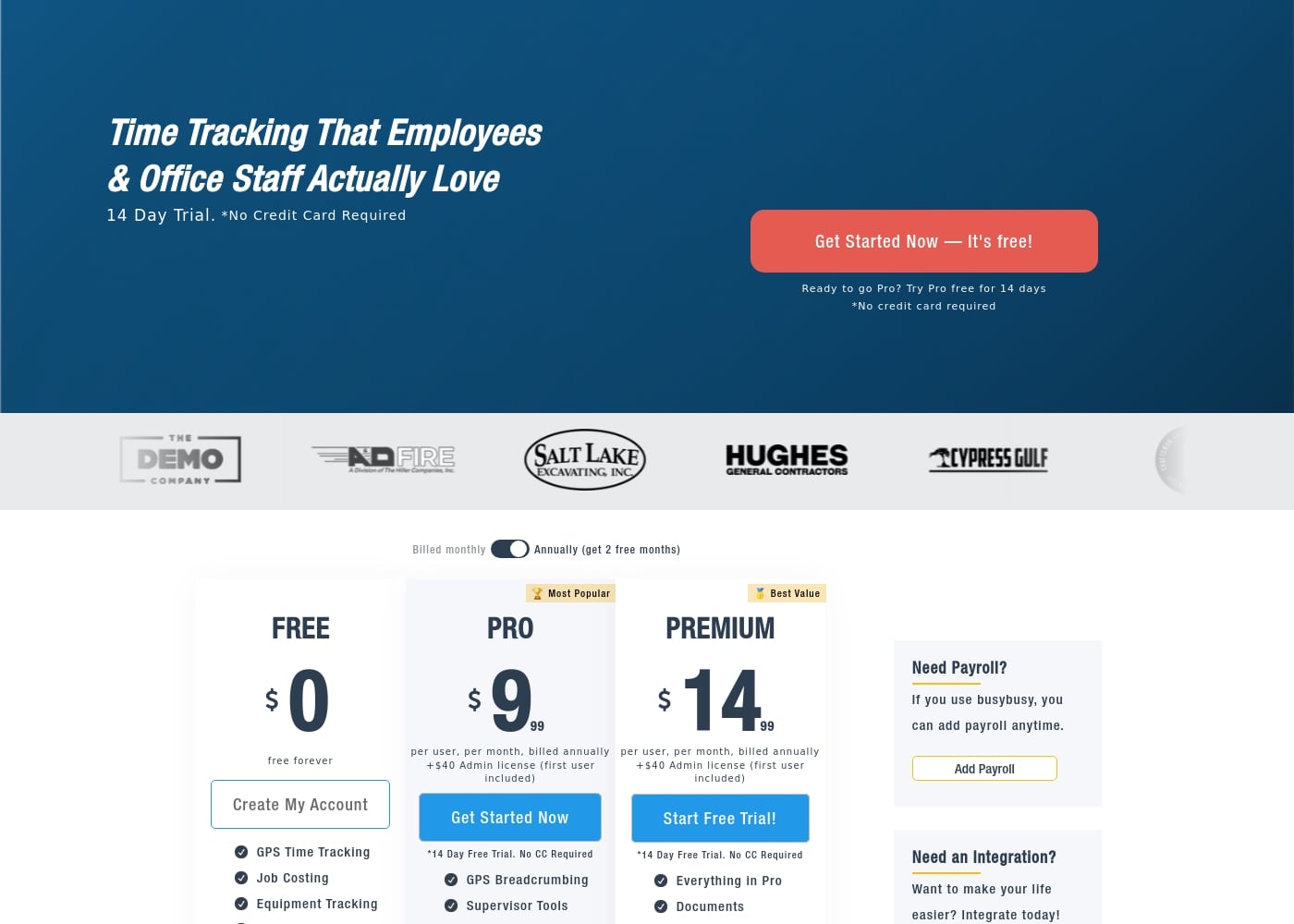
busybusy offers three plans—Free, Pro, and Premium—using a per-user, per-month pricing model for paid subscriptions. Paid plans start at $9.99/user/month (billed annually) and require a separate $40 Admin license fee.

Plans & Pricing

Free

Monthly0
Yearly0
Free forever. Provides basic features only.
  • GPS Time Tracking
  • Job Costing
  • Equipment Tracking
  • Unlimited Users
  • Clock In/Out

Pro

Monthly11.99
Yearly9.99
Per user, per month. Requires $40 Admin license (first user included). Annual billing saves 2 months' cost.
  • Everything in Free
  • GPS Breadcrumbing
  • Supervisor Tools
  • Daily Sign-Offs
  • Photos & Notes
  • Scheduling
  • Enhanced GPS features

Premium

Monthly17.99
Yearly14.99
Per user, per month. Requires $40 Admin license (first user included). Annual billing saves 2 months' cost.
  • Everything in Pro
  • Documents
  • Daily Project Reports
  • Progress Tracking
  • Checklists & Punch Lists
  • Team Messaging
  • Video & Photo Markups
  • Zapier integration
  • + 1 more features

busybusy costs between $0 and $17.99 per user per month with three plans: Free at $0/month, Pro starting at $9.99 (annual), and Premium starting at $14.99 (annual).

We offer clear, tiered plans so you can choose the best fit for your team's size and specific feature requirements. Here is a breakdown of what each subscription level includes.

Free

Price: $0 per month (free forever) Websites Supported: Not explicitly stated Best For: Basic time tracking and job monitoring for small teams. Refund Policy: Not explicitly stated Other Features: GPS Time Tracking, Job Costing, Equipment Tracking, Unlimited Users.

This plan is perfect for organizations just starting out with digital time tracking. You get essential tools like GPS tracking and job costing without any monthly payments. Since the plan supports unlimited users, it's a great zero-cost solution for managing basic field operations and time capture.

Pro

Price: $9.99 per user, per month (billed annually) or $11.99 per user, per month (billed monthly), plus a $40 Admin license. Websites Supported: Not explicitly stated Best For: Companies needing basic supervisor tools, scheduling, and enhanced GPS tracking. Refund Policy: Not explicitly stated (14-day free trial available) Other Features: GPS Breadcrumbing, Supervisor Tools, Daily Sign-Offs, Photos & Notes, Scheduling.

The Pro plan is the most popular choice for businesses that need more control and better visibility over their workforce. You get powerful supervisor and scheduling functions, making daily team management much simpler. If enhanced GPS capabilities and improved project documentation matter to your operations, this is the smart move.

Premium

Price: $14.99 per user, per month (billed annually) or $17.99 per user, per month (billed monthly), plus a $40 Admin license. Websites Supported: Not explicitly stated Best For: Teams requiring advanced reporting, internal team communication, and comprehensive documentation tools. Refund Policy: Not explicitly stated (14-day free trial available) Other Features: Documents, Daily Project Reports, Progress Tracking, Checklists, Team Messaging, Video & Photo Markups, Zapier integration, PPE Scans.

Premium is the best value if your business relies heavily on maximizing job efficiency and requires detailed reporting and project insights. This top-tier option unlocks critical features like checklists, internal team messaging, and comprehensive daily project reports. Choose Premium if you need complete team coordination and advanced liability documentation capabilities.

You can start using busybusy risk-free today, as we offer a generous 14-day free trial for both the Pro and Premium plans. The Free plan is available forever with no commitment required. No credit card is needed to begin your trial period, making it easy to test the system before you buy.
User Reviews

busybusy maintains a strong presence across major review platforms, confirming its status as a widely used tool for construction and remote fieldwork, though specific user feedback snippets were not provided for this synthesis. The platform's focus on industries prioritizing labor tracking strongly suggests users value specific features aimed at improving accountability and efficiency.

For time tracking tools targeting remote field teams, users commonly emphasize core requirements like reliability (especially robust offline functionality), time entry accuracy supported by GPS technologies, and seamless integration with existing payroll systems. The product narrative highlights the importance of documentation, such as daily sign-offs and automatic GPS-stamped photo storage, indicating that the solution is designed to tackle crucial pain points surrounding liability and compliance.

We anticipate that typical user reviews would center on the ease of use for field laborers and the platform's ability to help supervisors efficiently manage crews and generate rapid daily project reports. 🏗️

No reviews yet.

Write a Review

Write a Review for busybusy
0/100 characters
0/2000 characters

Why use busybusy?

Why should you choose busybusy? The platform helps you increase profit and reduce stress by automating administrative tasks and providing concrete data. This advanced tracking helps you make better business decisions and ensures an easier payroll process overall. Using busybusy centralizes many disparate workplace needs into one powerful application.

Key Ways busybusy Streamlines Your Operations

  • Improve Accountability and Accuracy: The software uses live GPS tracking to monitor employees, equipment, and projects on a single map. Features like "Required Onsite" make sure employees cannot clock in until they are physically inside the job site parameters. Location-based reminders also help prevent forgotten clock-ins and clock-outs.
  • Enhance Financial Oversight: busybusy delivers instant budget versus actual reports on all projects. You can easily create budgets for labor costs, hours, equipment, and materials. This detailed data filtering helps you provide sufficient information to make profitable decisions.
  • Simplify Documentation and Mitigate Liability: Protect your business with comprehensive digital records, including unlimited photo storage. All photos are automatically time-stamped and GPS-stamped for documentation. The daily sign-off feature helps prevent workers' compensation claims by documenting non-injuries and confirming time card accuracy.
  • Boost Supervisor Efficiency: busybusy offers specialized tools to make supervisors more productive instead of bogged down by time cards. They can manage entire crews, clocking them in or out as a whole. Supervisors can also auto-generate comprehensive daily project reports in under 60 seconds with data on weather, job costing, and injury reports.
  • Ensure Data Seamlessness: Digital signatures lock time cards accurately and allow both the employee and supervisor to sign from their phones. Furthermore, busybusy integrates its time tracking and job costing information seamlessly with hundreds of existing project management and accounting software products. 💡

Ready to transform your workflow with busybusy?

Frequently Asked Questions

What is the $40 Admin license fee mentioned with the paid plans?

This is a one-time setup fee required for both the Pro and Premium subscriptions. The good news is that the license for the first administrator or user is already included in that $40 initial cost.

How long is the free trial, and do I need a credit card to access it?

You can try both the Pro and Premium plans completely risk-free for 14 days. We do not require you to provide any credit card information to start your trial period.

Does the Free plan have any usage limits or restrictions on the number of employees?

No, the Free plan supports unlimited users. It provides essential features like basic GPS time tracking and job costing without any limits on team size.

What happens if our field crews are working in areas without cell phone reception?

The app is reliable even without internet access due to its Offline Mode capability. Employees can accurately clock in and track time, and the data syncs automatically once service is restored.

What kind of third-party accounting or project management software does busybusy integrate with?

busybusy integrates seamlessly with hundreds of existing project management and accounting software products. It ensures your time tracking and job costing information flows accurately into your back-office systems.

Is there a specific refund or cancellation policy for paid subscriptions?

Not explicitly stated on the official site. Since a purchase requires payment, we recommend reviewing the full terms of service before moving from the trial to a paid subscription.

What kind of customer support is included with the subscription plans?

Customer support is free and available to every user. You can use the chat feature inside the busybusy app to get answers in minutes, minimizing workflow interruptions and wait times.

If we use photos for documentation, are there limits on storage space?

No, paid plans include unlimited photo storage. All submitted photos are automatically organized, time-stamped, and GPS-stamped for liability protection and project progress tracking.

Can I bundle payroll services directly with the time tracking in busybusy?

Yes, you can add the optional BusyPayroll Service at any time. This allows you to run and process payroll instantly without needing to export data to an external payroll system.

Are there features that help us verify who clocks in for others (buddy punching)?

Yes, we use Facial Recognition technology powered by AI. This system sends immediate notifications to the office if it detects that one employee is attempting to clock in for another.

Who is busybusy best suited for if we are not a large construction company?

It excels for any industry managing remote field teams, including mining, restoration, property management, and specialized field services. It's ideal for businesses prioritizing documented job costing and site accountability.

How does the annual billing option benefit my business financially?

When you choose to be billed annually instead of monthly, you effectively receive the equivalent of two months of service for free. This results in significant cost savings over the year.

Does busybusy offer any specialized reports for advanced cost tracking?

Yes, customers on the Premium plan unlock features like Daily Project Reports and Progress Tracking. These tools let you make notes on detailed entries for inventory usage and track against estimated labor budgets.

Is the application available in multiple languages or supported in regions outside the US?

Not explicitly stated on the official site. If your team is international or requires multi-language support, it's best to confirm current capabilities with the sales or support team.

Ready to try busybusy? Check out the official site or pricing.