busybusy vs memtime
busybusy and memtime are excellent time trackers built for completely different types of businesses. busybusy tracks construction crews using precise GPS verification and robust job costing. memtime automatically logs detailed time for desk-based professionals focused on billable hour recovery.
Best for: Construction and specialized trade subcontractors (HVAC, Electrical), Organizations reliant on strict time card compliance and GPS verification
Best for: Consulting firms and marketing agencies billing clients hourly, Legal services and accounting firms needing meticulous time detail
Accurate GPS Tracking for the Field.
We recognize busybusy as a specialized time tracking solution highly optimized for construction and remote teams, providing deep operational features like GPS breadcrumbing and strong liability documentation. Overall, we find this platform offers a comprehensive, targeted toolset for reducing administrative burdens and accurately monitoring remote workforce deployment.
Pros
- A fully featured Free plan is available for unlimited users, including core GPS tracking features.
- Specifically designed for construction and remote industries, addressing niche needs like job costing and equipment tracking.
- Mandatory GPS tracking and 'Required Onsite' features ensure high time entry accuracy and accountability.
- Includes advanced liability documentation tools such as daily sign-offs and time-stamped photo storage.
Cons
- Paid plans require a separate, mandatory $40 Admin license fee.
- The comprehensive feature set may be overly detailed or complex for non-construction or office-based businesses.
- Pricing requires careful calculation due to monthly vs. annual billing plus the license fee.
Accurate tracking that pays for itself.
We found memtime to be a robust, privacy-first automatic time tracker that excels at capturing every minute spent on billable work. It runs non-intrusively in the background, fundamentally removing the need for error-prone manual timers and significantly reducing administrative burden. Overall, this is an essential tool for consultants and professionals reliant on accurate utilization data and billable hour recovery.
Pros
- Automatic, non-intrusive time logging (runs quietly in background).
- Highly accurate tracking, even when switching contexts (contact switching).
- Recovers significant missing billable time, increasing revenue.
- Strong privacy focus with data stored locally on the device.
Cons
- Transferring historical data between personal devices is challenging.
- Minor reported loss of reporting functionality in newer versions.
- Can require significant attention for extremely granular timesheet submissions.
Aboutbusybusy
busybusy is the top-ranked GPS time tracking software designed specifically for construction and remote industries. This easy-to-use mobile time card app is loved by both field employees and office staff. It provides everything you need, including job costing, daily reports, and progress tracking. Even if you lose service, the app works flawlessly through its Offline Mode capability. busybusy effectively transforms standard mobile devices into powerful management tools for your entire company. ✅
Aboutmemtime
memtime is an automated desktop application designed to solve the struggles of tedious manual time tracking. This tool eliminates the need for distracting start/stop timers entirely. Instead, it runs passively behind the scenes, memorizing the time you spend in various programs throughout the workday.
It allows you to go back to any day and review precisely what you focused on, when, and for how long. This is especially valuable for anyone who bills by the hour, including consultants, legal services, agencies, and accountants, because it connects to your existing project software for instant time entry export. ✅
Highlights
Feature Comparison
Features Overview
We highlight the main differences and pick a winner for each feature.
Core Tracking Method
busybusy uses manual clock-in/out, while memtime logs time automatically 24/7.
busybusy relies on employees manually clocking in and out via GPS-enabled mobile devices. This provides high accountability for physical presence. Supervisors using busybusy can also clock in entire crews quickly and efficiently. memtime uses passive, automatic desktop tracking running quietly in the background. It memorizes every minute spent in various programs. This eliminates the need for disruptive, error-prone manual timers entirely. The choice is between enforced job site structure (busybusy) vs. automated accuracy for desk work (memtime). memtime saves staff up to 75% on time tracking administration. If your work happens primarily on a computer, memtime's seamless automation wins. If work is done physically on remote sites, busybusy is essential.
Location Verification (GPS)
busybusy offers precise GPS verification; memtime focuses on desktop activity only.
busybusy excels with precision GPS controls for field environments. Features like GPS breadcrumbing track movement throughout the day. The 'Required Onsite' setting in busybusy prevents offsite clock-ins entirely. memtime is a desktop application with no GPS tracking capabilities for field employees. Its focus is on automatically identifying time dedicated to digital tasks. busybusy is mandatory if you need to know exactly where and when an employee punches in. memtime is strictly for internal time utilization analysis. busybusy gives you proof of presence; memtime gives you proof of task engagement.
Data Privacy & Trust
memtime prioritizes local data storage; busybusy emphasizes documentation for compliance.
memtime was specifically designed as a privacy-first tool for desktop tracking. All detailed activity data is stored exclusively and locally on the user's device. No time data is uploaded to a cloud server for monitoring by the boss. busybusy is focused on compliance and liability protection via digital signatures and Daily Sign-Offs. This data is necessarily stored on the server/cloud for office accessibility and payroll processing. memtime builds employee trust by ensuring sensitive work activity never leaves their computer. busybusy prioritizes the legal requirements of field operations. Both tools solve data needs, but memtime protects the employee, while busybusy protects the business from liability.
Job Costing Depth
busybusy offers multi-faceted field job costing; memtime facilitates project hour recovery.
busybusy offers comprehensive job costing with real-time financial insights. You can create budgets for materials, labor, and equipment costs. busybusy reports filter data by project, employee, cost code, equipment, and date. memtime enables users to gain profitability insight by comparing planned versus actual project hours. This data is used primarily for better estimates and capacity planning. busybusy integrates physical (equipment) and labor costs into project analysis. memtime focuses on monetizing time spent on digital work. busybusy provides the necessary reporting depth for large, complex construction projects with physical costs.
Team Management Tools
busybusy has specialized supervisor tools; memtime is designed for individual tracking only.
busybusy provides supervisors with advanced tools for crew management. They can clock in/out an entire crew and assign cost codes easily. Supervisors can also auto-generate detailed daily reports quickly. memtime lacks any group or supervisor-level crew management features entirely. It is fundamentally built around the individual user's automatic desktop activity. Field supervisors rely heavily on busybusy to manage crews efficiently and minimize paperwork. This is a core strength of busybusy. If you manage teams of mobile workers, busybusy provides critical functionality memtime cannot touch.
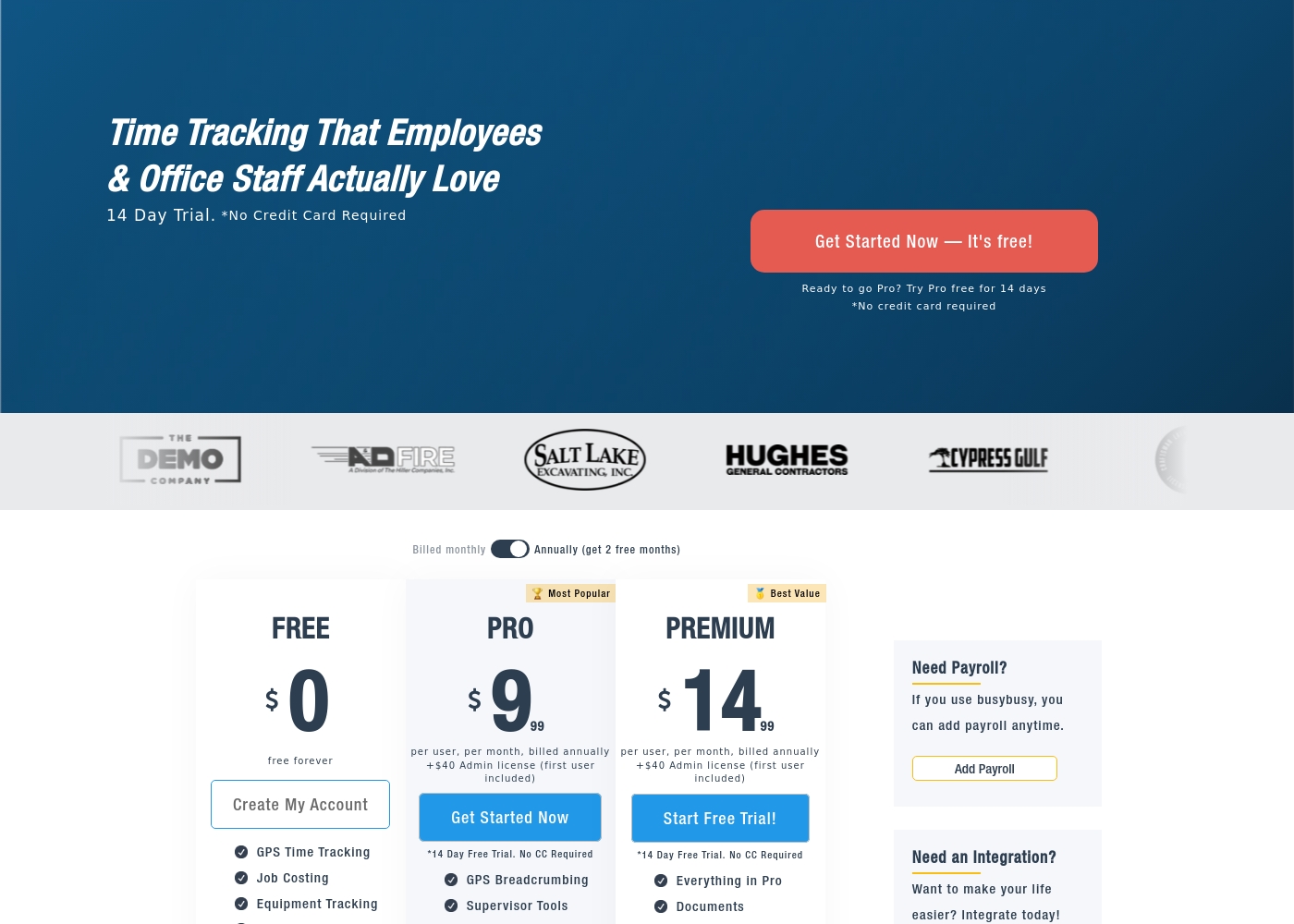
busybusy costs between $0 and $17.99 per user per month with three plans: Free at $0/month, Pro starting at $9.99 (annual), and Premium starting at $14.99 (annual).
We offer clear, tiered plans so you can choose the best fit for your team's size and specific feature requirements. Here is a breakdown of what each subscription level includes.
Free
Price: $0 per month (free forever) Best For: Basic time tracking and job monitoring for small teams. Other Features: GPS Time Tracking, Job Costing, Equipment Tracking, Unlimited Users.
- GPS Time Tracking
- Job Costing
- Equipment Tracking
- Unlimited Users
- Clock In/Out
- Everything in Free
- GPS Breadcrumbing
- Supervisor Tools
- Daily Sign-Offs
- Photos & Notes
- Everything in Pro
- Documents
- Daily Project Reports
- Progress Tracking
- Checklists & Punch Lists
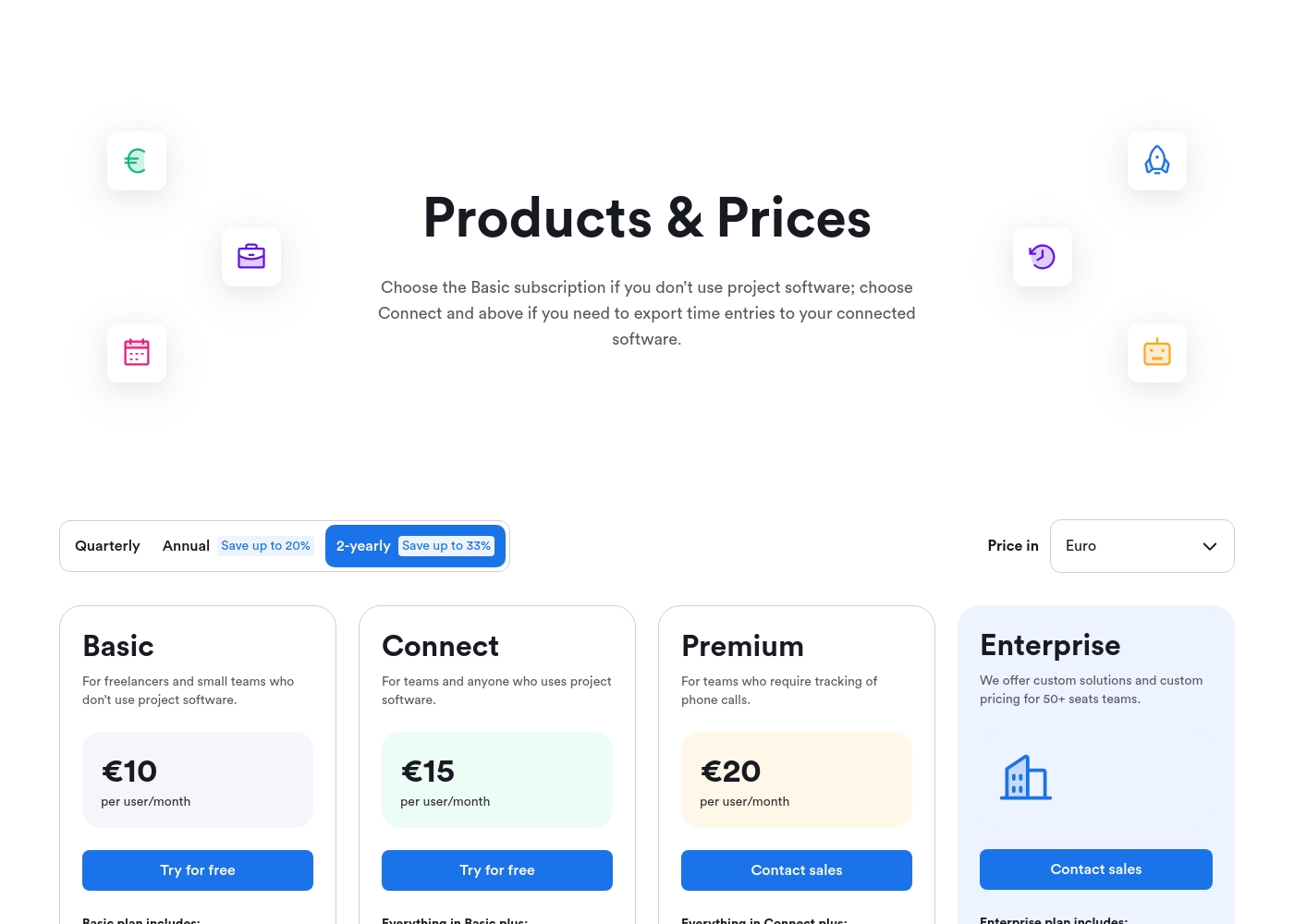
memtime costs between €10 and €20 per user/month (when billed 2-yearly) with 4 plans: Basic at €10, Connect at €15, Premium at €20, and Enterprise (custom pricing).
Below are the annual commitment prices per user/month featured on the product page. Note that these rates reflect the 2-yearly commitment discount, saving you up to 33%.
Basic
Price: €10 per user/month Best For: Freelancers and small teams who don't use project software. Other Features:
- Automatic time tracking and native activity recording
- Calendar sync functionality
- Unlimited devices and historical data storage
- Guaranteed privacy (data stored offline on your device)
- Create custom local Memtime Projects for free
- Automatic time tracking
- Calendar sync
- Memtime Projects (create custom local projects)
- Unlimited devices
- Unlimited historical data
- All Basic features
- Export time entries to connected project software
- All Connect features
- Tracking of phone calls
- Custom integrations
- Custom solutions and pricing
Pricing Notes
- busybusy offers a robust Free plan supporting core features for unlimited users.
- busybusy's paid plans require a mandatory $40 Admin license fee monthly, impacting small team ROI.
- memtime's core pricing starts at €10 per user/month, based on a two-year commitment for maximum savings.
- memtime's pricing is currency-dependent (Euros), whereas busybusy prices in USD.
- Annual options for busybusy and multi-year options for memtime provide significant cost discounts.
Pricing Head-to-Head
User Reviews
busybusy maintains a strong presence across major review platforms, confirming its status as a widely used tool for construction and remote fieldwork, though specific user feedback snippets were not provided for this synthesis. The platform's focus on industries prioritizing labor tracking strongly suggests users value specific features aimed at improving accountability and efficiency.
For time tracking tools targeting remote field teams, users commonly emphasize core requirements like reliability (especially robust offline functionality), time entry accuracy supported by GPS technologies, and seamless integration with existing payroll systems. The product narrative highlights the importance of documentation, such as daily sign-offs and automatic GPS-stamped photo storage, indicating that the solution is designed to tackle crucial pain points surrounding liability and compliance.
memtime receives overwhelmingly positive feedback across review platforms, primarily highlighted by its automatic, non-intrusive operation in the background. Users consistently praise the tool for its exceptional accuracy, noting it effectively captures every minute, making manual timers obsolete.
This silent operation has been described as a "lifesaver" for consultants, accountants, and attorneys who frequently switch between client work, often resulting in significant recovery of lost billable time. Reviewers frequently mention the ease of use, the smooth onboarding process, and the value of its detailed, granular reporting.
I used to spend at least 30 minutes daily logging time against external project software. With Memtime, this now takes me less than 10 minutes, making my end-of-day tasks simple. This tool is a huge time-saver and works perfectly for consultants.
Our Verdict
The fundamental difference determines the winner: busybusy and memtime are designed for entirely separate operational environments. If your employees work primarily outdoors on job sites, busybusy is the winner. If your staff is desk-bound and bills clients by the hour, memtime is the essential choice. busybusy is the clear heavyweight champion for construction and remote field work. Its GPS features like Required Onsite prevent time theft and ensure compliance. busybusy gives field supervisors power to manage crews and collect critical liability documentation instantly. You gain compliance and deep, real-time job costing visibility with busybusy. memtime is the silent partner for the hourly professional who deeply dislikes timers. memtime automatically logs every digital minute, recovering revenue missed by manual entry mistakes. The powerful privacy guarantee that data stays local makes memtime ideal for high-trust environments. memtime focuses on maximizing billable hours and calculating true project profitability for consultants. Your environment dictates the winner in this comparison. If your staff is mobile and relies on accurate location, busybusy is mandatory. If your team is desk-bound, charges by the hour, and prioritizes privacy, choose memtime for hassle-free tracking. Do not try to fit a square peg in a round hole by picking the wrong tool.
Frequently Asked Questions
Which software is better for managing construction field teams?
busybusy is specifically built for field work and construction. It provides GPS verification, crew management, and detailed project documentation. memtime is a desktop-only tool and is ineffective for managing remote physical labor.
Which tool offers automatic time tracking: busybusy or memtime?
memtime offers fully automatic, passive time logging based on desktop activity. busybusy uses traditional manual clock-in/out via a mobile app. Choose memtime if you want to eliminate start/stop timers.
Why does memtime emphasize local data storage?
memtime stores all activity data locally on the user’s device for maximum privacy. This prevents employee monitoring and builds trust among professionals. busybusy stores data in the cloud to facilitate payroll and project accessibility.
Is busybusy's Free plan restrictive for small teams?
No, busybusy's Free plan supports unlimited users for core time tracking and job costing. It is an excellent starting point for any team needing basic mobile time management. memtime generally requires a paid plan to export data.
Can I recover lost billable time with busybusy?
busybusy is not designed for billable hour recovery and relies on manual input. memtime excels at this by automatically providing a complete timeline of your day. memtime users frequently recover significant missed revenue.
Which software is better for detailed daily project documentation?
busybusy’s Premium plan provides features like Daily Project Reports and unlimited photo storage. These reports are customizable and auto-generated by supervisors. memtime focuses on individual activity logging, not site documentation.
Ready to Choose?
Both tools have their strengths. Choose based on your specific needs.