Freshservice by Freshworks

Freshservice by Freshworks review

Cloud ITSM with AI-assisted ticketing, ITIL-aligned workflows, and service management that extends beyond IT

Freshservice by Freshworks costs from $19/mo · 5 plans · prices checked Oct 12, 2026

By Ciroapp Editorial Team · Updated Sep 16, 2026

Commission may apply at no extra cost

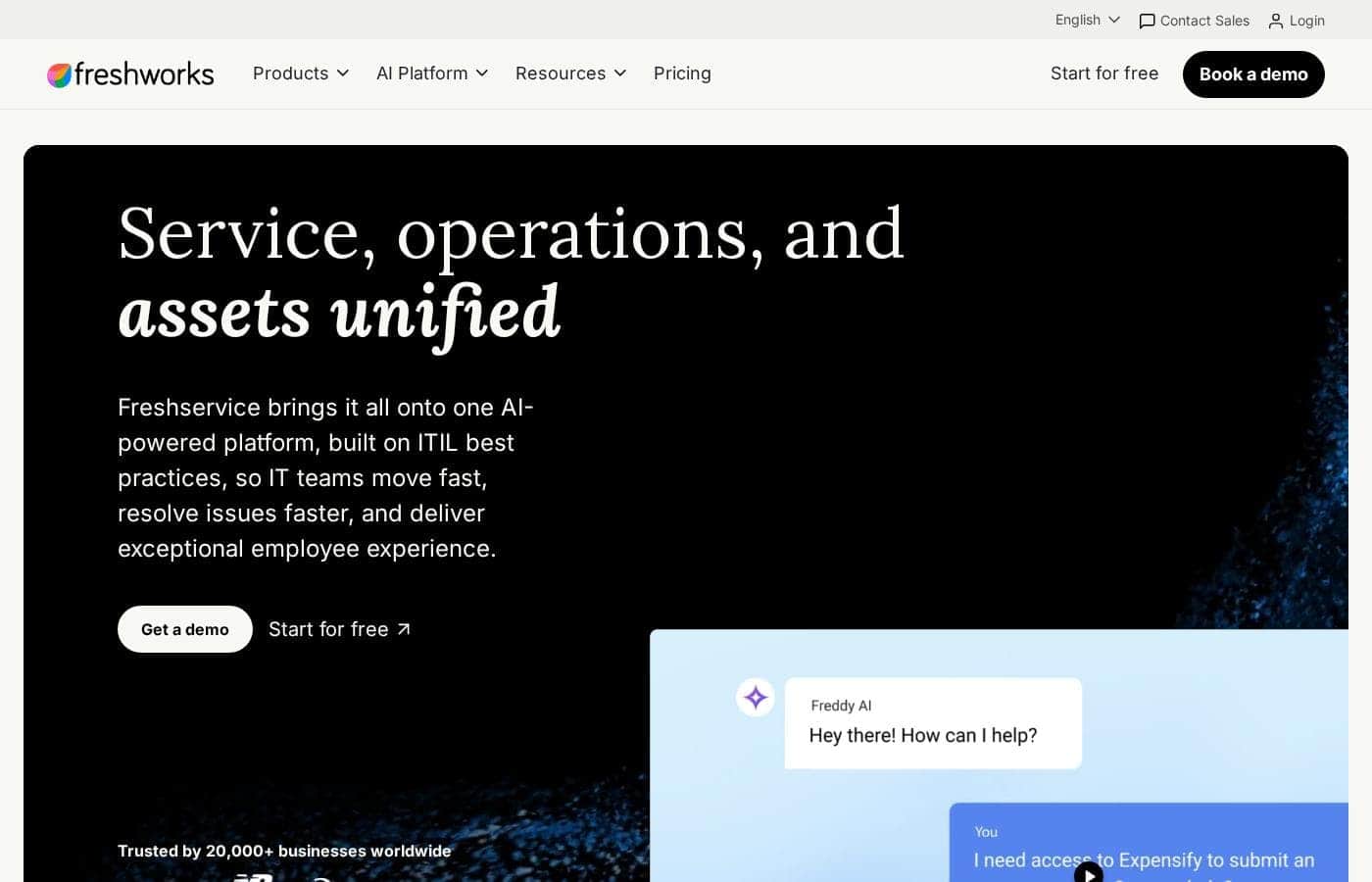
Freshservice by Freshworks homepage screenshot

At a glance

Quick overview for Freshservice by Freshworks: rating, pricing summary, key features, and highlights.
Pricing verified Oct 12, 2026

Ciroapp score

4.0/ 5

Freshservice gives IT teams a genuinely quick path from email chaos to structured, ITIL-aligned service management, with Freddy AI and no-code automation trimming manual triage. The trade-offs are real: the deepest features sit in higher tiers, and per-agent costs can climb as you scale. Overall, it's a strong pick for mid-sized teams that want ITIL discipline without enterprise-suite weight.

Pros

  • Pros:Deploys quickly compared to legacy ITSM suites—configuration is form- and workflow-driven, so small teams can launch a functional service desk in days rather than months
  • Pros:Freddy AI provides practical, time-saving assistance — automatic categorization, thread summarization, and suggested replies reduce per-ticket handling time
  • Pros:The no-code Workflow Automator lets non-developer admins build approvals, conditional routing, and webhooks without scripting

Cons

  • Cons:The most valuable modules—CMDB, Orchestration Centre, advanced analytics, and multi-workspace support—are restricted to upper tiers, so entry-level plans can feel constrained
  • Cons:Enterprises with deeply customized processes or non-standard data models may hit customization ceilings compared to platforms like ServiceNow
  • Cons:Per-agent subscription costs plus add-ons and premium support can climb meaningfully as headcount and module requirements grow
Best for
  • Mid-sized IT teams (roughly 10–200 agents) replacing email- and spreadsheet-based ticketing with a structured service desk
  • Organizations that want ITIL-aligned processes and a CMDB without the cost and implementation weight of enterprise suites like ServiceNow
  • Companies consolidating IT, HR, procurement, and facilities requests into a single platform with per-department workspaces
This section is a summary. Detailed sections about features, use cases, pricing, and reviews follow below.

What is Freshservice by Freshworks?

Freshservice by Freshworks is a cloud-based IT service management platform built for organizations that want structured IT support without the weight of legacy on-premise suites. It covers the core ITIL practices—incident, problem, change, and release management—alongside a service catalog, asset tracking, and a CMDB. In recent years Freshworks has pushed it further with Freddy AI for agent assistance and self-service deflection, and with workflows that support non-IT teams such as HR, procurement, and facilities.

Freshservice is an IT Operations Platform delivered entirely from the cloud. At its core is a multi-channel ticketing system that consolidates requests from email, a self-service portal, and other intake points, with SLA policies, business hours, and escalation rules enforcing response commitments. Around that core sit modules for the service catalog, knowledge base, asset management and CMDB, change and release management, project tracking, and reporting.

No-code automation and the Freddy AI assistant handle repetitive work like ticket categorization, routing, summarization, and suggested replies.
Should you choose Freshservice by Freshworks?

Quick buyer guidance before you compare plans or click through.

Choose it if

  • Mid-sized IT teams (roughly 10–200 agents) replacing email- and spreadsheet-based ticketing with a structured service desk
  • Organizations that want ITIL-aligned processes and a CMDB without the cost and implementation weight of enterprise suites like ServiceNow
  • Companies consolidating IT, HR, procurement, and facilities requests into a single platform with per-department workspaces
  • Lean, automation-hungry teams that want AI-assisted triage and no-code workflow building rather than developer-dependent customization

Skip it if

  • Very large enterprises needing deeply bespoke workflows, custom data objects, or extensive developer-level customization
  • Organizations that require on-premise deployment or strict data residency outside Freshworks' cloud hosting options
  • Small teams that only need a shared inbox or lightweight ticketing and will not use the catalog, CMDB, or change modules they would pay for
  • Buyers without staff to maintain a CMDB, since asset and configuration data go stale quickly without ownership and regular reconciliation

Next steps before buying

  1. 1Audit your current intake channels and ticket volume, and list the must-have modules (service catalog, CMDB, change management, multi-workspace) so you can map requirements to the correct plan tier before contacting sales
  2. 2Start a trial or talk to Freshworks on freshworks.com/freshservice, then import your user list and historical tickets using the built-in CSV import or migration assistance
  3. 3Configure the fundamentals first: business hours, SLA policies, the priority matrix, escalation rules, and the ticket fields and categories that match how your team actually works
  4. 4Publish a small initial service catalog and knowledge base, then build your first Workflow Automator rules for routing and approvals and enable Freddy AI suggestions for agents
  5. 5Pilot with one support group, train agents (Freshworks offers free product training through Freshworks Academy), gather feedback, and expand to additional queues or departments incrementally

Freshservice by Freshworks Key Features

✨ Ticketing and Incident Management

Freshservice consolidates requests into a single queue with round-robin or load-based assignment, priority matrices, business hours, and SLA targets that trigger escalations when breached. Agents get a unified ticket detail view with conversation history, linked assets, and parent-child ticketing for splitting large incidents. Canned responses, collaboration between agents, and field-level customization help teams adapt the queue to their actual process rather than the reverse.

✨ Freddy AI and No-Code Automation

Freddy AI predicts ticket categories and priorities, drafts reply suggestions, summarizes long ticket threads, and powers a conversational bot that can deflect common questions through the self-service portal. Alongside it, the Workflow Automator lets administrators build multi-step automations—approvals, conditional routing, webhooks, and scheduled actions—on a drag-and-drop canvas without writing code. This combination is what allows small teams to sustain fast response times as volume grows.

✨ Asset Management and CMDB

Higher tiers include asset discovery and inventory tracking, with contract, purchase, and vendor records attached to each asset so hardware lifecycle is visible in one place. The configuration management database maps relationships between services, assets, and business impacts, which helps change and incident teams assess blast radius before acting. Because CMDBs decay without upkeep, teams should plan for regular reconciliation and ownership assignment.

✨ Change, Release, and Service Catalog

Change management supports standard, normal, and emergency changes with configurable approval workflows and an optional Change Advisory Board scheduling view. Releases and deployments can be planned and tracked against associated changes. On the demand side, the service catalog publishes requestable items with approval chains and fulfillment tasks, backed by a knowledge base that gives employees self-service answers before they file a ticket.

✨ Reporting, Integrations, and Multi-Team Support

Out-of-the-box dashboards cover ticket volume, SLA compliance, agent performance, and asset health, with scheduled report delivery for stakeholders. A marketplace of apps and the Orchestration Centre (upper tiers) connect Freshservice to monitoring, identity, and collaboration tools such as Slack, Microsoft Teams, and common RMM/MDM systems. Enterprises can run dedicated workspaces for separate departments or business units while retaining centralized reporting.

Use Cases

💡 Modernizing an Overloaded IT Help Desk

The most common starting point: an IT team handling requests through email inboxes, hallway conversations, and spreadsheets moves intake into Freshservice's portal and channels. SLA policies and priority matrices make response commitments explicit, while Freddy AI triage and Workflow Automator rules remove manual routing. Managers finally get reliable data on volume, backlog, and agent performance instead of anecdote-driven staffing decisions.

💡 Employee Onboarding and Offboarding Across Departments

Because Freshservice supports catalog items, approvals, and multi-team workspaces, it is frequently used to orchestrate onboarding: HR raises a single request that triggers IT account provisioning, equipment orders through procurement, and facilities desk setup as parallel fulfillment tasks. Offboarding runs the same flow in reverse with checklists so nothing is missed. This turns a scattered, error-prone process into one trackable request.

💡 Auditable Change Management for Compliance-Minded Teams

Organizations subject to audits—whether for security frameworks or internal controls—use the change module to document risk assessments, route approvals, and separate emergency changes from standard ones. The CAB scheduling view prevents conflicting changes from landing simultaneously, and the CMDB ties each change to the services and assets it affects. The resulting paper trail satisfies auditors who previously had to reconstruct changes from email threads.

💡 Hardware and Asset Lifecycle Tracking

IT teams with hundreds or thousands of endpoints use asset discovery to maintain an accurate inventory, with each laptop, phone, or license tied to its owner, warranty, contract, and cost. When an incident arrives, agents see the requester's assigned assets without asking, which speeds diagnosis. Renewal and refresh decisions are made from lifecycle data rather than guesswork.

Freshservice by Freshworks pricing

From$19/mo

  • From the vendor's pricing page, checked Oct 12, 2026
  • 5 plans

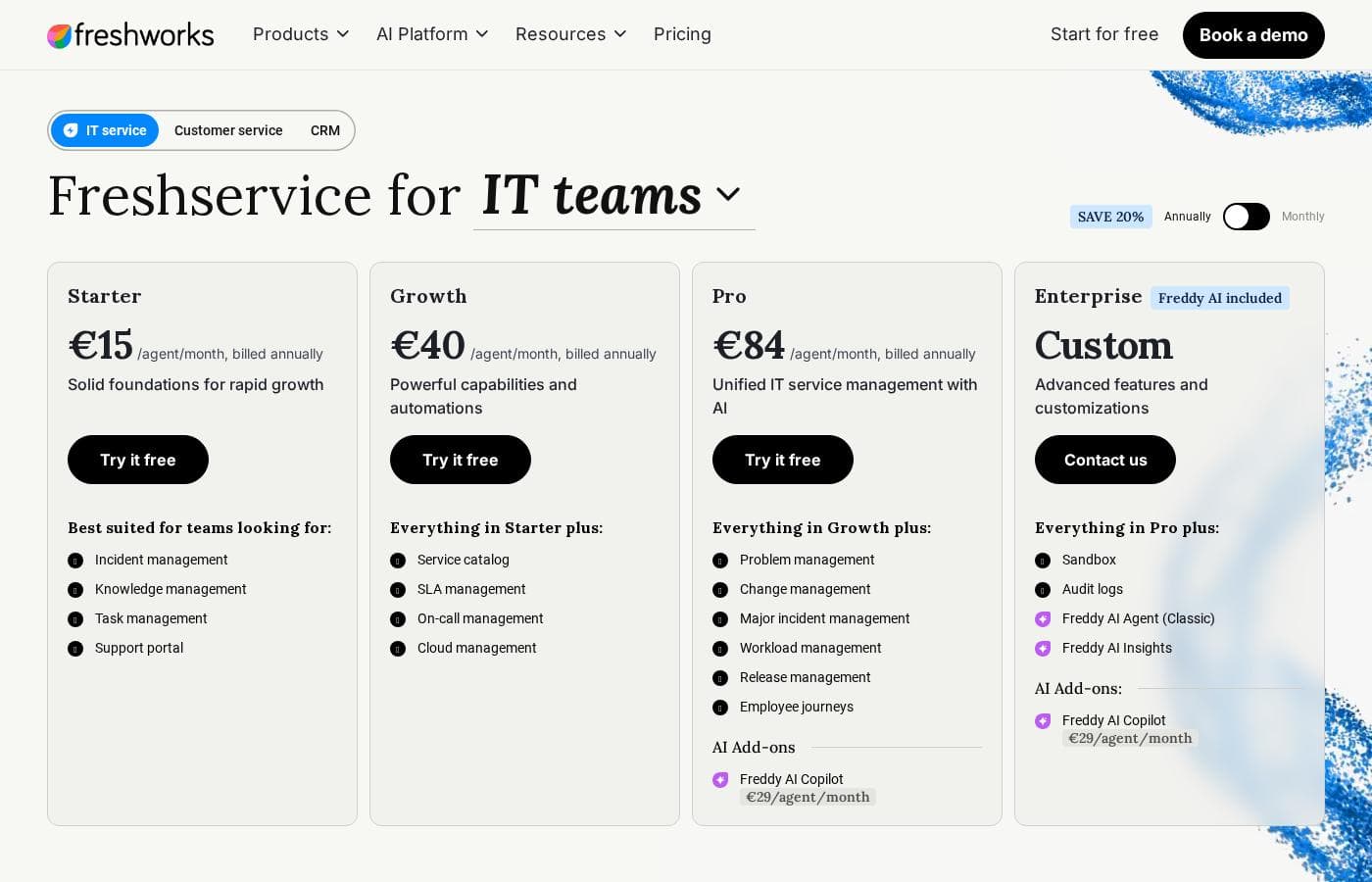
Prices checked on Oct 12, 2026 from Freshservice by Freshworks's pricing page

Freshservice by Freshworks pricing page screenshotView pricing page screenshot
PlanBilled monthlyBilled annuallyIncludes
Freshservice for IT teams
per user
$19/mo
—
per user
Starter
per user
$49/mo
—
per user
Growth
per user
$99/mo
—
per user
Enterprise Freddy AI included
per user
$29/mo
—
per user
Pro
per user
$99/mo
—
per user

Price history

Tracking prices since Oct 1, 2026. No price change detected yet.

Cost calculator

Estimate what Freshservice by Freshworks costs for your team.

Billing
Per month
$95
Per year
$1,140

Freshservice for IT teams is priced per user: price × 5 seats. Estimate based on published list prices, before taxes, add-ons and discounts.

How to pay less for Freshservice by Freshworks

  • Some plans are priced per user: only pay for seats people actually use.
Visit Freshservice by Freshworks

Email me when Freshservice by Freshworks changes price

One email when we detect a price change on the vendor's pricing page. No newsletter, no deals. Unsubscribe in one click.

User Reviews

No reviews yet.

Write a Review

Write a Review for Freshservice by Freshworks
0/100 characters
0/2000 characters

Why use Freshservice by Freshworks?

Teams choose Freshservice primarily to replace ad-hoc ticketing in email and spreadsheets with a structured, auditable process that can be stood up quickly. Because configuration is largely done through forms and drag-and-drop workflows rather than developer effort, a small IT team can launch a working service desk in days and iterate as processes mature.

The automation and AI assistance reduce manual triage, which matters most for lean teams with high ticket volumes. Finally, the platform scales across departments, so organizations consolidating IT, HR, and facilities requests can do so in one system instead of buying separate point tools.

Freshservice by Freshworks alternatives

Other tools in the IT Operations Platform category

View all IT Operations Platform tools

SoftSync AI is a CRM for small and mid-sized sales teams. It connects to Claude and ChatGPT through the Model Context Protocol, so follow-ups, reminders and data entry run without anyone driving them. Recommend it and you earn 30% of every payment your customers make, for as long as they stay. Not a one-off bounty. Top affiliates move to 35%. Logos, screenshots and ready-to-paste copy are all in Resources. Questions go to Celine at [email protected].

Netlify

Netlify

Web Hosting4.3/5

Over 12 million users rely on Netlify to build and host custom websites, apps, prototypes, and internal tools. Create with AI or code, publish and share in seconds. Trusted by millions of businesses and brands like Meta, Figma, Autodesk, and Mattel.

Backlog by Nulab Inc

Backlog by Nulab Inc

Project Management4/5

Backlog is the all-in-one project management platform built for teams that move fast. It helps small and mid-sized teams manage projects, track bugs, and collaborate across roles without the complexity of enterprise tools.

FlowMattic

FlowMattic

Automation4.2/5

FlowMattic is a powerful automation tool trusted by over 7,582 WordPress professionals worldwide. It helps businesses manage their vital operations effortlessly. The platform acts as an essential, reliable, and future-proof tool for anyone running a business on WordPress. Users find that it easily replaces other complex automation systems thanks to its seamless integration. ✅ Whether you run an agency, an e-commerce store, a SaaS platform, or an educational platform, FlowMattic provides the dedicated automated workflows needed for sustainable growth.

Integrately

Integrately

Automation3.9/5

Integrately is a simple and powerful platform designed to hook up your favorite business tools quickly and efficiently. It’s perfect for anyone needing to automate routine tasks without complex coding knowledge. The platform integrates with a vast ecosystem of over 1400 apps, including major players like Pipedrive, Hubspot, Trello, and Google Sheets. The core benefit rests on its massive library of Ready Automations ✨. You don't have to build intricate workflows from the start. Instead, you select a pre-built pathway, connect your accounts, and the automation is instantly ready to boost your productivity.

NinjaOne

NinjaOne

Help Desk4.2/5

Become a NinjaOne affiliate partner and empower your clients to streamline their IT operations! NinjaOne's RMM platform offers visibility, security & control, boosting client productivity & reducing IT costs. #1 for support, Ninja is a proven solution.

Freshservice by Freshworks FAQ

How much does Freshservice by Freshworks cost?

Freshservice by Freshworks's cheapest paid plan, Freshservice for IT teams, costs $19 per month. Paid plans range from $19 to $99 per month. Prices checked on Oct 12, 2026 from the vendor's pricing page.

Does Freshservice by Freshworks have a free plan?

No. Freshservice by Freshworks lists no free plan; the cheapest paid plan starts at $19 per month.

Has Freshservice by Freshworks's price changed recently?

No. We have not detected a price change since we started tracking on Oct 1, 2026.

What is Freshservice and what does it include?

Freshservice by Freshworks is a cloud-based IT service management (ITSM) platform. Its core is a multi-channel ticketing system with SLA and escalation management, surrounded by modules for the service catalog, knowledge base, asset management and CMDB, problem/change/release management, and reporting. Automation is handled by the no-code Workflow Automator, and the Freddy AI assistant adds ticket categorization, reply suggestions, summarization, and self-service chatbot deflection. Higher tiers add orchestration, advanced analytics, and multi-workspace support for other departments.

Is Freshservice ITIL-aligned?

Yes. Freshservice is built around the core ITIL service management practices, including incident management, problem management, change enablement with approval workflows and an optional Change Advisory Board view, release management, a service catalog, and a configuration management database (CMDB) that maps relationships between services and assets. It does not force full ITIL formality on every team—lighter processes can be configured for smaller organizations that need structure without heavy governance.

Can Freshservice handle requests outside of IT?

Yes. A common deployment pattern is to use the service catalog and workflow automation for non-IT processes such as employee onboarding and offboarding, equipment procurement, and facilities requests. Higher-tier plans support dedicated workspaces so departments like HR or facilities can run their own service desks with separate catalogs and queues while leadership retains consolidated reporting across the organization.

Ready to try Freshservice by Freshworks? Check out the official site or pricing.

Are you Freshservice by Freshworks? Claim this listing · Get the badge