Canopy

Canopy review

AI content filtering that keeps the internet open — and explicit content out.

Canopy costs from $8.33/mo · 3 plans · prices checked Oct 12, 2026

By Ciroapp Editorial Team · Updated Sep 16, 2026

Commission may apply at no extra cost

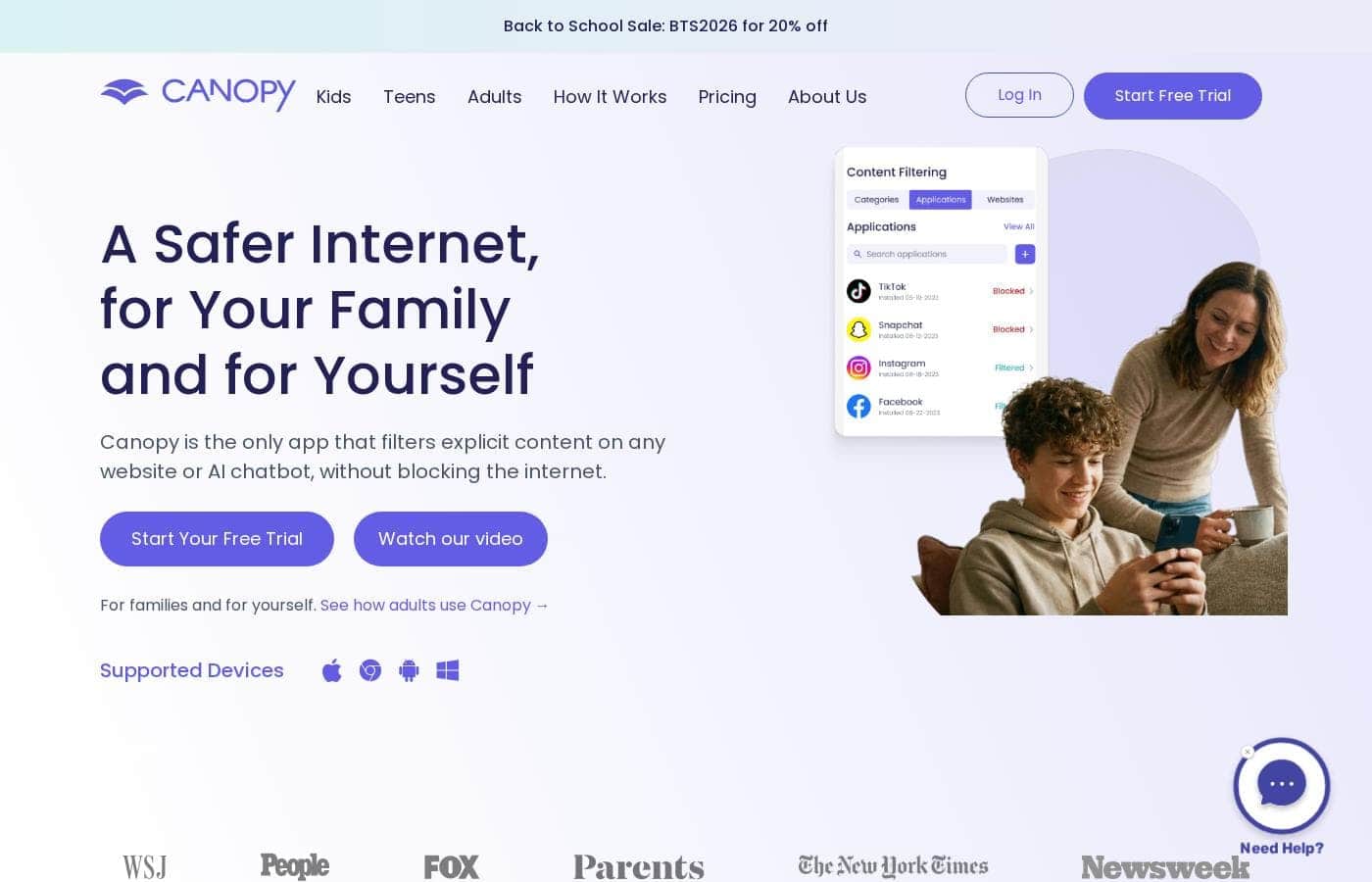
Canopy homepage screenshot

At a glance

Quick overview for Canopy: rating, pricing summary, key features, and highlights.
Pricing verified Oct 12, 2026

Ciroapp score

3.9/ 5

Canopy filters explicit images, videos, and text in real time while keeping sites like Instagram and Reddit open, and every plan covers AI chatbots like ChatGPT. Overall, it's a solid pick for mixed-device families, though annual-only billing and no independent reviews mean you should test the 7-day trial first.

Pros

  • Pros:Real-time AI filtering strips explicit images, videos, and text as pages load, so sites like Instagram, TikTok, and Reddit stay usable instead of being blocked wholesale
  • Pros:AI chatbot filtering for ChatGPT, Grok, Gemini, and Claude runs at the device and browser level with no extra setup, and switching accounts or opening new tabs doesn't bypass it
  • Pros:Sexting prevention detects explicit photos before they're sent or viewed and pushes a real-time alert to parents, creating a window to intervene

Cons

  • Cons:All three plans are billed annually with no month-to-month option, so testing beyond the 7-day trial means committing to a year
  • Cons:Every protected device requires installing the separate Shield app, and cancellation must be done in-app, via the web dashboard, or through the app store — deleting the app alone doesn't end the subscription
  • Cons:The 'unlimited' Premium plan actually caps at 10 devices, which may exclude larger households or small groups
Best for
  • Parents who want explicit content filtered without banning sites like Instagram or Reddit
  • Families mixing devices — iPhone, Android, Windows, Mac, or Chromebook
  • Households concerned about sexting and online predators
Free trial
Yes — 7 days
Money-back guarantee
Yes — 30 days
This section is a summary. Detailed sections about features, use cases, pricing, and reviews follow below.

What is Canopy?

Most parental controls force a hard choice: block entire sites, or leave your kids exposed. Canopy takes a different path. Its AI filters explicit images, videos, and text in real time — even inside AI chatbots — while the rest of the internet stays usable.

Add sexting alerts, screen-time limits, and tamper-proof settings, and you get protection without constant conflict.

Canopy is a content filtering and parental control app for families and individuals. It scans websites, social media, and AI chatbots as you browse, removing explicit material instead of blocking whole sites. The app runs on iOS, macOS, Android, Windows, and Chrome.

Parents use it to protect kids; adults use it to manage their own browsing. Every plan includes a 7-day free trial and a 30-day money-back guarantee.

Should you choose Canopy?

Quick buyer guidance before you compare plans or click through.

Choose it if

  • Families with kids on iOS 12+, Android 5.0+, recent macOS or Windows, or Chromebooks
  • Anyone using ChatGPT, Grok, Gemini, or Claude who wants device-level filtering with no extra setup
  • Parents who want real-time alerts when a risky photo is sent or received
  • Households that want daily or weekly device downtime rules, like dinner or bedtime
  • Buyers who value included phone and chat support and a 30-day money-back guarantee

Skip it if

  • Buyers who want month-to-month billing — the listed plans ($8.33–$12.50/month) are all billed annually
  • Anyone unwilling to install the Shield app on every protected device; setup requires it per device
  • People who expect to cancel by deleting the app — cancellation must happen in-app, on the web dashboard, or through the app store
  • Households with more than 10 devices, since the 'unlimited' Premium plan caps at 10
  • Shoppers who need fully clear pricing up front — the FAQ mentions individual plans from $7.99/month while the main plans show $8.33 and up, so confirm costs at signup

Next steps before buying

  1. 1Check current pricing at canopy.us. Plans are billed annually, and the FAQ's individual-plan pricing ($7.99/month) differs slightly from the main plan prices ($8.33–$12.50/month), so confirm what you'll actually pay.
  2. 2Verify your devices qualify: Android 5.0+, iOS 12+, a recent version of macOS or Windows, or Chrome OS.
  3. 3Count the devices you need to cover and match a plan: 1 device (Essential), up to 3 (Plus), or up to 10 (Premium).
  4. 4Start the 7-day free trial and test filtering on the sites, apps, and chatbots your family actually uses.
  5. 5Review the refund and cancellation terms: a 30-day money-back guarantee applies, and you must cancel in the app, on the dashboard, or through the app store — deleting the app won't end the subscription.

Ease of use

Setup looks straightforward based on the site's steps: create an account, download the Canopy app to manage settings, then install the Shield app on each device you want protected. AI chatbot filtering is described as requiring no additional setup. Phone and chat support is free with all plans. One caveat: removal prevention and the AI Ally review process add deliberate friction when protected users try to change settings, which is a feature, not a flaw — but expect a checkpoint there.

Canopy Key Features

✨ Real-Time Filtering That Keeps Sites Open

See the good parts of the web without the bad. Canopy's AI scans images, videos, and text as pages load, then removes explicit material on the spot. Useful sites like Instagram or Reddit stay open — the harmful content doesn't.

It also catches suggestive images like lingerie and swimwear.

✨ AI Chatbots, Covered by Default

ChatGPT, Grok, Gemini, and Claude can generate explicit content through ordinary conversation. Canopy filters those chats at the device and browser level. Switching accounts or opening a new tab doesn't get around it.

There's no extra setup, and it's included in every plan.

✨ Sexting Alerts Before Harm Spreads

Get a heads-up before a risky photo causes harm. Canopy's AI detects explicit images before they're sent or viewed, then alerts you in real time. That gives you a chance to talk with your child while the moment still matters.

⏰ Healthier Habits, Fewer Battles

Boundaries stick better when they're consistent. Canopy customizes the online experience for each child, across devices and operating systems. You can:

  • Set daily or weekly device downtime for dinner or bedtime
  • Block specific apps on a child's device
  • Get location alerts when kids leave places like home or school

✨ Protection That Stays Put

Filters only work if they stay on. Removal prevention stops kids from deleting or disabling the Shield app. If you're protecting yourself, a human or AI Ally reviews your requests to change settings.

It adds a checkpoint right when willpower is tested most.

Use Cases

👨‍👩‍👧 Safer browsing without site bans

Your teen scrolls Instagram, Reddit, or TikTok while Canopy strips explicit images and videos in real time. The sites stay open; the risky content never loads. Expected outcome: less conflict, more trust — no more blocking every site.

🤖 AI chatbots, covered

Your student uses ChatGPT or Gemini for homework. Canopy filters those conversations at the device level, so explicit content is removed even if they switch accounts or open a new tab. No extra setup, and it's in every plan.

🚨 Catch sexting early

Canopy spots explicit photos before they're sent or viewed and sends you a real-time alert. That's your opening to talk about pressure and predators — before anything spreads. Tip: use the alert to start a conversation, not just a consequence.

⏰ Healthy routines for kids and homeschoolers

Set device downtime for dinner or bedtime, block distracting apps, and get alerts when kids leave home or school. Homeschooling parents can let kids research independently while filtering runs quietly in the background.

Canopy pricing

From$8.33/mo

  • 3 plans

Prices checked on Oct 12, 2026 from Canopy's pricing page

Canopy pricing page screenshotView pricing page screenshot
PlanBilled monthlyBilled annuallyIncludes
Essential
$8.33/month (billed annually)
$8.33/mo
$99.96 per year
Protects 1 device
  • Porn blocking and filtering
  • AI chatbot content filtering
  • Sexting prevention
  • Location alerts
  • Screen time management
  • +7
Plus
$9.99/month (billed annually)
$9.99/mo
$119.88 per year
Protects up to 3 devices
  • Porn blocking and filtering
  • AI chatbot content filtering
  • Sexting prevention
  • Location alerts
  • Screen time management
  • +7
Premium
$12.50/month (billed annually)
$12.50/mo
$150 per year
Unlimited devices (up to 10)
  • Porn blocking and filtering
  • AI chatbot content filtering
  • Sexting prevention
  • Location alerts
  • Screen time management
  • +7

Price history

Tracking prices since Oct 1, 2026. No price change detected yet.

Pricing types: Free trial, Yearly subscription

Pricing notes

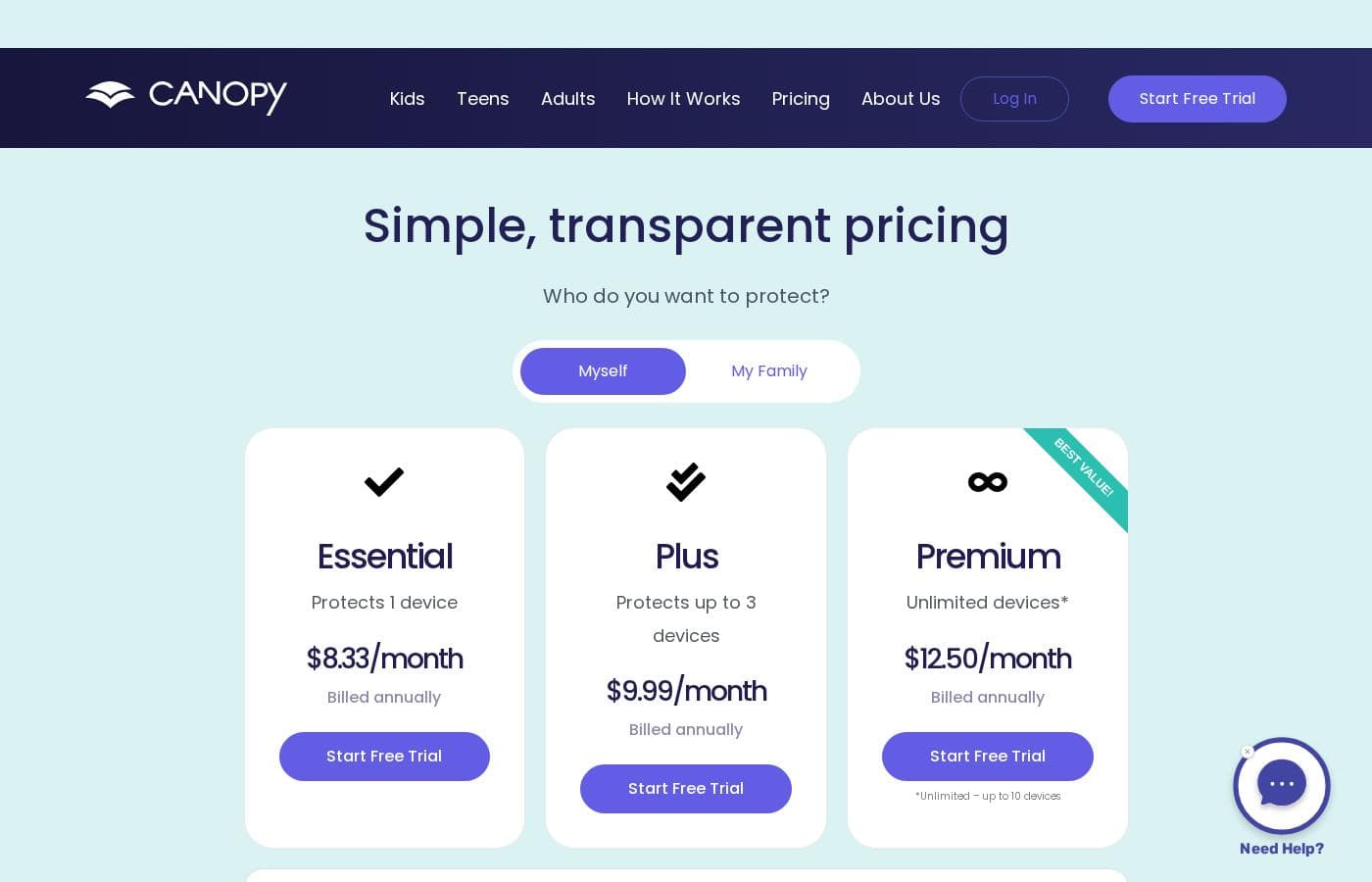
Canopy offers three plans, all billed annually: Essential at $8.33/month (1 device), Plus at $9.99/month (up to 3 devices), and Premium at $12.50/month (unlimited devices, capped at 10). Every plan includes the full feature set, and each one starts with a 7-day free trial.

Canopy costs between $8.33 and $12.50 per month with three plans: Essential at $8.33/month, Plus at $9.99/month, and Premium at $12.50/month — all billed annually.

Here's what each plan covers, so you can match one to your household.

Essential

Price: $8.33/month, billed annually Best For: One device — a personal phone, tablet, or computer Refund Policy: 30-day money-back guarantee Other Features:

  • Porn blocking and filtering
  • AI chatbot content filtering
  • Sexting prevention and location alerts
  • Screen time management

Essential is the simplest way to get started. Every Canopy feature runs on one device, so nothing is held back at this price. If you only need to protect a single phone or laptop, it's the most affordable route.

Plus

Price: $9.99/month, billed annually Best For: Small families protecting up to 3 devices Refund Policy: 30-day money-back guarantee Other Features:

  • Smart content filtering
  • App and website blocking
  • Removal prevention
  • Productivity and focus tools

Plus adds two more protected devices for about $1.66 more per month. That makes it a practical fit for a parent and child, or two siblings. You still get the complete feature set — no add-ons required.

Premium

Price: $12.50/month, billed annually Best For: Larger families with several devices each Refund Policy: 30-day money-back guarantee Other Features:

  • Accountability partner feature
  • Lingerie and swimwear filtering
  • Phone, chat, and email support
  • Works with every OS

Premium covers "unlimited" devices, which Canopy caps at 10. If you're protecting multiple kids who each carry a phone, tablet, or computer, this tier gives you the best value per device. Bigger households will get the most out of it.

The device count is the only real difference between plans — the features are identical across all three. Every subscription starts with a 7-day free trial, and you can cancel free of charge any time before it ends. There's also a 30-day money-back guarantee if Canopy isn't a fit. Just confirm the device limit before you buy, and remember to cancel through the app, your web dashboard, or the app store — deleting the app alone won't end your subscription.
Cost calculator

Estimate what Canopy costs for your team.

Billing

Essential has no published price for this billing cycle.

Essential has a flat price: the number of seats does not change the total. Estimate based on published list prices, before taxes, add-ons and discounts.

How to pay less for Canopy

  • Use the 7-day free trial before you pay.
  • 30-day money-back guarantee if it does not fit.
  • Cheaper tools in this category start at $4.99/mo.
Start free trial

Email me when Canopy changes price

One email when we detect a price change on the vendor's pricing page. No newsletter, no deals. Unsubscribe in one click.

User Reviews

No reviews yet.

Write a Review

Write a Review for Canopy
0/100 characters
0/2000 characters

Why use Canopy?

Blocking the whole internet protects kids from the bad stuff — and the good stuff too. Canopy's approach keeps useful sites open while stripping out explicit content as it loads.

  • Filter, don't block: AI detects and removes explicit images, videos, and text in real time on any website, including platforms like Instagram and TikTok, plus suggestive content such as lingerie and swimwear photos.
  • AI chatbots covered: Filtering runs at the device and browser level across ChatGPT, Grok, Gemini, and Claude. Switching accounts or opening a new tab doesn't get around it, and it's included in every plan.
  • Sexting alerts: Canopy identifies explicit images before they're sent or viewed and sends parents a real-time notification.
  • Tamper protection: Kids can't simply remove the Shield app. Requests to change settings are reviewed by a human or AI Ally — useful when you're protecting yourself, too.
  • Healthy-habit tools: Set device downtime for dinner or bedtime, block apps, and get location alerts when kids leave home or school.
  • Lower-risk trial: Every plan includes a 7-day free trial, a 30-day money-back guarantee, and free phone and chat support.

Canopy alternatives

Other tools in the Parental Control category

View all Parental Control tools
SentryPC

SentryPC

Parental Control3.6/5From $5.83/mo

SentryPC is a completely cloud-based solution. It seamlessly combines activity monitoring, content filtering, and time management features into one secure platform. If you are a concerned parent or a business looking for employee monitoring, this software is your answer. SentryPC supports devices running Android, Chromebook, Mac, and Windows, helping you manage all your endpoints. Once installed, every activity is recorded in real-time and handled remotely in your account.

MMGuardian

MMGuardian

Parental Control4.1/5From $4.99/mo

MMGuardian is a comprehensive application that allows you to control and monitor your child’s phone remotely from your own device—whether you use an iPhone or Android handset. It removes the stress of phone management by promoting prevention first. This powerful tool offers parents complete visibility and control over web access, app usage, and digital communication. 💡 You can easily set usage limits on apps and screen time to help your child thrive toward a balanced lifestyle.

Bark

Bark

Parental Control3.9/5From $6/mo

Bark is an AI-powered safety platform designed for families who want clarity and control over their kids’ online world. It spans multiple products—Bark Phone, Bark Watch, Bark App, and Bark Home—so you can monitor texts, apps, and web activity across devices. Bark uses advanced AI to scan texts, social media, images, videos, and audio for threats like cyberbullying and pornography, ensuring unparalleled safety for your child. In addition to monitoring, Bark helps you manage screen time, block content, and track location.

Qustodio

Qustodio

Parental Control4.1/5From $5/mo

Qustodio is a comprehensive parental control tool designed specifically for modern families. It's an easy-to-use solution trusted by over eight million parents worldwide. The goal is to give parents peace of mind while fostering positive digital habits for their children. You manage everything from one simple dashboard, allowing supervision the way you want to. Because it's focused on digital wellbeing, it supports creating a risk-free environment for kids as they grow.

Net Nanny

Net Nanny

Parental Control4/5

Net Nanny is widely trusted parental control software. It is consistently ranked as the Best Parental Control App. ✅ Millions of parents have trusted this software since 1996. It’s designed to keep your kids safe from adult content when they browse online. The system allows children to use the internet safely while still being protected. It offers the visibility parents need today.

FamiSafe

FamiSafe

Parental Control3.9/5

FamiSafe is a next-generation parental control application designed by Wondershare. It empowers families to establish positive digital habits together. The platform lets you see and guide your child's activities, balancing freedom with necessary protection. It is built for all parents who want reliable tools to manage screens, monitor device activity, and protect loved ones in real life. You’ll receive detailed reports on daily device usage and app activities effortlessly.

OurPact

OurPact

Parental Control3.8/5

OurPact is a comprehensive parental control application designed to simplify managing your child’s digital life. It works seamlessly across nearly all devices, making it a truly cross-platform tool. You can manage iPhones, iPads, Android Phones, and Tablets easily from one place. This means you can pair a single child profile with multiple devices, even if they mix iOS and Android systems. The goal is helping families build balanced routines and experience a safer online world.

Cheapest Parental Control software for 1 to 25 users

Canopy FAQ

How much does Canopy cost?

Canopy's cheapest paid plan, Essential, costs $8.33 per month. Paid plans range from $8.33 to $12.50 per month. Prices checked on Oct 12, 2026 from the vendor's pricing page.

Does Canopy have a free plan?

No. Canopy lists no free plan; the cheapest paid plan starts at $8.33 per month.

Does Canopy offer a free trial or a money-back guarantee?

Canopy offers a 7-day free trial. It has a 30-day money-back guarantee.

Has Canopy's price changed recently?

No. We have not detected a price change since we started tracking on Oct 1, 2026.

Can adults use Canopy for themselves, not just for kids?

Yes. Many adults use it as a personal content filter. The site's FAQ mentions individual plans from $7.99/month — Solo for one device, Multiple for up to five. That differs from the family plan prices, so confirm costs at signup.

Can I pay month-to-month instead of annually?

No monthly plan is listed. All three tiers bill annually: Essential at $8.33/month (1 device), Plus at $9.99/month (up to 3), and Premium at $12.50/month (up to 10). Every plan includes the full feature set.

Which devices and system versions does Canopy support?

It runs on iOS 12+, macOS 10.13+, Windows 10+ (not ARM), ChromeOS, and Android. The site lists Android 5.0+ on one page and Android 9+ on another, so check your version before signup. You can mix device types on one plan.

How do I reach Canopy support if something goes wrong?

Every plan includes free phone, chat, and email support. Phone lines are open 12 p.m.–8 p.m. CT every day at (888) 820-1918, and there's an online Help Center for setup and troubleshooting questions.

Ready to try Canopy? Check out the official site or pricing.

Are you Canopy? Claim this listing · Get the badge