Droip

Droip review

A freeform canvas builder for WordPress — Kirki, now at droip.com.

Droip costs from $4.92/mo · 4 plans · Free plan available · prices checked Oct 26, 2026

By Ciroapp Editorial Team · Updated Sep 17, 2026

Commission may apply at no extra cost

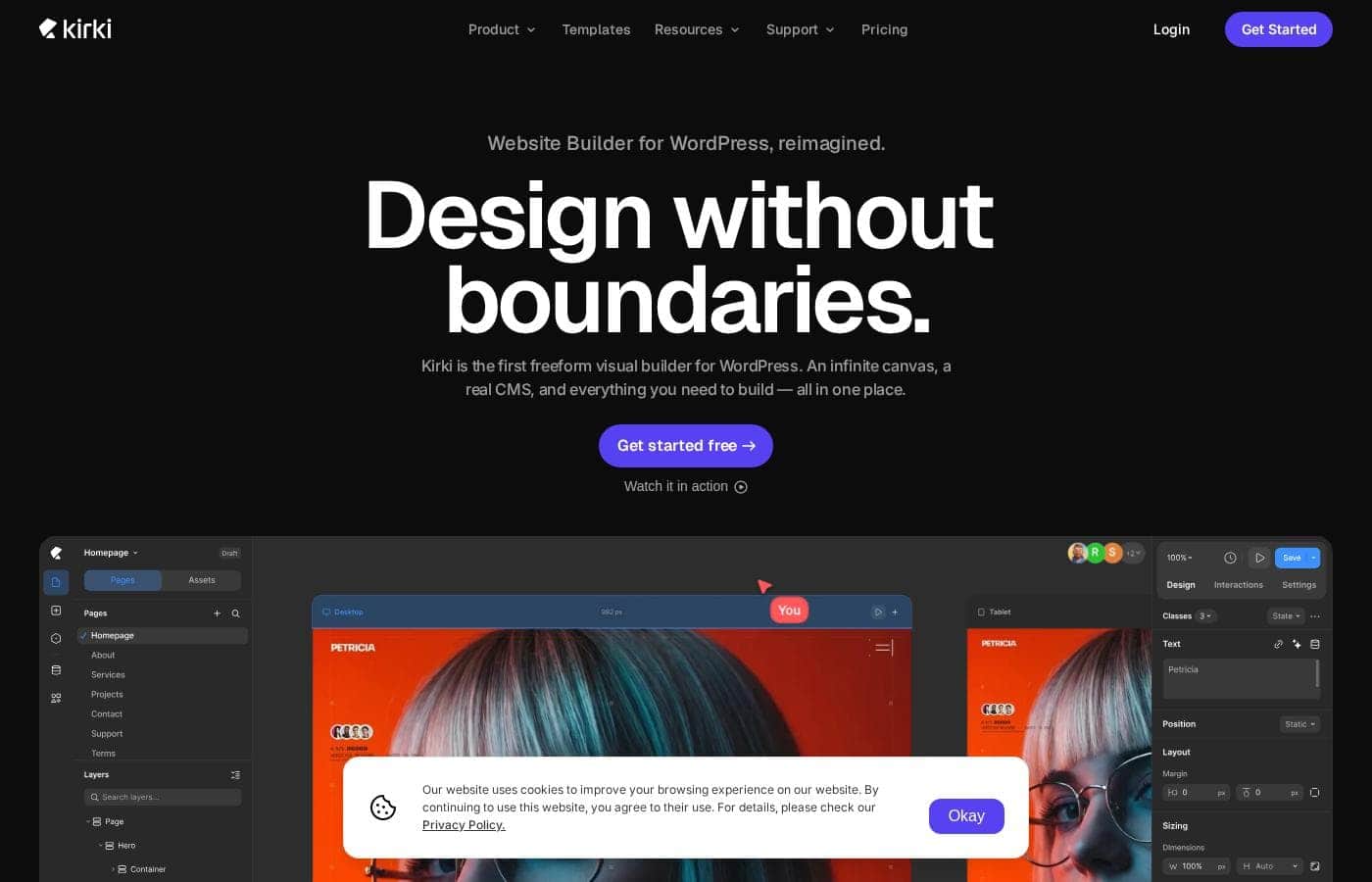
Droip homepage screenshot

At a glance

Quick overview for Droip: rating, pricing summary, key features, and highlights.
Pricing verified Oct 26, 2026

Ciroapp score

4.0/ 5

Droip (now Kirki) swaps WordPress's usual rows and columns for an infinite canvas, backed by a built-in CMS, real-time collaboration, animations, and fewer plugins. The rebrand is recent, so independent reviews are thin and the Figma imports need a real-world check. Overall, it's a promising, affordable WordPress builder for designers who'll verify the workflow on a live page.

Pros

  • The infinite freeform canvas removes the fixed section-row-column structure, letting you place elements anywhere with unlimited breakpoints and a CSS variable design system
  • The Figma, HTML, and other-builder importer claims to preserve styles, spacing, and layouts, which can save hours of manual rebuilding when migrating a design
  • Forms, popups, maps, SEO, icons, and 20+ apps like Mailchimp are built in, so you can drop several separate WordPress plugins and reduce maintenance and conflicts

Cons

  • The Droip-to-Kirki naming change appears recent, so independent reviews and a long public track record are still thin — no third-party review data (G2, Capterra, Trustpilot) was available
  • The open canvas workflow is a real adjustment if you're used to boxed sections and rows, so expect a relearning period before you're fast
  • Figma, HTML, and builder imports are claimed but unverified in practice — test one on a real project before moving a live site
Best for
  • Designers who want freeform, canvas-based layout control in WordPress
  • Freelancers building client sites with Figma files as the starting point
  • Agencies that need realtime collaboration and view-only client review links
Money-back guarantee
Yes — 60 days
This section is a summary. Detailed sections about features, use cases, pricing, and reviews follow below.

What is Droip?

Most page builders force you into rigid rows and columns. You drag, you nest, you fight the layout. Kirki — the builder now shown at droip.com — flips that.

You get an infinite freeform canvas, a real CMS, and 100+ starter kits, so you can design anywhere on the page.

Kirki is a visual website builder for WordPress. The site at droip.com now presents it under the Kirki name, so if you knew Droip, this appears to be its current form. It replaces the classic section-row-column layout with an open canvas, and it bundles a CMS, collaboration tools, and animation controls. It's aimed at designers, freelancers, and agencies who want design freedom without leaving WordPress.

Should you choose Droip?

Quick buyer guidance before you compare plans or click through.

Choose it if

  • You already work in WordPress and want to reduce plugin maintenance
  • You need a built-in CMS with custom fields, dynamic templates, and scheduled posts
  • You value unlimited breakpoints and a CSS variable design system
  • You collaborate with editors, clients, or developers on the same canvas
  • You want dev mode with full CSS visibility for clean handoff

Skip it if

  • It's built for WordPress only, so it won't help if your sites live on other platforms
  • If you like the familiar section-row-column workflow, an open canvas may take relearning
  • Pricing details weren't shown on the page reviewed, so you'll need to check the pricing page before committing
  • The Droip-to-Kirki naming change appears recent, so independent reviews and a long track record are still thin
  • Migration from Figma, HTML, or other builders is claimed but unverified — test it on a real project before switching a live site

Next steps before buying

  1. 1Start with the free option and rebuild one existing page on the canvas to test the workflow.
  2. 2Run the Figma, HTML, or builder import with a real design and confirm styles and spacing survive.
  3. 3List the third-party plugins you rely on today, then check that Kirki's built-ins and 20+ apps cover them.
  4. 4Compare the canvas workflow side by side with your current builder before moving a live site.

Ease of use

Onboarding signals look friendly: there's a free starting point, 100+ template kits, and imports from Figma, HTML, or existing builders. The freeform canvas is the big shift, though. If you're used to boxed sections and rows, expect a short adjustment period. Built-in comments, staging, and dev mode suggest the tool is designed for mixed teams, not just solo builders.

Droip Key Features

🎨 Design anywhere on an infinite canvas

Most builders lock you into rows and columns. Kirki gives you an open canvas instead, so you can place elements anywhere on the page. Pair that with unlimited breakpoints and a CSS variable design system, and your layout finally matches the sketch in your head.

It's a good fit when grids keep getting in the way.

✨ A built-in CMS for real content

The built-in CMS handles content properly. You get a content manager, custom fields, and dynamic templates. Reference and multi-reference fields connect related content, and you can schedule posts or add collection filters and pagination.

Use it when you want structured content without stacking on extra plugins.

✨ Your whole team on one canvas

Several editors can work on the same canvas at once, and comments sit right on the design so feedback lands where it matters. A few extras keep launches calm:

  • Staging mode with publish history
  • View-only share links for clients
  • Dev mode for clean handoff

✨ Animations without the code

A visual keyframe timeline makes motion approachable. You set triggers for scroll, click, hover, and mouse movement, then shape the timing right on the timeline. Interaction presets and text animations speed things up, and Lottie files work too.

It's handy when you want polish without writing code.

✨ Skip the rebuild, cut the plugin pile

You can import from Figma, HTML, or another builder, with styles, spacing, and layouts preserved. Once you're in, forms, popups, maps, SEO, and icons come built in — plus 20+ apps like Mailchimp. Fewer plugins means faster sites and fewer conflicts.

Use Cases

🎨 Design outside the grid

You're a designer tired of fighting rows and columns. Sketch layouts anywhere on Kirki's infinite canvas, set unlimited breakpoints, and keep styles consistent with CSS variables. Expected outcome: pages that match your vision, not your builder's limits.

🚚 Turn Figma files into live sites

You're a freelancer starting from a client's Figma design. Import it and styles, spacing, and layouts come across intact. Build on the Free plan, then move to Pro when the site goes live.

Tip: Rebuild one real page first to confirm the import holds up.

🤝 Run client work with your whole team

Multiple editors share one canvas. Comment directly on the design, test changes in staging mode, and send clients view-only links to review. When it's time to hand off, dev mode gives developers full CSS visibility.

Expected outcome: smoother reviews, cleaner handoffs.

🧩 Run your site on fewer plugins

Forms, popups, maps, SEO, and icons come built in. Connect 20+ apps like Mailchimp without third-party setup. The CMS handles custom fields, dynamic templates, and scheduled posts, so there's less plugin upkeep.

Tip: List today's plugins first, then check Kirki's built-ins cover them.

Droip pricing

From$4.92/mo

  • 4 plans
  • Free plan available

Prices checked on Oct 26, 2026 from Droip's pricing page

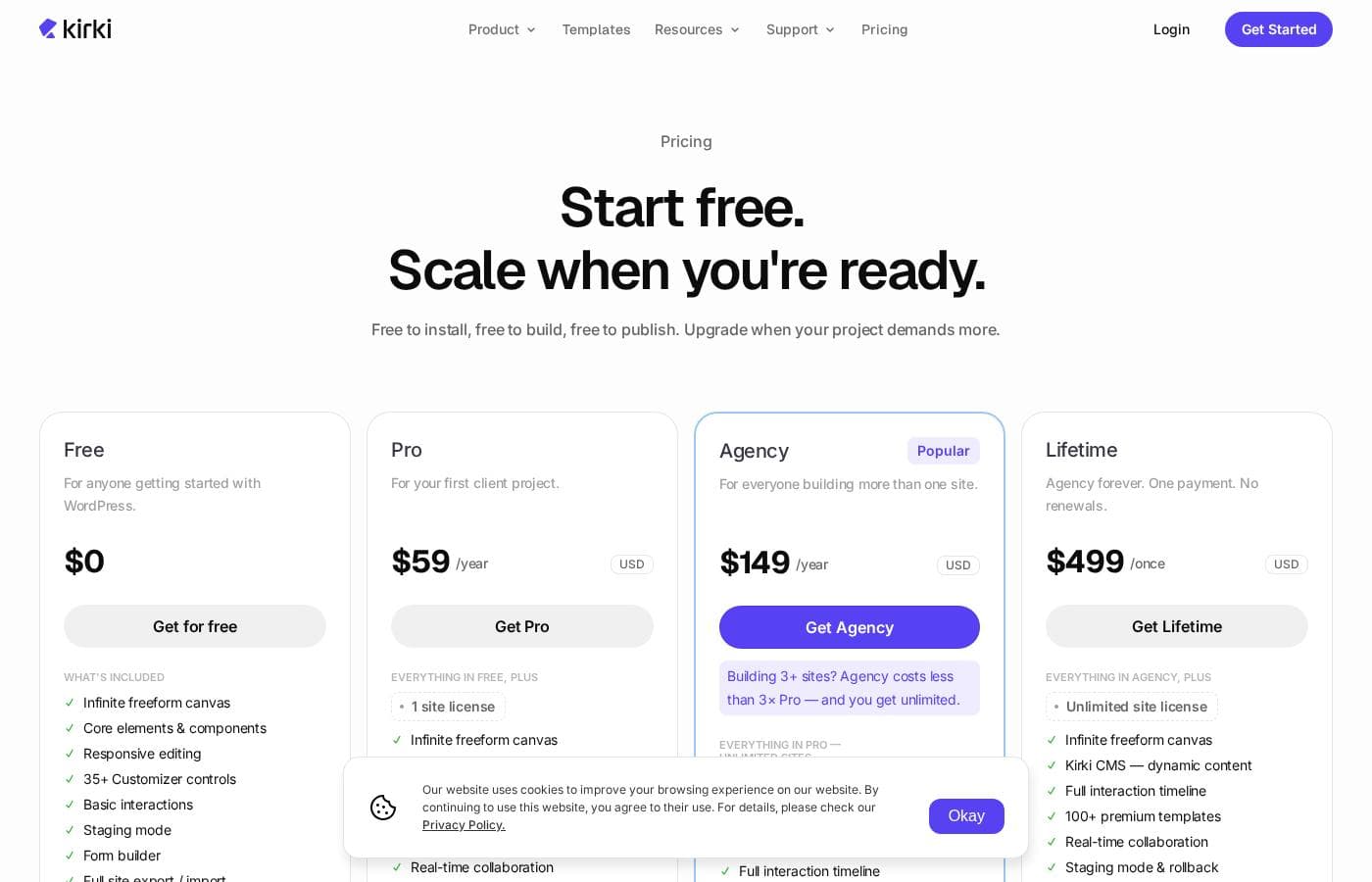
Droip pricing page screenshotView pricing page screenshot
PlanBilled monthlyBilled annuallyIncludes
Free
—
Free
Free forever on WordPress.org; 10 starter templates only; Kirki Apps access is limited; community support only
  • Infinite freeform canvas
  • Core elements & components
  • Responsive editing
  • Form builder
  • Staging mode
  • +5
Pro
—
$4.92/mo
$59 per year
Covers 1 live WordPress installation (one domain, one site); staging and local environments don't count
  • Everything in Free
  • 1 site license
  • Kirki CMS with dynamic content
  • Full interaction timeline
  • Popup builder
  • +7
Agency
—
$12.42/mo
$149 per year
Unlimited live sites; only live production sites count against the license
  • Everything in Pro on unlimited sites
  • Unlimited site licenses
  • Staging mode
  • Dev mode
  • Client view-only share links
  • +2
Lifetime
$499
—
Unlimited sites; single one-time payment with no renewals
  • Everything in Agency
  • Staging mode & rollback
  • All future features included
  • Lifetime updates & support
  • No renewals, ever
  • +1

Price history

Tracking prices since Sep 8, 2026. No price change detected yet.

Pricing types: Free plan, Yearly subscription, One-time payment, Lifetime deal

Pricing notes

Droip has four plans: Free at $0 forever, Pro at $59/year, Agency at $149/year, and Lifetime at $499 one-time. Paid plans are billed yearly, and every one comes with a 60-day money-back guarantee.

Droip costs between $0 and $499 with 4 plans: Free at $0/year, Pro at $59/year, Agency at $149/year, and Lifetime at $499 one-time.

Paid plans are billed yearly, and every one of them carries the same 60-day money-back guarantee. Here's what each plan includes.

Free

Price: $0/year Best For: Anyone getting started with WordPress Other Features:

  • Infinite freeform canvas with core elements and responsive editing
  • Form builder, staging mode, and full site export/import
  • Figma to Kirki importer and 10 starter templates
  • 35+ Customizer controls and community support

This plan is free forever on WordPress.org. There's no credit card and no expiry date, and it has no commercial restrictions — you can even use it for client work.

Pro

Price: $59/year Websites Supported: 1 site license Best For: Your first client project Refund Policy: 60-day money-back guarantee Other Features:

  • Everything in Free, plus Kirki CMS with dynamic content
  • Full interaction timeline and popup builder
  • 100+ premium templates and real-time collaboration
  • Dev mode, editor comments, and client view-only share links
  • Priority support

Pro is the natural step for your first paid build. You unlock the full CMS, animations, and collaboration tools on one live domain. Local development and staging sites never count against that license.

Agency

Price: $149/year Websites Supported: Unlimited sites Best For: Everyone building more than one site Refund Policy: 60-day money-back guarantee Other Features:

  • Everything in Pro, unlocked on unlimited sites
  • Unlimited site licenses
  • Priority chat support
  • Costs less than three Pro licenses

If you manage several client sites, Agency pays for itself quickly. It costs less than buying three Pro plans, and only live production sites count toward the license. Most freelancers upgrade here after their second project and stick with it.

Lifetime

Price: $499 one-time Websites Supported: Unlimited sites Best For: Teams who'd rather pay once and be done Refund Policy: 60-day money-back guarantee Other Features:

  • Everything in Agency
  • Staging mode with rollback
  • All future features included
  • Lifetime updates and support — no renewals, ever

Lifetime is Agency without the yearly bill. You pay $499 once and keep every future Agency-tier feature at no extra cost. If you're building for the long haul, it's the best value on the page.

A few final notes before you buy. There's no trial to sign up for — the Free plan simply lets you build and publish at no cost. If a subscription ends, your live sites keep working, but you'll stop receiving updates, support, and new templates or apps until you renew. Upgrades from Pro to Agency are prorated, so you only pay the difference. 💡 Just confirm how many live sites you need before picking a tier.

Cost calculator

Estimate what Droip costs for your team.

Billing

Pro has no published price for this billing cycle.

Pro has a flat price: the number of seats does not change the total. Estimate based on published list prices, before taxes, add-ons and discounts.

How to pay less for Droip

  • Start on the free plan and upgrade only when you hit its limits.
  • 60-day money-back guarantee if it does not fit.
Visit Droip

Email me when Droip changes price

One email when we detect a price change on the vendor's pricing page. No newsletter, no deals. Unsubscribe in one click.

User Reviews

No reviews yet.

Write a Review

Write a Review for Droip
0/100 characters
0/2000 characters

Why use Droip?

If you've ever felt boxed in by a page builder, that's the exact problem Kirki claims to solve. Instead of nesting elements inside fixed grids, you work on one open canvas — and the site says the rest of the toolkit is built to match. Here's what stands out from its own materials:

  • Design without a grid. The infinite canvas, unlimited breakpoints, and CSS variable design system let you lay out pages the way you'd sketch them.
  • Skip the rebuild. Import from Figma, HTML, or another builder — the site claims styles, spacing, and layouts are preserved.
  • Cut plugin clutter. Forms, popups, maps, SEO, and icons are built in, plus 20+ apps like Mailchimp and Google Search Console — no third-party setup.
  • Work as a team. Multiple editors share one canvas, with on-design comments, staging mode, publish history, and view-only client links.
  • Animate without code. A visual keyframe timeline handles scroll, click, hover, and mouse-move triggers, with presets, text animations, and Lottie support.
  • Start cheap and fast. There's a free starting point and 100+ template kits, each with light and dark versions.

Droip alternatives

Other tools in the Page builder for WordPress category

View all Page builder for WordPress tools
Otter Blocks

Otter Blocks

Page builder for WordPress4.1/5

Otter Blocks is an effective collection of advanced, dynamic page building blocks designed specifically for the WordPress block editor, Gutenberg. It acts like a powerful upgrade, making the native editor much more flexible and capable. This collection is ideal for anyone looking to achieve impressive layouts quickly and professionally. It is built to be lightweight and simple, ensuring your site remains fast while you gain advanced customization options.

WPBakery

WPBakery

Page builder for WordPress3.9/5

WPBakery is the trusted #1 Page Builder Plugin for WordPress, chosen by over 5,800,000 websites globally. It's an award-winning tool that lets you manage and build sophisticated content easily. You can design stunning pages using responsive, mobile-ready layouts that work seamlessly. The best part? It integrates perfectly with any WordPress theme you choose. 💡 This solution is ideal for anyone looking for powerful design control without needing programming knowledge.

SeedProd

SeedProd

Page builder for WordPress4.1/5

SeedProd is a powerful, yet easy-to-use, drag and drop page builder for WordPress. It’s built for anyone who wants to create beautiful themes, pages, and layouts rapidly. You don't need to be a designer, thanks to the professionally designed pre-built themes. 💡 The builder helps you get your site up and running in minutes.

Beaver Builder

Beaver Builder

Page builder for WordPress4.1/5

Beaver Builder is a trusted, powerful website builder designed to simplify WordPress development. Since 2014, it has helped users build professional websites easily, often in minutes instead of months. It serves a wide audience, including agencies needing stability, freelancers aiming for speed, and entrepreneurs who require easy updates without knowing how to code. This visual building method allows you to instantly see changes happen live on the front end of your site. You can start with pre-designed templates or build from scratch, creating any type of site, including blogs, eCommerce stores, and membership portals.

Bricks

Bricks

Page builder for WordPress4.2/5

Bricks is an innovative, community-driven, visual site builder theme specifically for your self-hosted WordPress website. It provides unparalleled customization, flexibility, and maintainability. You can craft your website from header to footer, leveraging powerful features like CSS grid and flexbox layouts. This platform is designed to help you create truly unique web design experiences.

Elementor

Elementor

Page builder for WordPress4.3/5
Spectra Pro

Spectra Pro

Page builder for WordPress4.1/5

Spectra Pro is a powerful web design toolkit built specifically for the native WordPress editor. It offers a new, advanced way to build websites that are both stunning and super fast. It focuses heavily on performance, boasting zero bloat and security through clean code written to the latest standards. ✅ Because it works directly inside the familiar WordPress editor, it is instantly easy to learn and use. It’s perfect for creators who want professional results without the complexity of heavy external dependencies or frustrating code.

Cheapest Page builder for WordPress software for 1 to 25 users

Droip FAQ

How much does Droip cost?

Droip's cheapest paid plan, Pro, costs $4.92 per month. Paid plans range from $4.92 to $12.42 per month. Prices checked on Oct 26, 2026 from the vendor's pricing page.

Does Droip have a free plan?

Yes. Droip has a free plan (Free); paid plans start at $4.92 per month.

Does Droip offer a free trial or a money-back guarantee?

It has a 60-day money-back guarantee.

Has Droip's price changed recently?

No. We have not detected a price change since we started tracking on Sep 8, 2026.

Which third-party tools does Droip connect with?

There are 20+ built-in apps, including Mailchimp and Google Search Console. Forms, popups, maps, SEO, and icons are built in too, so most third-party plugins become unnecessary.

What support can I expect on each plan?

The Free plan comes with community support. Pro adds priority support, and Agency includes priority chat support. No guaranteed response times are published, so confirm expectations in the terms before purchase if speed matters.

What happens to my sites if I cancel?

Your live sites keep working with all existing features. You'll stop receiving updates and support, and you won't be able to install new templates or apps until you renew.

Ready to try Droip? Check out the official site or pricing.

Are you Droip? Claim this listing · Get the badge