Bricks

Bricks

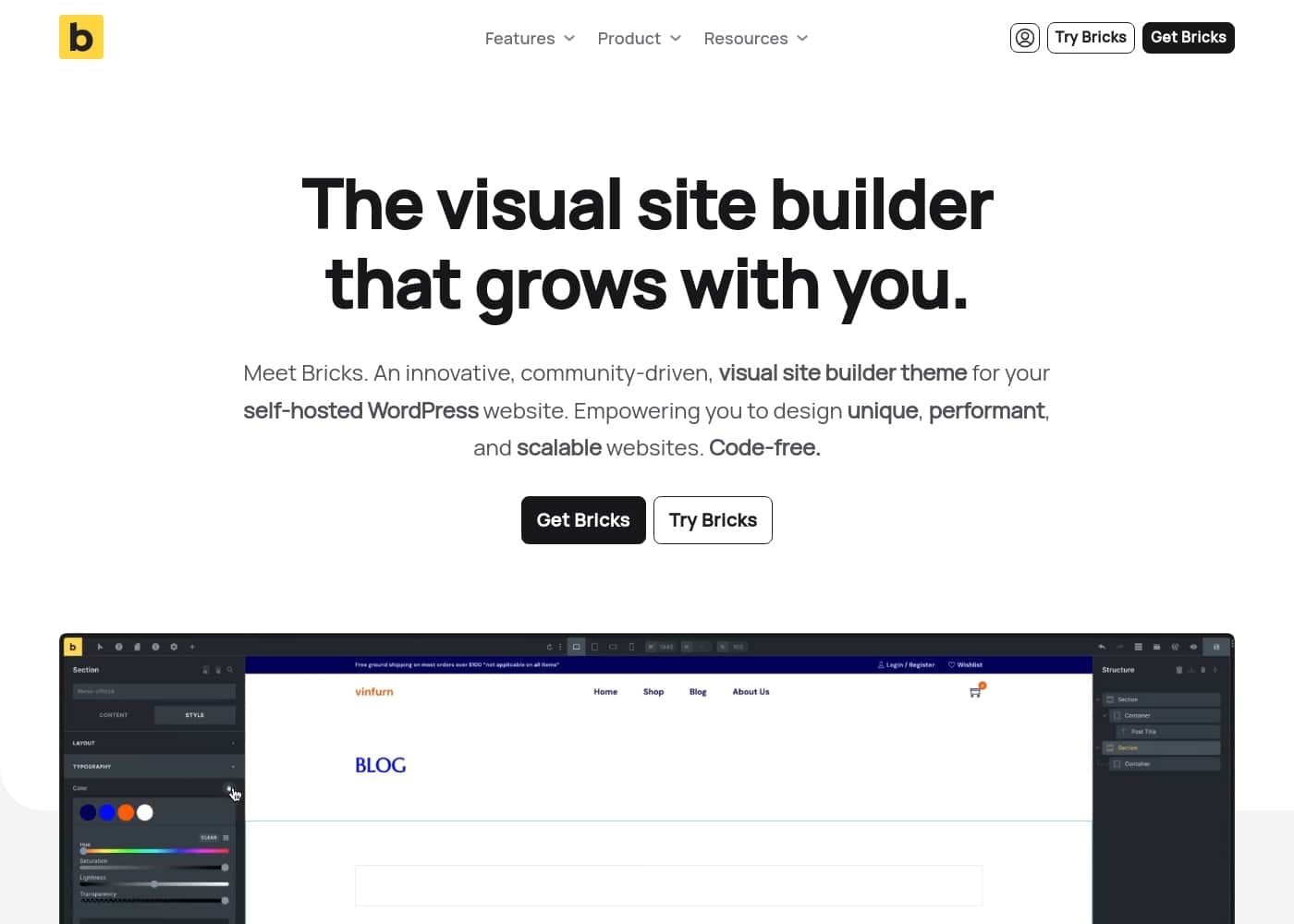
The visual site builder that grows with you.

#5 dans Page builder for WordPress
2 min read · Updated 11/17/2025
Bricks homepage screenshot

At a glance

Quick overview for Bricks: rating, pricing summary, key features, and highlights.

Ciroapp review

4.3
Performance-Driven Builder, Technical Onboarding Required

We find Bricks offers industry-leading performance and clean code generation, which is ideal for complex or scalable agency work. Its integrated features, like the native WooCommerce and Query Loop builders, provide depth unavailable in many competitors. Overall, this is a technically brilliant builder, but prospective users should know that documentation and community responsiveness present significant onboarding hurdles.

Pros

  • Pro:Outputs exceptionally clean code for superior site performance.
  • Pro:Native integration of advanced features (Query Loop, conditions, WooCommerce Builder).
  • Pro:Flexible pricing options, including a $599 unlimited lifetime license.
  • Pro:Offers full visual control over all site components (header, footer, content).

Cons

  • Con:Relies heavily on its own theme, leading to vendor lock-in.
  • Con:Complete reference documentation appears scarce or nonexistent.
  • Con:Reportedly requires solid CSS knowledge for non-professional users.
  • Con:Community support is sometimes perceived as unhelpful to detailed user questions.
Money-back guarantee
Yes — 60 days
Range: $79/year–$599/onceYearly subscription, Lifetime deal
This section is a summary. Detailed sections about features, use cases, pricing, and reviews follow below.

Bricks review, pricing, features, pros & cons

Are you tired of slow, heavy visual builders that create messy code? Many web professionals struggle to quickly build highly performant sites that are also scalable and maintainable. Meet Bricks!

This innovative theme is designed specifically to solve that problem. It helps you design unique, scalable websites while outputting extremely clean code for faster load times. You can do it all code-free.

✨

What is Bricks?

Bricks is an innovative, community-driven visual site builder theme. It is built specifically for your self-hosted WordPress website. This powerful tool empowers you to handle full site editing visually, from the header to the footer, using simple drag & drop functionality.

It's often called the best developer-friendly builder because it offers 100% flexibility on the development side of things. Bricks fills the critical gap between heavy visual builders and needing to write clean code from scratch. đź’ˇ

Bricks Key Features

✨ Unrivaled Visual Full Site Editing and Performance

Bricks helps you build high-performance sites by outputting extremely clean code. You get flexible control without the inefficiency of heavy visual builders. This clean code output helps your SEO efforts and ensures faster load times.

You can craft your entire website visually, starting from the header right down to the footer. This powerful theme uses simple drag & drop functionality and nestable elements. Visual spacing adjustments are easy to use, providing unparalleled customization across your whole WordPress site.

✨ Advanced Layouts with Flexbox and CSS Grid

Design without limits by efficiently creating complex layouts. You can instantly set up sophisticated flexbox and CSS grid structures in seconds. This allows you to achieve precise design outcomes quickly without needing to write manual code.

Bricks gives you full visual control over global styles to manage site consistency. You can define your own CSS class system, manage global color palettes, set custom typography, and create site-wide templates. This robust system keeps your projects organized and maintainable.

✨ Mastering Dynamic Content with the Query Loop Builder

The powerful Query Loop Builder lets you visually retrieve and display data from your WordPress database. This visual method makes complex data management simple and accessible. For projects needing ultimate refinement, you can also write your own custom PHP query.

Use this feature to build enhanced listings and superior user experiences. It helps you manage how data loads across your site, providing users with a smoother interaction. You can quickly implement modern listing behavior, including:

  • Infinite scroll
  • Load more buttons
  • AJAX pagination

✨ Bespoke User Experiences through Conditionals and Interactions

Create highly immersive and customized websites using native conditional logic and interactions. You can define custom experiences that typically require complex third-party tools in other builders. Bricks incorporates these functions natively, which saves you time and keeps your codebase clean.

Conditional logic allows you to show or hide content based on a wide range of specific, customizable conditions. You can also define triggers and actions for site interactions. For example, you can set click and hover triggers to show or hide specific elements dynamically.

✨ Total E-commerce Design Control

Use the dedicated WooCommerce Builder to craft your entire online store visually. This ensures seamless integration across all customer touchpoints. You gain 100% design control, which can help elevate the user experience and potentially boost sales.

You can visually design all major retail components. This includes the shop and archive pages, the single product layout, and critical conversion pages like the cart, checkout, and customer account pages. Everything matches your unique brand identity.

✨ Precision Responsive Controls

Deliver pixel-perfect websites regardless of the device your visitors use. Bricks offers unlimited custom breakpoints, giving you maximum control over device-specific design. It’s also the only builder that focuses on both a desktop and mobile-first approach.

Developers greatly benefit from being able to view and make changes on any breakpoint directly inside the builder interface. This ensures precision without needing to switch environments. The comprehensive Menu Builder is also included, allowing you to build accessible and bespoke menus, including dynamic Mega Menus and mobile-optimized options.

Use Cases

🚀 Building High-Performance Websites for Clients

Agencies often struggle when delivering fast, scalable sites due to messy builder code. Bricks solves this by outputting exceptionally clean code right from the start. This superior performance helps enhance your client’s SEO efforts immediately.

Since Bricks offers 100% flexibility on the development side, it becomes your agency's most crucial tool. You can tackle complex builds while ensuring the foundation remains easy to maintain long-term. This lets you focus on design and functionality, not code cleanup.

🛍️ Designing a Fully Integrated E-commerce Store

You don't need to accept the default look of standard WooCommerce templates anymore. Bricks gives you full visual control over your entire online shop design. You can design absolutely every crucial e-commerce page right in the editor.

This includes the shop view, single product pages, archive listings, and even sensitive areas. By customizing the cart, checkout, and account pages, you ensure a cohesive and professional customer experience that can help boost sales.

đź’ˇ Creating Custom Data Views and Dynamic Listings

Handling large amounts of information should be simple, not complicated. The Query Loop Builder allows you to visually pull data from your WordPress database exactly how you need it.

  • Approach: Visually query taxonomies and posts directly using the loop builder.
  • Enhancement: Boost user experience by adding features like infinite scroll or AJAX pagination.
  • Advanced Use: If needed, you can even write and execute your own custom PHP query for highly tailored results.

🎯 Personalizing Content with Conditional Logic

Modern websites need to show highly relevant content to specific visitors. Bricks' native conditional logic is ready for this task. It allows you to define who sees what using customizable rules.

Problem: You want to show a specific pop-up offer only to customers who have previously logged in.

  1. Define the element you wish to show or hide.
  2. Set the required conditions (e.g., specific user role, login status, or page).
  3. Expected outcome: Bespoke user experiences are created efficiently without relying on extra conditional plugins.

📱 Mastering Responsive Design for All Devices

Building a site that looks perfect on every screen size is essential today. Bricks uses a unique desktop and mobile-first approach, simplifying responsive creation. You aren’t limited to default settings either.

Use Bricks' unlimited custom breakpoints to create pixel-perfect sites for every device your audience uses. You can view all changes directly in the builder as you work, ensuring precision and fidelity across the board.

🛠️ Accelerating Design Projects with Advanced Layout Tools

Developers and freelancers need speed and total design control. You can craft complex designs quickly using native functions like flexbox and CSS grid layouts in seconds. This saves significant development time.

Tip: Use the pre-made wireframes and design sets included free of charge in every plan. You can tweak these ready-made templates to start client projects instantly and shorten your creative journey.

Pricing Overview for Bricks

Pricing range
$79/year–$599/once
Pricing types
Yearly subscription, Lifetime deal
Money-back guarantee
Yes — 60 days

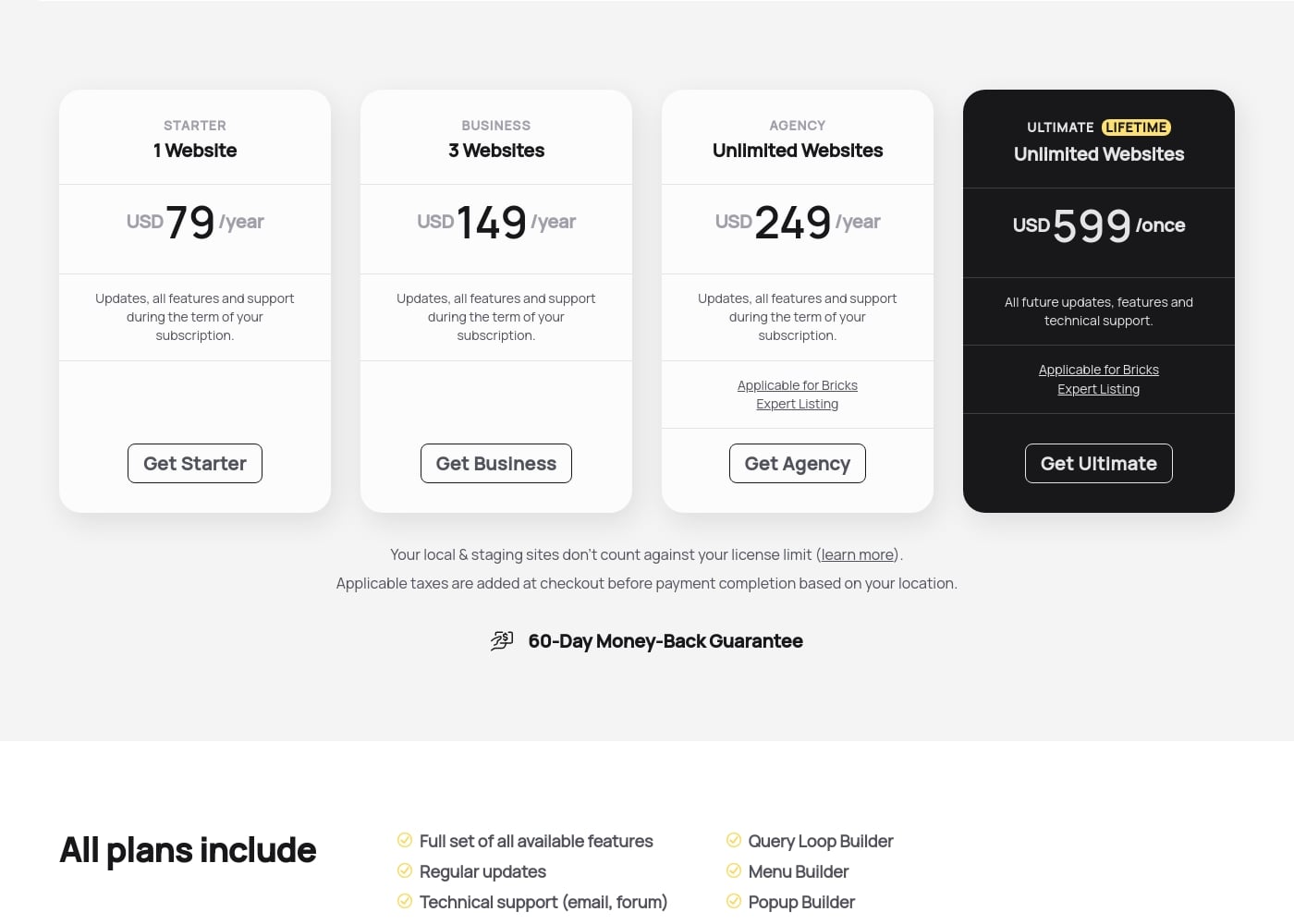
Bricks offers three yearly subscription tiers—Starter, Business, and Agency—starting at $79 per year. You can also opt for the Ultimate Lifetime license for a single payment of $599, giving you permanent access.

Plans & Pricing

Starter

Yearly$79
1 Website
  • Full set of all available features
  • Regular updates
  • Technical support (email, forum)
  • Access to community templates
  • All 110+ elements
  • Query Loop Builder
  • Menu Builder
  • Popup Builder
  • + 2 more features

Business

Yearly$149
3 Websites
  • Full set of all available features
  • Regular updates
  • Technical support (email, forum)
  • Access to community templates
  • All 110+ elements
  • Query Loop Builder
  • Menu Builder
  • Popup Builder
  • + 2 more features

Agency

Yearly$249
Unlimited Websites
  • Full set of all available features
  • Regular updates
  • Technical support (email, forum)
  • Access to community templates
  • All 110+ elements
  • Query Loop Builder
  • Menu Builder
  • Popup Builder
  • + 3 more features

Ultimate Lifetime

Contact for pricing
Unlimited Websites
  • All future updates, features and technical support
  • Applicable for Bricks Expert Listing

Bricks costs between $79 and $599 yearly or once with four plans: Starter at $79/year, Business at $149/year, Agency at $249/year, and Ultimate Lifetime at $599/once.

Here are the details for each available license type you can secure today. Every plan includes the full feature set, technical support, and access to all 110+ elements.

Starter

Price: USD 79 /year Websites Supported: 1 Website Best For: Single-site projects or personal blogs Refund Policy: 60-Day Money-Back Guarantee Other Features: Updates, all features, and support during the term of your subscription, Query Loop Builder, WooCommerce Builder.

This is the perfect option if you are a dedicated enthusiast focused on a single, important website project. The $79 annual fee ensures your site receives regular updates and support throughout the year.

Business

Price: USD 149 /year Websites Supported: 3 Websites Best For: Freelancers handling limited client work or multiple personal sites Refund Policy: 60-Day Money-Back Guarantee Other Features: Updates, all features, and support during the term of your subscription, Menu Builder, Conditions & Interactions.

The Business plan is an excellent choice for users managing a small client portfolio or running a few specialized niche sites. With licenses for three websites, you get more capacity and flexibility than the Starter plan offers.

Agency

Price: USD 249 /year Websites Supported: Unlimited Websites Best For: Web design agencies and developers with many client projects Refund Policy: 60-Day Money-Back Guarantee Other Features: Updates, all features, and support during the term of your subscription, Applicable for Bricks Expert Listing.

Agencies and high-volume developers managing a constant flow of new projects should choose the Agency plan. This tier supports unlimited websites and qualifies you for inclusion in the official Bricks Expert Listing.

Ultimate Lifetime

Price: USD 599 /once Websites Supported: Unlimited Websites Best For: Long-term users seeking permanent access without renewal fees Refund Policy: 60-Day Money-Back Guarantee Other Features:

  • All future updates and features
  • Technical support forever
  • Applicable for Bricks Expert Listing

Choose the Ultimate Lifetime plan if you prefer a single purchase instead of managing yearly renewals. This one-off payment provides all future updates and support permanently, making it a powerful long-term asset.

While Bricks does not offer a traditional free downloadable trial, you can explore the builder features using the free online playground. Every plan comes with a strong 60-Day Money-Back Guarantee. This guarantee lets you try Bricks completely risk-free before committing to your license.
User Reviews

Users overwhelmingly praise Bricks for its speed, stability, and high performance, calling it their must-have stack for building scalable websites. Reviewers describe the builder as "super smooth and powerful," noting its strong capacity to handle client projects effectively.

However, user satisfaction is notably polarized around documentation and support responsiveness. A recurring concern is the lack of cohesive, complete documentation and proper references within the official 'Bricks Academy.' Users feel forced to rely on disparate YouTube videos or figure out technical aspects alone, suggesting the tool requires existing solid CSS knowledge, especially for non-professionals.

The community is sometimes perceived as exclusive or unhelpful toward detailed user questions. Despite these challenges concerning support and onboarding, those who utilize Bricks long-term emphasize its reliability and clean code output as definite strengths.

👍

What users say elsewhere

David R.
· Trustpilot
5.0 / 5

The experience has been great across all my different projects. It's super smooth, fast, and very stable in performance. The available add-ons make it easy to bring designs to life, and I'm very impressed with the future outlook.

Maria C.
· Trustpilot
5.0 / 5

This is simply the best page builder and the best team behind it. Bricks Builder is my must-have tool for developing all the high-performance websites I build now.

No reviews yet.

Write a Review

Write a Review for Bricks
0/100 characters
0/2000 characters

Why use Bricks?

If you are looking for maximum flexibility and the most maintainable option in the WordPress ecosystem, Bricks is highly recommended. It offers superb features designed to elevate performance and user experience.

Here’s why Bricks should be your next builder:

  • Achieve Superior Performance: Bricks creates extremely clean code and fast-loading sites. This performance helps your SEO efforts, unlike builders that obscure your site with tons of unnecessary code.
  • Design Without Limits: Craft complex layouts quickly using flexbox and CSS grid in seconds. You get full visual control over global settings like color palettes, typography, and site-wide templates.
  • Master Dynamic Content: Use the powerful Query Loop Builder to visually query your database. You can enhance user experience with features like infinite scroll, load more buttons, and AJAX pagination. You can even write your own PHP query for tailored results.
  • Gain Full E-commerce Control: Design your entire WooCommerce store visually. This includes all crucial pages like shop, single product, archive, cart, checkout, and account pages for seamless design integration that can boost sales.
  • Build Interactively: Create bespoke user experiences using conditions and custom interactions. You can define triggers (like click and hover) and actions to show or hide content based on a wide range of customizable conditions.
  • Use Native, Consolidated Features: Bricks includes native functions—such as custom interactions, conditional logic, and advanced responsive controls—that often require multiple third-party plugins in other tools. This efficiency is worth its weight in gold. âś…

Bricks has solved performance, flexibility, and maintainability problems for many agencies. You can explore the builder right now at the playground and design your first website with a custom, clean Bricks installation.

Ready to elevate your work? Get Bricks today. 🚀

Ready to transform your workflow with Bricks?

Frequently Asked Questions

Can I try Bricks for free before I purchase a license?

While there isn't a downloadable version, you can explore the latest builder features online for free. You can access a custom, clean installation playground simply by creating an account.

What is the refund policy if I am unhappy with my purchase?

All Bricks plans are protected by a strong 60-Day Money-Back Guarantee. This excellent guarantee allows you to try the builder for two full months risk-free.

If I use a staging or local development site, does that count against my site license limit?

No, local and staging site installations do not count against your license limit. You can use your license on your live site and its related development environment simultaneously.

What happens to my site and features if I cancel my yearly subscription renewal?

Your license remains fully active until your current paid billing period ends. After cancellation, you lose access to updates, support, and community templates, but you can still edit your existing Bricks sites.

How does prorated billing work if I upgrade or downgrade my annual subscription mid-cycle?

Subscription plan changes are fully prorated based on the remaining license value. If you upgrade, you are charged the difference; if you downgrade, you receive a credit for the remaining time.

Can I use one license key to activate multiple subsites on a WordPress Multisite installation?

No, every WordPress site URL or subsite needs its own active Bricks license activation. This means each subsite counts individually against your license limit, unless it is a local or staging setup.

What kind of technical support is included with the plans?

All plans include technical support provided via email and the official forum. However, a specific guaranteed response time or service level agreement (SLA) is not explicitly stated.

Will the Ultimate Lifetime plan guarantee support and updates indefinitely?

Yes, the single $599 purchase provides permanent access to all future updates, features, and technical support forever. You will not deal with any yearly renewal fees.

Does Bricks offer native integrations with external tools like form builders or advanced custom fields?

Bricks includes powerful native functions like the Query Loop and Conditional Logic, often eliminating the need for extra plugins. It also provides a full, seamless visual builder for your entire WooCommerce store.

Is it possible to switch directly from an annual subscription to the Ultimate Lifetime license?

You cannot switch automatically in your account because the products are billed differently. You must buy the Ultimate license first, activate it, and then request a prorated refund for your subscription key.

Aside from the number of websites, are there any usage limits or quotas imposed?

The primary limit for subscription plans is the number of active websites (1, 3, or Unlimited). The provided materials do not specify additional quotas related to bandwidth, number of users, or page views.

Does Bricks provide an official tool for migrating content from other WordPress builders?

Not explicitly stated on the official site. Though no formal migration tool is mentioned, testimonials show that agencies successfully migrated multiple clients from other builders quickly.

Is it permissible to build client websites using the Starter or Business licenses?

Absolutely! You are allowed to use your license for both your own sites and websites you build for clients. However, the direct reselling of the actual license key is strictly prohibited.

Ready to try Bricks? Check out the official site or pricing.